

Email Warmup in 2026: What Actually Works (and What's Just a Sales Pitch)
You spun up five fresh Google Workspace inboxes on Monday. By Wednesday, you loaded 500 prospects into your sequencer and hit send. By Friday, Gmail was routing every message straight to spam - and your shiny new domain had a reputation score hovering near zero. We've watched this exact scenario play out dozens of times. One in six emails never reaches the inbox, and for brand-new sending infrastructure, that number is far worse.
The fix isn't complicated, but it requires patience. Email warmup is the process of building trust with mailbox providers before you ask them to deliver your real campaigns. Skip it, and you're burning domains and wasting pipeline.
What You Need (Quick Version)
Authenticate first - SPF, DKIM, and DMARC are non-negotiable table stakes. Then ramp volume gradually over 2-4 weeks, using metric gates (open rate >20%, bounce <2%, complaints <0.1%) to decide when to scale. Before you send a single real campaign, verify your email list. Warming without clean data is pointless - we'll cover why in the list hygiene section below.
If you want a tool to automate it, Instantly starting around $30/mo with unlimited warmup is the best starting point for most teams.
What Is Email Warmup?
It's the gradual increase in low-risk email activity designed to build trust with mailbox providers. But most people misunderstand what "gradual increase" actually means in practice.
The process isn't just "sending fewer emails." Volume pacing alone doesn't build reputation. What Gmail, Microsoft, and Yahoo actually care about are engagement signals - opens, replies, conversations that look like real human interaction. When someone opens your email, replies to it, rescues it from spam, or marks it as important, that tells the mailbox provider your messages are wanted. Those signals are the entire point.
This is why warming up your inbox is a methodology, not a product. You can buy an email warmer that automates the engagement simulation, or you can do it manually with real contacts. Either way, the underlying principle is the same: prove to inbox providers that people want your mail before you start sending at scale.
Three Types of Warmup
Not all warmup is the same. The type you need depends on what you're building reputation for.
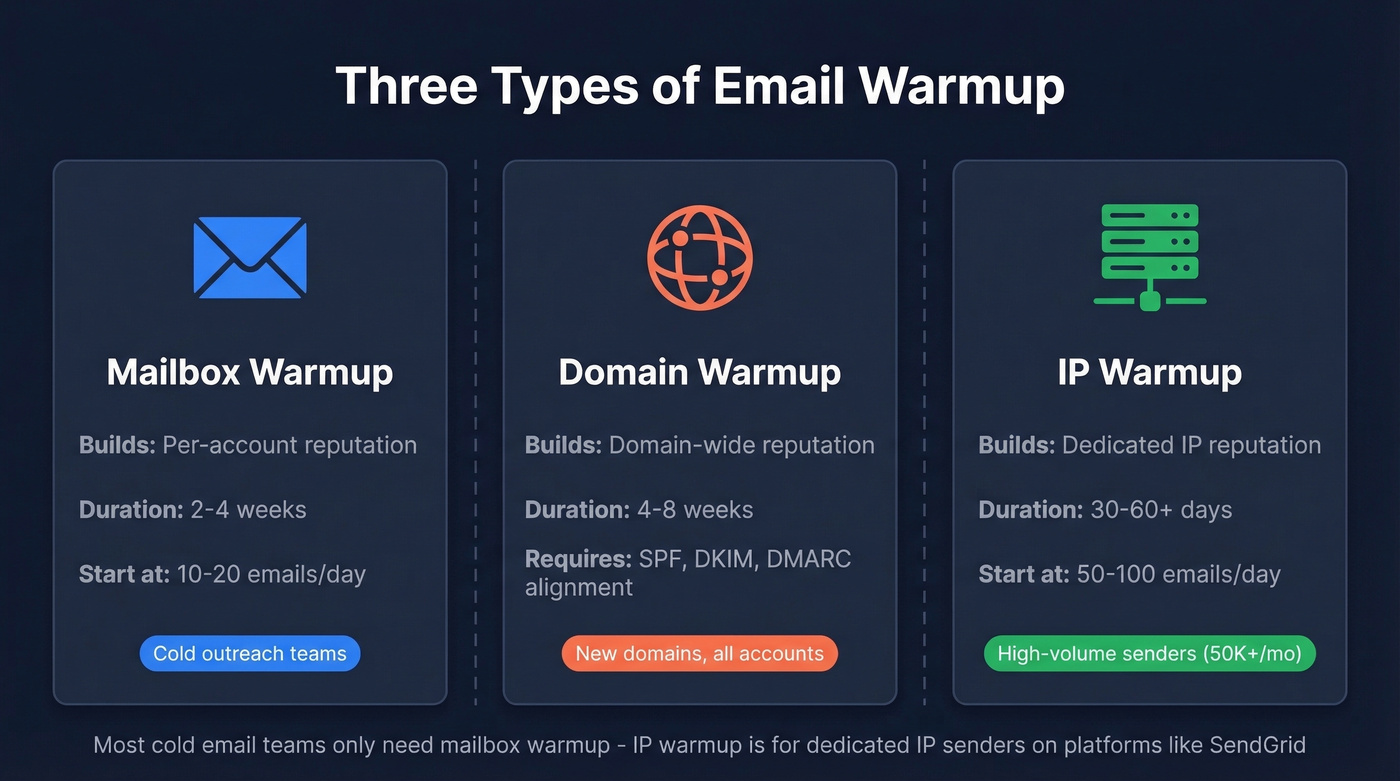
| Type | What It Builds | Duration | Who Needs It |
|---|---|---|---|
| Email (mailbox) | Per-account reputation | 2-4 weeks | Anyone with a new inbox |
| Domain | Domain-wide reputation | 4-8 weeks | New domains, all accounts |
| IP | Dedicated IP reputation | 30-60+ days | High-volume senders (50K+/mo) |
Email (mailbox) warmup is what most cold outreach teams need. You're building trust for a specific inbox - say, sarah@outreach.yourcompany.com. Start at 10-20 emails per day and ramp over 2-4 weeks. Each inbox needs its own warmup, which is why per-inbox pricing gets expensive fast.
Domain warmup is broader. You're establishing credibility for the entire domain across multiple sending accounts. This takes 4-8 weeks and requires SPF/DKIM/DMARC alignment across all accounts. If you're setting up a new outreach subdomain like outreach.yourcompany.com, this is what you're doing.
IP warmup is for dedicated IP senders doing 50,000+ emails per month - think marketing teams on platforms like SendGrid or Postmark with their own IP allocation. Start at 50-100 messages per day and double every few days while monitoring. Most cold email teams on Google Workspace or Microsoft 365 don't need this because they're on shared IPs managed by the provider.
Do You Actually Need to Warm Up Emails?
You need warmup if any of these apply:
- New domain, especially less than 30 days old
- New inbox on an existing domain
- Switching ESPs, CRMs, or outreach tools
- Recovering from a deliverability drop, bounce spike, or block
You probably don't if you have an established inbox with consistent sending history and healthy metrics - open rates above 30%, bounces under 2%, zero spam complaints.
Here's the thing most guides miss: domain age doesn't matter. Providers care about behavior. A five-year-old domain that's never sent outbound email might as well be brand new in Gmail's eyes. A two-month-old domain with strong engagement signals and clean authentication can build solid reputation fast. Don't assume your old domain gives you a free pass.
The 2026 Deliverability Rules
Every warmup guide written before November 2025 is outdated.
Gmail and Yahoo rolled out bulk sender requirements in early 2024: SPF + DKIM + DMARC became mandatory for anyone sending 5,000+ messages per day. Spam complaint rates must stay below 0.3% (Gmail recommends under 0.10%). One-click unsubscribe via RFC 8058 is required, and opt-outs must process within two days.
That was the warning shot. The real change came in November 2025, when Gmail moved to active enforcement. Non-compliant messages can now be rejected at the SMTP level - not spam-foldered, rejected. Your email doesn't land in spam where someone might rescue it. It bounces. Google Postmaster Tools also added a Compliance Status (Pass/Fail) view that makes authentication and policy compliance a hard gate.
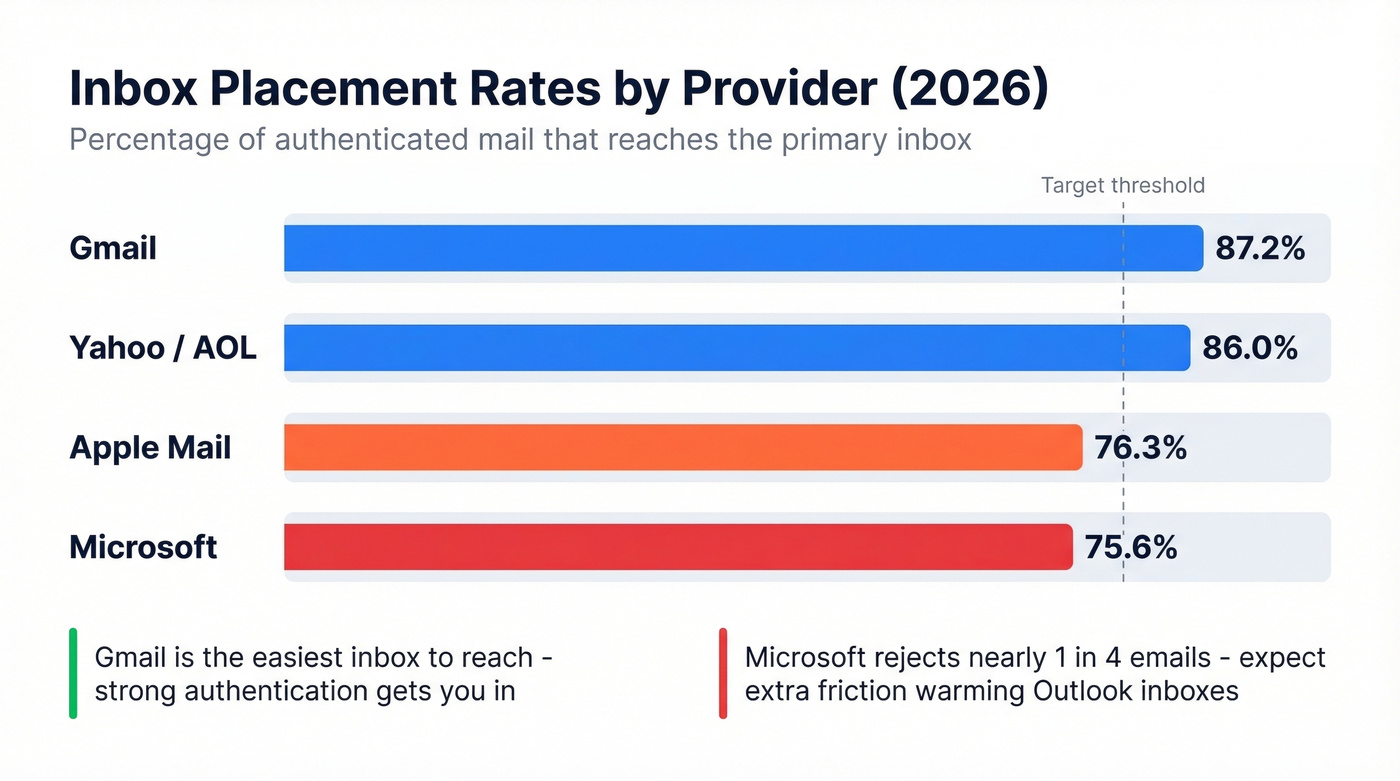
The ISP inbox placement numbers tell the rest of the story. Gmail delivers 87.2% of authenticated mail to the inbox. Microsoft sits at 75.6% - nearly a quarter of mail goes to spam or disappears entirely. Yahoo/AOL lands at 86%, and Apple Mail at 76.3%. Microsoft is the hardest inbox to crack, and it's getting harder.
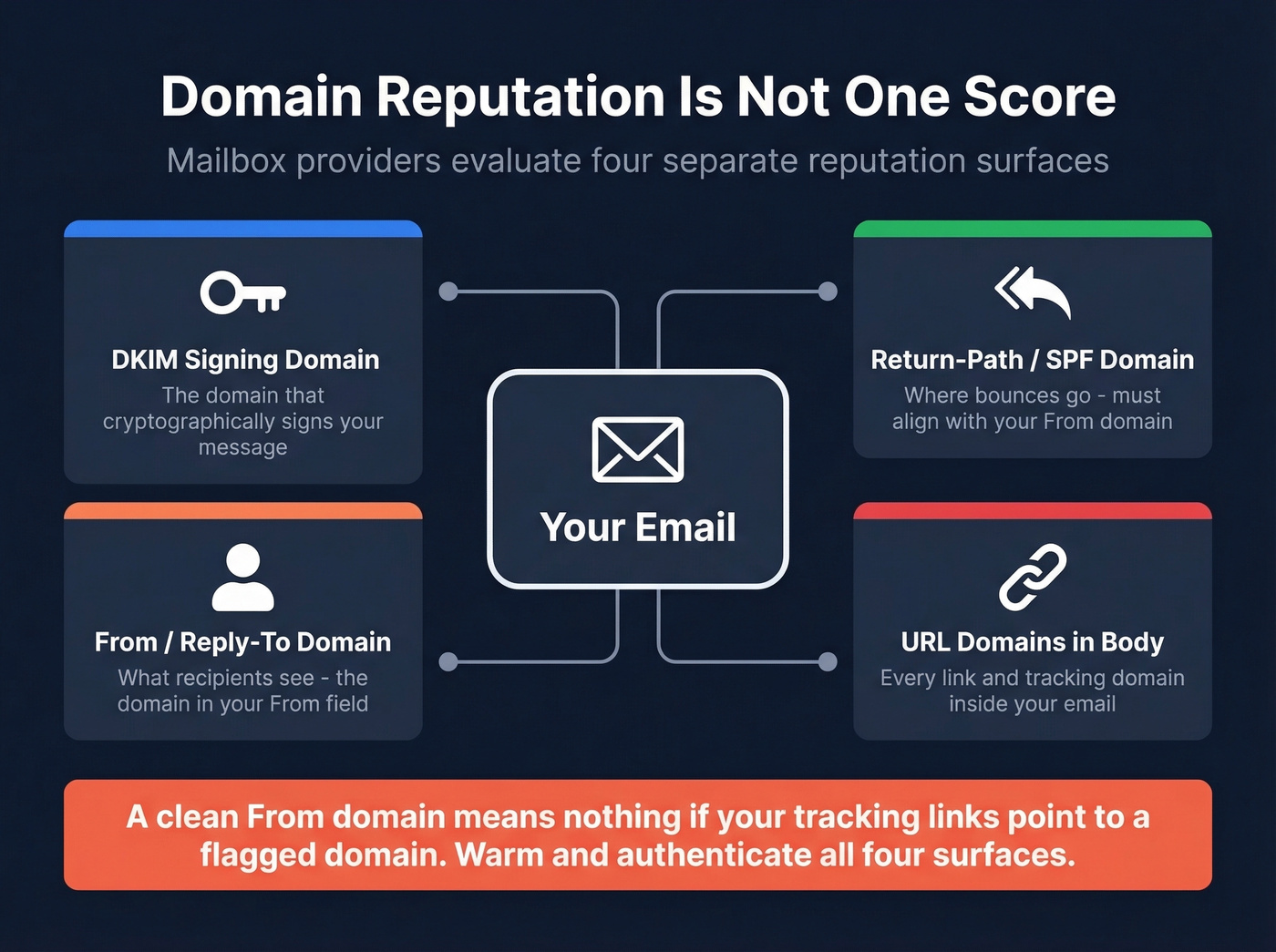
One detail most guides gloss over: "domain reputation" isn't a single score. Postmark's research identifies four distinct reputation surfaces - your DKIM signing domain, your Return-Path/SPF domain, your From/Reply-To domain, and the URL domains in your email body. A clean From domain means nothing if you're linking to a flagged tracking domain. Warmup and authentication need to cover all four surfaces, not just the one you see in your "From" field.
What this means for warmup: authentication is now a hard gate, not a best practice. And engagement signals matter more than ever because providers weight quality signals like time-to-read, reply depth, and conversation threading to distinguish real correspondence from automated outreach.
Pre-Warmup Checklist
Skip any of these and warmup won't save you. Treat this as pass/fail before you send a single message.
- ✅ SPF record configured for your sending domain
- ✅ DKIM signing enabled and aligned with your From domain
- ✅ DMARC policy published (at minimum
p=none- move top=quarantineorp=rejectas you gain confidence) - ✅ Reverse DNS (rDNS) matches your sending hostname
- ✅ HELO/EHLO hostname aligned with your rDNS and sending domain
- ✅ Valid TLS certificate on your mail server
- ✅ MX records set so your domain can receive replies (warmup requires two-way conversation)
- ✅ Subdomain isolation strategy: separate subdomains for transactional mail, marketing, and cold outreach
The subdomain point deserves emphasis. If your cold outreach tanks your domain reputation, you don't want that bleeding into transactional emails like password resets and invoices. Isolating mail streams on separate subdomains, each with their own DKIM and Return-Path, is standard deliverability practice that too many teams skip.

You just read that bounce rates must stay under 2% or warmup stalls. Bad data is the #1 reason domains never build reputation. Prospeo's 5-step verification and 98% email accuracy keep your bounce rate under control - so every warmed-up inbox actually reaches real people.
Don't burn domains on unverified emails. Start with clean data.
Step-by-Step Warmup Schedule
There's no industry-standard schedule - these are proven starting points, not gospel. Adjust based on your metrics.
Cold Email Inbox Warmup (2-4 Weeks)
| Timeframe | Daily Volume | Notes |
|---|---|---|
| Days 1-3 | 2-5 emails | Plain text only, no links |
| Days 4-7 | 5-10 emails | Short replies encouraged |
| Week 2 | 10-30 emails | Monitor open rates closely |
| Week 3 | 30-80 emails | Check Postmaster Tools daily |
| Week 4 | 80-120 emails | Cap at ~50/day long-term for cold |
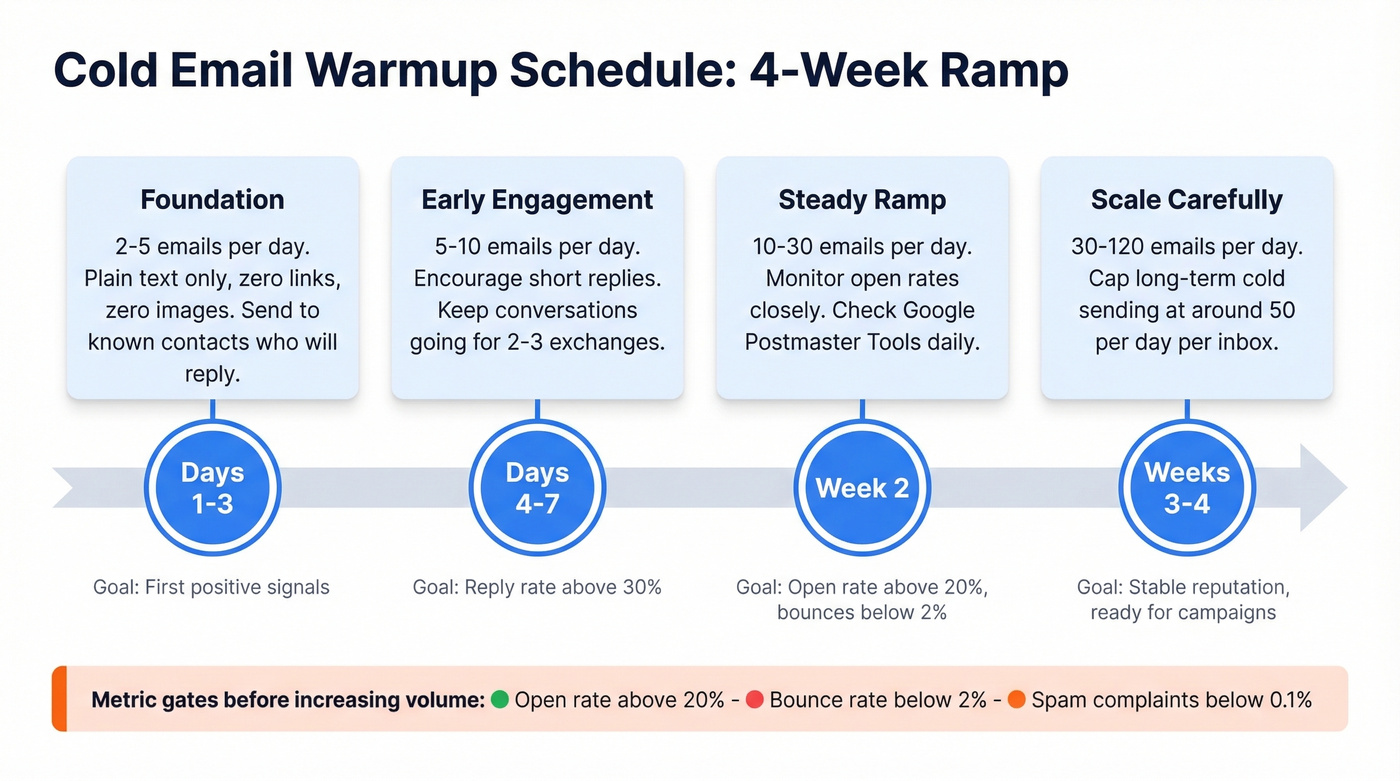
The long-term cap matters. A common limit is staying around 50 cold emails per day per account. Push past that consistently and you're asking for trouble.
Domain / Marketing Warmup (4-8 Weeks)
For higher-volume marketing sends, the ramp looks different. Start with 100-500 messages per provider (Gmail, Outlook, Yahoo separately) in the first couple of days. Early phase, you can double volume daily. Later, slow to 20-50% increases per day. If deliverability drops at any point, decrease volume 25-30% until metrics normalize.
The critical piece is metric gates. Do NOT increase volume until open rates are above 20%, bounce rates are below 2%, and spam complaints are below 0.1%. Segment your monitoring by provider - your Gmail deliverability might be stellar while Microsoft is flagging you. Per-provider visibility, which Google Postmaster Tools and most warmup dashboards provide, is essential for knowing when to push and when to pull back.
Manual vs. Automated Warming
Use manual warmup if you're running 1-3 inboxes and have real contacts willing to exchange emails. Send plain-text messages, get genuine replies, avoid links and images and tracking pixels entirely. It's time-consuming but it generates authentic engagement signals that no tool can perfectly replicate.
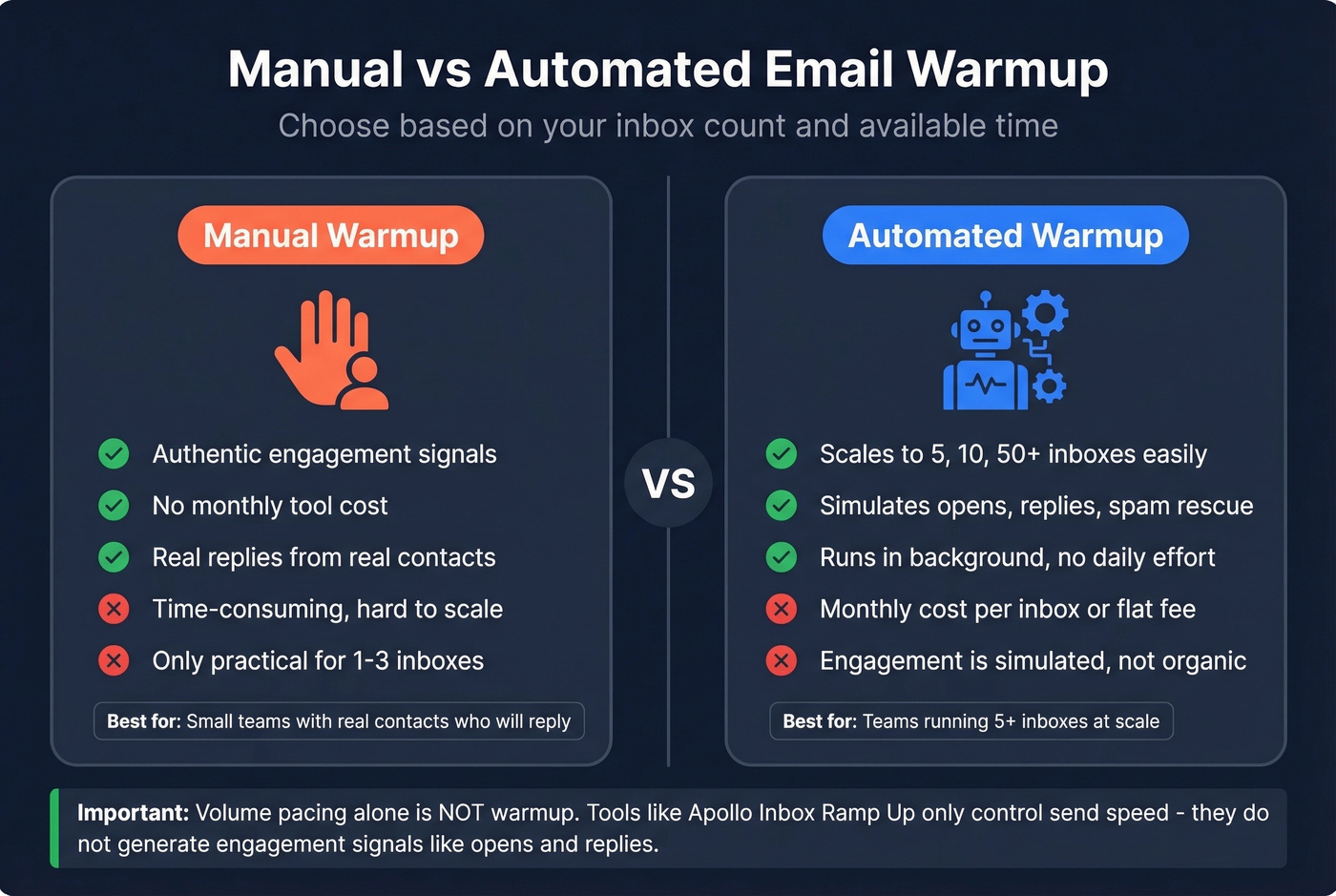
Skip manual and go automated if you're running 5+ inboxes. At that scale, manually coordinating warmup conversations across every account isn't realistic. Automated tools simulate the engagement loop - opens, replies, spam rescue, mark-as-important - across a network of real inboxes. A dedicated email warmer handles the heavy lifting so you can focus on campaign strategy instead of inbox babysitting.
One thing to watch: Apollo's "Inbox Ramp Up" feature is volume pacing, not warmup. It gradually increases your sending volume, but it doesn't generate engagement signals. That's a meaningful distinction - volume pacing without engagement simulation is like driving faster without steering.
A detail worth stealing from premium tools like Warmy.io: warmup content should mirror your actual outreach topics and ICP language, not generic filler. If you're selling DevOps tooling, warmup emails about DevOps perform better than "Hey, how's your week?" because providers see topical consistency between your warmup and real campaigns. Whether your tool supports it or not, you can configure custom warmup templates that match your outreach voice.
Let's be honest about one more thing: continuous warmup is mandatory. The consensus on r/coldemail is clear - stopping after your initial ramp is a recipe for reputation decay. Gmail weights ongoing engagement quality, including time-to-read, reply depth, and conversation threading. Keep your warmup tool running alongside your live campaigns indefinitely.
Best Email Warmer Tools Compared
Our pick for most teams: start with Instantly. Switch to Smartlead when you're managing 5+ clients. Use TrulyInbox if you're running 10+ inboxes on a tight budget.
| Tool | Starting Price | Per-Inbox Cost | Unlimited? | Best For |
|---|---|---|---|---|
| Instantly | $30/mo | Included | Yes | Solo/small teams |
| Smartlead | $32.50/mo (annual) | Included | Yes | Agencies |
| TrulyInbox | $29/mo | Included | Yes | Budget, high count |
| Warmbox | $15/mo | $15 (Solo) | No | Single inbox |
| Mailreach | $25/mo | $25 | No | Monitoring + warmup |
| Warmup Inbox | $15/mo (annual) | $15-$19 | No | Standalone |
| Lemwarm | $29/mo | $29 | No | Lemlist users only |
| Warmy.io | $49/mo | $49 | No | Premium features |
| Snov.io | Free tier; ~$69/mo Pro | Included (Pro S+) | Yes | All-in-one outreach |
Best for Most Teams - Instantly
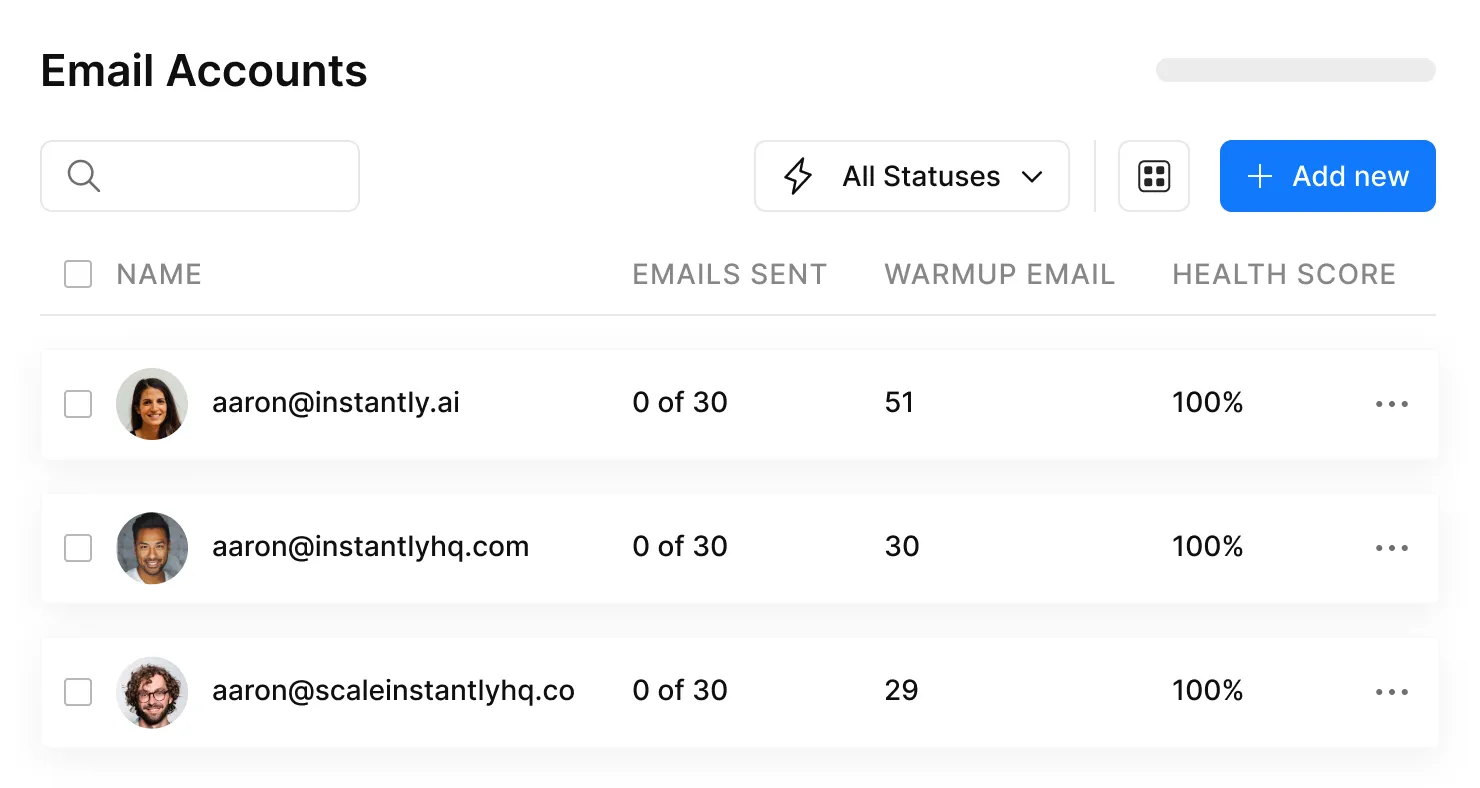
Instantly is the obvious pick for most teams getting started. Unlimited warmup on paid plans starting at $30/mo means you're not doing mental math on per-inbox costs as you scale. The UX is polished, the warmup network is large, and practitioners on r/coldemail consistently praise it. The Hypergrowth plan at $77.60/mo is a popular step-up. If you're running cold outreach and need warmup plus sequencing in one platform, this is the best entry point.
Best for Agencies - Smartlead

Smartlead was built for agencies managing multiple client campaigns. Client workspaces keep accounts isolated, Unibox centralizes reply management across all inboxes, and automatic inbox rotation swaps in healthy accounts when one gets flagged. The Base plan starts at $32.50/mo (annual billing) with unlimited warmup, stepping up to $78.30/mo (Pro), $144.50/mo (Smart), and $314.60/mo (Prime), with client workspace add-ons priced at $29-$39 per workspace depending on tier. If you're managing warmup for 5+ clients simultaneously, Smartlead handles the complexity that Instantly doesn't address.
Best Budget Option - TrulyInbox
TrulyInbox charges $29/mo for unlimited mailboxes. Period. If you're running a lot of inboxes, it's one of the simplest ways to keep warmup costs flat while you scale. The feature set is more basic than Instantly or Smartlead, but for pure inbox warming at high inbox counts, the math is hard to argue with.
Skip These Unless You Have a Specific Reason
Warmbox starts at $15/mo for a single inbox - solid if you literally need one account warmed. The Pro plan ($49/mo for 5 inboxes) is reasonable but not competitive with unlimited options at similar price points.
Mailreach runs about $25/inbox/mo. Worth it if you want warmup plus deliverability monitoring and you're comfortable paying per inbox.
Warmup Inbox runs $15-$19/inbox/mo depending on billing cycle. Straightforward standalone warmup without sequencing features.
Lemwarm at $29/inbox/month is a racket if you're running 10+ inboxes. It makes sense only if you're already deep in the Lemlist ecosystem and want everything under one roof. Otherwise, the per-inbox pricing is indefensible.
Warmy.io starts at $49/inbox/mo, with higher tiers at $129/mo and $429/mo. Premium price. Hard to justify unless you need their specific workflow and reporting.
Snov.io bundles warmup into its Pro plans (Pro S and higher) with unlimited warm-ups under a Fair Use Policy, alongside email finding and outreach sequences. If you want an all-in-one and don't need best-in-class warmup, it's a reasonable package.
WarmySender at $4.99/mo is the cheapest option we've seen mentioned on Reddit, though feature depth is limited. Worth testing if you're bootstrapping and need bare-minimum warmup on a single inbox.
Hot take: If your average deal size is under $5K, you don't need a $49/inbox warmup tool. Instantly or TrulyInbox will do the job. Save the budget for verified data - that's what actually protects your deliverability long-term.
Common Warmup Mistakes
Skipping authentication. No SPF/DKIM/DMARC means Gmail rejects your mail at the door. Warmup can't fix what authentication breaks. (If you need a refresher, start with email authentication.)
Sending too many emails from day one. Starting at 50 emails/day on a fresh inbox is a fast track to spam. Start at 2-5 and earn your way up.
Robotic sending patterns. Sending exactly 20 emails at exactly 9:00 AM every day looks automated because it is. Vary your timing and volume. Providers watch for unnatural consistency.
Using HTML, images, and links during warmup. Plain text only for the first 1-2 weeks. Heavy formatting and tracked links signal marketing automation, not human conversation.
Not monitoring sender reputation. If you're not checking Google Postmaster Tools at least weekly, you're flying blind. Reputation can drop before your bounce rates show it.
Stopping warmup after the initial ramp. We covered this above - keep it running indefinitely alongside your live campaigns.
Celebrating 100% open rates. A 100% open rate on your warmup emails is a red flag, not a victory. It looks artificial to providers. Healthy warmup should show realistic engagement patterns - 60-80% opens with varied reply rates.
Recovery Playbook
If your warmup went sideways - or your first campaign tanked your reputation - follow this sequence:
Pause all sending for 48-72 hours. Let the dust settle. Continuing to send while flagged makes everything worse.
Re-check SPF/DKIM/DMARC/rDNS alignment. Something may have broken during setup or a DNS change. Verify every record. (Use a SPF DKIM DMARC check to spot failures fast.)
Remove risky links and heavy formatting from any queued or draft emails. Strip it back to plain text.
Resume at your last safe volume tier. If you were at 30/day when things went wrong, drop back to 10-15/day and rebuild.
Ask trusted contacts for genuine replies. Real engagement from real humans is the fastest way to rebuild signals. A few colleagues replying to your emails and marking them as important goes a long way.
Check blocklists. Look yourself up on Spamhaus and Barracuda. If you're listed, submit delisting requests immediately. (Here’s a deeper email blacklist removal playbook.)
If the domain is burned, start fresh. Set up a new outreach subdomain and warm it from scratch. Sometimes the fastest recovery is a clean slate. It's painful, but it beats months of trying to rehabilitate a domain that providers have already flagged.
Warmup Alone Won't Save You
The framework that actually produces consistent deliverability:
Authentication + List Hygiene + Content Quality + Warmup = Deliverability
Remove any one of those pillars and the whole thing collapses. Email warmup builds your sender reputation. Bad data destroys it. If you're sending to unverified addresses after spending weeks on your warming routine, you've wasted your time.
The numbers prove this out. One of our customers, Meritt, saw their bounce rate drop from 35% to under 4% after switching to verified data - and their pipeline tripled. Stack Optimize built to $1M ARR with client deliverability consistently above 94%, bounce rates under 3%, and zero domain flags across all clients. The common thread wasn't a magic warmup tool. It was data quality as the foundation.

A 10%+ bounce rate on your first campaign after warmup signals spam to Gmail regardless of how perfectly you warmed up. Verification isn't optional. It's the thing that protects the weeks of work you put into building sender reputation. (If you want benchmarks, see email bounce rate and average bounce rate for email campaigns.)
Warmup protects your sending reputation. Verified data protects your warmup. Teams using Prospeo cut bounce rates from 35%+ to under 4% - exactly the metric gate you need to pass before scaling volume. At $0.01 per email, cleaning your list costs less than a single bounced domain.
Meritt tripled their pipeline after dropping bounce rates below 4% with Prospeo.
FAQ
How long does email warmup take?
Mailbox warmup takes 2-4 weeks; domain warmup takes 4-8 weeks; IP warmup can take 30-60+ days. The exact timeline depends on your target volume and whether your metrics - open rate above 20%, bounce below 2%, complaints below 0.1% - hit the gates to scale. Don't rush it.
Can I warm up emails manually?
Yes, for 1-3 inboxes. Send plain-text emails to real contacts, get genuine replies, and gradually increase volume over 2-4 weeks. For 5+ inboxes, automated tools like Instantly ($30/mo unlimited) or Smartlead ($32.50/mo) are more practical - they run as an always-on email warmer so you can focus on outreach.
Is email warmup a one-time thing?
No - it should run continuously alongside live campaigns. Gmail weights ongoing engagement quality including time-to-read, reply depth, and conversation threading. Stopping after your initial ramp lets sender reputation decay, and rebuilding takes longer than maintaining it.
Do I need a warmup tool with Google Workspace?
Google Workspace doesn't include built-in warmup functionality. You need either a manual process or a third-party tool. Instantly and Smartlead both support Workspace accounts with unlimited warmup on their base plans, starting at $30/mo and $32.50/mo respectively.
What's the best free way to protect deliverability after warmup?
Verify every email address before your first real send - a 10%+ bounce rate will undo weeks of warmup instantly. Prospeo offers 75 free email verifications per month with 98% accuracy and catch-all handling, which is enough to validate a small initial campaign without spending anything.