

How to Run an SPF DKIM DMARC Check (2026)
54% of ransomware infections start with a phishing email. Yet only 7.6% of the top 10 million domains actually enforce DMARC. Most teams run a quick SPF DKIM DMARC check, see "pass," and move on - which is exactly where things break.
What You Need (Quick Version)
Two checks matter, and one thing most people miss between them.
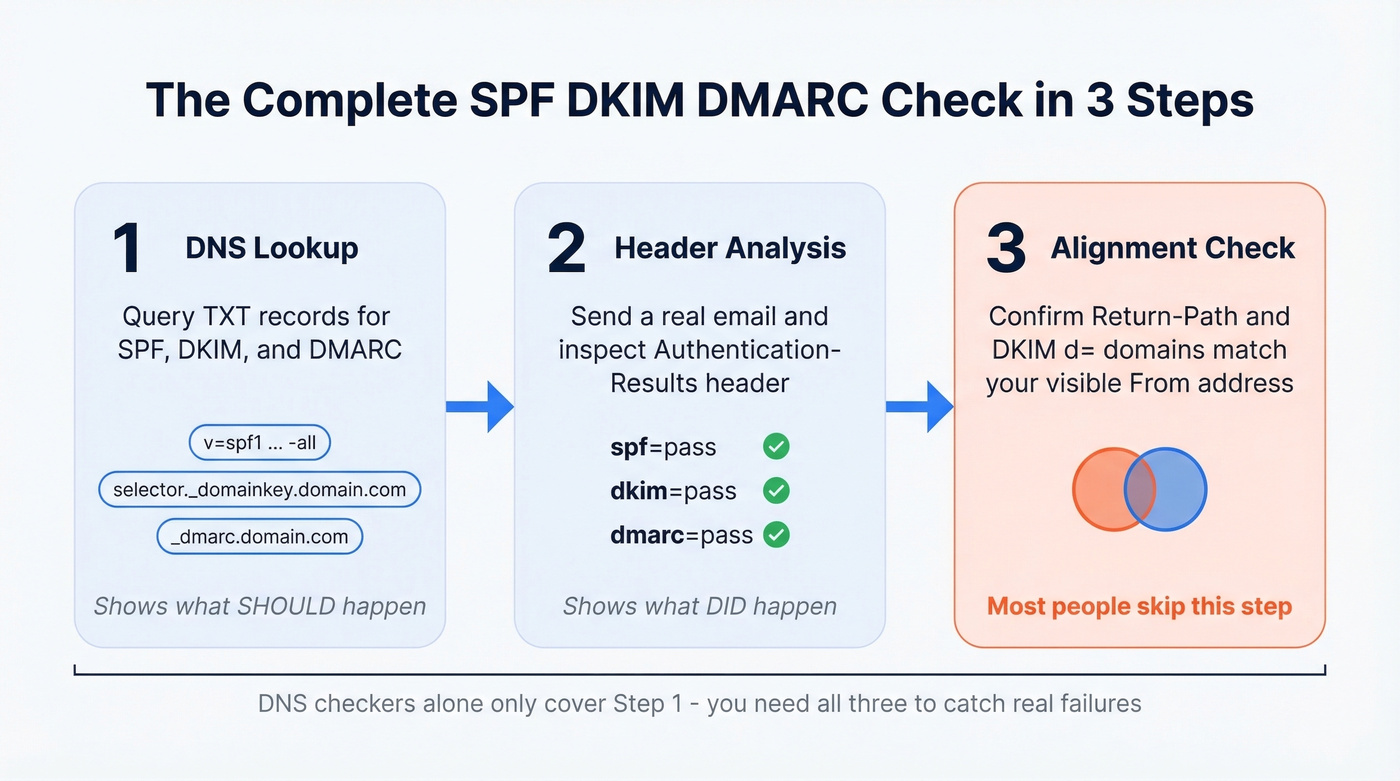
- DNS lookup - confirms your SPF, DKIM, and DMARC records exist and are syntactically correct. MxToolbox is the fastest option. URIports has a solid best-practices guide you can reference alongside your checks.
- Live email header analysis - shows what actually happened when a real message hit a real inbox. Some tools let you send an email to a generated address and get back a full authentication report, which is useful when you want to test from a specific sending service.
- Alignment confirmation - the piece everyone skips. SPF and DKIM can both pass and DMARC can still fail. If you stop at pass/fail, you'll miss the real problem (see DMARC alignment).
The 2-Minute DNS Lookup
Look up your SPF record. Query your domain's TXT records. You want a single v=spf1 record - two SPF records means neither works. And while ~all is common during rollout, you should end at -all once you've tested and you're confident every legitimate sender is included (use these SPF record examples if you need a reference).
Look up your DKIM record. You'll need your selector. Common ones are google, selector1, s1, or default. Query yourselector._domainkey.yourdomain.com as a TXT record. You want a 2048-bit RSA key present. If you want a second method beyond DNS, see how to verify DKIM is working.
Look up your DMARC record. Query _dmarc.yourdomain.com. A healthy record has v=DMARC1, a p= policy tag (ideally quarantine or reject), and a rua= tag pointing to a reporting address.
Here's the thing - DNS checkers show what should happen. They don't show what did happen on a live message. That's what header analysis is for.

The 5-Minute Header Analysis
Send yourself an email from the domain you're testing, then open the headers:
- Gmail: Open the message, three dots, "Show original"
- Outlook: File, Properties, Internet headers (desktop) or More actions, "View message source" (web)
- Apple Mail: View, Message, Raw Source
Scroll to the Authentication-Results header. You're looking for three lines: spf=pass smtp.mailfrom=yourdomain.com, dkim=pass header.d=yourdomain.com, and dmarc=pass header.from=yourdomain.com. All three domains should match your visible From address. If even one doesn't, keep reading.

You just spent 5 minutes confirming SPF, DKIM, and DMARC alignment. Don't waste that work by sending to addresses that bounce. Every hard bounce chips away at the domain reputation you just secured. Prospeo verifies emails at 98% accuracy on a 7-day refresh cycle - so your authentication passes *and* your messages land.
Clean authentication deserves clean data. Start with 75 free email verifications.
Why DMARC Fails When SPF and DKIM Pass
This is the most common trap, and it shows up constantly on r/sysadmin - SPF and DKIM both pass, DMARC still fails, and the admin is pulling their hair out until someone points out the alignment mismatch.
If you're also using a separate bounce domain, it helps to understand the return path and how it interacts with SPF alignment.
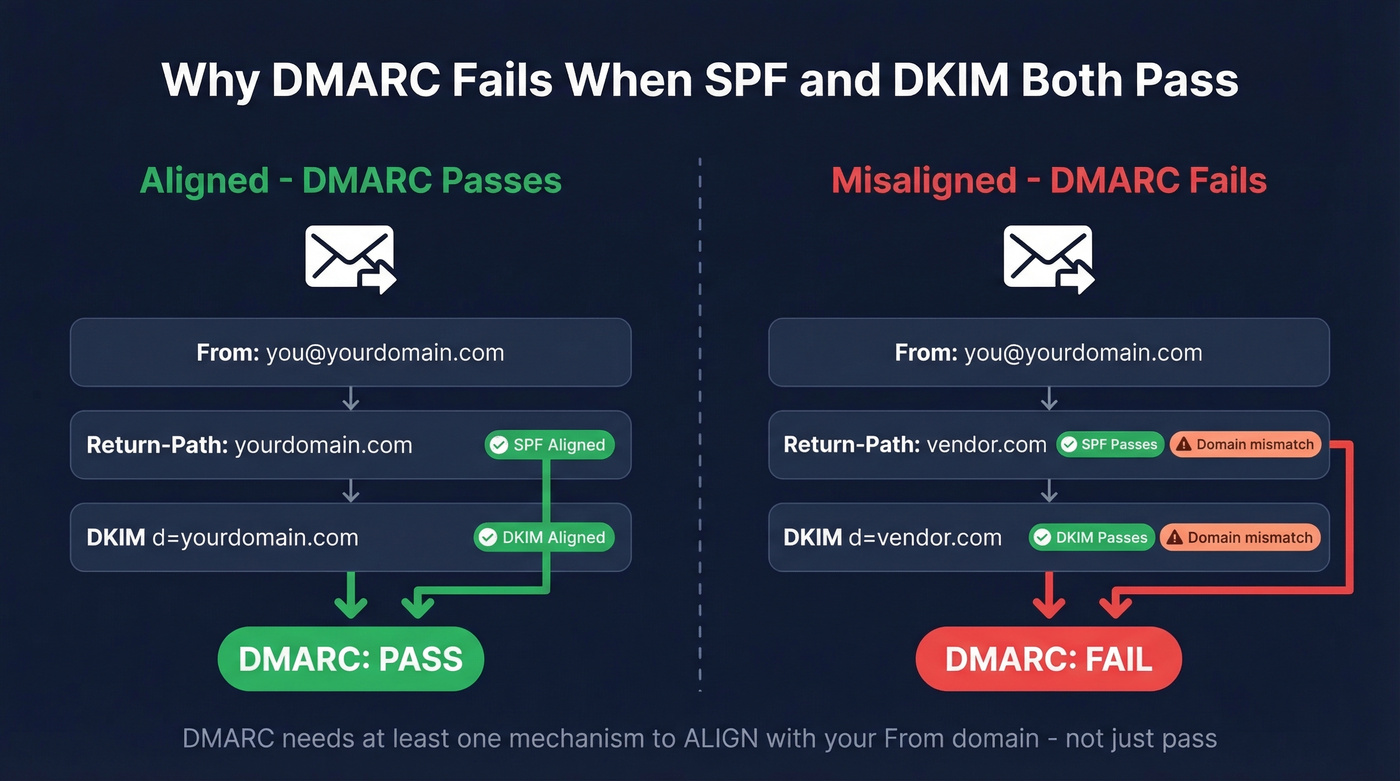
SPF aligns when the Return-Path domain matches the From domain the recipient sees. DKIM aligns when the d= signing domain matches the From domain. DMARC requires at least one of these to align - not just pass.
The classic scenario: a third-party vendor sends on your behalf. Their bounce domain passes SPF. Their signing domain passes DKIM. But neither domain matches your From address. Both checks pass individually, and DMARC fails anyway.
Basic DNS checkers won't surface alignment on a real message; header analysis and DMARC reports will. DMARC supports relaxed alignment where subdomains count and strict alignment requiring an exact match. Most setups use relaxed, which is fine, but you still need the organizational domain to match. We've debugged this exact issue for our own sending infrastructure more than once - it's always the third-party vendor you forgot about six months ago.
Common Errors and Fixes
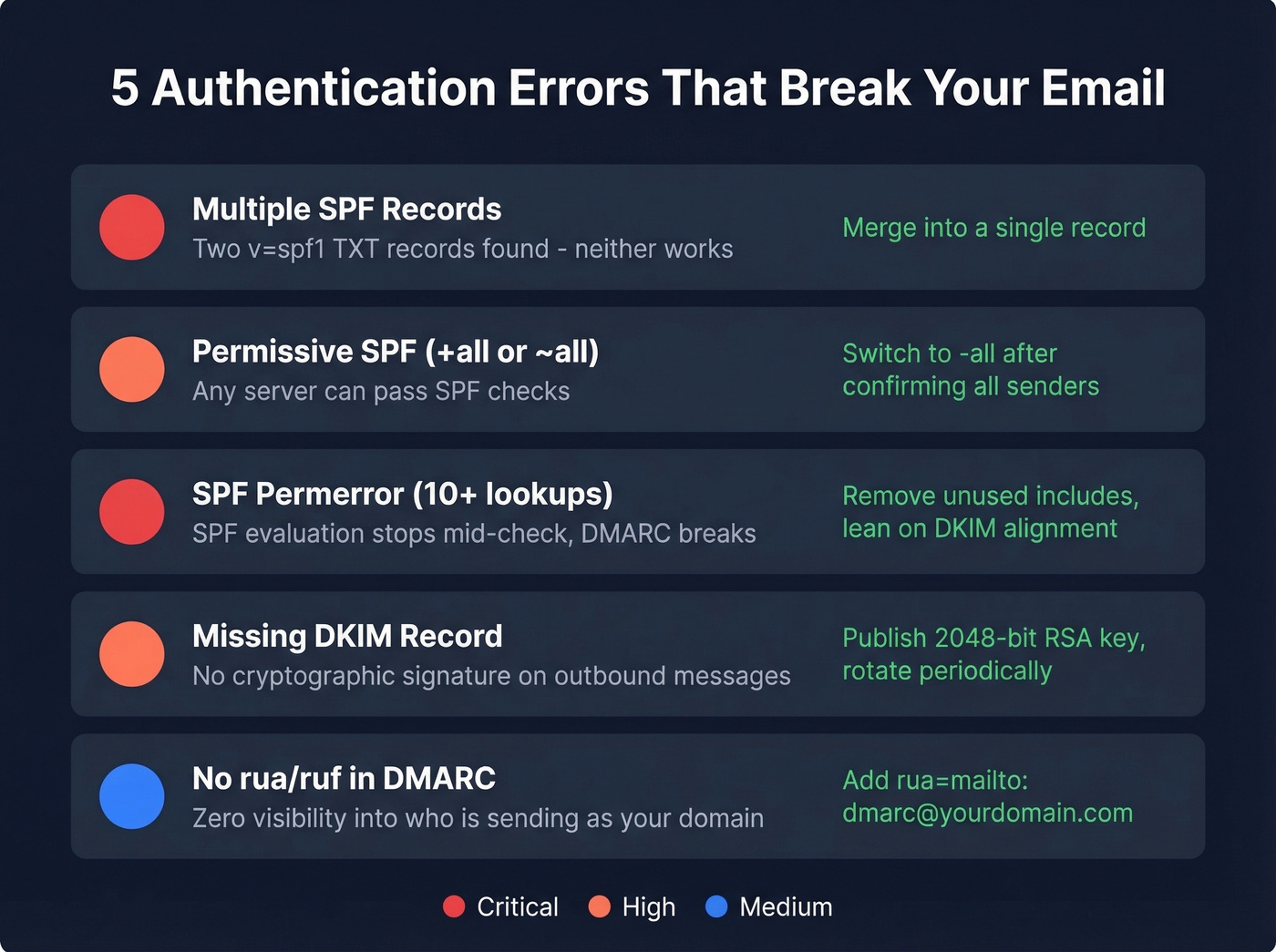
| Error | Symptom | Fix |
|---|---|---|
| Multiple SPF records | DNS returns two v=spf1 TXT records |
Merge into one record |
+all or ~all in SPF |
Overly permissive; weakens DMARC | Move to -all after testing |
| SPF permerror (>10 lookups) | SPF evaluation stops; DMARC breaks | Reduce includes, retire dormant senders, lean on DKIM alignment |
| Missing DKIM record | No cryptographic signature on messages | Publish a 2048-bit RSA key; rotate periodically |
No rua/ruf in DMARC |
No reports coming in | Add rua=mailto:dmarc@yourdomain.com |
For SPF troubleshooting, spf.access.nu lets you visualize your entire include tree and search for a specific IP - useful when you're trying to figure out which nested include pushes you over the 10-lookup limit.
One more thing: even domains that don't send email should publish a DMARC record with p=reject to prevent spoofing. It takes 30 seconds and closes a door attackers love to walk through.
When Free Checkers Aren't Enough
DMARC aggregate reports arrive as XML files meant for machines, not humans. If you're getting more than a handful per week, you need a monitoring tool (and a broader email deliverability guide to keep the rest of your stack from undermining authentication).
| Tool | Starting Price |
|---|---|
| PowerDMARC | $8/mo |
| Postmark | $14/mo |
| Valimail | $19/mo |
| Dmarcian | $19.99/mo |
| EasyDMARC | $35.99/mo |
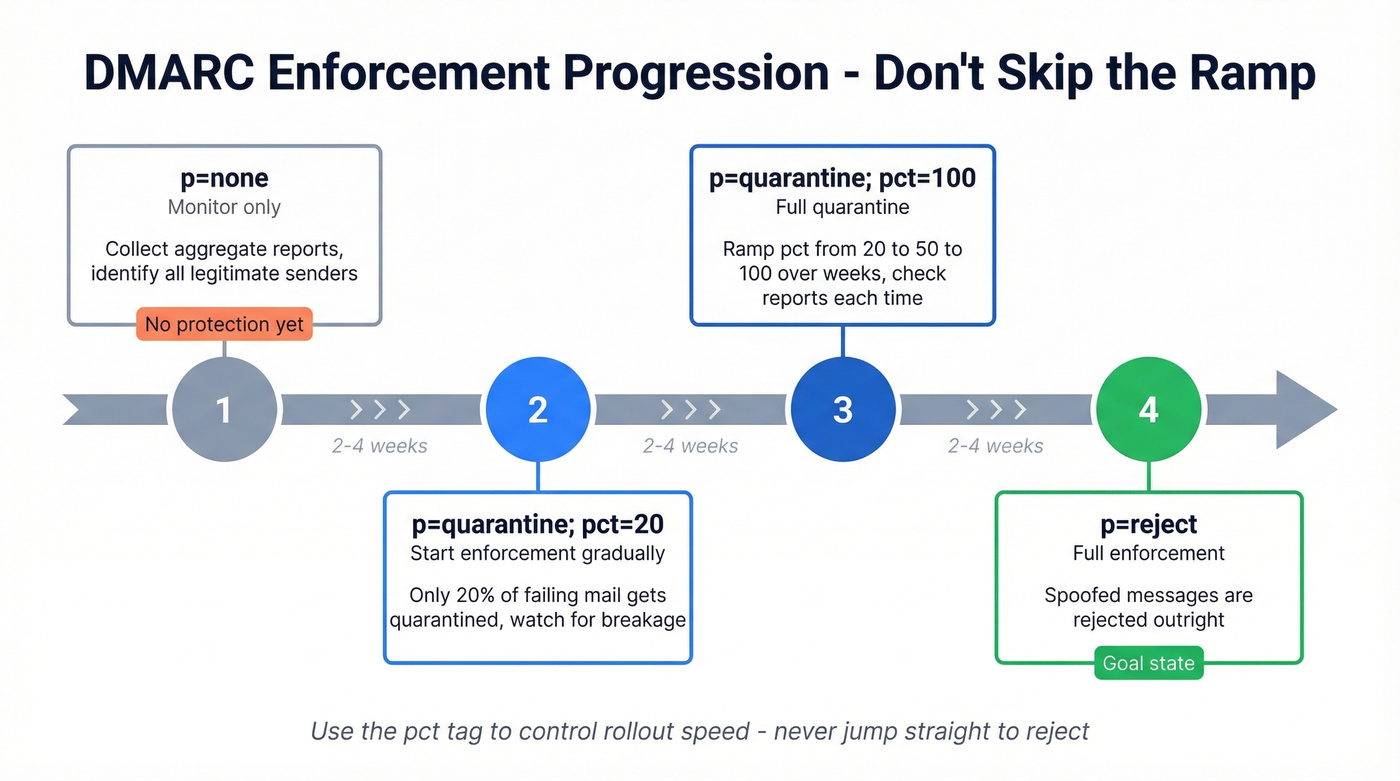
Let's be honest: if you've been sitting on p=none, you're not protected - you're observing. The enforcement progression is p=none to p=quarantine; pct=20, then ramp the percentage, then p=reject. Don't skip the ramp. Use the pct tag to gradually increase enforcement so you catch legitimate senders that would break before they actually break.
For a deeper explanation of why SPF records break in the real world - especially the include-chain problem - Red Sift's SPF guide is one of the clearest walkthroughs of the 10-lookup limit and how to fix it.
After Authentication: Protect Your Sender Reputation
Once your SPF DKIM DMARC check comes back clean and aligned, the next deliverability killer is bad recipient data. Bounces and spam traps damage your domain reputation regardless of how perfect your authentication is. We've seen teams nail every authentication record and still land in spam because 8% of their list was dead addresses (track and reduce this with email bounce rate benchmarks and fixes).
Before you ramp outbound volume, run your list through Prospeo's email verification - 98% accuracy on a 7-day data refresh cycle. The free tier gives you 75 email credits to test without commitment, and there's no contract to negotiate. If you're comparing tools, start with these Bouncer alternatives.

Authentication stops spoofing. Verification stops bounces. You need both to protect sender reputation. Teams using stale data see 8%+ bounce rates that trigger spam filters - even with perfect DMARC. Prospeo's 5-step verification catches dead addresses, spam traps, and honeypots at $0.01 per email.
DMARC won't save you from a 35% bounce rate. Verified data will.
FAQ
SPF vs DKIM vs DMARC - What's the Difference?
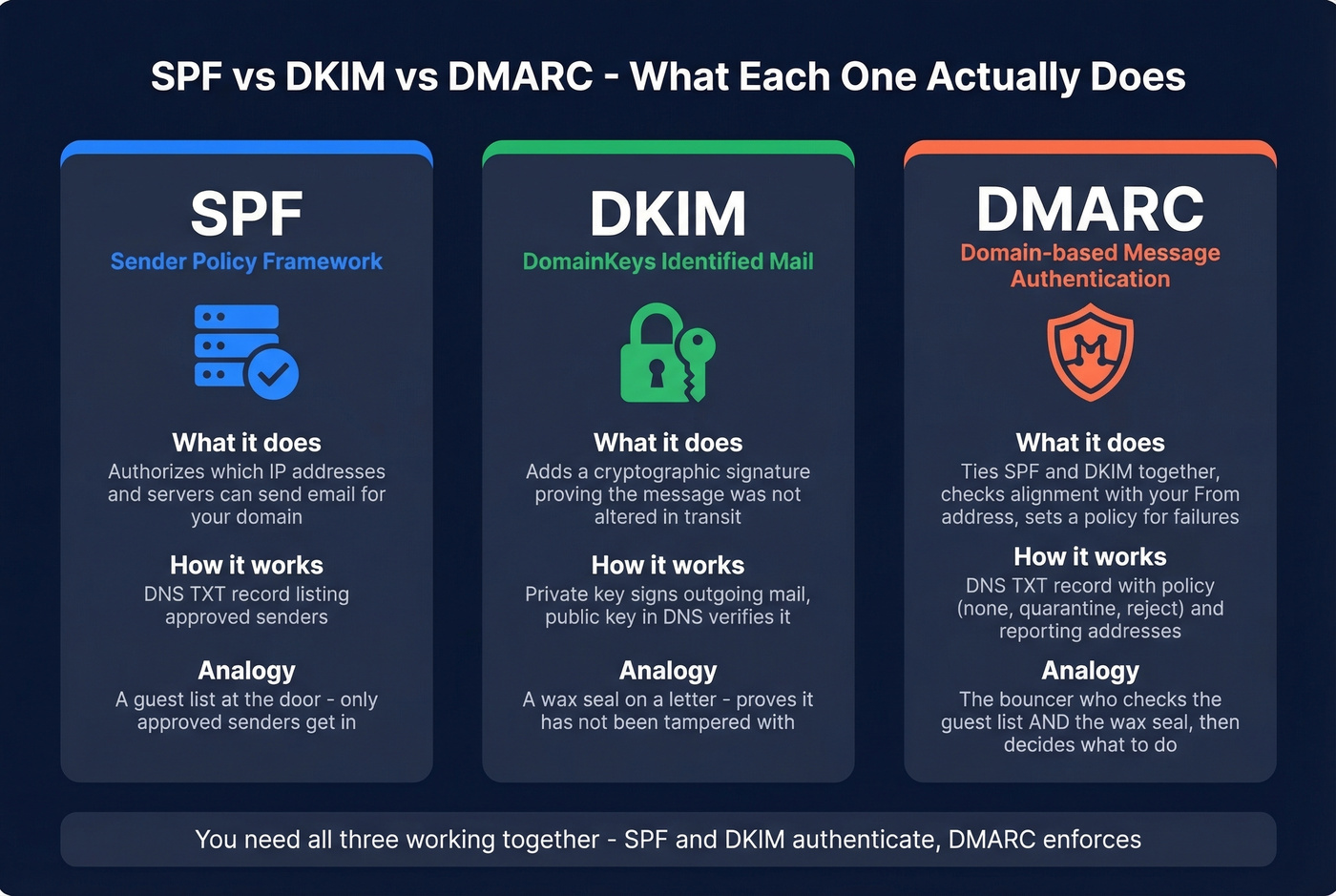
SPF authorizes which servers can send for your domain. DKIM adds a cryptographic signature proving the message wasn't altered in transit. DMARC ties them together with a policy - it checks whether SPF or DKIM align with your visible From address and tells receivers what to do if they don't.
How Do I Find My DKIM Selector?
Check your email provider's documentation - common selectors include google, selector1, s1, or default. You can also send yourself an email, view the headers, and look for DKIM-Signature: ... s=yourselector. Use that value in your DNS lookup: yourselector._domainkey.yourdomain.com.
How Often Should You Validate Email Authentication?
Re-check after every DNS change, new sending tool, or vendor onboarding. For ongoing monitoring, set up DMARC aggregate reports using the rua tag and review weekly - or use a monitoring tool to automate it. We've seen teams break their SPF record by adding a new marketing tool without checking their lookup count first. Skip the weekly review if you're on p=reject with a monitoring tool that alerts on failures - otherwise, don't skip it.
Can You Verify Emails After Fixing Authentication?
Yes - and you should. Authentication stops spoofing, but sending to invalid addresses still damages your sender reputation. Prospeo verifies emails in real time with 98% accuracy using a 5-step process that catches bounces, spam traps, and honeypots before they hurt your domain.