


Mixmax Pricing, Reviews, Pros and Cons: The 2026 Breakdown
Half the articles ranking for Mixmax pricing still reference legacy SMB and Growth tiers that don't exist anymore. Mixmax's current pricing is built around Copilots - Inbox, Meeting, Engagement - plus a bundled Suite. That mismatch is why you'll find conflicting numbers everywhere you look.
The sales engagement platform market is projected to hit $30B by 2032, up from $7.4B in 2022. Mixmax is carving out a specific niche: Gmail-first teams who want engagement tools without ever leaving their inbox.
Quick Verdict
Mixmax is best for Gmail-first teams of 5-15 reps doing personalized outreach. The Suite at $89/user/month on annual billing is the value play - buying all three Copilots separately runs $107/user/month. If you need enterprise scale or high-volume sending, look elsewhere.
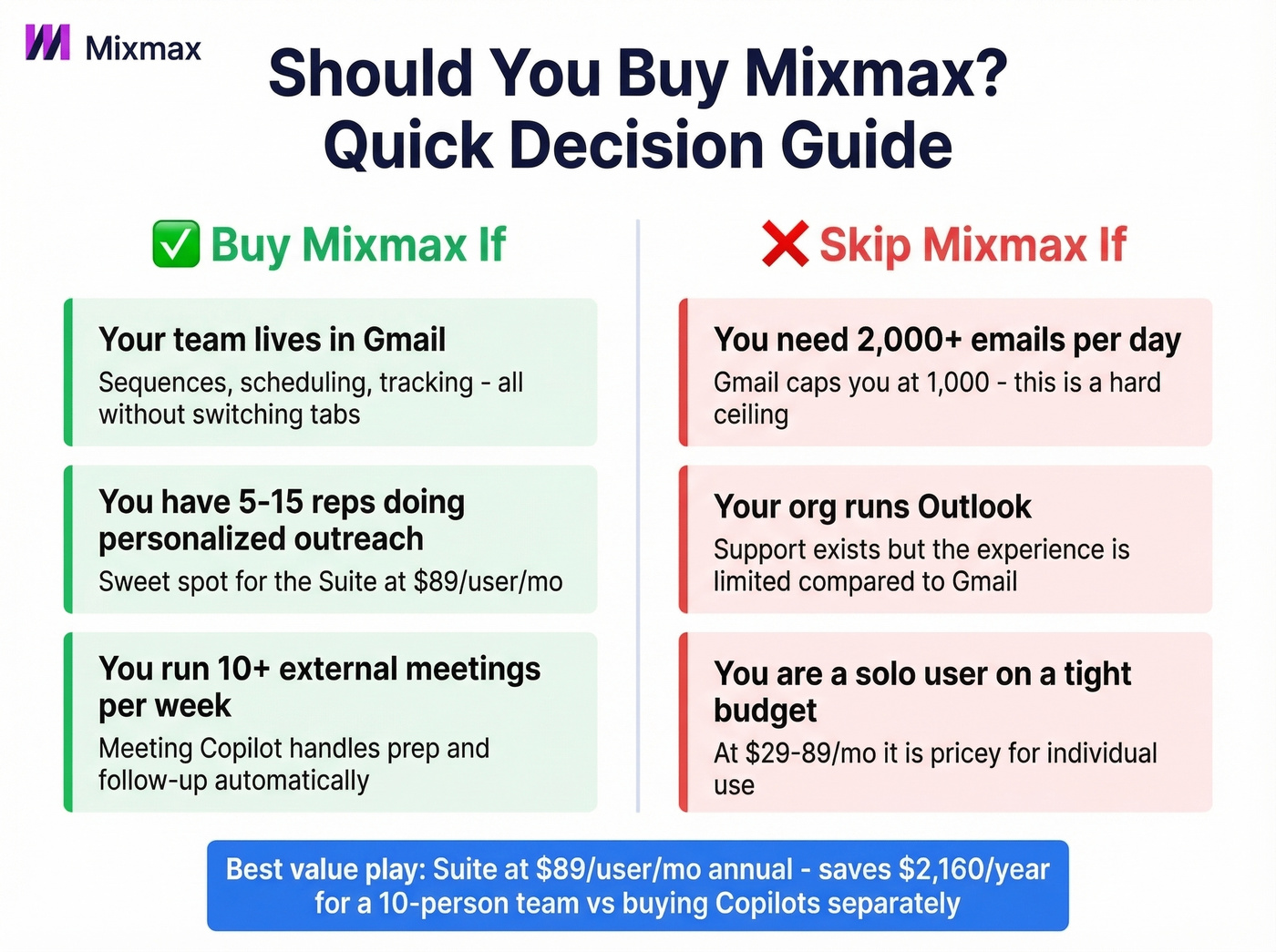
Buy Mixmax if:
- Your team lives in Gmail and wants sequences, scheduling, and tracking without switching tabs
- You run 10+ external meetings per week and need prep/follow-up automation
Skip Mixmax if:
- You need 2,000+ emails per day per sender
- Your org runs Outlook - support exists but it's newer and more limited than the Gmail experience
- You're a solo user on a tight budget
Mixmax Pricing in 2026
Current Copilot pricing, confirmed on Mixmax's pricing page:
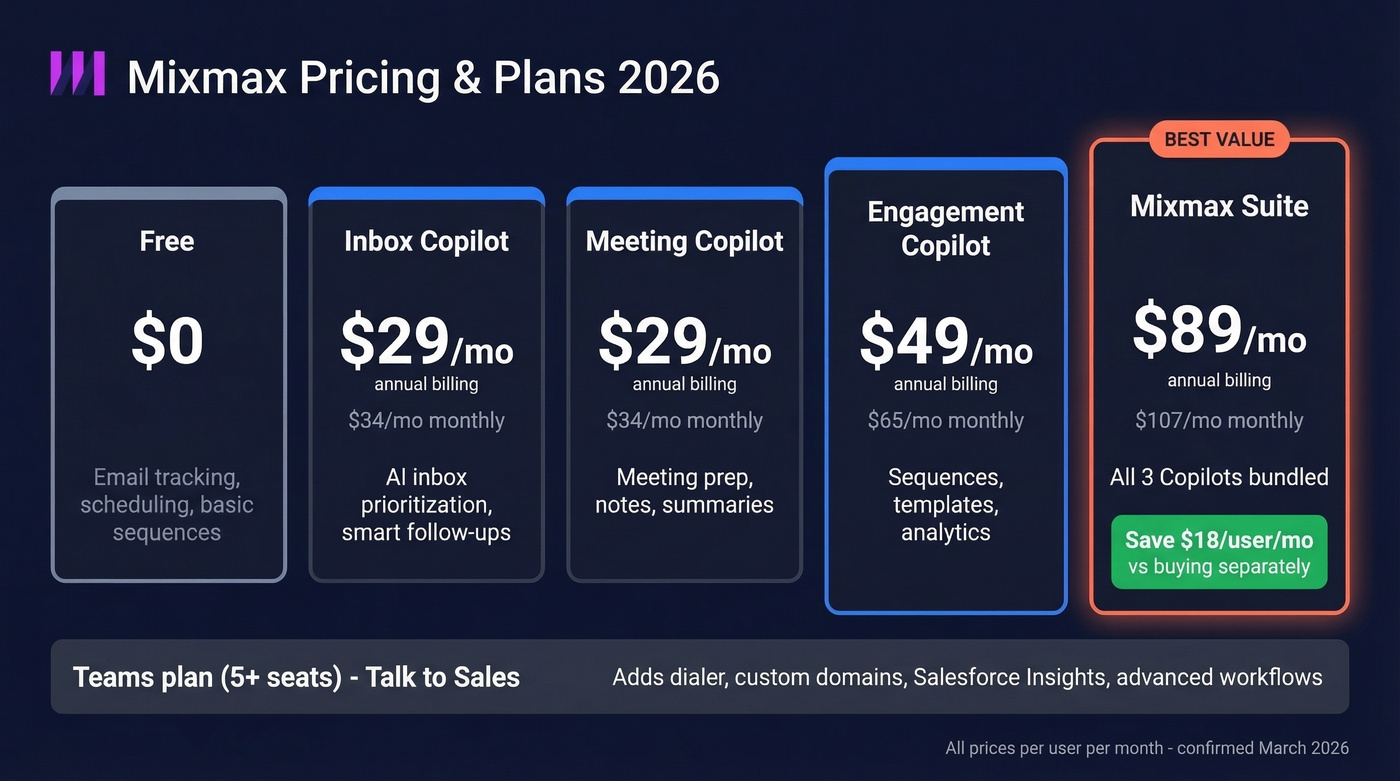
| Tier | Annual (/user/mo) | Monthly (/user/mo) |
|---|---|---|
| Inbox Copilot | $29 | $34 |
| Meeting Copilot | $29 | $34 |
| Engagement Copilot | $49 | $65 |
| Mixmax Suite (all 3) | $89 | $107 |
| Custom Branding | $9/seat | $11/seat |
| Teams (5+ seats) | Talk to Sales | Talk to Sales |
| Free | $0 | $0 |
Teams adds unlimited sequences, a dialer, custom branding, custom domains, Salesforce Insights, and advanced workflow rules. Expect pricing above the Suite rate with a 5-seat minimum.
The Suite bundle saves $18/user/month on annual billing over buying all three Copilots individually. For a 10-person team, that's $2,160/year you keep. G2 still lists a promo offering 25% off monthly or 50% off annual for legacy self-serve plans, which is why pricing searches return conflicting information.
Mixmax also runs a 14-day free trial with no card required. After that, you can continue on Mixmax Free, which includes email tracking, meeting scheduling, and basic sequences - enough to test the core workflow before committing.
What Reviews Get Right
Mixmax holds a 4.6/5 on G2 across 1,449 reviews. The praise clusters around a few real strengths.
Gmail-native workflow is the headline feature. Scheduling, templates, Remind Me follow-ups, and a live feed of opens - all without leaving your inbox. Quora users have praised this for years, and it remains the core differentiator. We've tested a lot of engagement tools, and the in-Gmail experience here genuinely feels like a native Google feature rather than a bolted-on extension.
AI Copilots handle meeting prep, follow-up drafts, and engagement signals. The Inbox Copilot surfaces what matters; the Meeting Copilot handles notes and summaries. For reps juggling 15+ calls a week, the time savings are real.
CRM sync covers Salesforce and HubSpot, with workflow automation that auto-creates records and logs activity so reps don't have to manually babysit every touch. Mixmax is primarily an inbox extension - not a full platform migration - which is why adoption tends to be straightforward for Gmail-first teams.
Industry data shows SEP users see roughly +46% open rates and +27% reply rates. Those are category-level stats, not Mixmax-specific results, but the productivity jump from manual email to sequenced outreach is well-documented across the space.

Mixmax sequences only work when the emails behind them are real. Prospeo verifies contacts at 98% accuracy on a 7-day refresh cycle - so your sequences hit inboxes, not spam traps. At $0.01 per email, cleaning your list costs less than a single bounced send costs your domain.
Verify your list before you load your next Mixmax sequence.
Mixmax Cons Worth Knowing
Deliverability Needs Day-One Config
Here's the thing most users don't discover until it's too late: Mixmax tracks clicks by routing recipients through a tracking URL before redirecting. Spam filters penalize this because spammers use the same technique.
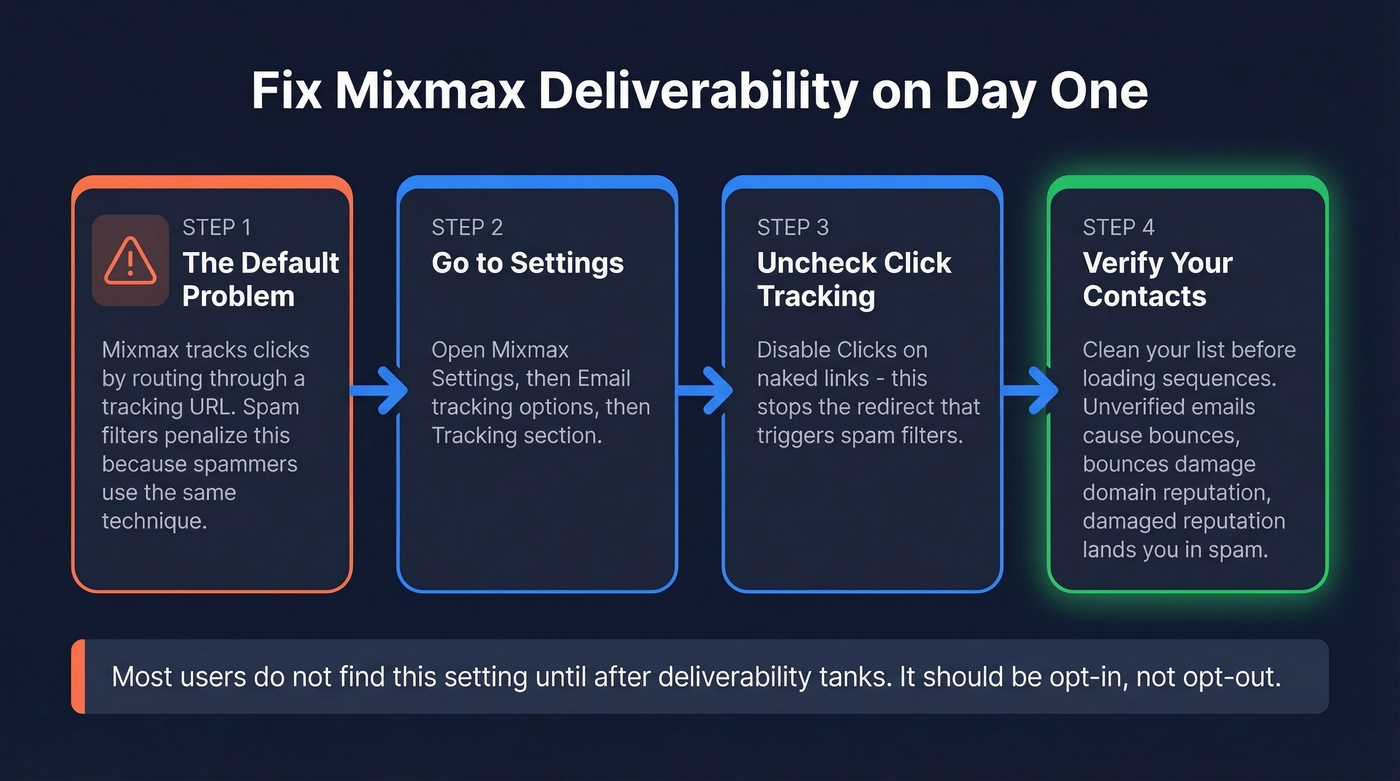
The fix is straightforward - go to Settings, then Email tracking options, then Tracking, and uncheck "Clicks on naked links." Mixmax documents this, but most users don't find it until after deliverability tanks. It's a frustrating default that should be opt-in, not opt-out.
Before blaming the tool entirely, though, check your data. Unverified emails lead to bounces, bounces damage domain reputation, and damaged reputation lands you in spam regardless of which platform you're sending from. In our experience, teams that verify contacts before loading them into any sequence tool see dramatically better inbox placement. Prospeo catches stale addresses at 98% accuracy on a 7-day refresh cycle - worth running before you blame your engagement platform.

Sending Limits Are Gmail's Ceiling
Mixmax sends through your Gmail account, so you're subject to Google's rate limits. A single user can send up to 1,000 emails/day, and workspace admins can configure the daily sequence limit anywhere from 100 to 1,000 (default: 500). If you need 5,000+ emails daily, you've outgrown it.
Browser Drag and Cost at Scale
The compose window runs as an embedded iframe that can slow Chrome and conflict with other Gmail extensions. A 10-person team on Suite annual pays $10,680/year - not cheap for what's essentially a Chrome extension, however powerful.
Let's be honest: Mixmax is the best Gmail-native engagement tool on the market right now. But "Gmail-native" is both its superpower and its ceiling. If your team will outgrow Gmail's sending limits within 12 months, you're better off starting with a standalone platform than migrating mid-pipeline.
Who Should Use Mixmax
| Best For | Not For |
|---|---|
| Gmail-first teams, 5-15 reps | Teams needing 2,000+ daily sends |
| Personalized 1-to-1 outreach | Outlook-primary orgs |
| 10+ external meetings/week | High-volume cold email at scale |
Final Verdict on Pricing and Value
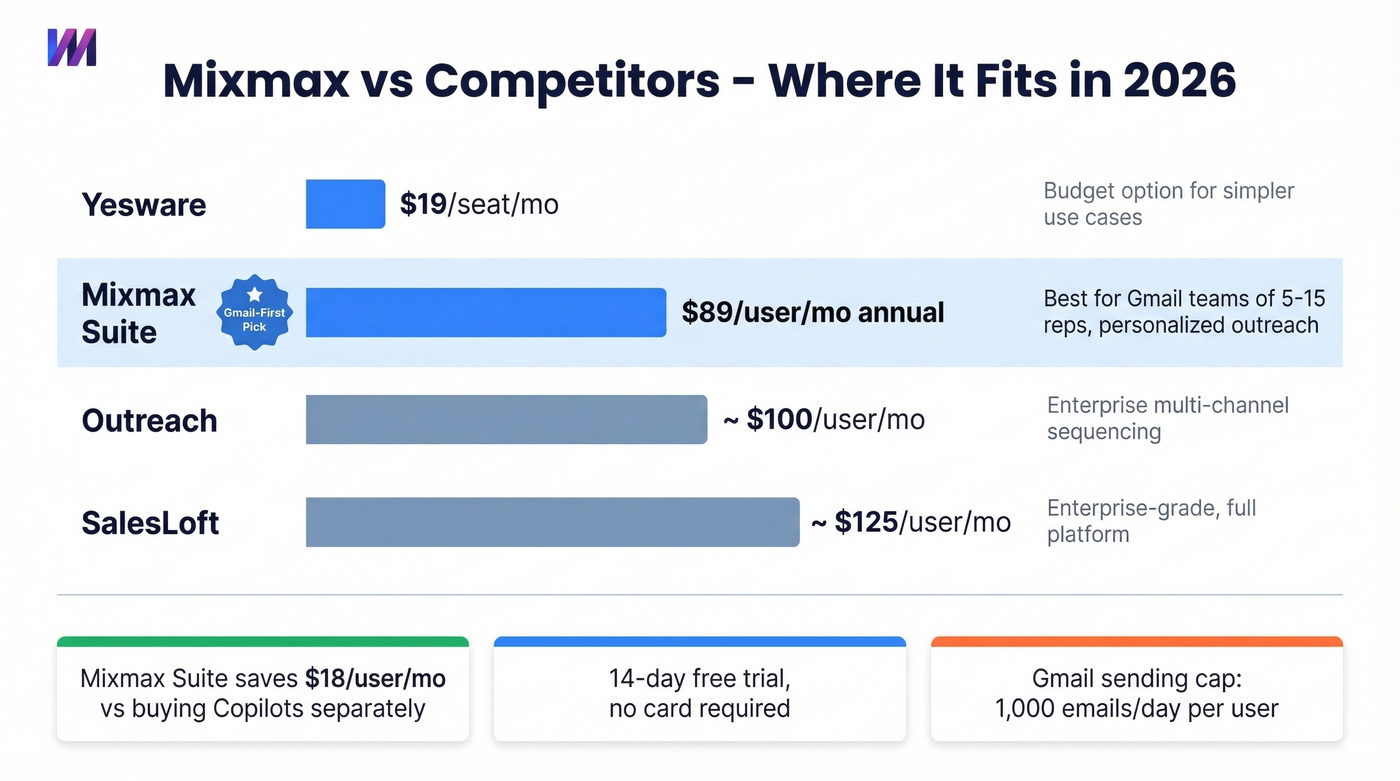
Start with the Engagement Copilot at $49/user/month if you're testing the waters. Upgrade to Suite when meeting automation and inbox AI justify the jump to $89. For teams that need enterprise-grade multi-channel sequencing, Outreach (~$100/user/month) and SalesLoft (~$125/user/month) are the established players. On the budget end, Yesware at $19/seat handles simpler use cases.
If you’re comparing options, see our breakdown of Mixmax alternatives for different team sizes and sending volumes.
We've seen teams blame their engagement platform for poor deliverability when the real culprit was a 15% bounce rate from stale lists. One agency we spoke with cut their bounce rate from 35% to under 4% just by verifying contacts before loading sequences - the tool didn't change, the data did. Clean contact data is what keeps sequences out of spam, regardless of which platform sends them. If you’re troubleshooting inboxing, start with an email deliverability guide and then audit your sender reputation.
Teams don't switch engagement platforms because of deliverability - they switch because of bad data. One agency cut bounce rates from 35% to under 4% by running contacts through Prospeo first. 143M+ verified emails, 5-step verification, catch-all handling included.
Fix your data before you blame your sending tool.