

MX Records Checker: How to Check, Read, and Fix Your MX Records
You migrated your website to a new host last Tuesday. Everything looks great - new theme, faster load times, the works. Then on Thursday, your sales team mentions they haven't received a single inbound email in two days. Your MX records got silently overwritten during the DNS change, and nobody noticed until prospects started complaining.
This happens a lot. It's almost always preventable with a 30-second check from any MX records checker. And the stakes aren't just missed emails - DeepStrike puts the figure at 54% of ransomware infections starting from a phishing email, so misconfigured email records are a genuine security liability.
What You Need (Quick Version)
If you just need to check your MX records right now: enter your domain into DNSChecker (best multi-resolver view), MXToolbox (most features), or Google Admin Toolbox (cleanest for Google Workspace). If the results don't match your email provider's expected records, scroll to our provider reference table below. If email is broken and MX looks fine, the problem is almost certainly SPF, DKIM, or DMARC - jump to the authentication checklist at the bottom.
What Is an MX Record?
An MX (mail exchange) record is a DNS entry that tells the internet where to deliver email for your domain. Think of it like a postal forwarding address - without it, mail servers have no idea which server handles your email, so messages bounce or disappear.
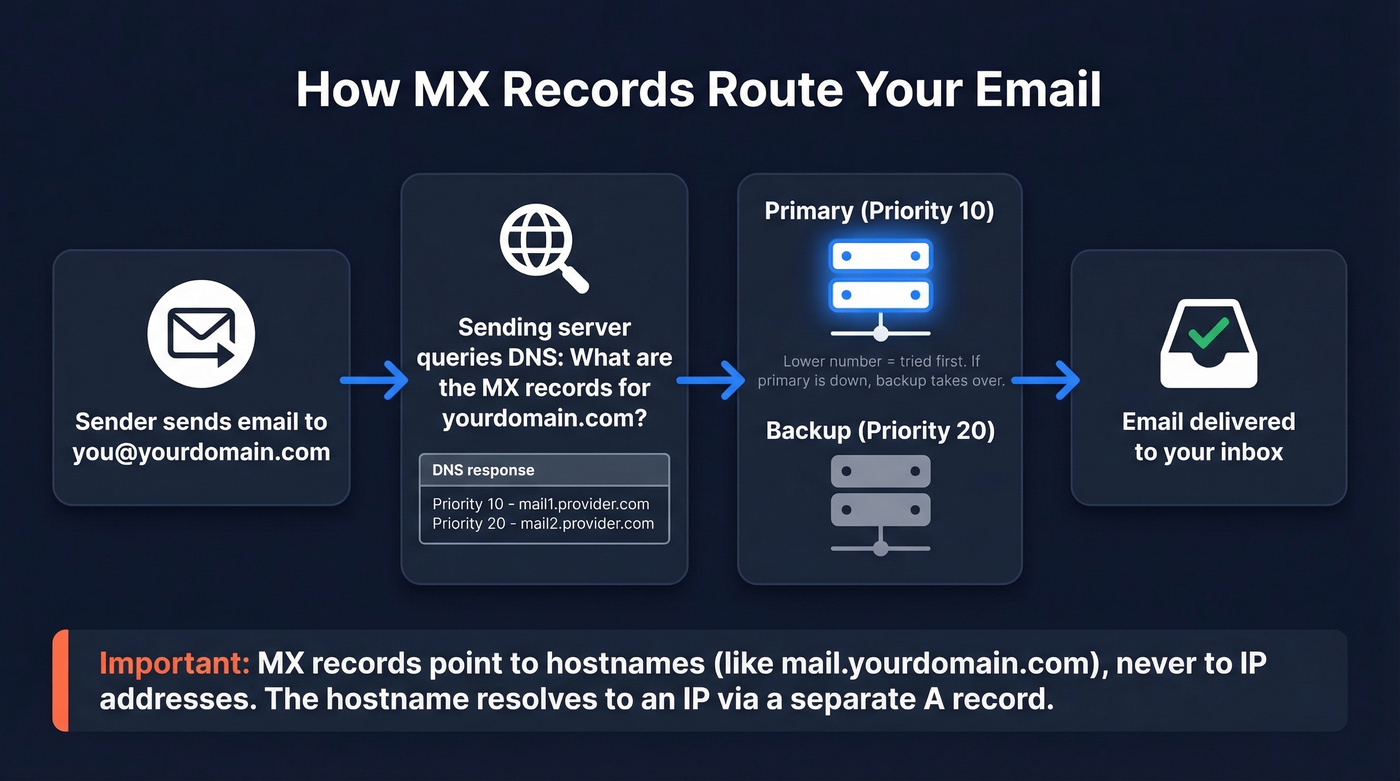
Every MX record has two key components: a priority number and a mail server hostname. Lower priority numbers get tried first. If that server's down, the sending server moves to the next highest priority - that's your failover.
One critical detail most guides skip: MX records must point to hostnames, not IP addresses. You can't set an MX record to 192.168.1.1. You point it to a hostname like mail.yourdomain.com, and that hostname resolves to an IP via a separate A record.
Best Free MX Lookup Tools in 2026
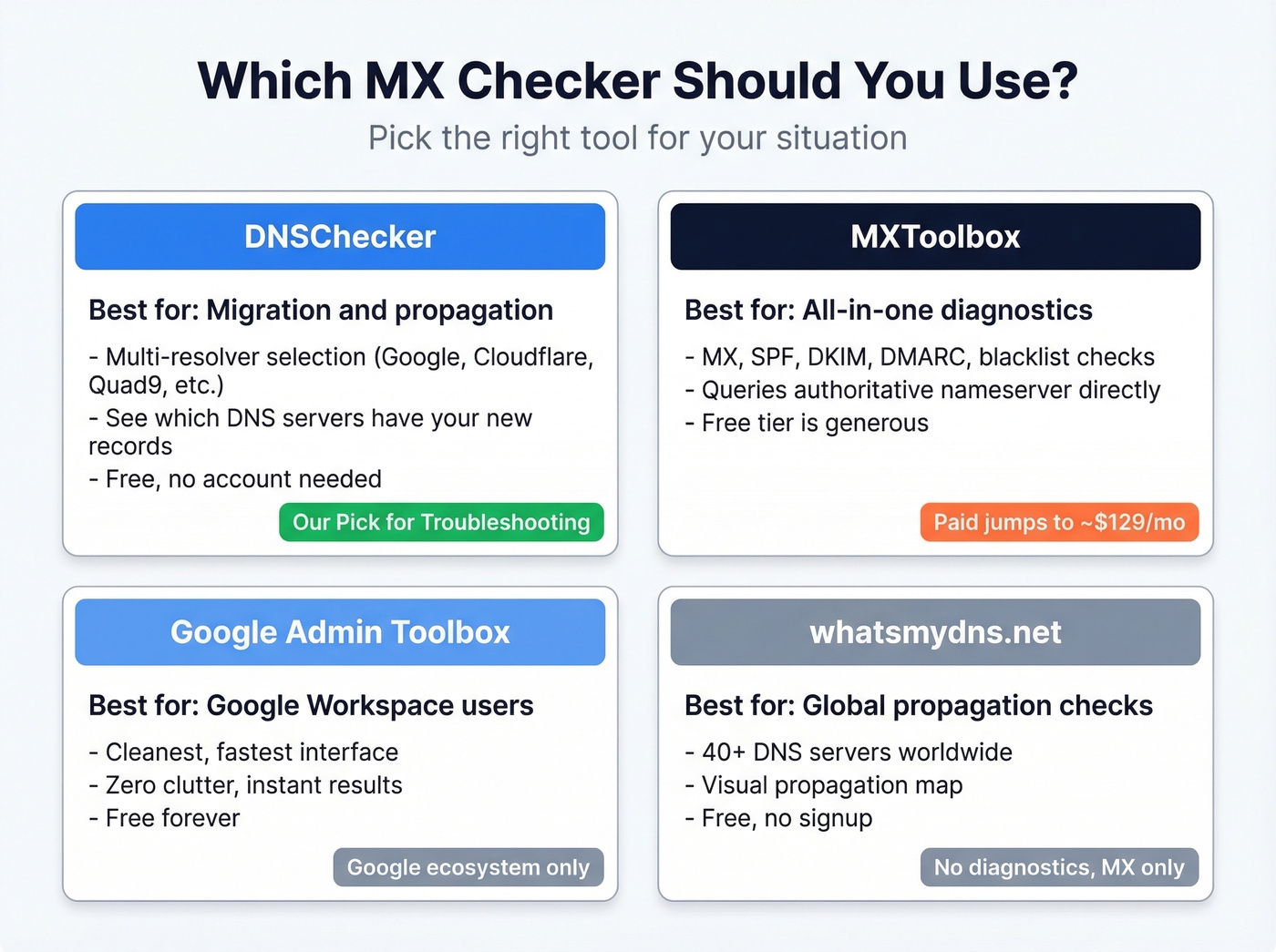
MXToolbox is the default recommendation everywhere. It's not the best for every use case. DNSChecker gives you multi-resolver checks for free - that's more useful for troubleshooting propagation issues than anything MXToolbox offers at $0.
| Tool | Price | Best For | Key Feature | Limitation |
|---|---|---|---|---|
| DNSChecker | Free (paid ~$8/mo) | Propagation checks | Multi-resolver selection | No monitoring |
| MXToolbox | Free (paid ~$129/mo) | All-in-one diagnostics | Broadest free toolset | Dated UI, expensive paid |
| Google Admin Toolbox | Free | Google Workspace users | Clean, fast | Google-only focus |
| whatsmydns.net | Free | Global propagation | 40+ global DNS servers | MX only, no diagnostics |
| EasyDMARC | Free (paid ~$36/mo) | DMARC monitoring | Auth-focused suite | MX is a side feature |
| NsLookup.io | Free | Quick lookups | Minimal, clean UI | Basic output |
| GlockApps | Free (paid ~$85/mo) | Inbox placement | Deliverability testing | MX is a side feature |
| UptimeRobot | Free | Uptime monitoring | MX check + alerts | MX lookup is secondary |
DNSChecker is the tool we reach for first. The resolver selection feature lets you query Google DNS, Cloudflare, OpenDNS, Quad9, Yandex, or the authoritative nameserver directly - all from one interface. During a migration, this is invaluable because you can see whether Cloudflare has picked up your new MX records while Google DNS still serves the old ones. That's how you distinguish "still propagating" from "actually broken."
MXToolbox has the broadest free feature set - MX lookup, blacklist checks, SMTP diagnostics, SPF/DKIM/DMARC validation. It also runs MX lookups directly against the domain's authoritative nameserver, which is great when you want the source of truth. The downside? The UI feels like it hasn't been updated since 2018, navigation is sluggish, and the moment you need monitoring or alerts, you're looking at ~$129/mo. That pricing jump is a common complaint in review threads.
Google Admin Toolbox is the fastest option if you're a Google Workspace shop. Clean interface, instant results, zero clutter. Not useful for anything outside Google's ecosystem.
whatsmydns.net shows propagation across 40+ global DNS servers - great for confirming whether your MX change has rolled out worldwide, but it won't diagnose why something's broken.
EasyDMARC and GlockApps are email authentication and deliverability platforms that happen to include MX checking. If you need DMARC monitoring or inbox placement testing, they're worth exploring. For a quick MX check, they're overkill. UptimeRobot is primarily a server monitoring tool, but its free DNS lookup includes MX records - handy if you already use it for uptime alerts.
NsLookup.io is clean and fast. No frills, no account required. Good for a quick sanity check.
How to Read Your Results
When you run an MX lookup, you'll get back a set of records with several fields. Here's what each one means:
| Field | Example | What It Means |
|---|---|---|
| Priority | 10 | Lower = tried first |
| Value | aspmx.l.google.com | Mail server hostname |
| TTL | 3600 | Cached for 1 hour |
| Type | MX | Mail exchange record |
Priority determines the order. A record with priority 1 gets tried before priority 10. If two records share the same priority, the sending server picks one at random - that's load balancing, not a misconfiguration.
Value is the mail server hostname. This must be a fully qualified domain name, never an IP address. If you see mail.yourdomain.com, there should be a corresponding A record that resolves it to an IP.
TTL (time to live) is how long DNS resolvers cache this record, in seconds. A TTL of 3600 means one hour. Here's the thing: the "24-48 hours for propagation" advice you see everywhere is lazy. Check the TTL on your old records. If TTL was 3600, most resolvers update within about an hour, not two days. The 48-hour figure is a worst case for records with very high TTLs, and it gets parroted without context.

MX records get your email delivered - but bad contact data means your outbound still bounces. Prospeo's 5-step verification and proprietary email infrastructure deliver 98% accuracy, so you never burn your domain reputation on invalid addresses.
Stop fixing bounces. Start with emails that are already verified.
Expected MX Records by Provider
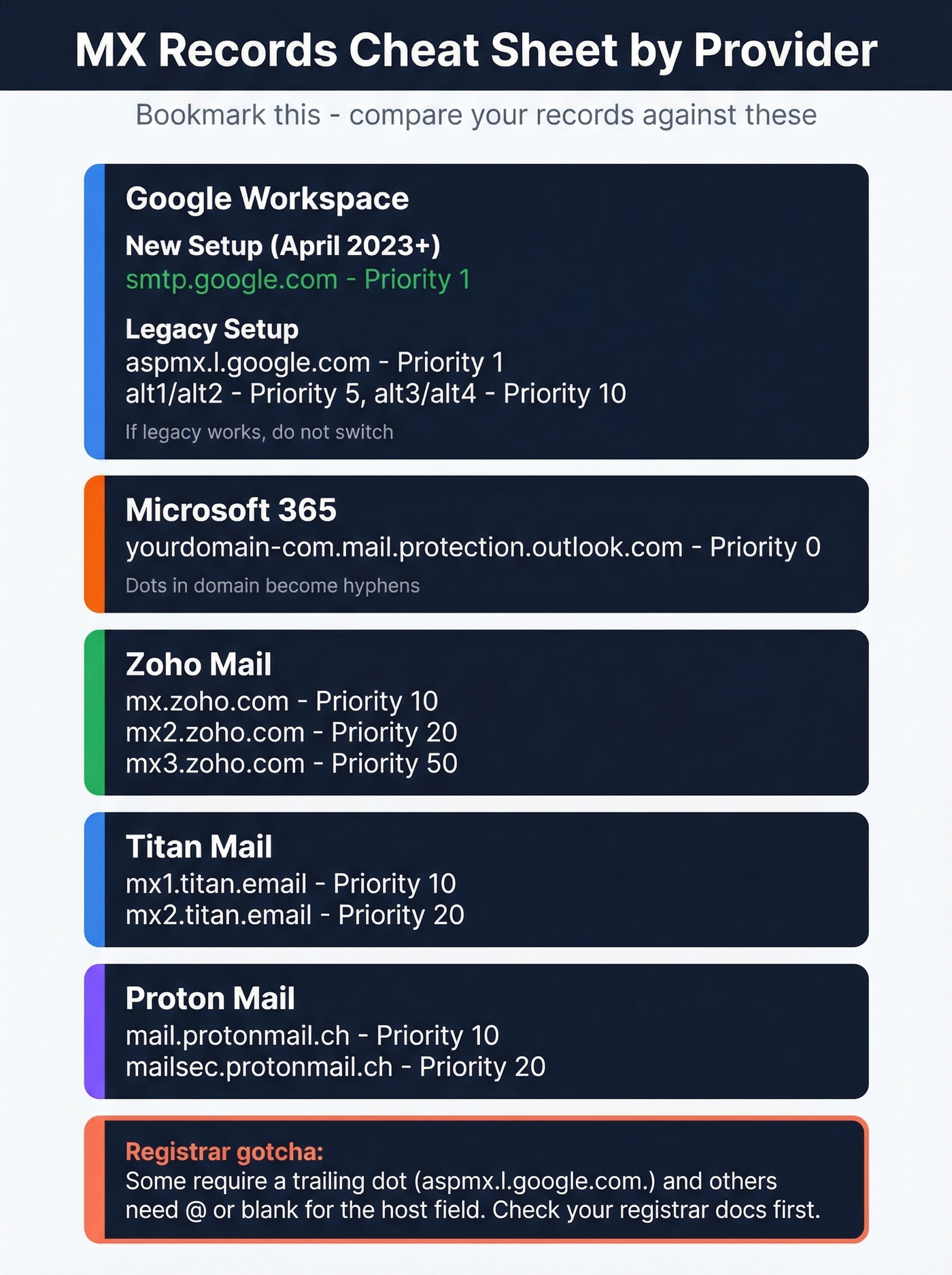
This is the section nobody else publishes. Bookmark it.
| Provider | MX Records | Priority | Notes |
|---|---|---|---|
| Google Workspace (new) | smtp.google.com |
1 | Since April 2023; for new setups |
| Google Workspace (legacy) | aspmx.l.google.com |
1 | Still works; 5-record set |
alt1.aspmx.l.google.com |
5 | ||
alt2.aspmx.l.google.com |
5 | ||
alt3.aspmx.l.google.com |
10 | ||
alt4.aspmx.l.google.com |
10 | ||
| Microsoft 365 | yourdomain-com.mail.protection.outlook.com |
0 | Dots become hyphens |
| Zoho Mail | mx.zoho.com |
10 | Region-specific in some cases |
mx2.zoho.com |
20 | ||
mx3.zoho.com |
50 | ||
| Titan Mail | mx1.titan.email |
10 | |
mx2.titan.email |
20 | ||
| Proton Mail | mail.protonmail.ch |
10 | |
mailsec.protonmail.ch |
20 |
A note on Google Workspace: the simplified single-record setup using smtp.google.com was introduced in April 2023 for new configurations. If you're already running the legacy 5-record ASPMX set and everything works, don't change it. Switching a working legacy config to the new single record can cause downtime if something goes wrong during the transition. Only use the new format for fresh setups or if Google's Admin console explicitly tells you to migrate.
For Microsoft 365, the hostname follows a pattern: your domain with dots replaced by hyphens, followed by .mail.protection.outlook.com. So acme.co becomes acme-co.mail.protection.outlook.com.
Registrar formatting gotchas: Some registrars require a trailing dot after hostnames (e.g., aspmx.l.google.com.). Others expect @ or a blank host field for root domain records. If your MX records aren't saving correctly, this is almost always the reason - check your registrar's documentation before assuming the record itself is wrong.
Check MX Records via Command Line
You don't need 10 DNS tools. You need one good lookup utility and the command line.
Windows (nslookup)
Open Command Prompt or PowerShell and enter interactive mode:
nslookup
set q=mx
yourdomain.com
To query a specific resolver (useful during propagation):
server 1.1.1.1
yourdomain.com
This forces the query through Cloudflare's DNS instead of your ISP's resolver, which might still be serving cached records. In PowerShell, you can also use Resolve-DnsName -Name yourdomain.com -Type MX for a more script-friendly output.
macOS / Linux (dig)
One line, instant results:
dig mx yourdomain.com
To query a specific resolver:
dig mx yourdomain.com @1.1.1.1
The output includes the ANSWER SECTION with your MX records, plus TTL values and the authority section. Everything you need in one command.
macOS / Linux (host)
A simpler alternative to dig with cleaner output:
host -t mx yourdomain.com
With a specific resolver:
host -t mx yourdomain.com 1.1.1.1
The host command strips out the extra sections that dig includes, giving you just the MX records. Useful when you want a quick answer without parsing verbose output.
During a migration, run the same query against two or three resolvers (1.1.1.1, 8.8.8.8, and your authoritative nameserver). If they all return the same records, propagation is done. If they differ, wait for the TTL to expire and check again.
Common Misconfigurations and Fixes
Missing MX Record
Symptom: Inbound mail bounces or silently routes to the wrong place. Some sending servers fall back to the domain's A record if no MX exists - meaning mail lands on your web server instead of your email provider.
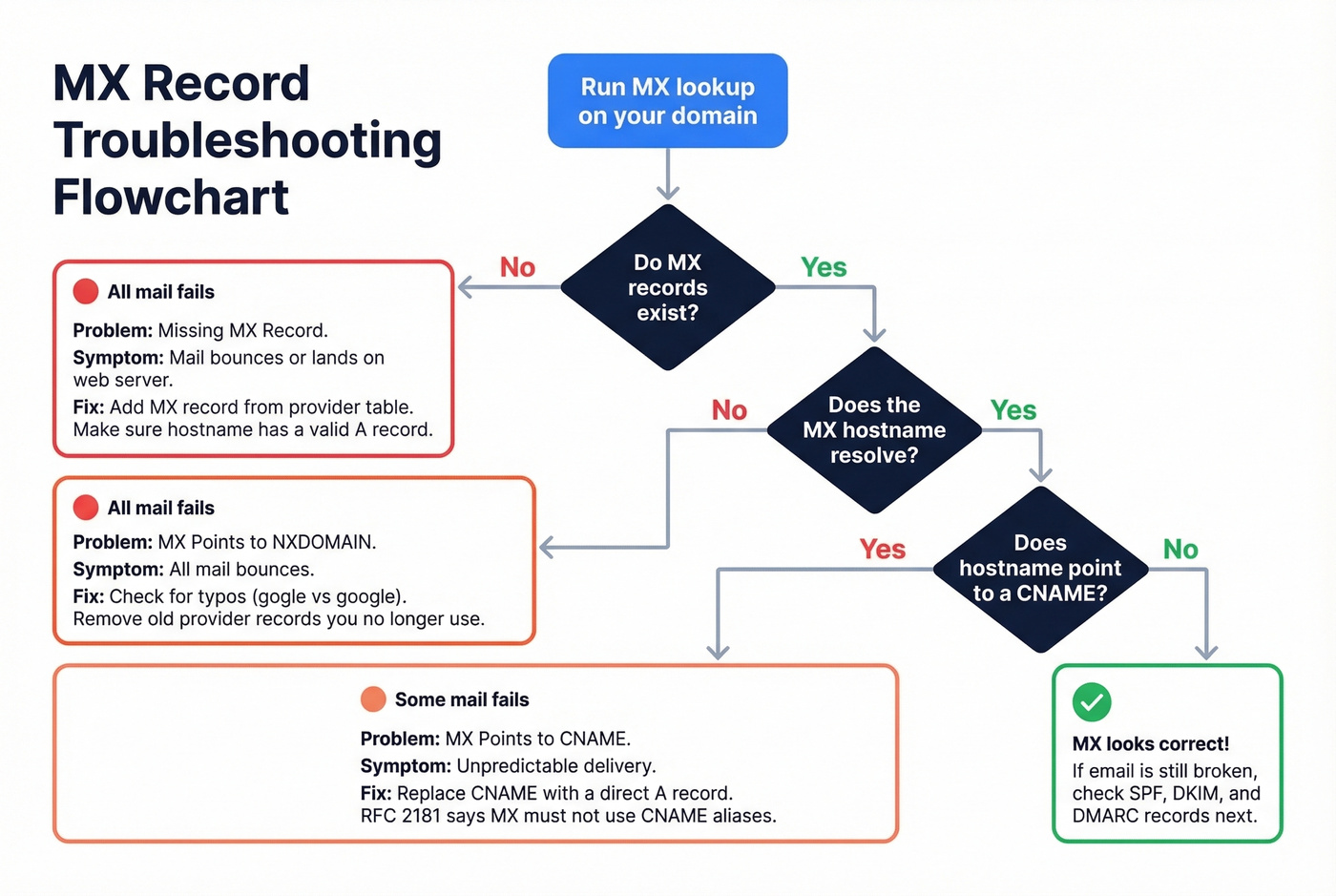
Fix: Add an MX record pointing to your email provider's mail server. Cross-reference the provider table above. Make sure the hostname in your MX record has a valid A record that resolves it to an IP.
MX Points to NXDOMAIN
Symptom: All inbound mail bounces. The MX record exists, but the hostname it points to doesn't resolve - usually a typo (mx.mailer.gogle.com instead of google.com) or a leftover from a provider you no longer use.
Fix: Correct the hostname typo or remove stale entries from your old provider. We've seen domains with three MX entries from three different eras - only one was valid. Clean house.
MX Points to a CNAME
Symptom: Unpredictable delivery - some sending servers resolve the chain and deliver mail, others reject it outright. Per RFC 2181, MX records must not point to CNAME aliases. Some DNS panels let you do it anyway without warning.
Fix: Replace the CNAME target with a direct A record hostname. If your MX points to mail.yourdomain.com and that's a CNAME for mailserver.provider.com, create an A record for mail.yourdomain.com pointing to the actual IP, or point the MX directly to mailserver.provider.com.
MX Points to an IP Address
Symptom: Some sending servers reject the record outright; others silently fail. Per RFC 1035, MX records must point to hostnames, not raw IP addresses.
Fix: Create an A record for a hostname like mail.yourdomain.com pointing to 192.168.1.1, then set your MX record to that hostname. Never put an IP directly in the MX value field.
Stale Records After Migration
This is the most common scenario we see, and it's the most frustrating.
Symptom: Email worked fine, then stopped after a DNS or hosting change. You connect your domain to a new hosting provider, the website works, and email vanishes because the host silently overwrote your MX records with their own defaults.
Fix: Confirm which nameservers are actually active (your registrar's panel will show this). Then check MX records at that DNS provider - not the old one. Update MX to match your email provider's expected values. Bluehost, GoDaddy, and others are notorious for this. Verify your mail exchange records after every DNS change, not just email changes.
Multiple SPF Records
Symptom: SPF validation fails, mail lands in spam or gets rejected. You can only have one SPF TXT record per domain. Two SPF records means both are invalid.
Fix: Merge all SPF includes into a single TXT record. Watch the 10-lookup limit - if your merged record exceeds 10 DNS lookups, you'll need to flatten some includes into IP ranges. Also watch the 255-character limit per TXT string; some DNS panels split long records incorrectly, breaking SPF parsing entirely.
Why MX Records Break
The website migration scenario is the single most common cause, and it follows the same pattern almost every time: you connect your domain to a new hosting provider, update nameservers, and the website loads perfectly. Two days later, your sales team realizes they haven't received a single inbound email. The hosting provider's default DNS template overwrote your Google Workspace MX records with their own generic mail server entries. Nobody checked because "we only changed the website, not email."
This exact scenario plays out regularly in r/selfhosted and r/Hosting - someone's email stops working after a DNS change, and the root cause is MX records getting silently overwritten. Running an MX records checker immediately after any DNS migration catches these issues before your team loses days of inbound mail.
If your MX records match your provider's expected values and email still isn't working, stop troubleshooting MX. The problem is almost certainly SPF, DKIM, or DMARC. MX handles routing. Authentication handles trust. They're different layers, and confusing them wastes hours. If you're also troubleshooting outbound performance, it helps to understand the bigger picture of email deliverability and how authentication impacts inboxing.
Let's be honest: if your average deal size is under $50k and you're running fewer than five domains, you don't need a paid MX monitoring tool. DNSChecker plus dig on the command line covers 95% of what MXToolbox charges ~$129/mo for. Save the budget for email authentication monitoring, which actually matters for deliverability.
Beyond MX: The Authentication Checklist
MX records are step 1 of 4. Getting mail routed to the right server is necessary but not sufficient - modern email delivery requires a full authentication stack. Since February 2024, Google and Yahoo require bulk senders pushing 5,000+ messages per day to implement DMARC at minimum p=none.
- MX records match your provider - you just did this.
- SPF record exists and passes - this tells receiving servers which IPs are authorized to send on your behalf. Watch the 10-lookup limit; exceeding it causes a permanent SPF failure. Also watch for the 255-character TXT string limit. (If you want examples and provider-specific syntax, see our SPF record guide.)
- DKIM record published and signing active - DKIM adds a cryptographic signature to outgoing messages, proving they weren't tampered with in transit. Your email provider generates the key pair; you publish the public key as a TXT record. Use this checklist to verify DKIM is working.
- DMARC record set - DMARC ties SPF and DKIM together with a policy. Start at
p=none(monitor only), then move toquarantineorrejectonce you've confirmed legitimate mail passes. If you're debugging failures, DMARC alignment is usually the missing piece.
Fixing your inbound email authentication ensures messages reach you. But if you're running outbound campaigns, the other half of the equation is data quality - sending to invalid addresses tanks your sender reputation just as fast as a missing SPF record. Prospeo's real-time email verification catches bad addresses before they damage your domain, with 98% accuracy across 143M+ verified emails refreshed every 7 days. If you're trying to reduce bounces systematically, start with your email bounce rate benchmarks and fixes.
You just spent 30 minutes diagnosing DNS records to protect deliverability. Don't waste that effort on stale prospect data. Prospeo refreshes 300M+ profiles every 7 days - not every 6 weeks - so the emails you send actually reach real people.
Your DNS is clean. Make sure your prospect data is too.
FAQ
What does an MX record do?
An MX record tells other mail servers where to deliver email for your domain. It points to a hostname (not an IP) and includes a priority number - lower numbers are tried first. Without valid MX records, inbound email bounces or falls back to your domain's A record, which usually isn't configured for mail.
How long do MX changes take to propagate?
It depends on the TTL of your old records. A TTL of 3600 means roughly one hour, not the "24-48 hours" commonly cited. Check your current TTL in any MX lookup tool or via dig mx yourdomain.com before assuming you need to wait.
Can I have multiple MX records?
Yes - multiple MX records provide failover redundancy. If the highest-priority server is unreachable, mail routes to the next. Records with equal priority distribute traffic randomly between them, which is intentional load balancing.
Why is email broken when MX records look correct?
The issue is almost always SPF, DKIM, or DMARC misconfiguration. A missing DKIM key or duplicate SPF record causes delivery failures that mimic MX problems. Run authentication checks on all four record types - most MX lookup tools include SPF and DKIM validation alongside mail exchange diagnostics.
How do I verify email addresses before outbound campaigns?
Use a real-time verification tool that checks addresses against live mail servers before you send. Prospeo verifies emails at 98% accuracy with 5-step validation including catch-all handling and spam-trap removal - upload a CSV, verify in bulk, and export clean lists in minutes.