

How to Set Up and Manage Your NetSuite Sales Pipeline
Your VP asks why the forecast is off by 40%. You pull up the pipeline and find 200 stale opportunities - half with no projected total, a quarter stuck in "Proposal" for 90 days. The problem isn't NetSuite itself. It's how the pipeline was set up.
We've spent enough time inside broken NetSuite instances to know the pattern: teams rush through configuration, skip stage definitions, and then wonder why forecasting feels like guesswork. Here's how to fix it.
What You Need (Quick Version)
Three things that fix your pipeline overnight:
- A stage-probability mapping table your whole team agrees on - no more reps guessing what "Qualified" means.
- A SuiteFlow workflow that flags stale deals and enforces required fields before reps can advance stages.
- Verified contact data going in. Bad emails and dead phone numbers corrupt every forecast downstream. Prospeo's 98% email accuracy and 7-day refresh cycle keep your pipeline clean before data ever hits NetSuite.
What NetSuite Actually Offers for Pipeline Management
NetSuite's SFA module handles more than opportunity tracking. Out of the box, you get quote-to-order-to-fulfillment, probability-weighted forecasting, and KPI portlets showing pipeline amounts in real time. Report snapshots like Customers by Pipeline appear as graphs or lists, linking directly to the underlying report, and saved search results can be published to dashboards for fully customized views.
NetSuite doesn't publish public list pricing for CRM/SFA as a standalone line item. It's sold as an annual license - core platform plus optional modules plus number of users - with a one-time implementation fee. For budgeting, many teams ballpark CRM/SFA user licensing in the low hundreds per user per month, with implementation commonly ranging from $10K to $75K+ depending on scope.
Here's the thing: NetSuite doesn't natively feel like a drag-and-drop Kanban board, and CRM users often want stronger Outlook/Teams-style communication capture. For visual pipeline boards, look at SuiteApps like Kanban Boards for NetSuite or BI connectors like Power BI that pull pipeline data for custom dashboards. But for tracking, forecasting, and reporting, the native tools are solid once you configure them properly.
Setting Up Opportunity Stages
This is where most pipelines break. Teams skip stage-probability mapping, and every rep invents their own definition of "Qualified."
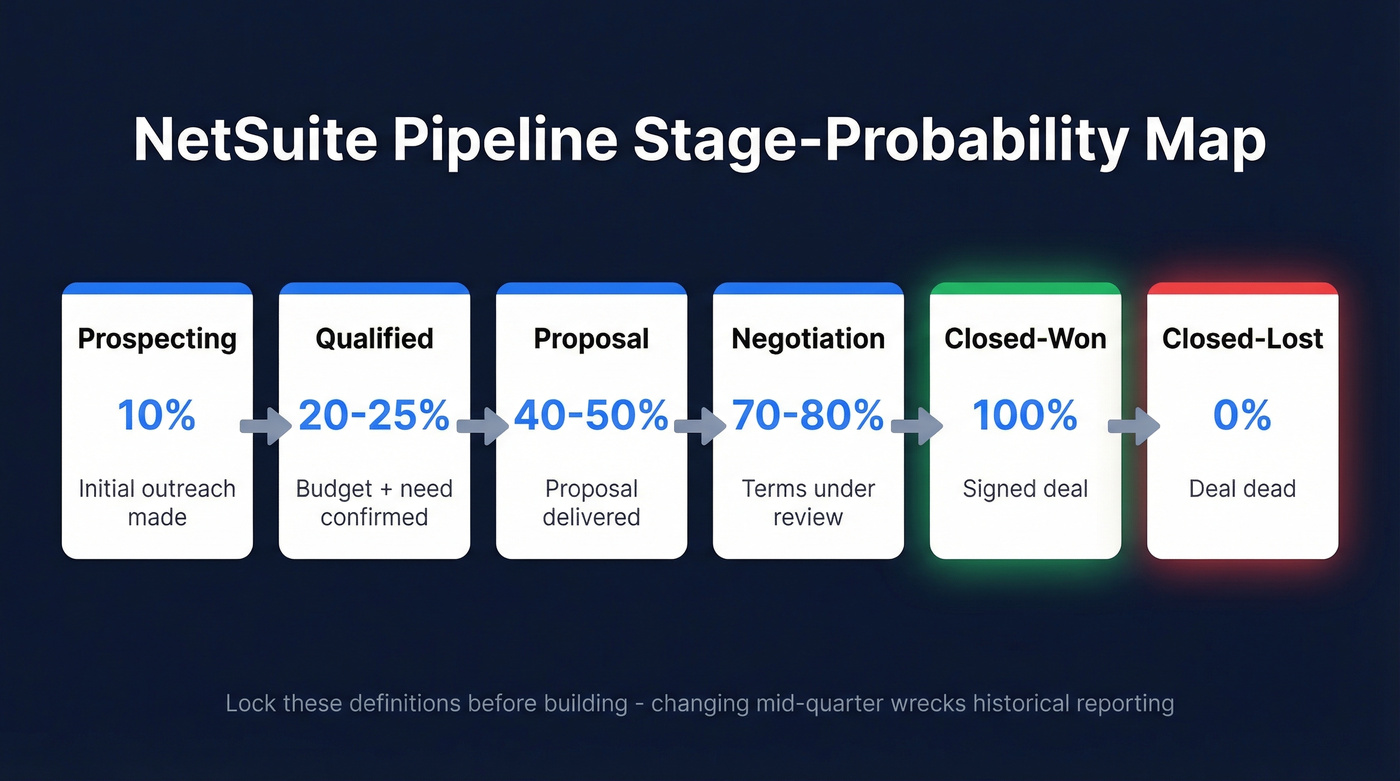
| Stage | Probability | Entry Criteria |
|---|---|---|
| Prospecting | 10% | Initial outreach made |
| Qualified | 20-25% | Budget + need confirmed |
| Proposal | 40-50% | Proposal delivered |
| Negotiation | 70-80% | Terms under review |
| Closed-Won | 100% | Signed deal |
| Closed-Lost | 0% | Deal dead |
Configure your opportunity statuses and make sure each stage has a consistent probability percentage for forecasting. Then apply those statuses to opportunity records so every rep uses the same definitions.
Most teams land on 5-7 stages. Fewer and you lose visibility. More and reps stop updating.
Get agreement before you build. Print this table, walk it through your sales managers, and lock it down. Changing stage definitions mid-quarter wrecks historical reporting - we learned that one the hard way on a Q3 rollout that turned three months of pipeline data into noise.
Day-to-Day Pipeline Workflow
When a lead is ready, convert it to an opportunity via the button or dropdown. NetSuite carries over relevant lead information automatically. Set the initial status to Prospecting at 10%, then advance to Qualified once budget and need are confirmed. Always enter a projected total - this feeds your weighted pipeline, and without it your forecast is fiction.
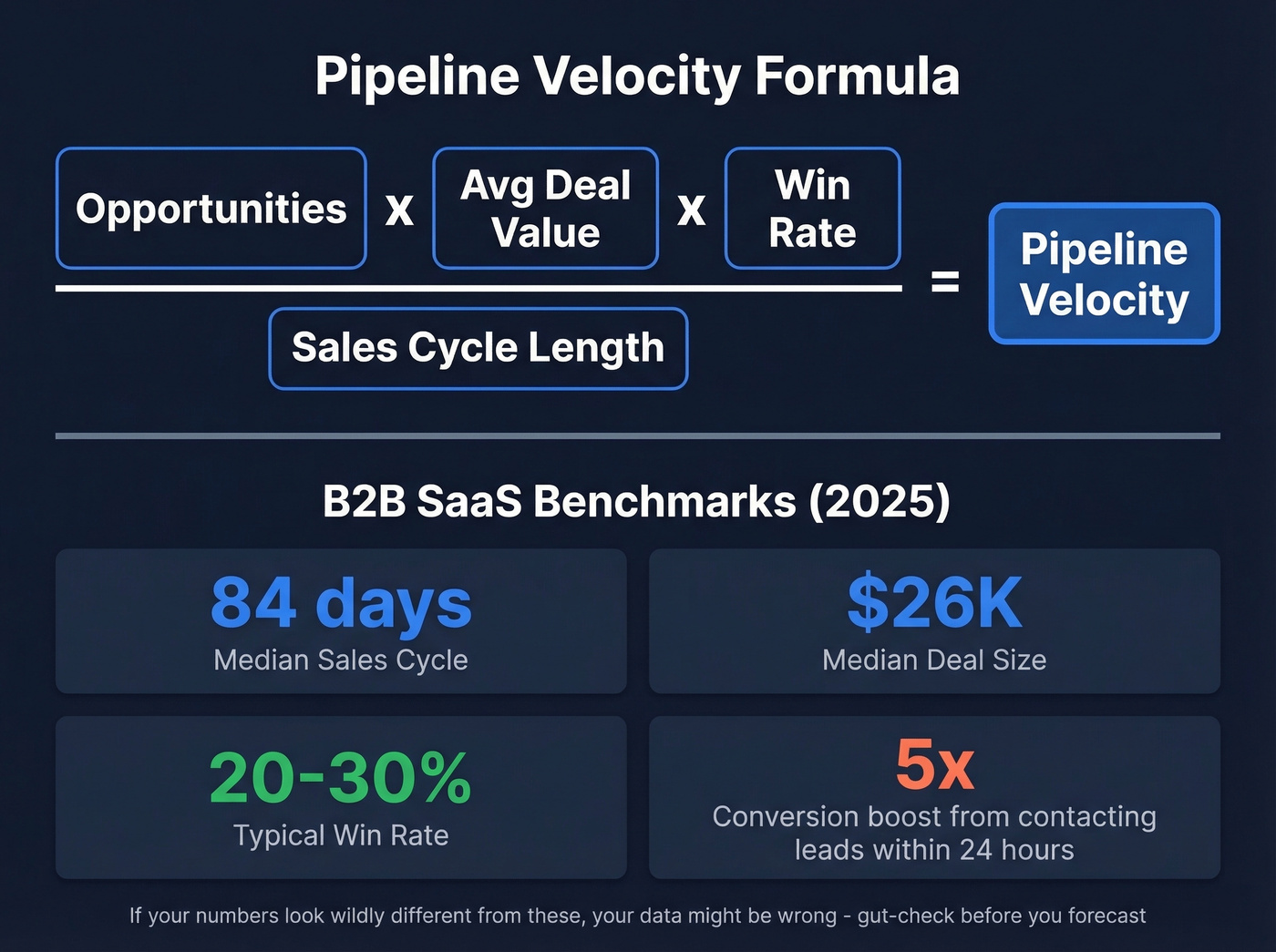
NetSuite dashboards show real-time changes in projected and weighted pipeline via KPI portlets as opportunities are updated. Contacting leads within 24 hours increases conversion by 5x. Build that urgency into your process, not just your training decks.
The median B2B SaaS sales cycle is 84 days with a median deal size around $26K. If your pipeline shows a 30-day average cycle and $5K deals, you're either in a different business or your data is wrong. Use the pipeline velocity formula - Opportunities x Avg Deal Value x Win Rate / Sales Cycle Length - to gut-check your numbers against reality.

Your weighted pipeline is only as accurate as the contact data behind it. Prospeo's 5-step email verification delivers 98% accuracy and refreshes every 7 days - so every opportunity in NetSuite maps to a real, reachable buyer. At $0.01 per email, cleaning your pipeline costs less than one stale deal.
Stop forecasting on phantom opportunities. Verify before it hits NetSuite.
Pipeline Reporting with Saved Searches
Saved searches are NetSuite's reporting workhorse. They're more flexible than standard reports and can power dashboard portlets, scheduled alerts, and workflows.
Navigate to Reports > Saved Searches > All Saved Searches > New. Choose Transaction as your search type. Check Public and Available as List View. Filter by Type = Opportunity and Status = your open stages.
In the Results tab, add columns for Amount, Probability, Expected Close Date, and Sales Rep. Sort by close date ascending so the nearest deals surface first. Publish to a dashboard portlet and your pipeline view is live.
A few tips from our experience: schedule email alerts for deals over $50K that haven't been updated in two weeks, use summary types to roll up pipeline totals by rep or stage, and avoid "Contains" filters on large datasets because they're slow. Limit date ranges to what you actually need.
If you want a broader view of what to track beyond NetSuite fields, align your saved searches to core pipeline health metrics.
Automate Pipeline Hygiene with SuiteFlow
Expecting reps to manually clean pipeline data is a losing bet. SuiteFlow is NetSuite's built-in workflow engine - enable it via Setup > Company > Enable Features > SuiteCloud, then go to Customization > Workflow > Workflows > New to start building.
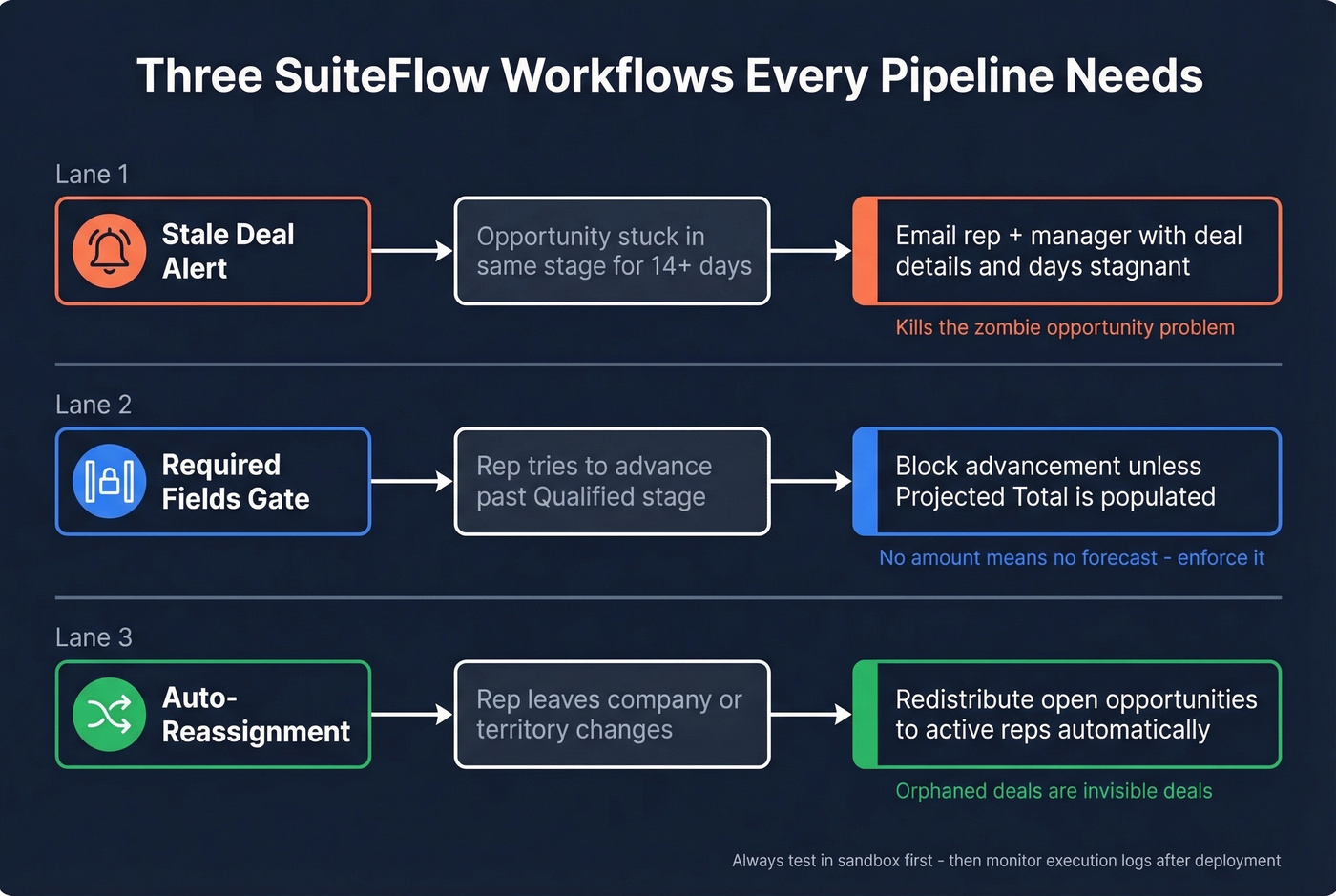
Every pipeline needs three workflows:
Stale deal alert. Flag any opportunity stuck in the same stage for 14+ days and email the rep and their manager. This alone eliminates the "200 zombie opportunities" problem that tanks forecasting accuracy.
Required fields gate. Block advancement past Qualified unless projected total is populated. Without this, reps skip the field and your weighted pipeline means nothing.
Auto-reassignment. Redistribute open opportunities when a rep leaves or territory changes. Orphaned deals are invisible deals, and invisible deals don't close.
83% of companies that evaluated ROI before automation projects met expectations within a year. Test in sandbox first, then monitor execution logs after deployment. Skip this if you're on a tight timeline and don't have a NetSuite admin who's comfortable with SuiteFlow - hire a consultant for the initial build and handle maintenance in-house.
Why Clean Data Matters for Your Pipeline
You can nail your stage mapping, build perfect saved searches, and automate every workflow. Your forecast will still be wrong if the underlying contact data is garbage. Every bounced email is a phantom opportunity inflating your weighted pipeline.
This is where data quality tools earn their keep upstream. Prospeo's 5-step email verification process catches invalid addresses before they enter your CRM - upload a CSV, get results in minutes, push only valid records into your pipeline. If you’re comparing options, start with these data enrichment services and then decide what belongs in your stack.
Teams like Snyk cut bounce rates from 35-40% to under 5% and grew AE-sourced pipeline by 180% after switching to verified data. The consensus on r/sales is pretty clear: bad data is the silent killer of pipeline accuracy, and most teams don't realize how much of their forecast is built on contacts that'll never connect.

SuiteFlow catches stale deals, but it can't fix wrong phone numbers or bounced emails baked into opportunity records. Prospeo gives you 143M+ verified emails and 125M+ direct dials with a 30% pickup rate - so when reps work pipeline, they actually connect with buyers.
Your NetSuite automation deserves data that actually converts.
NetSuite vs. Salesforce for Pipeline
If you're already running NetSuite as your ERP, adding Salesforce creates a sync headache that rarely justifies the cost. NetSuite's killer advantage is ERP-native context - reps see credit status, inventory levels, and financials right alongside opportunities. No middleware, no integration tax.
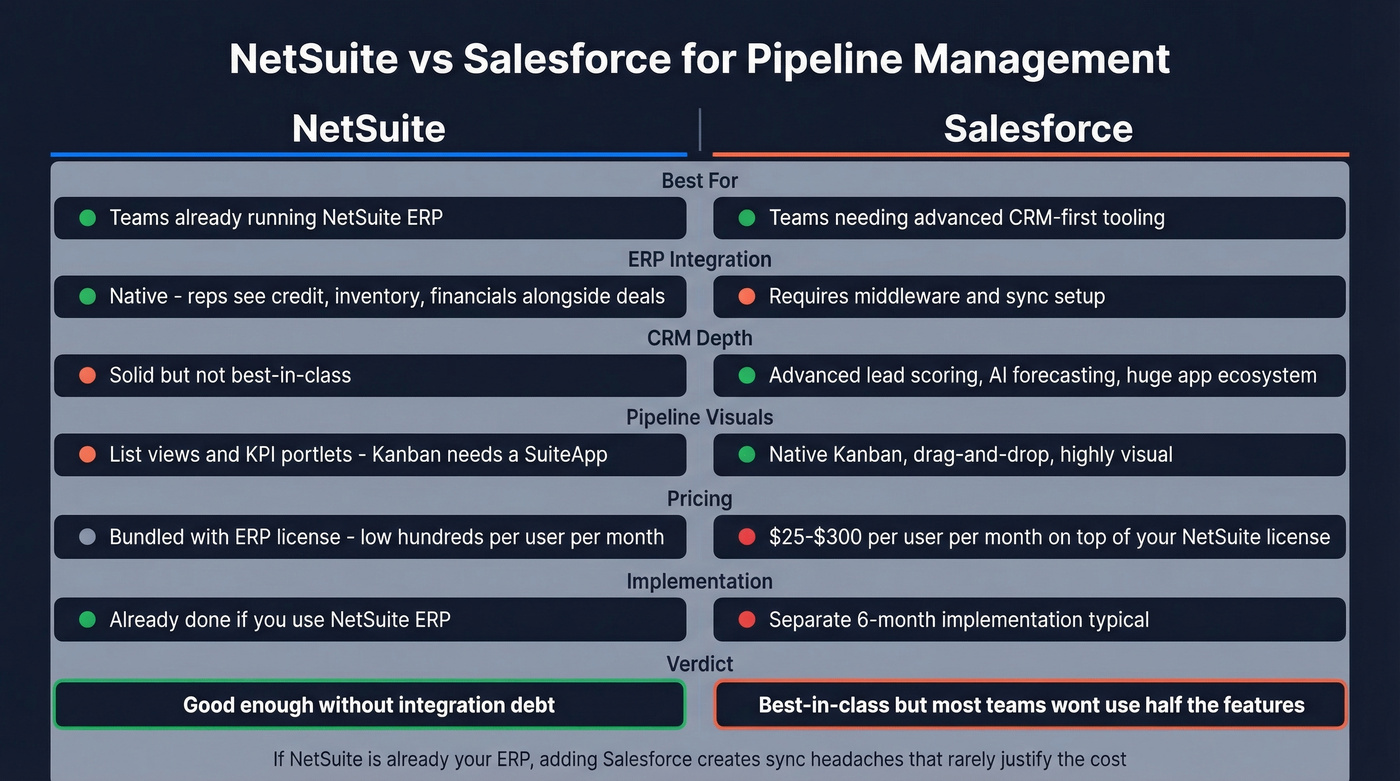
Salesforce wins on deeper CRM tooling: advanced lead scoring, AI-driven forecasting, and a massive app ecosystem at $25-$300/user/month on top of your existing NetSuite license. For teams whose pipeline complexity demands it, Salesforce earns its keep. For everyone else, "good enough without integration debt" beats "best-in-class with a six-month implementation." Let's be honest - most sales teams don't use half the features they're paying for in Salesforce anyway.
If forecasting is the core pain, compare dedicated sales forecasting solutions before you add another CRM.
FAQ
Can I customize pipeline stages in NetSuite?
Yes. Configure opportunity statuses, map each to a probability percentage, and apply them to opportunity records. You can add, rename, or reorder stages anytime, though changing definitions mid-quarter will skew historical reporting.
How is weighted pipeline calculated?
Projected Total x Probability %. A $100K deal at 25% contributes $25K to your weighted pipeline. NetSuite displays this on KPI portlets using opportunity amount and probability - no custom formula needed.
How often should reps update opportunities?
After every meaningful interaction - weekly at minimum. SuiteFlow can enforce this by flagging opportunities unchanged for 7-14 days. The typical B2B SaaS win rate sits at 20-30%, and stale data is the fastest way to land on the wrong side of that range.
How do I keep pipeline contact data accurate?
Use a verification tool before importing contacts into NetSuite. A 5-step email verification process with catch-all handling and spam-trap removal catches invalid addresses before they inflate your forecast. Upload a CSV, verify in minutes, and push only confirmed records - bounce rates typically drop below 5%.
Does NetSuite support Kanban-style pipeline views?
Not natively. NetSuite displays pipeline data through list views, reports, and KPI portlets. For drag-and-drop Kanban boards, install a SuiteApp like Kanban Boards for NetSuite or connect a BI tool like Power BI for custom visual dashboards.