


OneCal Pricing, Reviews, Pros and Cons: Is It Worth It in 2026?
Every site you check shows a different price for OneCal. G2 lists Premium at $30/user/month. Some comparison pages show it starting around $3/month. The official pricing page tells a different story entirely - and that's the one that matters when you're pulling out a credit card. Here are the real numbers, honest user feedback from 30 G2 reviews (4.7/5 average), and a clear verdict on the pros and cons.
30-second verdict: OneCal is the best pure calendar sync tool for professionals juggling 2-10 calendars across Google and Outlook. The Essential plan at $10/user/month (billed annually) is the sweet spot. Skip it if you need scheduling links as powerful as Calendly, a dedicated mobile app, or more than 50 calendars.
What OneCal Actually Costs
We've verified these prices directly against OneCal's official pricing page. Here's what you'll pay with annual billing:
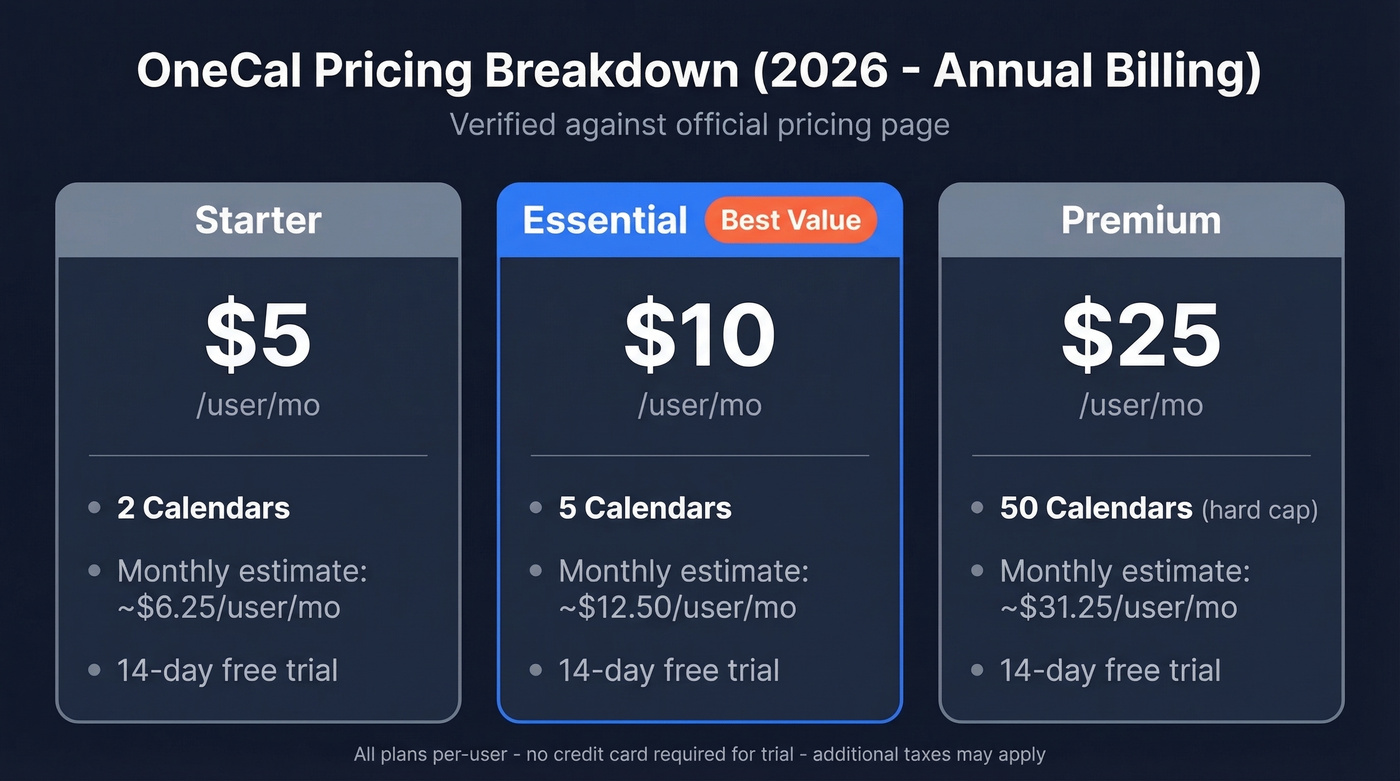
| Plan | Annual Billing | Est. Monthly (if billed monthly) | Calendars |
|---|---|---|---|
| Starter | $5/user/mo | ~$6.25/user/mo | 2 |
| Essential | $10/user/mo | ~$12.50/user/mo | 5 |
| Premium | $25/user/mo | ~$31.25/user/mo | 50 |
All plans include a 14-day free trial with no credit card required. Pricing is per-user, and additional taxes apply depending on your region.
So why does every site show something different? G2's pricing snapshot lists Premium at $30/user/month and even displays "unlimited calendars" on Premium - neither of which matches the current official plans. Calendhub's pricing section claims $3/month per user for 2 calendars, which is also wrong. Always check the source directly.
What Users Love About OneCal
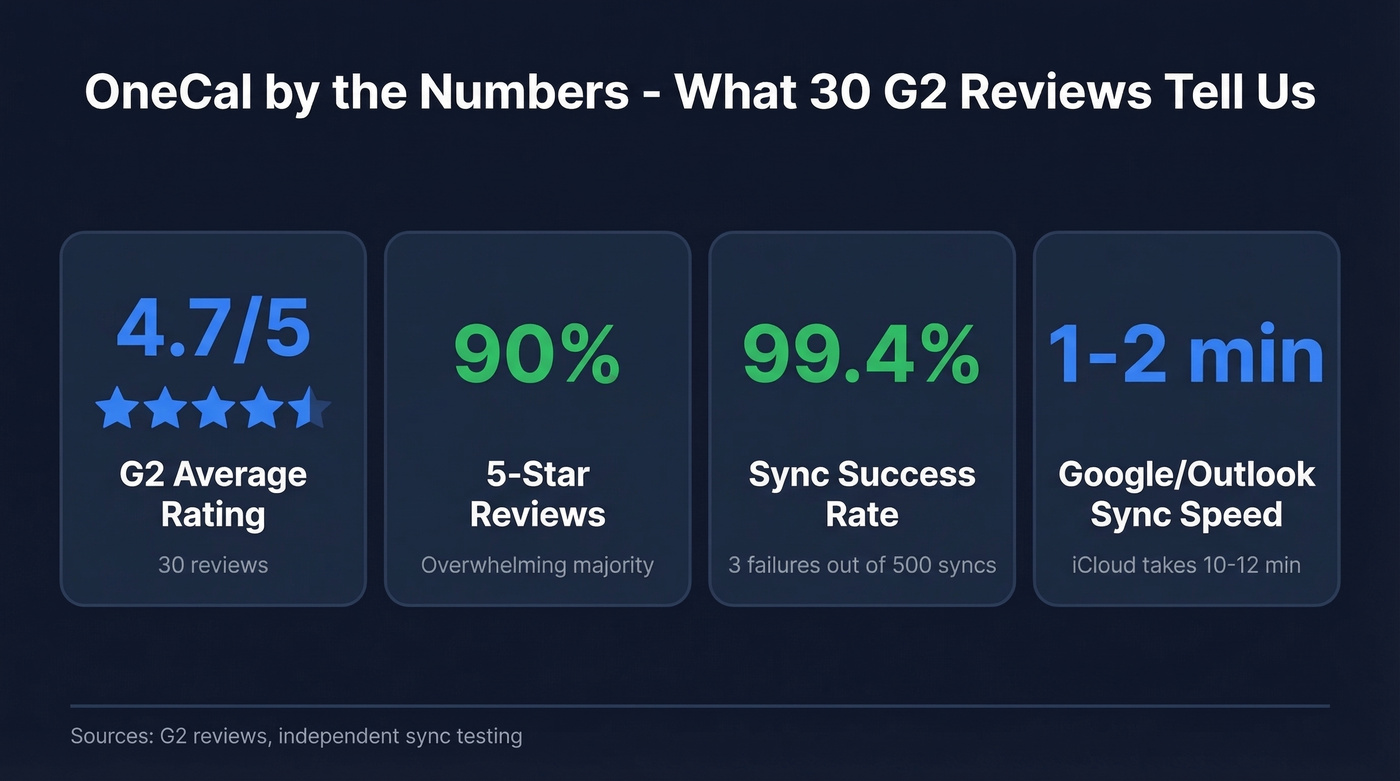
Of 30 reviews on G2, 90% are 5-star. But that 3% at 1-star tells a story too. Let's start with what the majority highlights.
"Set it and forget it" setup. Reviewers consistently say that once you configure your syncs, OneCal runs silently in the background. No desktop app to keep open, no manual triggers. In our testing, the initial setup genuinely took under five minutes - connect your accounts, pick sync direction, done.
Strong sync reliability. Independent testing cites 3 failed syncs out of 500 for OneCal, a 99.4% success rate. Google and Outlook calendars sync bidirectionally in 1-2 minutes, which is fast enough that you won't notice the lag in practice.
Responsive customer support. Multiple 5-star reviews call out fast, helpful responses. That's unusual for a tool at this price point, and it matters when a sync breaks right before a packed meeting day.
Granular privacy controls. You can sync events as busy-only blocks, hide titles and descriptions, or mark cloned events as private. This is a big deal when you're syncing a personal calendar into a work account and don't want your dentist appointment showing up in your team's shared view.
If you're trying to turn those meetings into pipeline, pairing calendar hygiene with sales prospecting techniques and a clean lead generation workflow matters more than most people think.

OneCal keeps your calendars in sync. Prospeo keeps them full. Find verified emails and direct dials for your ideal buyers across 300M+ profiles - with 98% email accuracy and a 7-day data refresh cycle.
Stop syncing empty calendars. Start booking real meetings.
Where OneCal Falls Short
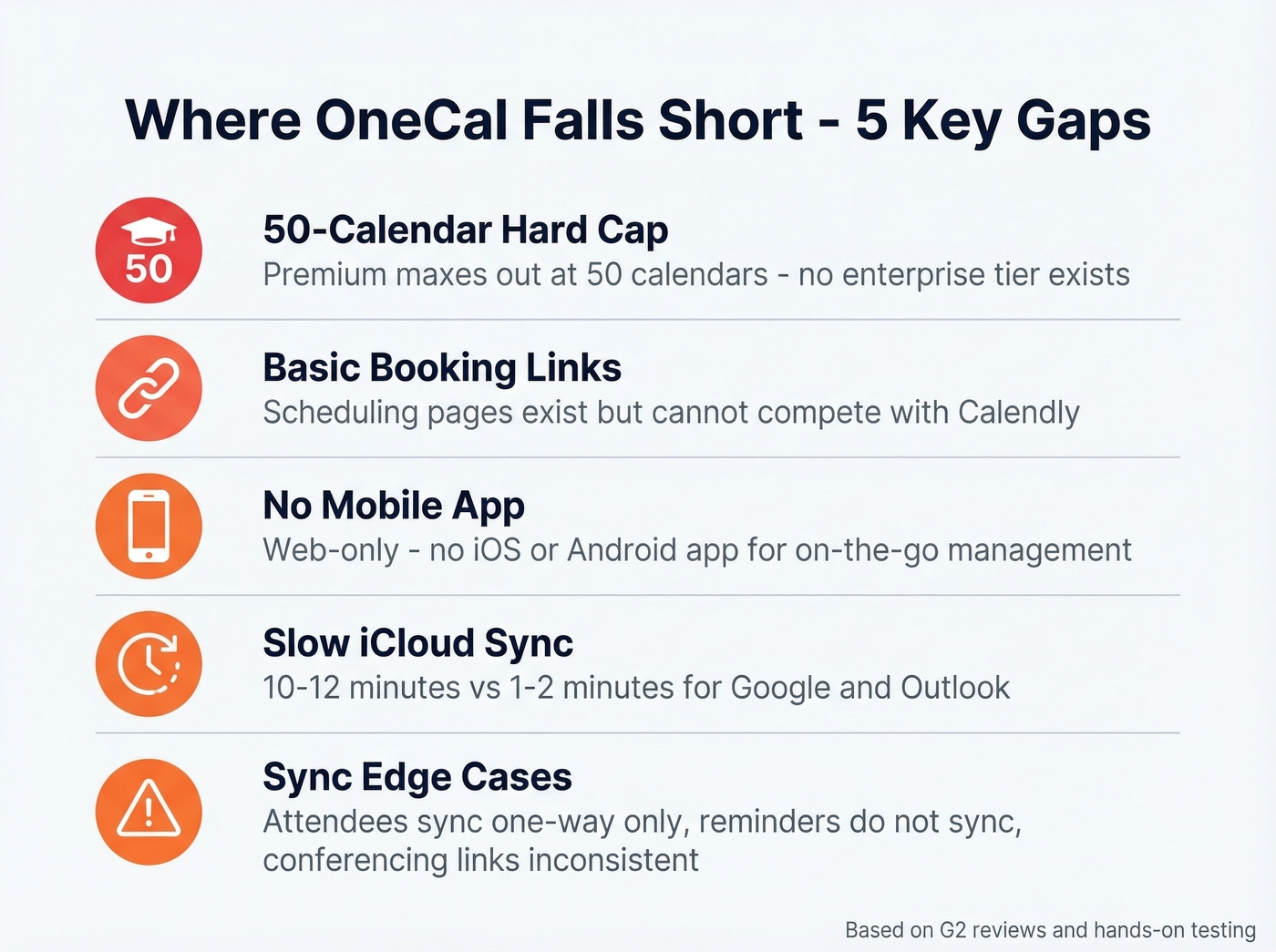
Here's the thing - that 50-calendar cap on Premium is a hard ceiling. For agencies or executives managing dozens of client accounts, this alone is a dealbreaker.
"Expensive, slow, and clunky." That's a direct quote from a G2 review. The reviewer described repeatedly unlinking and relinking calendars, plus unwanted "(Clone)" entries cluttering their view. It's one review, but the frustration it describes is specific enough to take seriously.
Booking links feel immature. OneCal offers scheduling links, but they aren't in the same league as Calendly. If booking pages are your primary use case, you'll be disappointed.
No mobile app. OneCal is web-based only. Want a dedicated iOS/Android app for managing a unified calendar and sync rules on the go? That's a real gap, especially for people who live on their phones between meetings.
iCloud sync latency. iCloud syncs take 10-12 minutes versus 1-2 minutes for Google and Outlook. Reliable, but not fast. If you're scheduling something time-sensitive across an iCloud calendar, plan accordingly.
Sync edge cases nobody mentions upfront. Attendees sync one-way only, reminders don't sync at all, and conferencing links can be inconsistent. These sound minor until you depend on them - then they compound quickly.
If you're using booking links to drive outbound, you'll also want solid sales meeting follow-up email workflows so meetings don't go cold.
OneCal vs. Alternatives
| Feature | OneCal | CalendarBridge | Calendly |
|---|---|---|---|
| Starting price | $5/user/mo (annual) | $4/mo (annual) | Free |
| Calendar sync | Yes | Yes | No |
| Booking links | Basic | Basic | Advanced |
| Mobile app | No | Yes | Yes |
| iCloud support | Yes | Yes | No |
| HIPAA BAA | No | Yes | No |
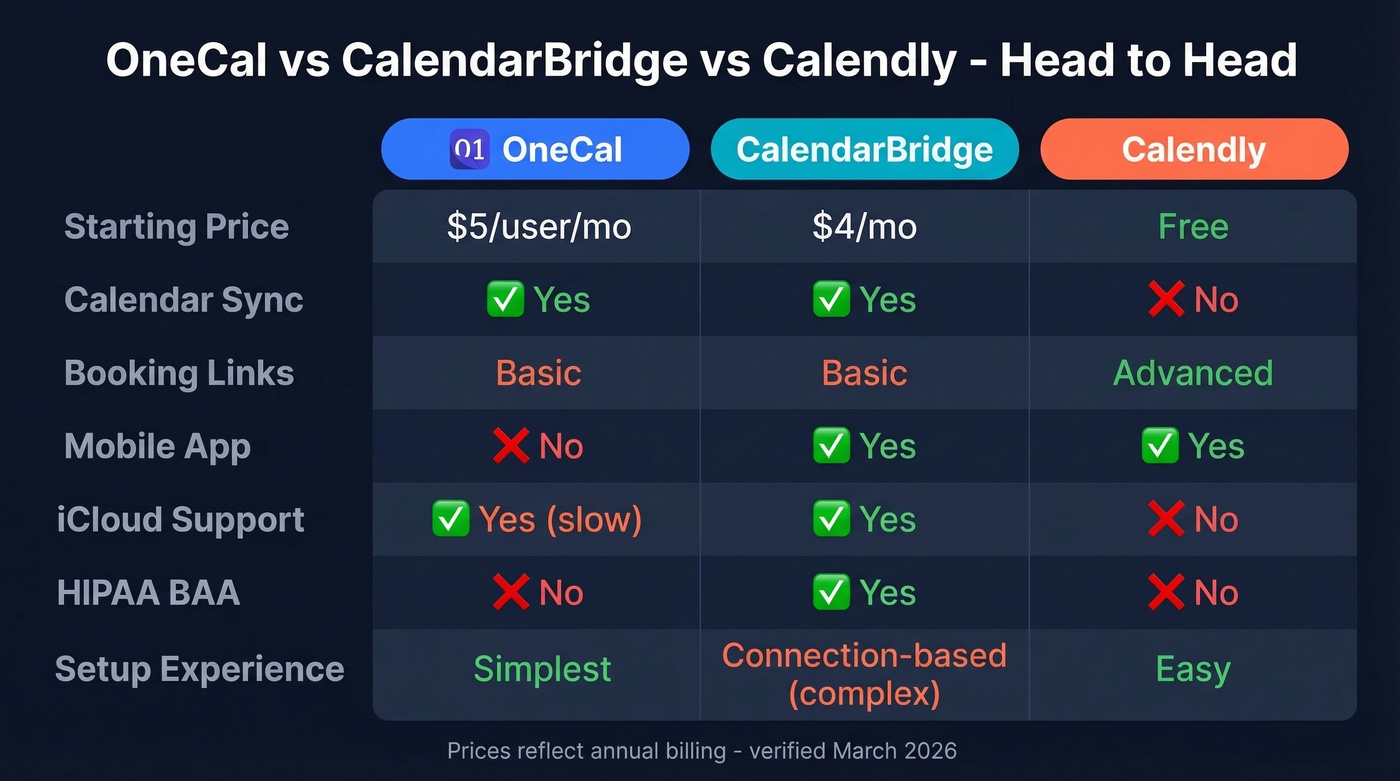
CalendarBridge is OneCal's closest competitor. Pricing runs $5/month ($4/month yearly) for Basic, $10/month ($8/month yearly) for Premium, and $40/month ($32/month yearly) for Pro. One wrinkle: CalendarBridge uses a connection-based model, so syncing 3 calendars fully multi-directional counts as 6 connections, and the math gets expensive fast if you're syncing lots of calendars in lots of directions. CalendarBridge pulls ahead with mobile apps on iOS and Android, HIPAA BAA availability on Premium/Pro, and US (Delaware) legal governance. OneCal wins on simpler multi-way sync configuration and a cleaner setup experience. There's a Reddit thread comparing the two on r/overemployed, though the substantive feedback there is thin.
Calendly isn't really a competitor - it's a scheduling tool, not a sync tool. Free tier available, paid plans from $12/seat/month. Use Calendly if booking pages are your primary need, then pair it with a sync tool for the calendar layer underneath.
Look, most professionals shopping for calendar sync don't actually need 50 calendars. If you're syncing 2-5 calendars and don't need a mobile app, the $10/user/month Essential plan does everything you need. The moment you outgrow it - mobile apps, compliance, 50+ calendars - you've outgrown OneCal entirely, and CalendarBridge or a custom solution is the move.
If your goal is more booked calls (not just cleaner calendars), it helps to treat this as part of your sales funnel automation tools stack.
Who Should Use OneCal
Use this if you're a consultant, freelancer, or executive managing 2-5 calendars across Google and Outlook. The Essential plan at $10/user/month billed annually hits the right balance of features and price. Setup takes minutes, and you genuinely won't think about it again.
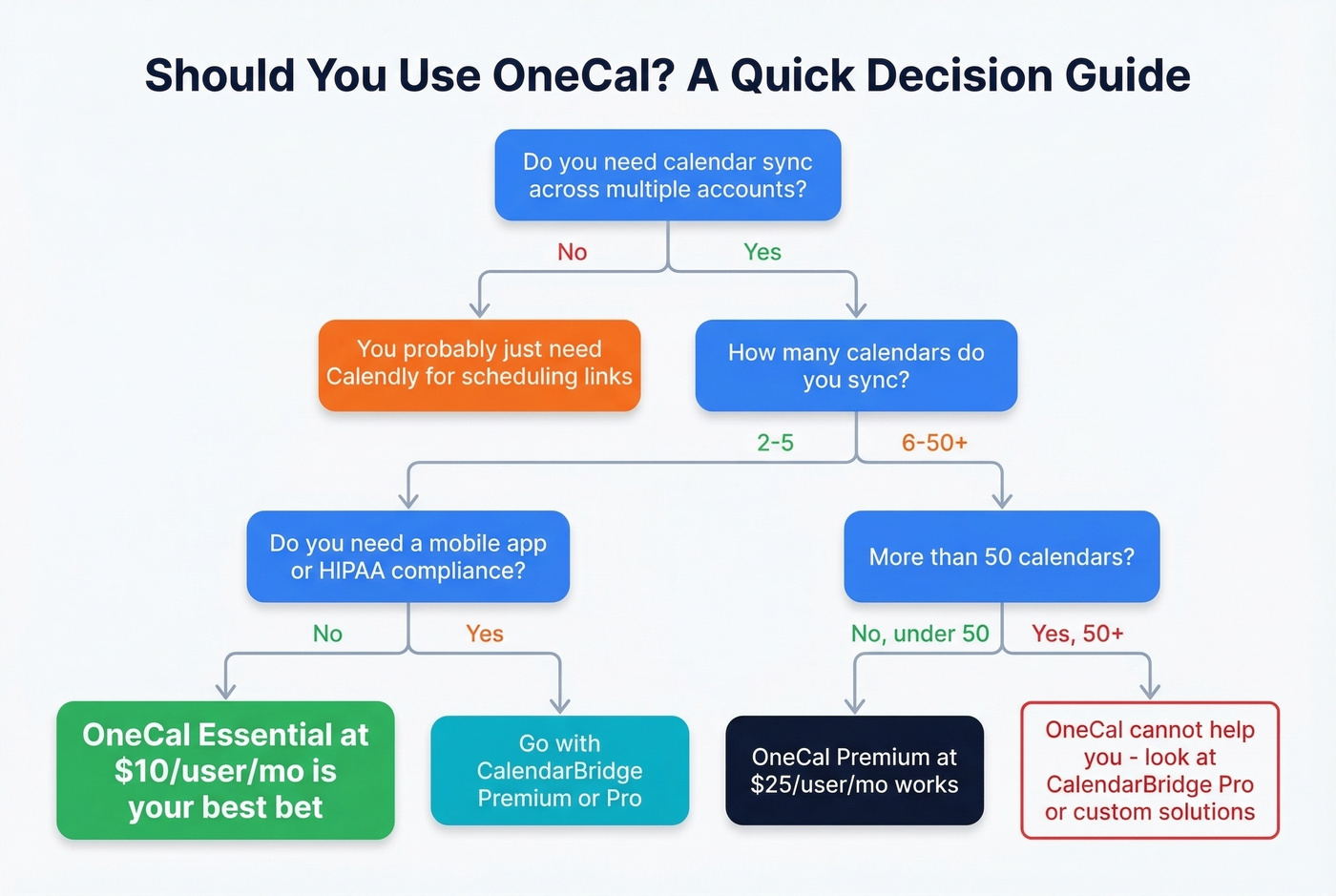
Skip this if you need more than 50 calendars, robust scheduling links, a dedicated mobile app, or HIPAA compliance. CalendarBridge covers the mobile and compliance gaps. Calendly handles scheduling.
If you're a consultant or freelancer, having a lightweight contact management software setup can be the difference between “busy” and “productive.”
You're optimizing your calendar stack - smart. Now optimize what fills it. Prospeo gives you verified contact data for decision-makers at $0.01/email, so every slot OneCal syncs actually has a meeting in it.
Build your prospect list in minutes, not hours.
FAQ
Does OneCal have a free plan?
No. OneCal offers a 14-day free trial with no credit card required, but there's no permanent free tier. After the trial, the Starter plan at $5/user/month (billed annually) is the cheapest option, covering 2 calendars.
Does OneCal work with iCloud?
Yes, but iCloud syncs take 10-12 minutes due to CalDAV protocol limitations, compared to 1-2 minutes for Google and Outlook. The sync is reliable - just noticeably slower for time-sensitive scheduling.
Is OneCal better than CalendarBridge?
OneCal is simpler to set up, with multi-way sync handled in one configuration. CalendarBridge wins on mobile apps for iOS and Android, HIPAA compliance, and US legal governance. If you don't need a mobile app or healthcare compliance, OneCal's setup experience is hard to beat.
What's a good free tool for finding contacts from calendar meetings?
Prospeo offers 75 free verified emails per month - enough to look up attendees from meetings and enrich them with direct dials and company data. No credit card or contract required, and email accuracy sits at 98%.