

Outlook Email Tracking: The Honest Guide to What Actually Works
You sent the proposal Tuesday. It's Thursday. Your Sent folder stares back at you with zero information - no read confirmation, no sign of life, nothing. You hover over the message like it might spontaneously reveal whether anyone opened it.
Most guides about Outlook email tracking tell you to fix this with pixel-based open tracking. This one tells you why open tracking is mostly broken in 2026 and what to measure instead.
The Short Version
- Outlook's native read receipts are useless for outreach. Recipients decline them. Corporate IT blocks them. You'll never get reliable data this way.
- Best standalone tracker: Yesware (free plan). Best lightweight CRM with tracking: Salesflare ($29/mo).
- Open rates are broken. Apple Mail Privacy Protection generates fake opens. Inbox placement for Microsoft addresses sits at 75.6% in recent benchmarks. Track replies and clicks instead - and verify your contact data first so emails actually arrive.
How Outlook's Native Tracking Works
Read and Delivery Receipts
Outlook's built-in read receipts are the feature everyone tries first and abandons within a week. You toggle "Request a Read Receipt" before sending, and if the recipient's email client supports it, they get a prompt asking whether to send confirmation. The keyword there is "if."
Most corporate Exchange environments block read receipt requests outright. Even when they do get through, the recipient can simply click "No." You're asking prospects to voluntarily tell you they read your email. That's not tracking - that's hoping.
Delivery receipts are slightly more useful. They confirm the message reached the recipient's mail server, not their inbox. Think of it as confirmation your letter reached the post office, not that anyone opened the envelope.
Viva Insights Limitations
Microsoft's Viva Insights offers open-rate tracking, but the limitations make it nearly useless for sales. It only works for emails sent within your organization - external outreach is completely excluded. It requires at least 5 recipients per email, and the accuracy is deliberately coarse.
For emails sent to 10 or fewer people, open rates display only as a 25-75% range. A 5% real open rate and a 70% real open rate look identical. For larger groups above 10, the range widens to 10-95%. Data takes up to 30 minutes to appear and excludes anything sent more than 14 days ago. This is a privacy-first design choice by Microsoft, and it means Viva Insights is a blunt instrument for internal comms, not a sales tool.
The New Outlook Problem
If you've migrated to the new Outlook that Microsoft's been pushing since late 2024, you've probably noticed things are missing. A lot of things.
A Microsoft moderator confirmed that "tracking emails sent/received daily in new Outlook is not feasible." The recommended workaround? Switch back to Classic Outlook and use Search Folders with date-based criteria. That's not a fix. That's an admission.
User sentiment on the Microsoft community forums isn't subtle. One comment put it plainly: "the number of features missing in new Outlook is unacceptable." If you're relying on any native tracking workflow, stick with Classic for now.
How Third-Party Tracking Actually Works
Third-party email trackers all use the same core mechanism. When you send an email through a tracker, it embeds an invisible 1x1 pixel image in the message body. When the recipient opens the email and their client loads that image, the tracker's server logs the request - recording the open, the timestamp, and sometimes the IP address.
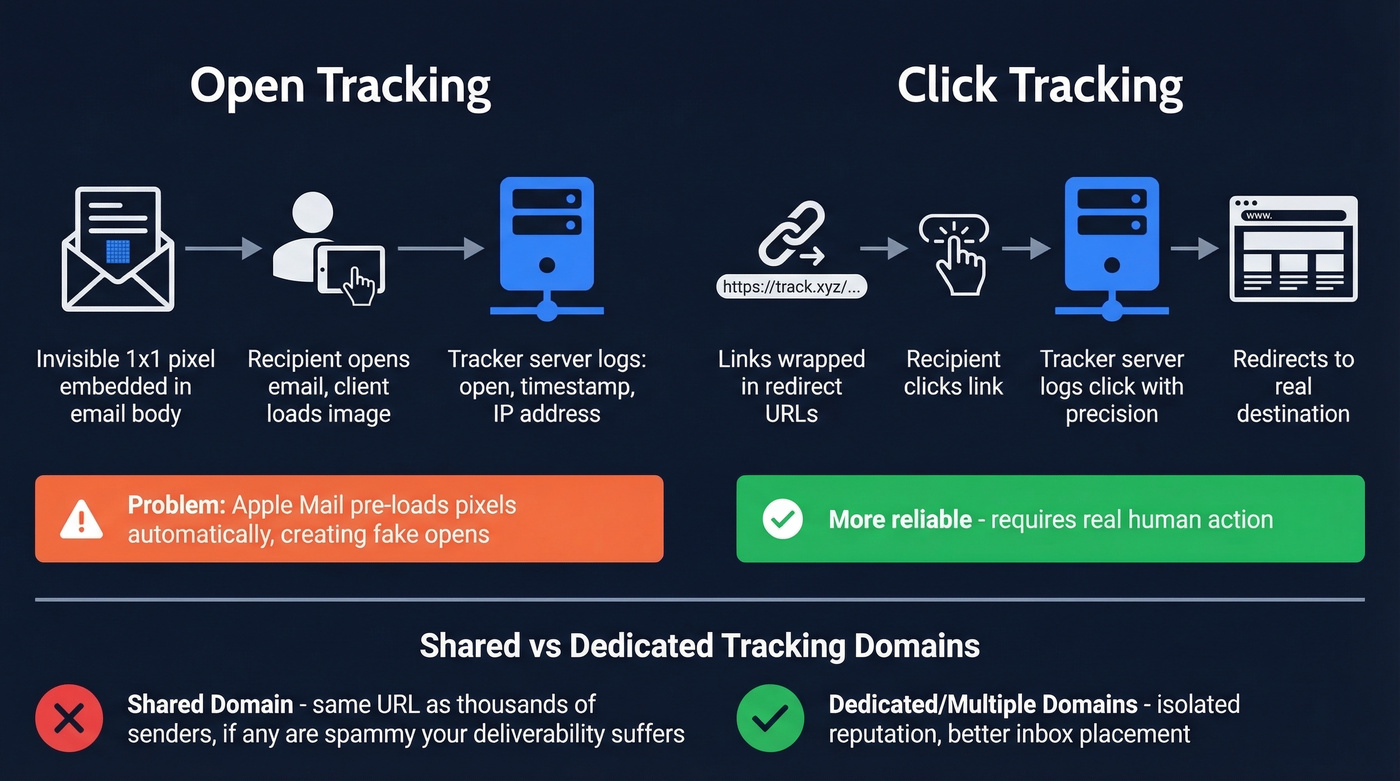
Click tracking works differently. The tool wraps your links in redirect URLs that pass through the tracker's server before landing on the destination page. This lets it log every click with precision.
One detail that matters more than most people realize: whether the tracking domain is shared or dedicated. Shared domains mean your tracking pixel loads from the same URL as thousands of other senders. If any of them are spammy, your deliverability takes the hit too. Salesflare reduces that shared-domain risk by using multiple tracking domains, including personalized subdomains.

Open tracking only works if your emails land in the inbox. With 75.6% inbox placement on Microsoft addresses, bad contact data is the real problem. Prospeo's 98% email accuracy and 7-day data refresh mean your outreach hits real inboxes - not dead addresses that wreck your domain reputation.
Fix deliverability at the source - start with data that's actually accurate.
Best Email Tracking Tools for Outlook
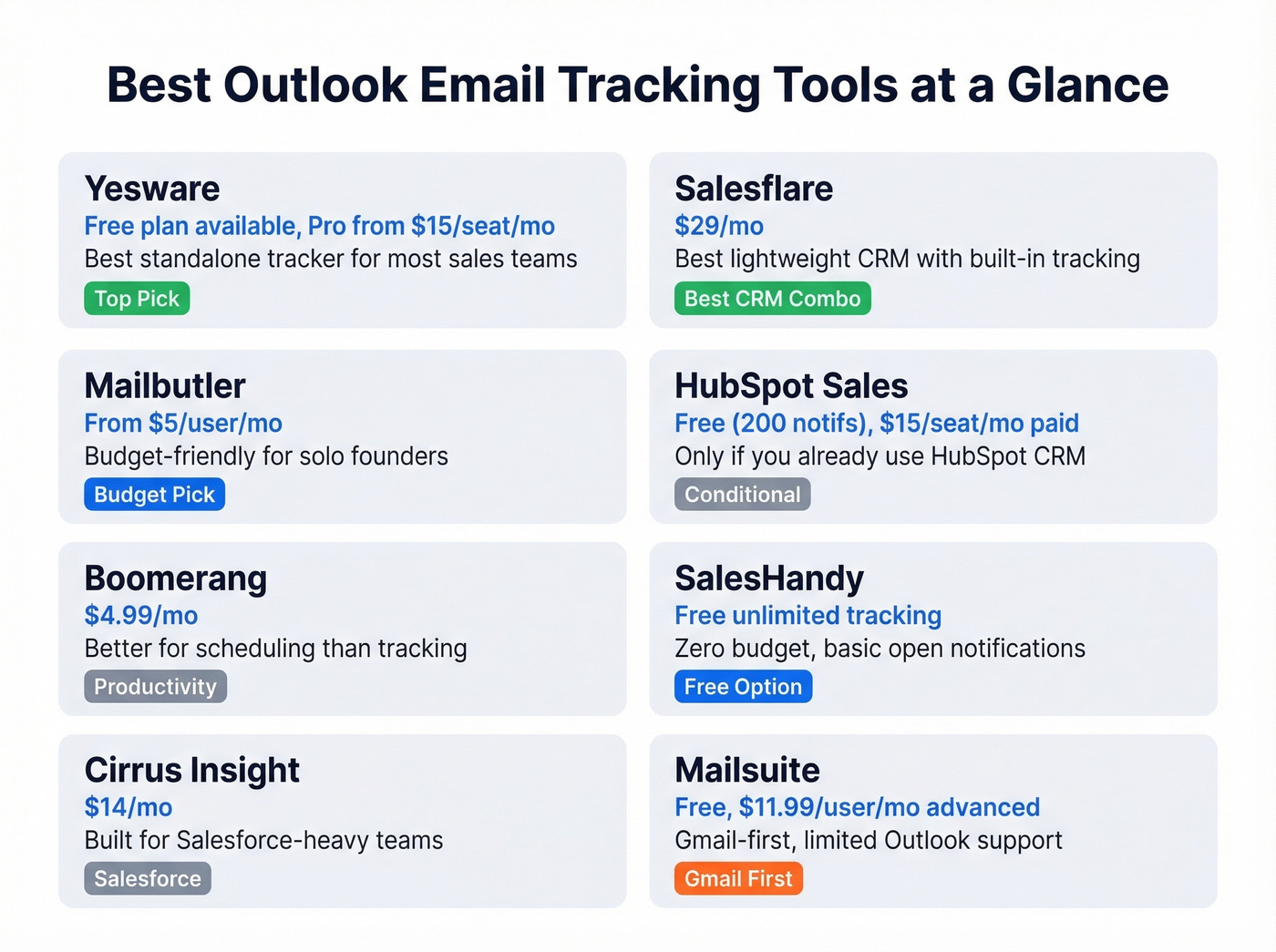
| Tool | Free Tier | Starting Price | Best For | Outlook Support |
|---|---|---|---|---|
| Yesware | Yes | $15/seat/mo (annual) | Standalone tracking | Native |
| Salesflare | No | $29/mo | CRM + tracking | Yes |
| Mailbutler | No | ~$5/user/mo | Budget users | Yes |
| HubSpot Sales | Yes (200 notifs) | $15/seat/mo | HubSpot teams | Yes |
| Boomerang | Yes | $4.99/mo | Follow-up reminders | Yes |
| SalesHandy | Yes | $9/mo | Free tracking | Yes |
| Cirrus Insight | No | $14/mo | Salesforce teams | Yes |
| Mailsuite | Yes | $11.99/user/mo | Gmail-first users | Limited |
Yesware
Yesware is the obvious pick for most sales teams that need tracking in Outlook without switching to a full CRM. The free plan costs nothing and includes basic open tracking and basic attachment tracking. We've seen it recommended more than any other tracker in sales communities, and for good reason - it just works.
When you're ready to upgrade, Pro starts at $15/seat/mo billed annually and adds templates, campaigns, and reporting. Premium runs $35/seat/mo for shared templates and team-level analytics. Enterprise at $65/seat/mo adds Salesforce bi-directional sync - the feature that justifies the jump for orgs running Salesforce as their system of record.
If you want tracking without CRM lock-in, Yesware is one of the fastest ways to get there.
Salesflare
Use this if you need a lightweight CRM and don't want to pay for HubSpot's full stack. Skip this if you only need open tracking and nothing else.
Salesflare starts at $29/mo and bundles email tracking with a CRM that auto-populates contact data from your inbox. The deliverability angle sets it apart: it scored 9.4/10 on MailReach's deliverability test and uses multiple tracking domains to reduce shared-domain risk. For teams sending 50+ tracked emails a day, that deliverability edge compounds fast. Its Outlook integration connects natively, so you don't need to leave your inbox to see engagement data. In our experience, the CRM auto-population alone saves about 30 minutes of manual data entry per rep per day - time that adds up across a team of five or ten.
Mailbutler
Mailbutler starts around $5/user/mo, making it a budget option for individuals who need open and click notifications without a full platform. It integrates with Outlook, does what it says, and stays out of your way. If you're a solo founder tracking 10-15 important emails a week, this is the right weight class.
HubSpot Sales Hub
Free tier caps at 200 notifications per month. Paid Sales Hub Starter plans start at $15/seat/mo. If your team already runs HubSpot CRM, the tracking plugs right in. If you don't, you're buying a CRM to get email tracking. That's backwards.
Boomerang
$4.99/mo. Better known for send-later scheduling and follow-up reminders than tracking. The open tracking exists but it's a secondary feature. Good for productivity, not for sales analytics.
SalesHandy
Free unlimited email tracking - genuinely unlimited, not "unlimited with asterisks." Paid plans from $9/mo add advanced features. If your budget is literally zero and you need basic open notifications in Outlook, SalesHandy is the move.
Mailsuite
Free plan tracks unlimited emails but caps some reporting to just 10 emails. Advanced plan runs $11.99/user/mo. Mailsuite is primarily a Gmail-first tracker, so it's a better fit for teams living in Google Workspace than Outlook-first orgs.
Why Open Rates Don't Mean What You Think
Let's be honest: open rates in 2026 are closer to fiction than data.
Picture this. Your SDR manager pulls up the dashboard and announces a 65% open rate on last week's sequence. The team celebrates. But half those opens are machines, not humans.
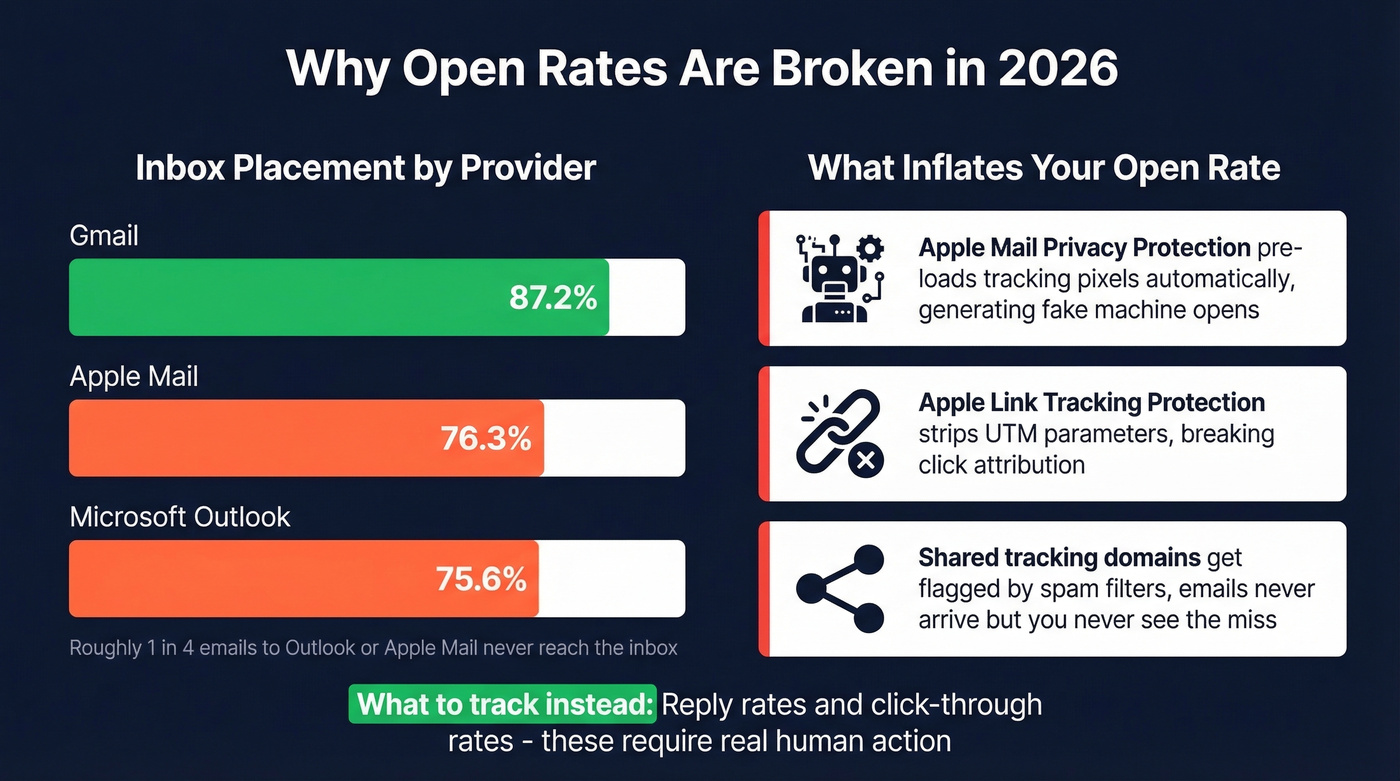
Apple Mail Privacy Protection, launched in September 2021, pre-loads tracking pixels automatically when emails arrive. It masks IP addresses and generates "machine opens" that look identical to real ones in your analytics. Every Apple Mail user on your list registers as an open whether they read your email or not. MPP is technically opt-in, but 77% of marketers believe it activates automatically - which tells you how widespread adoption actually is. Apple's Link Tracking Protection goes further, stripping UTM parameters from links in Mail and Safari, muddying even your click attribution.

Then there's the deliverability problem. Microsoft inbox placement sits at 75.6% in recent benchmarks - and Apple Mail is nearly identical at 76.3%. Gmail leads at 87.2%. That means roughly 1 in 4 emails sent to Outlook or Apple Mail addresses never reach the inbox. They land in spam or vanish. Your "open rate" is calculated on what your tracker thinks was delivered, but you don't actually see the full inbox-vs-spam split inside the mailbox provider. You're measuring a fraction and calling it the whole.
Shared tracking domains make this worse. When your tracking pixel loads from the same URL as thousands of other senders, spam filters are more likely to flag your messages. The deliverability hit happens silently - you won't see it in your open rate dashboard because those emails never arrived in the first place.
The consensus on r/b2bmarketing is blunt: marketers are openly abandoning open-rate optimization because the data is too noisy to act on. Between machine opens inflating the number and undelivered emails shrinking your real reach, open rate has become a vanity metric.
Here's my hot take: most sales teams would get better results by deleting their open-rate dashboard entirely and spending that attention on reply rates. Open tracking creates a false sense of insight that leads to worse decisions - like following up on "opens" that were actually Apple Mail bots.
What to Track Instead of Opens
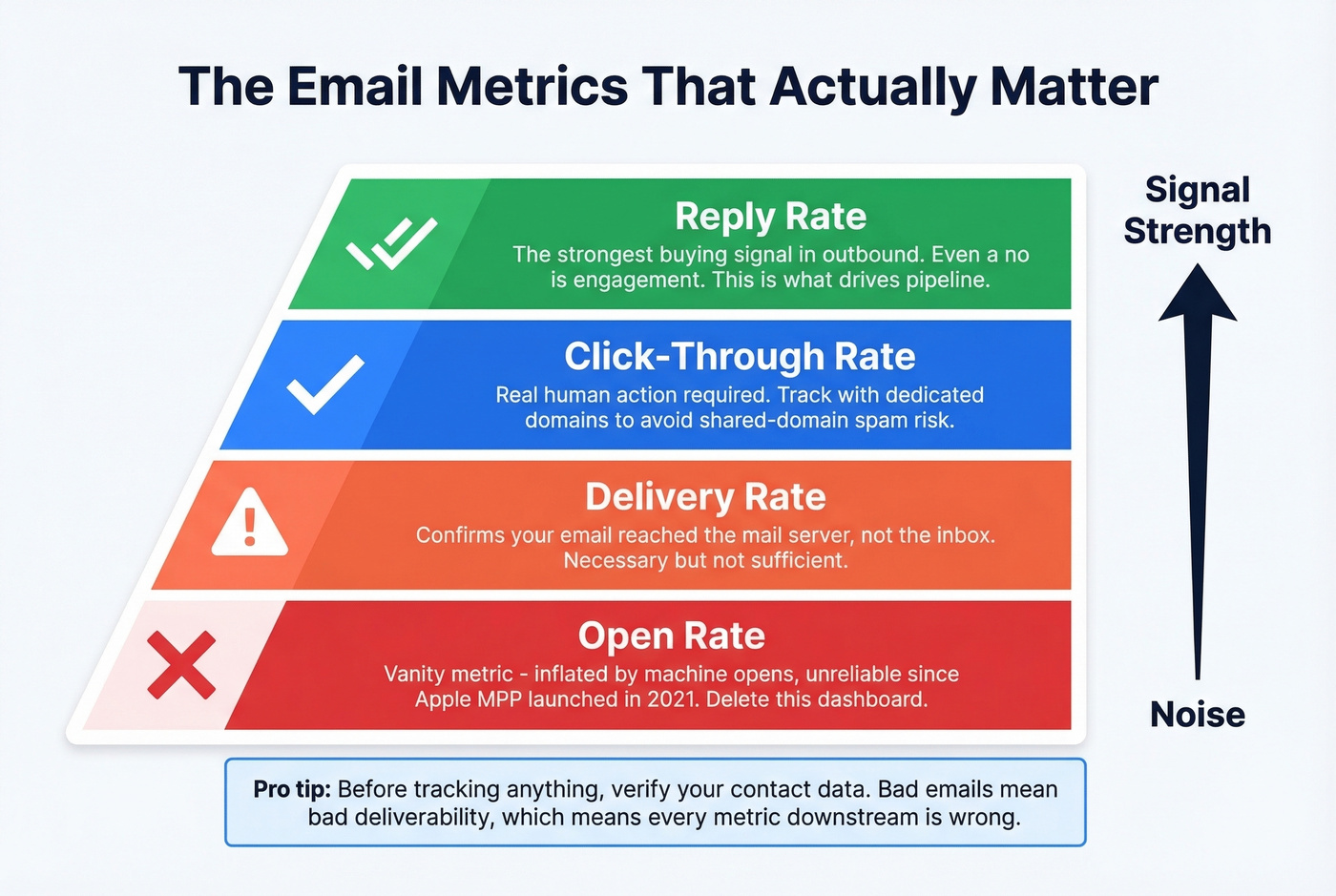
Reply rates are the strongest buying signal in outbound. Someone who replies - even to say "not interested" - engaged with your message more meaningfully than someone whose Apple Mail auto-loaded a pixel. Click rates are the next best indicator: if a prospect clicked your case study link, that's real intent.
Intent data is an even stronger signal than any email metric. Knowing which companies are actively researching solutions in your category tells you more than whether someone opened an email.
Bounce rates are your earliest warning signal. A bounce rate above 3-4% means your contact data is stale, and every bounce damages your sender reputation - which means fewer emails reaching the inbox on your next send. Bounce problems compound fast and get expensive quickly. One of our customers, Snyk, saw bounce rates drop from 35-40% to under 5% after switching to verified contact data, and their AE-sourced pipeline jumped 180%.
Before you track anything, make sure your emails actually arrive. If you're sending to unverified addresses, you're tracking opens on a fraction of your list. Upload a CSV to Prospeo's bulk verifier, get results in minutes, and pay roughly $0.01 per email. The free tier covers 75 emails per month - enough to test the workflow before committing.
A simple decision framework:
- Fewer than 50 emails/day: Yesware's free plan handles tracking. Verify your list first.
- Running outbound campaigns: Salesflare or HubSpot for tracking + CRM. Layer in intent data to prioritize who to contact.
- Need to know if one important email was read: Send a read receipt and follow up in 48 hours regardless. No tracking tool solves this perfectly.
Compliance and Legal Considerations
GDPR treats email tracking as personal data processing. That means explicit consent - freely given, specific, informed, and unambiguous. No pre-checked boxes. No burying it in a privacy policy footer.
France's CNIL issued a draft recommendation in June 2025 that draws a clear line. Anonymized campaign-level open rates may be permissible without individual consent. But identifying which specific person opened your email, or targeting contacts based on their opening behavior, requires explicit opt-in.
The practical checklist:
- Disclose what you collect - open times, device, location - and who accesses it
- Respond to data access or deletion requests within 30 days
- Set retention limits of 12 to 24 months
- Know the ceiling - GDPR fines can reach EUR 20 million
Real talk: most B2B sales teams using tracking pixels aren't getting explicit consent from every prospect. That's the reality. But if you're selling into the EU, especially France and Germany, the regulatory direction is clear. Build consent mechanisms now before enforcement catches up.
You're optimizing tracking pixels while 25% of your emails never arrive. Prospeo's 5-step verification with catch-all handling and spam-trap removal keeps your bounce rate under 4% - so every tracked email is one that actually had a chance to be opened.
Stop tracking ghosts. Send to verified contacts at $0.01 per email.
FAQ
Does Outlook have built-in email tracking?
Outlook offers read receipts and delivery receipts, but recipients can decline them and most corporate Exchange environments block them entirely. Viva Insights tracks open rates for internal emails only, with coarse 25-75% accuracy ranges for small groups. For reliable external tracking, you'll need a third-party add-in like Yesware or Salesflare.
What's the best free email tracker for Outlook?
Yesware's free plan includes basic open and attachment tracking at no cost. SalesHandy offers genuinely unlimited free tracking. For teams that also need verified contact data, Prospeo's free tier includes 75 email credits per month alongside its verification tools.
Are email tracking pixels legal under GDPR?
Anonymized campaign-level open rates may be permissible without individual consent, but identifying which specific person opened your email requires explicit opt-in under GDPR. France's CNIL issued draft guidance on this distinction in June 2025, signaling stricter enforcement ahead for pixel-based tracking.
Why do my open rates seem inflated?
Apple Mail Privacy Protection pre-loads tracking pixels automatically, generating "machine opens" that look real in your dashboard. Combined with Microsoft inbox placement at 75.6% - meaning some emails never reach the inbox at all - your open-rate numbers reflect neither true engagement nor true reach.
How do I make sure tracked emails reach the inbox?
Verify your contact list before sending. A bounce rate above 3-4% damages sender reputation and silently kills deliverability. Beyond verification, use a dedicated tracking domain rather than a shared one, and monitor your sender score regularly.