

PandaDoc vs Qwilr: Which Proposal Tool Actually Fits Your Team?
33% of sales teams still don't use proposal software at all. The other 67% are split between tools that look nothing alike under the hood. PandaDoc is a document lifecycle platform - proposals, contracts, e-signatures, the works. Qwilr builds interactive web-page proposals that look like microsites. Same category, very different bets on what closes deals.
We've spent time in both platforms, and here's what we think matters.
30-Second Verdict
PandaDoc wins if you need the full stack - proposals, contracts, e-signatures, CRM sync, approval workflows. It's the Swiss Army knife for sales teams of 5+ running a structured pipeline.
Qwilr wins if you send interactive, web-based proposals and care more about buyer experience than contract management. Agencies and consultants love it.
Skip both if your close rate problem isn't the proposal - it's stale contact data. Verify your prospect list with Prospeo before stressing over proposal design. A beautiful proposal sent to a dead inbox is wasted effort.
At-a-Glance Comparison
| Feature | PandaDoc | Qwilr | Winner |
|---|---|---|---|
| G2 Rating | 4.7/5 (3,408 reviews) | 4.6/5 (885 reviews) | PandaDoc |
| Capterra Rating | 4.5/5 (1,242 reviews) | 4.6/5 (385 reviews) | Qwilr (smaller sample) |
| Starting Price | $0 (Free) | $35/user/mo | PandaDoc |
| Free Plan | Yes (60 docs/yr) | No | PandaDoc |
| E-Signatures | Starter+ | Business | Tie |
| CRM Integrations | Business ($49/seat) | HubSpot/Pipedrive/Zoho CRM (Business) | PandaDoc (more options) |
| Buyer Experience | Static PDF-style docs | Interactive web pages | Qwilr |
| Customer Service (Capterra) | 4.3/5 | 4.6/5 | Qwilr |
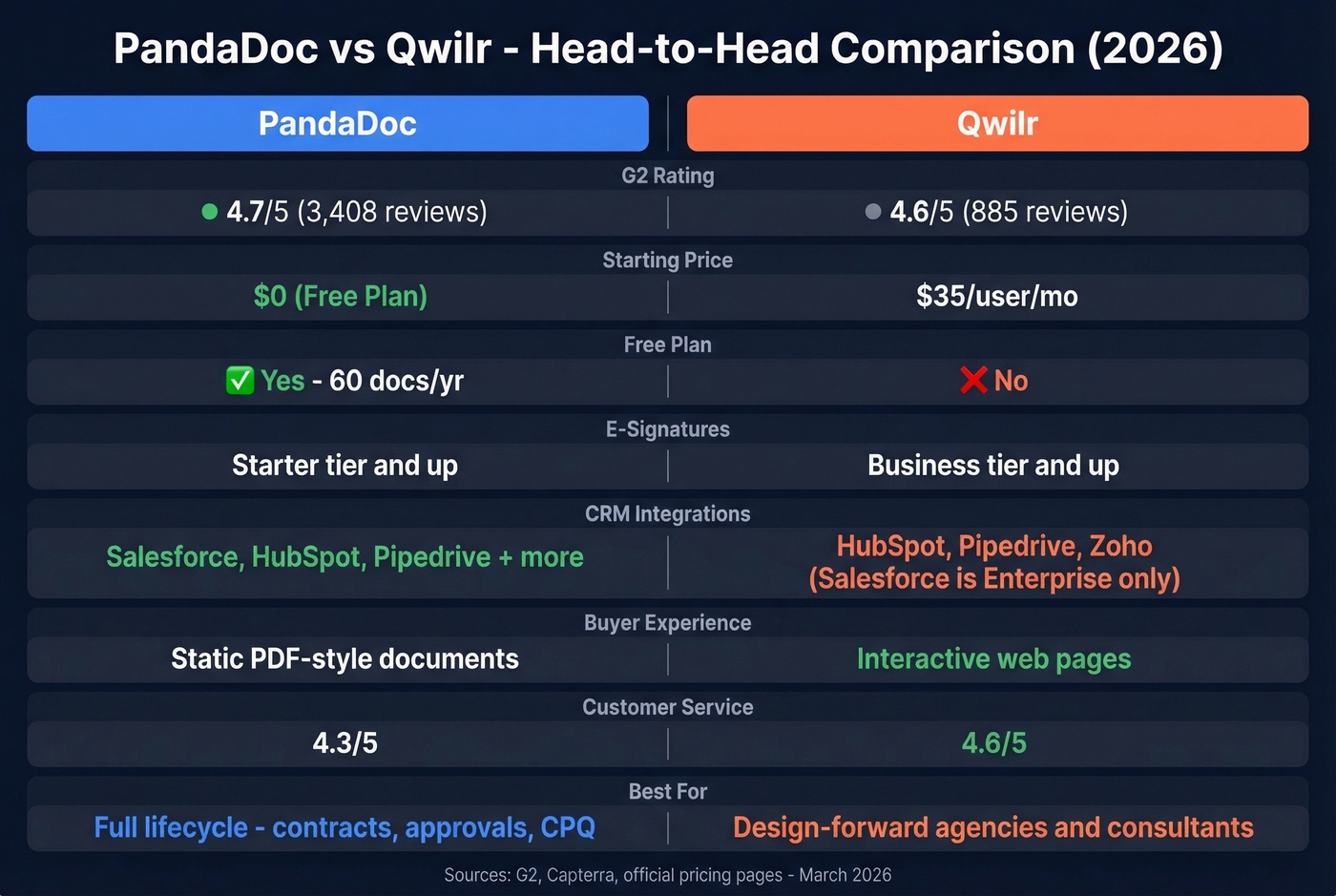
PandaDoc has nearly 4x the review volume on G2. Qwilr's slightly higher Capterra score comes from a much smaller sample, but its customer service rating (4.6 vs 4.3) is a genuine edge.
What You'll Actually Pay
Nobody else does this math. Here it is.
| Plan | PandaDoc | Qwilr |
|---|---|---|
| Free | $0 (60 docs/yr) | - |
| Launch | $9/mo (60 docs/yr, $3/doc after) | - |
| Starter / Business | Starter: $19/seat/mo | Business: $35/user/mo |
| Business / Enterprise | Business: $49/seat/mo | Enterprise: $59/user/mo (10-seat min, billed annually) |
| Enterprise | Custom (typically ~$10k-$30k/yr) | - |
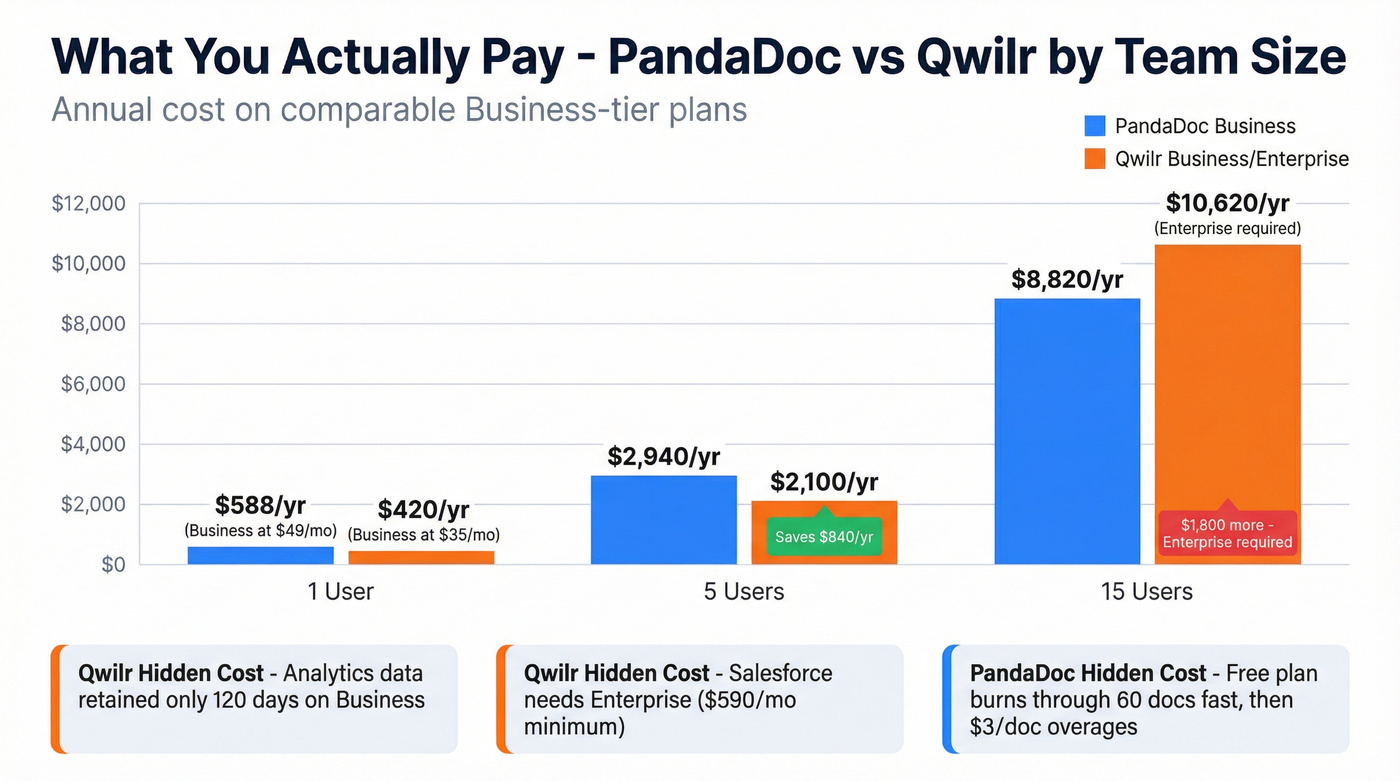
For a 5-person team: PandaDoc Business runs $245/mo ($2,940/yr). Qwilr Business is $175/mo ($2,100/yr). Qwilr saves $840/yr - but you lose PandaDoc's approval workflows and CPQ, and Qwilr's custom branding is gated to Enterprise.
For a 15-person team: PandaDoc Business hits $735/mo ($8,820/yr). Qwilr Enterprise is $885/mo ($10,620/yr) at 15 seats since Enterprise has a 10-seat minimum. PandaDoc is cheaper at scale and more feature-complete.
Hidden costs on Qwilr: Analytics data is only retained 120 days on Business. Salesforce is Enterprise-only at $59/user (billed annually) with a 10-seat minimum, so $590/mo is your floor. QwilrPay tacks on a 0.09% transaction fee (0.05% on Enterprise).
Hidden costs on PandaDoc: The free plan's 60-document cap sounds generous until an active team burns through it in weeks. Launch at $9/mo adds $3/doc overages - costs sneak up fast if you're sending lots of one-off proposals.

You're comparing proposal tools to boost close rates - but 15-20% of sales emails bounce before prospects ever see the proposal. Prospeo verifies emails at 98% accuracy with a 7-day refresh cycle, so every proposal you send actually lands.
Fix the inbox problem before you fix the proposal problem.
Where Each Tool Wins
PandaDoc Strengths
PandaDoc owns the full document lifecycle: proposals, quotes, contracts, e-signatures, approval workflows, and CPQ under one roof. The Business tier ($49/seat) adds CRM integrations, custom branding, deal rooms, approval workflows, and bulk send.
In our testing, PandaDoc's drag-and-drop editor felt noticeably snappier for complex, multi-section documents - the kind with 10+ pages, pricing tables, and conditional logic that would make a Google Doc cry. It scores a 9.2 on G2's Ease of Use vs Qwilr's 8.8, and it's SOC 2 compliant. Skip PandaDoc if you just need pretty proposals and don't care about contract management.
Qwilr Strengths
Qwilr proposals aren't PDFs. They're interactive web pages. Buyers can configure pricing tables themselves, watch embedded videos, and click through sections like a microsite. For design-conscious agencies, that's a genuine competitive edge.
The built-in Unsplash library and page-level engagement analytics make it easy to build visually striking proposals without a designer. Qwilr's own marketing claims a 20%+ increase in win rates - take that with appropriate skepticism, but the interactive format does stand out in crowded inboxes. Skip Qwilr if you need contracts, approval chains, or Salesforce without paying Enterprise pricing.
What Real Users Complain About
PandaDoc Complaints
Signature issues top the list with 107 G2 mentions - formatting glitches, signing order problems, and recipient confusion. Missing features on lower tiers get 105 mentions.
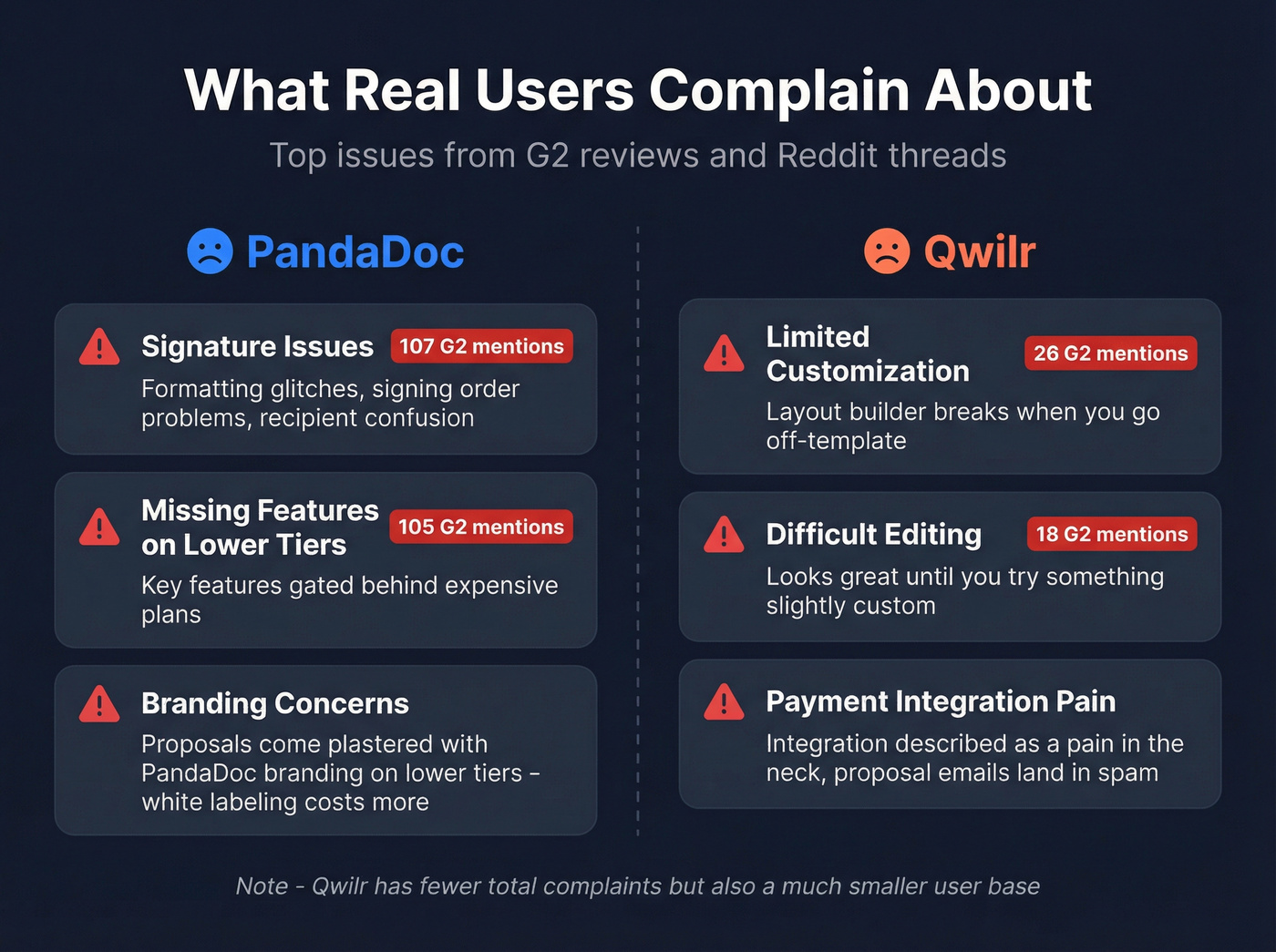
The branding concern is real. On Reddit, buyers worry proposals come "plastered with their brand names." If white-labeling matters, plan on a higher tier that supports custom branding.
Qwilr Complaints
Limited customization (26 G2 mentions) and difficult editing (18 mentions) are the recurring themes. The layout builder looks great until you try something slightly off-template. One long-time user flagged that payment integration is "a pain in the neck" and that proposal emails routinely land in spam. Smaller complaint volume overall, but Qwilr also has a fraction of PandaDoc's user base.
Which One Should You Pick?
Solo consultant or freelancer? Qwilr Business at $35/mo. If budget's tight, Better Proposals at $19/mo is worth a look.
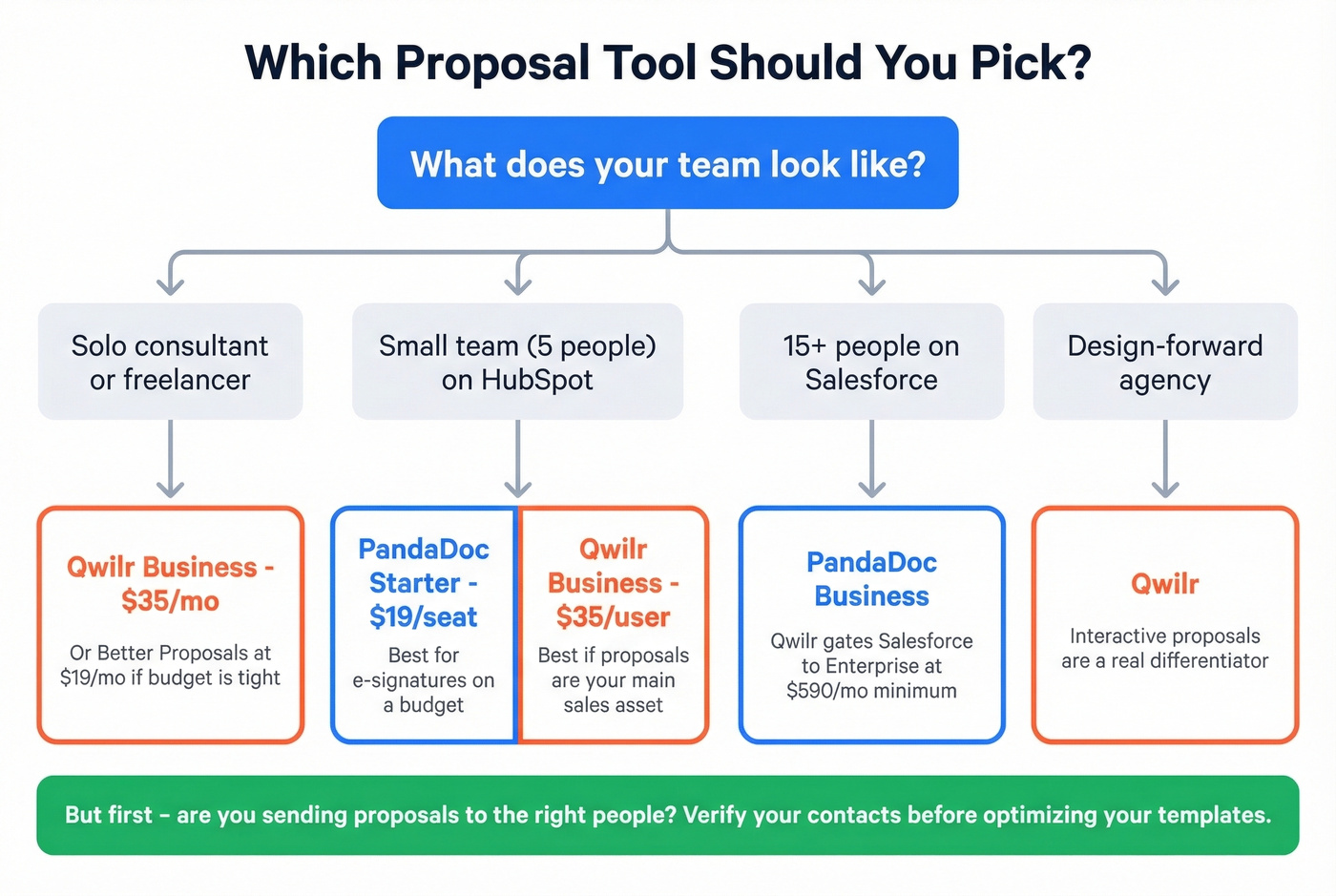
5-person sales team on HubSpot? PandaDoc Starter ($19/seat) if you need e-signatures on a budget. Qwilr Business ($35/user) if proposals are your main sales asset and you want that interactive format.
15+ person team on Salesforce? PandaDoc Business. Qwilr gates Salesforce to Enterprise ($590/mo minimum), and PandaDoc is cheaper at this team size anyway.
Design-forward agency? Qwilr. The interactive proposals are a real differentiator for client-facing work.
Teams needing contracts + e-sign + approvals? PandaDoc. It's not close.
Here's the thing: most teams agonizing over which proposal tool to pick are solving the wrong problem. If your proposals aren't closing, the issue is usually who you're sending them to, not how they look. Fix your targeting first with a tighter ideal customer profile.
Fix Your Data Before Your Proposals
Neither tool can save a proposal sent to a dead email or the wrong decision-maker. We've seen teams spend months optimizing proposal templates while 15-20% of their sends bounce - that's a data problem, not a design problem. Prospeo verifies emails with 98% accuracy on a 7-day refresh cycle, drawing from 300M+ professional profiles. The free tier gives you 75 verified emails per month with no contracts and no sales calls required. For less than one PandaDoc seat, you can make sure those polished proposals actually land - and improve email deliverability at the same time.

PandaDoc or Qwilr won't help if you're pitching the wrong person. Prospeo's 300M+ profiles with 30+ filters - including buyer intent and job changes - put your proposals in front of actual decision-makers, not outdated contacts.
Stop optimizing templates. Start reaching the right buyers.
FAQ
Does PandaDoc have a free plan?
Yes. PandaDoc Free includes unlimited seats but caps you at 60 documents per year. Most active sales teams outgrow it within weeks. The Launch plan ($9/mo) adds $3/doc overages after 60, and Starter ($19/seat/mo) unlocks unlimited documents with e-signatures.
Does Qwilr integrate with Salesforce?
Only on the Enterprise plan - $59/user/month billed annually with a 10-seat minimum, so $590/month is your floor. If you're a Salesforce shop spending under $7K/year on tools, that's a dealbreaker. HubSpot, Pipedrive, and Zoho CRM integrations are available on the cheaper Business plan.
How do I make sure proposals reach the right inbox?
Verify contact data before sending. A 5-step email verification process with catch-all handling and spam-trap removal delivers 98% accuracy across 300M+ profiles. Free tiers on verification tools like Prospeo include enough credits to validate your highest-priority deals without spending a dime.
Can a proposal tool fix a low close rate?
Not if the problem is upstream. A polished proposal sent to a dead email or the wrong stakeholder still fails. Teams that verify contacts before sending consistently see higher open rates - fix the data, then optimize the design.