

Email Authentication Checker: What It Actually Means (and What Most Guides Get Wrong)
Last quarter, we watched a 12-person sales team's entire outbound campaign land in spam. The culprit wasn't bad copy or a burned domain - it was 14 nested DNS lookups in their SPF record and a DMARC policy stuck on p=none for two years. The fix took 20 minutes. Finding the root cause took three weeks of blaming their sequencer, because nobody was running authentication checks in the first place.
Here's the thing: searching for "email authentication checker" mostly returns email verification tools, not actual authentication checkers. That's a completely different problem, and the distinction matters more than most teams realize.
What You Need (Quick Version)
- Quick one-time check: MXToolbox - free, instant SPF/DKIM/DMARC lookup
- Ongoing DMARC monitoring: dmarcian Personal plan (free) or Postmark DMARC Digests
- Email verification (the other half of deliverability): Prospeo - 98% email accuracy, real-time verification, free tier with 75 emails/month
Authentication vs. Verification
These terms get used interchangeably across the web, and it causes real confusion. Mailmeteor's "email checker" page is a perfect example - it ranks for authentication queries but runs 15+ verification checks on individual addresses. That's not authentication.
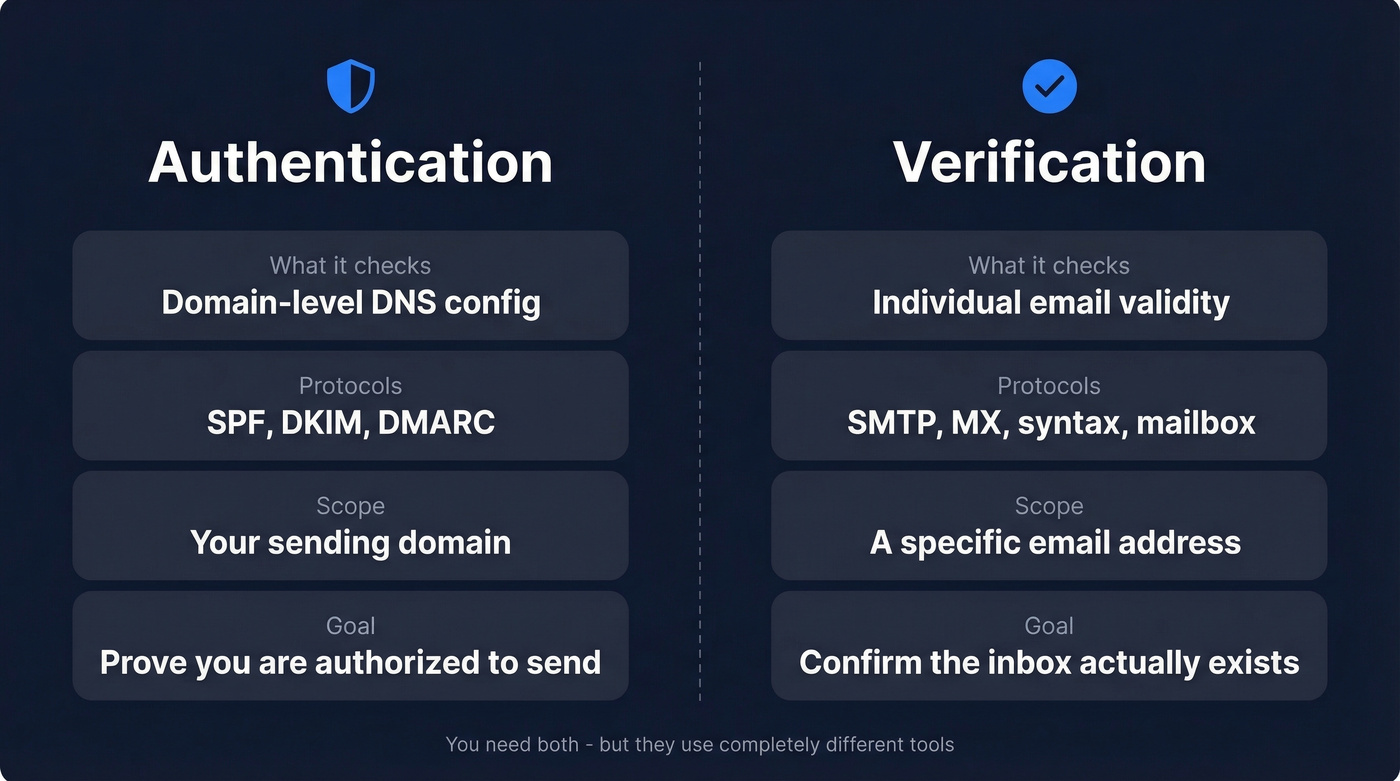
| Authentication | Verification | |
|---|---|---|
| What it checks | Domain-level DNS config | Individual email validity |
| Protocols | SPF, DKIM, DMARC | SMTP, MX, syntax, mailbox |
| Scope | Your sending domain | A specific address |
| Goal | Prove you're authorized | Confirm the inbox exists |
Authentication is about your domain's credibility. Verification is about whether john@company.com is a real, deliverable mailbox. You need both, but they're solved by completely different tools.
What Is Email Authentication?
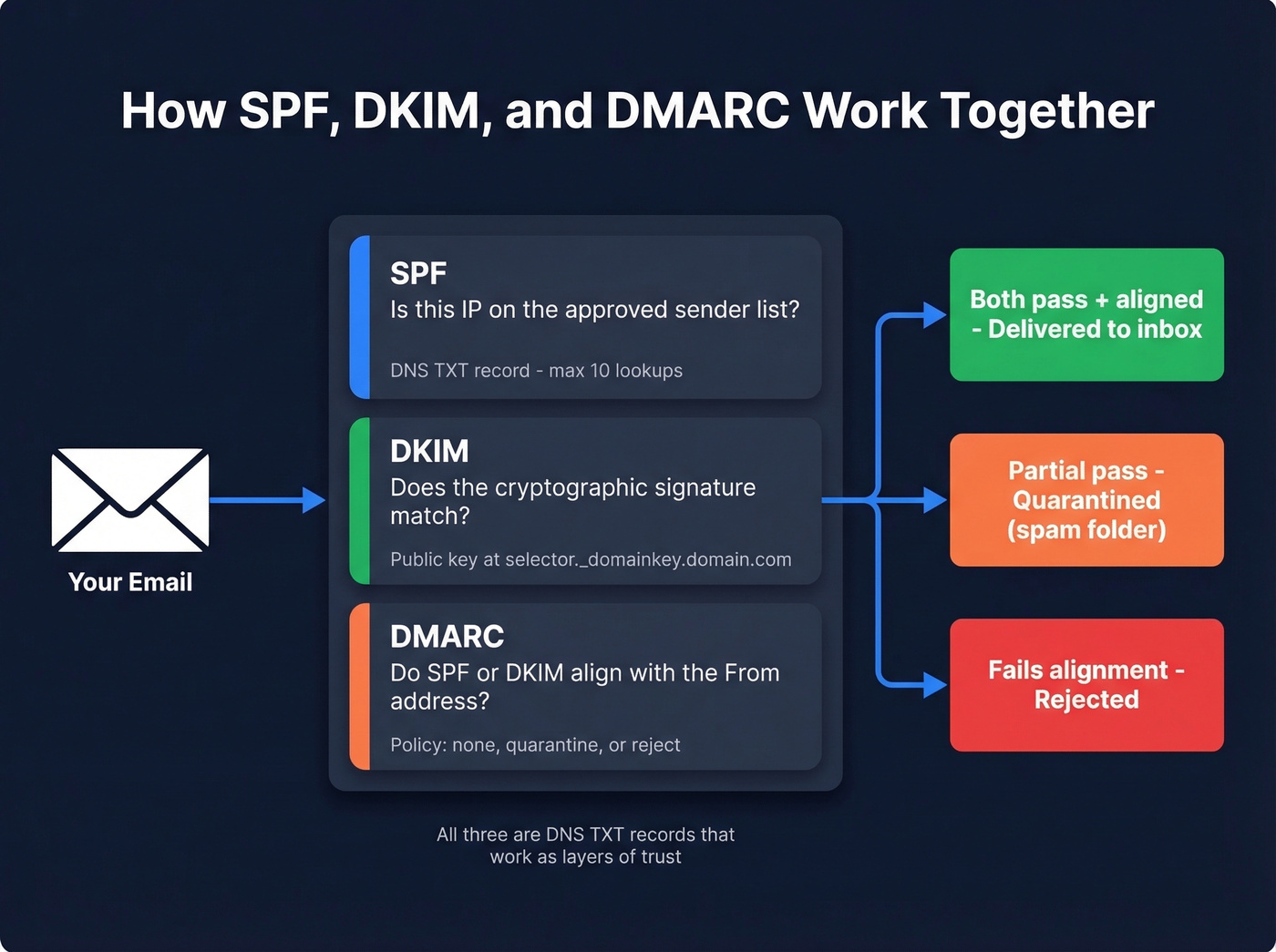
Email authentication is a set of DNS-based protocols that prove your emails are actually coming from you. All three protocols - SPF, DKIM, and DMARC - are stored as DNS TXT records and work together as layers of trust.
SPF: Your IP Allowlist
SPF (Sender Policy Framework) is a DNS record listing every IP address authorized to send email for your domain. Receivers check the sending IP against this list. If it's missing, the message fails SPF.
The critical constraint: SPF allows a maximum of 10 DNS lookups. Every include: directive triggers a lookup, and nested includes count too. Exceed 10 and you get a permerror, which effectively breaks SPF for your entire domain. Flattening tools exist specifically to solve this - spf.access.nu is a popular free checker shared frequently in r/DMARC for visualizing nested lookups before they become a problem.
DKIM: Cryptographic Signing
DKIM adds a cryptographic signature to every outgoing email. Your mail server signs with a private key; the public key lives in DNS at selector._domainkey.yourdomain.com. Receivers verify the signature matches.
Common failure mode: selector mismatch. Rotating keys without updating DNS first means every email fails DKIM until the records sync. A 5-minute fix that can cause days of deliverability damage if you don't catch it. (If you want a quick diagnostic workflow, see verify DKIM is working.)
DMARC: The Policy Layer
DMARC ties SPF and DKIM together with a policy telling receivers what to do when authentication fails - deliver anyway (p=none), quarantine (p=quarantine), or reject outright (p=reject). It also enables aggregate reporting via the rua= tag, sending XML reports about your authentication results.
The alignment pitfall most teams miss: SPF and DKIM can both pass, but DMARC still fails if the authenticated domain doesn't align with your visible From: address. Signing emails through a third-party sending domain while your From: says yourdomain.com is a classic example. (More detail: DMARC alignment.)
Safe rollout path: start at p=none to collect data, move to p=quarantine; pct=25, gradually increase the percentage, then shift to p=reject once your reports show clean alignment.
Why Authentication Matters in 2026
Google drew a line in the sand. Any domain sending 5,000+ messages per day needs SPF and DKIM alignment plus a DMARC record. Spam complaint rates must stay below 0.3% - ideally under 0.1%. Google's stricter enforcement began in November 2025, and Microsoft followed suit, prompting 400,000 domains to add DMARC records after Microsoft's enforcement announcement in May 2025.
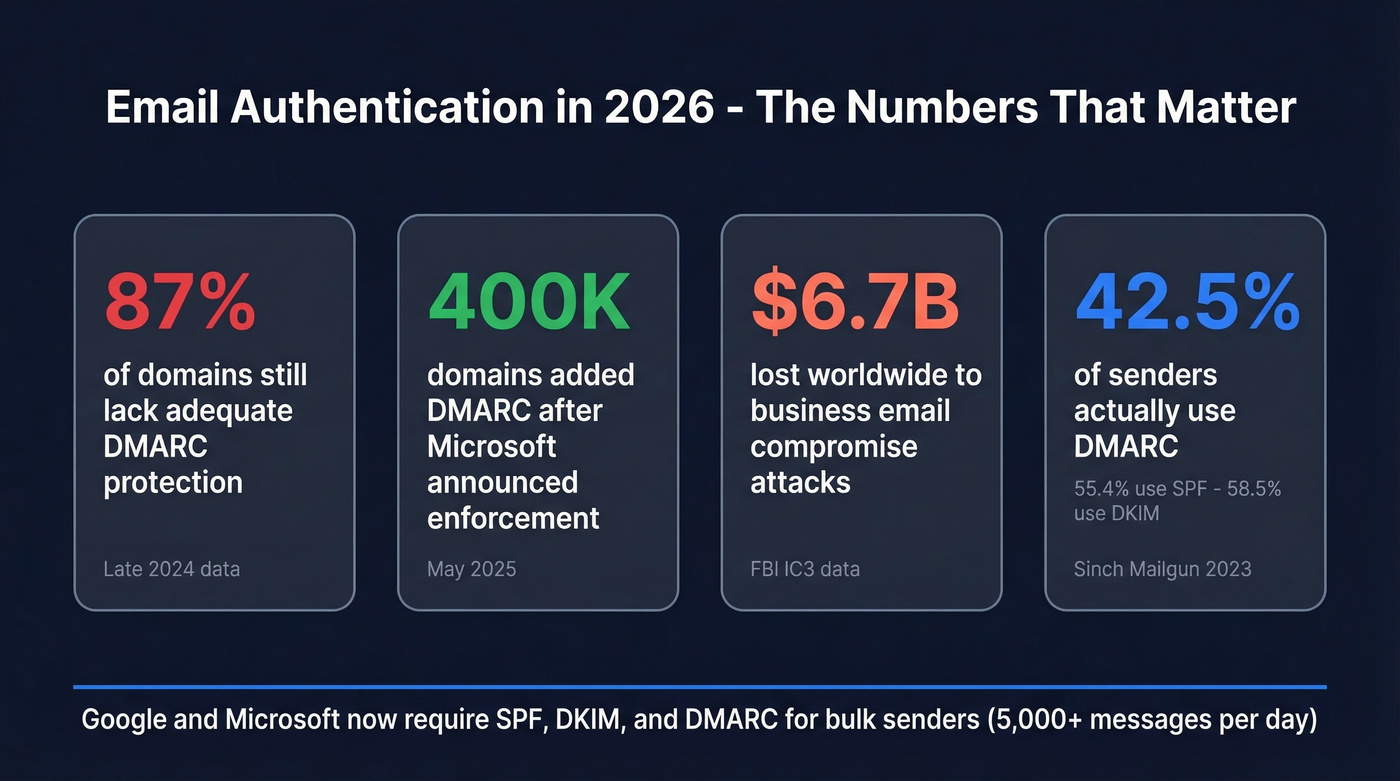
Yet adoption is still shockingly low. As of late 2024, 87% of domains still lacked adequate DMARC protection. A 2023 Sinch Mailgun survey found only 42.5% of senders use DMARC, 55.4% use SPF, and 58.5% use DKIM - with roughly a third unsure whether they have any of them configured.
Let's be honest: if your domain sends more than 50 emails a day and you haven't moved past p=none, you're borrowing time. The security angle alone justifies urgency - BEC attacks cost $6.7B worldwide, and proper DMARC enforcement is the single most effective countermeasure. On the upside, domains running p=reject qualify for BIMI, which displays your verified brand logo directly in the inbox. That's the carrot after the stick.

Fixing SPF, DKIM, and DMARC is half the deliverability equation. The other half? Making sure you're sending to real inboxes. Prospeo's 5-step verification delivers 98% email accuracy - so your authenticated emails actually land.
Don't fix your DNS records just to bounce off bad addresses.
Best Email Authentication Tools for 2026
You don't need a $600/month DMARC platform. Most teams need a free checker, a ~$24/month monitoring tool, and the discipline to actually read their reports.
When evaluating DMARC monitoring tools, prioritize these capabilities: XML report parsing, forensic (RUF) support, multi-domain management, alerting and integrations, and guided enforcement workflows. No single tool nails all five, so know which matter most for your setup.
| Tool | Free Tier | Paid From | Best For |
|---|---|---|---|
| MXToolbox | Yes (one-time) | ~$129/mo | Quick diagnostics |
| dmarcian | Yes (Personal) | $24/mo | SMB monitoring |
| EasyDMARC | Yes (personal) | $35.99/mo | Guided enforcement |
| PowerDMARC | No | $8/mo | Budget monitoring |
| Postmark DMARC Digests | Yes | Free | Report summaries |
| Red Sift OnDMARC | No | $9/mo | Affordable monitoring |
Enterprise teams with complex multi-domain environments should look at Valimail, Proofpoint, or Mimecast - expect $6k+/year and sales conversations.

MXToolbox
The default starting point. Paste in a domain, get instant SPF/DKIM/DMARC results with syntax validation and practical warnings - duplicate includes, void lookups, multiple SPF records, characters-after-ALL issues. Free for one-time checks; paid monitoring starts around ~$129/mo, which is steep when cheaper alternatives exist. Use it for diagnostics, not daily monitoring.
dmarcian
The best value for ongoing DMARC monitoring, and the tool we recommend most often for teams just getting started. The free Personal plan covers 2 domains and 1,250 messages/month with 1-month history - enough for a small team to get real visibility. The $24/mo Basic plan bumps that to 100,000 messages and 3 months of history. Plus ($240/mo) and Enterprise ($600/mo) tiers add higher volumes and advanced features like RUF processing, API access, and more user seats. We've seen teams run dmarcian for months on the free tier before upgrading, which is exactly how a monitoring tool should work.
EasyDMARC
The prettiest dashboard in the category. It holds a 4.8/5 on G2 from 162 reviews, with users consistently praising the intuitive interface and guided setup wizard. Paid plans start from $35.99/mo. The tradeoff: it gets expensive as you scale, a recurring complaint in G2 reviews. Great for teams that need hand-holding through DMARC enforcement; skip it if you just need to read reports.
PowerDMARC
Broad protocol coverage on a budget - DMARC, SPF, DKIM, BIMI, MTA-STS, and TLS-RPT in one dashboard, starting at $8/mo.
Postmark DMARC Digests
Free weekly email summaries of your DMARC aggregate reports. No dashboard, no forensic support, no multi-domain management. Just a clean digest that tells you what's passing and what's failing. Perfect as a lightweight monitoring layer alongside MXToolbox diagnostics.
Red Sift OnDMARC
Affordable monitoring starting at $9/mo. Worth a look if you want something beyond digests but don't need a heavier platform.
How to Check Email Authentication
Three methods, all free, all take about five minutes.
Method 1: Check Email Headers
Send a test email to yourself (Gmail works best). Open the email, click "Show Original" or "View Message Source," and search for spf=, dkim=, and dmarc=. You want pass next to all three - anything else needs investigation.
Method 2: Use a Free Lookup Tool
Go to MXToolbox or PowerDMARC's analyzer and enter your sending domain. Review the SPF record for syntax errors and lookup count, DKIM for selector resolution, and DMARC for policy and reporting address. Fix any flagged issues in your DNS provider. (For syntax patterns and common gotchas, keep an SPF record example handy.)
Method 3: Set Up Google Postmaster Tools
Google Postmaster Tools added a compliance status dashboard that shows exactly where you stand against the bulk sender requirements. For anyone sending volume through Gmail recipients, this is non-negotiable - it's free, it's authoritative, and it catches drift that one-time checks miss. Set it up once and check it weekly.
Common Mistakes (and Fixes)
Multiple SPF records on one domain. Merge into a single record. SPF evaluation supports only one SPF policy per domain, and having two causes both to fail.
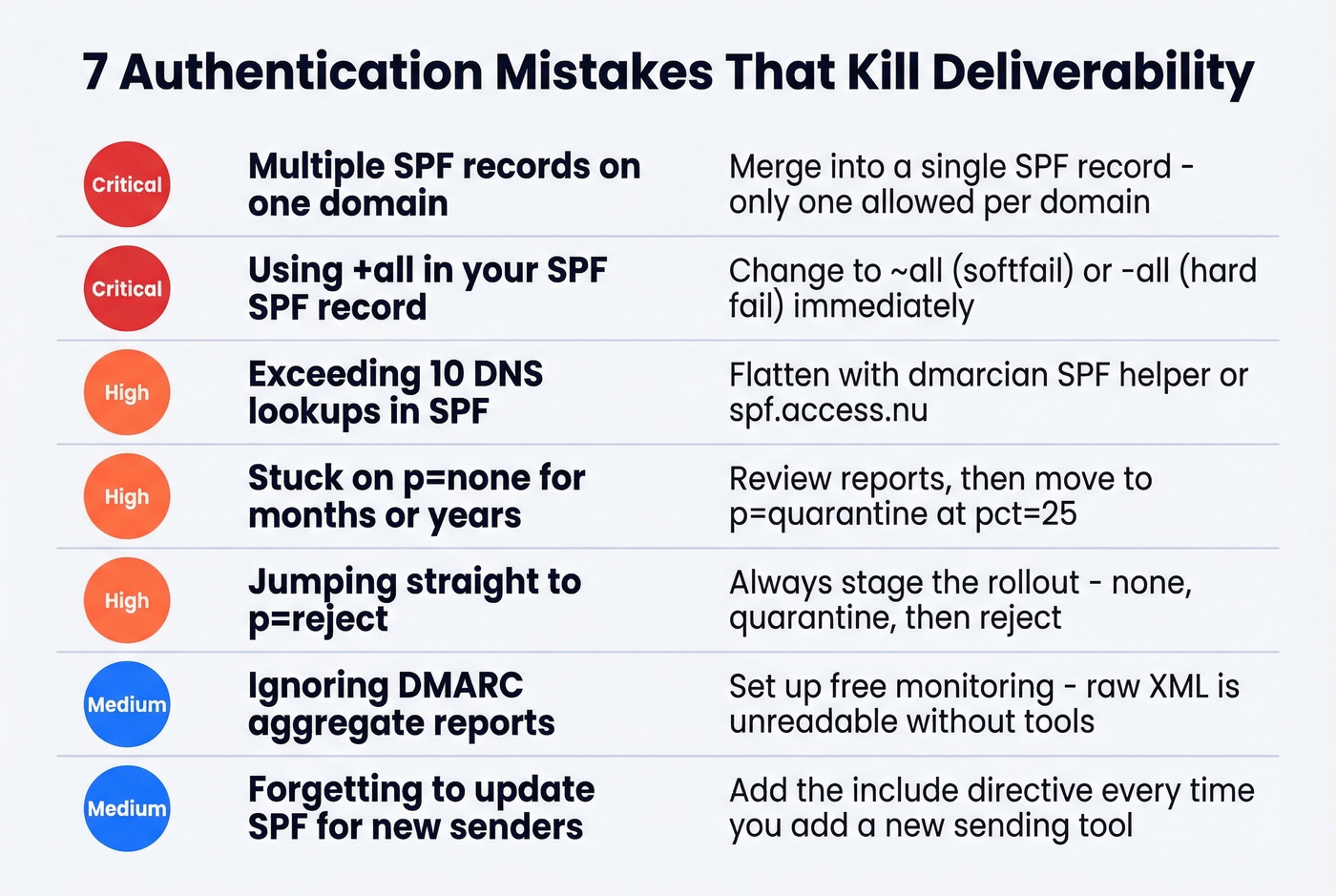
Using +all in SPF. Change to ~all (softfail) or -all (hard fail). +all authorizes the entire internet to send as you. We've actually seen this in production environments at companies that should know better.
Exceeding 10 DNS lookups. Flatten your SPF record using dmarcian's SPF helper or spf.access.nu. Nested include: directives add up fast, especially when you're running multiple SaaS tools that each require their own include.
Stuck on p=none forever. Review your DMARC reports. If alignment looks clean, move to p=quarantine; pct=25 and ramp up.
Jumping straight to p=reject. This blocks legitimate mail from third-party senders you forgot to authorize. Always stage the rollout.
Ignoring DMARC reports. Set up a free monitoring tool. Raw XML reports are unreadable; tools exist to parse them for a reason. The r/DMARC subreddit is also a solid resource when you're trying to interpret unusual report patterns.
Forgetting to update SPF when adding new senders. Every time you add a marketing tool, CRM, or transactional email service, add its include: to your SPF record. Run a quick authentication check after each change.
DKIM selector mismatch. Verify the selector in your DNS matches what your mail server is signing with. Key rotations without DNS updates break everything silently.
Authentication Is Half the Equation
Authentication gets your domain trusted. Clean data keeps it that way.
You can have perfect SPF, DKIM, and DMARC records and still tank your sender reputation by emailing invalid addresses. Bounces, spam traps, and honeypots do cumulative damage that no DNS configuration can undo. This is where email verification comes in - and it's the piece that connects authentication hygiene to actual deliverability outcomes. (If you're troubleshooting reputation drift, see how to improve sender reputation and track email bounce rate.)
Prospeo runs a 5-step verification process with proprietary infrastructure: catch-all domain handling, spam-trap removal, and honeypot filtering, resulting in 98% email accuracy across 143M+ verified addresses. (If you need a broader view of the category, compare email reputation tools and an end-to-end email deliverability guide.)
One customer, Meritt, dropped their bounce rate from 35% to under 4% after switching. The free tier gives you 75 email verifications plus 100 Chrome extension credits per month - enough to test before committing. Paid plans run about ~$0.01 per email with no contracts.
Other verification tools worth knowing: Hunter offers 100 free verifications per month. ZeroBounce offers 100 free monthly verifications when you sign up with a business domain. Verifalia handles free single-address lookups for quick spot checks.
That 12-person team we mentioned? After fixing authentication, their bounce rate was still 11% - because half their list was stale. Prospeo refreshes data every 7 days, not the 6-week industry average, so your contacts stay valid between campaigns.
Authentication proves it's you. Verification proves they exist. Handle both.
FAQ
What does SPF=fail mean in email headers?
SPF=fail means the sending server's IP isn't listed in the domain's SPF DNS record. The receiving server will reject the message or route it to spam, depending on the DMARC policy. Check your SPF record for missing include: directives - that's the most common cause.
Do I need SPF, DKIM, and DMARC - or just one?
You need all three. Google requires SPF and DKIM alignment plus a DMARC record for any domain sending 5,000+ daily messages. Missing any single protocol weakens deliverability and leaves your domain open to spoofing.
How often should I run an email authentication checker?
Run a manual check after every DNS change or new sender integration. For ongoing monitoring, use dmarcian or Postmark DMARC Digests - they flag issues automatically so you don't have to remember weekly spot-checks.
What's the difference between an authentication checker and an email verifier?
Authentication checkers validate your domain's SPF, DKIM, and DMARC configuration - confirming you're authorized to send. Email verifiers check whether individual addresses are real and deliverable. Different problems, different tools, both critical for deliverability.
Is DMARC p=none enough?
No. p=none only collects reports - it doesn't instruct receivers to quarantine or reject spoofed messages. Move to p=quarantine once your aggregate reports show clean alignment, then progress to p=reject for full enforcement.