

Reverse Prospecting: The Complete Guide for 2026
You list a 4-bed colonial in a competitive suburb. Within two hours, you pull up reverse prospecting in your MLS and find 12 buyer agents whose clients have saved searches matching that exact property. You message three of them before lunch. One replies with a showing request by 3 PM. That's not a hypothetical - it's a Tuesday for agents who actually use this feature.
Here's the uncomfortable context: 73.64% of Northeast Florida agents closed fewer than four deals in all of 2025. A third sold zero homes. This MLS matching tool is one of the simplest features separating productive agents from the rest, and most agents either don't know it exists or ran it once and forgot about it.
Quick version: Reverse prospecting lets listing agents see which buyer agents have clients with saved searches matching their listing. It's available in Matrix and Flexmls at no extra cost, and RealScout offers a third-party workflow. The single most important habit: run it within 48 hours of every new listing. Jump to: Matrix walkthrough · Flexmls walkthrough · RealScout walkthrough · Email templates
What Is Reverse Prospecting?
The term means three different things depending on who's using it, and the confusion costs agents time.
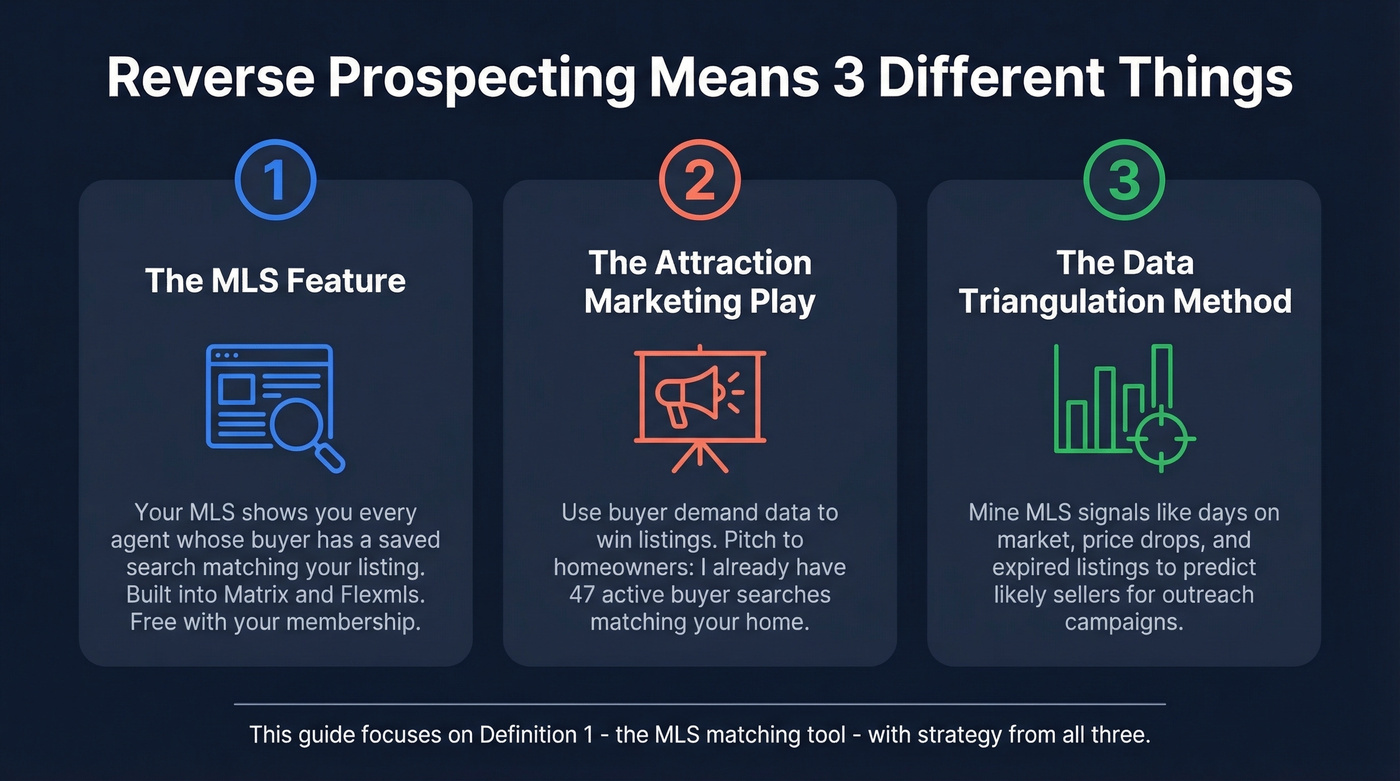
Definition 1 - the MLS feature. When you activate a listing, your MLS shows you every agent who has a buyer with a saved search matching your property's criteria. You see the agent's name and contact info but never the buyer's identity. It's a matching engine built into platforms like Matrix and Flexmls, and it's free with your MLS membership.
Definition 2 - the attraction marketing play. Some coaches use the term to describe using buyer-demand data to generate listings. The pitch to a homeowner sounds like, "I already have 47 active buyer searches matching your home's criteria - let's talk timing." Same concept, different application.
Definition 3 - the data-triangulation method. On agent forums like r/realtors, you'll find a third usage: mining MLS signals - days on market, price reductions, expired listings, withdrawn-and-relisted patterns - to predict likely sellers for direct-mail campaigns. This isn't really a feature. It's a research methodology that falls under the same umbrella term.
This guide covers all three, with the MLS tool getting the deep dive. If you're here for the strategic play, skip to the advanced strategy section. One critical privacy point for every use case: buyer client identity is never shared. Only the buyer's agent information appears in results.
Why It Matters in 2026
The agent production numbers tell the story. When a third of licensed agents in a market sell zero homes in a year, any edge that connects you to active demand faster is worth using. Reverse prospecting gives you three things most listing agents lack: data-backed credibility in listing presentations, faster time-to-offer by reaching pre-qualified buyer pools, and agent-to-agent relationships that compound over multiple transactions.
Let's be honest: this is the most underused free feature in any MLS. Agents will spend $500/month on Zillow Premier Agent leads while ignoring a tool that connects them directly to agents representing motivated, pre-qualified buyers - at zero additional cost. If your brokerage isn't training every new agent on this in their first week, that's a leadership failure.
Most agents run it once on a new listing, glance at the results, and never touch it again. We've seen agents go from zero matches to 15+ just by educating buyer agents in their own office about opt-in settings. The feature doesn't decay - new buyer agents set up searches every day. Your listing from last Tuesday might match a search created this morning.
How to Use Reverse Prospecting
The workflow differs by platform. Here's each one, followed by a side-by-side comparison.
Matrix (Bright MLS, CRMLS, OneKey MLS)
Matrix reverse prospecting is straightforward once you know where to find it.
- Navigate to My Matrix → My Listings.
- Select the listing you want to prospect.
- Click Reverse Prospecting in the toolbar.
You'll see a results table with columns that matter more than most agents realize:
| Column | What It Means |
|---|---|
| Count | Listings matching that buyer's search - lower is better, meaning your listing competes with fewer |
| Ref# | Buyer agent's internal contact ID, replacing the client's name for privacy |
| Date Sent | When your listing was emailed to their client via Auto Email |
| Envelope icon | Whether you've already contacted this agent about the listing |
| Pre-approved | A field that appears in some Matrix implementations |
| Member Direct Phone | Agent's direct line |
The Count column is your quality signal. A count of 3 means the buyer's search only matches three active listings, including yours. A count of 47 means you're one of many. Prioritize the low-count matches - those buyers have fewer options and more urgency.
One limitation: Matrix only supports this on Active listings. Pending, withdrawn, or expired listings won't generate results.
Flexmls
Flexmls handles the matching differently, and the eligibility rules trip up a lot of agents.
- Go to Menu → Contacts → Reverse Prospecting.
- Select your listing (Flexmls supports Active, Pending, and Hold statuses).
- Click Run Reverse Prospecting.
Here's where it gets tricky. Flexmls searches for members who have contacts with saved searches matching your listing and whose contacts have clicked on Flexmls emailed links within the past year. That second requirement is the one nobody reads. If a buyer agent's client hasn't engaged with their Flexmls email alerts recently, they won't appear in your results - even if the search criteria match perfectly.
The activity window defaults to one month but you can extend it to 3 months, 6 months, or a full year.
Two more gotchas: saved searches must be attached to a contact in Contact Management, since orphan searches don't count. And if an agent has marked a listing as hidden, that agent won't appear in your matches.
RealScout
RealScout takes a different approach entirely. It's a third-party platform, not MLS-native, and some agents need a paid upgrade to access the feature.
Skip this if you're happy with Matrix or Flexmls results and don't need the extra polish. But if you want a cleaner messaging interface and your market has strong RealScout adoption, it's worth exploring.
Navigate to Listing Tools → My Listings, claim your listing, then click Reverse Prospecting. RealScout offers monthly and annual subscriptions, and some users need a Standard Plan upgrade to see Listing Tools. Listings must have an active status on RealScout/your MLS to be eligible. Buyer agents receive messages via email and inside RealScout's Messages tab with a quick-reply option that speeds up response time. As with the MLS tools, buyer identity stays private.
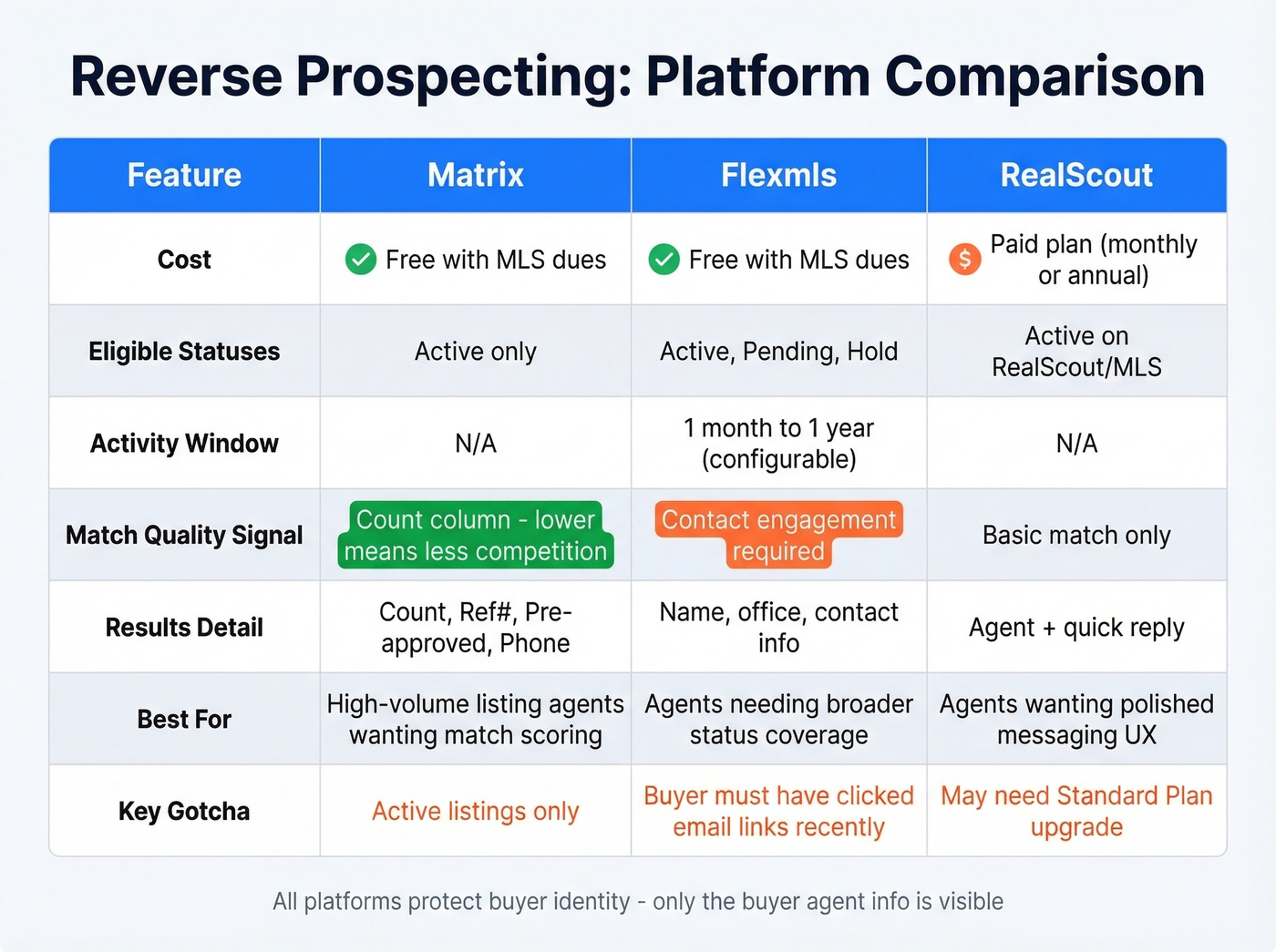
| Feature | Matrix | Flexmls | RealScout |
|---|---|---|---|
| Cost | Free with MLS dues | Free with MLS dues | Paid plan (monthly or annual) |
| Eligible statuses | Active only | Active, Pending, Hold | Active on RealScout/your MLS |
| Activity window | N/A | 1 mo-1 yr (configurable) | N/A |
| Results detail | Count, Ref#, Pre-approved (sometimes), Phone | Name, office, contact info | Agent + quick reply |
| Best for | High-volume listing agents who want match-quality scoring | Agents in Flexmls markets needing broader status coverage | Agents wanting a polished messaging UX |
Setup for Buyer Agents
Reverse prospecting is a two-way street. In Flexmls, both parties must opt in for the feature to work. If you're a buyer agent who hasn't enabled this, you're costing your clients opportunities - listing agents literally can't find you.
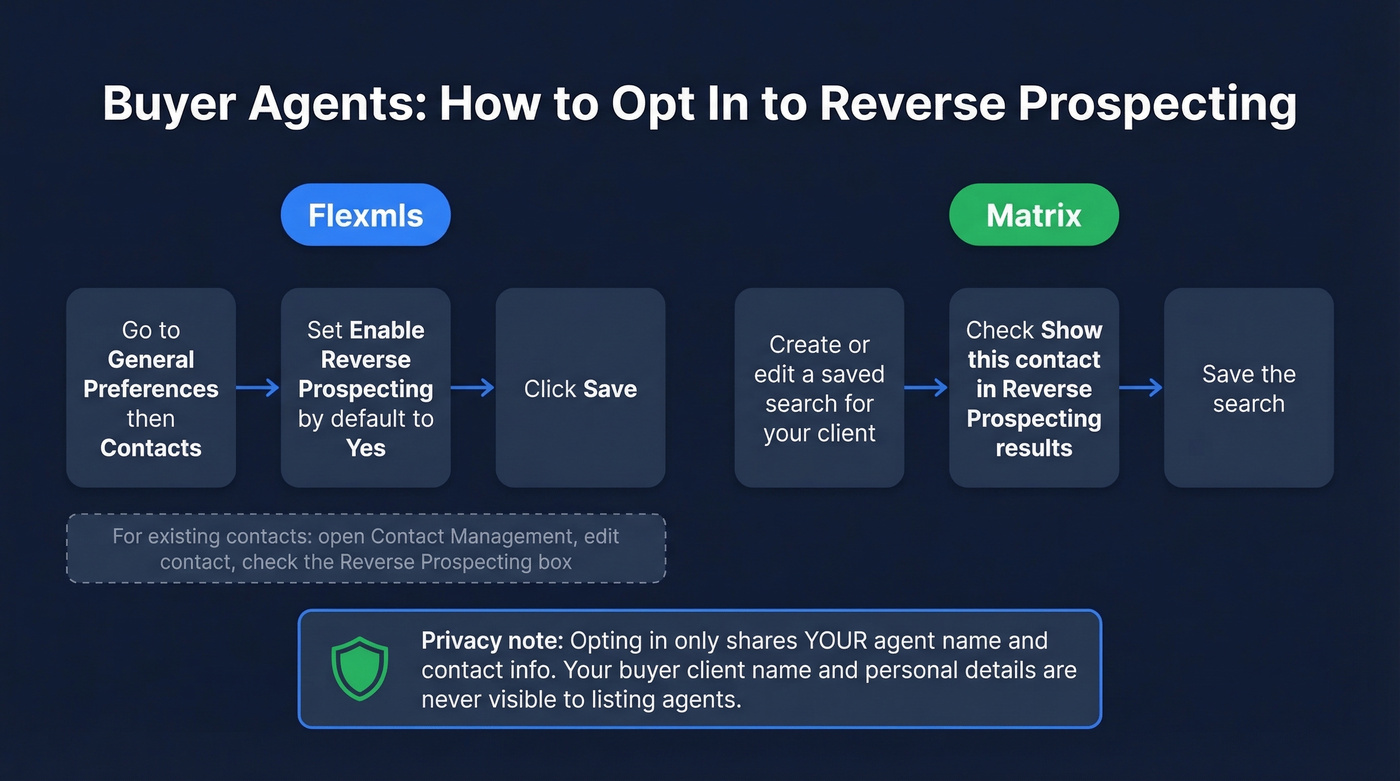
Flexmls setup: Go to General Preferences → Contacts → Enable Reverse Prospecting by default → Yes → Save. This ensures every new contact is automatically opted in. For existing contacts, open Contact Management, edit the contact, and check the Reverse Prospecting box. The default in Flexmls is "Yes" unless you've manually unchecked it, so most agents are already opted in without realizing it.
Matrix setup: Opt-in happens through Auto Email settings. When you create or edit a saved search for a client, make sure "Show this contact in Reverse Prospecting results" is checked.
The privacy reassurance you can give hesitant clients: enabling this doesn't send your client's information to other agents. Only your agent name and contact info appear. The client's name and personal information are never shared. You're making yourself findable, not your buyer.

Reverse prospecting shows you the agent - but reaching them fast is what wins the showing. Prospeo gives you 98% accurate emails and verified mobile numbers for 125M+ professionals, so you can skip the MLS message board and go direct.
Turn every MLS match into a real conversation before lunch.
Email Templates That Get Responses
Finding matches is the easy part. Getting buyer agents to actually respond requires a message that doesn't read like spam. If you want more variations, see these sales follow-up templates and email subject line examples.
Template 1 - Initial outreach:
Subject: Qualified Buyers Seeking Homes in [Neighborhood]?
Hi [Agent Name],
I just listed [address] - a [beds]/[baths] in [neighborhood] at [price]. Your client's saved search in our MLS matches this property.
The home features [1-2 standout details]. We're expecting strong interest in the first week.
Would your buyer like a private showing before the open house this weekend?
Best, [Your name + brokerage]
Template 2 - Follow-up (5-7 days later):
Subject: Re: [Address] - Still Available
Hi [Agent Name],
Following up on [address]. We've had [X] showings but no accepted offers yet. If your buyer is still actively searching in [area], I'd love to set up a showing this week.
Subject lines that work: "New Listing Matching Your Buyer's Search - [Neighborhood]" ... "Private Showing Invite: [Address]" ... "Your Client's Search + My New Listing."
Do: Personalize with the agent's name and specific listing details. Keep it under 150 words. Mention one or two concrete property features.
Don't: Share buyer details found through the MLS tool. Exaggerate demand. Send generic mass emails - agents can smell a mail merge from a mile away.
Zero Matches? Here's Why
A common question on agent forums: "I ran reverse prospecting and got nothing - is it broken?" Almost never. Here are the six causes, ranked by how often we see them:
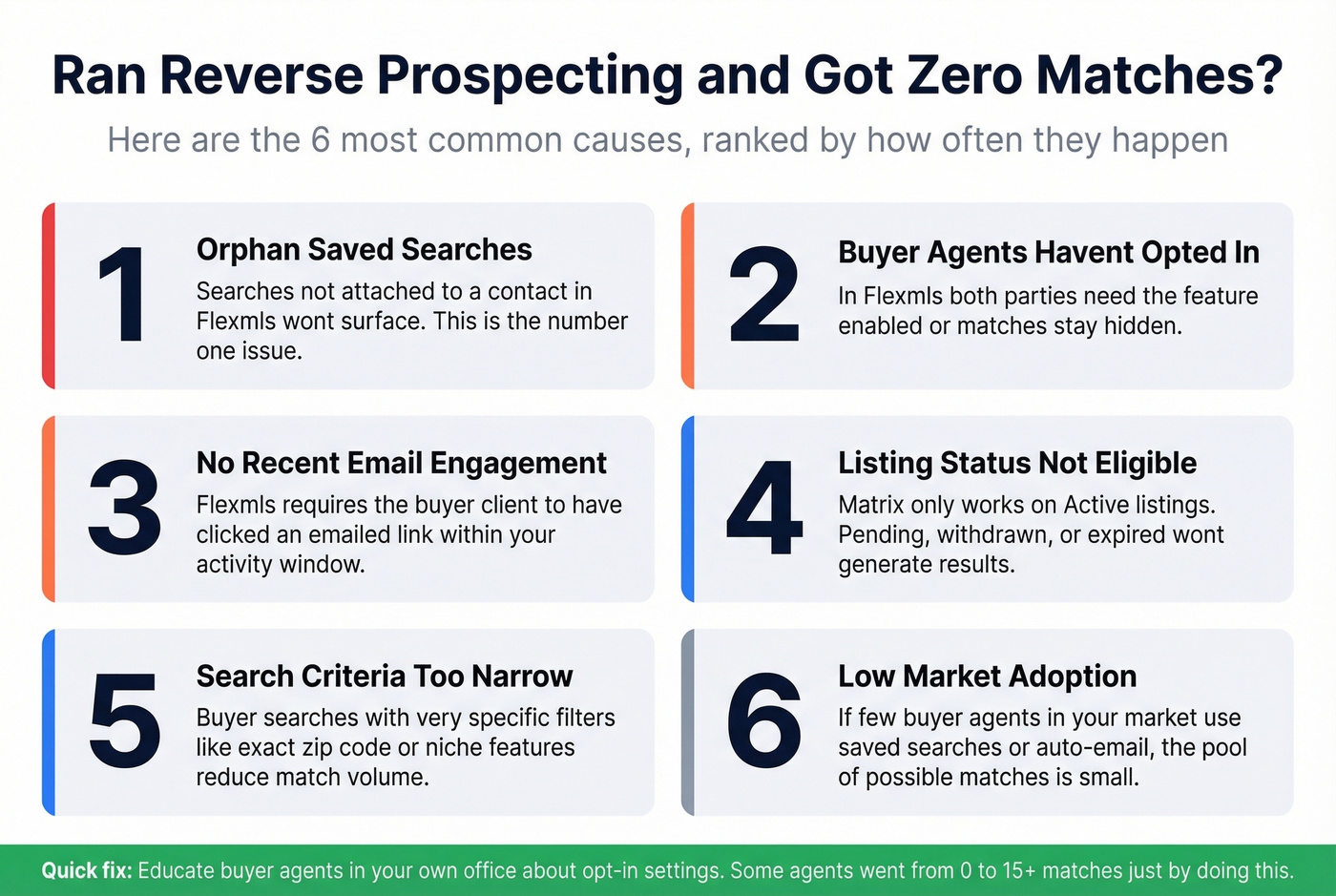
- Saved searches aren't attached to contacts. An orphan search sitting in an agent's account without a linked contact won't surface. This is the #1 Flexmls issue.
- Buyer agents haven't opted in. In Flexmls, both parties need the feature enabled.
- Contact hasn't engaged with Flexmls emails recently. If the buyer hasn't clicked a Flexmls emailed link within the past year, they're excluded.
- Search wasn't created or updated within the past year. Flexmls filters out stale searches.
- Listing isn't in Active status. Matrix only runs matching on Active listings.
- Listing is marked as hidden. If an agent has hidden a listing in Flexmls, their contacts won't appear.
The fix for most of these is education - not yours, but the buyer agents in your market. In our experience, the single highest-impact move is running a 10-minute training at your next office meeting on how to enable the feature and attach saved searches to contacts. The more agents who participate, the more useful the tool becomes for everyone.
Advanced Strategy: Win Listings With Buyer Demand
The MLS feature is powerful, but the strategic application is what wins listing appointments.
Picture this in a listing presentation: "I ran the data on your neighborhood. There are 47 active buyer searches matching your home's criteria right now - and I already know which agents represent those buyers. On day one, I'm reaching out directly to every one of them." That's not a pitch. That's proof of a system.
Here's a seller-facing email that puts this into practice:
Subject: Buyer Demand in [Neighborhood] - Quick Update
Hi [Homeowner Name],
I track buyer search activity in [neighborhood] weekly. Right now, there are [X] active buyer searches matching homes like yours - [beds] bed, [baths] bath, [price range]. That's up from [Y] last month.
If you've been thinking about timing, the demand data says now is strong. Happy to walk you through the numbers over coffee.
Beyond individual listings, this data reveals demand hotspots. If you're seeing 30+ saved searches for 3-bedroom homes in a neighborhood with only 4 active listings, that's a seller's market micro-pocket. Use that data in farming mailers, door-knocking scripts, and social media posts.
One practitioner example from LabCoat Agents illustrates the attraction angle: an agent posted "I have a buyer looking for X" and attracted 9 sellers - off-market and FSBO - who wanted to be considered. Another collected 53 sign-ups at a street fair, and 17 requested specific property information, a 32% conversion rate into warm leads.
In property management contexts, agencies using similar buyer-matching workflows report up to 40% faster time-to-lease rates compared to traditional methods.
Reverse prospecting isn't a feature you click once. It's a workflow you run on every listing, every week, feeding into your listing presentations, your farming strategy, and your agent network. The agents closing 20+ deals a year already know this. If you want to systematize the outreach side, borrow a few sales prospecting techniques and track it like sales activities.
Prospecting Beyond the MLS
You're already mining buyer-demand signals to win listings. Layer in Prospeo's 300M+ verified profiles and 30+ search filters to build targeted lists of FSBOs, expired-listing homeowners, and decision-makers - all with direct dials that pick up 30% of the time.
Stop paying $500/month for leads you can find in seconds.
FAQ
What is reverse prospecting in real estate?
It's an MLS feature that shows listing agents which buyer agents have clients with saved searches matching their listing. Buyer identity stays private - only the buyer's agent name and contact info are visible. Available in Matrix and Flexmls at no cost beyond MLS dues.
Does it work on all MLS platforms?
Most major platforms support it, including Matrix (Bright MLS, CRMLS, OneKey MLS) and Flexmls. RealScout offers a paid third-party workflow. Navigation paths vary by implementation, so check your MLS documentation for exact steps.
Why am I getting zero matches?
Usually a setup gap on the buyer agent side: searches not attached to contacts, opt-in not enabled, or inactive email engagement in Flexmls. Rarely a broken feature. See the troubleshooting section for all six causes ranked by frequency.
Can buyer agents see my client's information?
No. Only the buyer's agent name and contact details are revealed. Client names and personal information are never shared. This is consistent across Matrix, Flexmls, and RealScout.
What's a good tool for finding contacts outside the MLS?
Prospeo covers 300M+ professional profiles with 98% email accuracy and 75 free verified emails per month. It's useful for reaching FSBO owners, investors, and commercial contacts that MLS matching can't surface. Other options include RPR for property owner data and county tax records for direct-mail campaigns.