

Sales Cadences in Salesforce: What the Docs Don't Tell You
Your VP just told you to "set up cadences in Salesforce." You pulled up Trailhead, skimmed the docs, and now you've got more questions than when you started. What edition do you need? Is the $50/user/month add-on worth it, or should you just buy Outreach? And why does every guide on sales cadences in Salesforce skip the part where your emails bounce because half the contact data is stale?
Here's the practitioner version - real pricing math, cadence templates you can steal, the pitfalls Reddit warns about, and an honest comparison of native vs. third-party tools.
What you need (quick version): If you're on Sales Cloud Unlimited or Performance, try native cadences first - they're included. If you're on Enterprise or Professional, do the math: $225/user/month all-in vs. $100-150/user/month for Outreach or $75-125/user/month for Salesloft standalone. Regardless of tool, verify your contact data before loading a single prospect. A 12-step cadence built on bad emails is money on fire. For cadence design: 17-21 days, 8-12 touchpoints, 75-100 word emails.
How Sales Engagement Cadences Work
Sales cadences in Salesforce live inside Sales Engagement - the feature formerly known as High Velocity Sales.
You build a structured, multi-channel outreach sequence (email, call, SMS, custom steps) and assign prospects to it. Reps work through steps via the Work Queue, which surfaces the next action for each contact. In Cadence Builder 2.0, you can build with a three-track model - main, positive, and negative - so prospects branch based on engagement signals instead of marching through a single linear sequence. This gives ops teams granular control over every step and branch without writing code.
Edition availability matters. Sales Engagement is included with Sales Cloud Unlimited and Performance. For Professional and Enterprise, it's available as a $50/user/month add-on billed annually. That add-on includes cadences, Einstein Activity Capture, Work Queue, Prospecting Center, Quick Cadences, and Automated Actions. Sales Dialer is a separate SKU if you need native calling.
What It Actually Costs
The $50/user/month number is real, but it's not the whole story. You're paying for the Sales Cloud license underneath it.
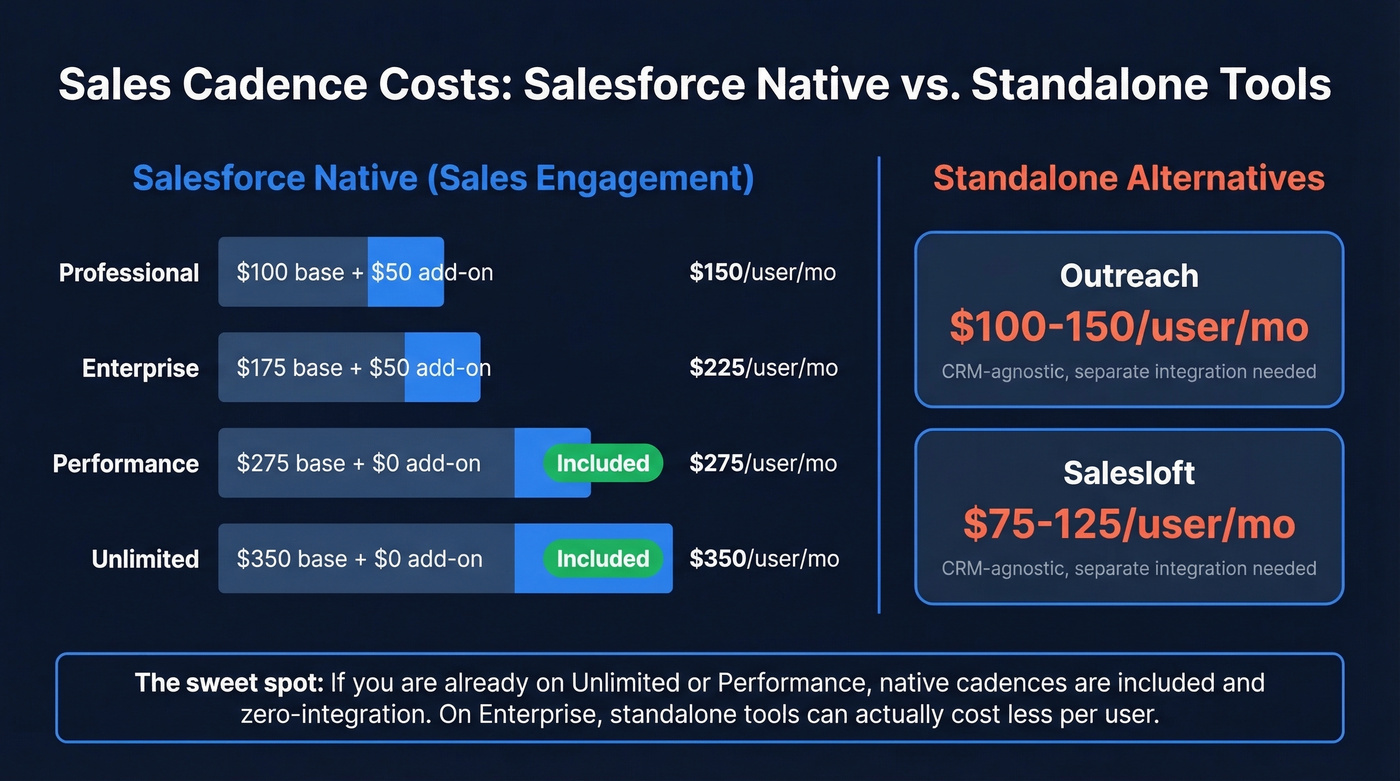
| Sales Cloud Edition | License Cost | + Sales Engagement | Total/User/Mo |
|---|---|---|---|
| Professional | $100 | $50 | $150 |
| Enterprise | $175 | $50 | $225 |
| Performance | $275 | Included | $275 |
| Unlimited | $350 | Included | $350 |
Ten reps on Enterprise with Sales Engagement: $225/user/month x 10 = $27,000/year.
That's before implementation. A typical range is $5K-$15K for a basic setup, $25K-$75K for mid-market orgs, and $75K-$300K+ for enterprise deployments with custom flows and integrations. Now compare that to standalone tools. Outreach typically runs $100-150/user/month. Salesloft sits around $75-125/user/month. Both require their own implementation effort, but neither forces you onto a specific CRM edition. For a team already on Enterprise, the native add-on can be more expensive per user than buying Outreach separately - a fact Salesforce's pricing page doesn't highlight.
The math flips if you're already on Unlimited or Performance. At that point, cadences are included and there's nothing to integrate. That's the sweet spot for native.
Designing a Cadence That Converts
Tool choice matters less than cadence design. Let's be blunt: the best cadence tool with bad messaging will lose to a mediocre tool with great messaging every time. We've seen teams on expensive platforms run terrible sequences, and scrappy teams on native Salesforce cadences outperform them because the structure was right.
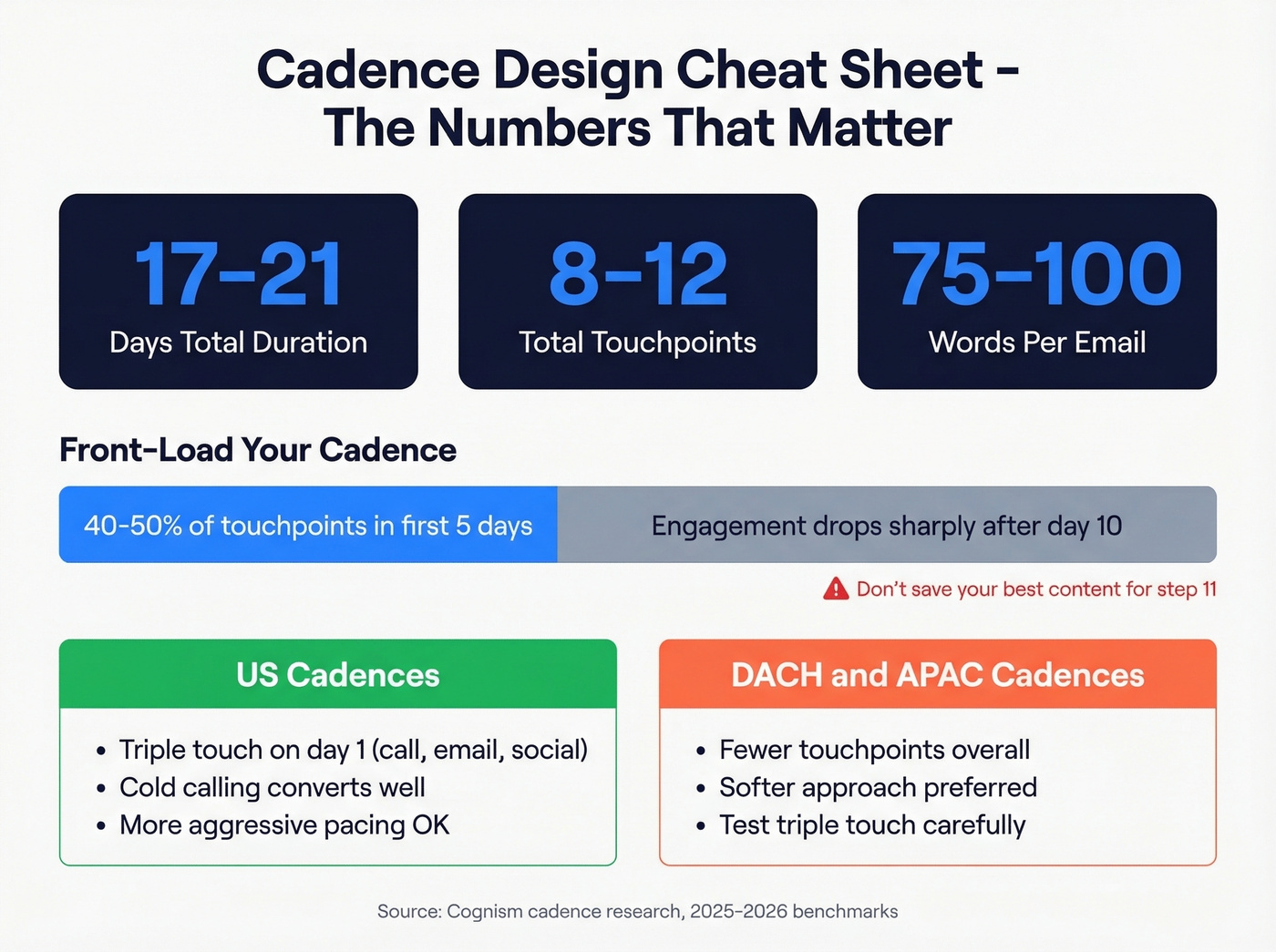
The benchmarks that matter: aim for 17-21 days total duration and 8-12 touchpoints. Keep emails between 75-100 words - anything longer and reply rates drop. Multi-channel isn't optional. Phone, email, social, and video each reach prospects in different contexts. Double down on whichever channel gets responses for your ICP.
Regional differences are real. Cold calling converts better in the US than in DACH or APAC, where fewer touchpoints and a softer approach tend to perform. If you're running global cadences from a single template, you're leaving meetings on the table. Build regional variants.
The "triple touch" approach - call, email, and social on the same day - works well for day one of a US-focused outbound cadence. It can feel aggressive in European markets though, so test it. Your data will tell you more than any benchmark.
One principle holds everywhere: front-load your cadence. The first 5 days should contain 40-50% of your total touchpoints. Engagement drops off sharply after day 10, so don't save your best content for step 11.
Three Cadence Templates You Can Steal
Before loading any list into these cadences, verify your emails. Skip this step and you'll end up with a 15% bounce rate on day one and a torched sender domain by day five.
Outbound Cold Prospecting
An 18-day, 9-touchpoint sequence for net-new outbound:
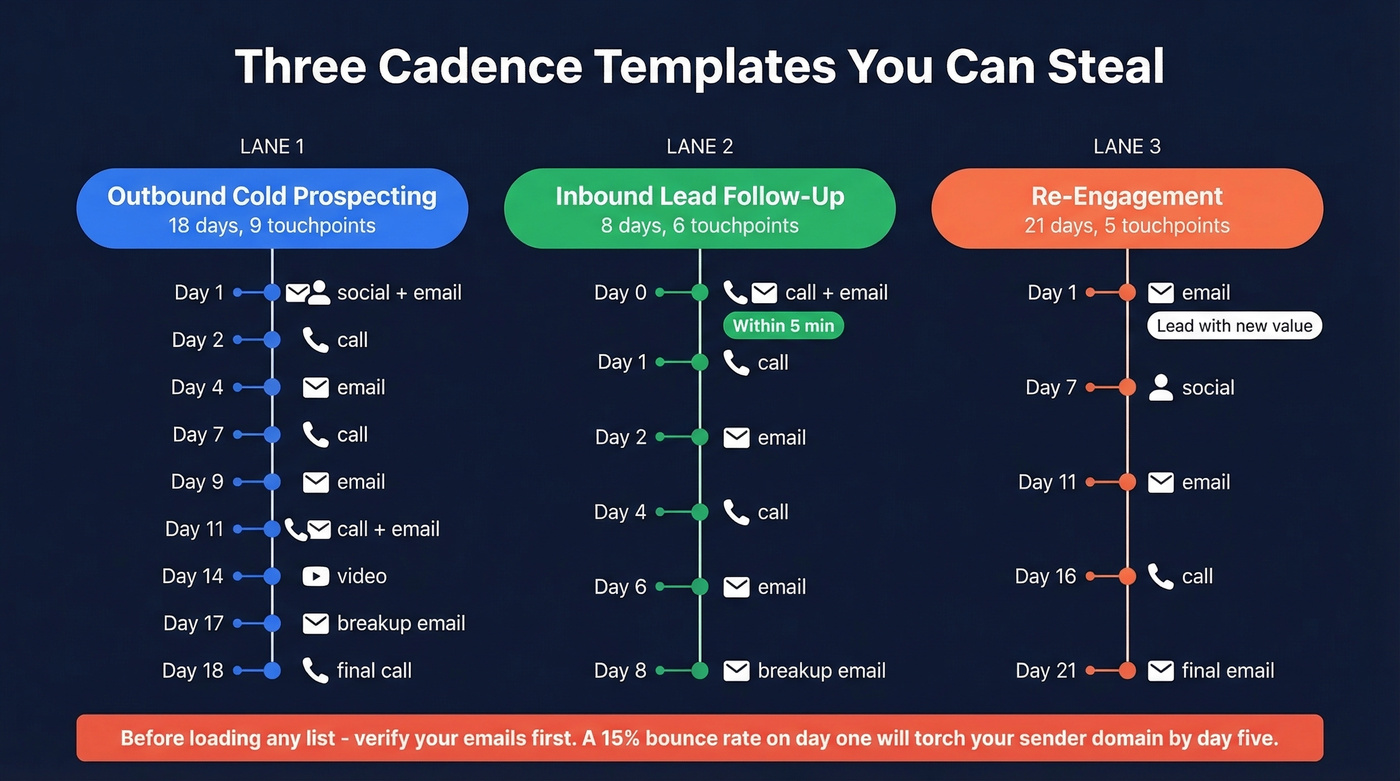
- Day 1: Social connect request + personalized email (pain-point hook)
- Day 2: Phone call + voicemail
- Day 4: Follow-up email (case study or proof point)
- Day 7: Phone call (no voicemail)
- Day 9: Email (different angle - industry insight)
- Day 11: Phone call + voicemail with email reference
- Day 14: Video message or social engagement
- Day 17: Breakup email (clear, no guilt trip)
- Day 18: Final phone call
Inbound Lead Follow-Up
A faster 8-day, 6-touchpoint sequence for leads who've already raised their hand:
- Day 0 (within 5 min): Phone call + personalized email referencing their action
- Day 1: Phone call + voicemail
- Day 2: Email (expand on their interest, add value)
- Day 4: Phone call
- Day 6: Email (social proof from similar company)
- Day 8: Breakup email with calendar link
Re-Engagement
A gentler 21-day, 5-touchpoint sequence for contacts who've gone cold. The key here is leading with new value, not "just checking in" energy.
- Day 1: Email (new value - industry report, product update, relevant news)
- Day 7: Social engagement (comment on their content)
- Day 11: Email (different stakeholder angle or use case)
- Day 16: Phone call + voicemail
- Day 21: Final email (direct ask or referral request)

You just read it: a 12-step cadence built on bad emails is money on fire. Prospeo's 5-step verification delivers 98% email accuracy with a 7-day data refresh - so the contacts you load into Salesforce Sales Engagement actually connect. At $0.01/email, verifying your entire cadence list costs less than one bounced sequence costs your domain reputation.
Verify your Salesforce contacts before your cadence torches your sender domain.
Setting Up Cadence Builder 2.0
Tracks, Entry, and Exit Rules
Cadence Builder 2.0's track model is the biggest upgrade from Classic for most teams. The main track is your default sequence. The positive track catches engaged prospects - replied, clicked, booked - and routes them to a different follow-up path. The negative track handles opt-outs, bounces, or disqualifications.
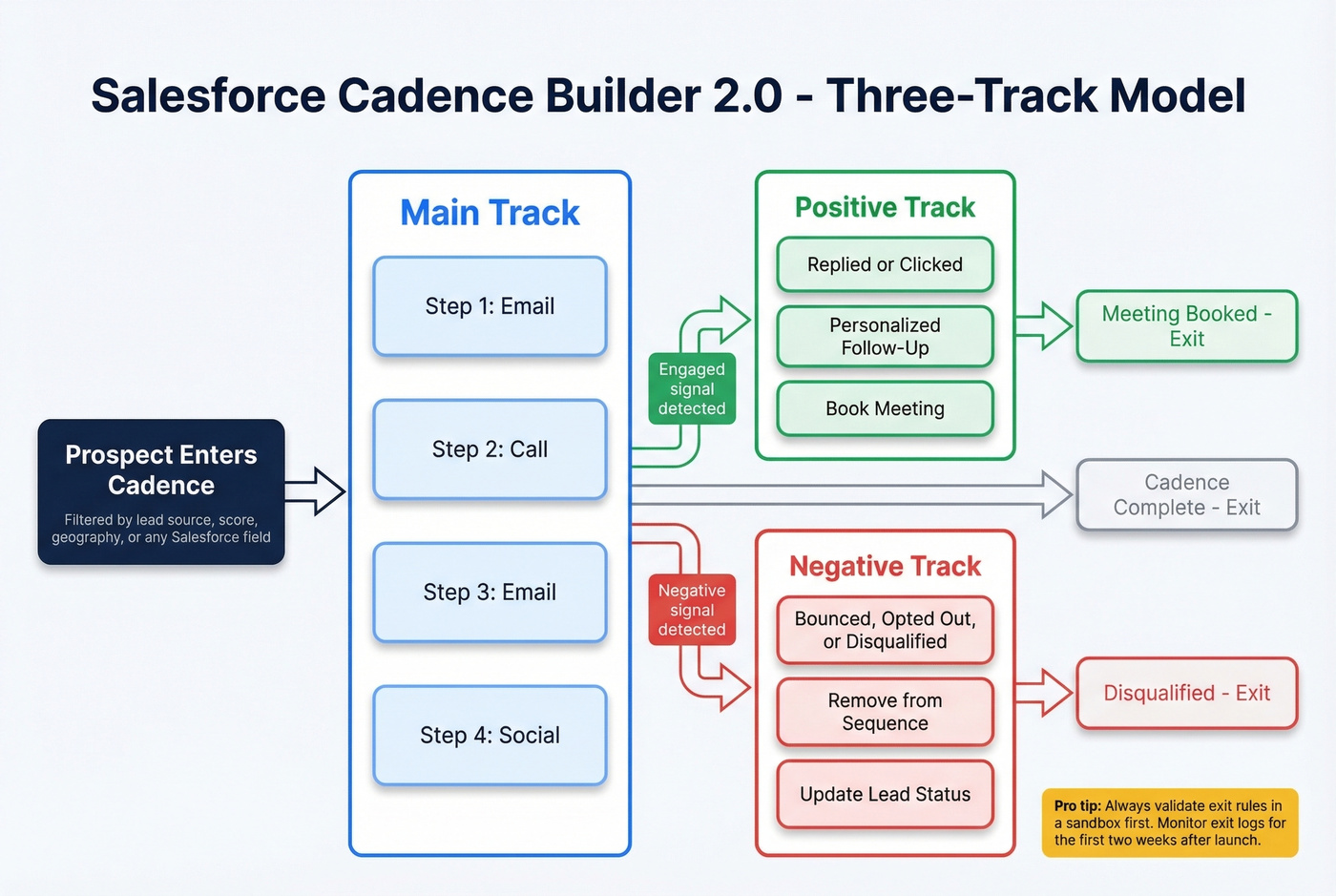
Entry criteria determine who gets added. You can filter by lead source, score, geography, or any Salesforce field. Exit rules are where things get tricky: a prospect who replies should exit the main track immediately. We've seen teams test this in production and regret it - always validate exit rules in a sandbox first, then monitor exit logs for the first two weeks after launch.
A/B Testing and Automation
Cadence Builder 2.0 supports up to three email template variants per step with configurable allocation percentages. You can run 50/25/25 splits or simple 50/50 tests on subject lines, CTAs, or email length.
Autolaunched flows fire after a rep completes a cadence step. Salesforce provides templates for updating lead status, creating tasks, and changing opportunity stages. You can also add screen flows as cadence steps - useful for guided data capture or qualification questions mid-sequence.
Quick Cadences and Governance
Quick Cadences let individual reps create lightweight sequences without full builder access. This is the right balance for most teams: Sales Ops owns the primary cadences, reps get flexibility for one-off follow-ups.
The SalesforceBen guidance is solid - start small. Roll out one or two cadences to a pilot group, measure for two weeks, then expand. Keeping cadence-building permissions tight prevents the "200 cadences, no governance" problem that plagues Outreach deployments too.
Tracking and Measuring Cadence Performance
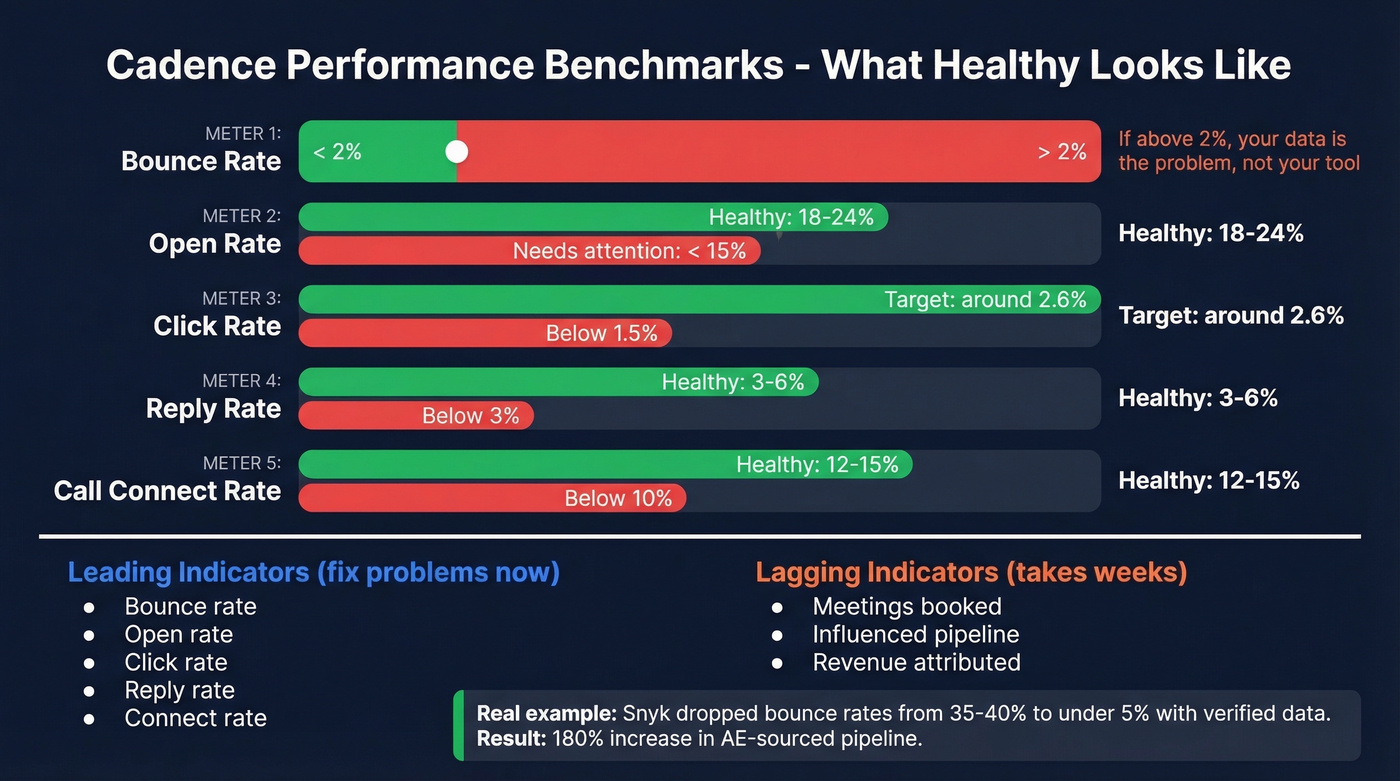
Here's the thing - most teams track open rates and call it a day. That's barely scratching the surface. These are the benchmarks that actually matter:
| Metric | Healthy | Needs Attention |
|---|---|---|
| Bounce rate | < 2% | > 2% |
| Open rate | 18-24% | < 15% |
| Click rate | ~2.6% | < 1.5% |
| Reply rate | 3-6% | < 3% |
| Call connect rate | 12-15% | < 10% |
Meetings booked and influenced pipeline are your lagging indicators - they tell you if the cadence is working, but they take weeks to materialize. The leading indicators above tell you if something's broken right now.
If your bounce rate is above 2%, your cadence tool isn't the problem - your data is. Snyk's sales team saw bounce rates drop from 35-40% to under 5% after switching to verified contact data, and their AE-sourced pipeline jumped 180%. Before loading contacts into any Salesforce cadence, run them through a verification tool like Prospeo, which verifies emails with 98% accuracy, catches catch-all domains, and refreshes data every 7 days versus the 6-week industry average. Free tier available, paid plans start around $0.01/email.

Salesforce's native cadence and lead outcome reports cover completion rates and disposition tracking. For deeper analytics - cohort analysis, step-level conversion, rep performance comparisons - you'll need custom reports or a tool like Outreach or Salesloft.
Running Salesforce cadences across US, DACH, and APAC? Prospeo gives you 125M+ verified mobile numbers with a 30% pickup rate globally - plus 300M+ profiles filterable by region, intent, technographics, and 30+ other criteria. Build region-specific cadence lists in minutes instead of hours, and actually reach the prospects your sequences target.
Build cadence-ready contact lists with direct dials across every region.
Native vs. Outreach vs. SalesLoft
This is the decision most Salesforce teams agonize over. Here's the honest breakdown.
| Feature | SF Native | Outreach | Salesloft | Winner |
|---|---|---|---|---|
| Multi-cadence/record | Limited in practice | Yes | Yes | Outreach/Salesloft |
| A/B testing | Up to 3 variants | Advanced | Advanced | Outreach (most flexible) |
| Analytics depth | Basic + custom | Deep | Deep | Salesloft (best out-of-box) |
| Pricing (per user/mo) | $50 add-on | ~$100-150 | ~$75-125 | SF Native (on Unlimited/Performance) |
| Integration effort | Zero (native) | Moderate | Moderate | SF Native |
| Sync reliability | Real-time | Can lag | Can lag | SF Native |
Our take: Most teams under 20 reps don't need Outreach or Salesloft. Native cadences on Unlimited/Performance cover 80% of use cases, and the integration headaches you avoid are worth more than the advanced features you think you need. The teams that genuinely need a third-party tool know it - they've already hit the one-cadence-per-record wall or need step-level conversion analytics that Salesforce can't deliver without custom work.
Native's biggest advantage is zero integration overhead. Data lives in Salesforce, inherits your security model, and updates in real time. No sync delays, no shadow CRM, no duplicate records from a bidirectional sync gone wrong.
Outreach and Salesloft win on sequencing maturity. Multi-cadence per record is a real workflow advantage - you can run a nurture sequence and an event invite simultaneously on the same contact. Their analytics are deeper out of the box, with step-level conversion tracking and rep benchmarking that Salesforce's native reports can't match without custom work. Revenue.io (~$75-150/user/month) is worth a look for call-heavy teams that want conversation intelligence layered into their engagement workflow.
The decision framework: On Unlimited/Performance already? Start native. Need multi-cadence flexibility or advanced analytics? Evaluate Outreach or Salesloft. Budget tight? Do the total cost math - sometimes the standalone tool is cheaper than the Salesforce edition upgrade.
Common Cadence Pitfalls
Exit Rules That Don't Fire
The #1 complaint on r/salesforce about native cadences: targets don't automatically exit after replying. One team stopped using cadences entirely because prospects kept getting follow-up emails after they'd already responded. That's a relationship-damaging bug when you're selling into enterprise accounts.
Fix it: Test every exit rule in a sandbox before going live. Monitor exit logs daily for the first two weeks. Build a flow-based safety net that checks for reply activity and removes contacts from active cadences independently of the native exit logic.
One Cadence Per Record
This is a common gotcha for teams coming from Salesloft-style workflows where multiple cadences can run at once. In many orgs, only one cadence can be active per record at a time - and that feels restrictive fast.
Workarounds exist. Sequential cadences with flow-based transitions work, as does adjusting your data model by standardizing on Contact as the parent record. But they add complexity. If parallel sequences are core to your workflow, validate this behavior in a sandbox early. If it's a hard blocker, that's a strong reason to choose a third-party tool.
Classic-to-2.0 Migration
Admins are seeing real pressure to move away from Cadence Builder Classic and standardize on 2.0 - and the migration makes people nervous. The perceived losses (connected cadences, disposition-based branching, screen flow integration) are mostly addressed in 2.0 through autolaunched flows and screen flow steps, but the implementation patterns are different.
Audit your existing cadences before migrating. Map each Classic feature to its 2.0 equivalent, and flag anything that doesn't have a clean path forward. Don't migrate and hope - migrate and validate.
FAQ
Is Sales Engagement included in Sales Cloud?
Sales Engagement is included with Sales Cloud Unlimited and Performance at no extra cost. For Professional and Enterprise, it's a $50/user/month add-on billed annually - covering cadences, Work Queue, Einstein Activity Capture, and Quick Cadences.
Can I run multiple cadences on the same contact?
In most Salesforce orgs, only one cadence can be active per record at a time. If you need parallel sequences on the same contact, Outreach and Salesloft both support multi-cadence enrollment natively.
What's a good reply rate for a sales cadence?
Outbound cadences should target 3-6% reply rates. Below 3% typically signals a messaging or targeting problem, not a tool problem. Check ICP fit, email copy, and subject lines before switching platforms.
How do I prevent cadence emails from bouncing?
Verify every contact before enrollment and keep bounce rates under 2%. Prospeo offers 98% email accuracy with catch-all detection and a 7-day refresh cycle - free tier included, paid plans at ~$0.01/email.
Should I use native Salesforce cadences or Outreach?
If you're on Sales Cloud Unlimited or Performance, start with native cadences - they're included and eliminate integration complexity. Evaluate Outreach if you need multi-cadence-per-record support, step-level analytics, or advanced multi-channel automation beyond what native delivers.