

Sales Call Reporting: How to Build a System Reps Actually Use
An AE on r/sales put it bluntly: he spends 1-2 hours every day manually entering call notes and updating deal stages in Salesforce, and it "ruins his evening." Over on r/mondaydotcom, a field rep records calls with PLAUD Note in the car, gets a decent transcript, then still has to manually copy everything into Monday.com. The transcription works. The last mile - getting structured intel into the system of record - doesn't.
That gap is where most sales call reporting systems die.
Short on Time? Fix These Three Things This Week
- Pick a template by call type. A cold call report and a discovery call report need different fields. One generic form guarantees reps skip it. Templates for five common scenarios are below.
- Automate transcription for under ~$20/user/mo. Fireflies.ai Pro runs $19/user/month and has a free tier. Fathom starts at $19/user/month. Either one kills the manual note-taking that eats hours.
- Run one 10-minute coaching debrief per week. Not a pipeline review - a single-call teardown using the framework in the coaching section. This is what makes reps care about reports, because the reports start helping them.
Why Structured Call Reports Drive Revenue
70% of sales leaders say the majority of their pipeline comes from the phone. That's not a legacy channel. It's still the primary revenue driver for most B2B teams. Meanwhile, average quota attainment sits around 43%, with up to 70% of reps missing their number entirely, and the average B2B win rate hovers around 20-21%.
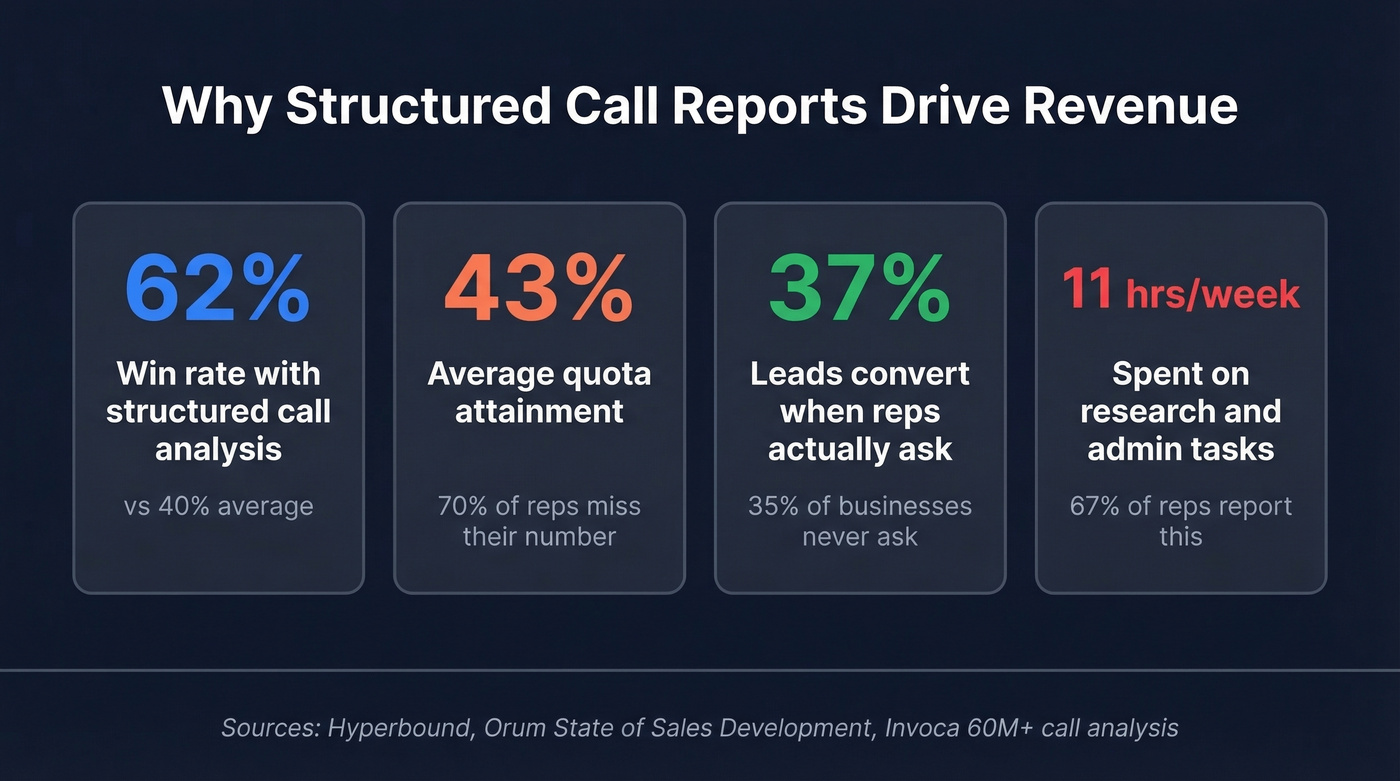
The gap between "we make calls" and "we learn from calls" is enormous. Teams using structured call analysis hit a 62% win rate versus the 40% average. That's not marginal - it's the difference between a team that hits plan and one that doesn't.
Invoca's analysis of 60+ million phone calls across nine industries found that 61% of callers actually reach a person, but 35% of businesses never ask those callers to buy or book an appointment. When they do ask, 37% of leads convert on the call. The data is sitting right there. Most teams just aren't capturing it in a structured way.
Here's the stat that should make every sales manager wince: 67% of reps spend at least 11 hours per week on research and follow-up tasks. That's a quarter of their selling time burned on admin. If you're not documenting what happens on calls in a way that feeds coaching and forecasting automatically, you're paying reps to be data clerks.
What to Include in a Call Report
The mistake most teams make is either capturing too little (a disposition code and a one-line note) or too much (a 15-field form that reps abandon by week two). Here's the middle ground - every field earns its spot.
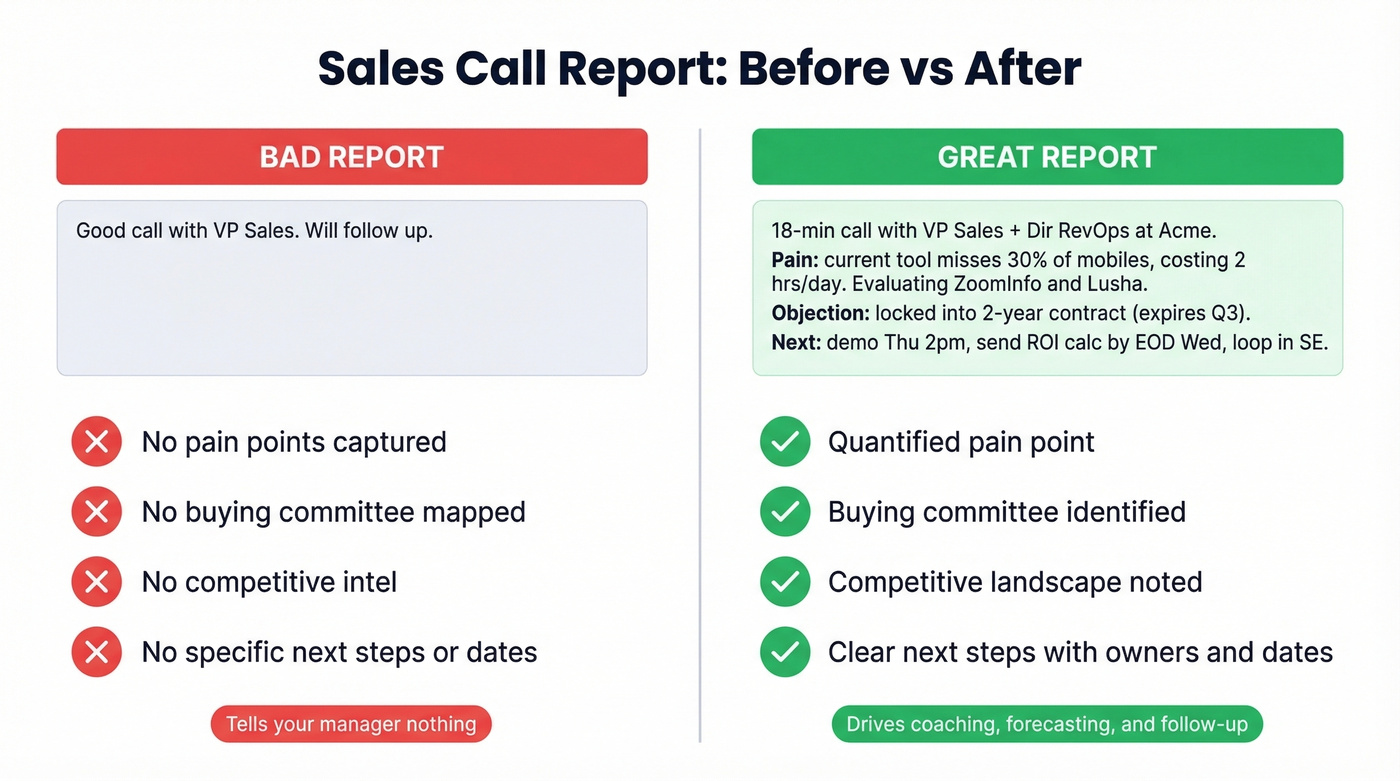
Before: "Good call with VP Sales. Will follow up." - This tells your manager nothing, your replacement nothing, and future-you nothing.
After: "18-min call with VP Sales + Dir RevOps at Acme. Primary pain: current tool misses 30% of mobiles, costing 2 hrs/day in manual research. Evaluating ZoomInfo alternatives and Lusha. Objection: locked into 2-year contract (expires Q3). Next: demo Thu 2pm, send ROI calc by EOD Wed, loop in SE for technical deep-dive. Added CFO to opp - budget approval required above $40k."
| Field | Why It Matters | Example |
|---|---|---|
| Date / time / duration | Patterns in timing and call length correlate with outcomes | Tue 2:15pm, 18 min |
| Participants | Maps the buying committee | VP Sales + Dir RevOps |
| Key discussion points | Captures pain, priorities, and objections | "Current tool misses 30% of mobiles" |
| Objections raised | Feeds coaching and battlecard updates | "We're locked into a 2-year contract" |
| Competitive intel | Tracks who you're displacing | Evaluating ZoomInfo and Lusha |
| Outcome + next steps | Drives follow-up accountability | Demo scheduled Thu, send ROI calc |
| Buying committee contacts | Enables multi-threading | Added CFO and IT lead to opp |
| Follow-up items | Prevents dropped balls | Send case study, loop in SE |
That buying committee field matters more than most teams realize. analysis of 1.8 million opportunities shows closed-won deals have roughly 2x as many buyer contacts as lost deals. For deals over $50k, multi-threading boosts win rates by 130%. If your call report doesn't capture who else needs to be in the conversation, you're leaving that insight on the table.
Templates by Call Type
One template doesn't fit all calls. Here are five scenario-specific templates - each tailored to what actually matters for that call type. Adopting templates like these is one of the most impactful reporting best practices because it reduces friction for reps while improving data quality for managers.
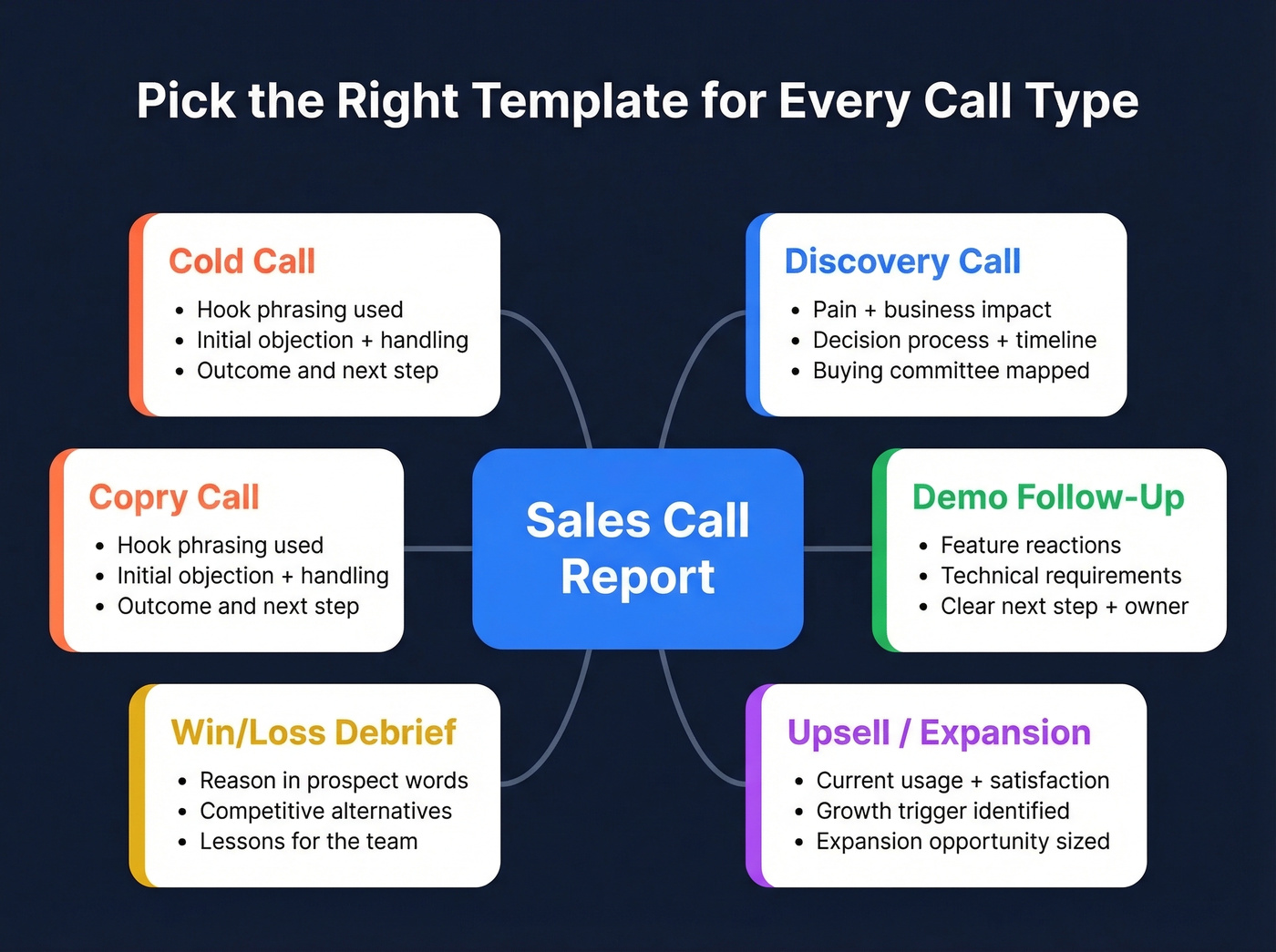
Cold Call Report
The hook field below is the one most teams skip. It's also the most valuable for coaching - knowing which opening lines get past the first 15 seconds is gold for the whole team.
- Hook phrasing used (exact words that got the prospect talking)
- Initial objection + how you handled it
- Pain point or trigger identified
- Outcome (callback scheduled, demo booked, dead end)
- Next step with specific date/time
Discovery Call Report
| Framework Field | What to Capture | Signal It Gives |
|---|---|---|
| Primary pain + business impact | Quantified if possible | Deal size indicator |
| Decision process + timeline | Who signs, by when | Forecast accuracy |
| Budget range discussed | Even a ballpark | Qualification gate |
| Buying committee identified | Names + roles | Multi-threading fuel |
| Competitive landscape | Who else they're evaluating | Positioning intel |
| Agreed next steps | Owners + deadlines | Pipeline velocity |
Demo Follow-Up Report
After the demo, your report should answer one question: did this move the deal forward, and what's blocking the next step?
Capture features demonstrated and the prospect's reaction to each, any technical requirements or integration questions that surfaced, which stakeholders need a second look, whether pricing was discussed, and what deliverables you owe - proposal, security questionnaire, reference call. If you walked out of the demo without a clear next step and owner, flag that in the report. It's the single biggest predictor of a stalled deal.
Upsell / Expansion Report
- Current product usage and satisfaction level
- New pain point or growth trigger
- Expansion opportunity (seats, modules, use cases)
- Internal champion and their influence level
- Competitive threat (evaluating alternatives?)
- Proposed next step and timeline
Win/Loss Debrief
This is the template that pays dividends across the entire team, not just the rep who ran the deal. Win/loss data also feeds your campaign performance dashboard, revealing which outreach sequences and messaging angles actually close deals.
- Primary reason for win or loss - in the prospect's words, not yours
- Competitive alternatives evaluated - who else was in the running
- Decision criteria ranking - price, features, support, speed
- What the rep would do differently - honest self-assessment
- Lessons for the team - patterns, objections, positioning insights worth sharing
Why Call Reporting Systems Fail
Six failure modes kill reporting systems. We've seen every one of these in production.
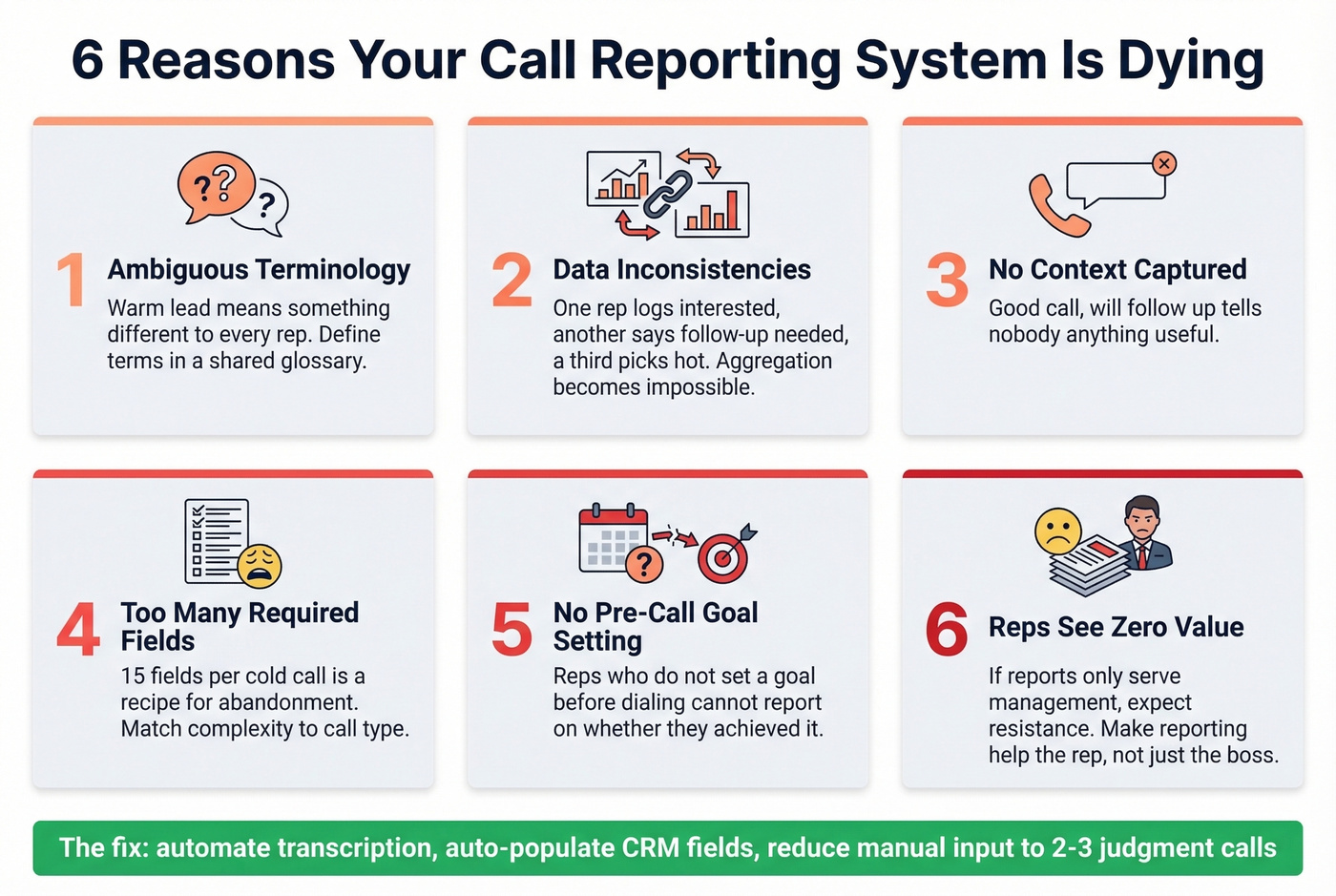
Ambiguous terminology is the silent killer. If "warm lead" means something different to every rep, your reports are noise. Define your terms in a shared glossary and enforce it. This pairs with data inconsistencies - one rep logs outcomes as "interested," another uses "follow-up needed," a third picks "hot." Without standardized entry protocols, aggregating reports is impossible.
Then there's the context problem. A report that says "good call, will follow up" is worthless. Reports need the why - what was discussed, what the prospect cares about, what happens next. Flip side: fifteen required fields per cold call is a recipe for abandonment. Match template complexity to call type. A cold call needs 5-6 fields. A discovery call needs more.
The two failure modes that matter most are upstream. Reps who don't set a goal before dialing can't meaningfully report on whether they achieved it - the report starts before the call. And the one that dooms most systems? Reps don't see value in reports. A HubSpot ops person on Reddit described the core problem: the team "doesn't see value in reports." If reports only serve management, expect resistance.
Let's be honest: you're not going to make reps love reporting. Make it invisible instead. Automate transcription, auto-populate CRM fields, and reduce manual input to the 2-3 fields that require human judgment.

Your call reports keep surfacing the same objection: "current tool misses 30% of mobiles." Prospeo delivers 125M+ verified mobile numbers with a 30% pickup rate - 3x higher than ZoomInfo. At $0.01 per email and 98% accuracy, reps spend time selling, not researching.
Stop logging bad data. Start logging closed deals.
Coaching That Makes Reports Worth Writing
The coaching session is where call reports become valuable to reps - not just to managers. Without it, reports feel like surveillance. With it, they're a performance tool.
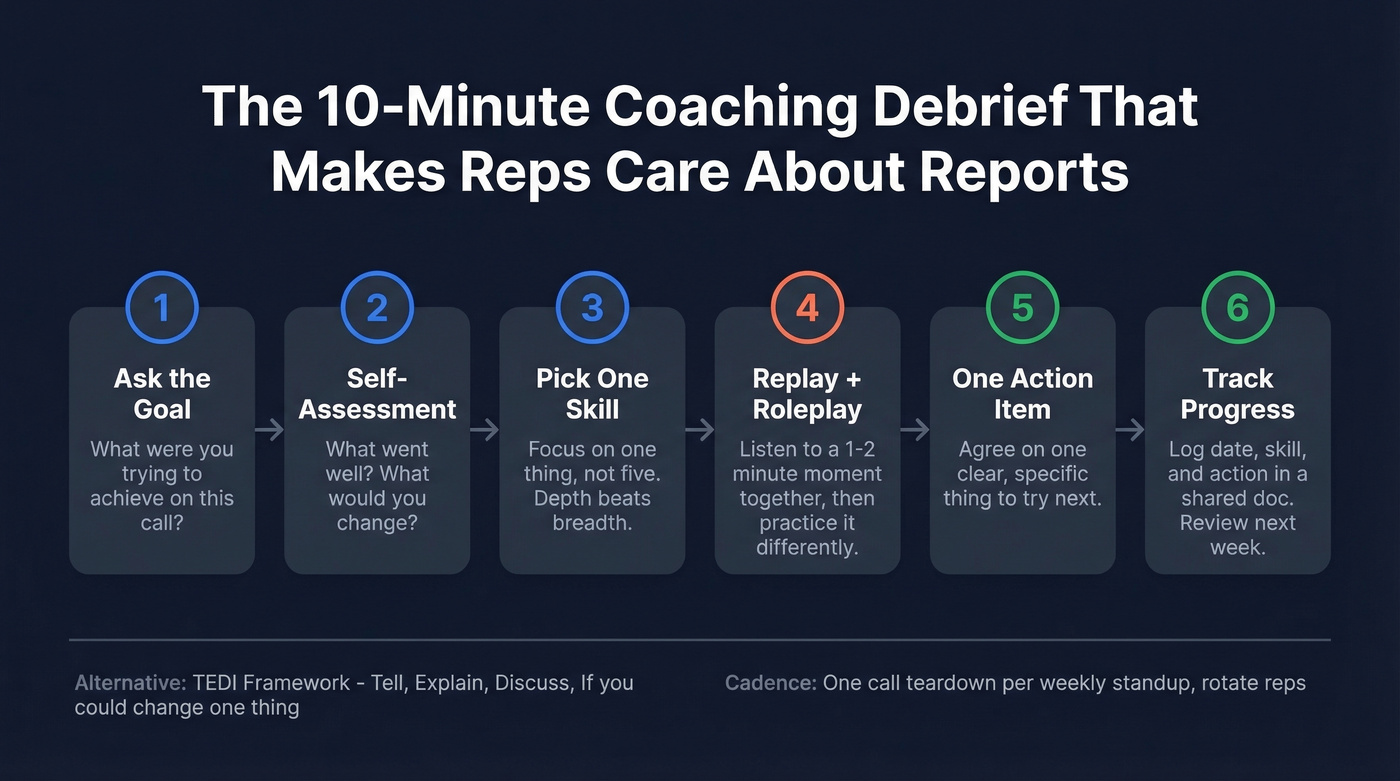
Rosa Yupari's 10-minute coaching framework is the most practical structure we've found:
- Ask the rep what their goal was for the call
- Have them self-assess - what went well, what would they change?
- Focus on one skill (not five)
- Replay a 1-2 minute moment from the recording and roleplay it
- Agree on one clear action item
- Track progress (date, skill, action) in a shared doc
The TEDI framework works as an alternative for reps who resist structured coaching: Tell me what's going on -> Explain what you've tried -> Discuss the customer's view -> If you could change one thing, what would it be?
For the manager's prep, Force Management recommends evaluating specific dimensions: speaking-to-listening ratio, whether the rep asked open-ended discovery questions, whether they identified the prospect's biggest business problems before jumping to solutions, and whether they adjusted their message to the buying audience.
Orum's recommended cadence: dedicate time in weekly standups to review one call as a team, first thing in the morning to prime reps for their calling block. One call, ten minutes, every week. That's the minimum viable coaching rhythm.
Tools for Automated Call Reporting
Here's the thing: if your deal sizes are under $25k, you almost certainly don't need Gong. A 10-seat Gong deployment runs roughly $28,500 in year one when you factor in the platform fee, per-user licenses, and onboarding. That's $238/user/month before you've sent a single sequence. Fireflies or Fathom get you 80% of the value at 10% of the cost.
| Tool | Category | Starting Price | Best For |
|---|---|---|---|
| Gong | Conversation Intelligence | ~$160-250/user/mo + platform fee | Enterprise teams, 50+ reps |
| Chorus | Conversation Intelligence | ~$40/user/mo (requires ZoomInfo) | ZoomInfo shops wanting CI |
| Fireflies.ai | Lightweight Transcription | $19/user/mo (free tier available) | SMB teams, budget-conscious |
| Fathom | Lightweight Transcription | $19/user/mo | Solo reps and small teams |
| Otter.ai | Lightweight Transcription | $8-20/user/mo | Meeting notes, not sales-specific |
| Avoma | Mid-Tier CI | ~$49-79/user/mo | Teams wanting CI without Gong pricing |
| Dialpad | AI Dialer | $15-150/user/mo | Dialer + AI in one platform |
| Aircall | AI Dialer | $30/user/mo | Call center and SDR teams |
| JustCall | AI Dialer | $19-49/user/mo | SMB outbound teams |
Skip Gong if you're a team of 10 or fewer with average deal sizes under $25k. The ROI math doesn't work. Start with Fireflies or Fathom, and upgrade only when you've outgrown their analytics.
The tool matters less than the workflow. Pick a transcription tool that auto-syncs to your CRM, pair it with a template that matches your call types, and run a weekly coaching session. That stack - transcription + template + coaching - is what separates teams that improve from teams that just document.
Fix the Data Before the Reports
Your call reports are only as good as your call list. If 30-40% of dials go to dead numbers or wrong contacts, your reports are documenting failure, not intelligence.
This is the upstream problem nobody talks about in call reporting guides, and it's the one that matters most. We ran into this ourselves when testing outbound workflows - reps were spending half their calling block on voicemails and disconnects, then dutifully logging "no answer" into the CRM. The reports looked complete. They were completely useless.
Prospeo addresses this at the source: 125M+ verified mobile numbers with a 30% pickup rate and a 98% email accuracy rate mean reps start every calling block with numbers that actually connect. Because data refreshes every 7 days versus the 6-week industry norm, the list doesn't decay between campaigns.

Better data upstream means every call report captures a real conversation, not a "number disconnected" disposition. That's the foundation everything else - coaching, forecasting, pipeline accuracy - depends on.
Multi-threading boosts win rates by 130%, but only if your call reports capture the right contacts with real data. Prospeo's 300M+ profiles and 30+ filters - including buyer intent and department headcount - map the full buying committee before the next call.
Fill every buying committee field with verified contacts in seconds.
Call Recording Compliance
Before you record a single call, know the rules. Federal law (ECPA) permits one-party consent - meaning you can record if you're a participant. But 12 states require all-party consent, and if you're calling across state lines, the stricter law applies.
All-party consent states (12): California, Connecticut, Delaware, Florida, Illinois, Maryland, Massachusetts, Montana, Nevada, New Hampshire, Pennsylvania, Washington. Some states like Nevada have nuances around specific recording contexts - when in doubt, disclose.
The penalties aren't theoretical. In California, violations carry fines up to $5,000 or triple damages. In Florida, illegal recording is a third-degree felony - up to 5 years in prison.
The fix is simple: always disclose, regardless of state. Use this script at the top of every call:
"Just so you know, this call is being recorded for quality purposes - is that okay?"
If the prospect continues the conversation after disclosure, that's generally treated as implied consent. It takes three seconds and dramatically reduces legal risk. Build the disclosure into your dialer's call script or your opening talk track so reps never have to think about it.
Keeping Your Reporting System Alive
Even the best reporting system degrades without maintenance. Here are the practices that keep data clean and reps engaged over time.
Audit a random sample of 10 call reports each week. Look for missing fields, vague notes, and inconsistent terminology - then address patterns in your team standup, not in one-on-ones where it feels punitive.
Tie reporting data directly to your campaign dashboard so managers can see how individual call outcomes roll up into campaign-level metrics like connect rate, meeting-set rate, and pipeline generated. When reps see their call reports feeding a number the VP of Sales actually references in board meetings, compliance goes up on its own.
Revisit your templates quarterly. As your product, market, or ICP shifts, the fields that matter change too. A template that was perfect six months ago might be capturing stale data today. And celebrate reps who write great call reports - sharing a well-documented call in Slack takes 30 seconds and signals to the team that reporting quality matters, not just volume.
If you want a lightweight starting point, use a call scorecard alongside your template so coaching stays consistent.
FAQ
How long should a call report take?
With AI transcription, under 2 minutes per call. The tool handles the transcript and summary; the rep adds 2-3 judgment fields (outcome, next steps, objections). Without automation, reps report 5-15 minutes per call. If it's taking longer, your template has too many fields - cut until it doesn't.
What's the difference between call logging and call reporting?
Logging records that a call happened - timestamp, duration, disposition code. Reporting captures what was discussed, what it means for the deal, and what happens next. Most CRMs default to logging. You need to build the reporting layer yourself or add a transcription tool like Fireflies or Fathom.
Do I need conversation intelligence software?
Spreadsheets work for teams under 5 reps making fewer than 20 calls a day. Beyond that, a transcription tool at $19/mo pays for itself in time saved within the first week. You don't need Gong-level analytics unless you're running 50+ reps and need cross-team pattern analysis.
How do I get reps to actually fill out reports?
Make reports useful to them, not just to management. When reports feed coaching sessions that improve close rates, compliance follows naturally. Automate everything you can - transcription, CRM sync, disposition codes - and reduce manual input to the fields that require human judgment. Clean upstream data helps too: reps are far more willing to document calls that reached a real decision-maker versus logging another disconnected number.