

How to Build a Sales Pitch PowerPoint That Actually Closes Deals
A SaaS founder we like to reference ran 47 demos in a single quarter using a 34-slide deck stuffed with feature comparisons, architecture diagrams, and a timeline nobody asked for. Three closes. They rebuilt the whole thing - stripped it to the bones, led with the buyer's problem instead of their own product - and the next quarter closed 9 out of 23 demos. Same product, same price, same rep. Different deck.
That's not an outlier. Sales reps spend roughly 30 hours per month creating or hunting for presentation content, and most of that time produces sales pitch PowerPoint decks that actively hurt their close rate. The fix isn't a prettier template. It's a sharper structure.
Quick Version
- 7-12 slides max. Anything longer and you're presenting for yourself, not the buyer.
- Follow this arc: Problem, Cost of Inaction, Solution, Proof, Pricing, Next Steps.
- One message per slide. If you need a second point, make a second slide.
- Personalize the problem and proof for every prospect. Generic decks get generic results.
- Start with a free template from Canva or Slidesgo, then customize ruthlessly.
- Verify your prospect's contact data before you pitch so your follow-up actually lands.
What a Sales Deck Actually Is
A sales presentation isn't an investor pitch deck, and it's not a cold-call script stretched across slides. Investor decks focus on TAM, financials, and team credibility - they exist to raise money. A sales deck exists to close a deal with a buyer who has a specific problem you can solve.
Think of it as the deepest, most conversion-critical format in your sales toolkit. It sits later in the funnel than a cold email or elevator pitch. By the time someone's watching your deck, they've already agreed to give you 15-30 minutes. That's a gift. The deck's job is to make those minutes count by walking the buyer through a narrative that ends with "yes, let's move forward."
The Slide-by-Slide Blueprint
Most sales decks fail because they don't have a narrative arc. They're feature catalogs with a logo on slide one and "Questions?" on slide twelve. The structure below is built from what we've seen work across hundreds of B2B deals - and it aligns with frameworks from Highspot and other sales enablement leaders.
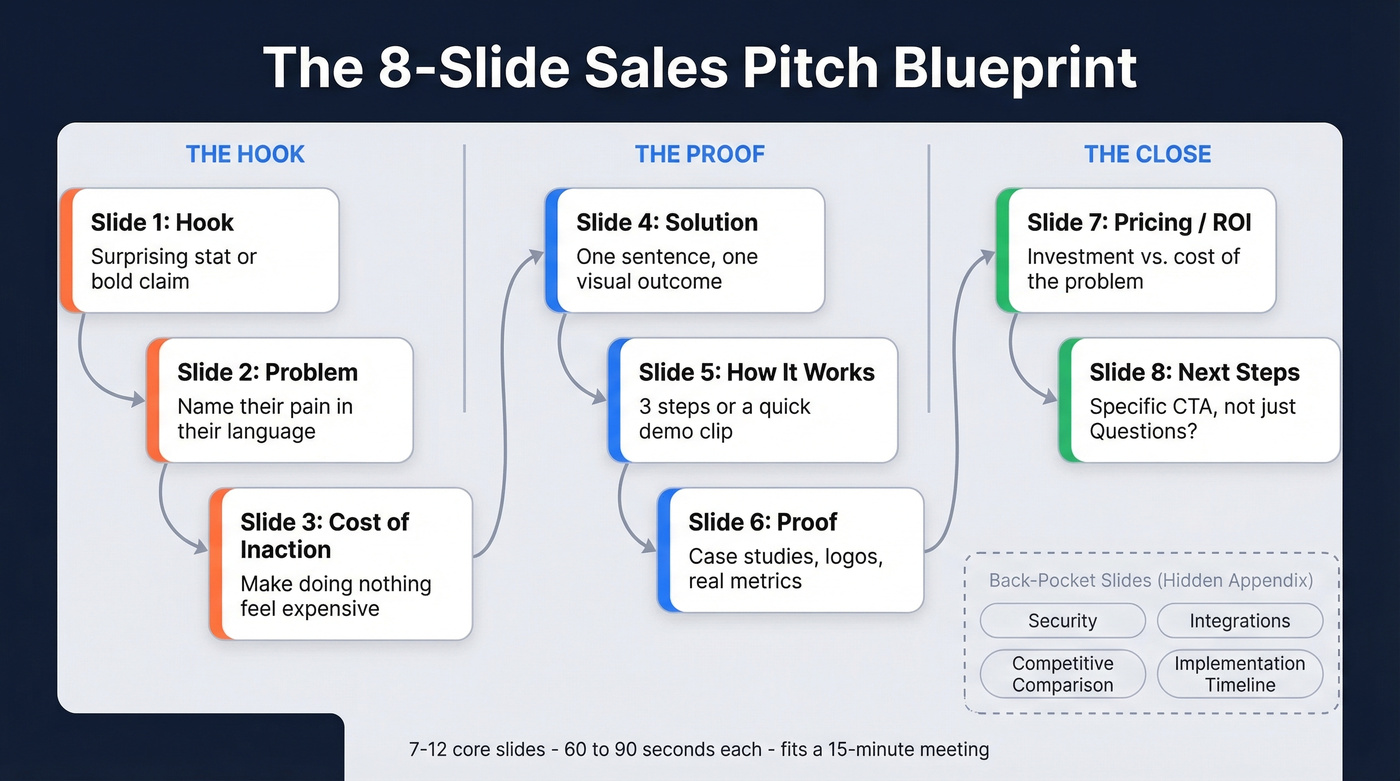
Your first three slides are everything. If those three are strong, 80% of your audience stays engaged. Lose them there, and no amount of product screenshots on slide nine will bring them back.
Slides 1-3: Hook, Problem, Cost
Slide 1 - Hook. Don't waste this on your logo and a tagline. Open with a surprising stat, a bold claim, or a question that makes the buyer lean in. "Your sales team loses 14 hours a week to manual data entry" hits harder than "Welcome to Acme Corp."
Here's a fill-in-the-blank you can steal for slide one:
"[Prospect's industry] teams lose [specific metric] every [time period] to [problem you solve]. Here's how [number] companies fixed it."
Slide 2 - Problem. Name the buyer's pain in their language, not yours. Use data to validate it. This slide should make them nod and think "yeah, that's exactly what's happening."
Slide 3 - Cost of Inaction. This is the slide most decks skip, and it's the one that creates urgency. Quantify what the problem costs them - in revenue, time, or competitive position. "Doing nothing" should feel expensive.
Slides 4-6: Solution, Demo, Proof
Slide 4 - Solution. Now - and only now - introduce your product. One sentence on what it does, one visual showing the outcome. Don't overwhelm with features.
Slide 5 - How It Works. Three steps, a quick diagram, or a 30-second demo clip. The buyer needs to believe this is implementable, not just theoretically impressive.
Slide 6 - Proof. Case studies, logos, metrics. Numbers over adjectives, always. Presentations with strong visuals are 43% more persuasive than text-heavy ones, so let the proof breathe on the slide.
Slides 7-8: Pricing and Next Steps
Slide 7 - Pricing / ROI. Show the investment alongside the return. If you can frame pricing as "this costs X, but the problem costs you 5X per quarter," you've already won the value argument.
Slide 8 - Next Steps. Not "Questions?" - that's passive. Give a specific CTA: "Let's schedule a 30-minute technical review with your team on Thursday." Specificity signals confidence.
Back-Pocket Slides
Build 3-5 hidden slides you can pull up when objections surface: security and compliance details, integration architecture, competitive comparison, implementation timeline. These live in the appendix. You don't present them unless asked - but having them ready makes you look prepared, not scripted.
How Many Slides You Actually Need
One founder on r/Entrepreneurs put it bluntly: "The long deck was for us, not them." They cut from 40 slides to 6 and saw a 35% improvement in close rate. Visme recommends 8-13 slides as a baseline.
Our guidance: 7-12 core slides, plus back-pocket slides hidden in the appendix. Pace yourself at roughly 60-90 seconds per core slide - faster for your hook, slower for proof and pricing. A 10-slide deck at that pace fits perfectly into a 15-minute window, leaving time for conversation.
Conversation is where deals actually close.
7 Mistakes That Kill Sales Decks
A reviewer on r/Entrepreneur analyzed 82 pitch decks over four months. While those were investor decks, the structural mistakes are identical to what kills sales presentations. Nine out of ten decks made at least three of these errors.
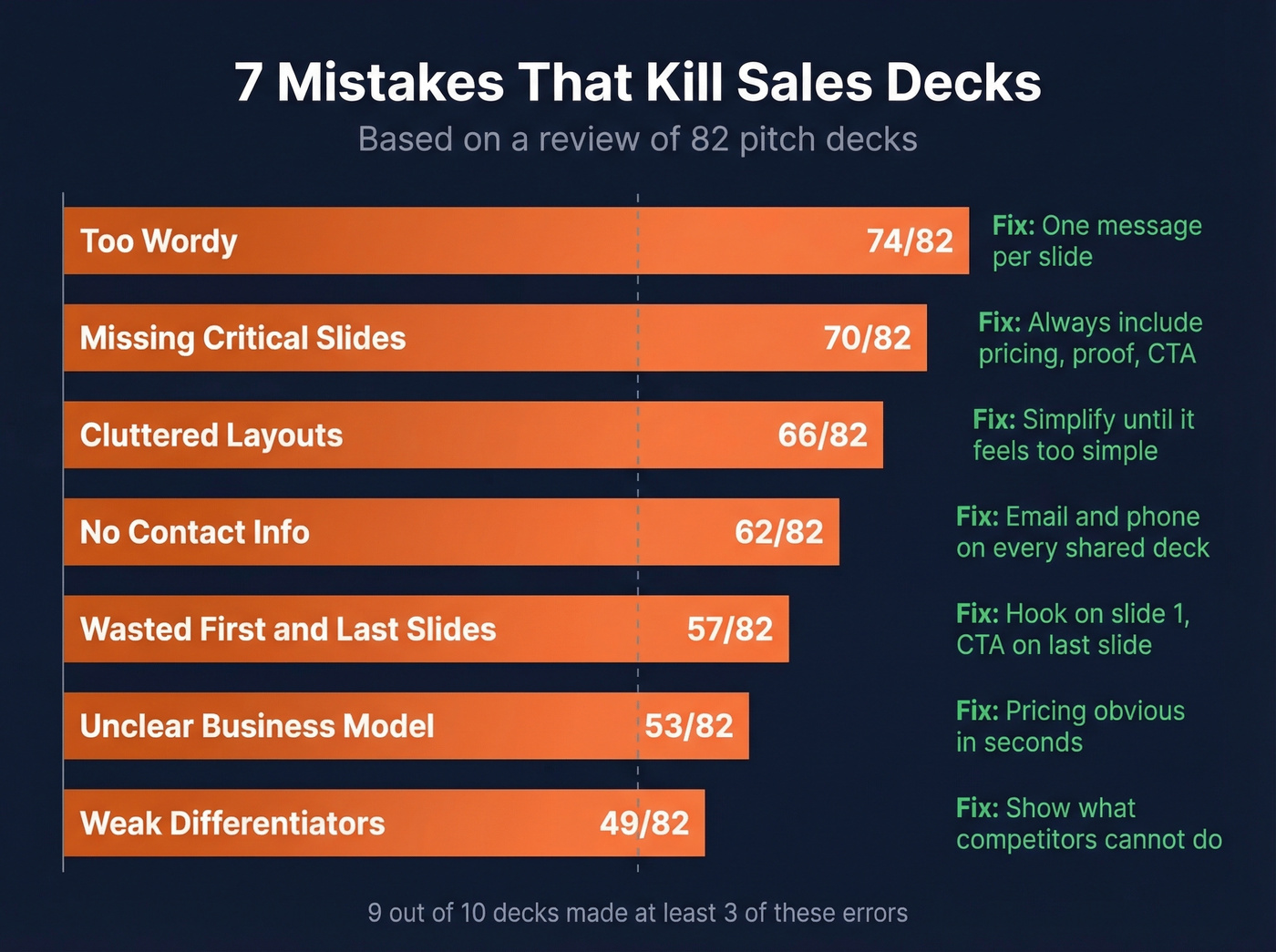
Too wordy (74/82). One message per slide. If the buyer is reading paragraphs, they're not listening to you.
Missing critical slides (70/82). No pricing, no proof, no clear next step. Every gap is a reason for the buyer to say "let me think about it."
Cluttered layouts (66/82). Jargon, tiny fonts, six bullet points competing for attention. Simplify until it feels almost too simple - then you're close.
No contact info (62/82). Decks get forwarded. If the VP who receives it can't find your email or phone, you've lost the thread.
Wasted first and last slides (57/82). Your logo slide and "Thank You" slide are prime real estate. Use slide one for a hook and the last slide for a specific CTA with your contact details.
Unclear business model (53/82). How you make money should be obvious within seconds. If the buyer can't explain your pricing to their boss, you won't get the deal.
Weak differentiators (49/82). "We're the best" isn't a differentiator. Show what you do that competitors can't or won't, backed by proof.

A killer sales pitch PowerPoint means nothing if your follow-up bounces. Prospeo gives you 98% accurate emails and verified direct dials for every prospect on your demo list - so the momentum from your deck converts into pipeline, not dead air.
Stop losing deals between the demo and the inbox.
Design Rules That Actually Matter
You don't need to be a designer. You need to be disciplined.
Cap every slide at 3-5 bullets. Anything more and you're writing a document, not building a presentation. Each slide should carry one message - if you can't summarize its point in one sentence, split it into two slides. Put your full talking points in speaker notes, not on the slide itself. The audience sees visuals and key phrases; you see your script in presenter view.
Use Slide Master to set your fonts, colors, and logo placement once so every new slide inherits the system. This saves hours and prevents the "Frankendeck" look that screams "I stitched this together from three old decks at midnight." When sharing, export as PDF - fonts render differently across machines, and PDF locks your design in place while preventing accidental edits.
The human brain processes images in 13 milliseconds. Use that. Charts, screenshots, and diagrams beat walls of text every time.
Personalize Every Deck
71% of buyers expect personalized experiences, and 76% get frustrated when they don't get them. Customized presentations can improve win rates by up to 50%. This isn't optional anymore - it's table stakes.
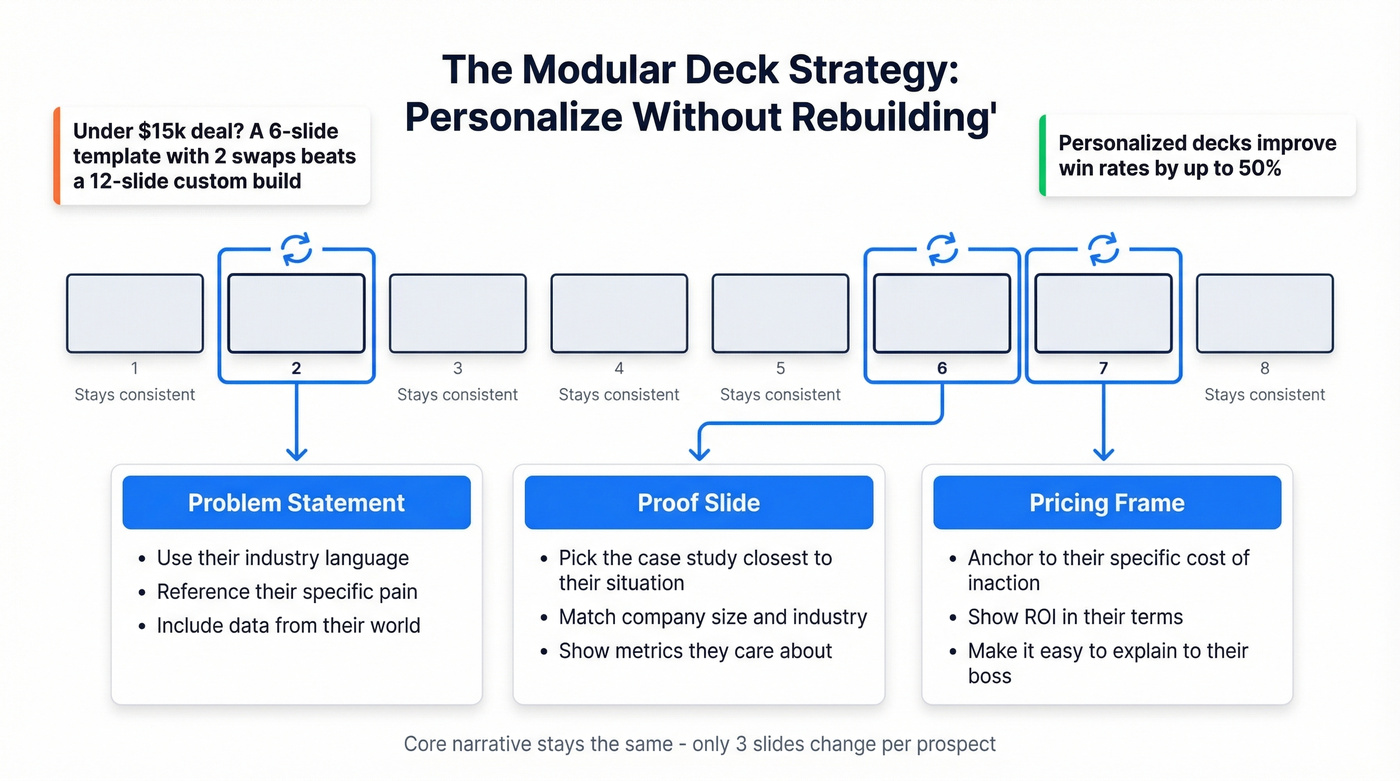
The fix isn't building a new deck for every prospect. Build a modular deck - a core narrative with swappable components. Tailor three things per prospect: the problem statement (use their industry's language), the proof slide (pick the case study closest to their situation), and the pricing frame (anchor to their specific pain's cost). Everything else stays consistent.
Here's the thing: if your deal size is under $15k, you probably don't need a 12-slide custom deck for every call. A tight 6-slide modular template with two swappable slides will outperform a bloated "personalized" deck that took you three hours to build.
The "About Us" slide is the most skipped slide in any sales deck. Move it to the appendix or kill it entirely. Nobody in a buying meeting cares about your founding story. They care about their problem and whether you can fix it.
For teams ready to go further, consider making your deck interactive - clickable sections, embedded demo videos, or branching paths that let the buyer drive. Interactive presentations close twice as many deals and cut sales cycles by 30%. Even a simple embedded Loom walkthrough on your "How It Works" slide can transform a static pitch into a conversation starter.
Personalization starts with knowing who you're pitching. That means having accurate data on your prospect - their role, their company's tech stack, recent funding - before you ever open PowerPoint. B2B contact data decays at 25-35% annually by most industry estimates. Bad data upstream kills good decks downstream, and we've seen teams lose entire deal cycles because a follow-up bounced to an outdated address. Tools like Prospeo, with 98% email accuracy and a 7-day data refresh cycle, catch stale contacts before they tank your outreach.
Best Free Templates for 2026
You don't need to start from a blank slide. Grab a solid starting point and customize from there.
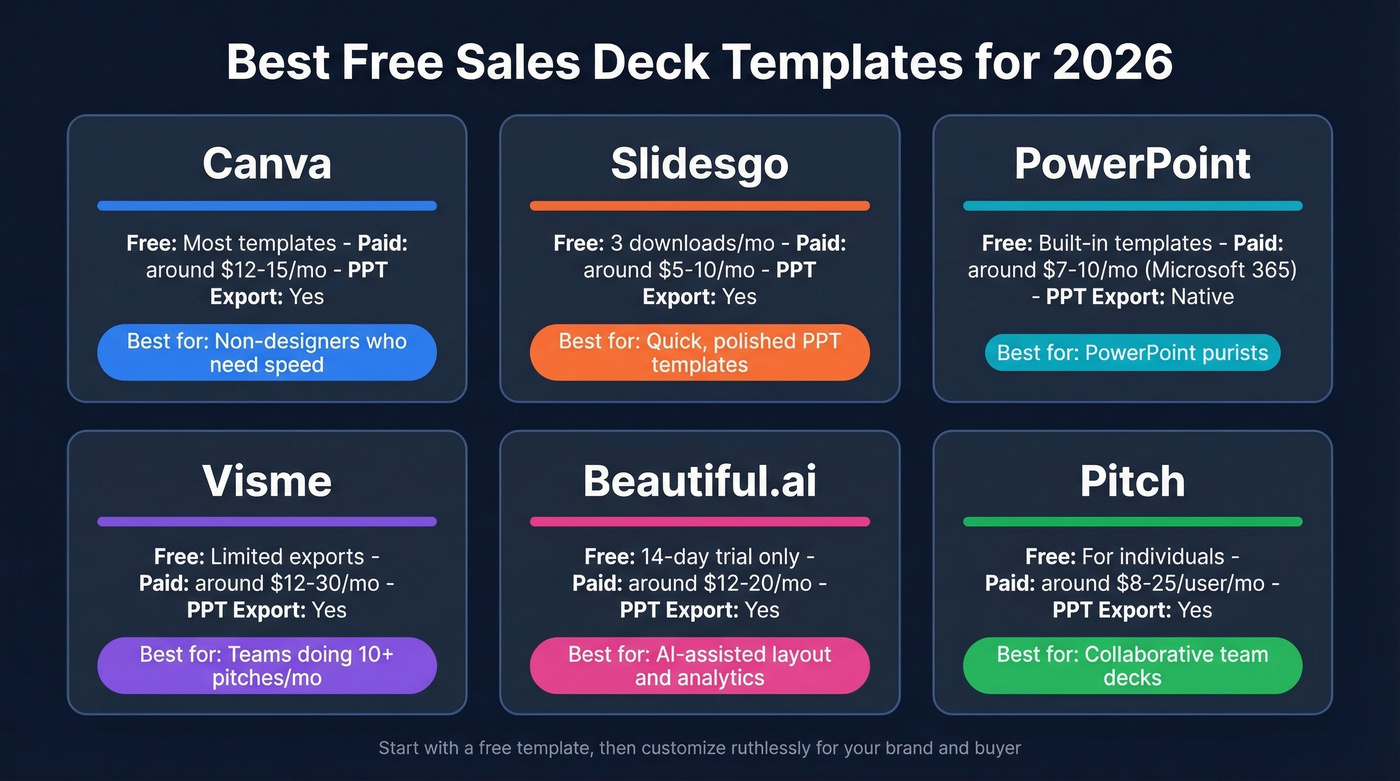
| Platform | Free Tier | Paid Upgrade | PPT Export | Best For |
|---|---|---|---|---|
| Canva | Most templates free | ~$12-15/mo | Yes | Non-designers who need speed |
| Slidesgo | 3 free downloads/mo | ~$5-10/mo | Yes | Quick, polished PPT templates |
| PowerPoint | Built-in templates free | ~$7-10/mo (Microsoft 365) | Native | PowerPoint purists |
| Visme | Limited free exports | ~$12-30/mo | Yes | Teams doing 10+ pitches/mo |
| Beautiful.ai | 14-day trial only | ~$12-20/mo | Yes | AI-assisted layout + analytics |
| Pitch | Free for individuals | ~$8-25/user/mo | Yes | Collaborative team decks |
Canva is the easiest on-ramp for non-designers - drag, drop, export to .pptx, done. PowerPoint's built-in templates are genuinely underrated; search "Sales" in the template gallery and you'll find plenty of starting points that need minimal customization. Skip Beautiful.ai if you only pitch once or twice a month - the analytics aren't worth it at that volume. Visme and Beautiful.ai earn the upgrade when you're building 10+ pitches a month and want to see who's viewing which slides.
Decks Worth Studying
Zuora built one of the most studied sales decks in SaaS history. They don't sell software on slide one - they sell a macro trend (the subscription economy). By the time the product appears, the buyer already believes the world is changing and they need to adapt. If you sell into a shifting market, steal this structure.
Uber for Business works because of radical restraint. Mostly visuals, each one making a single point. It's proof that the best sales presentation is often the one with the fewest words.
Reddit's Ad Sales Deck is the one to study if you sell to analytical buyers - packed with specific numbers, zero hand-waving "industry-leading" fluff.
Scrub Daddy's Shark Tank pitch reminds us that a 30-second live demo beats five slides of feature descriptions. If you can show your product working in real time, do it. Embed a short video or screen recording on your "How It Works" slide.
If you want to go deeper on narrative structure (beyond slide order), use a dedicated sales deck storytelling framework and build your talk track around it.
Before You Pitch - Verify Your Data
You can build the perfect 8-slide deck, nail the narrative, personalize every proof point - and then your follow-up email bounces because the prospect changed jobs two months ago. We've watched it happen more times than we'd like to admit.
Prospeo's free tier gives you 75 email verifications per month - enough to verify every prospect on your calendar before you pitch. Upload a CSV, run a bulk check, and know that your follow-up will actually land.
If you need the actual message that goes out after the call, keep a set of sales meeting follow-up email templates ready so you can send it within 10 minutes.
Slide 2 says personalize the problem. That starts before you open PowerPoint. Use Prospeo's 30+ filters - buyer intent, technographics, headcount growth - to research every prospect so your deck speaks their language, not yours.
Know your buyer before you build the deck.
FAQ
How many slides should a sales pitch PowerPoint have?
Aim for 7-12 core slides plus 3-5 hidden back-pocket slides for objections. One founder cut from 40 to 6 and saw a 35% close-rate improvement. Anything over 15 core slides is almost certainly too long for a buyer meeting.
What's the difference between a sales deck and a pitch deck?
A pitch deck targets investors - TAM, financials, team credibility. A sales deck targets buyers - their problem, your solution, proof, pricing, and a specific next step. Different audience, different structure. Don't use one for the other.
Should I send the deck before or after the meeting?
Send it after. Sharing the full presentation beforehand lets prospects skip ahead and decide "no" before you've said a word. Send a one-page teaser before the meeting, then share the full deck as a follow-up - and verify the recipient's email first so your deck doesn't disappear into a bounce folder.