

The Sales Presentation Outline That Turns Slides Into Revenue
You're eight slides in and the prospect's camera just turned off. The deck looked great - clean design, tight branding, plenty of product screenshots. But you lost them at slide three because the first three slides were about your company, not their problem.
Every guide tells you to "know your audience." None of them tell you what to actually put on each slide. This one does.
Quick Version
- Use a 7-slide structure: Problem, Cost, Cause, Solution, How It Works, Proof, Next Steps.
- Spend 70% of prep time on slides 1-3 (the pain). If they don't feel the problem, they won't care about your solution.
- Cap your deck at 10-11 slides. Longer decks lose 22% more engagement.
- Build it to work without you. 7.4 people will evaluate your deal, and most won't be in the room.
- Verify your prospect data before you rehearse a single slide. Presenting to someone who changed jobs last quarter is worse than no presentation at all.
Why Your Outline Matters More Than Design
Stop obsessing over slide design. The outline is 80% of the work.
7.4 decision-makers are involved in a typical B2B purchase. Your champion will forward your deck to six people who weren't in the room, and if the narrative doesn't hold up without your voiceover, you've lost the committee before you ever had them. Personalized decks get shared internally 2.3x more often and boost average reading time 41%, which means your content needs to carry the story on its own.
Nearly 70% of the buyer's journey is complete before they reach out to a sales rep. Your deck isn't introducing a problem - it's confirming that you understand one they've already been researching for weeks. The outline needs to mirror their internal conversation, not start a new one.
The delivery context has shifted, too. 80% of B2B sales interactions happen virtually now, and 61% of B2B buyers actually prefer a rep-free experience. Your deck competes with Slack notifications, email tabs, and a second monitor. A tight narrative structure is the only thing that holds attention through a screen share. Two days after your presentation, your prospect will recall roughly 10% of what you said. The logical progression from pain to proof to next step is what sticks - not your animations, not your brand colors. The story.
Discovery Deck vs. Pitch Deck
Before you build anything, answer one question: are you still qualifying, or are you presenting to a qualified buyer?
A sales engineer on r/salesengineers described the tension perfectly - leadership pushed them to bring slides into technical discovery, but the slides kept pulling the conversation into "showing what we can do" instead of asking questions. The deck became a script, and discovery became a demo nobody asked for.
The decision rule is simple. If you're still qualifying, use a discovery deck - five or six slides that frame the problem and provoke conversation. If you're presenting to a qualified buyer who has a confirmed problem, willingness to change, and understanding of the cost of inaction, use a pitch deck built on the 7-slide framework below. Mixing the two is how you end up feature-dumping on a prospect who hasn't even confirmed they have the problem you solve. Discovery decks open doors. Pitch decks close them. Don't confuse the two.
The 7-Slide Framework
This is the core structure. Problem-Cost-Cause-Solution works for most B2B sellers because it front-loads pain and earns the right to present a solution. You don't need 25 slides. You need seven that actually do something.
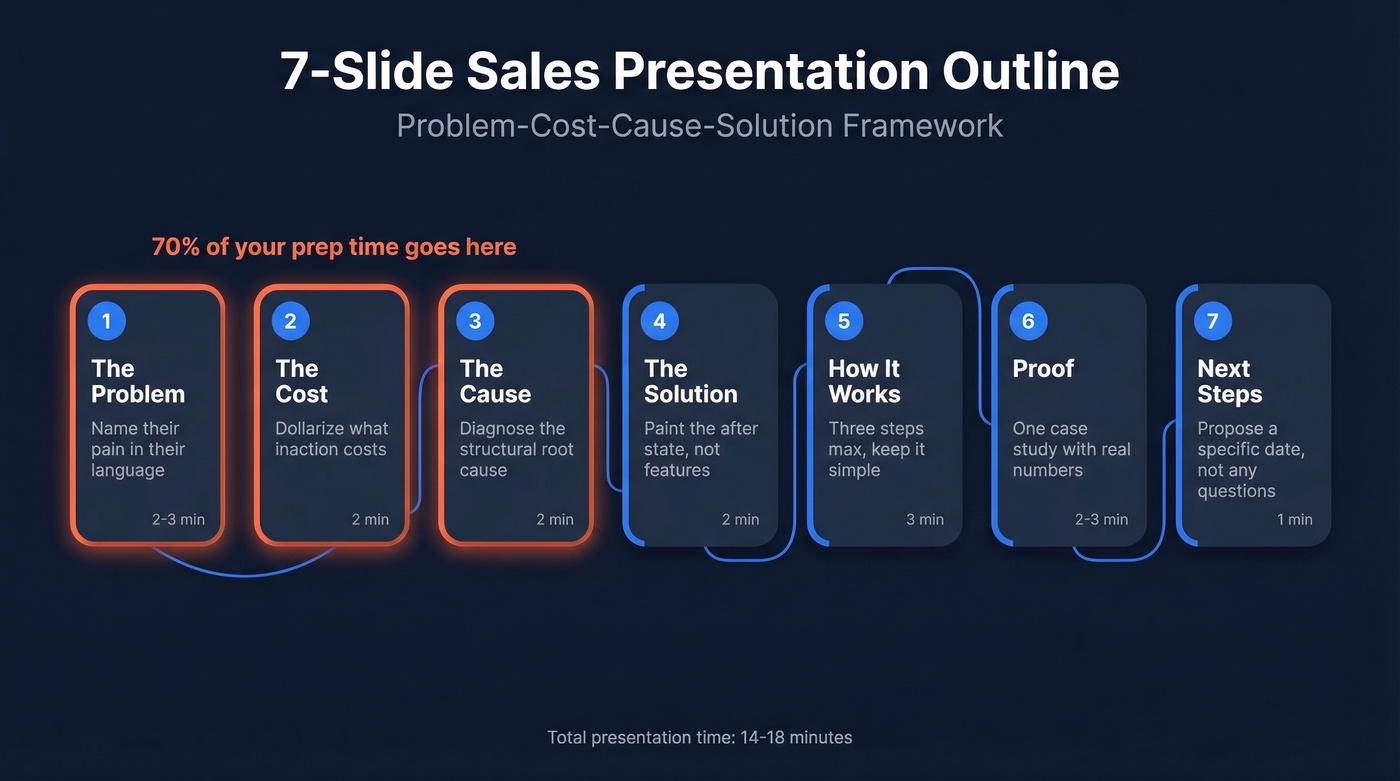
Spend 70% of your time on slides 1-3. If your audience doesn't feel the problem, they won't care about your solution.
Slide 1: The Problem
Name the prospect's pain in their language - not yours. This slide should make them nod, not learn something new. Pull from discovery notes, their job postings, their earnings calls. One clear problem statement, supported by one or two data points that make it feel urgent. Use agitation language here - "black hole" hits harder than "inefficiency."
Talk-track prompt: "Based on what [name] shared in our last call, here's what we're hearing..."
Time: 2-3 minutes.
Slide 2: The Cost
Quantify what inaction costs. Revenue lost, time wasted, deals slipping, headcount bloat - whatever metric resonates with this buyer. Abstract problems don't get budget. Dollarized problems do.
Talk-track prompt: "For a team your size, that gap typically costs somewhere around..."
Time: 2 minutes.
Slide 3: The Cause
"This isn't a people problem - it's a structural one. Here's what's actually driving it..."
Lead with that framing. This slide explains why the problem exists - not their fault, not your competitor's fault, but systemic. Market shifts, legacy processes, scaling pains. You're diagnosing, not blaming, and that builds credibility faster than any logo wall. It also quietly reframes the decision criteria in your favor.
Time: 2 minutes.
Slide 4: The Solution
High-level vision, not features. Paint the "after" state. What does their world look like when this problem is solved? Keep it to one core value proposition and two or three supporting outcomes. Features come later - or never, if the vision is compelling enough.
Talk-track prompt: "What if instead of [current pain], your team could..."
Time: 2 minutes.
Slide 5: How It Works
Three steps maximum. If your implementation requires more than three steps to explain at this stage, you're going too deep. This slide answers "is this realistic?" without turning into a technical spec. Use simple language - the CFO will see this slide too. If your product lends itself to a 30-second demo clip, embed it here. Video has convinced 82% of buyers to purchase.
Time: 3 minutes.
Slide 6: Proof
Here's what this slide should look like in practice:
[Customer name] had [problem]. Their team of 40 reps was spending 6 hours a week on manual prospecting. They implemented [solution]. Within 90 days, ramp time dropped 35% and pipeline grew by $200K/month.
That's it. One case study with specific numbers. Not a logo wall - a story. The more specific the numbers, the more believable the proof. Percentages are good. Dollar amounts are better.
Time: 2-3 minutes.
Slide 7: Next Steps
The "Any Questions?" slide is where deals go to die. It hands control to the prospect and invites silence.
Instead, propose a specific next step with a timeline: "We'll send a mutual action plan by Thursday. Can we schedule a technical review for next Tuesday?" 35-50% of deals go to the vendor that responds first - your next-step slide should include a specific date, not a vague "we'll follow up." Build every slide to stand alone with speaker notes and a clear narrative. This deck will be forwarded.
Time: 1 minute.

Your presentation outline is dialed in - but are you presenting to the right person? 7.4 stakeholders evaluate every deal. Prospeo gives you verified emails and direct dials for the entire buying committee, not just the one contact who booked the call. 98% email accuracy, 125M+ verified mobiles, refreshed every 7 days.
Stop rehearsing slides for prospects who changed jobs last quarter.
Four Deck Frameworks Compared
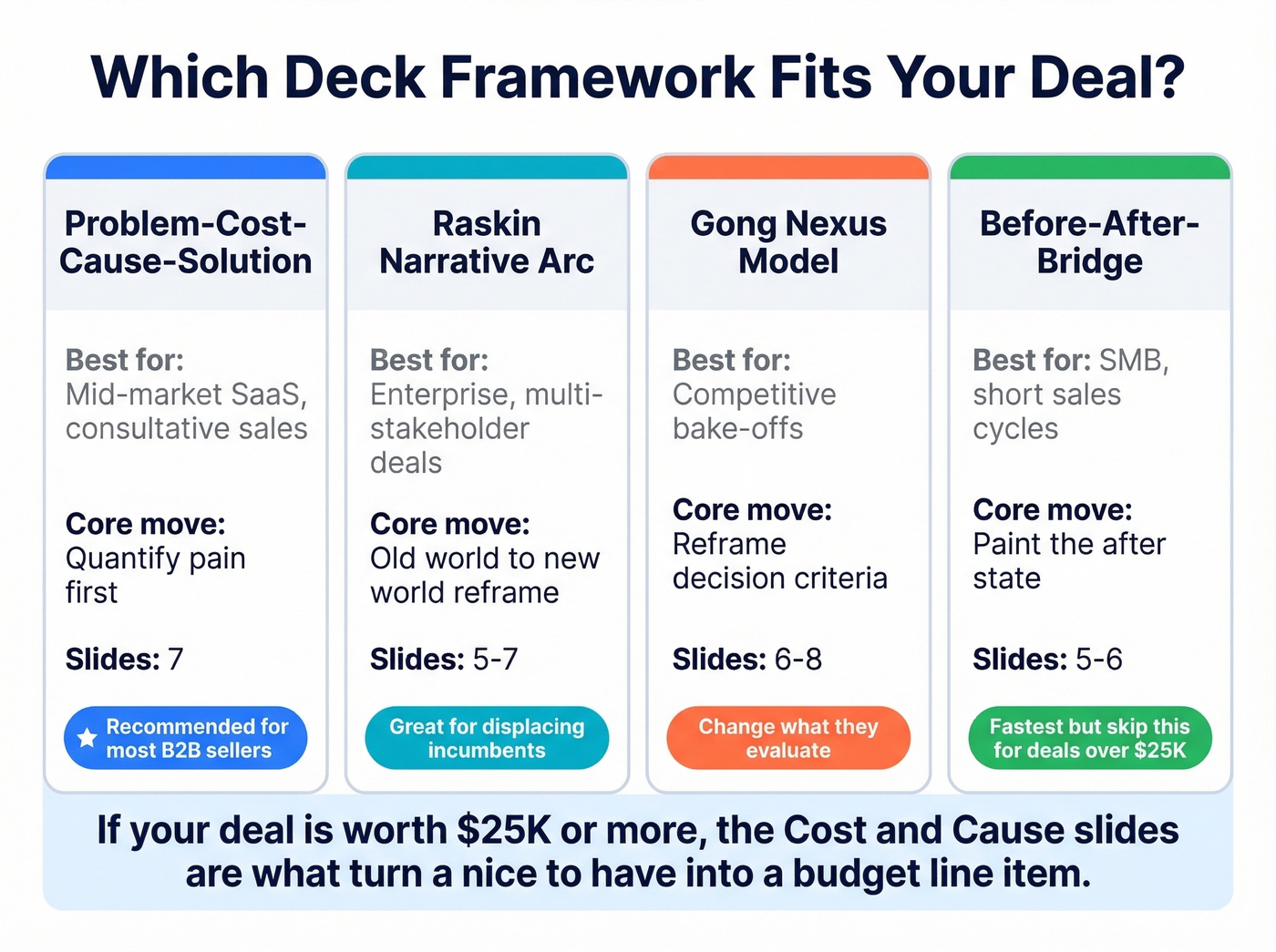
Problem-Cost-Cause-Solution is our default recommendation for most B2B sellers, but it's not the only option.
| Framework | Best For | Core Move | Slides |
|---|---|---|---|
| Problem-Cost-Cause-Solution | Mid-market SaaS, consultative | Quantify pain first | 7 |
| Raskin Narrative Arc | Enterprise, multi-stakeholder | Old world to new world | 5-7 |
| Gong Nexus Model | Competitive bake-offs | Reframe decision criteria | 6-8 |
| Before-After-Bridge | SMB, short sales cycle | Paint the "after" state | 5-6 |
Problem-Cost-Cause-Solution works when you're selling a solution to a known pain and need to justify budget. The Raskin Narrative Arc is your move when you're displacing an incumbent - it frames the conversation as "the old way is dying" rather than "your current vendor is bad."
The Gong Nexus Model shines in competitive evaluations where you need to change what the buyer is evaluating, not just win on their existing scorecard. Before-After-Bridge is fastest for simple products with short cycles - paint the dream, then show the bridge.
Here's the thing: most teams default to Before-After-Bridge because it's easy. But if you're selling a deal worth $25K+, you're leaving money on the table by skipping the Cost and Cause slides. Those two slides are what turn a "nice to have" into a line item with budget attached.
Map Your Outline to Your Methodology
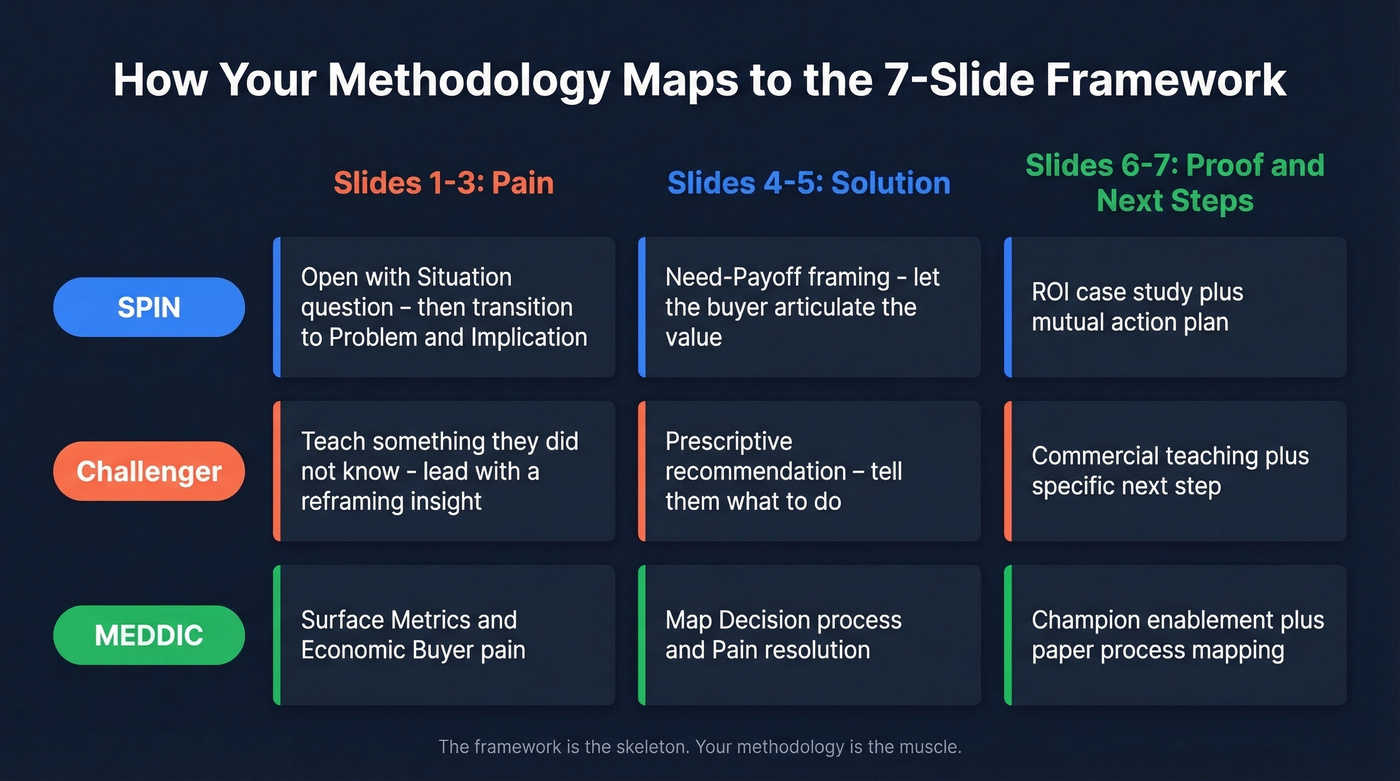
Your outline should reinforce the selling motion your team already uses. Here's how SPIN, Challenger, and MEDDIC align with the 7-slide framework:
| Methodology | Slides 1-3 (Pain) | Slides 4-5 (Solution) | Slides 6-7 (Proof + CTA) |
|---|---|---|---|
| SPIN | Situation, Problem, Implication | Need-Payoff framing | ROI case study + mutual plan |
| Challenger | Teach + Tailor insight | Prescriptive recommendation | Commercial teaching + next step |
| MEDDIC | Metrics + EB pain + criteria | Decision process + Pain resolution | Champion + paper process |
For SPIN teams, Slide 1 shouldn't state the problem - it should open with a Situation question: "You mentioned your team spends X hours on..." then transition to the Problem implication on Slide 2. Slide 4 becomes the Need-Payoff moment where the buyer articulates the value themselves.
Challenger teams should use Slides 1-3 to teach something the buyer didn't know - lead with a stat or insight that reframes how they think about the problem. If your teaching moment doesn't make the buyer pause, it's not sharp enough.
MEDDIC teams need Slides 1-3 to surface the metrics and economic buyer pain that justify the deal, then use Slide 7 to map the paper process and champion next steps explicitly. The framework is the skeleton. Your methodology is the muscle.
Mistakes That Kill Sales Presentations
We've seen teams build beautiful decks that close nothing. Here are the seven mistakes that actually kill deals.
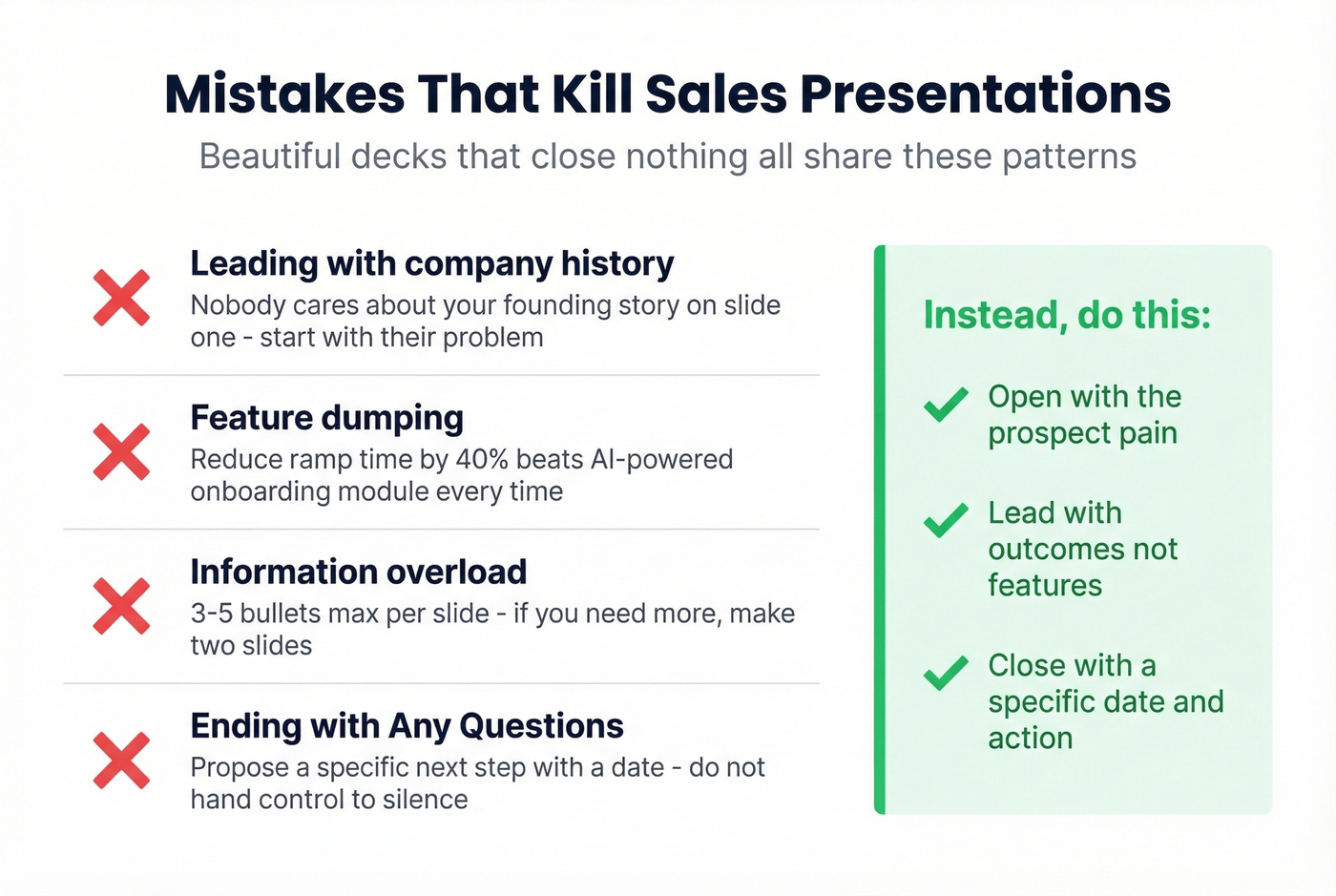
Leading with company history. Nobody cares about your founding story on slide one. Start with the prospect's problem. Your "About Us" belongs in the appendix - or nowhere.
Feature-dumping. Listing every capability signals you don't know which ones matter. "Reduce ramp time by 40%" beats "AI-powered onboarding module" every single time.
Information overload. 3-5 bullets maximum per slide. If you can't say it in five bullets, it needs two slides.
No clear next step. Ending with "Any Questions?" is ending with nothing. Specific CTA, specific timeline, named action.
Talking more than listening. If you're presenting for 25 minutes straight, you've lost the conversation. Build pause points after Slides 2 and 5 - stop and ask a question. Let's be honest: the best presentations feel like conversations, not monologues.
Generic deck for every prospect. 71% of buyers expect personalized interactions, and 76% get frustrated when they don't get them. Top performers achieve 2.7x more conversions with customized first meetings. Build modular sections swappable by persona - the CFO gets ROI numbers, the technical evaluator gets integration details.
Deck that dies when forwarded. Add speaker notes and a self-sufficient narrative so every slide makes sense to someone who wasn't in the room.
Real Decks Worth Stealing From
Zuora
The deck that launched a framework. Andy Raskin's analysis of Zuora's sales deck became one of the most shared teardowns on the internet for a reason - it opens with a named shift in the world ("the subscription economy"), not a product pitch. The move to steal: name the macro trend that makes your solution inevitable.
Google Business Messages
Google's deck follows a clean arc: pain-point stats, a "What if you could...?" vision slide, an integration story, and customer wins near the end. The move to steal: use the "What if?" pivot between your pain slides and your solution slide. Simple rhetorical bridge, works every time.
TeleTracking
The entire story lives in six slides. Executive-scan readability - every slide communicates its point in under five seconds. The move to steal: design for the executive who'll spend 30 seconds per slide when your champion forwards the deck.
Pre-Presentation Checklist
Before you touch a single slide, run through this:
- Verify your prospect's contact data is current. Your outline is worthless if you're presenting to someone who left the company three months ago. We use Prospeo to confirm emails and phone numbers before every meeting - its 7-day refresh cycle catches job changes that stale CRM data misses.
- Confirm who's in the room and their roles. Tailor your modular sections accordingly.
- Research the prospect's recent news, earnings, and job postings. These feed Slides 1-3.
- Identify which framework fits this deal stage. Discovery? Pitch? Competitive displacement?
- Prepare three objections and your responses. Have backup slides ready.
- Test your tech setup. Screen share, audio, backup plan if Zoom dies.
Try mind mapping your sales pitch before jumping into a slide builder - sketch the narrative arc on paper or a whiteboard first, connecting the prospect's pain to your proof points, so you can spot logical gaps before they become awkward transitions on screen.

Tools that support the workflow:
| Category | Tools | Price Range |
|---|---|---|
| Prospect data | Prospeo | Free tier; paid ~$0.01/email |
| Slide design | Canva, Pitch, Google Slides | Free-~$25/user/mo |
| Sales enablement | Highspot, Showpad | ~$30-$100/user/mo |
| Interactive demos | Walnut, Demodesk | ~$10K-$60K/yr |
| Proposals | PandaDoc, Proposify | ~$20-$100/user/mo |
Skip interactive demo tools if you're running a short sales cycle with a simple product - they add complexity without a payoff when a 30-second screen recording does the same job.
If you're tightening your workflow end-to-end, pair this deck with sales follow-up templates and a consistent sales meeting follow-up email process.
Slide 6 says proof wins deals - but only if your deck reaches the right 7.4 decision-makers. Prospeo's 30+ search filters let you identify every stakeholder by title, department, and intent signals so your forwarded deck lands with people who actually have budget authority.
Find every decision-maker before you open PowerPoint.
FAQ
How many slides should a sales presentation have?
Aim for 7-11 slides. Decks capped at 10-11 slides see 22% more engagement than longer formats. Every slide beyond 11 increases the chance your prospect checks out before the CTA. If you can't tell your story in 11 slides, the problem is your outline, not your slide count.
What's the best structure for a B2B sales deck?
Problem-Cost-Cause-Solution works for most B2B sellers. Lead with the prospect's pain across slides 1-3, then present your solution, proof, and a clear next step. Spend 70% of prep time on the pain slides - if the buyer doesn't feel the problem, nothing after slide 3 matters.
Should I include pricing in my sales deck?
Include pricing if your model is transparent. Buyers who've completed 70% of their journey expect pricing context. Show a range or "starting at" figure and offer a detailed proposal as the next step. Hiding pricing doesn't create curiosity - it creates friction and stalls deals.
How do I make my deck work for multiple stakeholders?
Build a modular deck with swappable sections by persona. Your champion needs the vision story, the CFO needs ROI numbers, and the technical evaluator needs integration details. Add speaker notes so the deck stands alone when forwarded - because 7.4 people will evaluate your deal, and most of them won't hear your voiceover.
How do I verify I'm presenting to the right person?
Use a B2B data platform to confirm emails, phone numbers, and current job titles before your meeting. A weekly data refresh cycle catches job changes that stale CRM data misses, preventing wasted presentations to contacts who've already moved on.