

How to Create a Sales Sheet That Actually Converts
You're at a trade show. Your rep hands a prospect a one-pager. The prospect glances at it for maybe three seconds, nods politely, and drops it in a tote bag full of identical sheets from your competitors. That's the reality for most sales sheets - they get skimmed and forgotten.
Here's why that should bother you: 61% of B2B buyers now prefer a rep-free buying experience, and 73% actively avoid suppliers who send irrelevant outreach. Your sell sheet might be the only shot you get. It needs to do the selling when your rep can't.
What You Need (Quick Version)
A sales sheet is a one-page document that pitches your product or service to a prospect who's already interested. Three things determine whether it works: a benefit-led headline, three to five bullet points that solve the buyer's problem, and a single unmissable CTA. Design matters less than copy. Start with Canva if you need a template, but spend 80% of your time on what the words say.
What Is a Sell Sheet?
A sell sheet is a single-page document - print or digital - that gives a prospect a concise overview of your product, service, or company. It's your elevator pitch on paper. It balances business value, scannability, and visual appeal without drowning the reader in marketing fluff.
You'll hear it called different things depending on the industry: sell sheet, sales slick, one-pager, selling sheet. They're all the same format. The key distinction is where it sits in your funnel - this isn't a top-of-funnel awareness piece. It's mid-funnel collateral designed for prospects who already know you exist and need a reason to keep talking.
Sell sheets also serve as internal alignment tools. When marketing, sales, and product teams all work from the same one-pager, messaging stays consistent across every touchpoint. That dual purpose - external selling and internal enablement - is what makes a great one worth the effort.
Sales Sheet vs Brochure vs Line Sheet
Wilson Printing nails the distinction: "Sell sheets are for starting conversations. Brochures are for moving the conversation forward." That's the clearest framing we've come across.
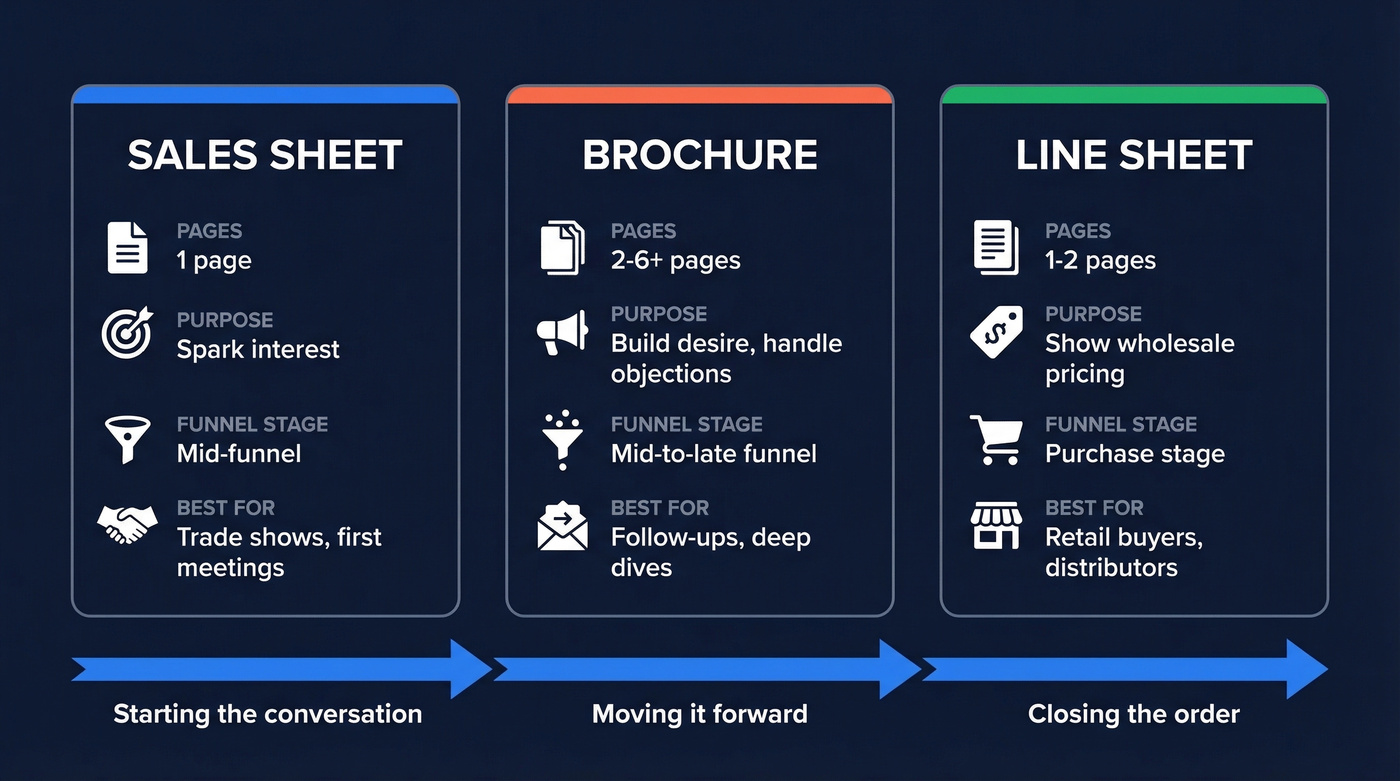
| Format | Pages | Purpose | Funnel Stage | Best For |
|---|---|---|---|---|
| Sales sheet | 1 | Spark interest | Mid-funnel | Trade shows, first meetings |
| Brochure | 2-6+ | Build desire, handle objections | Mid-to-late funnel | Follow-ups, deep dives |
| Line sheet | 1-2 | Show wholesale pricing | Purchase stage | Retail buyers, distributors |
A line sheet is a different animal entirely - it's a wholesale or retail pricing document designed for buyers who are ready to place orders. If you're in consumer goods or manufacturing, you'll use both a sell sheet to get the meeting and a line sheet to close the order.
Types of Sell Sheets
Not every sell sheet looks the same. The format shifts depending on what you're selling and who's reading it.
Product sell sheets focus on a single product's features, benefits, and specs. They're the most common type in manufacturing, SaaS, and consumer goods. Company sell sheets position the entire organization - mission, capabilities, key clients - and work best for agencies and professional services firms pitching new accounts. Service sell sheets highlight a specific offering with outcomes and social proof, the kind consulting firms and managed IT providers rely on.
Then there are industry-specific variations. Real estate agents build them around high-res property photos and financing details. SaaS companies lean on ROI stats and integration logos. Manufacturers include technical specifications and compliance certifications.
The consensus on r/ecommerce threads about "what was the best sell sheet you've ever received" is telling - sellers care deeply about getting this format right, especially when they're trying to land shelf space with retail buyers.
The biggest split is B2B versus B2C. The content strategy changes dramatically.
| Element | B2B | B2C |
|---|---|---|
| Tone | Formal, data-driven | Emotional, lifestyle |
| Content focus | Specs, ROI, integrations | Benefits, imagery, price |
| Social proof | Case studies, logo bars | Reviews, testimonials |
| CTA | "Book a demo" | "Buy now," "Visit store" |
What to Include (Complete Checklist)
Every component a high-performing product sell sheet needs, in order of importance.
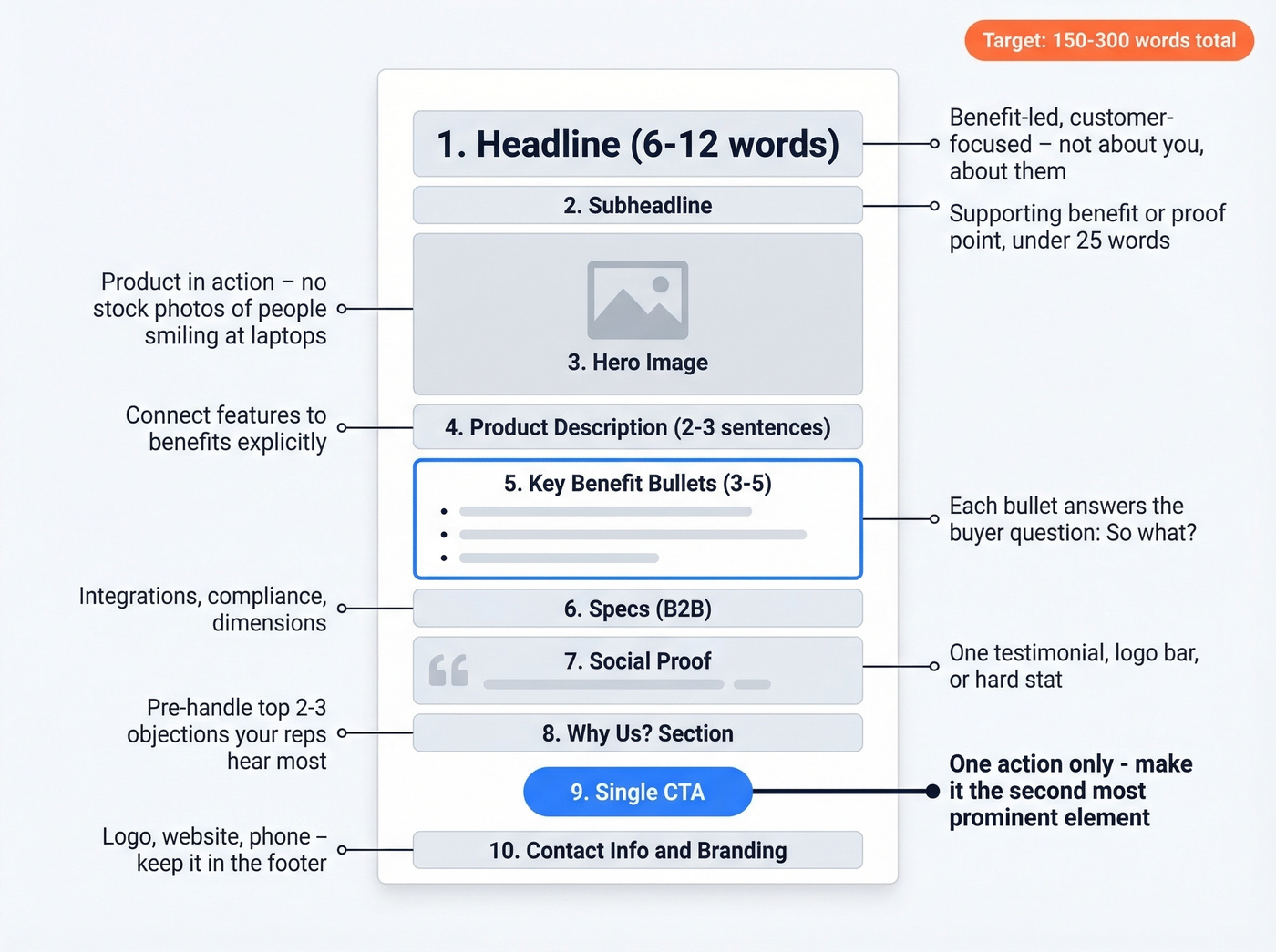
- Headline (6-12 words). Benefit-led, customer-focused. Pipedrive's contrast says it all: "We have the best accounting software" loses to "Save ten hours a week with automated accounting software." The first is about you. The second is about them.
- Subheadline (1-2 lines). Expands on the headline with a supporting benefit or proof point. Keep it under 25 words.
- Hero image or product shot. People notice images before text. Show the product in action - a screenshot of the dashboard, a photo of the product in use, not a stock photo of someone smiling at a laptop.
- Product description (2-3 sentences). Connect features to benefits explicitly. Don't just list what it does - explain why that matters to the buyer.
- 3-5 key benefit bullets. These are the core of your sheet. Each bullet should answer "so what?" from the buyer's perspective. Features tell, benefits sell.
- Specifications (B2B). For technical buyers who need to verify fit - dimensions, integrations, compliance certifications, supported platforms.
- Social proof. A single testimonial quote, a logo bar of recognizable clients, or a hard stat like "Used by 15,000+ companies." Pick one format and execute it well.
- "Why Us?" objection handler. For complex B2B sales, add a short section that pre-handles the top two or three objections your reps hear most. Frame it as "Why [Product]?" with two-line answers. This turns your one-pager from a pitch into a conversation closer.
- Single CTA. One action. Not three. "Book a demo," "Request a quote," "Download the full spec sheet." If your document doesn't have a single, clear CTA, it's a brochure pretending to be a sell sheet.
- Contact info and branding. Logo, website, phone number, email. Keep it in the footer - it shouldn't compete with your CTA.
Total word count for the entire sheet should land between 150 and 300 words. That's tight. Every sentence needs to earn its spot.
Writing Headlines That Convert
Your headline does 80% of the work. If it doesn't hook the reader in the first two seconds, the rest of your sheet is invisible.
The 4P Framework
Walk through four questions. What's the buyer's Pain? What's the Product? What's the big Promise? What's the better Possibility if they act?
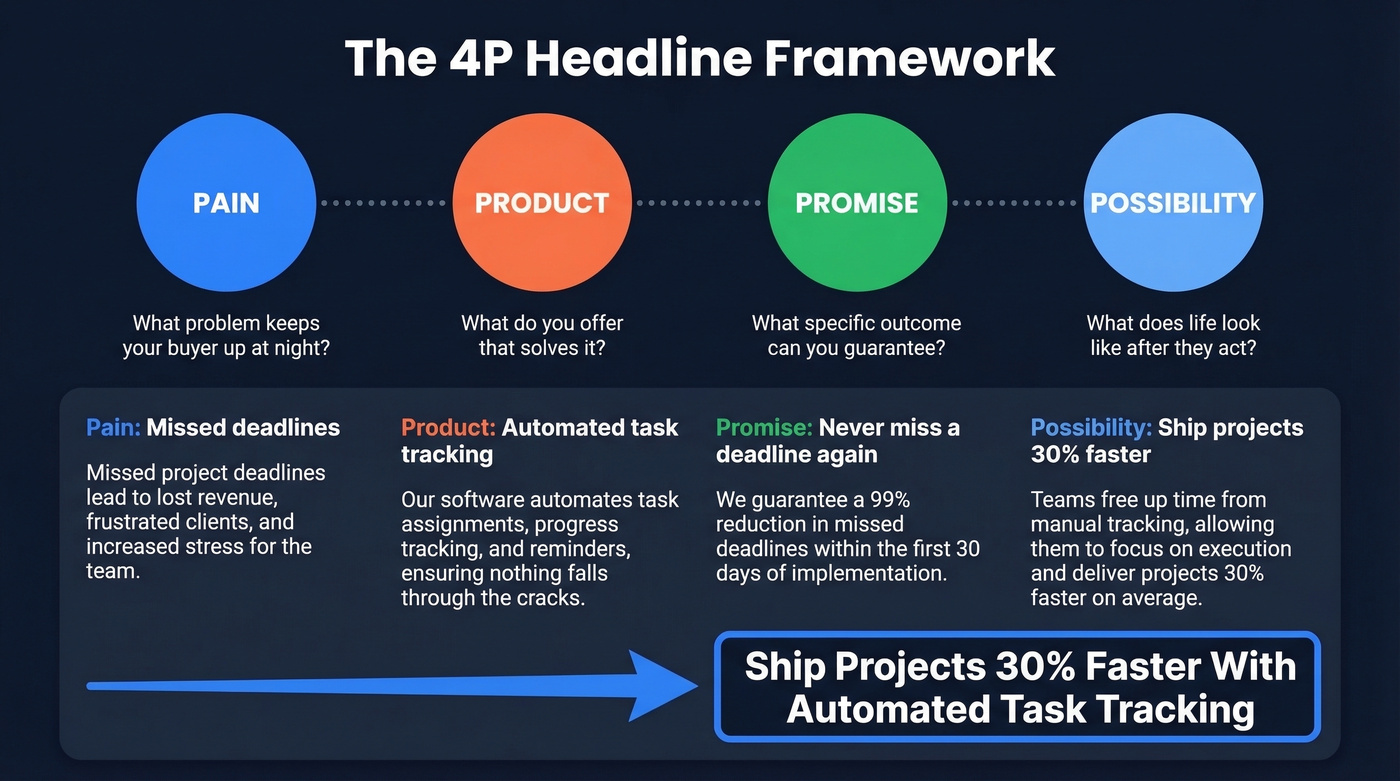
Example for a project management tool - Pain: missed deadlines. Product: automated task tracking. Promise: never miss a deadline again. Possibility: ship projects 30% faster.
Completed headline: "Ship Projects 30% Faster With Automated Task Tracking."
For a cybersecurity service - Pain: data breaches. Product: 24/7 threat monitoring. Promise: catch threats before they spread. Possibility: sleep at night knowing your data's protected.
Completed headline: "24/7 Threat Monitoring That Catches Breaches Before They Spread."
The 4U Scoring Rubric
Before you finalize, score your headline against four criteria. Is it Useful - does it promise a benefit? Is it Urgent - is there a reason to act now? Is it Unique - does it differentiate from competitors? Is it Ultra-Specific - does it include a number, timeframe, or concrete outcome?
A headline that scores 3 out of 4 is strong. All four is exceptional.
Fill-in-the-Blank Templates
Proposify offers solid starters: "{Product type} to {benefit}" or "Get rid of {pain point}." A few more completed examples:
- "Cut Onboarding Time From 6 Weeks to 10 Days"
- "The CRM That Pays for Itself in 90 Days"
- "Stop Losing Deals to Slow Follow-Up"
And remember: whitespace isn't wasted space - it's breathing room. Cramming more content onto the page doesn't make your sheet more persuasive. It makes it less readable.

Your sales sheet checklist says to include social proof like hard stats. Here's one worth stealing: Prospeo delivers 98% email accuracy across 300M+ profiles - the kind of number that makes a one-pager impossible to ignore.
Build your prospect list before you build your sell sheet.
Five Mistakes That Kill Conversions
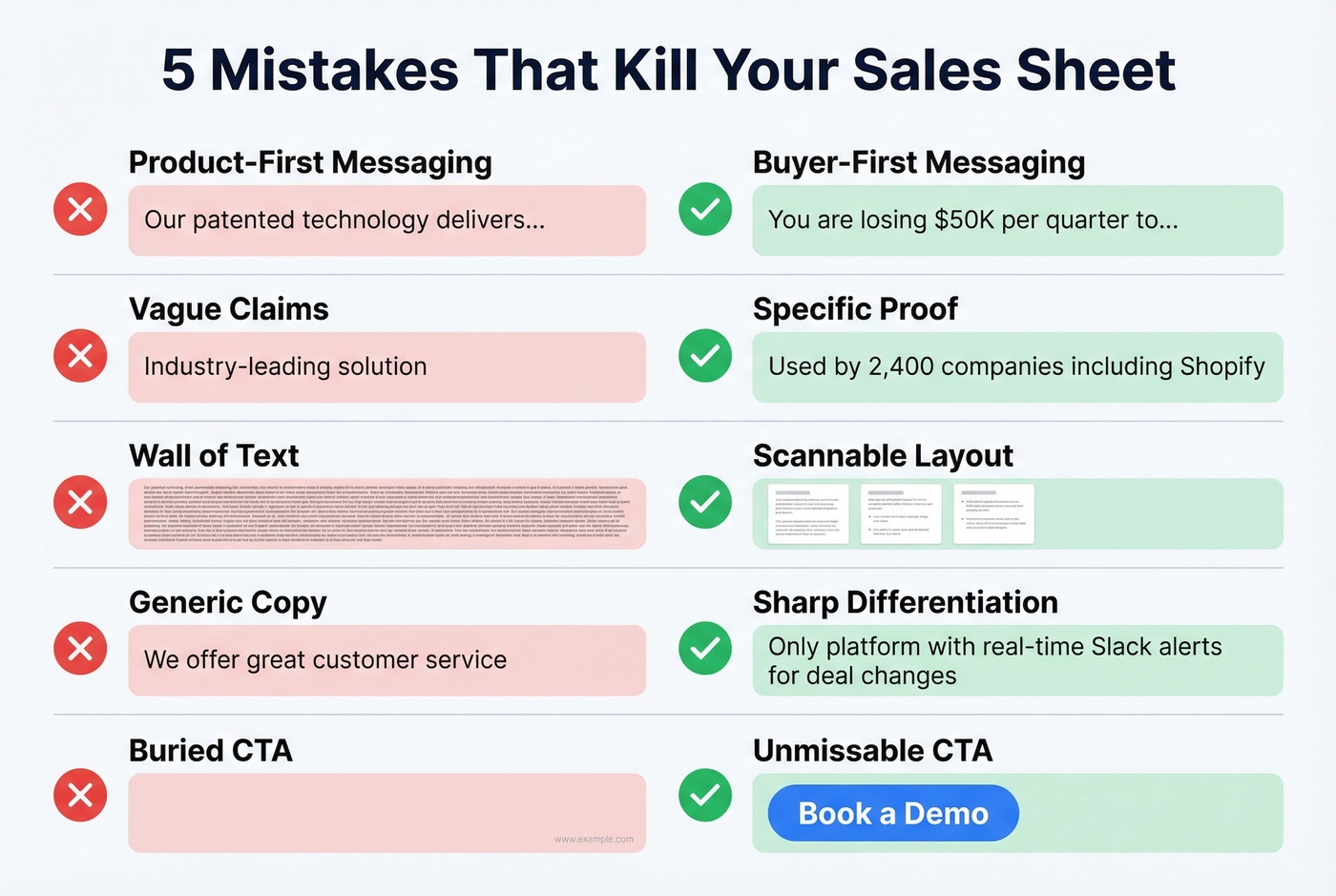
- Product-first messaging instead of buyer-first. Your sheet opens with "Our patented technology..." instead of "You're losing $50K/quarter to..." Flip the script. Lead with the buyer's problem.
- Vague claims with no proof. "Industry-leading solution" means nothing. Replace it with "Used by 2,400 companies including [recognizable name]." Specifics build trust; adjectives don't.
- Dense layouts that overwhelm. If your sheet looks like a terms-of-service page, nobody's reading it. Use whitespace, limit yourself to one font family, and keep paragraphs to two lines max.
- Weak differentiation. If you swapped your logo for a competitor's and the sheet still made sense, you haven't differentiated. Name what makes you different - explicitly.
- Missing or buried CTA. We've seen sheets where the CTA is a tiny URL in 8pt font in the bottom corner. Make it the second most prominent element on the page after the headline.
Print vs Digital - You Need Both
Print isn't dead. But sending a print-only sell sheet in 2026 is a strategic mistake.
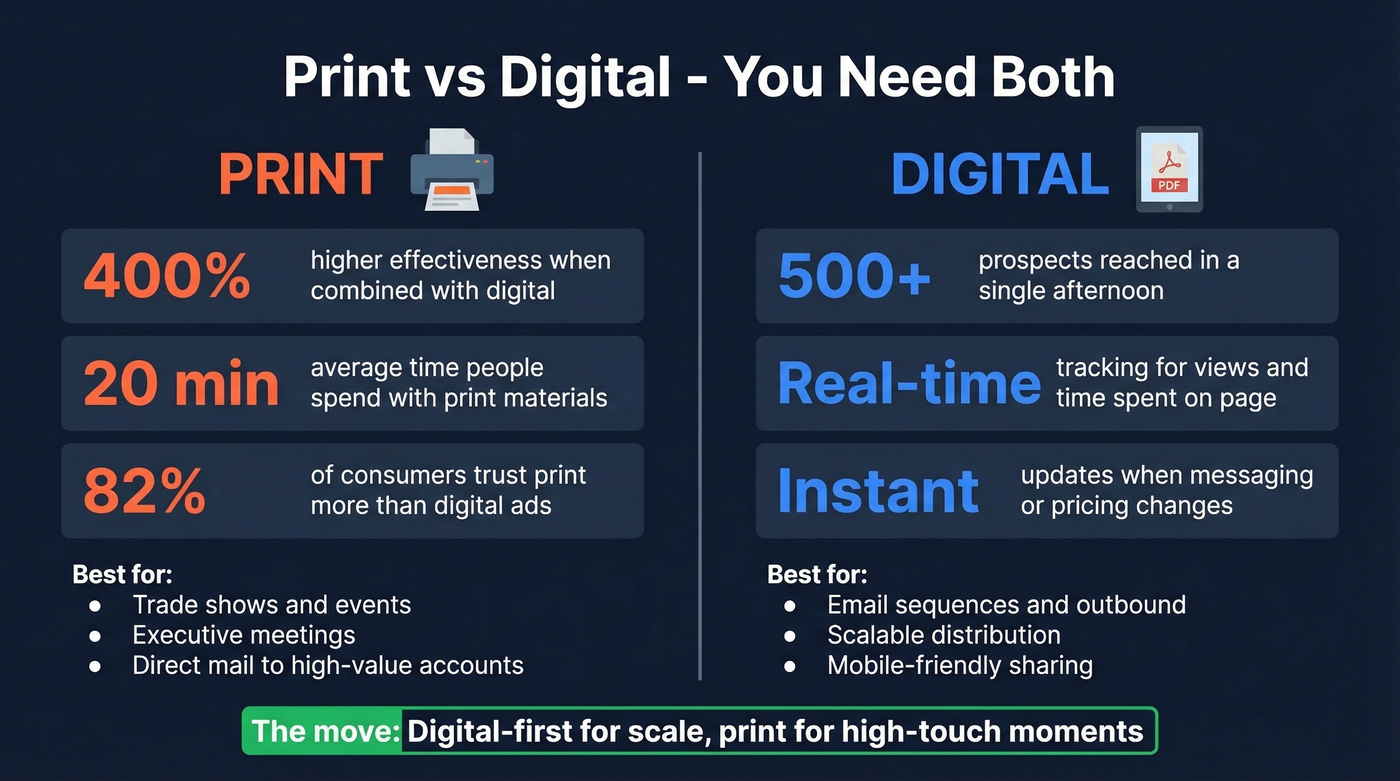
The neuroscience argument for print is real. People skim digital content horizontally, bouncing between links and tabs. Print creates what researchers call an "embodied experience" - the physical act of holding and flipping a page helps integrate information more deeply. Campaigns that combine print and digital see 400% higher effectiveness than digital-only campaigns. People spend around 20 minutes with print marketing materials, and 82% of consumers trust print more than digital ads.
But a digital version is where scale lives. A PDF can be emailed to 500 prospects in an afternoon, embedded in a sales sequence, tracked for views and time spent, and updated instantly when your messaging changes. Print can't do any of that.
The move is digital-first with print for high-touch moments - trade shows, executive meetings, direct mail campaigns. Optimize your PDF for mobile viewing, use tracked links for your CTA, and keep the file size small so it doesn't create deliverability issues.
How to Distribute Your Sell Sheet
The best one-pager in the world is worthless if it doesn't reach the right people.
Email attachments and links remain the highest-ROI channel for B2B. Attach the PDF to outbound sequences or link to a hosted version with tracking. Trade shows and events call for print copies paired with a QR code linking to the digital version for follow-up. Sales meetings are where you hand it across the table or screen-share the PDF - leave a copy behind so it circulates to other stakeholders.
Direct mail to high-value accounts is expensive per unit, but response rates crush email for enterprise prospects. And don't overlook social and content - post as a downloadable resource on your website or share key stats from the sheet as social content.
Let's be honest about what actually happens, though. Your sales rep emails a PDF to 200 prospects. 60 bounce. 50 go to spam. 30 people actually see it. The distribution channel isn't the problem - the contact data is.
A sell sheet is only as good as the list it reaches. One sales consultancy, Meritt, cut their bounce rate from 35% to under 4% after switching to Prospeo's email finder, which pulls from 300M+ professional profiles with 98% email accuracy. The free tier gives you 75 verified emails per month - enough to test whether clean data changes your response rates.

How to Measure Effectiveness
Most teams create a sell sheet and never measure whether it works. That's a mistake, because even small tweaks to a headline or CTA can double response rates.
Seller adoption rate. Are your reps actually using it? If it's sitting in a shared drive untouched, the problem is either discoverability or relevance. Ask your reps directly - you'll get a more honest answer than any analytics dashboard.
Document analytics. Tools like PandaDoc track views, time spent per page, and shares/forwards. If prospects spend 3 seconds on your sheet, the headline isn't working. If they forward it to a colleague, it is.
Deal-stage correlation. Does sending the sheet correlate with deals advancing to the next stage? Pull the data from your CRM. Even a rough correlation is useful signal.
Email engagement metrics. Open rate and click rate on the email containing your PDF. Verify emails before you send so your open-rate data reflects prospect interest - not delivery failures. If you're troubleshooting bounces, use an email bounce rate benchmark as your baseline.
The goal isn't perfection - it's iteration. Measure, adjust the headline or CTA, and measure again.
Tools and Templates
You don't need a design degree. Reddit threads on r/Entrepreneur about the "best software for making your own quality sell sheet" show how often people look for an easy tool that doesn't require Photoshop skills.
Canva (free; paid plans around $10-$15/month) is the default for non-designers. The templates are solid, the drag-and-drop editor is intuitive, and you'll spend your time on copy instead of fighting software. If we had to pick one tool, it's Canva.
Adobe Express (free; paid plans around $10/month) gives you more design control and access to Adobe's font and asset library. Good if you're already in the Adobe ecosystem.
Visme (free; paid plans around $12/month) shines for data-heavy sell sheets with built-in charts, infographics, and data visualization widgets.
Proposify (around $35/month per user) and PandaDoc (free tier available; paid plans around $35/month per user) are overkill for a simple one-pager, but if you want document tracking, e-signatures, and CRM integration, they're worth the investment.
For print, expect around $0.50-$3 per sheet at major print shops depending on paper stock and quantity.
Skip the design rabbit hole if you're just getting started. A mediocre-looking sell sheet that reaches 500 verified decision-makers will outperform a gorgeous one that bounces from 200 bad email addresses. Nail the copy, pick a Canva template, and invest the remaining time in building a clean prospect list. If you're building lists from scratch, a few sales prospecting techniques can help you fill the top of funnel faster.
A great sales sheet gets the meeting. But who are you sending it to? Prospeo's 30+ search filters - buyer intent, technographics, job changes, funding - let you find the exact decision-makers who'll actually read past the headline.
Stop handing sell sheets to the wrong people. Target buyers who convert.
Sales Sheet FAQ
What size should a sell sheet be?
Standard is 8.5" x 11" (US letter) or A4 for international audiences. Stick to a single page - one side for a quick-hit version, both sides if you need specs or a case study on the back. Going beyond one page defeats the purpose.
How many words belong on a sell sheet?
Aim for 150-300 words total. Your headline should be 6-12 words, the subheadline under 25, and you'll want 3-5 bullet points with a 1-2 sentence product description. Every word should earn its place.
Should I include pricing?
Only for standardized offerings where price is a competitive advantage - think SaaS with transparent tiers or consumer products. For complex B2B sales, leave pricing for the conversation after you've established value. Leading with price before value is a losing move.
How do I distribute a sell sheet by email without bouncing?
Verify your contact list before sending. Run your list through a bulk verification tool so your PDF actually reaches inboxes instead of bouncing. A 20%+ bounce rate doesn't just waste your collateral - it damages your sender reputation for every future campaign.