

Sales Sheet Template: Build One That Actually Sells
It's 4:30 PM on a Thursday. Your VP of Sales pings you: "I need a one-pager for the Acme deal by tomorrow morning." You open a blank doc, stare at it, and realize you've never built one from scratch.
You don't need to start from zero. Grab a sales sheet template, fill in the right pieces, and you'll have something that sells better than most reps - that's not hyperbole. 61% of B2B buyers now prefer a rep-free buying experience, which means your one-pager might be closing deals while your team sleeps.
What Is a Sales Sheet?
A sales sheet is a single-page document that works like a physical or digital elevator pitch. It covers what you sell, why it matters, and what the reader should do next - all in one scannable page. You'll hear it called a sell sheet, sales slick, one-sheet, product datasheet, or line sheet depending on the industry. The terms are interchangeable.
People often confuse sales sheets with brochures, but they serve fundamentally different purposes:
| Sales Sheet | Brochure | |
|---|---|---|
| Purpose | Drive a buying decision | Tell a brand story |
| Length | One page (front, maybe back) | Multi-page, often folded |
| Tone | Direct, benefit-focused | Narrative, aspirational |
| Use case | Post-demo follow-up, trade show | Top-of-funnel awareness |
Types of Sales One-Pagers
Most readers need the product overview type, but it's worth knowing the full menu:
- Product overview - your core offering, benefits, and CTA on one page
- Company overview - who you are, what you do, key differentiators
- Competitive comparison - side-by-side against alternatives (powerful in late-stage deals)
- Pricing breakdown - standardized pricing with tiers or packages
- Case study highlight - one customer story distilled to a single page with quantified results
If you're building your first one-pager, start with the product overview. Everything else is a variation on that foundation.
The Essential Checklist
Every effective sell sheet includes these elements:
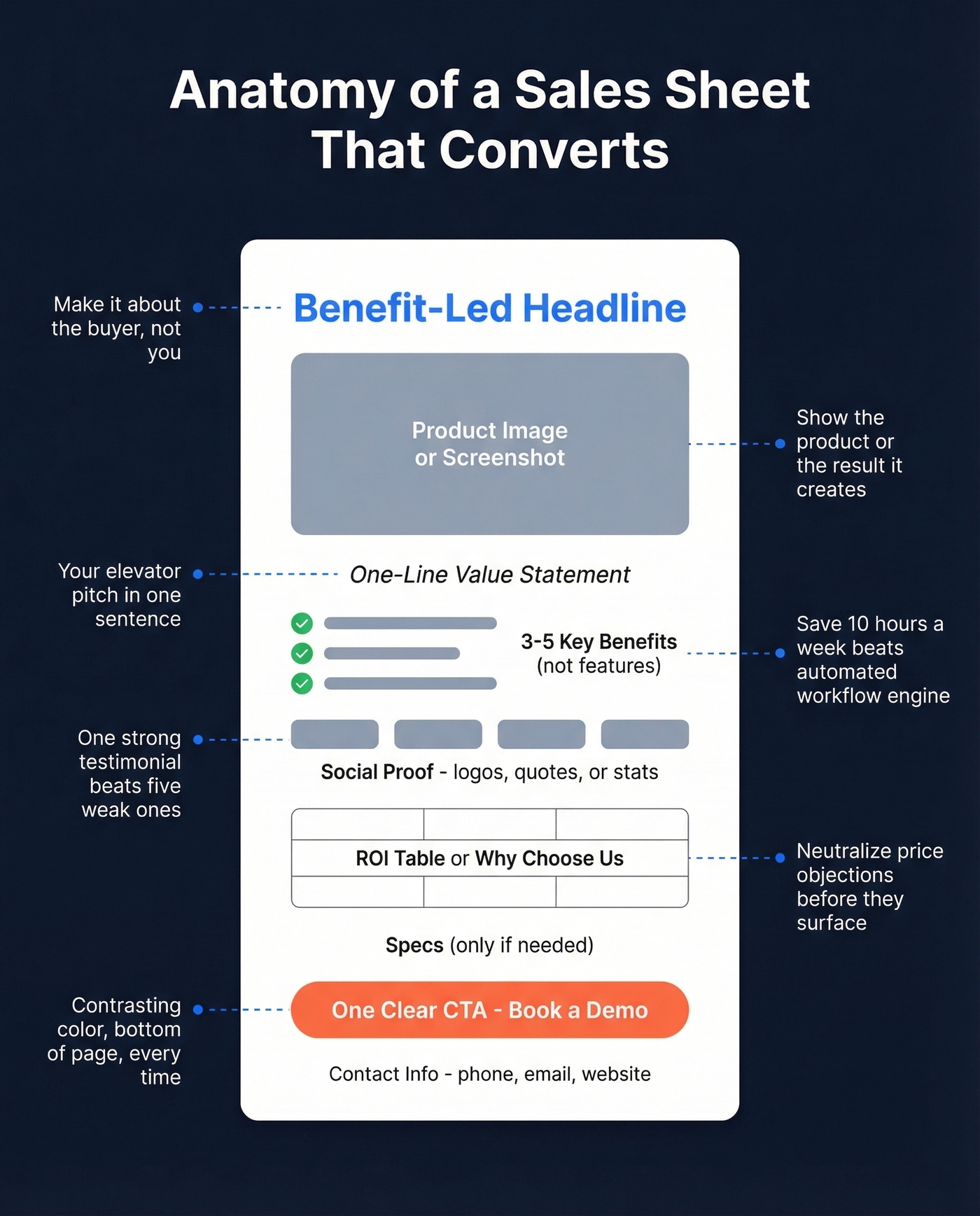
- ☐ Benefit-led headline - what the buyer gets, not what you do
- ☐ Product or service image - show the thing, or the result it creates
- ☐ One-line value statement - your elevator pitch in a sentence
- ☐ 3-5 key benefits - benefits, not features. "Save 10 hours a week" beats "automated workflow engine"
- ☐ Social proof - a testimonial quote, logo strip, or stat like "trusted by 500+ companies." Outreach's one-pager nails this: benefit-led headline, clean UI screenshot, and a logo strip that does the convincing
- ☐ "Why choose us?" section or ROI table - especially for B2B sheets where cost objections are common. A simple three-row ROI table can neutralize price concerns before they surface
- ☐ Specs or details - only if your buyer needs them to evaluate (B2B tech, manufacturing)
- ☐ Clear CTA - one action, prominently placed. QR code, link, or "Book a demo" button
- ☐ Contact info - phone, email, website. Don't make them search
If your sales sheet has all nine, you're already ahead of the pack.

Your sales sheet says "trusted by 500+ companies" - but can your reps actually reach those prospects? Prospeo gives you 98% accurate emails and 125M+ verified mobiles so the CTA on your one-pager connects to real conversations.
Build the list that makes your sales sheet worth printing.
How to Create a Sales Sheet
1. Define your audience first. A one-pager for a CFO looks different from one for an end user. Pick one reader and write to them. (If you need a starting point, use an ideal customer profile to keep the sheet focused.)
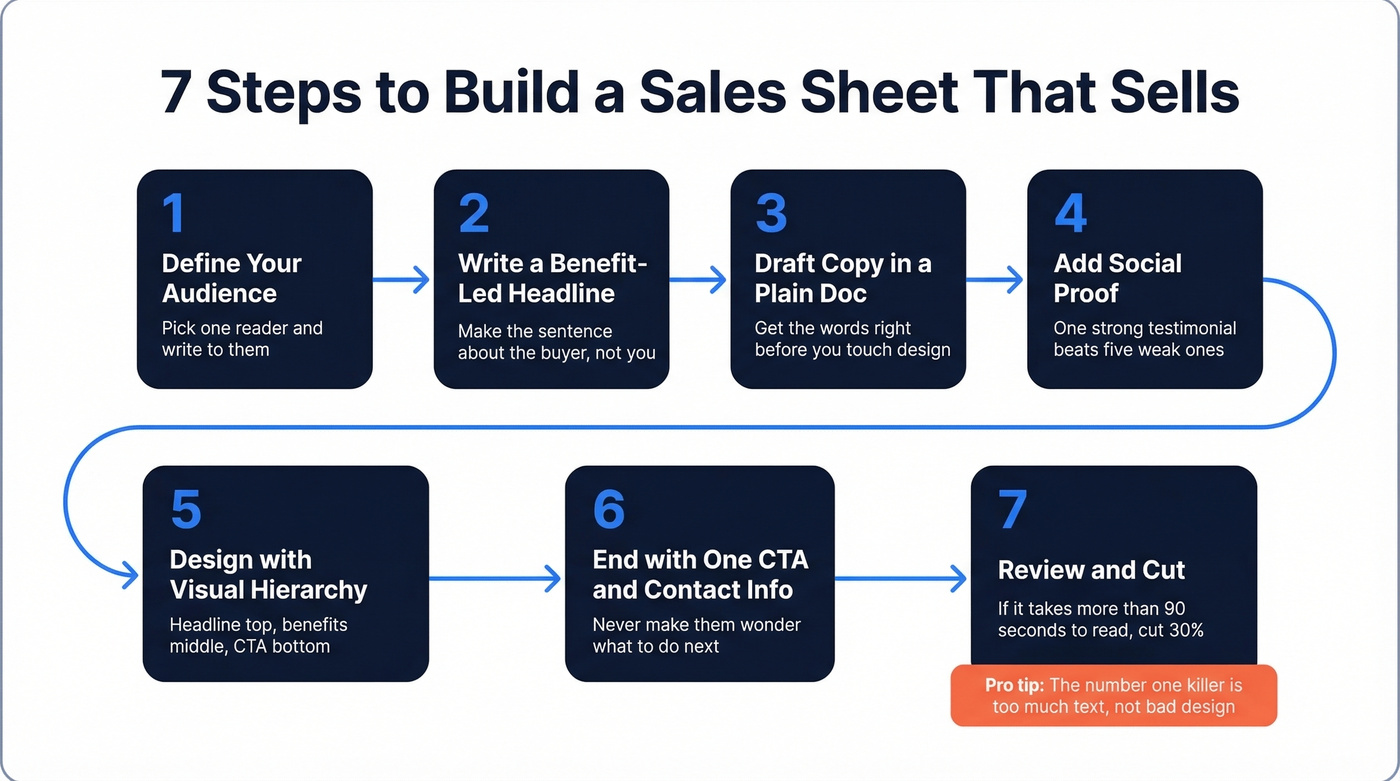
2. Write a benefit-led headline. "Save ten hours a week on manual reporting" works. "We are the leading provider of business intelligence solutions" doesn't. The difference is who the sentence is about - the buyer or you.
3. Draft the copy in a plain doc. Don't open Canva yet. Write the headline, value statement, benefits, and CTA in a Google Doc or text file. Get the words right before you touch design. We've seen teams spend hours perfecting layouts only to realize the copy says nothing useful.
4. Add social proof. One strong testimonial beats five weak ones. If you don't have testimonials yet, use a customer count, a logo strip, or a specific result like "reduced onboarding time by 40%."
5. Design with visual hierarchy in mind. Now open the template tool. Drop your copy in, add your product image, and build a clear visual hierarchy: headline at the top, benefits in the middle, CTA at the bottom. White space isn't wasted space - it's what makes the important stuff pop. Audiences read only about 20% of text when blocks exceed 600 words. Say less.
For print, export as a PDF in US Letter or A4 and add bleed only if your design prints to the edge of the page.
6. End with one CTA and your contact info. The reader should never wonder what to do next. Make the CTA visually distinct - contrasting color, bold font, bottom of the page.
7. Review and cut. Read it aloud, delete anything that doesn't earn its space, and check that the page isn't text-heavy. In our experience, the number-one killer is too much text - not bad design. If you can't read the whole thing in under 90 seconds, it's too long.
Mistakes That Kill Sales Sheets
The fastest way to ruin a sales sheet is leading with "We are the leading provider of..." Nobody cares. Rewrite every sentence to start with the buyer's problem or outcome.
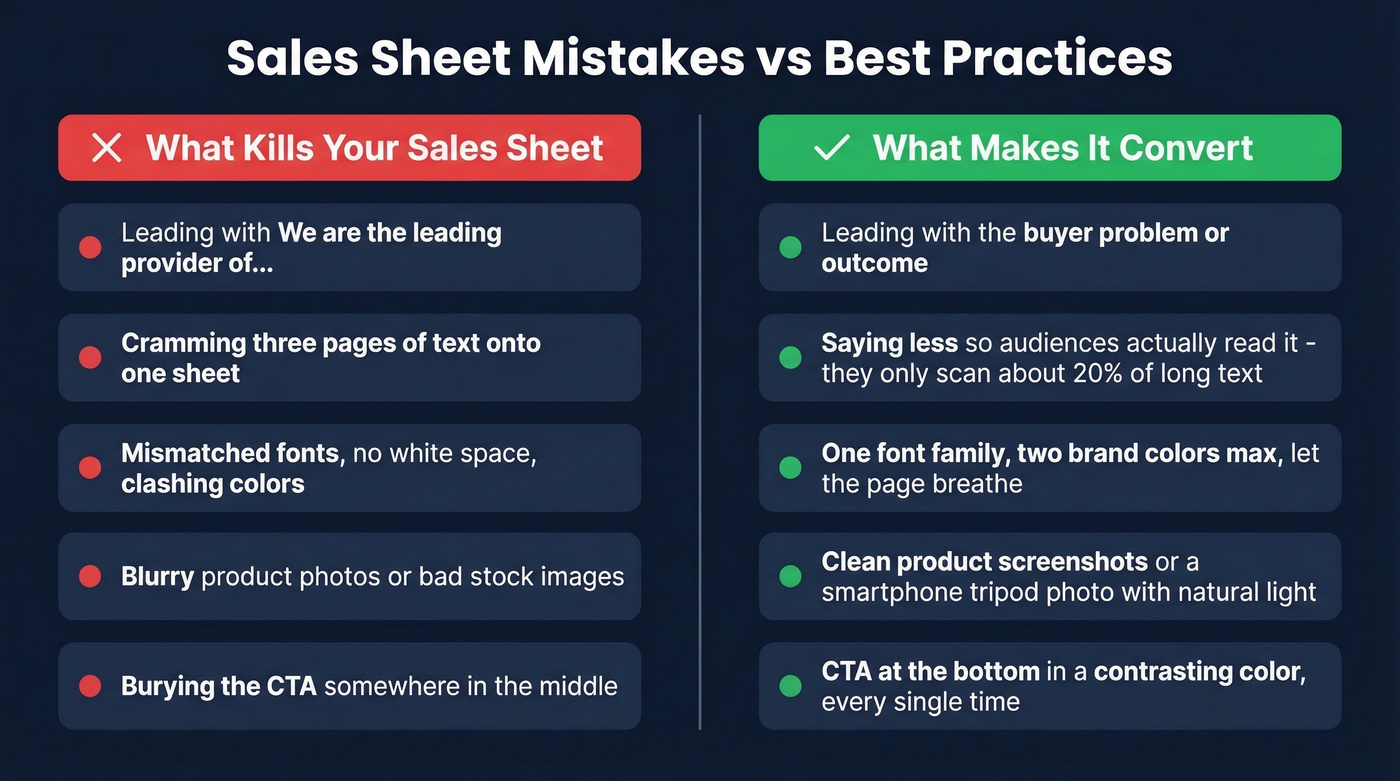
The second-fastest way? Cramming too much text. If it hits three pages, it's a brochure - cut 30% of the words and add more visuals. The most common request we hear from sales teams is some version of "just give me something simple that doesn't look like it was made in Word." That's a design problem, and it usually comes down to three things: mismatched fonts, no white space, and clashing colors. Use one font family, two brand colors max, and let the page breathe. A blurry product photo kills credibility just as fast - a smartphone on a tripod with natural light beats a bad stock photo every time.
Never bury the CTA. If the reader has to hunt for the next step, they won't take it. Put it at the bottom in a contrasting color, every single time.
Free Template Tools Worth Using
Write the copy in a plain doc first. Open the template tool second.
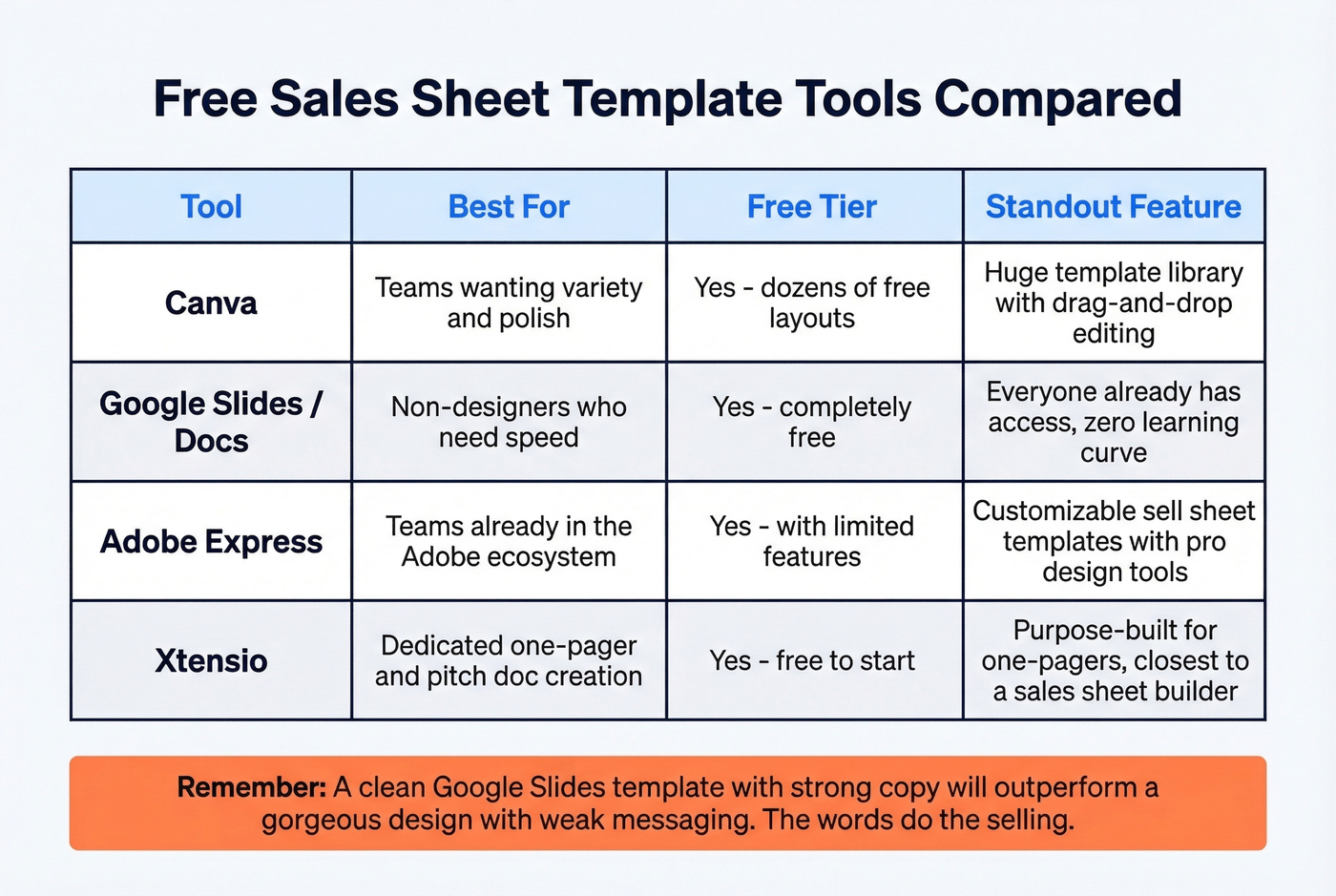
Canva has a huge variety of free sell sheet layouts - dozens of one-pager designs you can customize quickly. There's a paid plan if you need more assets and brand controls, but the free tier is genuinely good enough for most teams.
Google Slides/Docs is free, dead simple, and your whole team already has access. Best for non-designers who need something fast. Google also has a template gallery you can start from.
Adobe Express includes free, customizable sell sheet templates, with paid options for more features.
Xtensio is free to start and purpose-built for one-pagers and pitch docs - the closest thing to a dedicated sales sheet builder.
Look, most teams overthink the tool. A clean Google Slides template with strong copy will outperform a gorgeous Canva design with weak messaging every time. The words do the selling. The template just keeps them organized.
How to Distribute Your One-Pager
A great sales sheet sitting in a shared drive helps nobody.
Print copies for trade shows and hand them directly to prospects at your booth. Attach the PDF to cold emails - it feels more personal than "check out our website." Send it within an hour of a demo call while context is fresh. And always think of it as the thing your champion forwards to the decision-maker you never met.
Here's the thing most teams miss: 73% of buyers actively avoid suppliers who send irrelevant outreach. Sending your polished one-pager to the wrong person is worse than not sending it at all. Your sales sheet is only as good as the contact list behind it. If you're spending hours building a beautiful one-pager but guessing at email addresses, you're solving the wrong problem first. Tools like Prospeo can pull verified emails from 300M+ professional profiles at 98% accuracy, so your one-pager actually lands in the right inbox. (If you're building lists at scale, lead enrichment can help keep records complete.)
A perfect one-pager means nothing if you're sending it to dead emails. Prospeo's 5-step verification and 7-day data refresh keep your distribution list clean - under 4% bounce rates, just like Meritt achieved scaling to $300K/week in pipeline.
Stop designing sales sheets that land in spam folders.
FAQ
What's the difference between a sell sheet and a brochure?
A sell sheet is one page focused on driving a single buying decision; a brochure is multi-page brand storytelling. If your document exceeds two pages, it's a brochure - strip it back to one page with a clear CTA.
Should I include pricing on my sales sheet?
Include pricing only when it's standardized and helps qualify the buyer upfront - tiered SaaS plans or per-unit product costs, for example. For custom or enterprise pricing, use the CTA to drive a conversation instead.
Where can I find a free sales sheet template?
Canva and Xtensio both offer free, customizable one-pager templates you can edit in minutes. Google Slides works too if you want maximum simplicity - just focus on strong copy first.
How do I get my sales sheet to the right buyers?
Start with a verified contact database so you're not guessing at email addresses. Accurate emails with high deliverability ensure your one-pager lands in the right inbox, not a spam folder. From there, personalize the send - reference the prospect's company or pain point in the email body so the attachment feels relevant, not generic.