

Salesforce Alternatives: What to Actually Switch To in 2026
You just opened the renewal quote. $5,000 a year for four users - and that's before the 6% price increase Salesforce rolled out in August 2025 for Enterprise and Unlimited across Sales Cloud, Service Cloud, Field Service, and select Industry Clouds. The CFO wants to know why the team only touches about 40% of the features you're paying for. You don't have a great answer.
Salesforce is a powerful platform. Nobody disputes that. But it's oversold, underutilized, and overcomplicated for the majority of teams running it. One r/salesforce user described their instance as a "2010 time capsule" - built by consultants, maintained by nobody, and understood by fewer people every quarter.
Most teams browsing Salesforce alternatives don't need a clone at a lower price. They need a smaller CRM plus a better data layer. Let's find both.
Our Picks (TL;DR)
| Tool | Best For | Starting Price |
|---|---|---|
| HubSpot CRM | All-in-one (marketing + sales + service) | Free; ~$90/user/mo (Sales Hub Pro) |
| Pipedrive | Pure sales teams wanting transparent pricing | $14/seat/mo |
| Prospeo | Cleaning your data before/after migration | Free; ~$0.01/email |
Honorable mentions: Zoho CRM (best value suite for SMBs, free for 3 users), Dynamics 365 (enterprise Microsoft shops), Freshsales (budget AI pick, $9/user/mo).
What Salesforce Really Costs
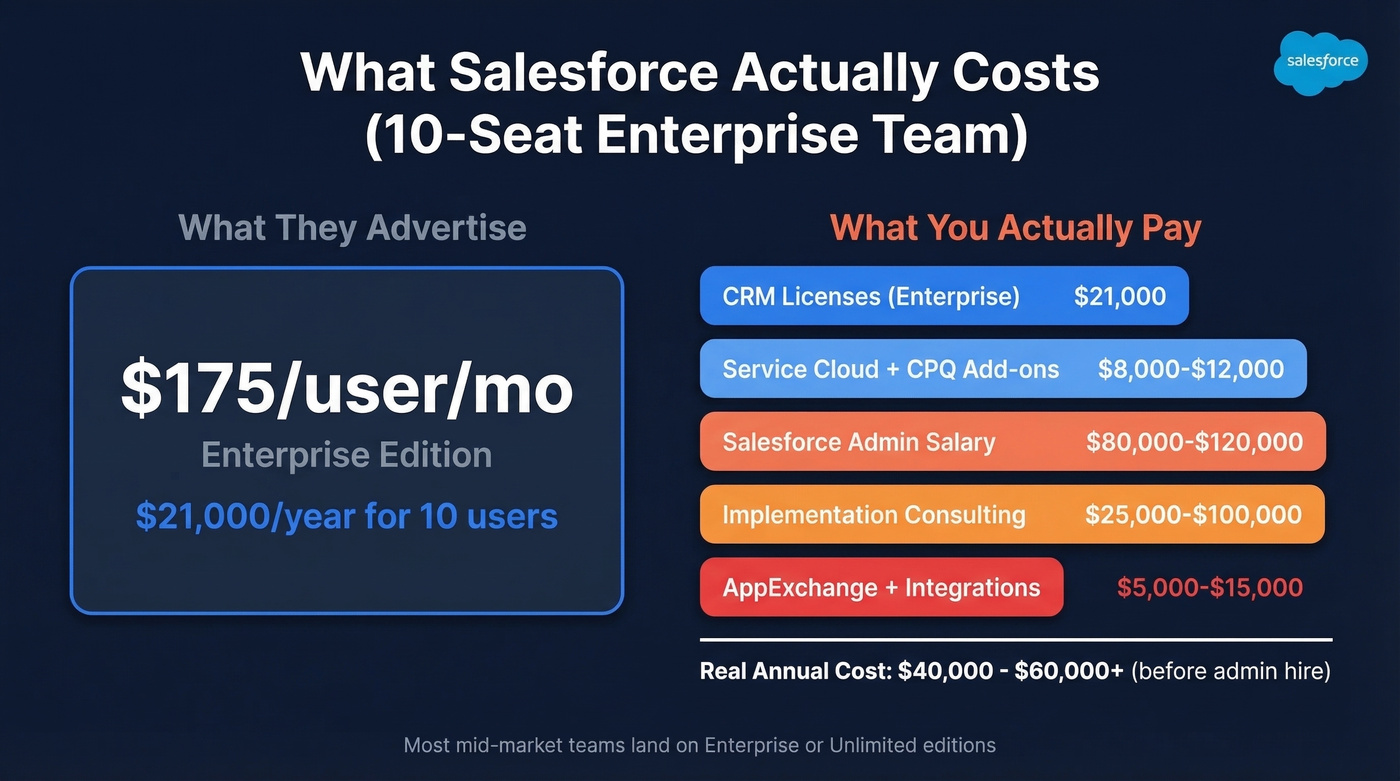
The "starting at $25/user/month" headline is marketing fiction. Here's the real tier structure:
| Edition | Price (per user/mo, billed annually) |
|---|---|
| Starter Suite | $25 |
| Pro Suite | $100 |
| Enterprise | $175 |
| Unlimited | $350 |
| Agentforce 1 | $550 |
Most mid-market teams land on Enterprise or Unlimited. Once you add Service Cloud, CPQ, analytics, and Pardot, the real per-user cost climbs to $250-$350/month. Then stack on the hidden costs nobody puts in the brochure: a dedicated Salesforce admin ($80-$120k/year), implementation consulting ($25k-$100k+), AppExchange add-ons, and the ongoing configuration work that keeps your integrations from breaking.
A 10-seat Enterprise deployment with common add-ons runs $40-$60k/year before you hire anyone to manage it. That's real money for a company that just needs pipeline tracking and email sequences.
Why Teams Leave in 2026
Three patterns keep showing up in every conversation we have with teams evaluating CRM alternatives.
If you're trying to sanity-check what you actually need from a CRM, it helps to look at a few examples of a CRM side by side before you migrate.
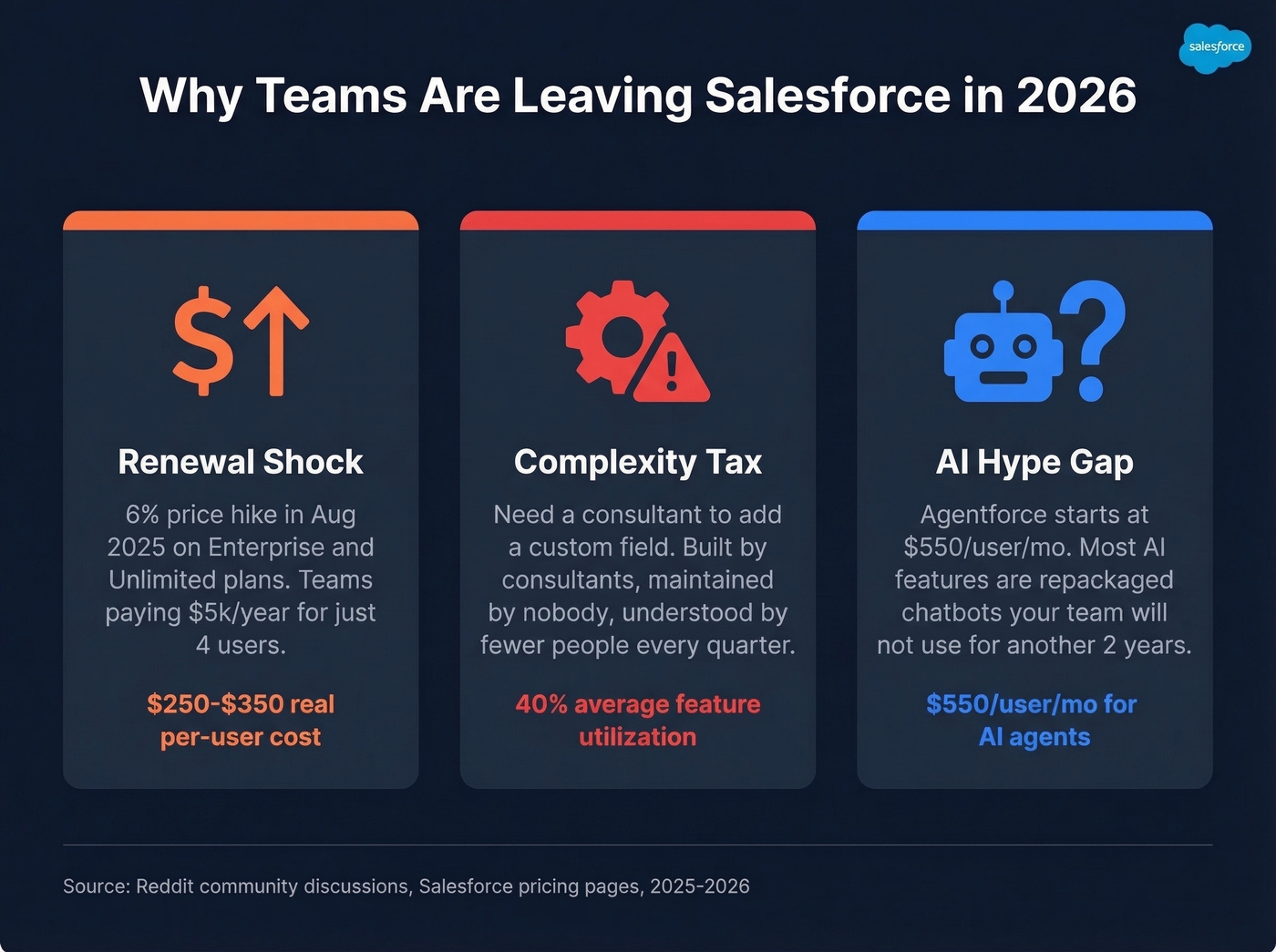
The renewal shock. Salesforce's August 2025 price increase hit Enterprise and Unlimited plans across multiple clouds. Teams already stretching their budgets got pushed over the edge. One r/CRM poster paying $5k/year for four users found that HubSpot quoted "about the same price" - which tells you how far Salesforce's pricing has drifted from SMB reality.
The complexity tax. When your CRM requires a consultant to add a custom field, something's broken. Teams describe Salesforce as overcomplicated - built by consultants, for consultants. Newer CRMs don't carry that baggage.
The AI hype gap. Every CRM vendor is racing to ship AI agents in 2026. Most of them are repackaged chatbots with a new label. The AI that actually matters for your revenue team is the kind that keeps contact data clean and current - not the kind that writes generic follow-up emails your prospects immediately delete. Salesforce's Agentforce starts at $550/user/month. That's a steep bet on features most teams won't use for another two years.

Switching CRMs exposes every dirty record in your database. Bad emails, stale contacts, departed employees - they all migrate with you. Prospeo enriches and verifies your entire contact list before it hits the new CRM. 98% email accuracy, 92% match rate, 50+ data points per contact. At $0.01/email, cleaning your database costs less than one month of that Salesforce seat you're canceling.
Migrate clean data, not expensive garbage. Start verifying free.
Best CRM Alternatives to Salesforce
HubSpot CRM
HubSpot is the first name everyone considers, and for good reason - it's the closest thing to a full Salesforce replacement with marketing, sales, and service under one roof. The free CRM is genuinely useful for small teams.
If you're comparing CRM options more broadly (not just Salesforce swaps), this list of contact management software can help narrow down what you actually need.
But HubSpot isn't the "cheap Salesforce." HubSpot uses seat types - Core, Sales, Service, View-Only - and here's the catch: if you mix subscription tiers (say, Starter for Service Hub and Professional for Sales Hub), all your Core Seats get priced at the highest tier. That one rule catches more teams off guard than anything else in HubSpot's catalog.
Sales Hub Professional runs ~$90-$100/user/month. Marketing Hub Professional starts around $1,180/month as a base, then scales with contact volume - which is exactly the pain point that pushed one Reddit user away from HubSpot. Credits reset monthly and don't roll over.
Use this if: you want marketing automation and CRM in one platform and your marketing contact list stays under 10,000. Skip this if: you have high contact volume or need only a sales CRM - you'll overpay for features you don't touch. Sound familiar?
Pipedrive

Pipedrive has the cleanest pricing in the CRM market. No seat-type gymnastics, no contact-volume surcharges, no "talk to sales" gates:
- Lite: $14/seat/month
- Growth: $39/seat/month
- Premium: $59/seat/month
- Ultimate: $79/seat/month
All billed annually. A 14-day free trial, no credit card required. Pipedrive renamed its plans in 2025 (Essential became Lite, Advanced became Growth, etc.), so older reviews reference different names - same product.
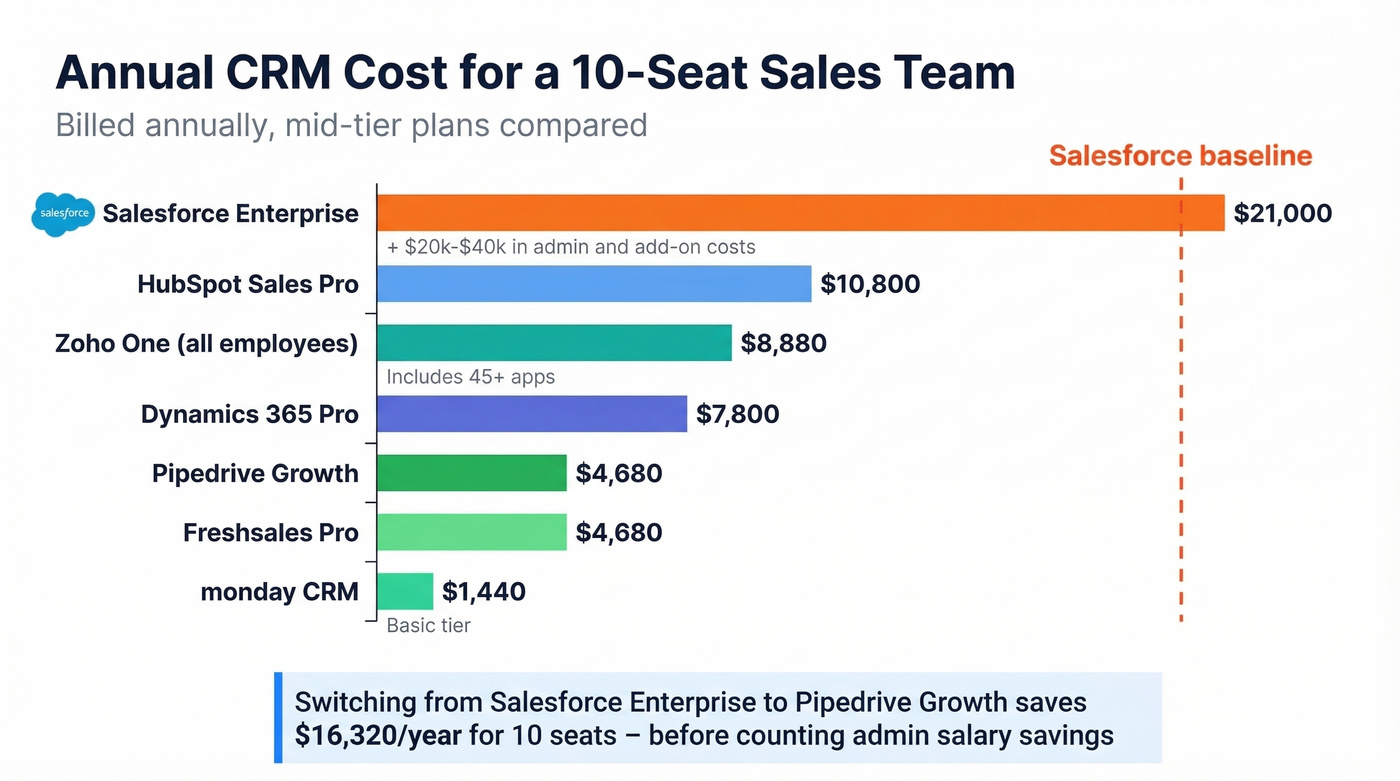
The tradeoff is scope. Pipedrive is a sales CRM, full stop. No native service desk, no marketing automation hub. You'll need add-ons for lead generation (LeadBooster from $32.50/mo) and email campaigns (from $13.33/mo). But for teams that need deal tracking, pipeline management, and activity logging - the things reps use every day - Pipedrive delivers without the bloat. A 10-seat Growth plan runs $4,680/year. Compare that to Salesforce Enterprise at $21,000/year for the same headcount.
Here's the thing: if your average deal size is under $15k, you almost certainly don't need Salesforce-level infrastructure. Pipedrive at $39/seat will cover 90% of what your reps do, and the other 10% wasn't getting done in Salesforce either.
Zoho CRM

Zoho is the best value play for SMBs that want a full business suite, not just a CRM. The standalone CRM is free for three users, with paid tiers starting around $14/user/month. Enterprise runs about $50/user/month. But the real move is Zoho One - $37/employee/month on the all-employee plan - which bundles 45+ apps including CRM, email marketing, project management, HR, and accounting.
Zoho's licensing has a clever wrinkle: "org users" get full CRM access, while "team users" (non-sales roles) get limited permissions at lower cost. Team users can't access reports, dashboards, or AI features, but they can view and update records. Smart way to get operations and support staff into the CRM without paying full freight.
A 20-person company on Zoho One's all-employee plan pays ~$8,880/year. That same team with 20 paid Salesforce Enterprise users pays $42,000/year for CRM alone. The UI feels dated compared to newer tools, and Zia (Zoho's AI) is gated to higher tiers - but at that price delta, most SMBs won't care.
Microsoft Dynamics 365 Sales
Use this if: your company already lives in the Microsoft ecosystem - Outlook, Teams, SharePoint, Power BI. The integration depth is unmatched, and IT will thank you for keeping the vendor count down. Skip this if: you're an SMB without a Microsoft EA. Implementation starts at $25k, the licensing is named-user only (no seat sharing), and the admin overhead rivals Salesforce.
Pricing runs $65/user/month (Professional), $105 (Enterprise), or $150 (Premium). Annual subscription costs for a mid-market team typically land between $5,000 and $35,000/year depending on role mix. This is the enterprise pick, not the startup pick.
Freshsales
Freshsales is the budget AI play and the tool we'd recommend to any team under 15 reps that wants AI-assisted pipeline management without a five-figure annual bill. Free for three users, $9/user/month on Growth, $39 on Pro, $59 on Enterprise - all billed annually. The 21-day free trial is the longest on this list.
Freddy AI - contact scoring, deal insights, sales email generation - kicks in at the Pro tier. Enterprise adds forecasting insights. The ecosystem is smaller than HubSpot's or Zoho's, but Freshsales punches above its weight for the price.
If you're building a modern outbound stack alongside your new CRM, it’s worth reviewing a few SDR tools that plug into HubSpot/Pipedrive-style setups.
monday CRM
monday CRM starts at $12/seat/month with 200+ integrations and the visual, drag-and-drop interface that monday.com is known for. If your team already uses monday for project management, adding CRM feels natural - same UI, same logic, minimal training.
The limitation is maturity. Complex sales processes with multi-stage approvals, territory management, or CPQ workflows will outgrow monday quickly. Great for teams selling straightforward deals who value speed-to-value over configurability.
Creatio
Enterprise no-code CRM with built-in process automation. Creatio's own research references a Nucleus Research finding of 37% reduction in technology costs for teams that switch. Pricing sits at $25/user/month (Growth), $55/user/month (Enterprise), and $85/user/month (Unlimited). Best for organizations that want to build custom workflows without writing code.
SugarCRM
Mid-market CRM with both cloud and on-premise deployment options. SugarCRM targets teams that want more control over their instance than a pure SaaS tool allows. Pricing typically starts around $49-$99/user/month. Worth evaluating if data residency or self-hosting matters to your compliance team.
Open-Source: Odoo & SuiteCRM
For technical teams that want full control, Odoo's community edition is free and modular - add CRM, invoicing, inventory, and HR as needed. SuiteCRM is an open-source CRM originally forked from the SugarCRM codebase with no licensing fees. Both require internal technical resources for setup, hosting, and maintenance. The "free" price tag comes with an ops cost that non-technical teams consistently underestimate.
Pricing Comparison
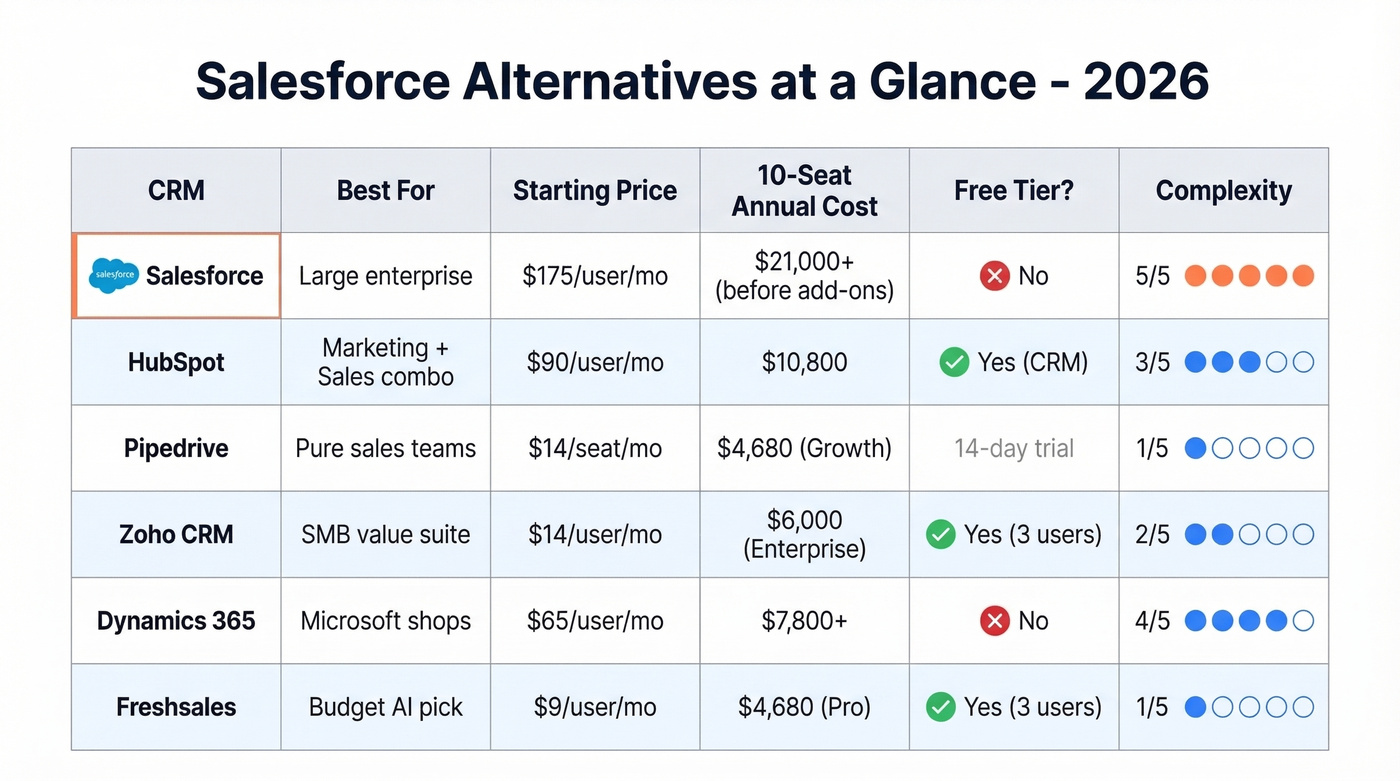
| Tool | Starting Price | Free Tier? | Best For | Service Module? |
|---|---|---|---|---|
| HubSpot | ~$90/user/mo (Sales Pro) | Yes (CRM) | Marketing + sales combo | Yes (Service Hub) |
| Pipedrive | $14/seat/mo | No (14-day trial) | Pure sales teams | No |
| Zoho CRM | ~$14/user/mo | Yes (3 users) | SMB full suite | Yes (Zoho Desk) |
| Dynamics 365 | $65/user/mo | No | Microsoft shops | Yes (Service module) |
| Freshsales | $9/user/mo | Yes (3 users) | Budget AI CRM | Yes (Freshdesk) |
| monday CRM | $12/seat/mo | No | Visual/simple CRM | Limited |
| Creatio | $25/user/mo | No | No-code enterprise | Yes |
| SugarCRM | ~$49-$99/user/mo | No | Mid-market control | Yes (SugarServe) |
| Odoo/SuiteCRM | Free (community) | Yes | Self-hosted/technical | Yes (modules) |
How to Migrate Off Salesforce
Migration is where good intentions go to die. We've watched teams spend months picking the perfect CRM, then blow the migration because they treated it as a data dump instead of a project. Here's how to avoid that.
Clean your data first. Before you move a single record, run your contact database through an enrichment and verification tool to remove bounced emails, update stale records, and fill in missing mobile numbers. If you’re evaluating vendors, start with a shortlist of data enrichment services so you don’t migrate bad records twice. Snyk's 50-person AE team cut their bounce rate from 35-40% to under 5% and added 200+ new opportunities per month after fixing their data layer with Prospeo before migrating. Your new CRM starts clean instead of inheriting Salesforce's data debt.

Map your fields before you build. A migration from a mature Salesforce org might involve 21 source tables mapping to 28 objects in the target system. Don't build the target system and migrate simultaneously - that's how teams end up in weekend go-lives with broken automations.
Plan for three phases. SIT (system integration testing), UAT (user acceptance testing), and Production. The SalesforceBen migration guide documents a 350-user migration across 21 source tables - and the biggest lesson was that the "frozen zone" between systems always shrinks. Implementation delays eat into it, and suddenly your team is working overtime to hit a go-live date that should've been pushed.
Audit your integrations. Salesforce's AppExchange has 7,000+ integrations. Major tools - Slack, Mailchimp, Zapier - connect to most CRMs on this list. Custom integrations will need rebuilding. Budget 2-4 weeks for that work on top of your core migration timeline.
You Don't Need a CRM Replacement
The biggest mistake teams make when switching from Salesforce is trying to recreate its entire universe in a cheaper tool. You end up with the same complexity at a lower price point - which is better, but not by much.
The smarter move is to simplify. Pick a lighter CRM for pipeline management - Pipedrive, Freshsales, monday - and rebuild the rest of your revenue stack intentionally. A modern setup looks like three layers: a CRM for deal tracking, a data platform like Prospeo for contact accuracy and enrichment, and outbound tools for sequences and deliverability. (If deliverability is a priority post-migration, keep an email deliverability guide handy while you ramp volume.)
Stop shopping for "Salesforce but cheaper." Most teams use 40% of their CRM's features. Build a stack around the 40% you actually need, and you'll spend less, adopt faster, and wonder why you carried all that dead weight for so long.
You just saved $20K+ dropping Salesforce. Don't blow it on a data provider that charges $1/lead. Prospeo gives you 300M+ profiles, 125M+ verified mobiles, and intent data across 15,000 topics - with a 7-day refresh cycle that keeps your new CRM current. Native integrations with HubSpot, Pipedrive, and every tool on this list.
Pair your new CRM with data that's 90% cheaper than ZoomInfo.
FAQ
Can I export all my data from Salesforce?
Yes - Salesforce allows full data export via Data Export and Data Loader, covering contacts, accounts, opportunities, and custom objects. Plan for field-mapping changes: your new CRM's data structure won't match 1:1, and custom fields need manual remapping. Budget 1-2 weeks just for mapping on a mature org.
How long does a typical CRM migration take?
Expect 4-12 weeks depending on org complexity. Simple orgs with clean data and few custom objects can move in a month; mature instances with custom workflows take closer to three months. Always budget extra time for UAT - the frozen zone between systems shrinks faster than anyone plans for.
Is HubSpot actually cheaper than Salesforce?
Not always. HubSpot's seat pricing forces all Core Seats to the highest subscription tier if you mix levels, and marketing contact volume adds cost fast. One Reddit user found HubSpot quoted "about the same price" as their Salesforce contract. Run a real quote with your exact seat count and contact volume before assuming savings.
What's a good free tool for cleaning CRM data before migration?
Prospeo offers a free tier with 75 email verifications and 100 Chrome extension credits per month - enough to test data quality before committing. For larger migrations, paid credits run ~$0.01/email with 98% accuracy and 50+ enrichment data points per contact. Apollo and Hunter also offer free tiers, but with lower verification accuracy in our testing.
What happens to my Salesforce integrations when I switch?
Major tools like Slack, Mailchimp, Zapier, and most outbound platforms connect natively to every CRM on this list. Custom API integrations and Apex triggers will need rebuilding. Budget 2-4 weeks for integration work on top of your core migration timeline - and audit your AppExchange dependencies before you commit to a go-live date.