

Salesforce Lead Gen: The Practitioner's Playbook for 2026
You ran a webinar last month. 800 registrants. Marketing calls it a win. But three weeks later, those leads are sitting in Salesforce - unscored, unrouted, half of them bouncing when SDRs try to email. 42% of sales professionals say low-quality leads make selling harder than a year ago, and 79% of marketing leads never convert into sales. The problem isn't generating leads. It's that your Salesforce lead gen setup does nothing useful with them once they arrive.
This playbook fixes that - Web-to-Lead forms, scoring models, Flow automation, routing rules, and the data quality layer that makes everything else work. No theory. Just implementation steps that turn Salesforce from a lead graveyard into a conversion engine.
The Three-Step Foundation
Short on time? Here's what matters:
- Enable Web-to-Lead and configure reCAPTCHA. Takes 1-3 hours for a basic setup.
- Build a lead scoring model with negative scoring and route leads via Assignment Rules. Budget 1-2 weeks for the initial rollout.
- Connect an enrichment tool to keep your lead data verified and current - garbage data kills everything downstream.
Get those three right and you're ahead of most Salesforce orgs.
How Salesforce Lead Gen Works
Every lead follows the same lifecycle: Lead -> Contact + Account + Opportunity. A Lead is an unqualified prospect - someone who filled out a form, downloaded a whitepaper, or got imported from a list. When sales qualifies that Lead, they "convert" it, which creates three separate records: a Contact representing the person, an Account representing their company, and optionally an Opportunity representing the deal.
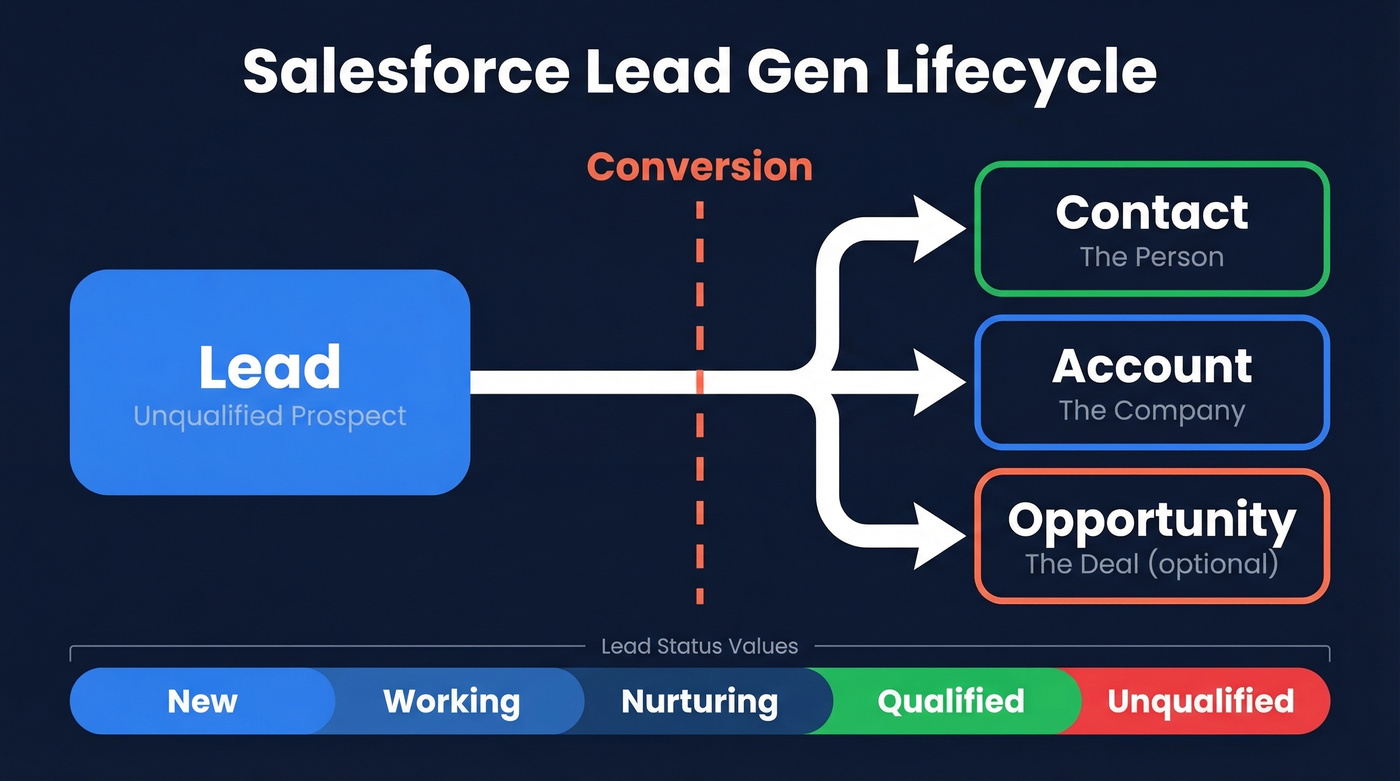
This matters because the Lead object is where all lead gen starts. Every form submission, every import, every API-created record lands here first. If your Lead object is messy - duplicates, missing fields, bad emails - the rot spreads to Contacts, Accounts, and Opportunities downstream.
Configure your Lead Status values early: New -> Working -> Nurturing -> Qualified -> Unqualified. These stages give reps a shared language and give you clean reporting on where leads stall.
One operational note: if you're still on Salesforce Classic, switch to Lightning Experience. We've seen orgs report a 41% productivity increase, 22% higher conversion from guided selling features, and 23% faster time-to-close after migrating. There's no reason to stay on Classic in 2026.
Set Up Web-to-Lead
Web-to-Lead is Salesforce's native form-to-CRM pipeline. It's basic, but it works - and it's included in every edition. Here's the setup:
Before you start, make sure you have admin access, your lead fields decided, an email template for auto-response, and ideally a Lead Queue and Assignment Rule already configured. Without an assignment rule, leads default to the Default Lead Owner and sit there until someone notices.
Step-by-step:
- Go to Setup -> search "Web-to-Lead" -> click Enable Web-to-Lead.
- Enable Require reCAPTCHA Verification - this blocks spam submissions. You'll need a Site Key and Secret Key from the Google reCAPTCHA admin console.
- Set the Default Lead Creator - pick a user with Modify All Data and Send Email permissions. This user's context is used for auto-response emails.
- Choose a Default Response Template as the fallback if no auto-response rule matches.
- Click Create Web-to-Lead Form, select your fields, set the Return URL where users land after submission.
- Grab the generated HTML and embed it on your site.
Testing tip: In the generated HTML, find the debug section and uncomment those lines. This surfaces validation errors during testing instead of silently failing - a trick that saves hours of troubleshooting.
Limitations: Web-to-Lead caps at 500 submissions per 24-hour period. It doesn't support file uploads, has no native field validation beyond required fields (you'll need JavaScript), and duplicate prevention is unreliable. For high-volume campaigns, use an AppExchange form tool or a custom API integration.
Build a Lead Scoring Model
Scoring is where most Salesforce orgs go from "we have leads" to "we have qualified leads." Without it, SDRs cherry-pick by company name and ignore the mid-market prospect who just viewed your pricing page three times.
The Scoring Blueprint
You need two dimensions - behavioral signals based on what prospects did, and fit signals based on who they are - plus negative scoring to suppress junk.
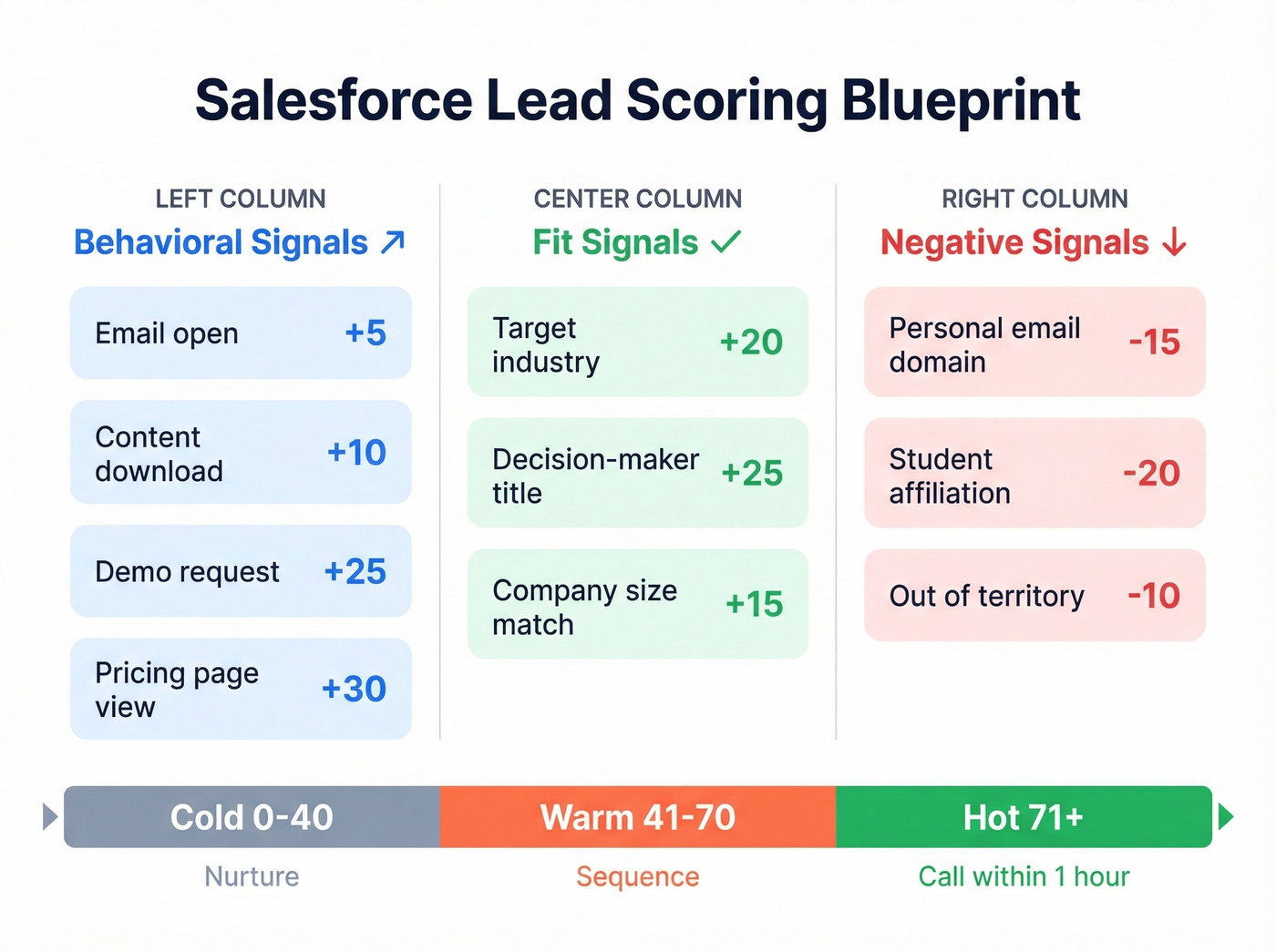
| Signal | Type | Points |
|---|---|---|
| Email open | Behavioral | +5 |
| Content download | Behavioral | +10 |
| Demo request | Behavioral | +25 |
| Pricing page view | Behavioral | +30 |
| Target industry | Fit | +20 |
| Decision-maker title | Fit | +25 |
| Company size match | Fit | +15 |
| Personal email domain | Negative | -15 |
| Student affiliation | Negative | -20 |
| Out of territory | Negative | -10 |
Set threshold bands: Cold (0-40), Warm (41-70), Hot (71+). Cold leads get nurtured. Warm leads get a sequence. Hot leads get a phone call within the hour.
Custom Fields You Need
Create three fields on the Lead object:
Lead_Score__c(Number) - the cumulative scoreScore_Classification__c(Picklist: Cold/Warm/Hot) - for reporting and routingScore_Last_Modified__c(DateTime) - tracks score freshness
Scoring only works if your data is complete. Target an 85%+ population rate on Industry, Job Title, and Company Size. If those fields are blank on half your leads, your scoring model is guessing - which is exactly why enrichment matters so much.
Einstein Lead Scoring vs. Manual Models
Salesforce offers Einstein Lead Scoring on Enterprise edition and above. Sales Cloud Enterprise runs $175/user/month. Einstein uses machine learning trained on your historical conversion data to predict which leads are most likely to convert. The catch: it needs hundreds to thousands of converted leads before its predictions become reliable. It also distinguishes between scoring (behavioral engagement) and grading (demographic/firmographic fit) - a useful split that manual models should mirror.
Here's the thing: if you have fewer than 500 converted leads in your org, build the manual model above. It's transparent, tunable, and works on any Salesforce edition. Once you have enough conversion data, layer Einstein on top for a second opinion.
If You Use Account Engagement (Pardot)
Account Engagement has its own scoring and grading system. Start with a score threshold of 100 and a grade threshold of B-. Once you have conversion data, tighten to 150 / B+.
The automation rule pattern: if prospect score >= 150 AND grade >= B+, assign the prospect via your Salesforce active assignment rule. Monitor conversion rates monthly and adjust thresholds based on what sales actually closes.

Your scoring model just flagged a lead as Hot. Your SDR picks up the phone - and the email bounces. 42% of reps say bad data makes selling harder. Prospeo enriches Salesforce leads with 50+ data points at 98% email accuracy and a 92% API match rate, so your scoring and routing actually work.
Stop routing leads to dead email addresses. Fix the data layer first.
Configure Lead Routing
Scoring tells you who matters. Routing tells Salesforce where to send them.
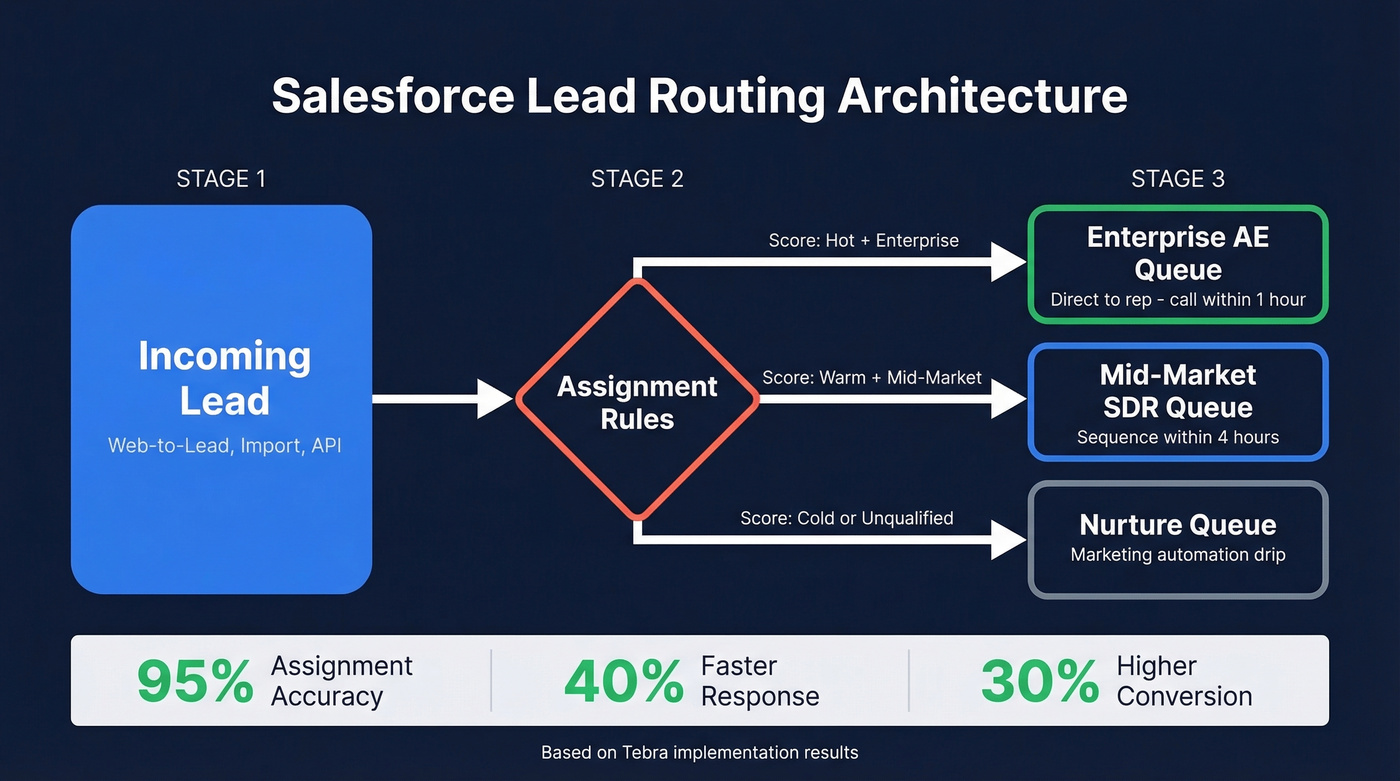
Use Lead Queues to segment by territory, vertical, or conversion stage. Then layer Lead Assignment Rules on top to automatically route leads to the right queue or rep based on field values - region, score classification, company size, whatever your sales org needs.
A Tebra implementation of scoring + routing showed a 95% increase in assignment accuracy, 40% faster response times, and a 30% increase in conversion rates. Your specific numbers will vary, but the pattern is universal: leads sitting unassigned in a general queue is the single biggest conversion killer in Salesforce.
Automate with Salesforce Flow
If you're still running Process Builder or Workflow Rules, your automations are on borrowed time. Both hit end of support on December 31, 2025. Flow Builder is now the only supported declarative automation tool in Salesforce, and any future platform release can break your legacy automations without warning.
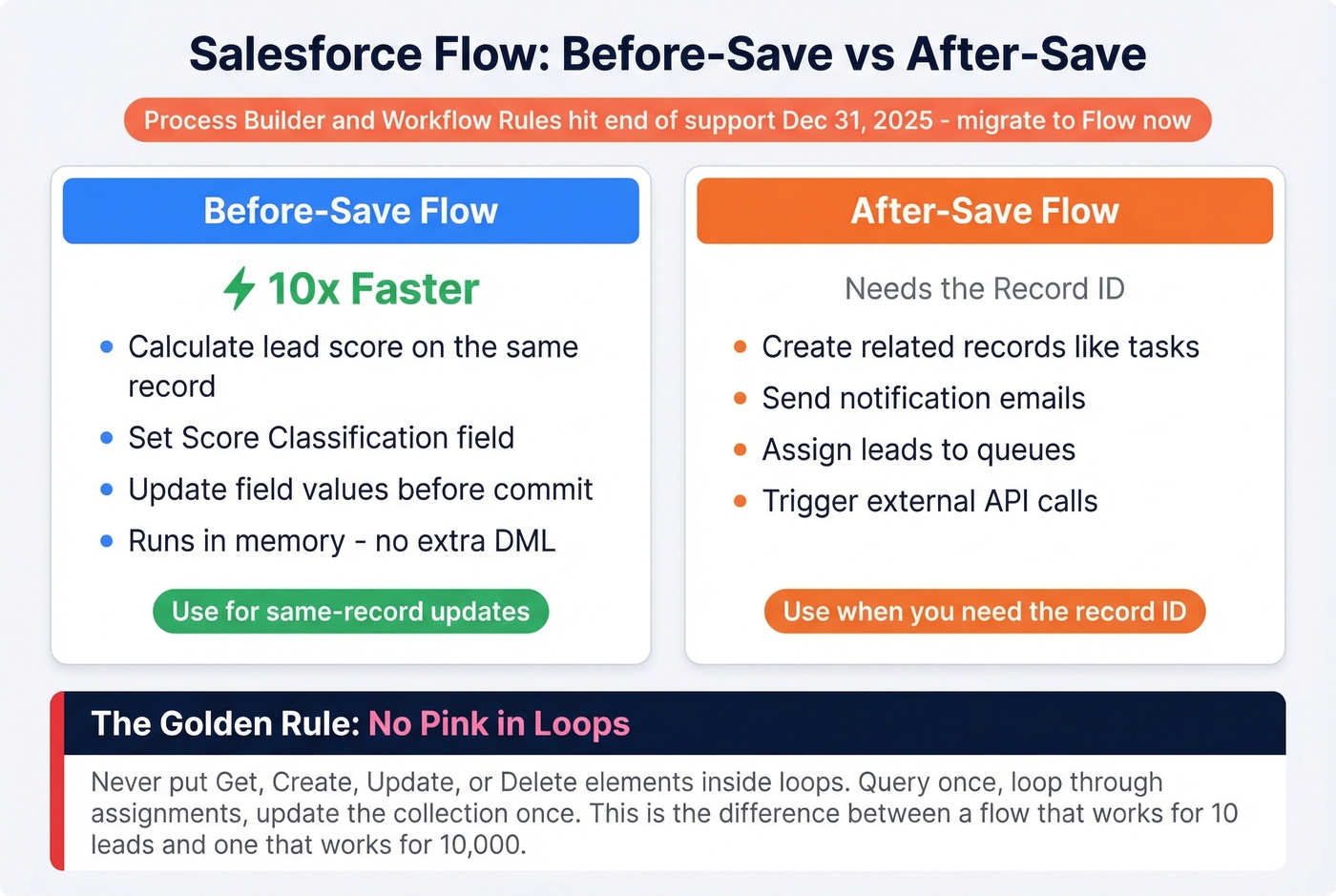
The key distinction: before-save flows run roughly 10x faster than after-save flows because they execute in memory without extra DML operations. Use before-save for same-record updates like calculating a lead score or setting a classification field. Use after-save when you need the record ID - creating related records, sending emails, assigning tasks.
One rule that'll save you from governor limit nightmares: no pink in loops. That means no Get, Create, Update, or Delete elements inside loop elements. Instead, use the collection-based bulk pattern - query once, loop through assignments, update the entire collection once. This is the difference between a flow that works for 10 leads and one that works for 10,000.
Fix Your Data First
Let's be honest: the biggest problem in most orgs isn't strategy. It's data quality. Web-to-Lead captures a name, email, and maybe a company. Half those emails are personal addresses or already outdated by the time a rep reaches out. Your scoring model, your routing rules, your automation - all of it falls apart when the underlying data is wrong.
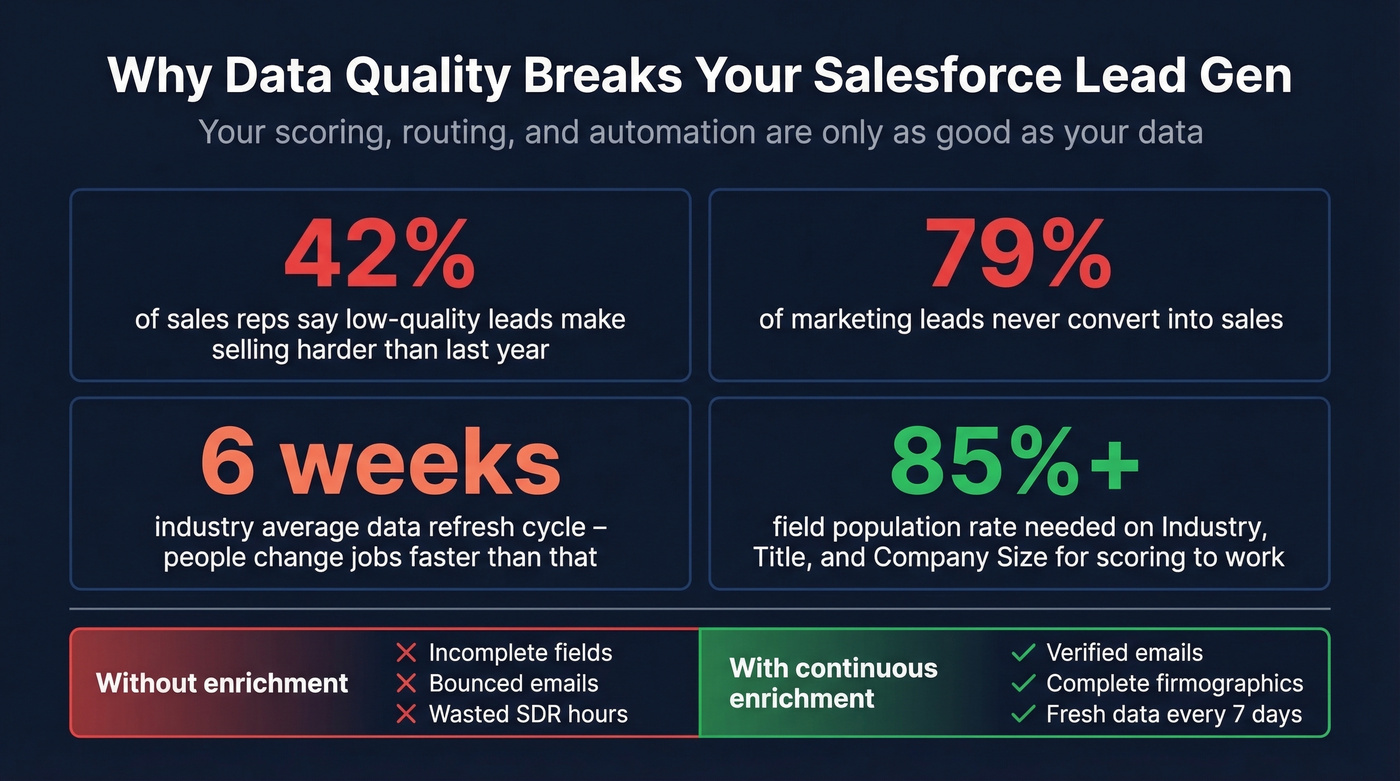
We've seen teams solve this by connecting an enrichment tool directly to their Salesforce org so every lead gets verified contact data on arrival. Prospeo's native Salesforce integration does exactly this - enriching records with verified work emails, direct dials, and 50+ data points including job title, company details, and technographics. With a 98% email accuracy rate and an 83% enrichment match rate, the majority of your leads come back with usable contact data instead of question marks.
What separates continuous enrichment from running a manual pass once a quarter is the refresh cycle. Prospeo refreshes data every 7 days. The industry average is six weeks. In that gap, people change jobs, get promoted, switch companies - and your "verified" data goes stale.
You read it above: scoring needs 85%+ field population on Industry, Title, and Company Size. Prospeo's CRM enrichment fills those gaps automatically - 83% of leads come back with verified contact data, refreshed every 7 days. At $0.01 per email, it costs less than one wasted SDR hour chasing bad records.
Complete data in, qualified leads out. That's how scoring actually works.
Lead Gen Benchmarks Worth Knowing
Numbers without context are useless. Here's what "good" looks like so you can benchmark your Salesforce pipeline - because 91% of marketers say lead gen is their top priority, yet 61% call it their greatest challenge.
Channel Benchmarks
| Channel | Conversion Rate | CPL |
|---|---|---|
| 6.5% | $30-$45 | |
| LinkedIn Ads | 3.2% | $120-$200 |
| Google Search Ads | 4.5% | $90-$150 |
| Content/SEO | 1.8% | $30-$60 |
| Webinars | 11.2% | $60-$80 |
| Organic Social | 1.2% | - |
Webinars dominate on conversion rate at 11.2%, while email wins on cost efficiency with CPLs under $50. LinkedIn Ads are expensive but put you directly in front of decision-makers - worth it if your ACV justifies $120+ per lead. Use these ranges to evaluate your lead sources in Salesforce reports.
Industry Benchmarks
| Industry | CR | CPL | Lead-to-Customer |
|---|---|---|---|
| SaaS | 5.1% | $85 | 17% |
| Healthcare Tech | 3.8% | $100 | 12% |
| Financial Services | 4.5% | $110 | 15% |
| Manufacturing | 2.7% | $75 | 8% |
| Professional Services | 6.0% | $60 | 20% |
Professional services leads are cheap and convert well - a 20% lead-to-customer rate is exceptional. Manufacturing sits at the bottom with 8%, dragged down by longer sales cycles and more stakeholders in the buying committee.
Salesforce-Specific Conversion Ranges
The formula is straightforward: (Converted Leads / Total Leads) x 100. But "good" depends entirely on deal complexity. For lower-value, faster sales cycles, target 20-30% conversion. For complex enterprise deals, 5-15% is realistic. Nurtured leads produce 47% higher order values than leads that go straight to sales - which is exactly why your scoring model and routing rules matter so much.
If your ACV is under $10k, you probably don't need Einstein Lead Scoring or a complex multi-touch attribution model. A simple manual score with three threshold bands and automated routing will get you 80% of the value at 10% of the cost. Don't over-engineer this.
Mistakes That Kill Salesforce Lead Gen
No ICP definition. You can't score leads without knowing who you're scoring for. Start with your last 50 closed-won deals and reverse-engineer the pattern.
Dirty, unverified data. If your bounce rate is above 5%, the problem isn't your messaging - it's your data source. Skip this one if your bounce rates are already under 3%, but for everyone else, an enrichment layer with 98% email accuracy eliminates this overnight.
No lead scoring. SDRs cherry-pick by company name. The mid-market buyer who viewed pricing three times gets ignored.
No routing rules. Leads unassigned for 48 hours are already cold. Automate assignment or accept the revenue leak.
Still using Process Builder. It's been unsupported since December 31, 2025. Migrate to Flow now, not after something breaks in production.
No dashboards. You can't optimize what you don't measure. Track lead source performance, conversion rates by score band, and time-to-first-contact at minimum.
Ignoring enrichment. Web-to-Lead data is thin by default - name, email, maybe company. Without enrichment, your scoring model runs on incomplete information and your reps fly blind. The consensus on r/salesforce is that data quality problems cause more pipeline friction than any other single issue.
FAQ
How many leads can Web-to-Lead capture per day?
Salesforce caps Web-to-Lead at 500 submissions per 24-hour period. After that, additional submissions queue up or require manual entry. For high-volume campaigns, use an AppExchange form tool or a custom API integration that writes directly to the Lead object.
Does Salesforce have built-in lead scoring?
Einstein Lead Scoring is available on Enterprise+ plans (Sales Cloud Enterprise is $175/user/month and up) and uses machine learning trained on your historical conversion data. It needs hundreds of converted leads to produce reliable predictions. For orgs without Einstein or without enough data, build a manual scoring model using custom fields and Flow automation.
What's the difference between a Lead and a Contact?
A Lead is an unqualified prospect stored in its own object. When qualified, you "convert" the Lead, which creates a Contact, an Account, and optionally an Opportunity. Leads and Contacts are separate objects - data doesn't flow between them until conversion.
How do I improve Salesforce lead conversion rates?
Focus on three levers: score leads into 3 bands (Cold/Warm/Hot), route Hot leads to a rep or queue in under 5 minutes, and enrich records so you're not selling off missing titles and bouncing emails. That combination usually beats "more leads" by fixing follow-up speed and data quality.
Is Salesforce Flow hard to learn?
Flow Builder uses a visual drag-and-drop interface. Basic record-triggered flows - auto-assigning leads, updating score fields, sending notifications - take hours to learn, not weeks. Start with before-save flows for field updates. They're simpler, run roughly 10x faster, and cover most lead gen automation needs.
Turn Leads Into Pipeline
If you want Salesforce lead gen to actually produce pipeline in 2026, stop treating Salesforce like a storage unit. Capture leads cleanly with Web-to-Lead and reCAPTCHA, prioritize them with a simple scoring model, route them automatically with Assignment Rules, and keep the Lead object fresh with continuous lead enrichment. Do that, and your "800 registrants" turns into meetings instead of a spreadsheet of regrets.