


SavvyCal Pricing, Reviews, Pros and Cons (2026)
You send 20 scheduling links a week and half your recipients fumble through three screens to pick a time. SavvyCal was built to fix that friction - but at $12-20/user/month with a limited free option, it deserves a close look before you commit.
30-Second Verdict
SavvyCal earns a 4 out of 5. It holds a 4.8/5 on G2 from 36 reviews, and the calendar overlay UX is genuinely best-in-class. Worth it for consultants, podcasters, and small teams sending scheduling links to external contacts daily. Skip it if you need a usable free tier, Salesforce integration, or a broad app ecosystem.
What Is SavvyCal?
SavvyCal's pitch is "recipient-first" scheduling. Instead of forcing bookers through a day picker and then a time picker, it shows a high-fidelity week view with a calendar overlay so both sides spot mutual availability faster. Think of it as the scheduling tool that actually respects the person on the other end of the link.
Pricing Breakdown for 2026
SavvyCal offers a free option plus two paid tiers: Basic at $12/user/month and Premium at $20/user/month. Both paid plans include a 30-day money-back guarantee and a free trial. Annual billing gives you 2 months free.
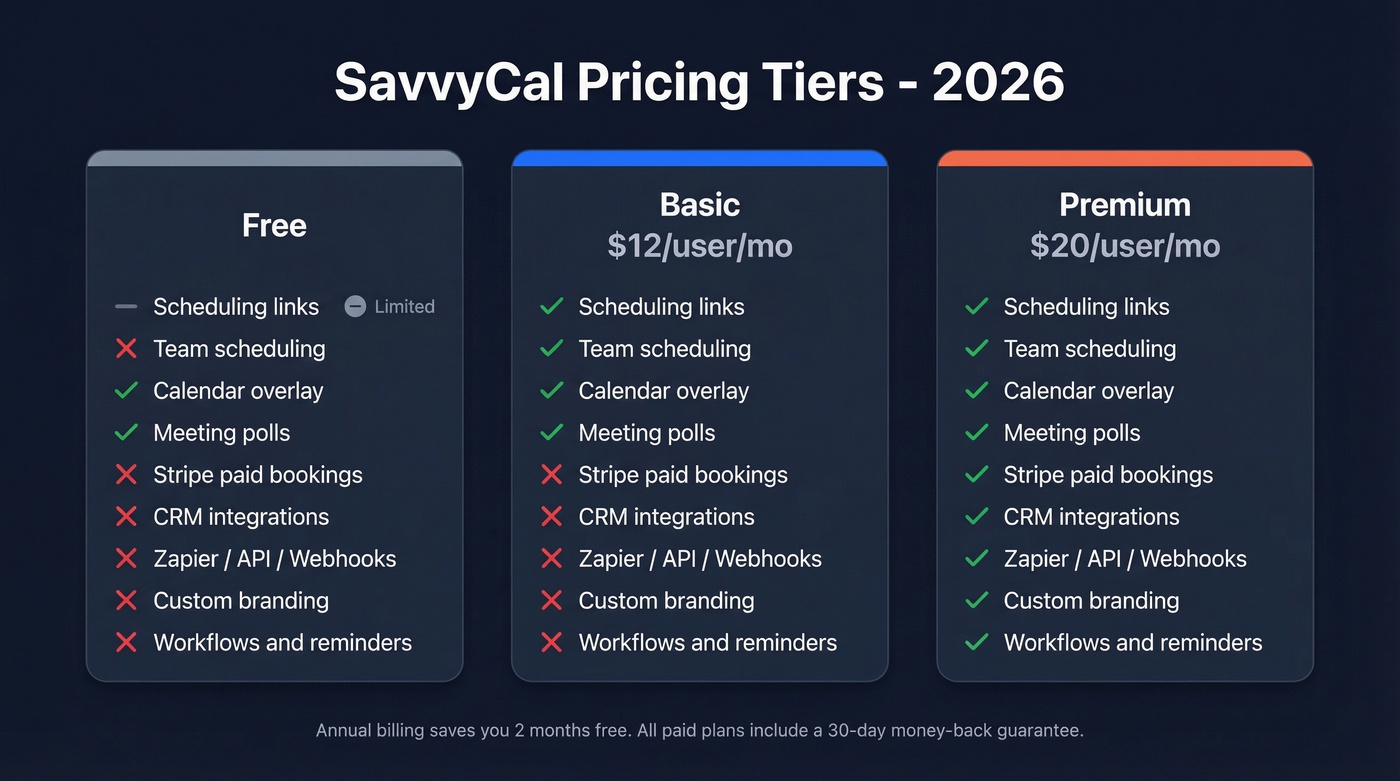
The free option is limited. You can use meeting polls and the calendar overlay (including overlaying calendars on other people's scheduling links), but if you want the core workflow - creating and sharing your own scheduling links - you'll end up on Basic.
Here's the thing: feature gating between Basic and Premium is where the real debate starts. Premium is where you get reminders and workflows, CRM integrations, Zapier, API access and webhooks, custom domains, delegated access, paid bookings via Stripe, and deeper branding controls. That's a lot of functionality locked behind an extra $8/month.
| Feature | Free | Basic ($12/mo) | Premium ($20/mo) |
|---|---|---|---|
| Scheduling links | Limited | Unlimited | Unlimited |
| Team scheduling | ✗ | ✓ | ✓ |
| Calendar overlay | ✓ | ✓ | ✓ |
| Meeting polls | ✓ | ✓ | ✓ |
| Stripe paid bookings | ✗ | ✗ | ✓ |
| CRM integrations | ✗ | ✗ | ✓ |
| Zapier / API / Webhooks | ✗ | ✗ | ✓ |
| Custom branding / domain | ✗ | ✗ | ✓ |
| Workflows & reminders | ✗ | ✗ | ✓ |
SavvyCal vs Calendly Pricing
This is the comparison everyone makes, so let's break it down honestly.
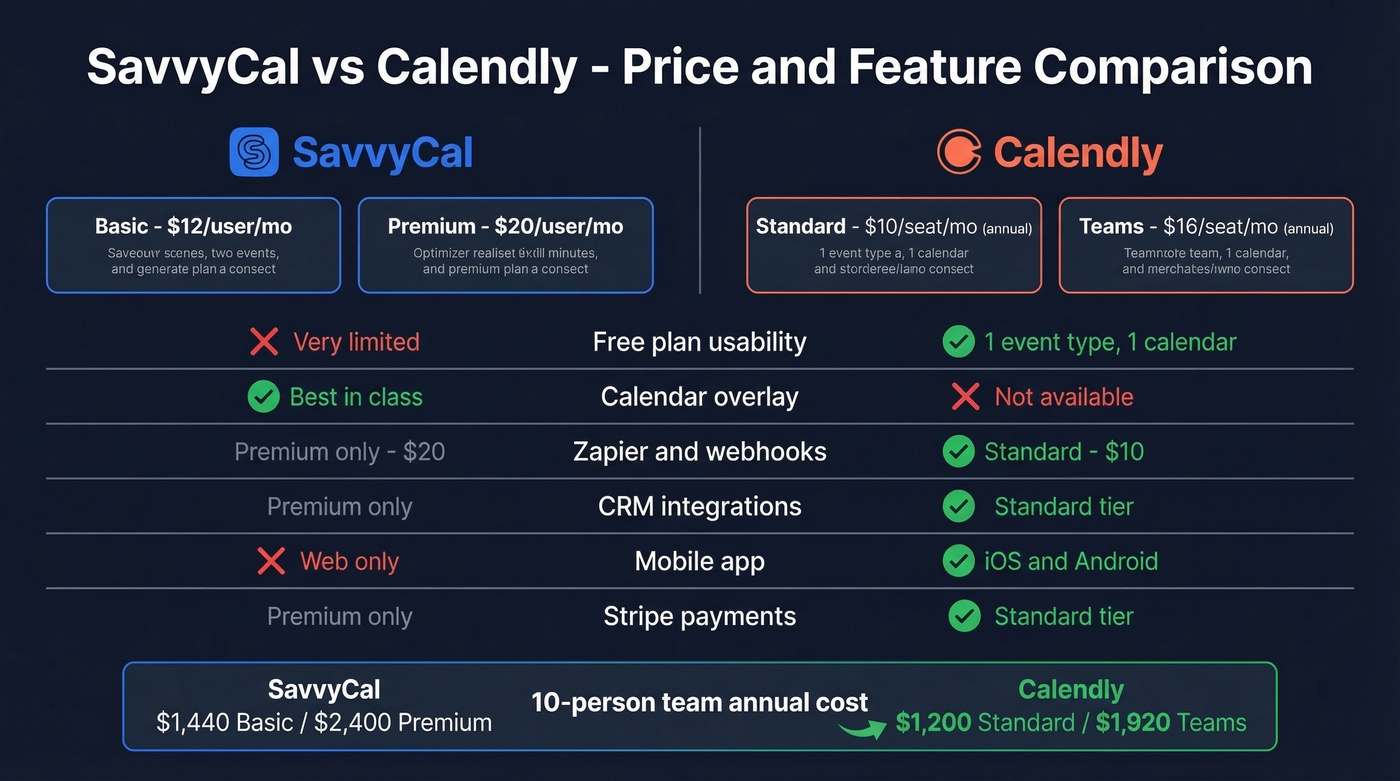
On annual billing, SavvyCal Basic and Calendly Standard are close - $12/user/month versus $10/seat/month. Premium tiers are close too: SavvyCal Premium runs $20/user/month while Calendly Teams sits at $16/seat/month billed yearly.
For a 10-person team:
| SavvyCal Basic | SavvyCal Premium | Calendly Standard (annual) | Calendly Teams (annual) | |
|---|---|---|---|---|
| Per user/mo | $12 | $20 | $10 | $16 |
| 10-person team/yr | $1,440 | $2,400 | $1,200 | $1,920 |
| Free scheduling | Limited | ✗ | ✓ | ✓ |
The cost gap is modest. The real difference is what you get at each tier. Calendly Standard includes Stripe + PayPal, Zapier + webhooks, reminders/automations, and integrations like HubSpot and Mailchimp - all at $10/seat/month billed yearly. SavvyCal puts Stripe paid bookings, Zapier, webhooks, API access, workflows, and CRM integrations behind Premium at $20. That's nearly double the price for features Calendly considers standard.
Calendly's free plan also includes 1 event type and 1 calendar connection, which is enough for many solo users. SavvyCal's free option is more of a "try the experience" tier than a real scheduling workflow.

Comparing scheduling tools is smart. But the real bottleneck isn't booking - it's finding verified contacts to send those links to. Prospeo gives you 98% accurate emails at $0.01 each so every SavvyCal link lands in a real inbox.
Stop scheduling with bad data. Start with verified contacts.
Review: Pros and Cons
What SavvyCal Gets Right
Calendar overlay is the killer feature. Recipients see their own calendar alongside yours and pick a time in seconds. Multiple reviews highlight how it reduces the awkwardness of traditional scheduling links. No other tool does this as well.
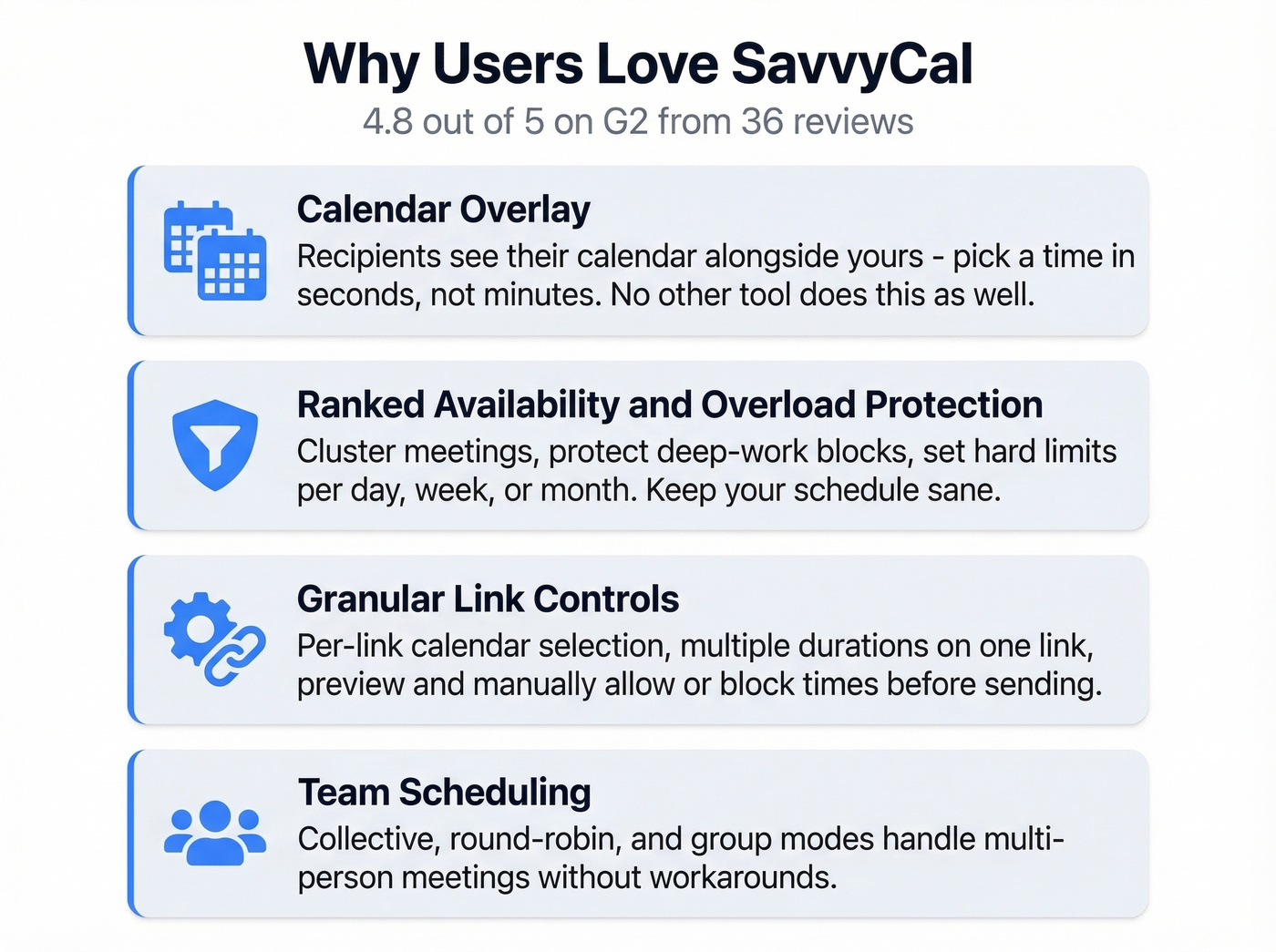
Ranked availability and overload protection. You can present time slots in preferred order, cluster meetings together, protect deep-work blocks, and set hard limits per day, week, or month. In our testing, this kept Tuesdays and Thursdays from becoming wall-to-wall calls - a small thing that made a real difference in how the week felt.
Granular link controls. Per-link calendar selection, multiple duration lengths on a single link, and the ability to preview and manually allow or block times before sending. These small touches add up fast when you're sending dozens of links per week.
Team scheduling covers the bases. Collective, round-robin, and group modes handle multi-person scenarios without workarounds.
Stripe paid bookings on Premium. If you charge for calls, you can turn bookings into paid appointments without duct-taping another checkout flow onto your scheduling page.
Where SavvyCal Falls Short
The free option isn't really free. A recurring complaint is that it's pricey for solo users and that the free experience isn't enough to run real scheduling long-term. If you're bootstrapping, this stings.
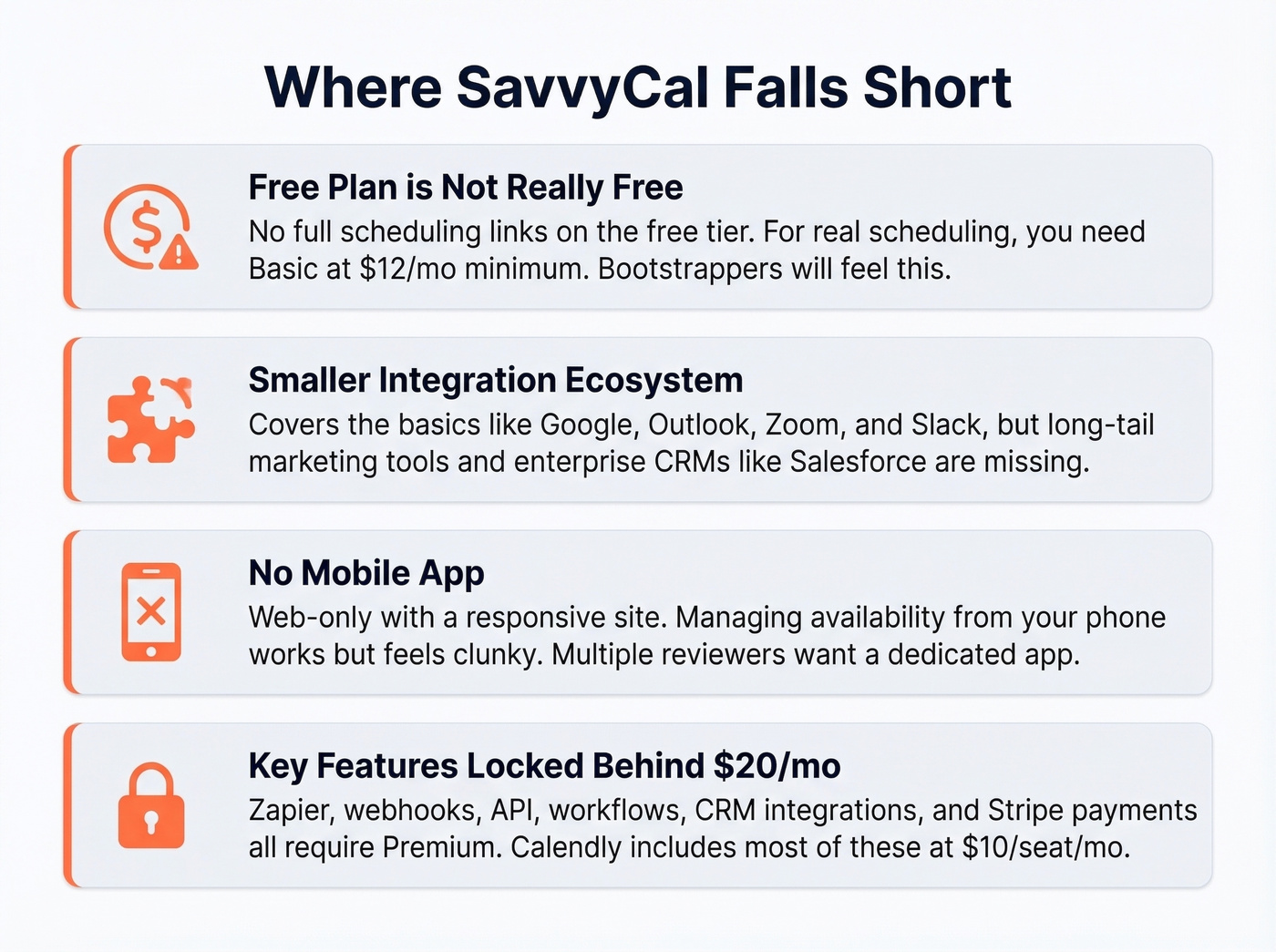
A smaller native integration ecosystem than Calendly. SavvyCal covers core needs - Google, Outlook, iCloud, Fastmail for calendars; Zoom, Google Meet, Teams, Whereby for conferencing; plus Stripe, Zapier, webhooks, Slack, and CRM options like HubSpot and Close. But if your world revolves around long-tail marketing tools and enterprise CRMs, you'll feel the gaps quickly. If you're evaluating CRM fit alongside scheduling, start with these examples of a CRM.
No mobile app. It's web-only with a mobile-responsive experience. We found managing availability from a phone workable but clunky, and multiple reviewers want a dedicated app. For a tool you check between meetings, that's a real miss.
Premium-gated automation. Zapier, webhooks, API, workflows, and CRM integrations all require the $20/month tier. Calendly includes many of these at $10/seat/month billed yearly. Hard to justify unless the calendar overlay alone is worth the premium to you.
Who Should Use SavvyCal
SavvyCal works best for consultants sending 15+ scheduling links per week, podcasters booking unfamiliar guests, and small teams that prioritize the recipient's booking experience over integration breadth. If you're building a repeatable outbound motion, pair scheduling with proven sales prospecting techniques.
Who Should Skip It
Solo users on a budget should start with Calendly's free plan. One event type and one calendar connection is enough for basic scheduling, and it costs nothing.
Teams needing Salesforce or deep marketing integrations will outgrow SavvyCal's ecosystem fast; Calendly Teams or Enterprise is built for that world. Mobile-first schedulers will find the lack of a native app frustrating. And for teams where Zapier or webhook triggers are part of the daily workflow, paying $20/month for what Calendly includes at $10/seat/month is a tough sell. If you're standardizing your stack, compare options in our guide to contact management software.
Best Alternatives
Calendly - The default for a reason. Free plan for basic scheduling, broad integrations, and native mobile apps. Standard runs $10/seat/month billed yearly.
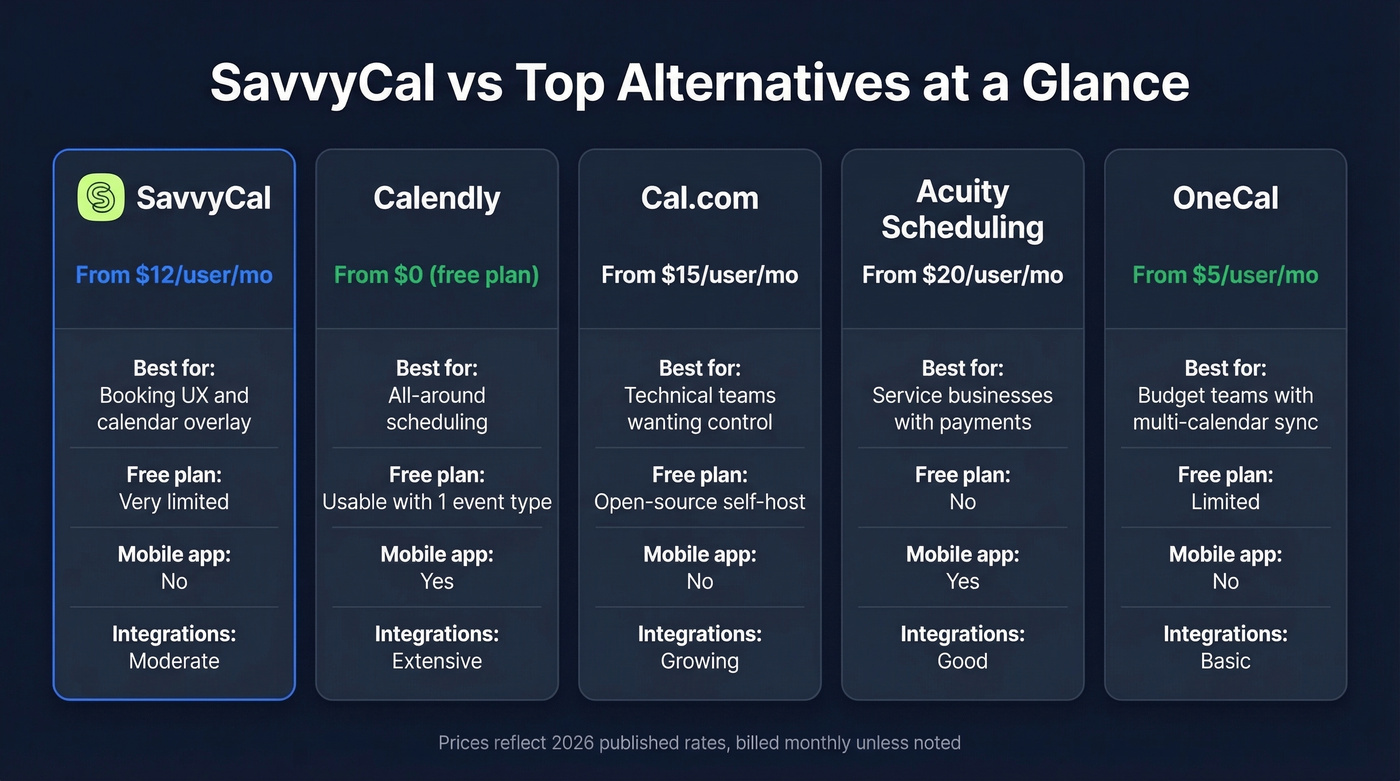
Cal.com - Open-source and self-hostable, from $15/user/month hosted. Best for technical teams wanting full control over routing logic and customization.
Acuity Scheduling - From $20/user/month. A solid pick for service businesses that want scheduling plus payments baked in.
OneCal - From $5/user/month. The budget pick with cross-account calendar sync that SavvyCal doesn't offer at all.
If you're also choosing tools for the outreach side (before the booking link), see our roundup of SDR tools and outbound lead generation tools.
FAQ
Does SavvyCal have a free plan?
SavvyCal offers a free option limited to meeting polls and calendar overlays - you can't create full scheduling links. For day-to-day scheduling, Basic at $12/user/month is the practical starting point.
How much does SavvyCal cost per year?
On annual billing, Basic costs roughly $120/user/year and Premium costs roughly $200/user/year (2 months free). A 10-person team on Premium runs $2,000/year - about $480 more than Calendly Teams.
Is SavvyCal better than Calendly?
For booking UX, yes - the calendar overlay is unmatched. For everything else (free plan value, integration breadth, mobile apps, and automation at lower tiers), Calendly wins. Pick SavvyCal only if most of your scheduling involves external contacts unfamiliar with your calendar.
What's the best free tool for outbound scheduling workflows?
Calendly's free plan handles basic scheduling. For the prospecting step before scheduling, Prospeo's free tier gives you 75 verified emails per month at 98% accuracy - enough to build a working find-verify-book pipeline at zero cost.
You're optimizing how meetings get booked. Now optimize who gets the invite. Prospeo's 300M+ profiles with 30+ filters - intent data, job changes, tech stack - let you target the right buyers before you ever share a scheduling link.
Fill your calendar with decision-makers, not dead leads.