

Search Engines Email (2026): Find Emails Without the Bounce-Rate Trap
You searched "search engines email" and still ended up with "verified" addresses that bounce. That's not your sequencer's fault. It's catch-all domains, stale records, and credit systems that reward the wrong behavior.
Here's the thing: most teams don't need a giant all-in-one data suite. They need one strong email finder, one catch-all-aware verification workflow, and the discipline to track hard bounce rate like adults.
If you're building lists for Instantly, Smartlead, Lemlist, Outreach, or Salesloft, you're in the B2B email-finding world - not "search my inbox" land.
Quick scenario: we watched a small agency import a "verified" CSV, hit 9% hard bounces in the first hour, and then spend the next two weeks warming new domains because their old ones got cooked. Nothing about that was a copy problem.
What people mean by search engines email (3 intents)
This keyword's a mess because it hides three totally different jobs under one phrase. Pick the wrong tool for the wrong intent and you'll waste money, waste time, and still end up with bounces (or an inbox you can't search).
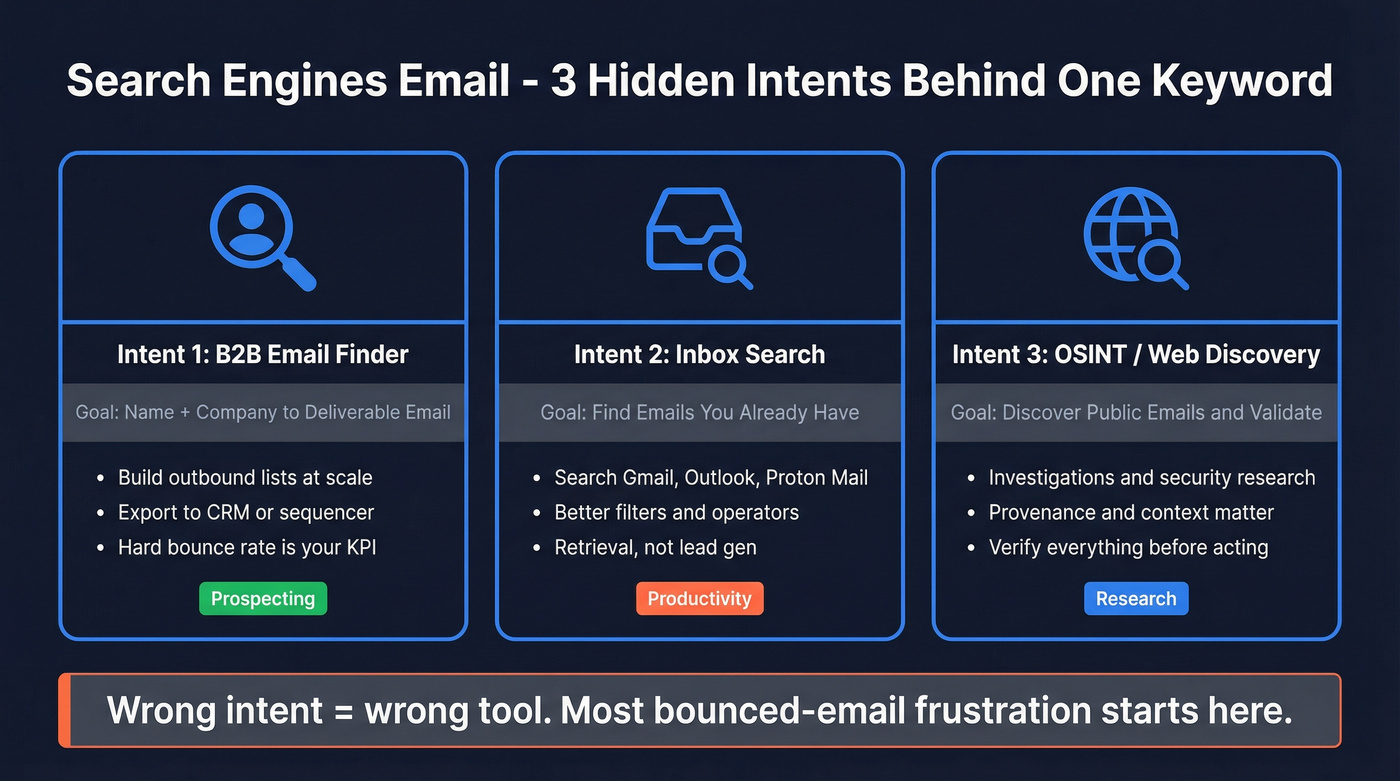
Intent #1: B2B email finder (prospecting)
You're trying to go from name + company (or a profile/URL) to a deliverable work email, at scale. This is what most "email finder" tools are built for.
Use this if you:
- Build outbound lists weekly
- Need exports to a CRM/sequencer
- Care about hard bounce rate and sender reputation
Intent #2: Inbox/provider search (productivity)
You're trying to find an email you already have inside Gmail, Outlook, Proton Mail, etc. This is operators + indexing, not lead gen.
Use this if you:
- Need to locate "that invoice thread from last March"
- Want better filters, labels, and attachment search
- Don't need new contacts - just faster retrieval
Intent #3: OSINT / web discovery (research)
You're trying to discover emails that exist publicly on the web (or are associated with accounts), then validate them before any outreach.
Use this if you:
- Do investigations, fraud checks, or security research
- Need provenance and context, not just "an email string"
- Expect to verify everything before you act on it
Symptoms you're in the wrong intent (and why results feel "bad")
- You bought a B2B finder but you're really trying to search your mailbox -> you'll get new emails, not better search.
- You're doing OSINT but you're judging tools by "match rate" -> you'll miss provenance and context.
- You're prospecting but you're optimizing for database size -> you'll get coverage and still torch deliverability.
If you're building outbound lists, treat this like a deliverability problem first and a data problem second.
That mindset fixes half the "verified but bounced" drama.
How email-finding tools actually find addresses (found vs deduced vs database)
Most "email search engine" tools do one (or more) of these under the hood. Knowing which one you're paying for makes it easier to predict failure modes and design a workflow that doesn't implode.
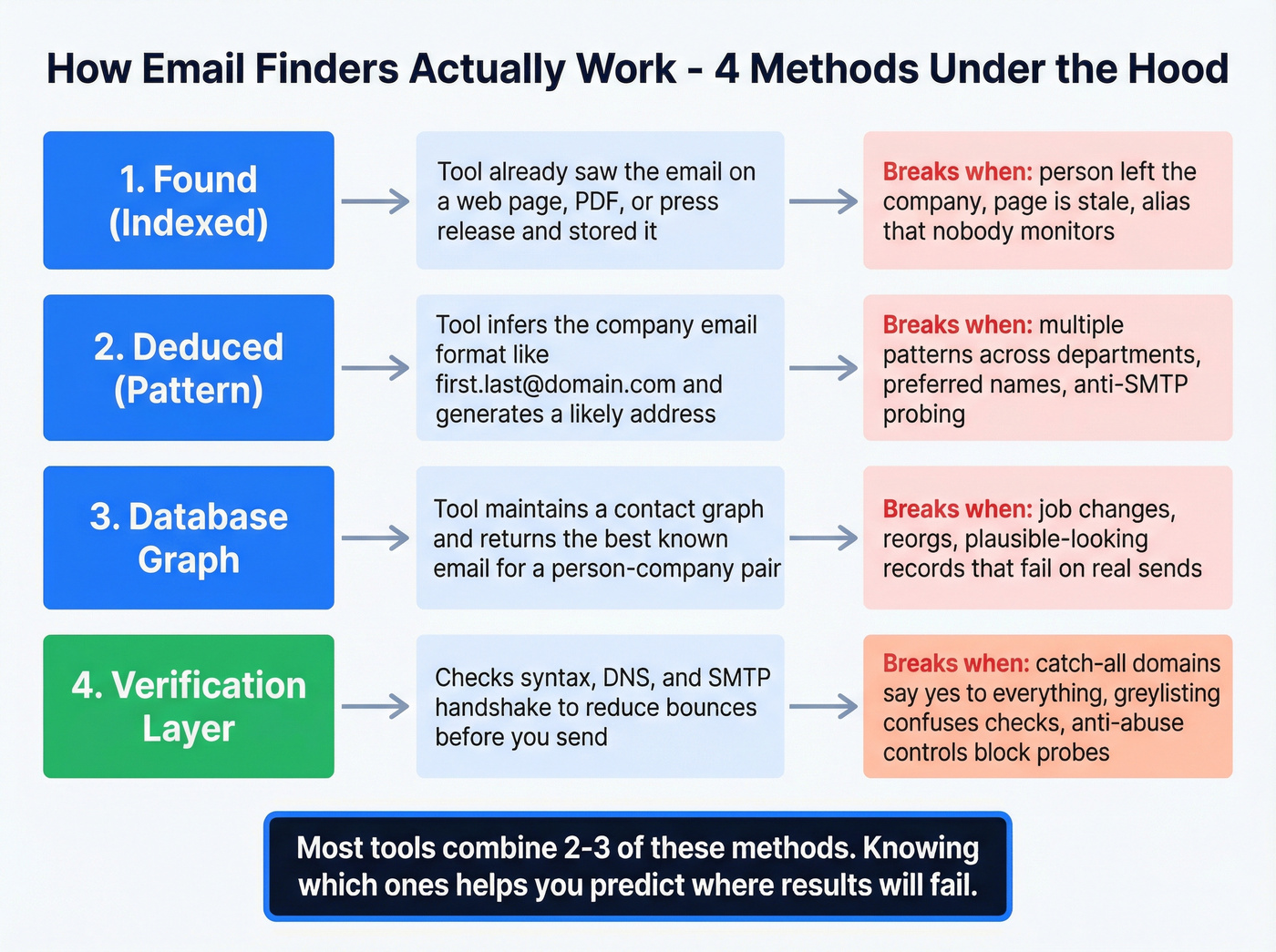
1) Found (indexed) emails
The tool has already seen the email somewhere (web pages, PDFs, press releases, public bios, etc.) and stored it.
Concrete example: you search "Jane Doe + Acme Corp" and the tool returns jane.doe@acme.com with a source URL and a discovery date.
What goes wrong:
- The email was real once, but the person changed roles or left
- The page is old and never refreshed
- The address is an alias that forwards (looks "alive" but isn't monitored)
2) Deduced (pattern-based) emails
The tool infers the company's email format (like first.last@domain.com or f.last@domain.com) from known examples, then generates a likely address.
Concrete example: the tool finds that Acme uses first.last@acme.com, then generates jane.doe@acme.com even if it never saw it published.
What goes wrong:
- The company uses multiple patterns across departments or regions
- The person has a middle initial or preferred name that breaks the pattern
- The company blocks verification attempts (anti-enrichment / anti-SMTP probing)
3) Database / enrichment graph
The tool maintains a contact graph and returns the "best known" email for a person/company pair.
Concrete example: you pull 5,000 contacts from a database and many come back instantly because they're already stored.
What goes wrong:
- Staleness: job changes, reorgs, mailbox deprovisioning
- "Looks plausible" records that pass basic checks but fail in real sending
- Duplicates across sources (same person, multiple emails, conflicting statuses)
4) Verification layer (the part everyone underestimates)
Verification reduces bounces, but it isn't magic - especially with catch-all domains.
Concrete example: a tool labels an address "valid" because the domain accepts mail during an SMTP handshake.
What goes wrong:
- Catch-all domains accept anything, so "valid" becomes "not rejected yet"
- Greylisting delays responses and confuses validators
- DMARC/anti-abuse controls make servers behave differently to probes than to real mail
Hunter's the cleanest UI example of this whole taxonomy: it distinguishes found vs deduced, verifies both, and (when found) shows source URLs + discovery dates. That provenance is how you debug results instead of guessing.
Here's the evaluation grid we use:
| Method | What it's great at | Where it breaks |
|---|---|---|
| Found/indexed | Provenance, trust | Stale pages, old roles |
| Deduced/pattern | Speed, scale | Pattern drift, naming quirks |
| Database graph | Coverage | "Plausible" but outdated |
| Verification | Bounce reduction | Catch-all + anti-verification |
If you want to see what "provenance" looks like in a real UI, Hunter's source/discovery view is the reference implementation.

You just read why "verified" doesn't mean deliverable. Prospeo's 5-step verification includes catch-all handling, spam-trap removal, and honeypot filtering - built on proprietary infrastructure, not third-party providers. The result: 98% email accuracy and under 4% bounce rates for teams sending at scale.
Stop cooking domains with bad data. Start with emails that actually land.
Why "verified" still bounces (catch-all domains + what to measure)
The most expensive mistake in this category is treating verified as a synonym for deliverable.
It isn't.
In a large benchmark dataset (20,000 tests across 15 tools), 15%-28% of B2B domains were catch-all, and the share climbed with bigger companies. On catch-all domains, validators can't confirm a mailbox exists because the server says "sure" to almost anything during the handshake.
What "verified" actually means in practice
Most tools label an email "verified/valid" when:
- The syntax is correct
- The domain has mail servers
- The server doesn't reject the address during a check
That's useful, but it's not the same as "this mailbox belongs to this person and will accept your campaign."
Status labels you'll see (and how to treat them)
Different tools use different words, but the meaning's usually consistent:
- Valid / Verified: Safe enough to send - still monitor bounces.
- Invalid: Don't send. Try another source or pattern.
- Catch-all / Accept-all: Higher risk. Treat as "maybe." Send carefully or route to manual review.
- Unknown: The tool couldn't complete checks (timeouts, greylisting, blocks). Don't assume it's valid.
- Risky: Often includes role-based emails (info@), temporary domains, or patterns associated with traps. Avoid for cold outreach.
If your tool charges "valid credits" for catch-all, that's a pricing model problem, not a data quality feature.
Benchmarks snapshot: hard-bounce rates (why this still happens)
Benchmarks often show non-trivial hard-bounce rates even from reputable tools. In that same benchmark set, reported hard-bounce rates included:
| Tool | Reported hard-bounce rate |
|---|---|
| Hunter | 11.2% |
| GetProspect | 8.3% |
| Voila Norbert | 10.6% |
Those numbers don't "prove the tools are bad." They prove the environment's hostile: catch-all domains, job-change staleness, and anti-verification behavior all create false positives. That's why you measure hard bounces in your real sending tool, not just "verification pass rate" in a dashboard.
Myth vs reality (what teams get wrong)
Myth: "If it passes verification, it won't bounce." Reality: Catch-all domains can pass checks and still bounce later, or soft-bounce until your reputation suffers.
Myth: "More tools = fewer bounces." Reality: More tools usually means more duplicates, conflicting statuses, and wasted credits.
Myth: "Match rate = deliverability." Reality: Match rate is coverage. Deliverability is outcomes.
The 3 metrics you should track (and stop mixing up)
- Match rate: % of prospects where the tool returns an email
- Verification pass rate: % labeled valid/verified
- Hard bounce rate: % that hard-bounce in your sequencer (the one that matters)
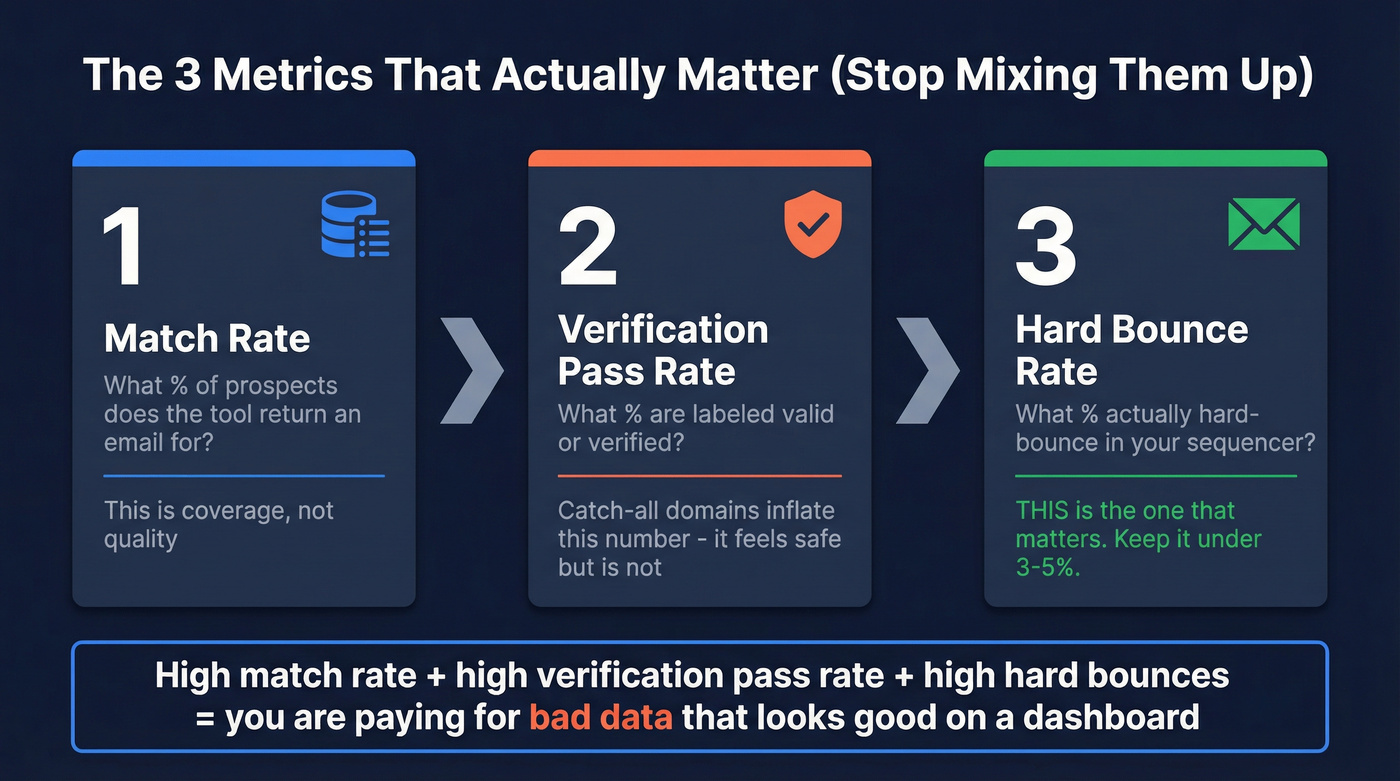
If you're running outbound at any real volume, hard bounces above ~3-5% will hurt you. That's the guardrail.
What actually mitigates bounces
You need two things: catch-all-aware verification (so "accept-all" doesn't masquerade as "valid") and freshness (so you're not emailing people who left months ago). In our experience, freshness is the quiet killer: people change jobs, mailboxes get shut off, and a perfectly formatted email can still be dead.
Prospeo is built around that reality: 5-step verification with catch-all handling, spam-trap removal, and honeypot filtering, plus a 7-day data refresh cycle so you're not living on stale records.

Best tools for search engines email (comparison table + picks)
Two quick notes before the tables:
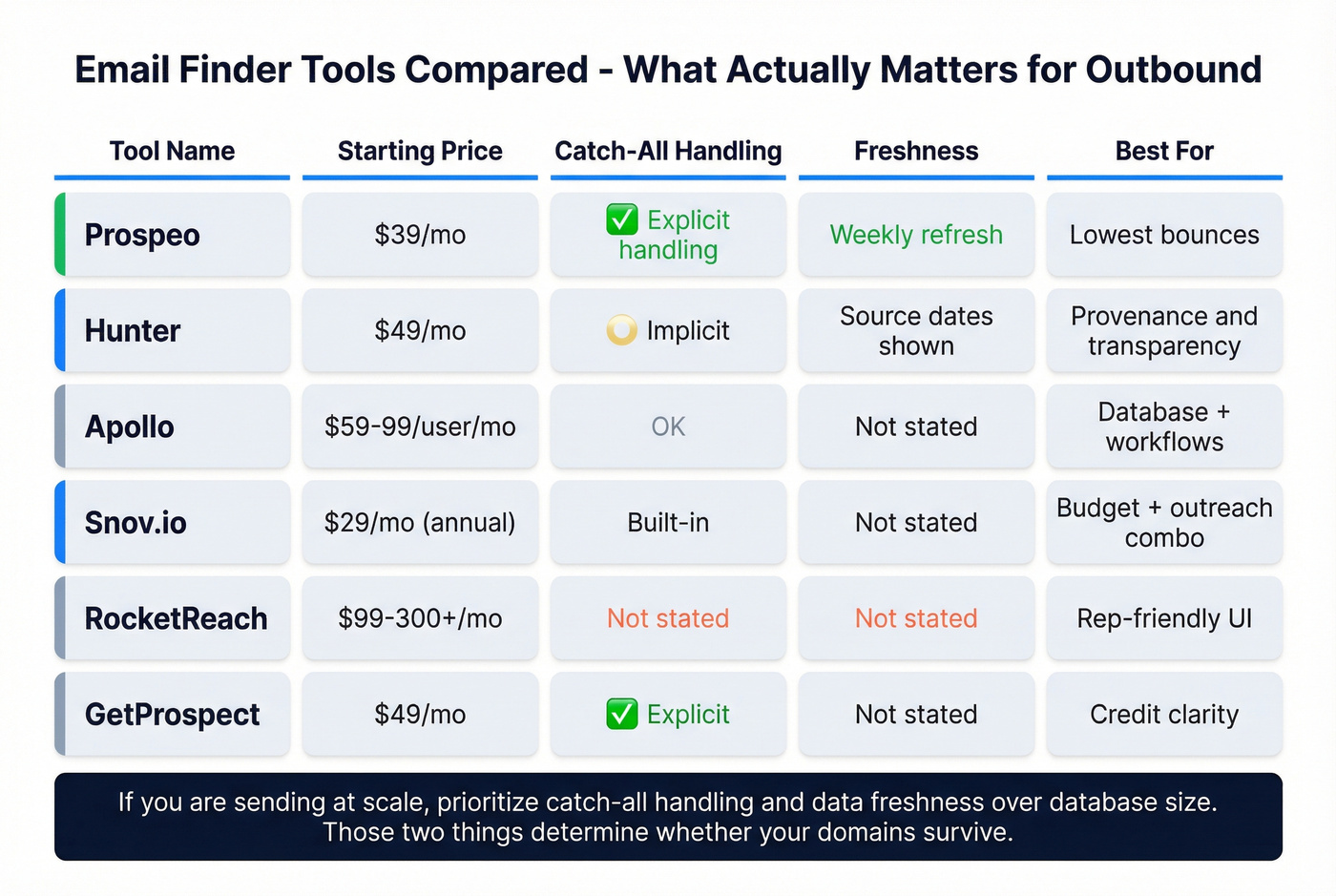
- We're mixing finder-first tools (like Hunter) and database-first tools (like Apollo) because that's how buyers actually compare options.
- Enterprise suites (ZoomInfo) are powerful, but pricing varies widely and often lands around $15k-$40k/year depending on seats and modules. If you won't use the platform features, you're paying for weight you don't need.
Comparison Table A (quick scan)
| Tool | Starting price | Free tier | Verification | Best for |
|---|---|---|---|---|
| Prospeo | ~$39/mo | Yes | 5-step, real-time | Lowest bounces |
| Hunter | $49/mo | Yes | Built-in | Provenance |
| RocketReach | ~$99-$300+/mo | Limited | Yes | Rep-friendly |
| GetProspect | $49/mo | Yes | Built-in | Credit clarity |
| Snov.io | ~$29.25/mo (annual) | Limited | Built-in | Budget + outreach |
| Emailsearch.io | $29/mo | Limited | Included | Volume search |
| Apollo | ~$59-$99/user/mo | Yes | OK | Database + workflows |
| ContactOut | ~$49/user/mo (est.) | Limited | Yes | Recruiter pulls |
| Voila Norbert | $49/mo | Trial-ish | Basic | Simple bulk |
Comparison Table B (how they behave in the real world)
| Tool | Catch-all handling | Freshness notes | Ext/API | Pay model |
|---|---|---|---|---|
| Prospeo | Explicit | Weekly refresh | Ext+API | Credits (pay only for valid emails) |
| Hunter | Implicit | Sources+dates | Ext+API | Pay per successful search |
| RocketReach | Not stated | Not stated | Ext+API | Pay per export |
| GetProspect | Explicit | Not stated | Ext+API | Pay per valid saved |
| Snov.io | Not stated | Not stated | Ext+API | Credits bundle |
| Emailsearch.io | Not stated | Not stated | API+hooks | Pay per search |
| Apollo | Not stated | Risk on older records | Ext+API | Seats+exports |
| ContactOut | Not stated | Not stated | Extension | Seats/credits |
| Voila Norbert | Not stated | Not stated | API | Leads/month |
Prospeo - best for bounce-safe list building (Tier 1)
Prospeo's the tool we start with when deliverability's the priority and you want a self-serve stack that doesn't trap you in annual contracts. It's built for accuracy and freshness: 300M+ professional profiles, 143M+ verified emails, 125M+ verified mobile numbers, and 98% verified email accuracy, all refreshed every 7 days (the industry average is 6 weeks, and you feel that lag fast once you're sending at scale). You also get 30+ filters to build lists that are actually campaign-ready, plus real-time email/mobile verification, CRM enrichment, intent data across 15,000 topics, and API access.
The pricing model's refreshingly sane: credit-based and transparent, roughly ~$0.01 per email, with a free tier of 75 emails + 100 Chrome extension credits/month.
What it looks like in practice: bulk verification groups results into clear buckets (valid/invalid/catch-all), you can filter down to "sendable now" vs "review later," and exports come out clean enough that RevOps doesn't have to spend an afternoon fixing columns and deduping.
And yes, the results show up where it counts. Meritt cut bounce rate from 35% to under 4% after switching to a verification-first workflow with catch-all-aware checks and weekly refresh, and they tied it to real pipeline outcomes.
If you want the cleanest path to bounce-safe lists, this is it.
Hunter - best for provenance transparency (Tier 1)
Hunter's still the best "show your work" tool in the category. The found vs deduced split isn't a gimmick: found emails come with source URLs and discovery dates, and deduced emails are pattern-generated, then verified before you see them.
Pricing's straightforward: Free (50 searches/month), then $49/mo, $149/mo, and $299/mo tiers. The credit rule's fair: no result = no charge, which prevents the classic "pay to fail" frustration.
Skip Hunter if you want a massive contact graph where you can pull thousands of records without doing any enrichment work. Hunter's a precision tool, not a warehouse.
RocketReach - best "rep adoption" tool (Tier 1)
RocketReach wins on something that matters more than people admit: reps actually use it. The extension workflow's fast, the results are usually usable, and it fits the day-to-day reality of "I have a name and a company - give me something I can try."
Pricing typically lands around ~$99-$300+/mo depending on seats and export volume.
One operational rule still applies: even if RocketReach feels accurate, run catch-all-aware verification before sending. Accuracy sentiment isn't deliverability.
Skip RocketReach if you need deep provenance (sources/dates) for every record. It's built for execution speed, not audit trails.
GetProspect - best for clear credit mechanics (Tier 2, and we love it for ops)
GetProspect is what we recommend when a team's sick of opaque credit systems. You pay for valid emails saved, and "not found" results don't cost you. Better: accept-all emails are added for free until you exhaust your plan's valid email limit - exactly how it should work.
Pricing is clean: Free (50 valid emails + 100 verifications), then $49/mo and $99/mo tiers.
Skip GetProspect if you want deep company intelligence or phone-first prospecting. It's an email-first workflow with clean math.
Snov.io - budget-friendly outreach + international (Tier 2)
Snov.io's the budget workhorse when you want email finding plus built-in outreach automation. It's popular with teams that want one tool to do "find + send" without paying enterprise prices.
Pricing's attractive on annual plans: ~$29.25/mo (1,000 credits) and ~$74.25/mo (5,000 credits).
How we'd use it: treat Snov.io as a finder + sequencing layer, then protect your domains with a stricter verification step before you scale volume.
Skip Snov.io if you're running brand-new sending domains and you can't tolerate experimentation. Use a stricter, verification-first stack.
Emailsearch.io - best "search engine" positioning + high-volume tiers (Tier 2)
Emailsearch.io leans hardest into the "email search engine" label and sells predictable volume tiers. Pricing is clear: $29 / $49 / $99 / $279 per month, with an agency tier positioned for high-volume usage.
Pick it when you care about throughput and you already have a verification workflow you trust.
Skip Emailsearch.io if you need strong provenance and freshness signals in the UI. Big databases without recency cues are how you get surprised by bounces.
Apollo - best for volume sourcing (but don't trust it as the final word) (Tier 2)
Apollo's the default starting point for a lot of SMB teams because it combines a big database with outbound workflows. It's also the tool we've seen most often in bounce postmortems - not because it's bad, but because teams treat database coverage as deliverability.
Pricing usually lands around ~$59-$99 per user/month for common plans, with higher tiers for more exports and features.
Use Apollo as your sourcing layer. Then verify before sending, especially on older records.
Skip Apollo as your only layer if deliverability's mission-critical. Database-first tools are where staleness hides.
Other notable options (Tier 3)
- ContactOut: Strong for recruiter-style pulls via extension. Expect ~$49/user/mo (estimate), scaling with seats/credits.
- Lusha: Clear credit model (email reveal vs phone reveal) with a free tier; paid plans scale with credits. Expect ~$39-$99+/user/mo depending on volume.
- Voila Norbert: Straightforward bulk finder with $49 / $99 / $249 / $499 monthly tiers.
- LeadFuze: Purpose-built list building with pricing that starts high (often ~$397-$497/mo depending on commitment), plus higher enterprise licensing.
- UpLead: Mid-market database + verification; expect ~$99-$199/mo depending on credits and add-ons.
- Dropcontact: Useful for enrichment/cleaning; expect ~$30-$150/mo depending on volume.
- If you meant OSINT/investigation: tools like Epieos are built for discovery and account-linked research. Treat any email you find as a lead, not a deliverable, and verify before outreach.
Most email search engines refresh data every 6 weeks. By then, your prospects have changed roles and your bounce rate has spiked. Prospeo refreshes every 7 days across 300M+ profiles - so the address you pull today is the address that works today. At $0.01 per email, bad data costs more than good data.
Get emails that survive first send - not just first verification.
Best-practice workflow: waterfall enrichment (stop testing 10 tools)
Most teams waste weeks "tool shopping" when they should be building a waterfall. Our rule's simple: one primary source + one catch-all-aware verification layer beats tool-hopping in every outbound program we've seen.
Real talk: if you're paying for five tools, you're also paying for five sets of duplicates and five different definitions of "valid."
A practical waterfall playbook (what actually works)
- Pick your primary finder (coverage).
Choose based on your motion:
- Need provenance and trust -> Hunter
- Need rep speed -> RocketReach
- Need database volume -> Apollo
- Need accuracy + weekly refresh -> an accuracy-first platform
Verify with catch-all awareness (deliverability). This is where you reduce "verified but bounced." You're not chasing a perfect label. You're reducing risk.
Normalize + dedupe before CRM. This is where teams quietly destroy their own data. If you export from multiple tools without normalization, you'll create duplicates, conflicting fields, and routing chaos, and then you'll blame the CRM for what was really a process problem.
Route outcomes instead of dumping a CSV.
- Valid -> sequencer
- Catch-all -> lower-volume sends, alternate channel, or manual review
- Unknown -> retry later or run through a second verifier
- Invalid -> don't send; try a different source/pattern
- Measure for 7 days, then lock the stack. Track match rate, verification pass rate, hard bounce rate, and meeting rate, because a stack that "finds emails" but doesn't book meetings is just an expensive spreadsheet generator.
Hard bounces are the guardrail.
Meeting rate's the scoreboard.
Hot take (because someone needs to say it)
If your average deal size is small and you're running normal outbound, you probably don't need an enterprise data suite. You need fresh data, strict verification, and clean ops.
Spend the savings on better targeting and copy.
If you meant searching inside your inbox (Gmail vs Proton Mail)
If you typed "search engines email" because inbox search is driving you nuts, don't buy a lead tool.
Fix your search workflow.
Gmail search (fast, server-side, content-native)
Gmail feels "smart" because Google indexes content server-side and ranks results aggressively. These operators do 90% of the work:
from:,to:,subject:has:attachmentandfilename:pdfolder_than:30d/newer_than:7dlabel:clients(or any label)in:anywhere(searches Spam + Trash too)is:unread/is:starred- Quotes for exact matches:
"invoice 4831" - Combine them:
from:acme subject:"renewal" has:attachment newer_than:90d
If you're not using labels, start. Search gets dramatically better when your inbox has structure.
Proton Mail search (private, local indexing tradeoffs)
Proton Mail can search message content, but because of zero-access encryption it relies on local indexing (your device/browser builds an index). That privacy model's real, and the tradeoffs are real too:
- Indexing is per device (and often per browser profile)
- Clearing browser storage can reset the index
- Large mailboxes can hit storage limits, reducing how far back content search works
Another nuance: Proton's advanced search syntax is metadata-focused, and you can't use advanced syntax to search message content at the same time. In practice, you'll use metadata operators for precision and content search for broad recall, but not always both at once.
Mobile reality check: content search behavior can differ by client and device because indexing's local. If you want consistent "search everything" performance, Proton Mail Bridge + a desktop client can be the most reliable setup because mail is downloaded/decrypted locally and searched like a normal mailbox.
FAQ
What is an "email search engine" in B2B sales?
An "email search engine" in B2B sales is an email finder that locates work emails from a name + company (or a profile/URL), then verifies them and supports bulk list building. It's not inbox search, and a solid setup should keep hard bounces under ~3-5% once you've tuned targeting and verification.
Why do "verified" emails still hard-bounce?
"Verified" usually means the address looks valid and the server didn't reject it during a check, not that the mailbox definitely exists. Catch-all domains (about 15%-28% of B2B domains), job changes, and anti-verification behavior create false positives, so your sequencer's hard bounce rate is the final truth.
What's a catch-all (accept-all) domain and how should you treat it?
A catch-all domain accepts mail for any address during SMTP checks, so validators can't confirm whether a specific mailbox exists. Treat catch-all results as higher risk: send at lower volume, route to manual review, and track their bounce rate separately. Don't lump them into your "safe to send" pool.
What's a good free tool to start with for finding and verifying emails?
Start with a finder that shows its work, then verify before you scale. Prospeo's free tier includes 75 emails plus 100 Chrome extension credits/month, and Hunter's free plan includes 50 searches/month with clear provenance. If deliverability's the constraint, prioritize catch-all-aware verification over "biggest database."
Summary: picking the right search engines email setup
"Search engines email" can mean prospecting, inbox search, or OSINT, and most frustration comes from using the wrong tool for the job. For outbound, the winning combo's simple: pick one primary finder, add catch-all-aware verification, and judge everything by hard bounce rate (aim for ~3-5% or better).
If accuracy and freshness are your constraints, Prospeo's the most direct path: 98% verified email accuracy, a 7-day refresh cycle, and verification that treats catch-all domains like the risk they are.