

Single Email Verification: How It Works in 2026
You paste an email address into a verification tool, hit "check," and get back "unknown." Or worse - one tool says "valid" while another says "invalid" for the exact same address. Now you're second-guessing every email on your list.
Single email verification shouldn't be this confusing. Let's fix that.
What Is Single Email Verification?
It's checking one email address at a time, as opposed to bulk verification where you upload a CSV of thousands. You'd use it when a prospect fills out a form, when you're manually building a list, or when you need a quick gut-check before hitting send on an important outreach email.
The underlying technology is the same either way. But verifying a single address gives you an instant, real-time answer - which matters when you're prospecting in the moment rather than cleaning a database.
What You Need (Quick Version)
Three paths depending on your situation:
- Free single checks: Hunter lets you verify one email on their website with no signup. Create an account and you get 100/month free.
- Detailed diagnostics: Verifalia runs free single checks and returns detailed deliverability reports so you can see exactly why an address failed.
- Skip verification entirely: Prospeo finds emails pre-verified at 98% accuracy across 143M+ verified emails - no second step needed.
Why Verification Matters
The global inbox placement rate sits around 83.5%. That means roughly 1 in 6 legitimate emails never reach the inbox. For outbound sales teams, the math gets worse fast: every bounced email chips away at your sender reputation, which drags down deliverability for every subsequent message.

The industry rule of thumb is to keep your bounce rate under 2%. Cross 5% and you're in dangerous territory - ESPs start throttling you, and recovery takes weeks. For context, software companies average 0.93% bounce rates and e-commerce sits at 0.29%. If you're above those numbers, your list hygiene needs work.
How SMTP Verification Actually Works
When you verify an email, the tool doesn't send a message. It initiates an SMTP handshake - a partial conversation with the recipient's mail server:
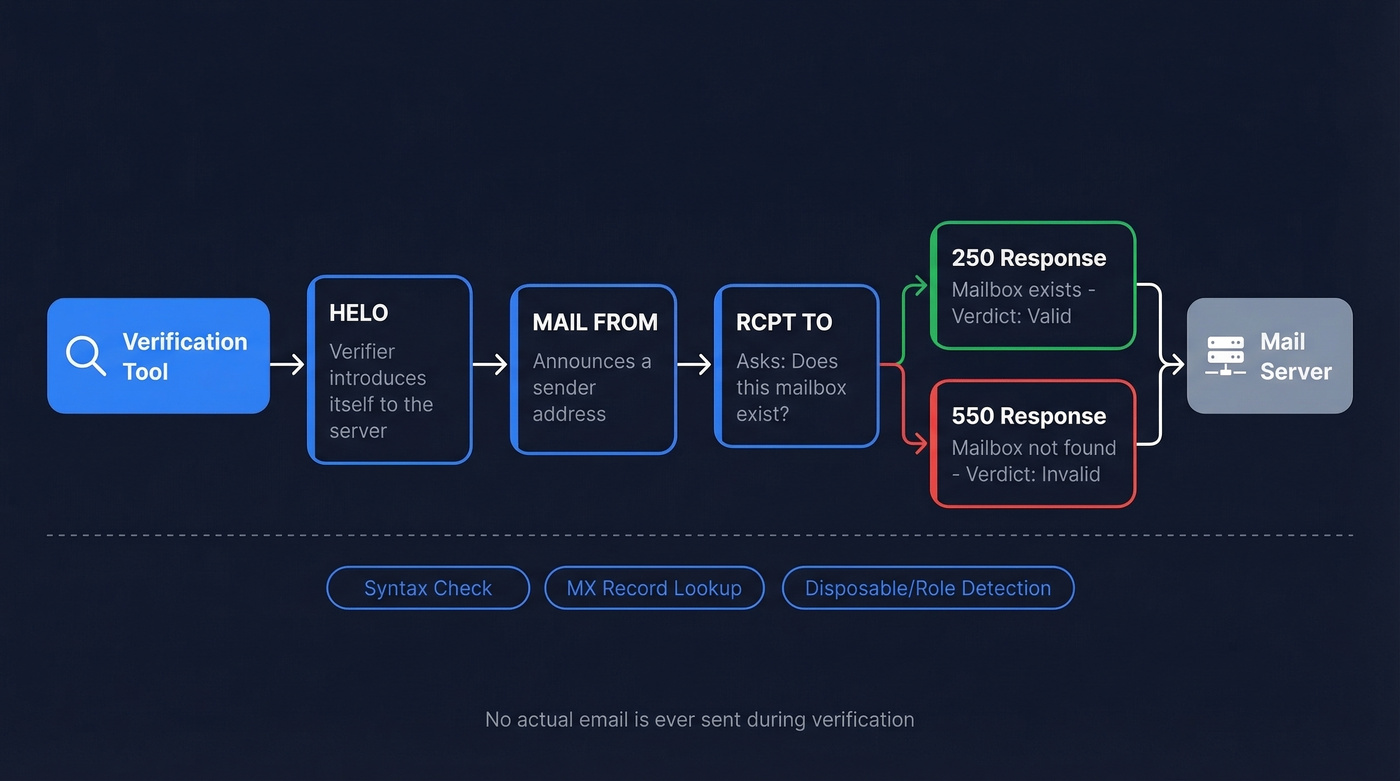
- HELO - the verifier introduces itself to the server.
- MAIL FROM - it announces a sender address.
- RCPT TO - it asks, "Does this mailbox exist?"
The server's response to that third step determines the verdict. A 250 response typically means the server accepted the recipient. A 550 means the address is invalid or doesn't exist. The verifier then hangs up without ever delivering an actual email.
Most tools layer additional checks on top of SMTP probing. Syntax validation confirms the format is correct. MX record lookups confirm the domain has a mail server. Then there's disposable email detection and role-based filtering for addresses like info@, support@, and admin@. These pre-checks catch obvious problems before the SMTP handshake even starts.

SMTP verification can't crack catch-all domains - and that's 30-40% of your B2B list. Prospeo's 5-step verification handles catch-all resolution, spam-trap removal, and honeypot filtering before you ever see the email. 98% accuracy across 143M+ verified addresses, refreshed every 7 days.
Skip the guesswork. Get emails that are already verified.
Understanding Your Results
Every verifier returns slightly different labels, but they map to five core statuses:
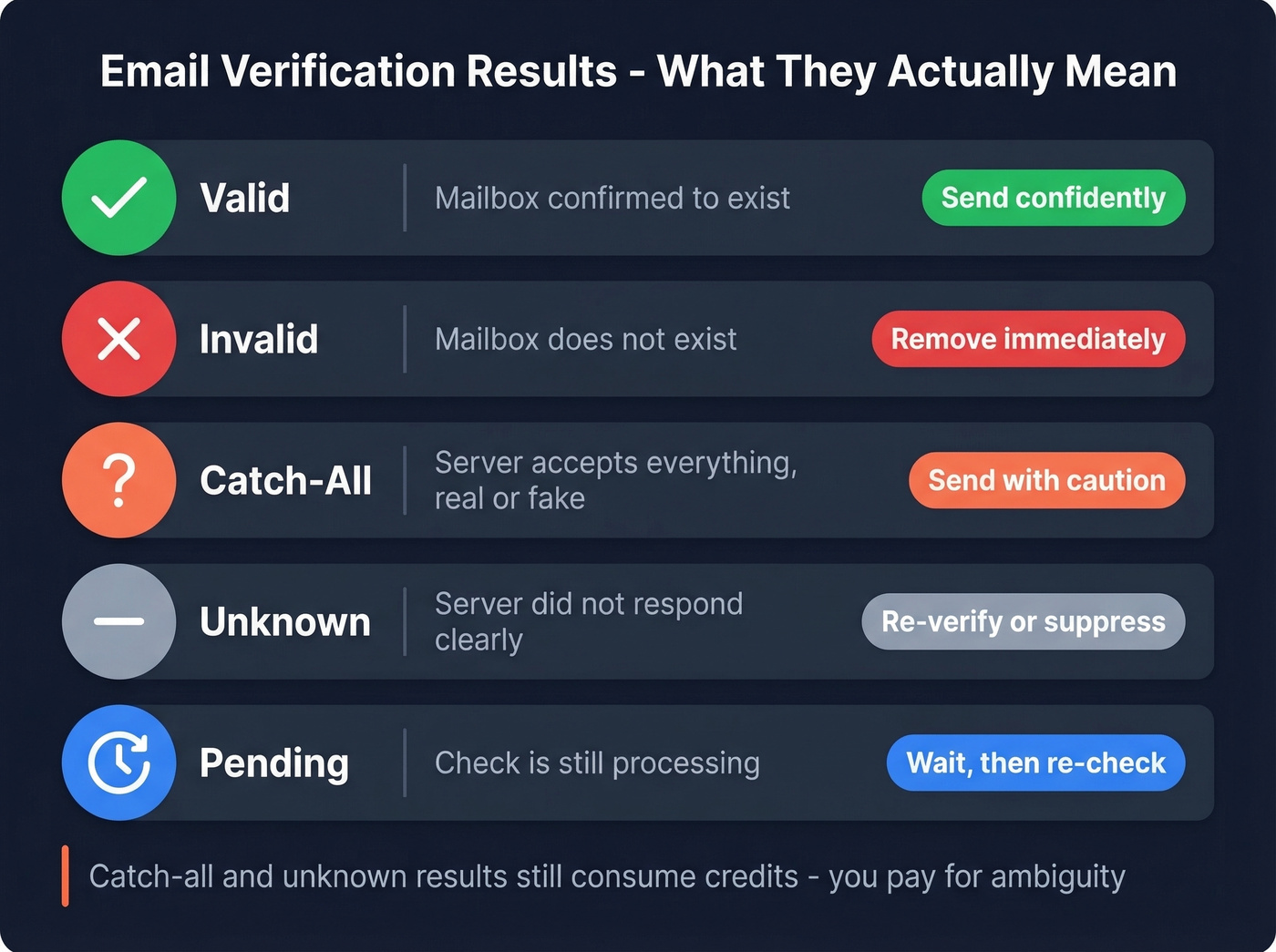
| Status | What It Means | What to Do |
|---|---|---|
| Valid | Mailbox confirmed | Send confidently |
| Invalid | Mailbox doesn't exist | Remove immediately |
| Catch-All | Server accepts everything | Send with caution |
| Unknown | Server didn't respond clearly | Re-verify or suppress |
| Pending | Check still processing | Wait, then re-check |
Catch-all and unknown results often still consume credits. You pay for ambiguity - which is why the catch-all problem deserves its own section.
The Catch-All Problem
Roughly 30-40% of B2B email addresses sit on catch-all domains. In one 10,000-email test, 28% of the sample landed on catch-all servers, confirming this isn't an edge case. Microsoft 365, Google Workspace, and secure email gateways like Proofpoint and Mimecast are the usual culprits.
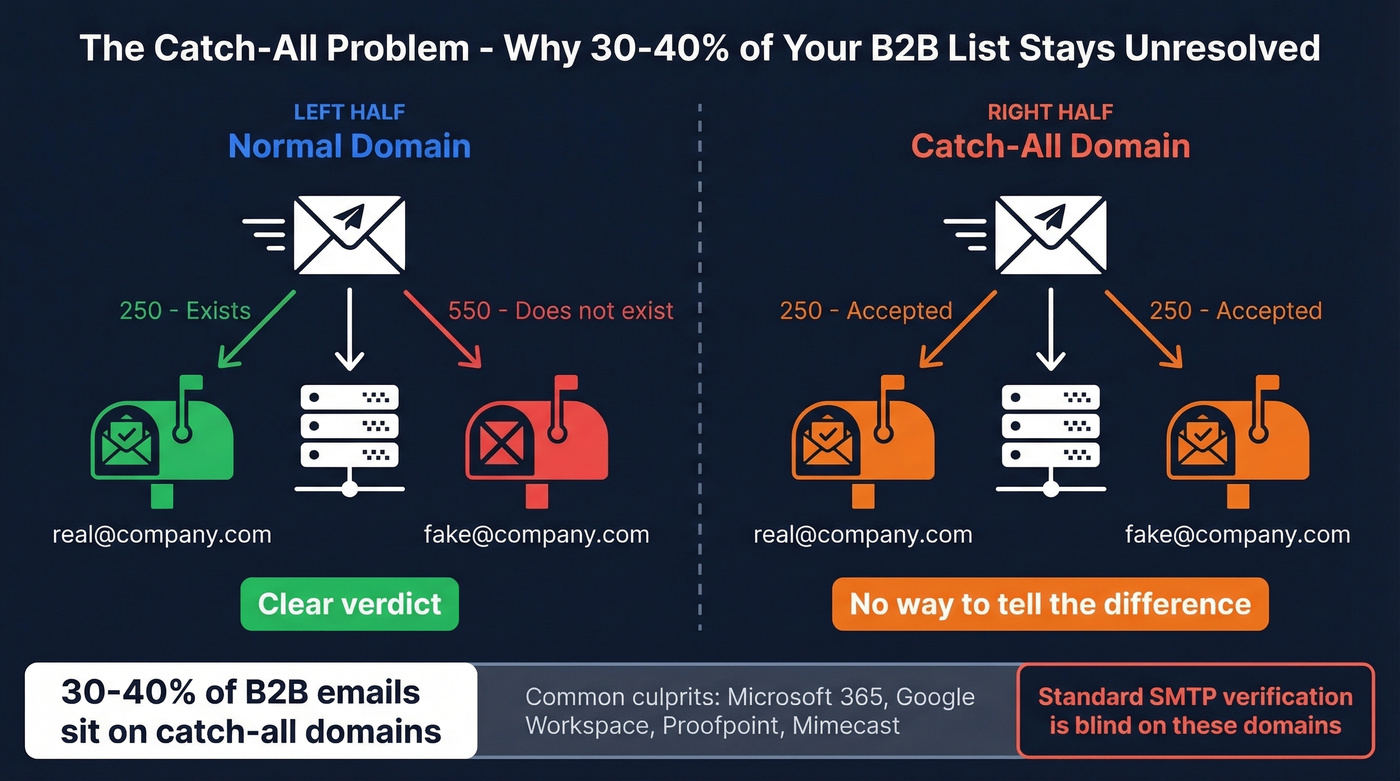
On these domains, the mail server accepts every RCPT TO command - whether the mailbox is real or completely made up. SMTP verification can't tell the difference. Secure email gateways can also greylist, rate limit, or block SMTP probes entirely, producing "unknown" results even when the mailbox is perfectly real.
This is why a huge chunk of your list comes back as "unknown" or "catch-all." Standard verifiers simply can't crack these domains with SMTP alone.
Here's the thing: if more than 20% of your list comes back as catch-all, your verifier is wasting your money on those addresses. In our experience, that's the single biggest source of burned verification credits - not invalid emails, but ambiguous ones you paid to not resolve. Switch to a tool with dedicated catch-all resolution, or accept you're flying blind on a third of your list.
Why Two Tools Disagree
A Reddit user in r/coldemail verified the same emails through Findymail, Hunter, and ZeroBounce inside Clay - and got three different verdicts. Findymail and Hunter said "invalid" while ZeroBounce said "valid." On another address, ZeroBounce returned "do_not_mail" while the others marked it verified.
This isn't a bug. Each tool uses different SMTP probing techniques, timeout thresholds, and classification logic. In Hunter's benchmark of 15 verifiers testing 3,000 real business emails, even the highest-scoring tool managed just 70% overall accuracy. That's the ceiling, not the floor.
Running the same address through two tools is a reasonable sanity check - and honestly, we'd recommend it for any high-value prospect.
Best Tools for Single Email Verification
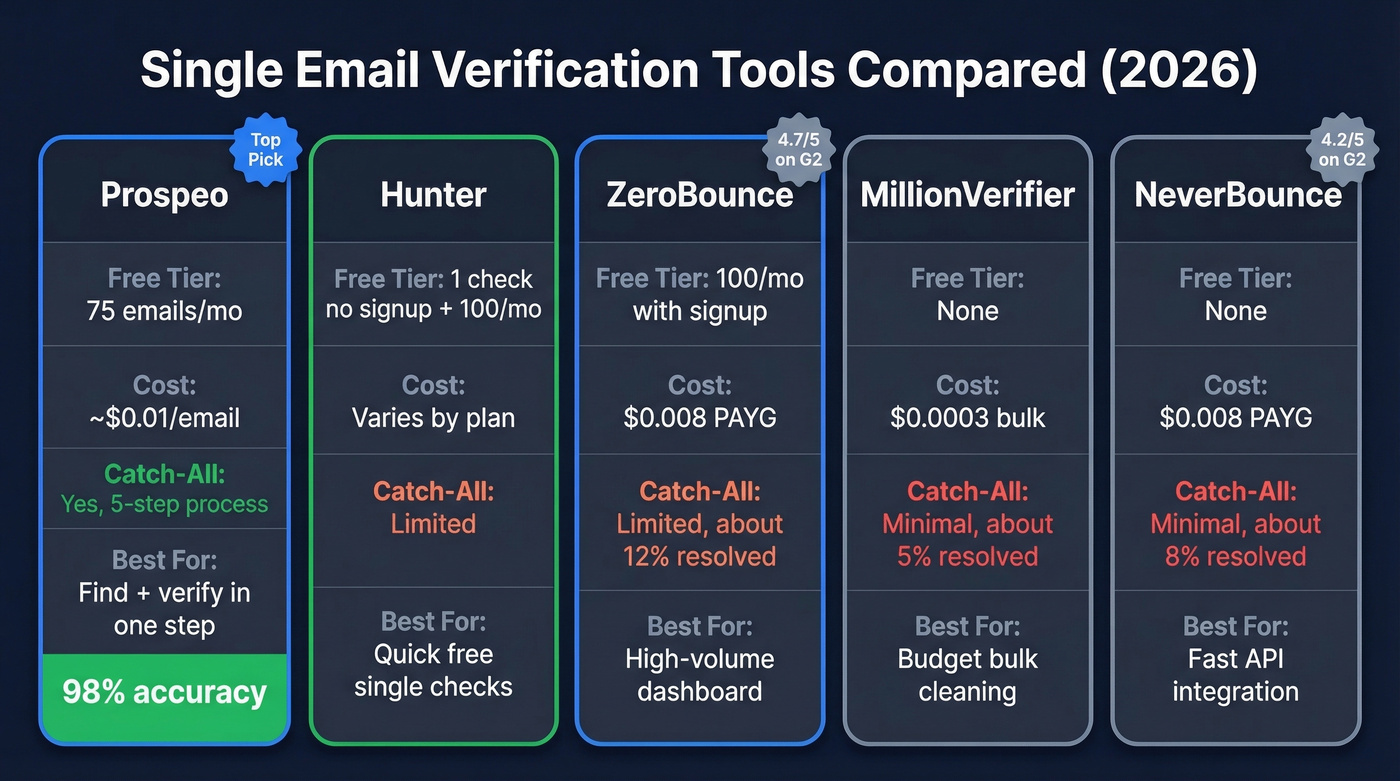
| Tool | Free Tier | Cost/Email | Catch-All Handling | Best For |
|---|---|---|---|---|
| Prospeo | 75 emails/mo | ~$0.01 | Yes (5-step) | Find + verify in one step |
| Hunter | Free single check + 100/mo with account | Varies by plan | Limited | Quick free single checks |
| ZeroBounce | 100/mo with signup | $0.008 PAYG | Limited (~12%) | High-volume dashboard |
| MillionVerifier | None | $0.0003 bulk | Minimal (~5%) | Budget bulk cleaning |
| NeverBounce | None | $0.008 PAYG | Minimal (~8%) | Fast API integration |
Prospeo
Prospeo isn't a standalone verifier - it's a data platform where emails come pre-verified. Search by 30+ filters, find the contact you need, and the email you get back has already been through a 5-step verification process with catch-all handling, spam-trap removal, and honeypot filtering. The result: 98% email accuracy across a database of 143M+ verified emails, refreshed on a 7-day cycle.
The free tier gives you 75 emails/month, and paid plans start at roughly $0.01 per email. For outbound teams, this eliminates the entire "find email, then verify email" two-tool workflow. Real-world proof: Snyk cut bounce rates from 35-40% down to under 5% after switching, and Stack Optimize maintains 94%+ deliverability across all clients with zero domain flags.

Hunter
Hunter is the best free option for occasional single checks. You can verify one email directly on their website without creating an account - genuinely zero friction. Sign up and you get 100 free verifications per month. Solid for quick checks, but it only verifies what you already have. It doesn't find emails for you.
If you're comparing options, see our breakdown of Hunter alternatives.
ZeroBounce
The most-reviewed verifier on G2 with a 4.7/5 rating across 1,361 reviews. You get 100 free credits per month when you sign up, and PAYG pricing runs $0.008/email or $15/mo for 2,000. The dashboard is clean and reporting is detailed. But credits burn fast on large lists, and in a 10,000-email bake-off, catch-all resolution was weak at just 12% resolved. Best for teams committed to a verification-only workflow who want a polished UI.
MillionVerifier
Budget king. At $0.0003/email for bulk, you're paying roughly $6 to verify 10,000 emails. Catch-all handling resolved about 5% of ambiguous addresses in the same 10,000-email test, so don't expect miracles on enterprise domains. Skip this if you're doing mostly single checks - the value is in volume.
NeverBounce
Fast API, $0.008/email PAYG, 4.2/5 on G2. Known for occasional catch-all inconsistencies, and it resolved about 8% of catch-alls in the same bake-off - but the API reliability is solid. Good pick for developer-driven workflows where you need programmatic verification at scale. If you're not building integrations, one of the other options will serve you better.
If you're building around verification programmatically, a dedicated cold email API can change the workflow.
Two tools disagreeing on the same email? That's what happens when you bolt verification onto a broken workflow. Prospeo finds and verifies in one step - no second tool, no conflicting verdicts. Teams like Snyk dropped bounce rates from 35% to under 5%.
One tool. One step. 98% accuracy. Start with 75 free emails.
FAQ
Is single email verification free?
Yes - several tools offer free tiers. Hunter lets you check one email with no signup and includes 100 free verifications monthly with an account. ZeroBounce gives 100 free credits per month. Prospeo includes 75 free emails with built-in verification and catch-all handling.
What does "catch-all" mean in verification results?
The recipient's mail server accepts all incoming emails regardless of whether the specific mailbox exists, making it impossible for standard SMTP probes to confirm deliverability. Roughly 30-40% of B2B emails sit on catch-all domains, which is why tools with dedicated catch-all resolution matter so much for outbound teams.
Why do different verification tools give different results?
Each tool uses different SMTP probing techniques, timeout thresholds, and classification logic - so ambiguous server responses get interpreted differently. In a benchmark of 15 verifiers testing 3,000 real business emails, even the top scorer managed just 70% overall accuracy. Running the same address through two tools is a reasonable sanity check.
When should I verify manually instead of in bulk?
Manual verification makes sense when you're vetting a handful of high-value prospects - say, before sending a personalized outreach email to a C-suite contact. It's also useful for spot-checking addresses that came back as "unknown" during a bulk run, since re-verifying individually can sometimes produce a clearer result from the mail server.