

SMTP Connection Refused: A Step-by-Step Fix
An SMTP connection refused error means your emails aren't going anywhere. You're staring at Connection refused (111) in your logs, and the fix is usually straightforward once you know where to look. Whether you're running a dedicated mail server or relying on a third-party SMTP provider, the diagnostic steps are the same. Let's run through them - from the 60-second check to the obscure edge cases that waste hours.
Quick Diagnostic
Open a terminal and run:
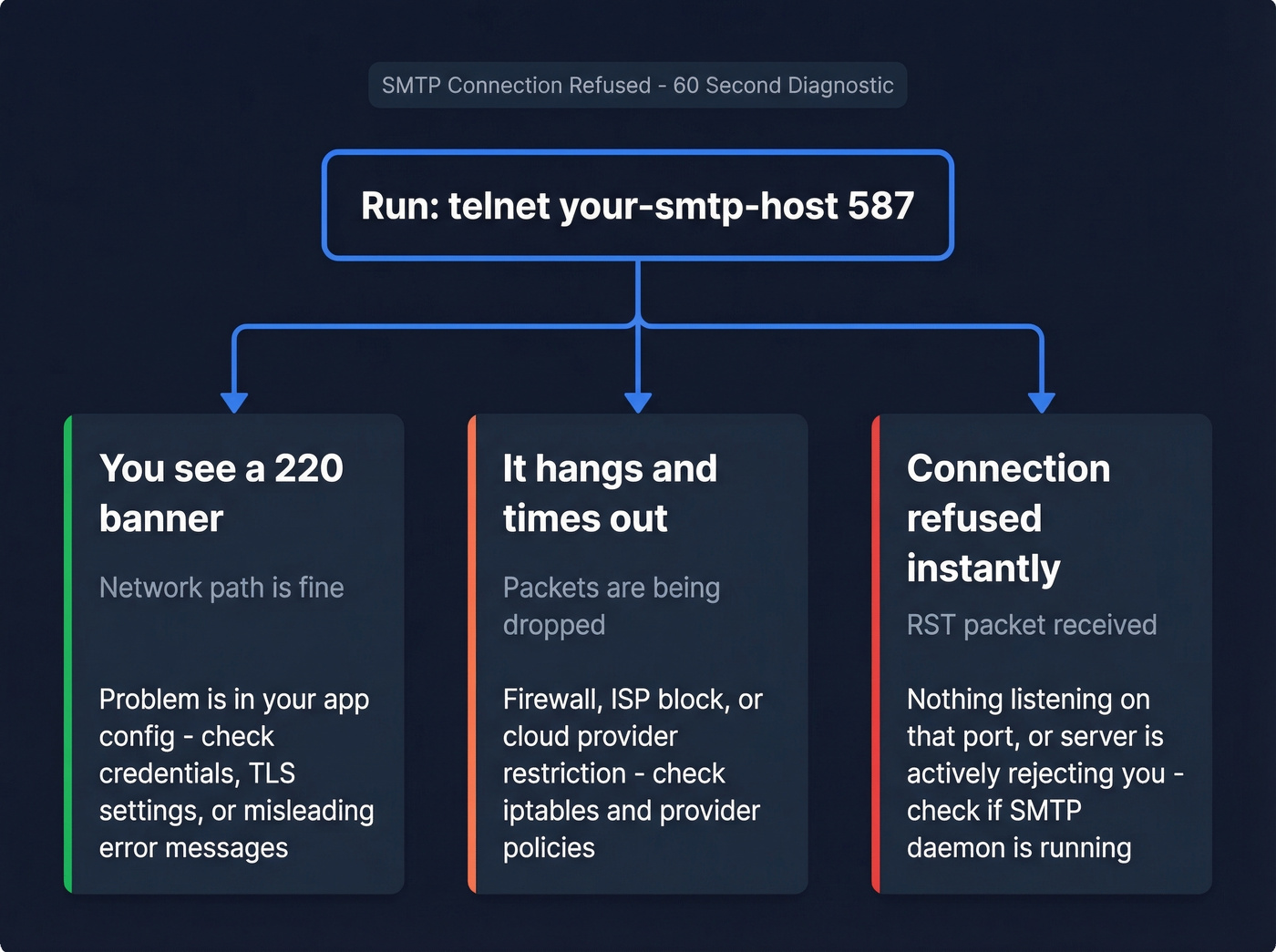
telnet your-smtp-host 587
Three outcomes tell you everything:
- You see a
220banner - your network path is fine. The problem is in your app config (wrong credentials, bad TLS settings, or a misleading error message). - It hangs and times out - something between you and the server is dropping packets. That's a firewall, ISP, or cloud provider block.
- "Connection refused" instantly - nothing is listening on that port, or the server is actively rejecting you.
What "Connection Refused" Actually Means
At the TCP level, "connection refused" means your machine sent a SYN packet and got back a RST (reset) instead of a SYN/ACK. The remote host - or something in front of it - actively said "no." This is fundamentally different from a timeout, where your SYN packets disappear into a void and you wait around for nothing.
On Linux, you'll see errno 111. On Windows, it surfaces as "actively refused." Both mean the same thing: the TCP handshake was explicitly rejected. A refusal points to the service being down or a REJECT-configured firewall; a timeout points to a DROP rule or upstream filtering. That distinction matters because it changes where you look first.
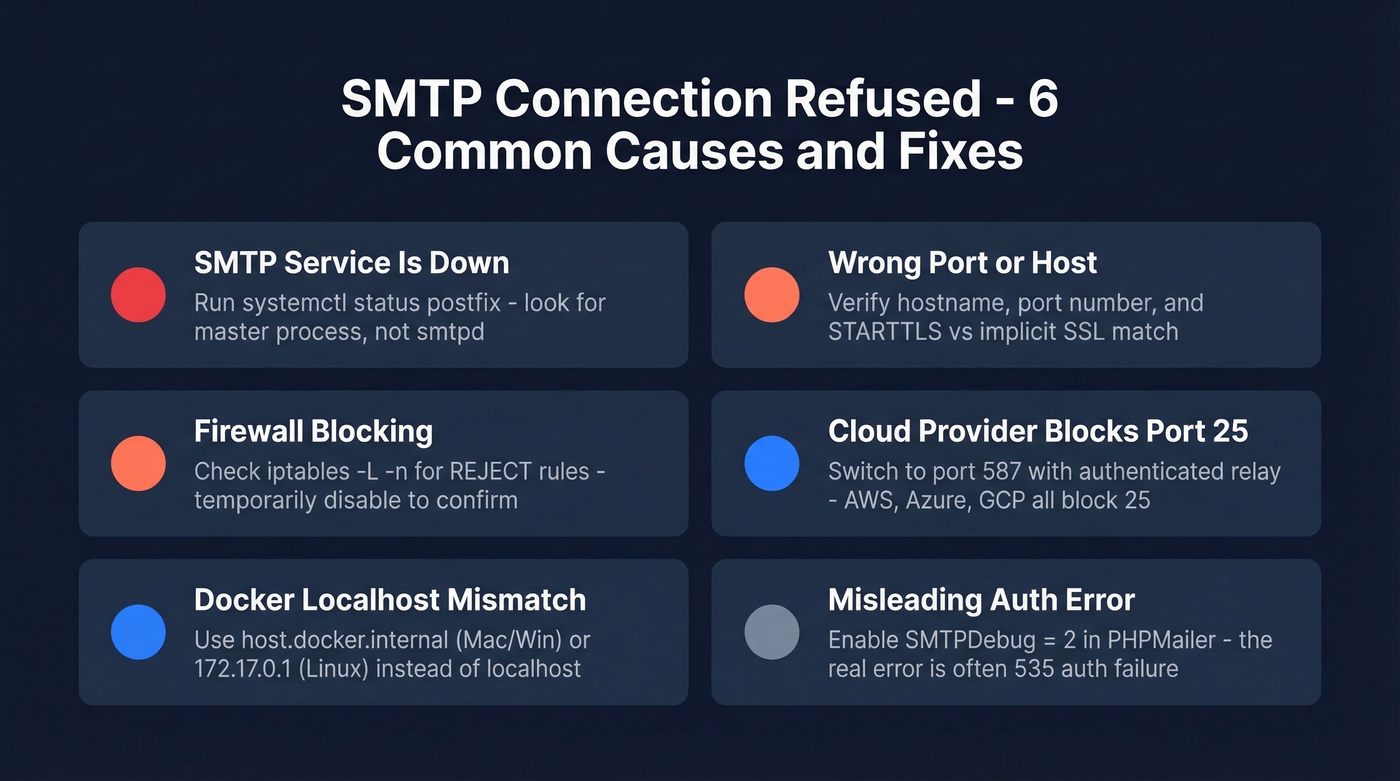
Common Causes and Fixes
SMTP Service Is Down
Check whether your mail daemon is actually alive:
systemctl status postfix
ss -tlnp | grep :25
Quick gotcha: the listening process for Postfix is master, not smtpd. If you're grepping for smtpd and seeing nothing, that's expected - don't panic. If the service genuinely isn't running, systemctl start postfix and check logs for why it stopped. Anyone setting up a mail server for the first time will hit this issue early. The daemon needs to be running and bound to the correct interface before anything else matters.
Wrong Port or Host
Here's a scenario we've debugged more times than we can count: someone configures smtpout.secureserver.net on port 465 with the wrong encryption mode in PHPMailer and gets errno 111. The server is fine. The credentials are fine. The port/encryption mismatch kills the connection before authentication even starts.
Double-check three things: hostname, port number, and whether you need STARTTLS (port 587) or implicit SSL (port 465). Getting any one of those wrong produces a refusal that looks identical to a server-side problem.
Firewall Blocking the Connection
Firewalls configured to REJECT send back a RST or ICMP unreachable - you see "connection refused." Firewalls configured to DROP silently eat packets - you see a timeout. Same root problem, different presentation.
iptables -L -n
On CentOS, watch for REJECT - reject-with icmp-host-prohibited, which confusingly surfaces as "No route to host" rather than "connection refused." If you suspect the firewall, temporarily disable it and retest. If that fixes it, add the appropriate allow rule rather than leaving it wide open.
ISP or Cloud Provider Blocking Port 25
Outbound port 25 is commonly blocked to reduce spam - especially on cloud networks and residential ISPs. If you're trying to send on port 25, switch to 587 before doing anything else. Seriously. This single change resolves a surprising number of "connection refused" tickets.
Docker Localhost Mismatch
I've debugged dozens of these, and almost no troubleshooting guide covers it. Inside a Docker container, localhost refers to the container itself - not your host machine. If your SMTP server runs on the host, the container can't reach it at 127.0.0.1.
- Docker Desktop (Mac/Windows): Use
host.docker.internalas your SMTP host. - Linux (default bridge): Use
172.17.0.1- the gateway IP of the default bridge. - Docker Compose: Create a shared network or use
network_mode: hostfor development.
Test from inside the container: telnet 172.17.0.1 587. If that connects but localhost doesn't, you've found your problem.
The Misleading Auth Error
Some SMTP libraries surface a generic "SMTP connect() failed" even when the TCP connection succeeded fine. PHPMailer is the worst offender here. The actual failure is authentication: 535-5.7.8 Username and Password not accepted. But the error message makes you think it's a connection problem, so you spend an hour checking ports and firewalls for nothing.
Always enable debug mode. In PHPMailer, set $mail->SMTPDebug = 2;. The transcript will show the EHLO exchange, the AUTH attempt, and the exact line where it fails. Don't trust the summary error - read the conversation.
Which SMTP Port to Use
| Port | Protocol | Encryption | Block Risk | Use Case |
|---|---|---|---|---|
| 25 | SMTP relay | Optional STARTTLS | Very high | Server-to-server only |
| 587 | Submission | STARTTLS + auth | Low | Default choice |
| 465 | SMTPS | Implicit TLS | Low | Common alternative |
| 2525 | Unofficial | STARTTLS | Very low | Fallback when 587 blocked |
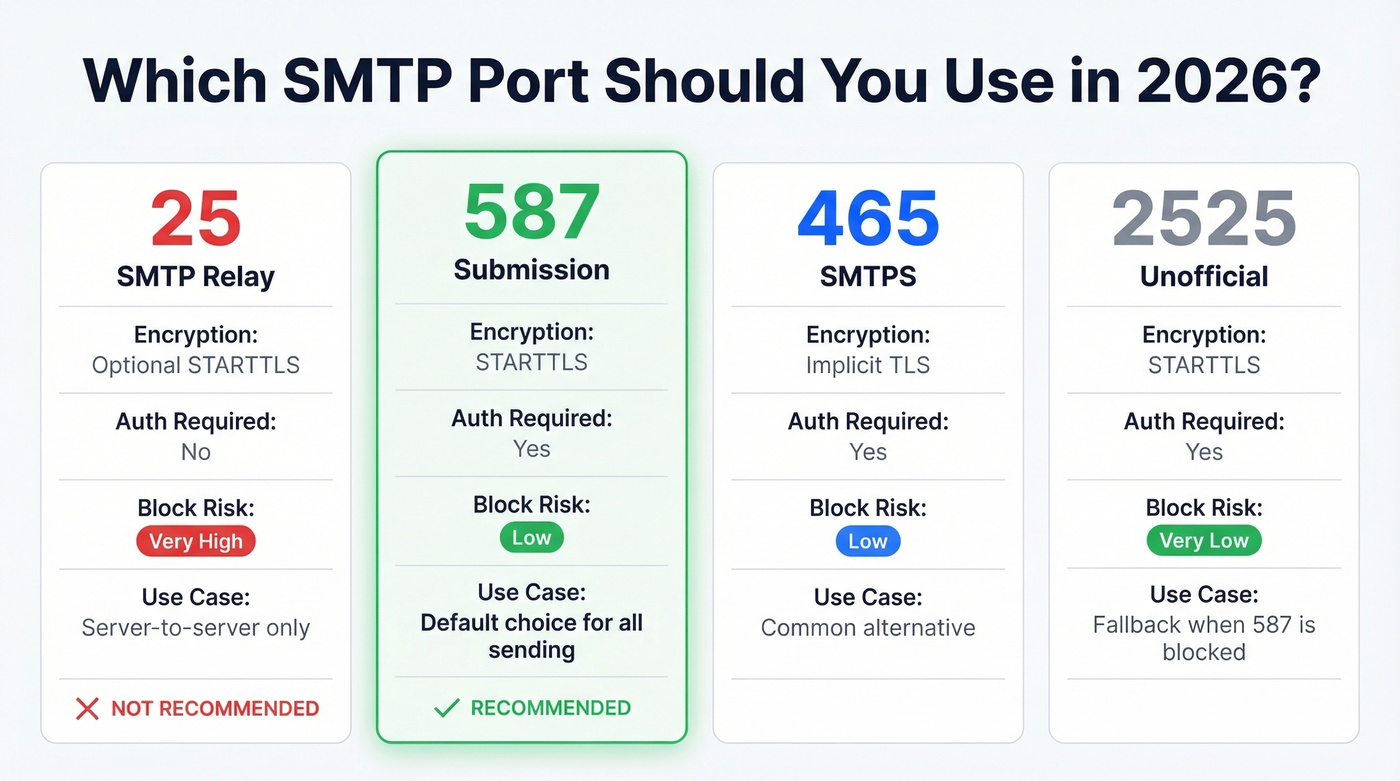
Port 587 is the right default for email submission in 2026. It uses authentication, supports STARTTLS, and is far less likely to be blocked than port 25. If 587 is blocked on a locked-down network, 2525 is a common fallback that most relay services support.

Most SMTP connection refused errors waste hours. But the ones that really hurt? Sending to bad addresses that tank your domain reputation after you finally fix the connection. Prospeo's 98% email accuracy and 5-step verification - including catch-all handling, spam-trap removal, and honeypot filtering - means your emails actually land.
Fix the connection, then fix the data. Start with 75 free verified emails.
Cloud Provider Restrictions
AWS blocks outbound port 25 on all EC2 instances by default. You can request removal, but it takes up to 48 hours per region. Amazon SES is the path of least resistance.
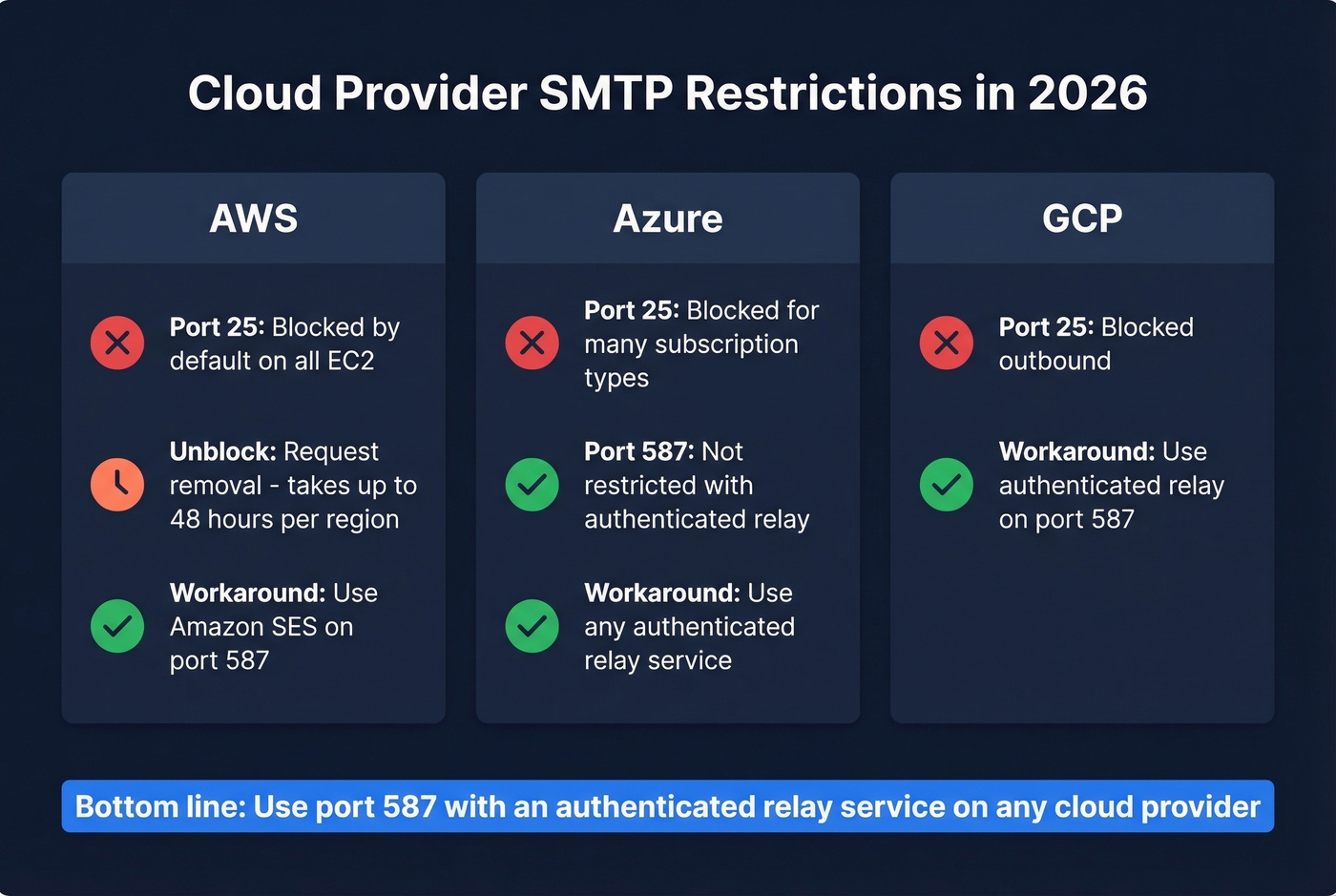
Azure blocks outbound port 25 for many subscription types. Port 587 with authenticated relay isn't restricted, regardless of subscription type.
GCP blocks port 25 outbound. Same story - use an authenticated relay service.
For low-volume sending, using a free SMTP relay (including Gmail SMTP on port 587) can be a quick workaround that avoids cloud port restrictions entirely.
Here's the thing: if you're running a mail server on a cloud VM and fighting port 25 blocks, you're solving the wrong problem. Use a relay service on port 587 and move on.
When to Skip SMTP Entirely
If you keep hitting connection refused errors in production, it's worth asking whether SMTP is even the right protocol for your use case. APIs bypass port-level blocks entirely because they communicate over HTTPS (port 443), which is almost never firewalled.
For transactional messages like password resets and order confirmations, API-based providers like Postmark or Amazon SES eliminate connection-level headaches completely. For bulk campaigns, APIs offer built-in analytics and webhook support that SMTP can't match without bolting on extra tooling. SMTP still makes sense for legacy systems, forwarding setups, and environments where you need protocol-level control - but if you're starting fresh, evaluate both options before committing to one.
Server Listening but Unreachable
Sometimes ss shows 0.0.0.0:25 LISTEN on your server, but external connections still fail. The most common hidden cause? NAT or router port forwarding.
If your server has a private IP (192.168.x.x, 10.x.x.x), the border router needs to forward the port. We've seen teams spend hours debugging Postfix configs when the problem was a missing port-forward rule on a $40 consumer router. Run nmap from an external machine to confirm whether the port is actually reachable from the outside. If it isn't, your server config is irrelevant - the traffic never arrives.
Prevent Future Failures
Once you've fixed the immediate issue, lock in these habits so you don't end up back here:
Use port 587 with authentication for submission. Always. No exceptions in 2026.
Test connectivity before deploying - a quick telnet check catches port blocks early and takes five seconds. Enable verbose SMTP logging so that when something breaks at 2 AM, you have the full transcript instead of a one-line error.
Monitor sender reputation via Google Postmaster Tools and Microsoft SNDS. Set up SPF and DKIM if you haven't already - they're table stakes for deliverability in 2026.
Verify email addresses before sending. High bounce rates hurt deliverability and can get your mail throttled or blocked entirely, which creates a whole new category of "connection refused" problems. Prospeo's 5-step verification catches invalid addresses and spam traps at 98% accuracy, with a free tier covering 75 verifications per month. (If you’re troubleshooting bounces too, see bounce codes & fixes.)
Use authenticated relay services in cloud environments. Choosing a provider with good uptime and monitoring saves you from chasing connection errors that aren't really yours to fix.

You just spent an hour debugging port configs and firewall rules. Don't waste the next hour cleaning bounced emails from a bad list. Prospeo refreshes 300M+ profiles every 7 days - not every 6 weeks like competitors - so the addresses you send to are current, verified, and deliverable.
Verified data at $0.01 per email. No SMTP surprises, no bounces.
FAQ
What's the difference between "connection refused" and "connection timed out"?
"Refused" means the server sent a RST packet - nothing is listening on that port, or a firewall is set to REJECT. "Timed out" means packets were silently dropped by a DROP rule or upstream filter. Check iptables -L -n for REJECT vs DROP rules to narrow the cause.
Why did my SMTP stop working overnight?
Most overnight failures trace to provider policy changes on port 25, a sending IP landing on a blocklist from excessive bounces, or an expired TLS certificate. Check provider announcements first, then review sender reputation via Google Postmaster Tools.
How do I prevent SMTP connection issues from recurring?
Use port 587 with authentication, monitor sender reputation, and verify email addresses before sending to avoid the bounce spiral that damages deliverability. Keeping your list clean is the single most effective long-term prevention.
Is an email API better than SMTP for avoiding connection errors?
For cloud environments, yes. APIs send over HTTPS (port 443), completely sidestepping the port blocks and firewall rules that cause refused connections. SMTP gives more protocol-level control for legacy systems. If connection reliability is your top priority, an API is usually the safer bet.