

SMTP vs IMAP: The Complete, Actually Accurate Guide
What You Need (Quick Version)
SMTP sends your email. IMAP syncs it across your devices. You need both - they're not competitors, they're partners in the same delivery chain. Understanding SMTP vs IMAP is less about choosing one and more about configuring both correctly.
Here's the port cheat sheet you came for:
- SMTP: 587 (STARTTLS) or 465 (implicit TLS)
- IMAP: 993 (TLS)
That's the 80/20. The rest of this guide covers why those numbers matter, what actually happens when you hit send, and how to fix things when they break.
Why "SMTP vs IMAP" Is Misleading
Most guides frame this as a choice. It isn't. SMTP sends email. IMAP retrieves it. They handle different halves of the same journey - like comparing a mailman to a mailbox. You don't pick one over the other; you configure both.
The real questions are more practical: which ports, which encryption, what breaks, and what's changing.
How Does SMTP Work?
SMTP - Simple Mail Transfer Protocol - is how email gets from point A to point B. Every email you've ever sent used SMTP, whether you knew it or not. The current spec is [RFC 5321](https://www.rfc-editor.org/rfc/rfc5321.html), published in 2008, with a [5321bis draft](https://www.ietf.org/archive/id/draft-ietf-emailcore-rfc5321bis-44.html) working its way through the IETF to replace it.
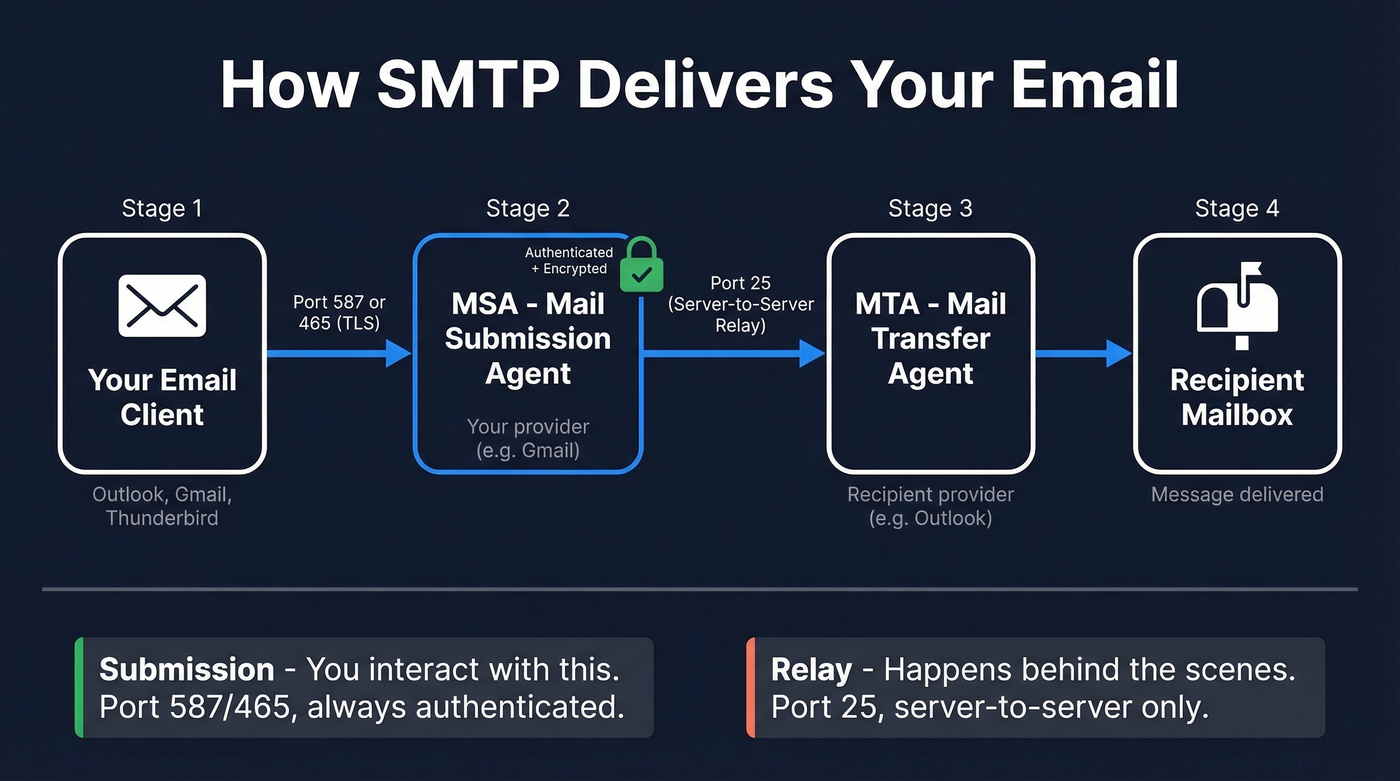
The protocol itself is surprisingly simple. Your email client opens a connection to an SMTP server and runs through a handshake: your client identifies itself with EHLO, specifies the sender with MAIL FROM, the recipient with RCPT TO, transmits the message body with DATA, and closes with QUIT. If everything checks out, the server responds with 250 OK and the message is queued for delivery. If something goes wrong, you get an error code - 550 for a rejected recipient, 421 for a temporary service issue - that tells you exactly what failed.
What matters more than the handshake is understanding the two roles SMTP plays. When your email client submits a message to your mail provider, it's talking to a Mail Submission Agent (MSA) on port 587 or 465. That MSA then relays the message to the recipient's server via a Mail Transfer Agent (MTA), typically on port 25. The distinction matters because port 25 is for server-to-server relay only - most residential ISPs and many cloud hosts block outbound port 25 by default to reduce spam. Your email client should never touch it.
Think of submission as dropping a letter at the post office counter: authenticated, encrypted, port 587. Relay is the postal trucks moving it between sorting facilities on port 25. You interact with submission. Relay happens behind the scenes.
What Is IMAP?
IMAP - Internet Message Access Protocol - handles the other half: reading email that's already been delivered. It keeps your messages stored on the server and syncs state across every device you use. Read an email on your phone, and it's marked read on your laptop. Delete it from your tablet, and it vanishes everywhere.
Here's something most guides get wrong: the current IMAP specification is [RFC 9051](https://www.ietf.org/rfc/rfc9051.html), published in August 2021. This is IMAP4rev2, and it obsoletes RFC 3501. If you see a guide citing RFC 3501 as the "latest" IMAP spec - and several popular ones still do - that information is out of date.
One of IMAP's most useful features is IDLE, which gives you push-like notifications without constant polling. When your client sends the IDLE command, the server holds the connection open and pushes untagged updates - EXISTS when new mail arrives, EXPUNGE when messages are deleted - in real time. The client sends DONE to exit IDLE mode. That's why your phone can show new email almost instantly without hammering the server every 30 seconds.
RFC 9051 also explicitly separates "posting mail" from IMAP's scope, pointing to RFC 6409 for message submission. IMAP retrieves. SMTP sends. The specs themselves enforce the boundary.
Side-by-Side Comparison
| SMTP | IMAP | |
|---|---|---|
| Purpose | Send email | Retrieve/sync email |
| Direction | Client -> server -> recipient | Server -> client(s) |
| Default port | 587 (STARTTLS) | 993 (TLS) |
| Encryption | STARTTLS or implicit TLS | Implicit TLS |
| Authentication | Required for submission | Required |
| Current RFC | RFC 5321 (5321bis pending) | RFC 9051 (IMAP4rev2) |
| Protocol layer | Application (TCP) | Application (TCP) |
| Do you need it? | Yes | Yes |
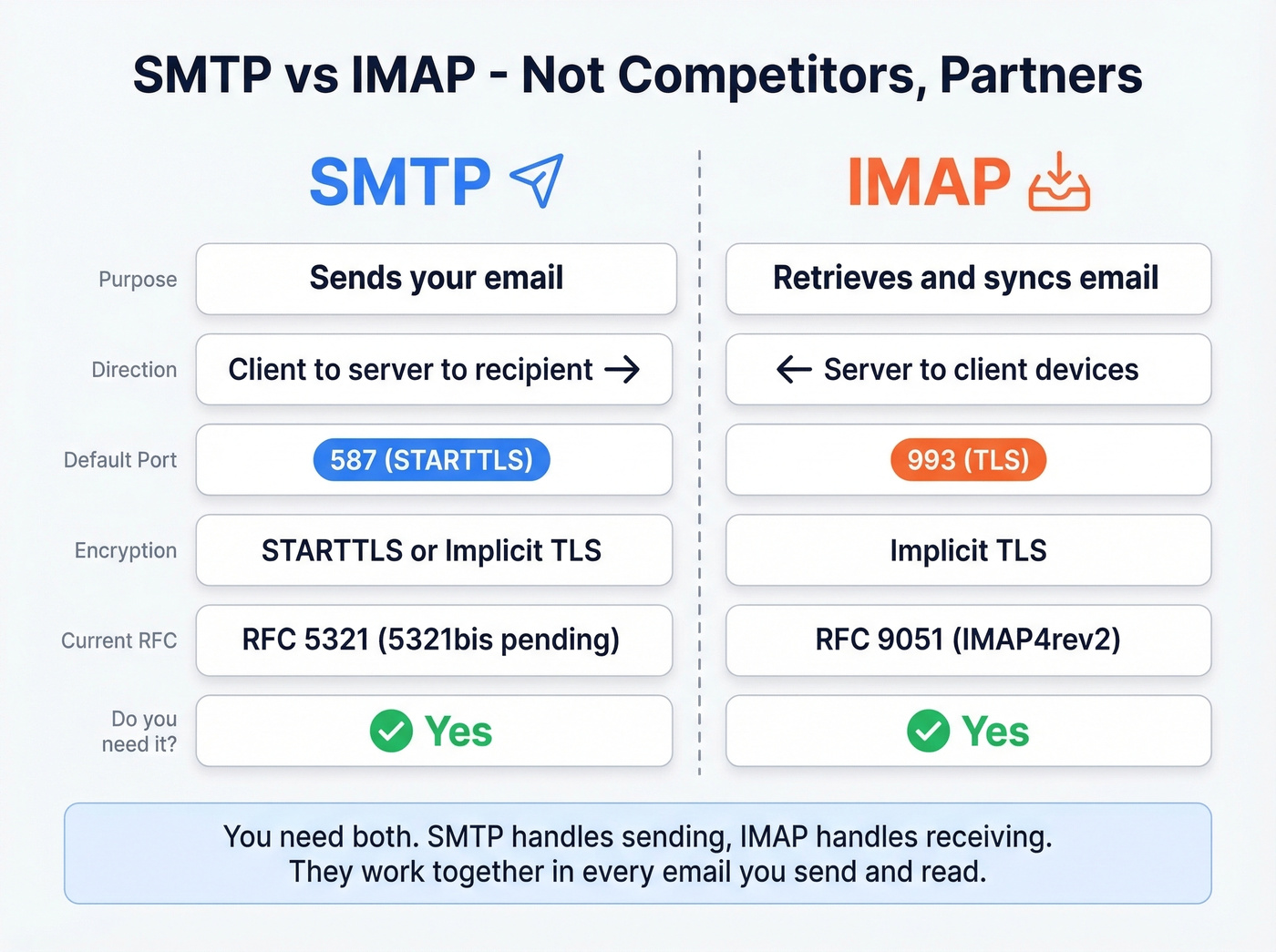
Both protocols are required for a functioning email setup. There's no real "vs" here.
One alternative worth mentioning: POP3 (port 995 with TLS) can replace IMAP for retrieval. POP3 downloads messages and typically deletes them from the server, which means single-device access and straightforward offline storage. But for anyone using more than one device - so, basically everyone in 2026 - IMAP is the default.
SMTP Ports Explained
Port numbers are where most configuration headaches start.
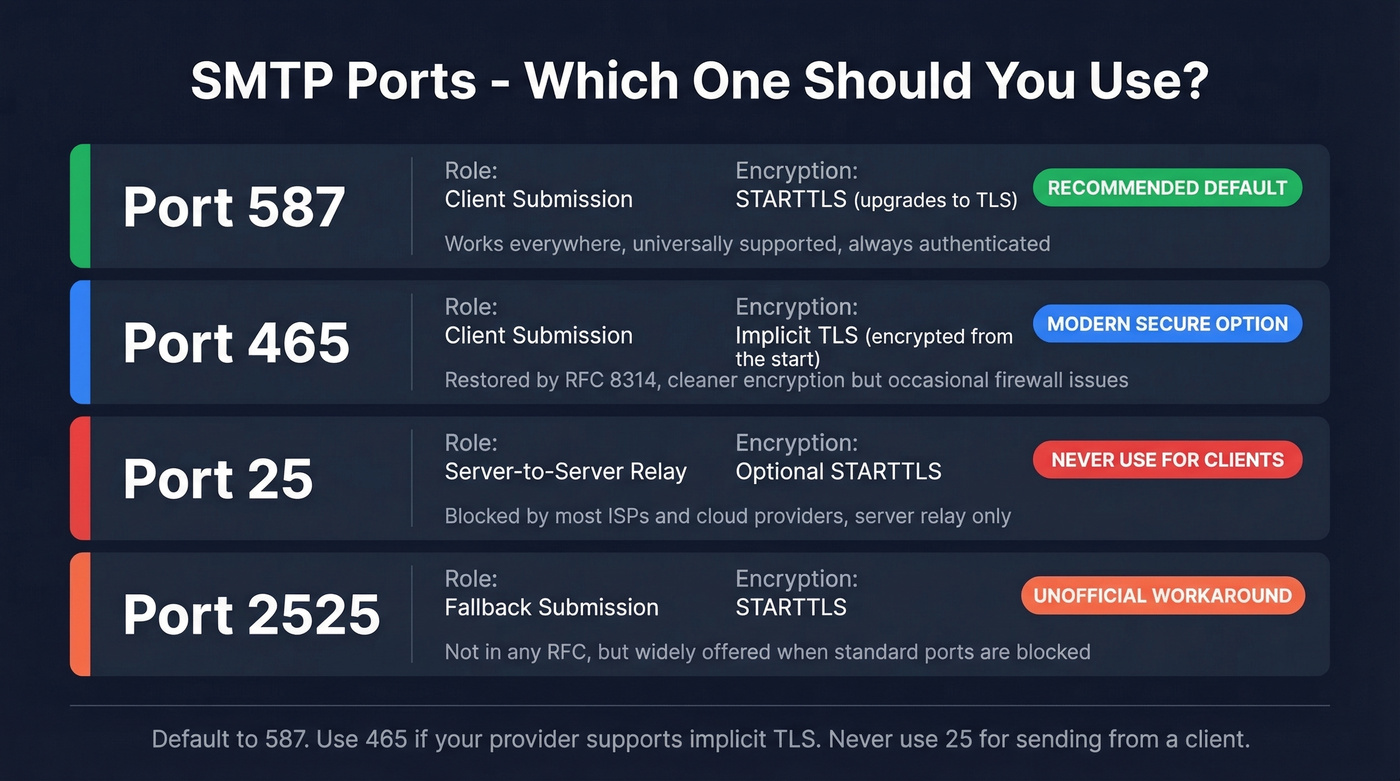
| Port | Role | Encryption | Status |
|---|---|---|---|
| 25 | Server-to-server relay | Optional STARTTLS | ISP-blocked for clients |
| 587 | Client submission | STARTTLS (upgrades) | Current standard |
| 465 | Client submission | Implicit TLS (from start) | Restored per RFC 8314 |
| 2525 | Fallback submission | STARTTLS | Unofficial workaround |
Port 587 is the safest default for client submission. It starts unencrypted, then upgrades to TLS via STARTTLS. It's universally supported and required to be authenticated. Gmail supports both 587 and 465, Outlook uses 587, and SendGrid accepts 587, 465, and 2525.
Port 465 has a complicated history. It was originally assigned for SMTPS, then deprecated, then restored by RFC 8314 as the recommended port for implicit TLS. Implicit TLS means encryption starts from the very first packet - no upgrade step. In our experience, 587 causes fewer firewall headaches than 465, but 465 is technically the cleaner option if your provider supports it.
Port 25 is for server-to-server relay only. Never use it for client submission.
Port 2525 is an unofficial fallback when ISPs or firewalls block the standard ports. It's not in any RFC, but it's widely offered as a workaround.
The "587 vs 465" debate matters less than making sure you're using one of them with proper TLS. Default to 587. If your provider supports 465 with implicit TLS, that's the modern secure option. For applications sending at scale, a dedicated SMTP relay service handles the infrastructure complexity - SMTP.com, for instance, provides authenticated relay on ports 587 and 465 with deliverability monitoring, starting at $25/month for 50,000 emails.
How They Work Together
You write a message and hit send. Your email client submits it via SMTP to your provider's MSA on port 587 or 465. The MSA authenticates you and relays the message to the recipient's MTA. The recipient's Mail Delivery Agent drops it into their mailbox. Their email client retrieves it via IMAP on port 993.
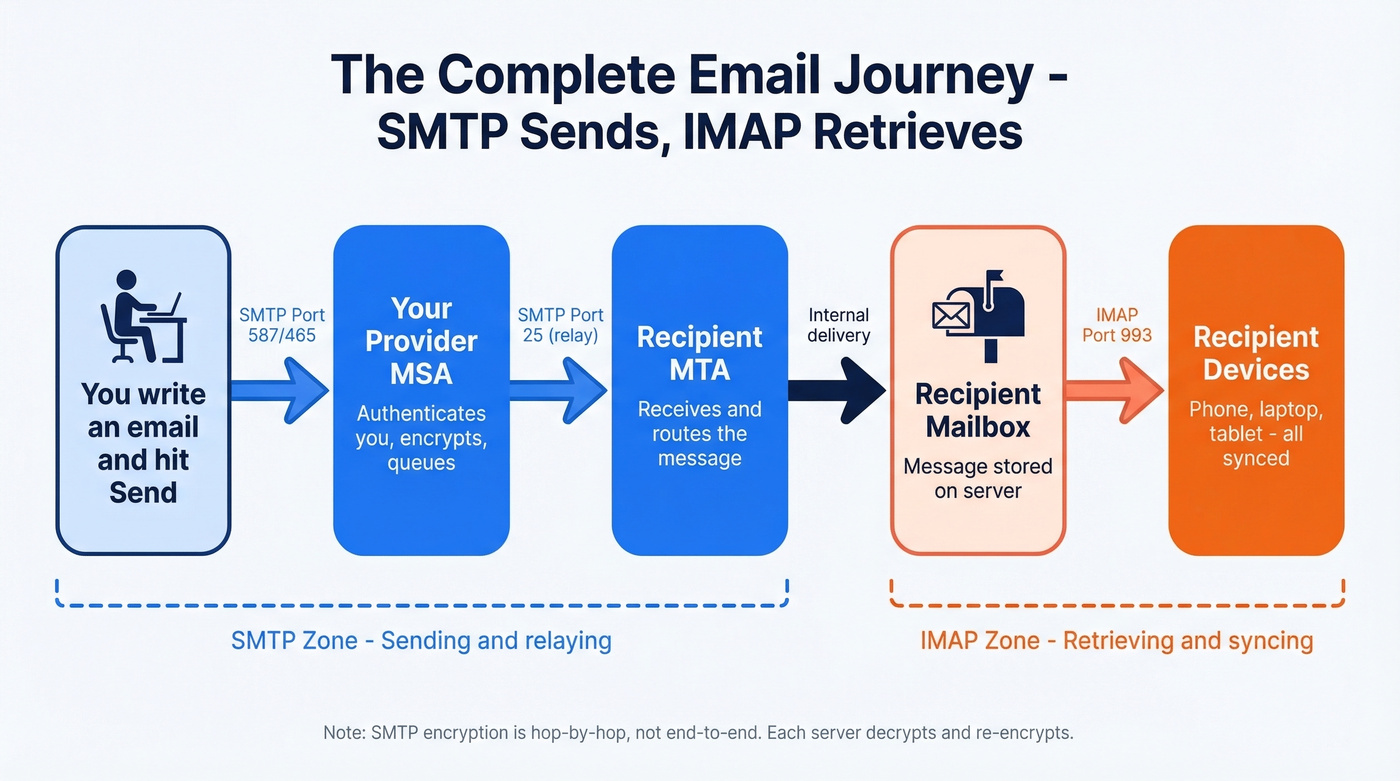
One important caveat: SMTP encryption is hop-by-hop, not end-to-end. Each server in the relay chain decrypts and re-encrypts. If you need true end-to-end encryption, you're looking at PGP or S/MIME on top of the transport layer.
Getting the protocol config right is half the battle. The other half is data quality. Perfect SMTP configuration means nothing if you're sending to addresses that don't exist. Bounces from invalid recipients destroy sender reputation fast - and once your domain's reputation tanks, even valid emails start landing in spam. Tools like Prospeo catch bad addresses before they hit your SMTP server, running a 5-step verification process at 98% accuracy. It's the difference between a clean send and a deliverability spiral.

Configuring SMTP and IMAP correctly is step one. Step two is making sure every email address you send to is real. Prospeo's 5-step verification catches spam traps, honeypots, and catch-all domains - delivering 98% email accuracy at $0.01 per address.
Stop perfecting your SMTP setup just to bounce off bad data.
How ISPs Affect Deliverability
Once your protocols are configured, ISPs become the next variable. ISPs and ESPs play different but overlapping roles: your ISP controls the network pipe and may block port 25, while your ESP - Gmail, Outlook, or a transactional platform like SendGrid - applies its own spam filtering and reputation scoring.
When an ISP throttles or blocks outbound SMTP traffic, your messages never even reach the recipient's server. This is especially relevant if you're running your own mail server on VPS hosting - many cloud providers block port 25 by default and require you to request an unblock. For most teams, using a reputable ESP or bulk email delivery service sidesteps these network-level restrictions entirely.
Choosing the Right Mailbox
Your use case determines your mailbox setup. If you're sending transactional or marketing emails, a shared mailbox on a free provider won't cut it - you need dedicated infrastructure with proper SPF, DKIM, and DMARC records.
For sales teams running outbound campaigns, deliverability hosting matters more than most realize. A dedicated IP on a reputable email delivery platform gives you full control over your sender reputation. Shared IPs mean your deliverability is partly at the mercy of other senders on the same infrastructure.
Let's be honest about the SMTP relay vs API tradeoff: SMTP is universal and works with any client, while APIs offer tighter integration, better error handling, and richer analytics. For high-volume programmatic sending, APIs typically win. For standard email client configuration, SMTP is the only option.
Provider Settings Reference
Copy-paste these into your email client or app configuration:
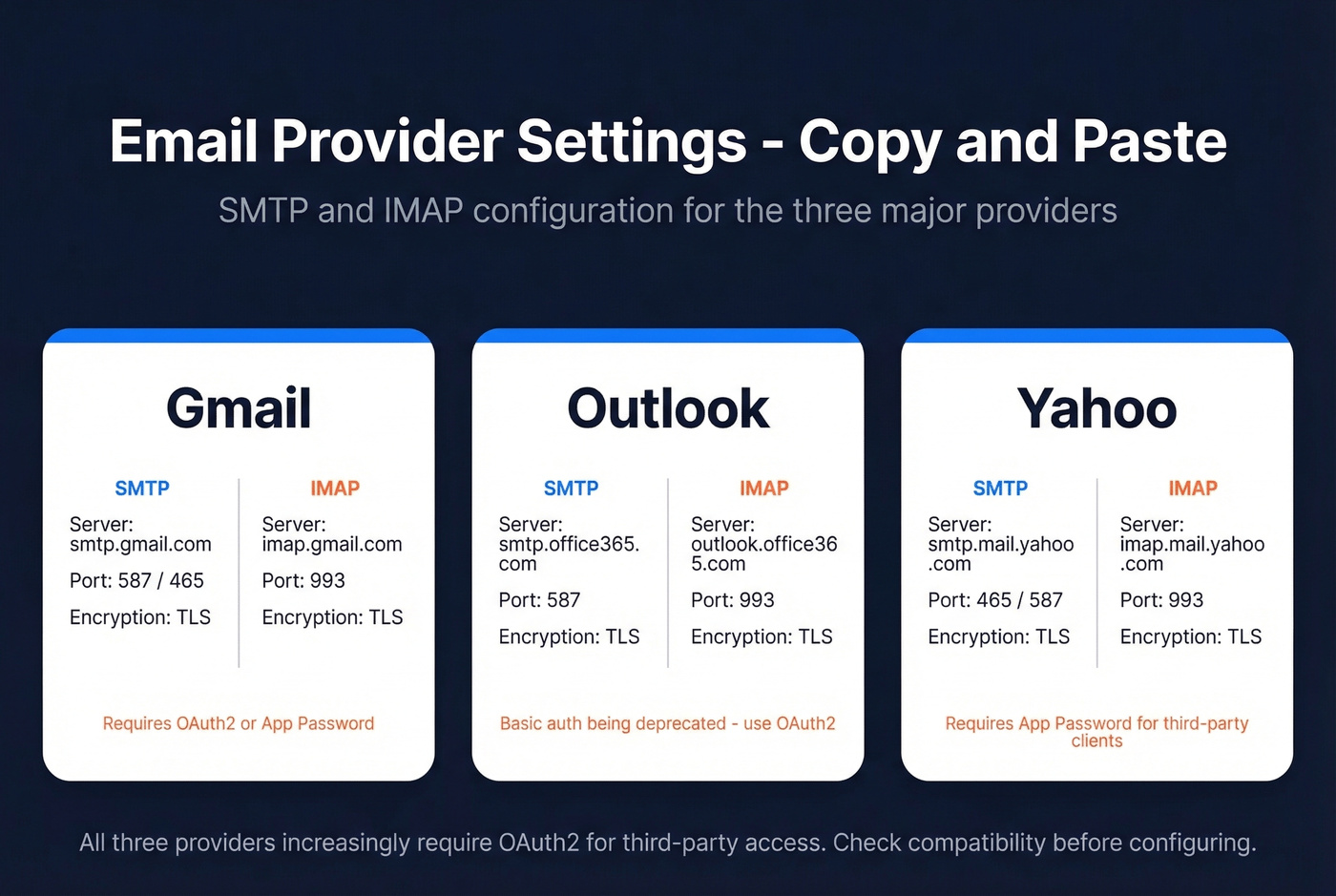
| Provider | SMTP Server | SMTP Port | IMAP Server | IMAP Port | Encryption |
|---|---|---|---|---|---|
| Gmail | smtp.gmail.com | 587 / 465 | imap.gmail.com | 993 | TLS |
| Outlook | smtp.office365.com | 587 | outlook.office365.com | 993 | TLS |
| Yahoo | smtp.mail.yahoo.com | 465 / 587 | imap.mail.yahoo.com | 993 | TLS |
Major providers increasingly prefer OAuth2 for third-party access, and many are deprecating basic authentication methods. If you're configuring a third-party client or integration, check whether it supports OAuth2 before you waste an hour on credentials that'll never work.
Troubleshooting Common Errors
When email connections fail, it's almost always one of four things.
Wrong IMAP server or port. Verify you're using port 993 with TLS enabled. Port 143 (unencrypted) still works on some servers but shouldn't be your default. Double-check the server hostname - imap.gmail.com isn't mail.gmail.com.
Wrong SMTP server or port. Confirm you're on port 587 with STARTTLS or 465 with implicit TLS. A common mistake is using port 25, which your ISP is almost certainly blocking.
Authentication failure. This is the most common culprit we see. Verify your credentials and auth method. In enterprise environments, check IP allowlisting - it's a frequent reason for "connection refused" and "can't authenticate" errors that have nothing to do with your password.
Greylisted email. If you see a temporary rejection with a message like "try again later," your email was likely greylisted. The recipient's server temporarily rejects the first delivery attempt from an unknown sender, expecting legitimate servers to retry. This isn't a permanent failure - most SMTP servers automatically retry after a few minutes and succeed on the second pass.
Test email fails to send. Even with correct server/port/auth, some SMTP servers restrict submission based on sender address, rate limits, or firewall rules. Verify your sending address matches the authenticated account, and check that no proxy or firewall is intercepting outbound traffic on your submission port.
Here's the thing: wrong port numbers get all the attention in troubleshooting guides, but bad recipient data causes more delivery failures than most people expect. We've seen teams spend days debugging SMTP configs when the real problem was a list full of dead addresses.
Your SMTP server returns 550 errors when recipient addresses don't exist. Prospeo eliminates that problem before you hit send - 143M+ verified emails refreshed every 7 days, not the 6-week industry average.
Get addresses that survive the SMTP handshake every time.
Deliverability Beyond Protocols
Getting SMTP and IMAP configured correctly is table stakes. If you're doing cold outreach or sales automation, deliverability management is a much bigger challenge than port numbers.
A few things that matter for outreach deliverability in 2026:
Plain text vs HTML. For cold email, plain text consistently outperforms HTML because spam filters treat it as more personal. HTML deliverability suffers when messages are image-heavy or contain broken images - Gmail's proxy system for inline images can also trigger rendering issues across clients.
Sender name best practices. Your display name affects open rates more than your subject line. Use a real person's name, keep it consistent, and avoid generic labels like "Sales Team."
Personalization. Personalized emails signal to ISPs that you're sending intentional, one-to-one messages rather than bulk blasts. Even simple merge fields like first name and company reduce spam classification rates.
Mailflow warm-up. New domains and IPs need gradual volume ramps. Jumping from zero to thousands of emails per day is the fastest way to get flagged. A 30-day warm-up plan that starts with low volume and scales gradually builds the sender reputation you need. Skip this step and you'll spend weeks digging out of a spam hole.
For teams using AI SDR tools or AI email agents, deliverability is an emerging concern. AI-generated emails can trigger spam filters if they produce repetitive patterns across high volumes. The key is ensuring each message has genuine variation and that your sending infrastructure - domains, IPs, warm-up - can support the volume your AI agent produces.
How to Improve Deliverability
If you want a practical checklist, start here:
- Authenticate everything. SPF, DKIM, and DMARC should be configured before you send a single email.
- Verify recipients. Invalid addresses generate bounces that tank your reputation. This is the single highest-impact action for B2B cold email deliverability. (If you want a deeper dive on bounces, see bounce codes & fixes.)
- Use the right ports. 587 or 465 for SMTP submission, 993 for IMAP retrieval. No exceptions.
- Monitor your reputation. Google Postmaster Tools and Microsoft SNDS give you visibility into how ISPs view your domain.
- Respect volume limits. Whether you're using a CRM with built-in deliverability features or a standalone platform, stay within your provider's sending limits. (This is where email velocity matters.)
- Exit recipients from the same domain if multiple addresses at that domain are bouncing. Continuing to send signals to the receiving server that you aren't monitoring your list.
The Future: JMAP
IMAP works. It's also an older protocol with decades of extensions and legacy behavior. JMAP - JSON Meta Application Protocol - is the modern replacement, standardized in RFC 8620 and RFC 8621 in 2019 and championed by Fastmail.
Instead of IMAP's custom protocol, JMAP uses a single JSON-based API over HTTP and WebSocket. State-based syncing means clients only fetch what's changed. Real-time push comes via WebSocket instead of the IDLE workaround. Authentication uses OAuth 2.0 bearer tokens over HTTPS. For developers building email integrations, JMAP's richer error reporting is a significant upgrade over raw IMAP connections.
Adoption is real but early. Fastmail runs JMAP in production. Thunderbird is rolling out support. Server-side implementations exist in Cyrus IMAP, Apache James, and Stalwart. But Gmail and Microsoft 365 aren't mainstream JMAP deployments today, which keeps IMAP as the default config for most people.
Real talk: JMAP is technically superior to IMAP in almost every way. But "technically superior" and "what you should configure today" are different things. Default to IMAP. Watch JMAP. When Gmail adopts it, the industry will follow.
FAQ
Can I use SMTP without IMAP?
Yes - SMTP handles sending only. If you're sending transactional emails from an application, you'll never configure IMAP at all. But recipients still use IMAP or POP3 to read your messages, and a full email client needs both protocols configured.
What port should I use for SMTP in 2026?
Port 587 with STARTTLS is the safest, most universally supported default. Port 465 with implicit TLS is the modern recommendation per RFC 8314 and avoids the STARTTLS upgrade step. Never use port 25 for client submission - ISPs block it.
How do I stop SMTP emails from bouncing?
Most bounces come from invalid recipient addresses, not protocol misconfiguration. Verify addresses before sending. Prospeo checks them in real time at 98% accuracy, so your SMTP server isn't wasting sends on dead mailboxes.
Does email format affect deliverability?
For cold outreach and sales emails, plain text wins - spam filters are more suspicious of HTML-heavy messages with tracking pixels and heavy formatting. For transactional and marketing emails, well-coded HTML is fine. Always test across clients to catch broken images and rendering issues.
How does SMTP vs IMAP apply to sales automation?
Sales automation tools use SMTP to send sequences and IMAP to monitor replies, bounces, and out-of-office responses. Both need to be configured correctly. The bigger factor is data quality - verified recipient addresses prevent the bounces that destroy sender reputation and derail campaigns.