

Spam Checker Tools: What They Get Wrong and What Actually Lands Your Email in the Inbox
Last quarter, a marketing team we work with ran their campaign through a spam checker. It flagged eight trigger words - "free," "guarantee," "act now," and five others. They rewrote every line, stripped the personality out of the email, and sent it again. Still landed in spam. The problem was never the words. It was a 12% bounce rate torching their sender reputation.
That's the gap most content-scanning tools don't close. They test the thing that barely matters and ignore the thing that kills you.
What You Need (Quick Version)
If you're short on time, here's the stack that actually covers your bases:
- For quick content scans - Postmark Spam Check (free)
- For inbox placement testing - GlockApps (free plan includes 2 Spam Test Credits) or Mail-Tester (1 test/day free)
- For ongoing monitoring - Google Postmaster Tools + Microsoft SNDS (both free)
And before any of this - verify your email list. Bad data destroys sender reputation faster than any trigger word ever could. Prospeo's free tier gives you 75 email verifications per month, enough to spot-check before a campaign goes out.
One more thing: no single tool covers everything. Content scanning, inbox placement, and reputation monitoring are three different jobs. Treat them that way.
What Gets Tested (and What Doesn't)
Most people confuse delivery with deliverability. The difference matters.
Delivery means the recipient's mail server accepted your email - no bounce. Deliverability means where it actually landed after acceptance: inbox, tabs, or spam. Most spam checkers test content risk - they scan your subject line, body copy, HTML structure, and headers against known patterns. Some go further and check authentication records (SPF, DKIM, DMARC) or run your sending IP against blacklists. The best ones actually send your email to seed accounts and report where it lands across Gmail, Outlook, Yahoo, and others.
Here's the uncomfortable reality: Litmus's analysis found that 70% of emails show at least one spam-related issue. As a broad industry benchmark, average deliverability sits around 83% - roughly one in six legitimate marketing emails doesn't reach the inbox. Testing isn't optional. It's just that most people test the wrong layer.

Do Spam Trigger Words Still Matter?
Barely. If a tool's main selling point is flagging words like "free" or "limited time," it's solving a 2015 problem.
Modern email filters at Gmail, Outlook, and Yahoo run on machine learning models that evaluate hundreds of signals simultaneously - sender reputation, authentication posture, engagement history, complaint rates, bounce rates, link structure, formatting patterns. All of these weigh far more heavily than any individual word in your subject line. A single trigger word won't cause spam placement if your other signals are strong.
Context still matters, though. An email with ALL CAPS, five exclamation marks, three "FREE!!!" mentions, and a sketchy link structure will trip filters. But that's pattern recognition, not keyword matching. The filter isn't flagging "free." It's flagging the combination of aggressive formatting signals that correlate with spam.
Older SpamAssassin installations and some corporate email gateways like Barracuda and Proofpoint can still be more keyword-driven. If you're selling into enterprises with on-premise email security, content scanning has more value. For everyone sending to Gmail and Outlook? domain reputation is king.
We've seen teams spend weeks rewriting emails to dodge trigger words while ignoring a 15% bounce rate. That's rearranging deck chairs on the Titanic.
What Actually Determines Inbox Placement
Here are the factors that matter, ranked from most to least impactful:
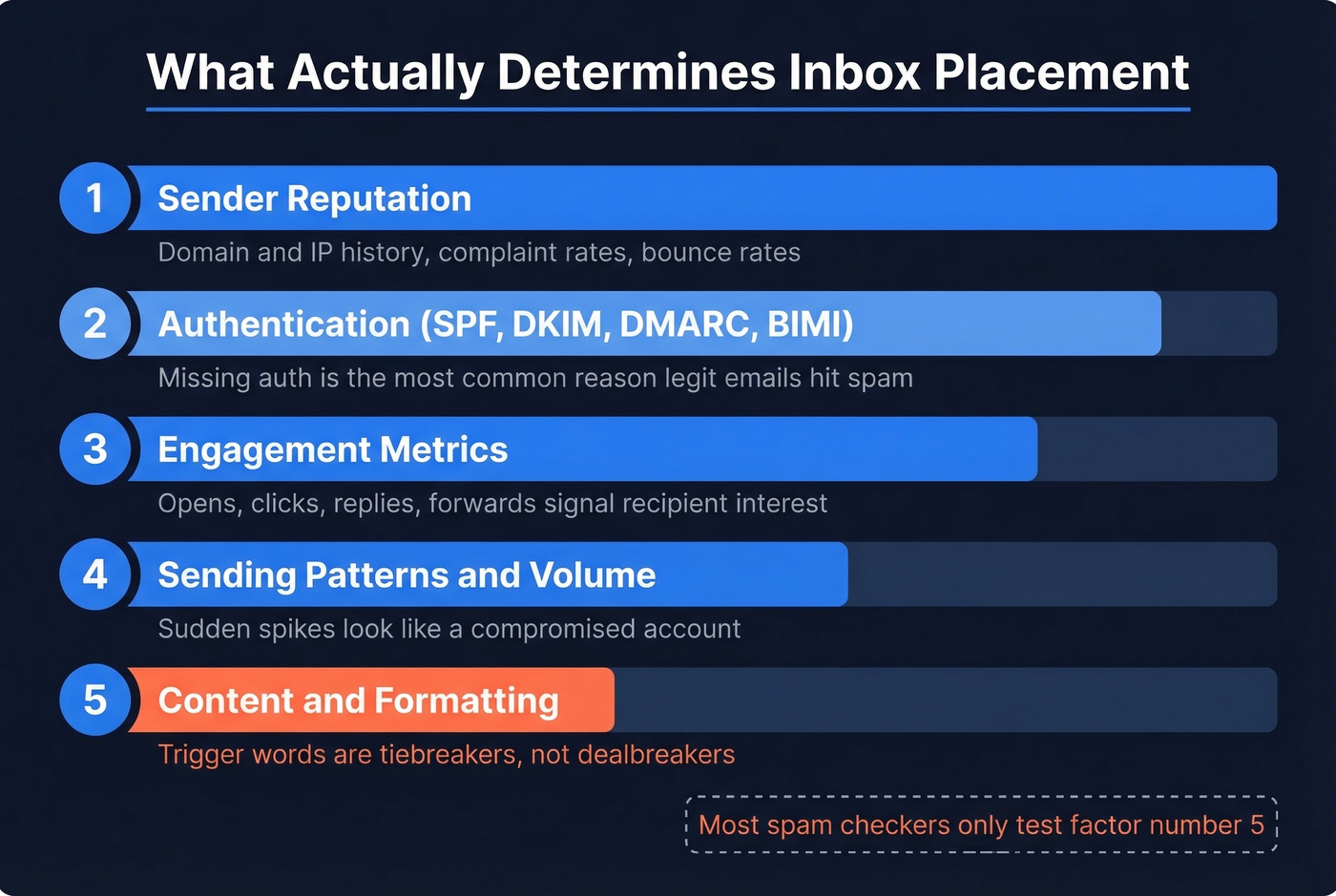
Sender reputation. Your domain and IP reputation are the single most critical factor. Gmail and Outlook track your sending history, complaint rates, and bounce rates over time. A clean reputation can carry mediocre content into the inbox. A bad reputation will sink a perfect email.
Authentication (SPF/DKIM/DMARC/BIMI). Missing or misconfigured authentication is one of the most common reasons legitimate emails hit spam. Providers err on the side of caution when they can't verify you are who you say you are. BIMI adds an extra trust signal by displaying your brand logo next to authenticated messages. All of this is table stakes.
Engagement metrics. Opens, clicks, replies, and forwards all signal to mailbox providers that recipients want your email. Engagement can actually override content concerns when recipients consistently interact with your messages - which is why warm-up tools generate artificial engagement to build this signal before real campaigns go out.
Sending patterns and volume. Sudden volume spikes trigger filtering regardless of content quality. Going from 50 emails/day to 5,000 overnight looks like a compromised account. Ramp gradually and maintain consistency.
Content and formatting. Yes, content matters - but it's fifth on the list, not first. HTML-to-text ratio, link density, image-heavy layouts, and aggressive sales language all contribute. They're tiebreakers, not dealbreakers.

You just read it: bounce rates destroy sender reputation faster than trigger words ever will. Prospeo's 5-step email verification catches bad addresses before they torch your domain - with 98% accuracy and a 7-day data refresh cycle.
Stop rewriting copy. Start cleaning your list at $0.01 per email.
How to Read Your Spam Score
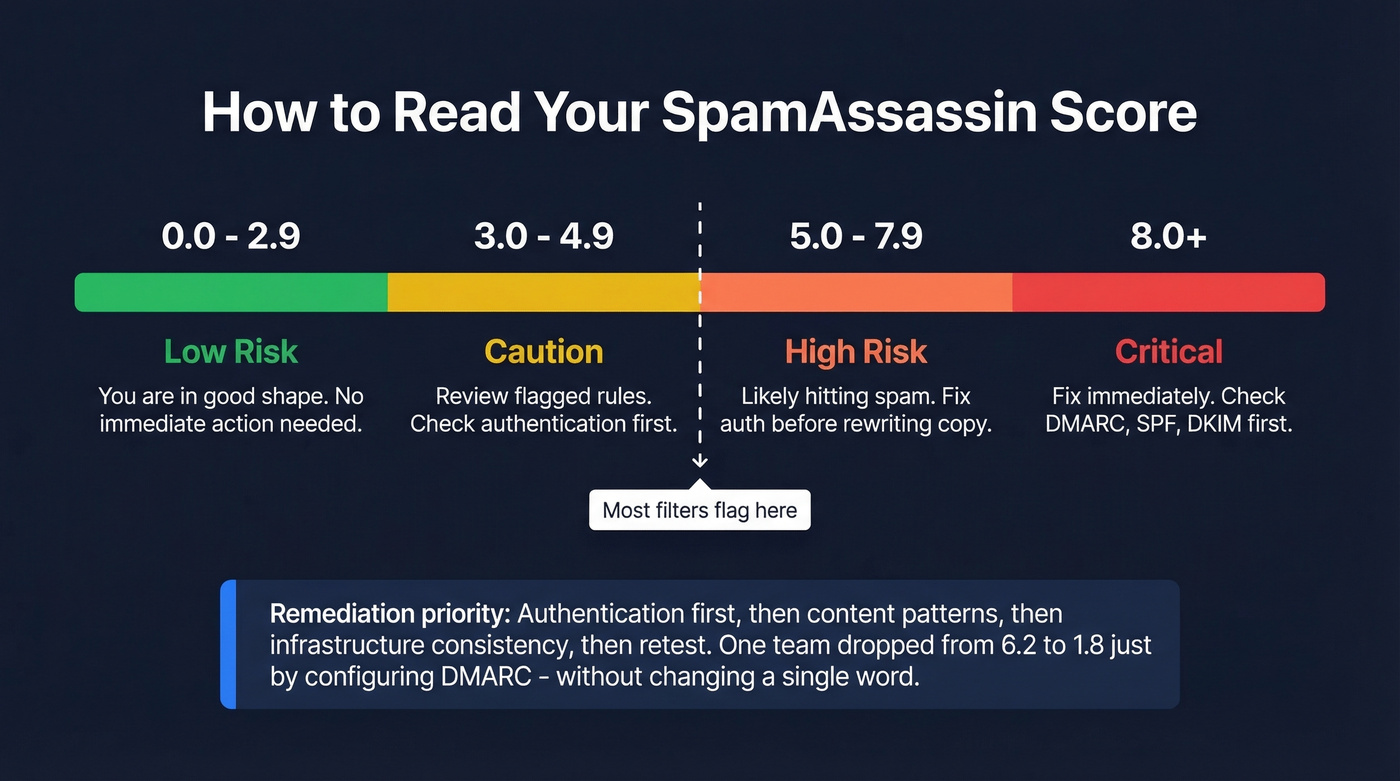
Most free tools output a SpamAssassin score. Here's how to interpret it:
| Score Range | Risk Level | What It Means |
|---|---|---|
| 0.0-2.9 | Low risk | You're in good shape |
| 3.0-4.9 | Caution | Review flagged rules |
| 5.0-7.9 | High risk | Likely hitting spam |
| 8.0+ | Critical | Fix immediately |
Most SpamAssassin installations flag messages at 5.0. If you're above that threshold, don't start rewriting copy - fix authentication first. The remediation priority is: authentication, then content patterns, then infrastructure consistency, then retest. We've seen teams drop from 6.2 to 1.8 just by properly configuring DMARC, without changing a single word in their email.
Types of Spam Checkers
Not all testing tools do the same thing. Four distinct categories exist, and understanding which you need saves you from buying the wrong tool.
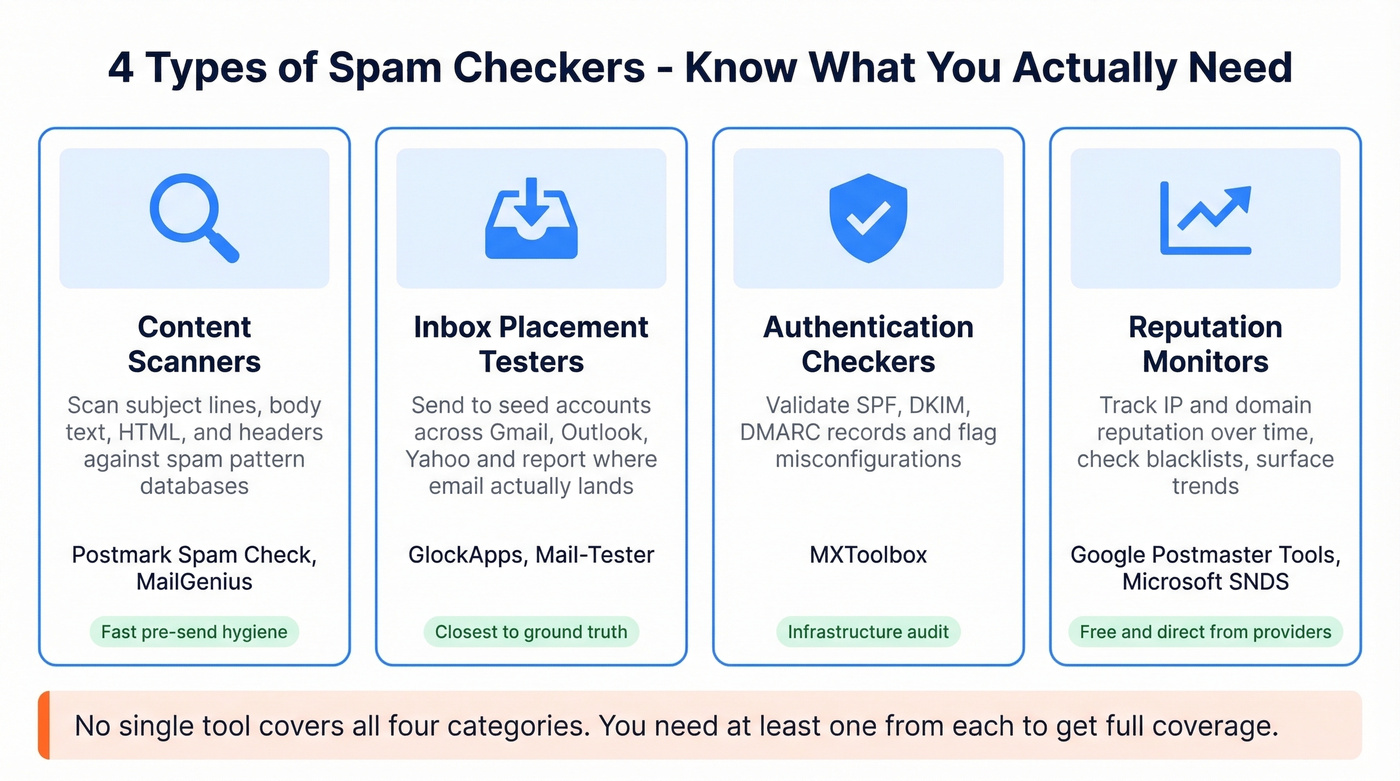
Content scanners check your subject line, body text, HTML structure, and headers against spam pattern databases. Postmark Spam Check and MailGenius live here. They're fast and useful for pre-send hygiene, but they can't tell you where your email actually lands.
Inbox placement testers send your email to seed accounts across Gmail, Outlook, Yahoo, and others, then report whether it hit inbox, spam, or disappeared entirely. GlockApps is the leader here. The limitation: seed accounts are synthetic - roughly 100 mailboxes - and they don't generate real engagement signals, so results can skew worse than real-world sending.
Authentication checkers validate your SPF, DKIM, and DMARC records. MXToolbox handles this well. Think of these as infrastructure audits.
Reputation monitors track your IP and domain reputation over time, check blacklist status, and surface trends. Google Postmaster Tools and Microsoft SNDS are the gold standard - free, direct data from the providers who actually decide where your email goes.
Let's be clear about one thing: some tools marketed as deliverability testers are actually email verification tools in disguise, checking whether addresses are disposable or role-based. That's a different function entirely - useful, but not what most people mean when they search for a spam score checker.
Best Tools for 2026
| Tool | Best For | Free Tier | Paid From | Key Limitation |
|---|---|---|---|---|
| GlockApps | Inbox placement | 2 Spam Test Credits | $59/mo | ~100 seed mailboxes |
| Mail-Tester | Quick snapshot | 1 test/day | $9.90/mo | Limited free tests |
| Postmark Spam Check | Content scoring | Unlimited | Free | No inbox placement |
| MailGenius | Content checks | Limited | $29/mo | No placement tests |
| MailReach | Warm-up + testing | 3 tests/24hrs | ~$25/mo | Primarily warm-up |
| MXToolbox | Auth + blacklists | Basic free | $129/mo | Monitoring only |
| Postmaster Tools | Gmail reputation | Full access | Free | Gmail only |
| Microsoft SNDS | Outlook reputation | Full access | Free | Microsoft only |
GlockApps
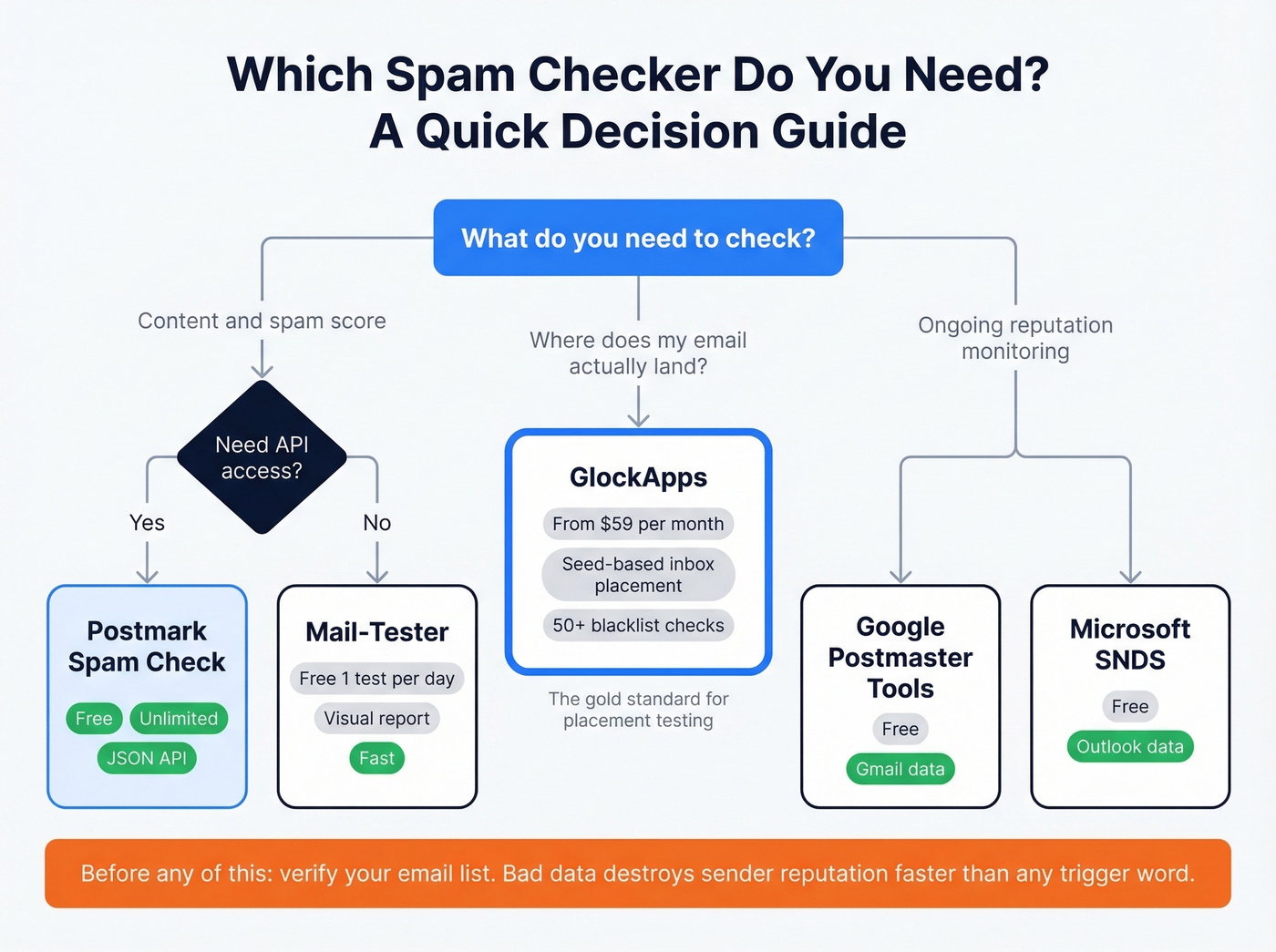
GlockApps is the closest thing to a ground-truth inbox placement test available to most teams. You send an email to their seed list, and it reports exactly where it landed across Gmail, Outlook, Yahoo, and dozens of other providers. It checks against 50+ blacklists and includes DMARC Analytics.
Pricing is straightforward. Free gets you 2 Spam Test Credits, enough to spot-check. Essential at $59/mo includes 360 tests. Growth at $99/mo bumps to 1,080 tests and 10 sending accounts. Enterprise at $129/mo gives 1,800 tests and 20 accounts.
The seed-account limitation is real, though. Those roughly 100 mailboxes don't engage with your emails the way real recipients do, so results can skew pessimistic. Use GlockApps to identify problems and track trends - don't treat a single test as gospel. That said, if your GlockApps results look bad, your real results are almost certainly worse.
Mail-Tester
Mail-Tester is the tool we recommend when someone asks "what's the fastest way to check my email spam score?" You send a message to a unique address, visit the results page, and get a visual report covering your SpamAssassin score, authentication status, and blacklist presence - all in one screen.
The free tier gives you one test per day. Paid plans start at $9.90/mo for more volume. For teams that send occasional campaigns and want a quick sanity check before hitting send, Mail-Tester is the best free option available. It won't test actual inbox placement like GlockApps, but for content and authentication auditing, nothing is faster.
Postmark Spam Check
Postmark's score checker is free with unlimited tests. It's SpamAssassin-based, available as both a web UI and a lightweight JSON API, which makes it the go-to for developers who want to integrate content scanning into their build pipeline.
The tradeoff is scope. Postmark only analyzes content. It won't tell you whether your email actually reaches the inbox, check your sender reputation, or test against real mailbox providers. Useful, fast, and free - but not a complete deliverability audit.
MailGenius
Skip this if you already use Mail-Tester or Postmark. MailGenius scans against 25+ spam-related factors including SpamAssassin and Barracuda filters, outputting a rating from 0 to 10 (lower is better). Plans start at $29/mo for 100 tests. It's a solid content optimization tool, but it doesn't do real inbox placement testing. For that, pair it with GlockApps.
MailReach
MailReach is primarily a warm-up tool that includes placement testing. Its approach differs from GlockApps: you send to multiple provided inboxes and include a code snippet, and it positions this as more accurate than single-address tests. The free tier offers 3 tests per 24 hours. Paid plans run ~$25-$150/mo depending on how many mailboxes you're warming. If you're already using MailReach for warm-up, the built-in placement tests are a nice bonus. For testing alone, GlockApps or Mail-Tester are better fits.
MXToolbox
MXToolbox is the infrastructure workhorse for email ops teams. Free basic checks cover blacklists, DNS records, and authentication validation. The Delivery Center plan at $129/mo and Plus at $399/mo add ongoing monitoring and alerting. Best for ops teams who need to watch infrastructure health over time, not for one-off content testing.
Free Provider Tools
Google Postmaster Tools, Microsoft SNDS, and Yahoo Sender Hub are the most underused tools in email. They give you direct reputation data from the providers who actually decide where your email lands - domain reputation, IP reputation, spam complaint rates, authentication pass rates. All free. If you're sending any volume and not checking Postmaster Tools weekly, you're flying blind.
Warmforge, SendForensics, Folderly, Unspam
Warmforge starts at $9/mo per mailbox and combines warm-up with reputation monitoring - good for teams scaling cold outreach across multiple mailboxes. SendForensics starts at $49/mo and focuses on deliverability analytics, more diagnostic than testing. Folderly offers a free spam word checker and a 7-day trial for its full platform. Unspam bundles inbox placement testing with extras like an AI eye-tracking heatmap, email previews, accessibility checks, and blacklist monitoring.
The Data Quality Problem Nobody Talks About
Here's the thing: if your average deal size is under $50k, the thing most likely to land you in spam isn't your copy - it's your data.
The chain that actually kills deliverability works like this. Bad email data leads to bounces. Bounces lead to reputation damage. Reputation damage sends everything to the spam folder. A bounce rate above 10% signals to Gmail and Outlook that you aren't maintaining your list, and once your sender reputation drops, no amount of content optimization or warm-up will save you quickly. High spam scores from providers are often a symptom of list quality issues, not content problems.
No deliverability testing tool fixes this. You need verified data before you send. Prospeo runs a 5-step verification process across 300M+ professional profiles with 98% email accuracy - catch-all handling, spam-trap removal, and honeypot filtering are built in, which are the exact things that prevent the bounce-to-spam chain. Stack Optimize, one of Prospeo's customers, maintains 94%+ deliverability and under 3% bounce rate across all their clients using this approach.
Every spam checker on this list tests what happens after you hit send. The real fix happens before. Prospeo verifies emails against catch-all domains, spam traps, and honeypots - the exact signals that tank your reputation score.
75 free verifications per month. No credit card, no sales call.
Pre-Send Checklist
Run through these seven steps before every major campaign:
- Verify your email list. Remove invalid, catch-all, and disposable addresses. This single step prevents more spam folder placements than any content tweak.
- Confirm authentication. SPF, DKIM, and DMARC should all be configured and passing. Use MXToolbox's free checker if you aren't sure.
- Run a content scan. Paste your email into Postmark Spam Check or Mail-Tester. Aim for a SpamAssassin score under 3.0.
- Check blacklists. MXToolbox's free blacklist check takes 10 seconds. If you're listed, fix the underlying issue before sending.
- Review sending volume. Don't spike. If you normally send 200 emails/day, don't jump to 2,000. Ramp over days or weeks.
- Test inbox placement. If you're sending at scale, run a GlockApps test to see where you're actually landing across providers.
- Monitor post-send. Check Google Postmaster Tools within 48 hours. If inbox placement drops below 90%, investigate immediately.
FAQ
What's a good spam score?
On SpamAssassin, anything under 3.0 is low risk. Most filters start flagging at 5.0. If you're above 5.0, prioritize fixing authentication (SPF/DKIM/DMARC) before touching content - that's where the biggest score drops come from.
Do spam trigger words actually matter?
Modern filters use machine learning and weigh sender reputation, authentication, and engagement far more heavily than individual words. A single trigger word won't send you to spam if everything else is solid. Worry about your bounce rate, not the word "free."
How often should I test deliverability?
Before every major campaign or template change. For ongoing sending, monitor weekly via Google Postmaster Tools. Run a full inbox placement test monthly if you're sending at scale - GlockApps' Essential plan at $59/mo covers this easily.
Are free spam checkers reliable?
For content scanning, Postmark and Mail-Tester are genuinely useful and cost nothing. For inbox placement, free plans are limited (GlockApps gives 2 test credits). For reputation monitoring, Google Postmaster Tools is free and the most authoritative Gmail data source available.
What if I'm already landing in spam?
Reduce sending volume immediately - blasting at full speed with damaged reputation makes things worse. Clean your list aggressively, removing anyone who hasn't engaged in 90+ days. Check MXToolbox for blacklist appearances and request delisting. Then warm up gradually with your most engaged recipients first. Recovery takes 2-4 weeks for most domains.