

Inbox Placement: What It Really Means and How to Fix It in 2026
You sent 50,000 emails last week. Your ESP says 97% were delivered. Your open rate? Eight percent. Something between "delivered" and "opened" ate your campaign alive - and your ESP can't tell you what it was.
That something is inbox placement. The global average sits at just 84%, which means nearly 1 in 6 emails never reaches the inbox before anyone even gets a chance to ignore them.
"Delivered" Doesn't Mean "Seen"
Your ESP's delivery metric is misleading. "Delivered" means the receiving server accepted the email with an SMTP 250 OK response. That's it. It doesn't mean anyone saw it, and it definitely doesn't mean it landed anywhere near the inbox.
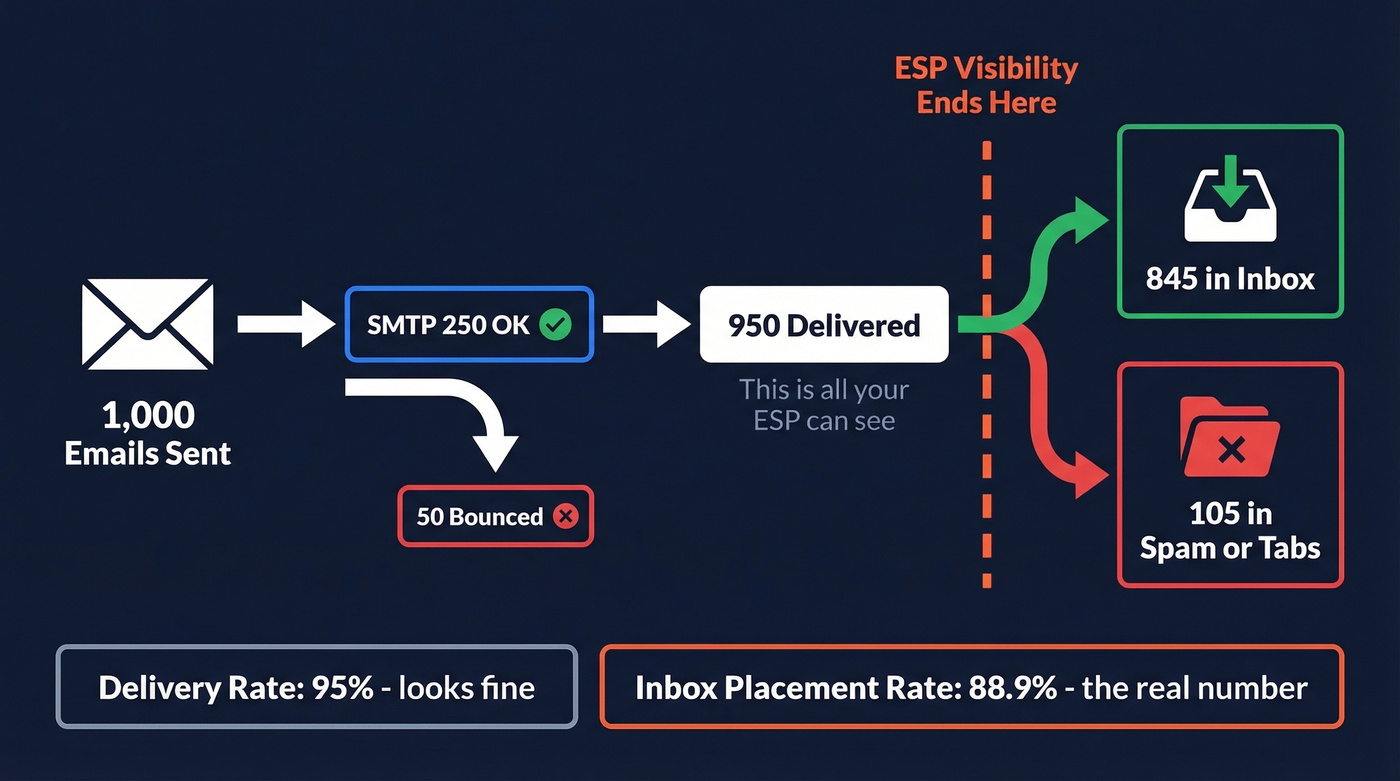
Delivery rate = (Sent - Bounced) / Sent x 100. Your ESP can see this because it controls the sending side.
Inbox placement rate (IPR) = Inbox / Delivered x 100. Your ESP can't see this. Once the receiving server says "accepted," the ESP loses all visibility into what happens next.
Here's a worked example: you send 1,000 emails, 50 bounce, and 950 are "delivered." Of those 950, only 845 reach the inbox. Your delivery rate is 95% - acceptable on paper - but your placement rate is 88.9%. That gap is invisible to your ESP, and it's where campaigns go to die.
The Revenue Math
With 392 billion emails projected daily in 2026, mailbox providers are filtering more aggressively than ever. Validity's 2026 benchmark report shows placement rates rising worldwide, but the gap between average and best-in-class remains wide.
Let's make this concrete. You're sending 1,000,000 emails per month at a 90% placement rate - that's 900,000 reaching the inbox. Bump that to 95% and you've got 950,000, which is 50,000 additional visible emails per send. Apply standard B2B engagement benchmarks (20% open rate, 2% conversion, $100 average order value) and those 50,000 extra emails translate to roughly $20,000 in additional revenue from a single campaign. That's not a rounding error. That's a headcount.
Most teams obsess over subject line A/B tests that move open rates by 0.3%, while 10-15% of their emails never reach the inbox at all. Fix placement first. Everything else is optimization on a leaky pipe.
What Controls Inbox Placement
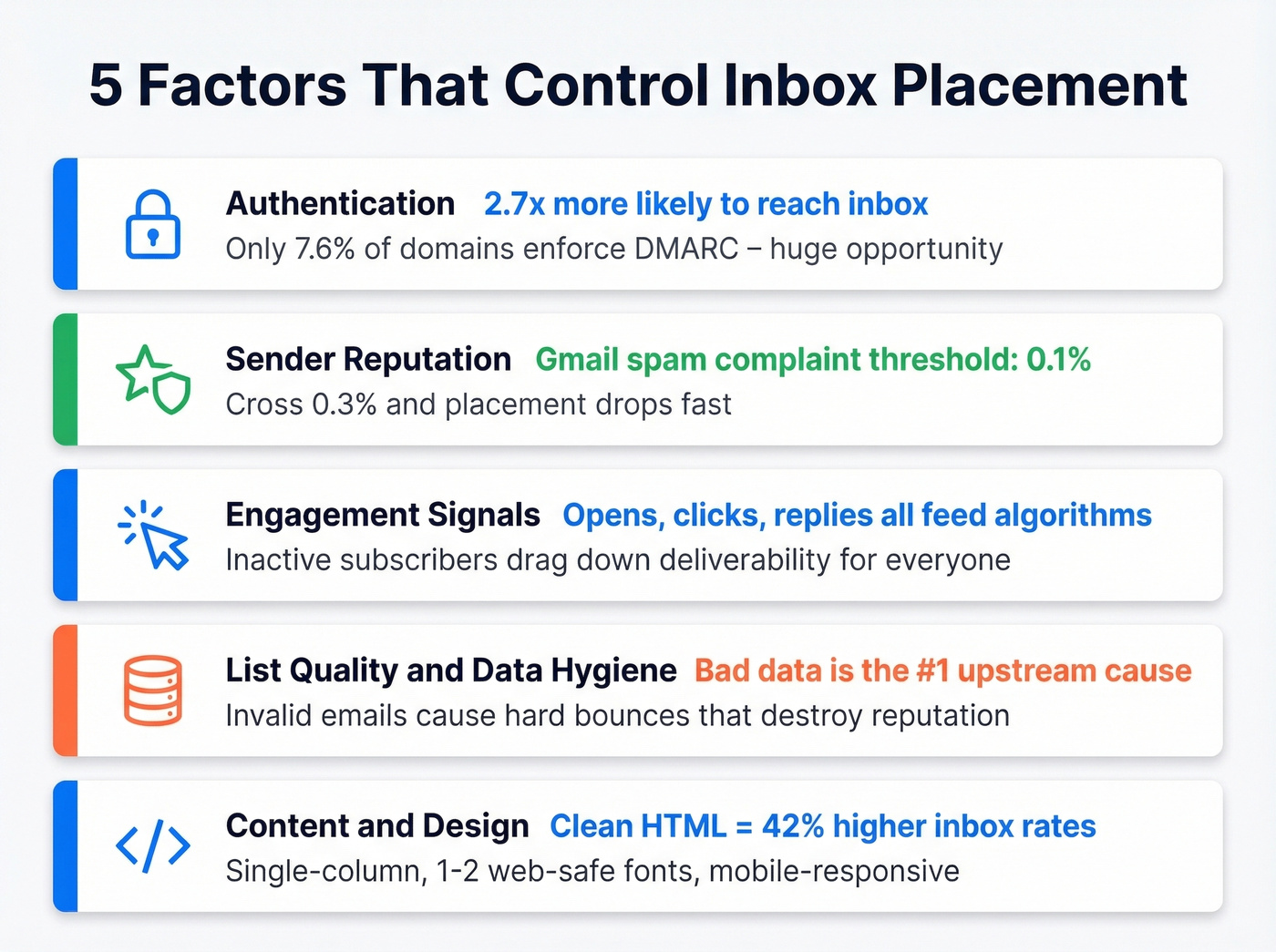
Five factors determine whether your email reaches the inbox or disappears.
Authentication
Fully authenticated senders are 2.7x more likely to reach the inbox than unauthenticated ones. Despite this, only 7.6% of domains enforce DMARC with a quarantine or reject policy. That's a staggering gap.
If you haven't set up SPF, DKIM, and DMARC with at least p=quarantine, stop reading and go do that first. Nothing else matters until authentication is locked down. Once the basics are solid, set up BIMI for brand logo display in supported inboxes - it's an emerging trust signal that also boosts recipient confidence.
If you want a deeper walkthrough, start with our Email Deliverability Guide and then validate your setup with SPF record examples.
Sender Reputation
Mailbox providers assign reputation scores per domain and per IP. The critical threshold for Gmail is keeping your spam complaint rate below 0.1%. Cross 0.3% and placement drops fast. Reputation is cumulative - one bad send can take weeks to recover from.
If you're actively trying to recover, follow a structured plan to improve sender reputation and keep an eye on the right email reputation tools.
Engagement Signals
Opens, clicks, replies, deletes, and spam reports all feed placement algorithms. When subscribers consistently ignore your emails, providers interpret that as a signal to deprioritize you. Inactive subscribers aren't just dead weight - they're actively dragging your deliverability down for everyone else on your list.
If you're running outbound, tightening your B2B cold email sequence and using proven cold email follow-up templates can lift replies (a stronger signal than opens).
List Quality and Data Hygiene
Here's the thing: bad data is the #1 upstream cause of poor inbox placement. Invalid emails cause hard bounces. Spam traps trigger blacklisting. Both destroy sender reputation, which is the primary signal mailbox providers use for filtering decisions.
If you're diagnosing list issues, start by benchmarking your email bounce rate and running an email spam checker before your next send.
Stack Optimize built their agency to $1M ARR using Prospeo-verified data - their clients maintain 94%+ deliverability with bounce rates under 3% and zero domain flags across all client accounts. That kind of consistency comes from catching bad addresses before they ever hit a mailbox provider's radar.
Content and Design
A Folderly analysis of 10,000+ campaigns found that clean HTML with no orphaned tags produced 42% higher inbox rates than messy code. Using 1-2 web-safe fonts outperformed stylized fonts by 27% in inbox visibility. Conversational, single-column layouts consistently beat heavy branded templates for Gmail Primary placement.
Don't overlook mobile. With 78% of emails now opened on mobile devices and 75% of users deleting emails that aren't mobile-optimized, responsive single-column layouts aren't optional - they're a placement factor.

You just read that bad data is the #1 upstream cause of poor inbox placement. Every invalid email triggers a hard bounce that tanks your sender reputation - and your placement rate with it. Prospeo's 5-step verification delivers 98% email accuracy, keeping bounce rates under 3% across 15,000+ companies.
Stop fixing deliverability downstream. Start with data that doesn't break it.
Provider-Specific Placement in 2026
Not all inboxes are created equal. Where your audience reads email changes everything about your strategy.
Gmail: Primary vs. Promotions
Gmail's Promotions tab is the most misunderstood placement outcome. It's not spam - most tools count it as "inbox" - but landing in Promotions instead of Primary still reduces visibility. Roughly 30% of Gmail users have the tabbed view enabled, which means Promotions placement cuts your reach for a meaningful chunk of recipients.
Common Promotions triggers include HTML-heavy templates, multiple images and links, salesy subject lines, no-reply sender addresses, and sending to inactive subscribers.
If you want to pressure-test your copy, pull from these cold email subject line examples and compare against broader email subject lines examples.
Microsoft Outlook / Office 365
If your B2B audience lives in Outlook, you likely have a deliverability crisis you don't know about. Office 365 inbox placement dropped 26.73 percentage points year-over-year - from 77.43% to 50.70%. Outlook/Hotmail consumer fell even harder, down 22.56 points to 26.77%.
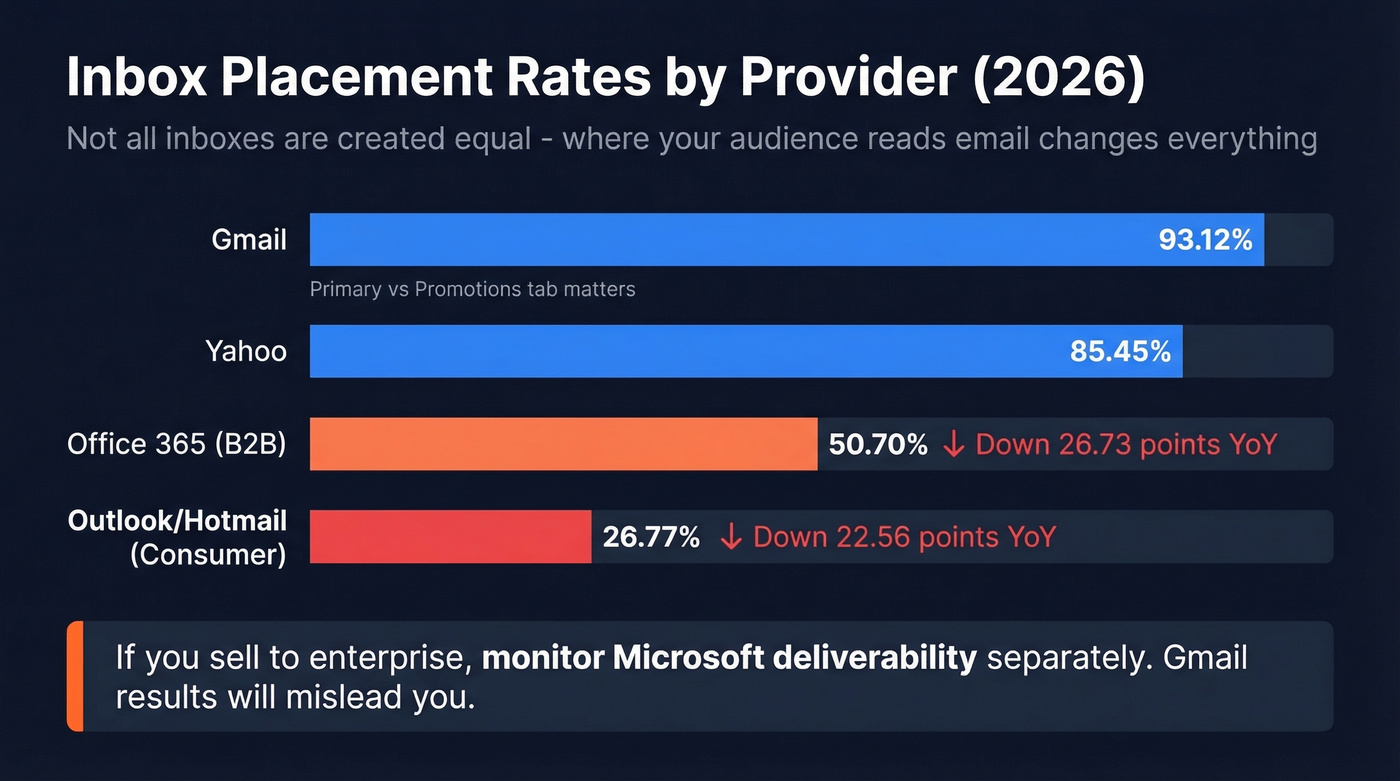
We've seen B2B teams with pristine Gmail placement get blindsided by Microsoft filtering. If you're selling to enterprise, monitor Microsoft deliverability separately. Microsoft SNDS provides free monitoring but gives far less granular data than Google Postmaster Tools.
Yahoo and Apple Mail
Yahoo Sender Hub offers basic reputation monitoring. Apple Mail holds 48-53% of email opens, making it the single largest client by market share. But Mail Privacy Protection inflates open rates by pre-fetching images, which makes engagement-based segmentation unreliable for Apple Mail users. You can't trust opens as a placement signal when half your audience is on Apple.
Measuring Your Placement Rate
Seed List Testing
Use this if you need a quick baseline before a major campaign launch.
Skip this if you expect it to reflect real-world placement accurately.
Seed list testing sends your email to a panel of test addresses across providers and checks where it lands. The problem is that seed accounts are inactive - they don't open, click, reply, or delete, and modern mailbox providers weight user interactions heavily in filtering decisions. Seed results are directional, not definitive. Prioritize real data from mailbox providers over seed data alone.
A recurring thread on r/coldemail asks for "reliable placement tests that match real-world sending." The fact that the question keeps getting asked tells you everything about the state of seed testing.
Free Monitoring Tools
Google Postmaster Tools is non-negotiable for anyone sending to Gmail. Setup requires verifying your domain via DNS TXT record, and you'll need at least 1,000 daily Gmail sends before data populates. Once it does, you get spam complaint rates, IP and domain reputation signals, authentication pass rates, and delivery errors. Tracking your spam rate here is the fastest way to catch problems before they spiral.
Google Postmaster Tools v2 shifts the focus toward compliance: SPF/DKIM/DMARC alignment, one-click unsubscribe, honoring opt-outs, and keeping user-reported spam below 0.1% (never at or above 0.3%).
Microsoft SNDS and Yahoo Sender Hub round out the free toolkit, though both provide less actionable data.
Monitoring Cadence
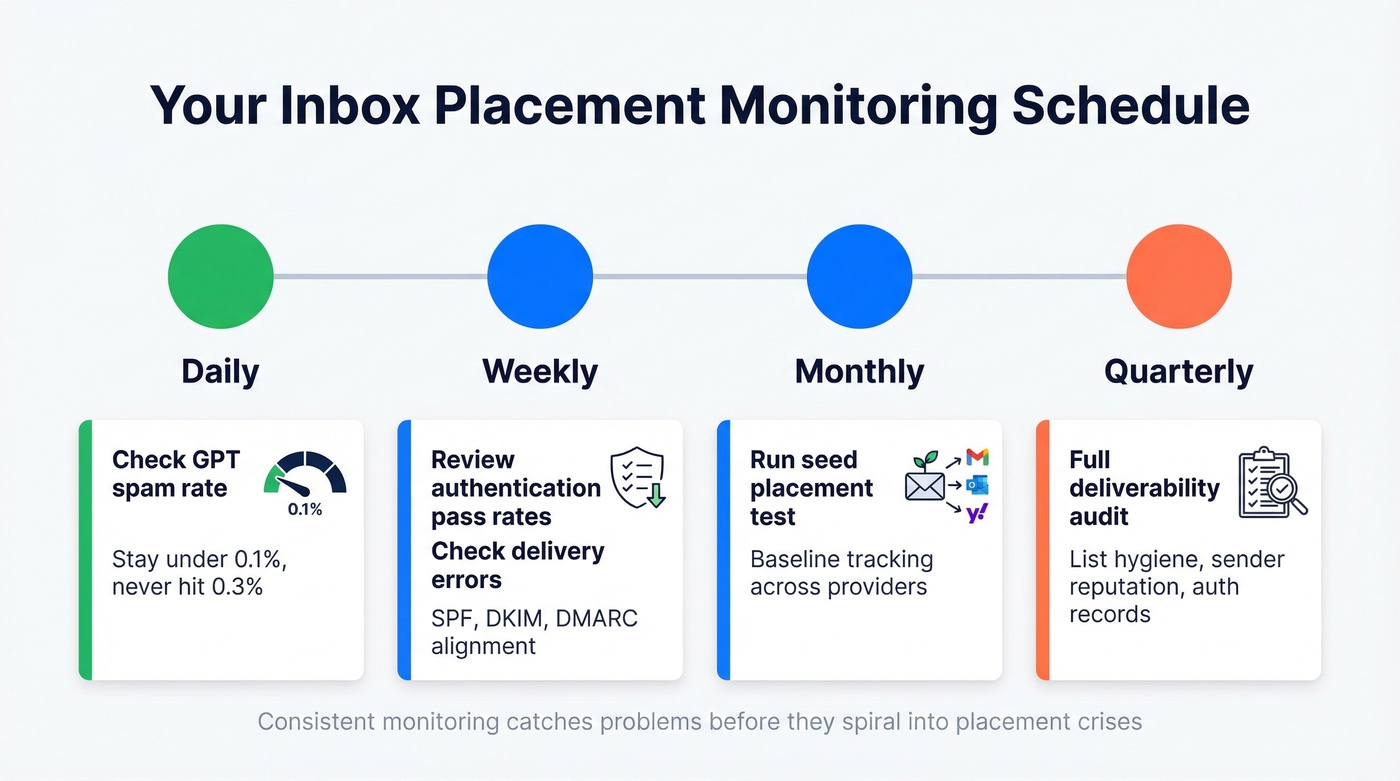
Check your GPT spam rate daily - stay under 0.1%. Review authentication pass rates and delivery errors weekly. Run a seed placement test monthly for baseline tracking. Every quarter, do a full audit of list hygiene, sender reputation, and authentication records.
Best Tools for Inbox Placement (2026)
| Tool | What It Does | Starting Price | Best For |
|---|---|---|---|
| GlockApps | Seed testing + DMARC monitoring | Free (2/mo); $59/mo | Most senders |
| MxToolbox | Auth + placement diagnostics | $129/mo | DNS/auth issues |
| MailReach | Warmup + testing | $25/inbox/mo | Cold email warmup |
| Instantly | Placement testing | Free (25 credits) | Instantly users |
| MailGenius | Quick free check | Free (3 tests) | One-off checks |
| Validity Everest | Enterprise seed network | ~$500+/mo | Enterprise benchmarks |
| Google Postmaster | Gmail reputation | Free | Everyone on Gmail |
GlockApps is the best starting point for most teams. The free tier gives you 2 tests per month - enough to spot-check before major sends. The $59/mo Essential plan includes 360 tests and DMARC monitoring, which covers most mid-market needs.
For cold email senders, MailReach bundles warmup with placement testing at $25/inbox/mo. Instantly includes 25 free credits you can use for placement tests if you're already on their outreach platform. MailGenius offers three complimentary tests for new users. Validity Everest serves enterprise programs that need industry benchmarking.
One thing we've noticed across all seed-based tools: real-world placement is often higher than seed results because seed accounts don't engage with emails. Treat seed results as a conservative floor, not a ceiling.
How to Improve Inbox Placement Rate
1. Authenticate everything. SPF, DKIM, and DMARC with p=quarantine at minimum. Add BIMI once you're enforcing DMARC at p=reject. This alone puts you ahead of 92% of domains.
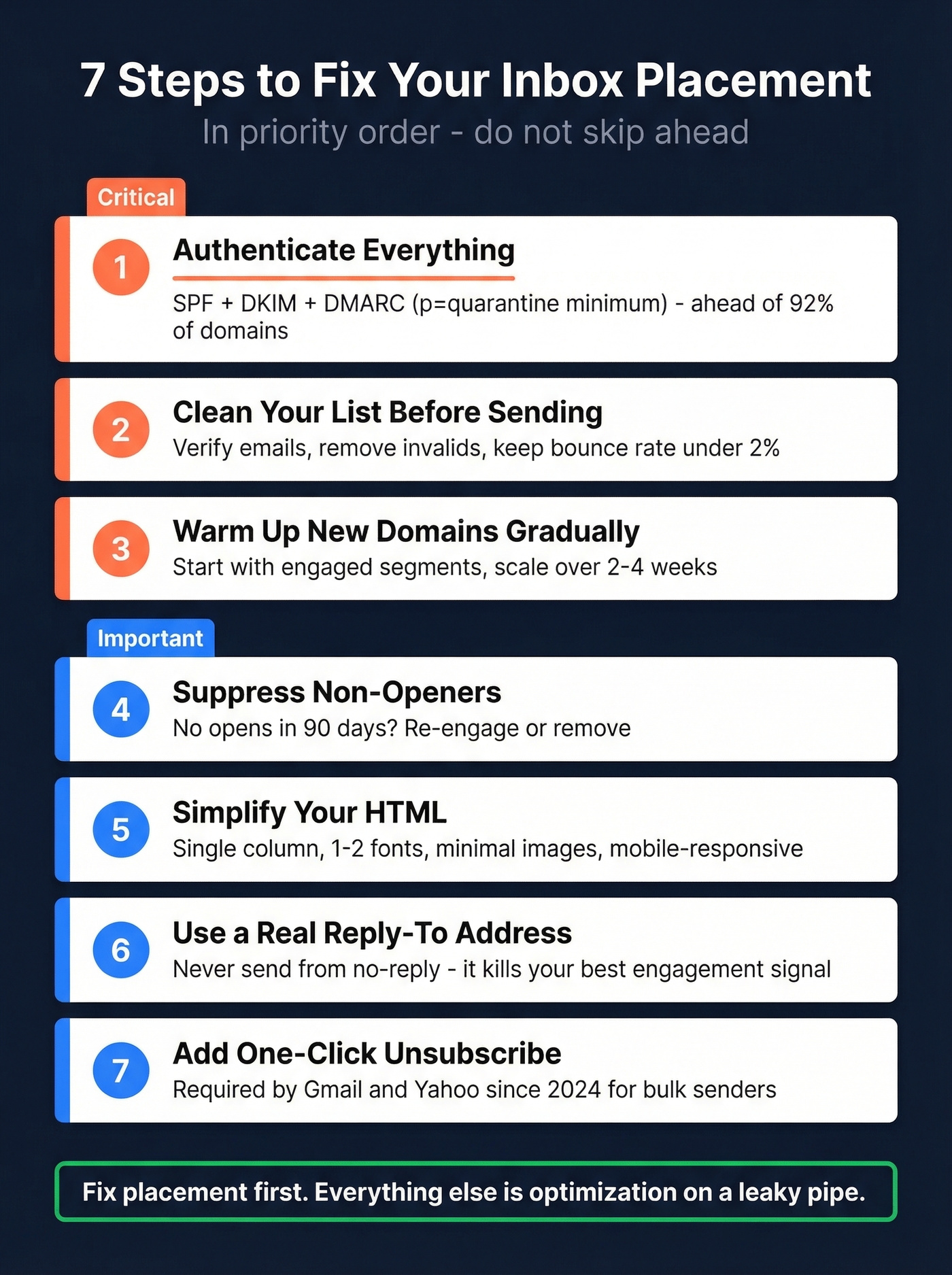
2. Clean your list before you send. Verify emails, remove inactive subscribers, and keep bounce rates under 2%. Meritt cut their bounce rate from 35% to under 4% after switching to verified data - and their pipeline tripled from $100K to $300K per week.
3. Warm up new domains and IPs gradually. Start with your most engaged segments and scale volume over 2-4 weeks. Jumping straight to full volume on a fresh domain is the fastest way to tank your reputation.
Monitor engagement and suppress non-openers. If someone hasn't opened in 90 days, move them to a re-engagement segment or remove them entirely.
Simplify your HTML. Single-column layout, 1-2 web-safe fonts, minimal images, mobile-responsive. Your designer won't love this advice, but Gmail's algorithms will.
Use a real reply-to address. Never send from no-reply@. It's a Promotions trigger and it kills the one engagement signal that matters most: replies.
7. Include one-click unsubscribe. Gmail now requires it. Beyond compliance, making it easy to unsubscribe reduces spam complaints - which matter far more to your placement than a slightly higher unsubscribe rate.
If you're scaling volume, make sure you understand safe email velocity and the practical bulk email threshold that applies to your setup.
Stack Optimize built a $1M agency with zero domain flags because they never sent to unverified addresses. Prospeo refreshes all 300M+ profiles every 7 days - not the 6-week industry average - so stale data never erodes your inbox placement rate.
Protect your sender reputation at the source for $0.01 per verified email.
FAQ
What's a good inbox placement rate?
Aim for the mid-90s or higher. The global average is 84%, so anything above 90% puts you ahead of most senders. Best-in-class programs consistently hit 95%+. If you're below 85%, you've got an active problem worth investigating immediately.
How is inbox placement different from delivery rate?
Delivery rate counts emails accepted by the receiving server - not bounced. Inbox placement measures how many of those delivered emails actually land in the inbox versus spam or missing. You can have a 98% delivery rate and a 70% placement rate simultaneously.
Can I test inbox placement for free?
Google Postmaster Tools monitors Gmail placement signals at no cost, though you need 1,000+ daily Gmail sends for data to populate. MailGenius offers three free seed-based tests for new users. GlockApps provides 2 free tests per month.
Why are my emails going to spam even with authentication?
Authentication is necessary but not sufficient. Spam filtering also weighs engagement signals, list quality, sending patterns, and content. High bounce rates or spam complaints override perfect SPF/DKIM/DMARC every time - fix your data first.
How does email data quality affect deliverability?
Invalid emails cause bounces and spam traps trigger blacklisting - both destroy sender reputation, the primary signal providers use for filtering. Verifying contacts before sending prevents reputation damage at the source, which is why teams that prioritize list hygiene consistently see placement rates 10-15 points above average.