

The Spamhaus Blocklist: A Practitioner's Guide to Checking, Delisting, and Staying Off
You wake up to a Slack message from your VP of Sales: "None of our sequences are getting delivered." You check your sending domain, pull up your IP, and there it is - you're on a Spamhaus blocklist. Your outbound program just hit a wall, and every minute it stays listed is pipeline you're not building.
Spamhaus data protects billions of mailboxes globally. Apple iCloud, Microsoft, Yahoo, Proofpoint, Rackspace, Cloudmark - they all query Spamhaus to decide what gets through and what gets rejected. A listing doesn't just hurt deliverability. It's an email kill switch.
What You Need Right Now
If you're here because something's broken, skip the theory:
- Check now. Go to check.spamhaus.org and enter your sending IP or domain. You'll see immediately whether you're listed and on which blocklist.
- If listed, jump to the delisting section below. Follow the role-specific path and don't skip the pre-flight checklist - submitting a removal request without fixing the root cause just gets you relisted.
- If clear, set up monitoring. MXToolbox scans 100+ blocklists in one pass. MultiRBL gives granular detail across hundreds of lists. For server-side validation, Spamhaus's own Blocklist Tester confirms your queries return correct results.
Blocklist Types Explained
Spamhaus doesn't run a single list - it runs a family of them, each targeting a different threat vector at a different stage of the SMTP lifecycle.

| List | What It Targets | Auto-Expires? | Who Can Delist |
|---|---|---|---|
| SBL | Spam sources, snowshoe, bulletproof hosting | No | ISP/network operator |
| CSS | Low-rep/abusive SMTP emitters | Yes | Auto-expires |
| XBL | Compromised devices, proxies, exploits | Yes | Auto-expires |
| PBL | End-user IP ranges that shouldn't send directly | No | ISP via portal |
| DBL | Domains with poor reputation | N/A | N/A |
| ZEN | Combined query (SBL + XBL + PBL) | N/A | See sub-list |
| DROP | Hijacked/leased IP space | No | Network operator |
| BCL | Botnet controllers | N/A | N/A |
| ZRD | Newly registered/newly observed domains | Yes (24 hrs) | Automatic |
The SBL averages 30-40 thousand listings at any given time, maintained by a dedicated OSINT research team. ZRD automatically includes newly registered or newly observed domains for 24 hours - so if you just bought a domain and immediately started sending, that's a common reason you get blocked.
ZEN is the list most mail servers actually query. It combines SBL, XBL, and PBL into a single lookup, which is why most admins deploy it as the default at the initial connection stage. For the content-analysis stage - checking URLs and sender domains in the message body and headers - DBL handles domain-level filtering. The recommended approach is staged: ZEN at the SMTP connection, DBL during post-acceptance content analysis. This layered filtering catches threats that slip past IP-only checks.
Here's the key distinction between lists: SBL and DROP require human intervention to delist. CSS and XBL auto-expire once the underlying issue resolves. PBL is managed through an ISP portal. Know which list you're on before you do anything else.
DNSBL Return Codes Reference
Every Spamhaus DNSBL query returns an IPv4 address in the 127.x.x.x range. Your mail server parses this code to decide what action to take. Getting this wrong is catastrophic - and we've seen it happen far more often than you'd expect.
| Return Code | Dataset | Meaning |
|---|---|---|
| 127.0.0.2 | SBL | Spam source / malicious IP |
| 127.0.0.3 | CSS | Low-rep/abusive SMTP emitter |
| 127.0.0.4-.7 | XBL | Compromised device (only .4 active) |
| 127.0.0.9 | DROP | Hijacked IP space (also returns SBL) |
| 127.0.0.10 | PBL | ISP-designated end-user range |
| 127.0.0.11 | PBL | Spamhaus-inferred end-user range |
| 127.0.0.30 | BCL | Botnet controller |
Now here's the part most guides skip entirely - and it's arguably more important than the listings themselves.
Error Codes Are Not Listings
Spamhaus added an error-code range in 127.255.255.0/24 for query-related problems, not reputation issues:
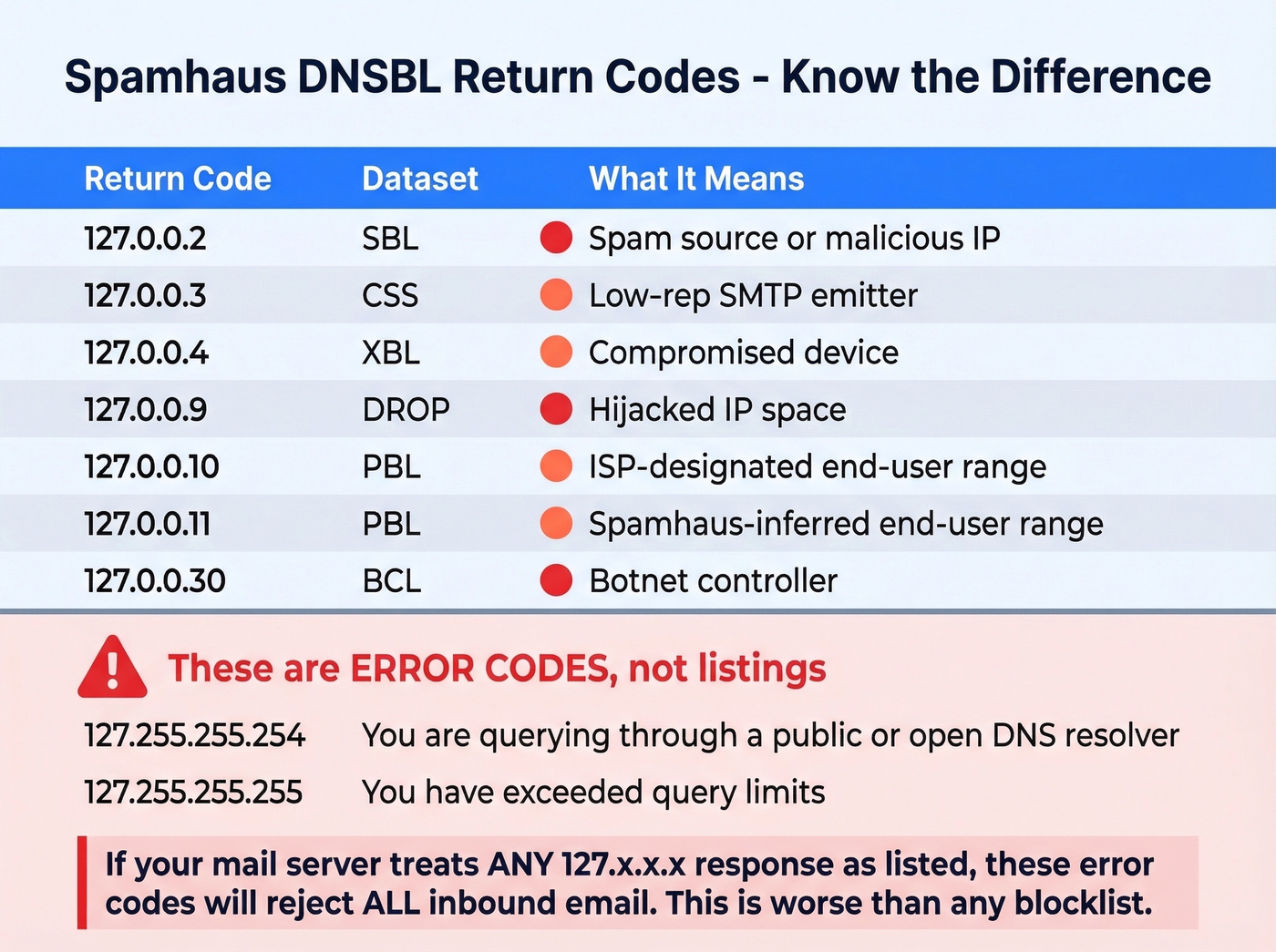
- 127.255.255.254 - You're querying through a public or open DNS resolver. Spamhaus can't attribute the query to you.
- 127.255.255.255 - You've exceeded query limits.
If your mail server treats any 127.x.x.x response as "listed," these error codes will cause it to reject every single inbound email. Starting September 26, 2024, GoDaddy users hit exactly this problem when Spamhaus rolled out error-code enforcement across GoDaddy's IP space. Mail servers that didn't parse return codes correctly started mass-rejecting legitimate mail.
Let's be blunt: misparsing return codes causes more damage than the listings themselves.
Why You Got Listed
Spamhaus listings don't happen randomly. They fall into a few predictable categories.
First, a definition that matters: Spamhaus defines spam as unsolicited bulk email (UBE). They don't evaluate whether your email is "legal" or "well-written" - they evaluate whether it fits that UBE definition.
Spam and unsolicited bulk email is the obvious one. If you're sending cold email to unverified lists, you're playing Russian roulette with spam traps. The CSS listing description is blunt: "suspect behavior, misconfigured, or has a poor sending reputation." That covers a lot of ground.
Compromised infrastructure triggers XBL listings. IoT devices, open proxies, exploited servers - anything on your network sending mail it shouldn't be. This is especially common on shared hosting and VPS ranges where one compromised neighbor poisons the whole block.
Snowshoe spamming - spreading spam across many IPs and domains to dilute reputation signals - lands you on the SBL. So does bulletproof hosting, running spam support services, or sitting on hijacked IP space.
Misconfiguration is the silent killer. Reverse DNS mismatches, missing SPF/DKIM/DMARC, broken HELO greetings - these correlate with poor reputation and make Spamhaus's automated systems flag you faster. MXToolbox warnings for these issues are often the canary in the coal mine.
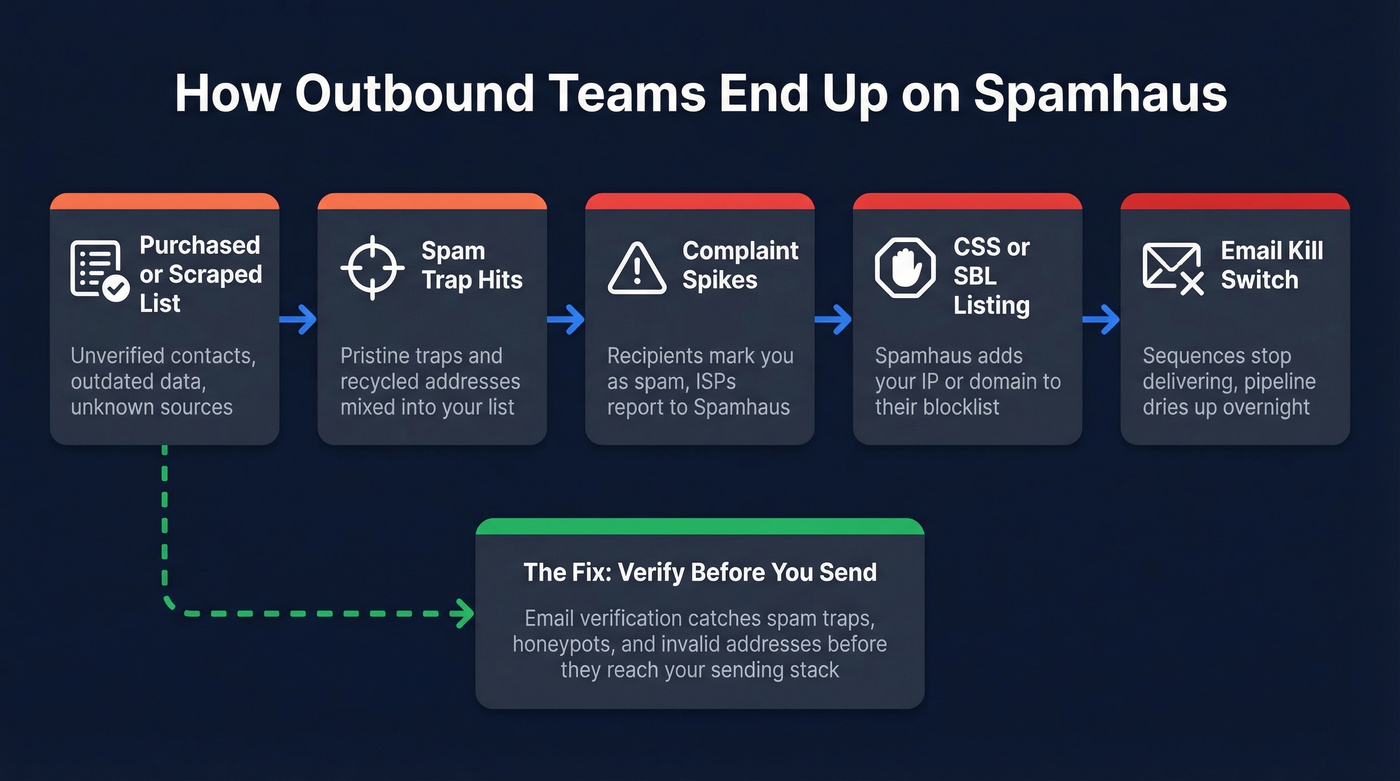
The causal chain we see most often in outbound sales teams: purchased or scraped lead lists, then spam trap hits, then complaint spikes, then a CSS or SBL listing. Cleaning your list before sending is the only reliable prevention. Prospeo flags spam traps and honeypots during its 5-step verification process - before bad addresses ever reach your sending stack.

Most Spamhaus listings we see trace back to one thing: sending to unverified email lists full of spam traps and honeypots. Prospeo's 5-step verification process - with dedicated spam-trap removal, honeypot filtering, and catch-all handling - eliminates those toxic addresses before they ever hit your sending stack. At 98% email accuracy and $0.01 per email, it's cheaper than a single delisting cycle.
Stop cleaning up blocklist disasters. Start with clean data instead.
How to Get Delisted
Pre-Flight Checklist
Don't submit a removal request until you've fixed these. Spamhaus will reject or ignore requests from senders who haven't addressed the root cause.
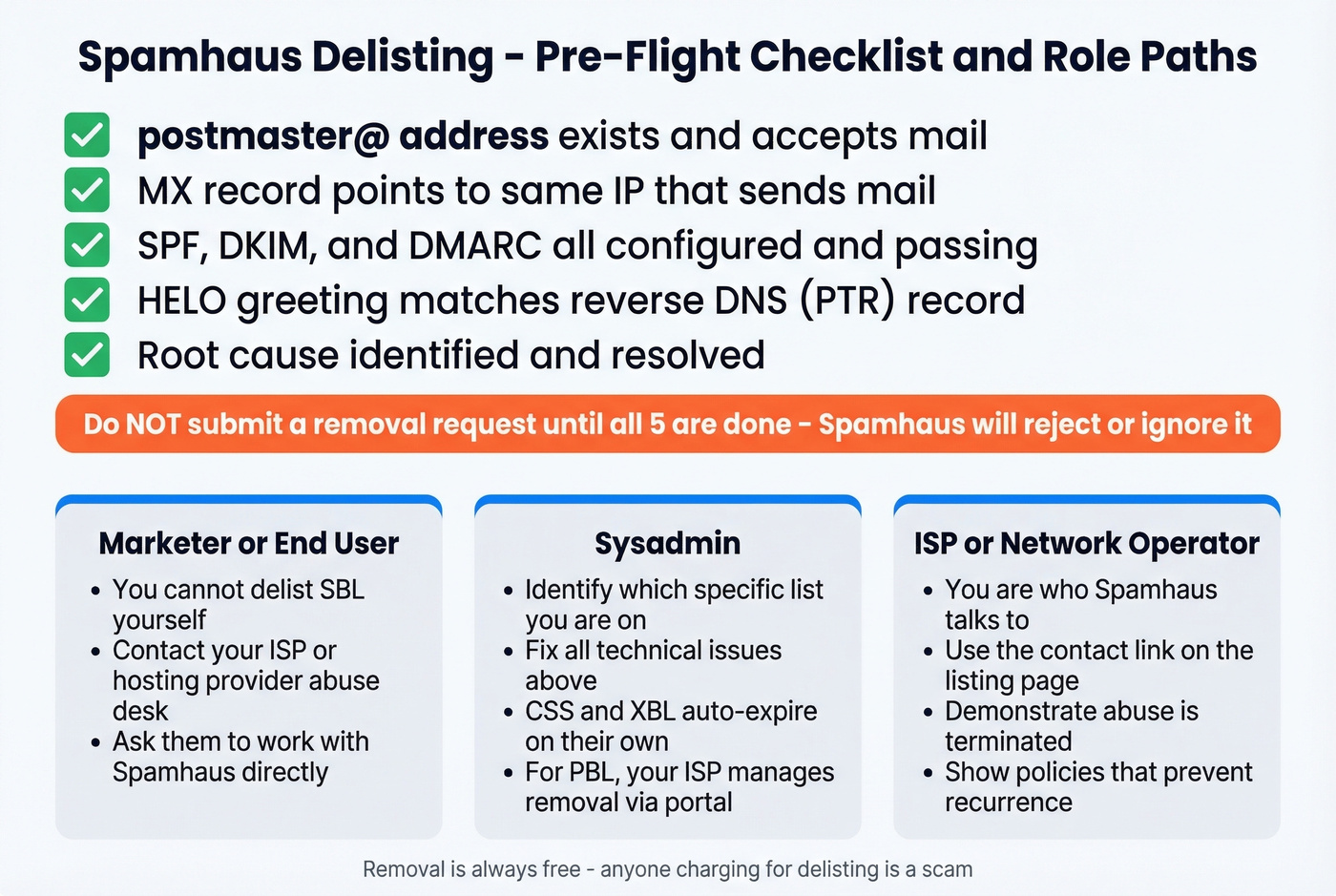
- postmaster@ address: Must exist and accept mail on the domain tied to your sending IP.
- MX alignment: Your domain's MX record should point to the same IP that sends mail.
- SPF, DKIM, DMARC: All three configured and passing. No exceptions. (If you need a quick check, see how to verify DKIM is working.)
- HELO to PTR match: Your server's HELO greeting must match the reverse DNS record for your IP.
- Root cause resolved: If you were sending to bad lists, stop. If a device was compromised, isolate it. Spamhaus will relist you within hours if the underlying problem persists.
Role-Specific Delisting Paths
End-user or marketer? You can't delist an SBL listing yourself. Contact your ISP or hosting provider's abuse desk and ask them to work with Spamhaus directly. Only the network operator responsible for the IP can request SBL removal.
Sysadmin? Diagnose first. Check which specific list you're on, fix the technical issues above, then contact your ISP's abuse desk. CSS and XBL listings auto-expire once the abusive behavior stops - no action needed. For PBL, your ISP manages removal through Spamhaus's ISP portal.
ISP or network operator? You're the one Spamhaus talks to. Use the "contact the SBL Team" link on the listing page at check.spamhaus.org. Demonstrate that the abuse has been terminated and your network policies prevent recurrence.
Timeline and Common Mistakes
Initial removal processes in minutes to 24 hours once the request goes through. But "delisted" and "staying delisted" are different things entirely. On shared hosting or VPS ranges, relisting can happen within days if neighbors on the same IP block continue sending spam. Budget up to three months for a listing to fully resolve on problematic ranges.
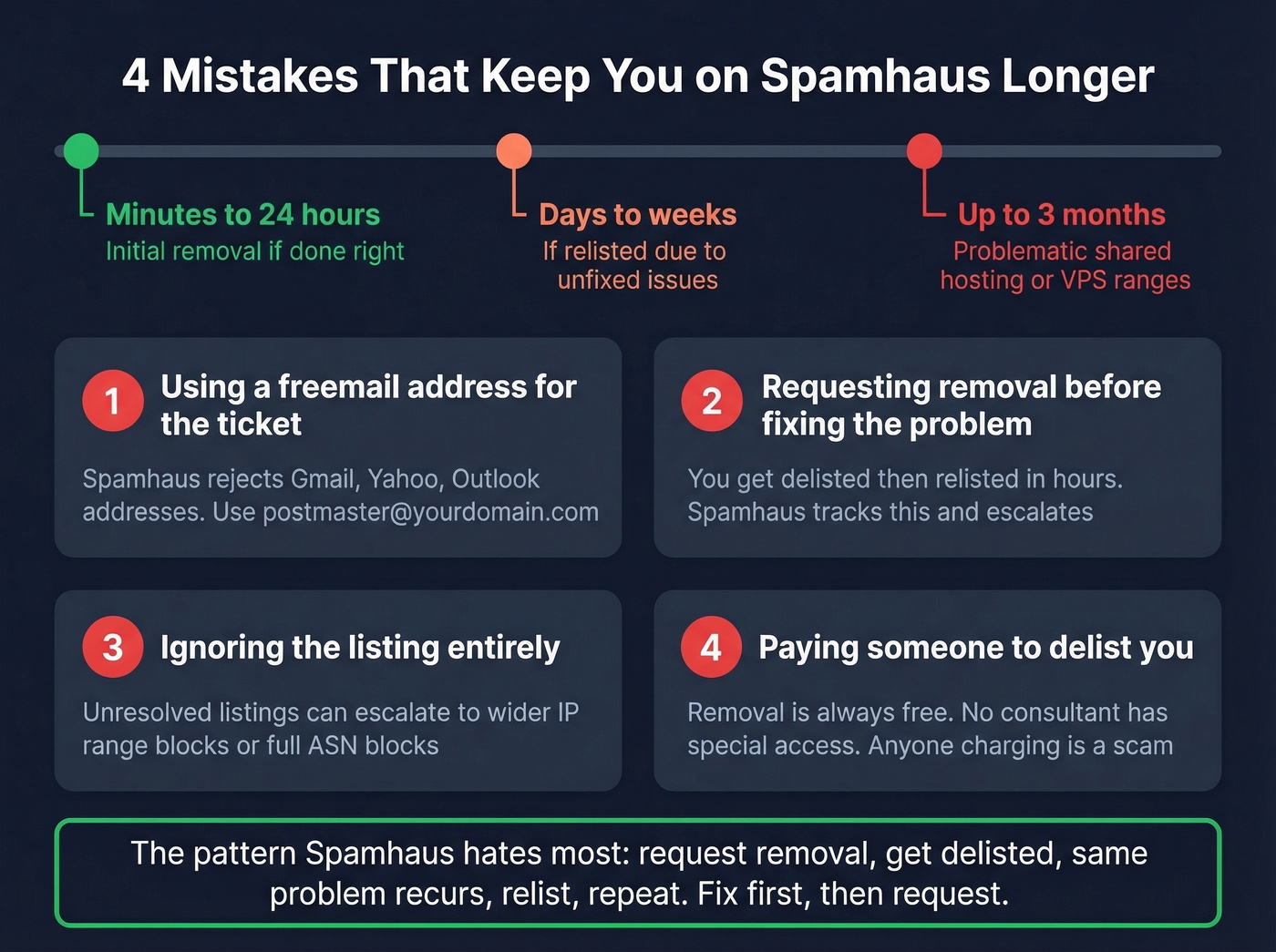
The mistakes that trip people up most often:
- Using a freemail address to submit the ticket. Spamhaus will reject it. Use postmaster@yourdomain.com.
- Requesting removal before fixing the problem. You'll get delisted, then relisted within hours. Spamhaus tracks this pattern, and escalation makes future removals harder.
- Ignoring the listing entirely. Unresolved listings can escalate to wider IP range blocks - and in severe cases, Spamhaus can block entire ASN ranges or network allocations, taking down every sender on your provider.
- Paying someone to delist you. Removal is always free. Any service charging for delisting is a scam. Deliverability consultants don't have special privilege to influence or expedite removals.
When It's a False Positive
False positives are rare, but they happen. In our experience, resolving them takes 3-5 ticket exchanges minimum.
One sysadmin on r/sysadmin documented repeated XBL listings despite thorough internal investigation finding zero evidence of compromise. After several ticket exchanges with Spamhaus - each requiring documentation of their clean infrastructure - Spamhaus acknowledged the issue was on their end. Their detection system was incorrectly flagging an email-integrated chat system as an exploited device. They updated their algorithm, and the false positives stopped.
If you're confident your infrastructure is clean, persist. Document everything: network logs, traffic analysis, security scans. Spamhaus's team is small relative to the scale of their operation, and false positive investigations take time. But they do fix legitimate detection bugs when presented with evidence.
Querying Spamhaus on Your Mail Server
Here's a production-ready Postfix config for main.cf that queries ZEN and DBL while correctly handling error codes:
smtpd_recipient_restrictions =
    ...
    reject_rbl_client zen.spamhaus.org=127.0.0.[2..11]
    reject_rhsbl_sender dbl.spamhaus.org=127.0.1.[2..99]
    reject_rhsbl_helo dbl.spamhaus.org=127.0.1.[2..99]
    reject_rhsbl_reverse_client dbl.spamhaus.org=127.0.1.[2..99]
    warn_if_reject reject_rbl_client zen.spamhaus.org=127.255.255.[1..255]
    ...
The =127.0.0.[2..11] syntax ensures you only reject on actual listing codes, not error responses. The warn_if_reject line for 127.255.255.x logs error codes as warnings instead of triggering rejections - this is what prevents the GoDaddy-style mass-rejection disaster. For high-volume servers, use postscreen_dnsbl_sites instead for lighter-weight pre-filtering at the connection stage.
If you're running SpamAssassin or Rspamd alongside Postfix, Spamhaus recommends using a milter approach rather than SMTP-level rejection. Let the content filter see the full message so it can learn from context. Reserve SMTP-level blocking for environments processing over 200,000 emails per day or running without additional anti-spam software.
Free DQS vs. Public Mirrors
The old public mirror approach for querying Spamhaus still technically exists, but it's being deprecated. New deployments should use the free Data Query Service (DQS) instead. Free DQS includes AuthBL, XBL, CSS, DROP, DBL, SBL, PBL, and ZRD. You get a DQS key to include in your DNS query configuration - no more relying on attributable reverse DNS from your resolver. Purpose-built plugins for SpamAssassin and Rspamd are available on GitHub.
The catch: Spamhaus provides no technical support for free-tier users. Commercial DQS subscriptions typically run hundreds to low-thousands per year depending on query volume, and they come with support and additional datasets.
Preventing Future Listings
Getting delisted is reactive. Prevention is where you actually protect your sending infrastructure long-term.
Here's the thing: if your average deal size is under $15k, a single listing costs you more in lost pipeline than a year of proper list hygiene tools. Prevention isn't optional - it's cheaper than the alternative.
Email authentication - SPF, DKIM, and DMARC - isn't optional. These are table stakes for every sending domain. (If you're troubleshooting policy failures, DMARC alignment is usually the missing piece.) Double opt-in remains the single most effective way to avoid spam trap contamination on marketing lists. For outbound, sunset policies that remove contacts who haven't engaged in 90-180 days keep recycled spam traps out of your segments.
On the infrastructure side, monitor outbound port 25 traffic to catch compromised IoT devices and misconfigured servers sending mail you don't know about. Check your IPs against blocklists weekly at minimum - MXToolbox and MultiRBL automate this.
The fastest path to a Spamhaus listing is sending to an unverified list full of spam traps and dead addresses. We've watched teams go from clean to listed in under 48 hours after importing a purchased list. Prospeo's 5-step verification removes spam traps, honeypots, and catch-all domains with 98% accuracy on a 7-day data refresh cycle, catching bad addresses before they ever touch your sending infrastructure. (If you're building a safer outbound motion end-to-end, start with an email deliverability guide and then lock down email velocity.)

The causal chain is always the same: bad list, spam trap hit, Spamhaus listing, dead pipeline. Prospeo breaks that chain at the source with 143M+ verified emails refreshed every 7 days - not the 6-week industry average that lets stale addresses decay into traps. Teams using Prospeo see bounce rates under 4% and book 26% more meetings than ZoomInfo users.
Your outbound deserves data that won't get you blocklisted.
FAQ
Is Spamhaus free to use?
Yes, for qualifying non-commercial and low-volume users via the free Data Query Service. You get access to SBL, XBL, CSS, PBL, DBL, DROP, and ZRD at no cost. Commercial or high-volume querying requires a paid subscription running hundreds to low-thousands per year depending on volume.
How long does Spamhaus delisting take?
Minutes to 24 hours once you submit a valid removal request with the root cause fixed. On shared hosting or VPS ranges, staying delisted can take up to three months if IP neighbors continue sending spam.
Can I pay to get removed faster?
No. Removal from any Spamhaus blocklist is always free. Any service charging for delisting is a scam - Spamhaus is explicit about this. Deliverability consultants don't have special access to expedite the process.
Does a listing affect Gmail delivery?
Not directly - Gmail runs its own reputation systems. But Microsoft, Yahoo, Apple iCloud, Proofpoint, and Cloudmark all query Spamhaus data, so a listing effectively blocks delivery to most major mailbox providers outside Gmail's ecosystem.
How do I keep my lists clean enough to avoid listings?
Verify every email list before sending to catch spam traps and honeypots proactively. Use tools like MXToolbox for blocklist monitoring and Prospeo for pre-send verification. Configure SPF, DKIM, and DMARC on every sending domain, and sunset unengaged contacts after 90-180 days. Skip this if you're only sending transactional email to confirmed users - blocklist risk there is near zero.