

SPF Flattening: The Quick Fix That Can Break Your Email
You're three Slack messages into your Monday when marketing drops the request: "We need to add HubSpot to our SPF record." You check. You're already at 9 lookups. One more include and your SPF evaluation hits permerror - meaning many receivers that strictly enforce RFC 7208 will start rejecting or spam-foldering your mail. So you search for "spf flattening" and find a dozen tools promising to fix it in minutes.
Here's the thing: flattening is a band-aid, and it can create problems worse than the one it solves.
What You Need (Quick Version)
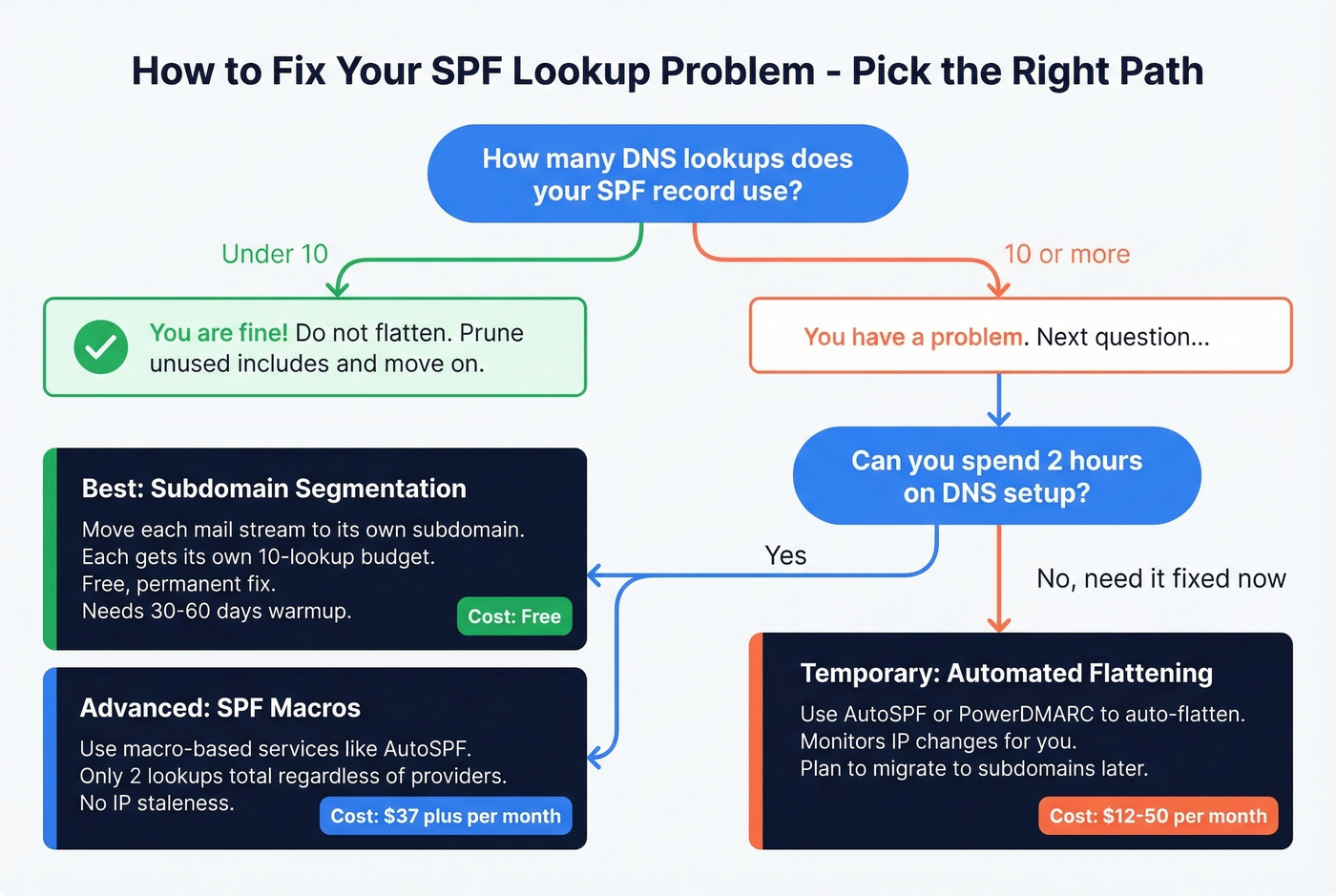
- Under 10 lookups? Don't flatten. Prune what you have.
- At 10+ and need a fast fix? Use an automated flattening tool like AutoSPF or PowerDMARC.
- Want a permanent fix? Move mail streams to subdomains - each gets its own 10-lookup budget.
- Comfortable with DNS? Macro-based SPF services can keep you within the limit with just 2 lookups.
The rest of this piece explains why those recommendations exist, what goes wrong when you flatten blindly, and how to pick the right approach for your infrastructure.
What Is SPF Flattening?
SPF flattening takes your include-heavy SPF record and replaces every lookup-causing mechanism with the resolved IP addresses. The result is a record that uses only ip4 and ip6 mechanisms - which don't trigger DNS lookups at all.
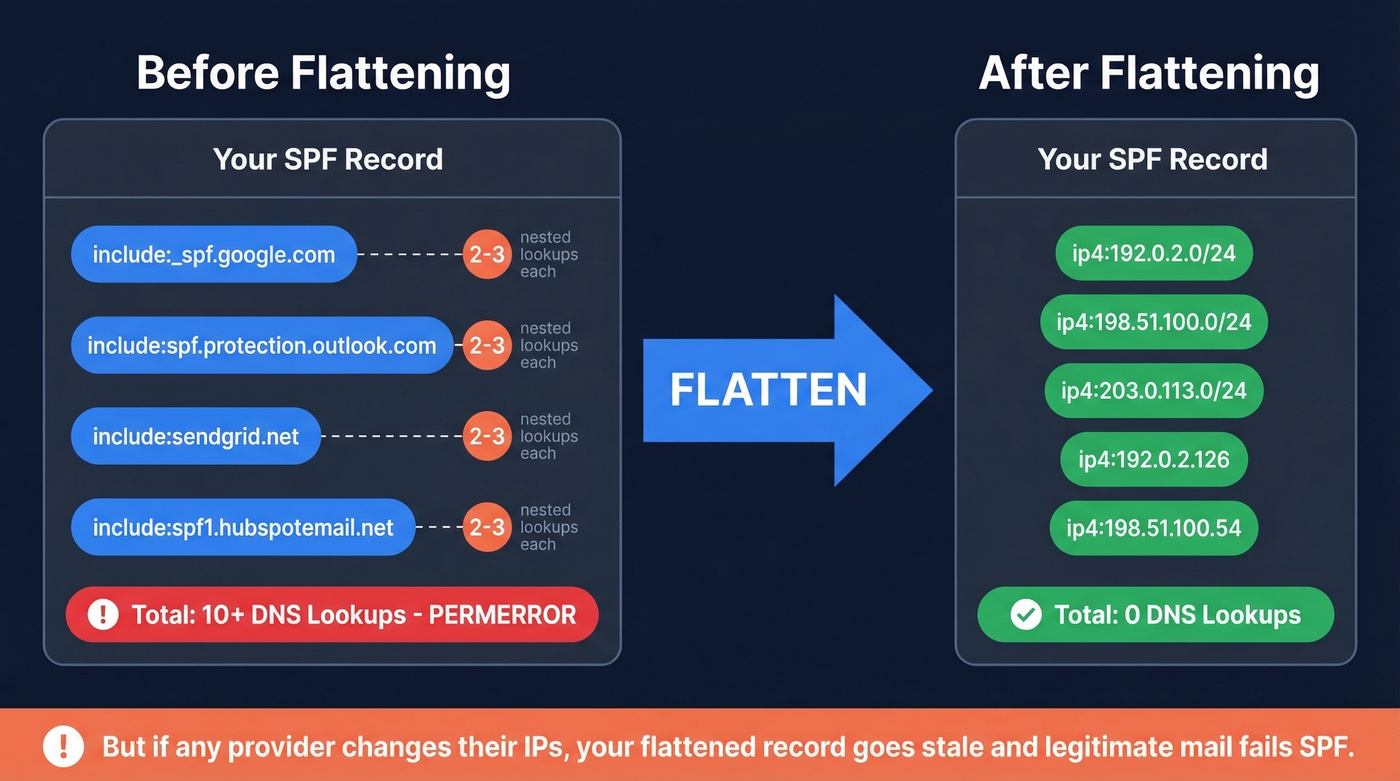
Here's a typical before/after. Say your current record looks like this:
v=spf1 [include:_spf.google.com](https://knowledge.workspace.google.com/admin/security/set-up-spf) [include:spf.protection.outlook.com](https://learn.microsoft.com/en-us/defender-office-365/email-authentication-spf-configure)
       [include:sendgrid.net](https://www.twilio.com/docs/sendgrid/glossary/spf) [include:spf1.hubspotemail.net](https://knowledge.hubspot.com/marketing-email/manage-email-authentication-in-hubspot) ~all
Each include triggers at least one DNS lookup, and each of those included records may contain nested includes. You're easily at 8-10 lookups before you've added your own mail server.
After flattening:
v=spf1 ip4:192.0.2.0/24 ip4:198.51.100.0/24 ip4:203.0.113.0/24
       ip4:192.0.2.126 ip4:198.51.100.54 ~all
Zero lookups. Problem solved - until Google or Microsoft changes their IP ranges and your flattened record goes stale.
The core tradeoff is simple: include mechanisms exist so providers can manage their own IP infrastructure without you touching DNS. Flattening breaks that delegation. You're taking on responsibility for tracking every IP change across every provider you use. Large providers like Google and Microsoft update IP ranges regularly, which makes manual flattening a ticking time bomb.
How the 10-Lookup Limit Works
RFC 7208, Section 4.6.4 caps SPF evaluation at 10 DNS-lookup-causing mechanisms. Exceed it, and the receiving server must return permerror. Depending on the receiver and your DMARC policy, that can mean rejection, spam-foldering, or treating the message as unauthenticated.
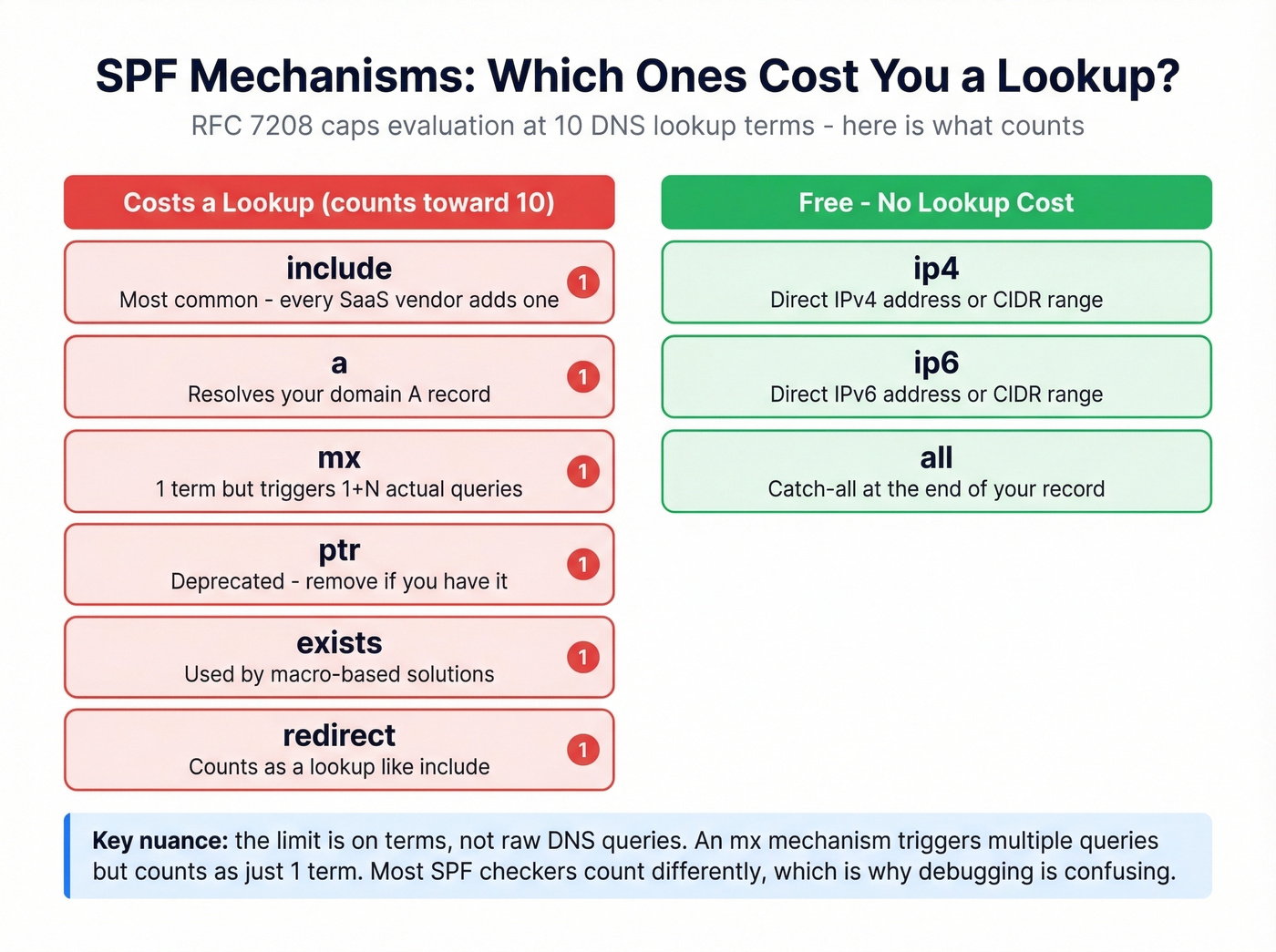
Not every mechanism costs a lookup:
| Mechanism/Modifier | DNS Lookup? |
|---|---|
ip4, ip6, all |
No |
include |
Yes |
a |
Yes |
mx |
Yes |
ptr |
Yes |
exists |
Yes |
redirect |
Yes |
Terms vs. queries - the nuance that trips everyone up. The limit is on terms, not raw DNS queries. An
mxmechanism triggers 1 + N queries (the MX lookup plus an A/AAAA lookup for each MX host), but it counts as just one term toward the 10-lookup limit. Your record can generate 20+ actual DNS queries and still be valid - as long as only 10 terms caused them. This distinction matters when you're debugging with different SPF checkers that count differently. Also worth knowing: RFC 7208 separately caps void lookups (queries returning empty results) at 2 - a constraint most guides skip entirely.
Major mailbox providers treat SPF permerror as a strong negative signal. Gmail and Microsoft don't publish exact enforcement rules, but in practice, permerror combined with a strict DMARC policy can stop mail from getting through. Even with p=none, permerror degrades your authentication posture in ways that compound over time.
Why SPF Records Get Bloated
You didn't create this problem. Your vendors did.
Every SaaS tool that sends email on your behalf needs authorization in SPF, which typically means an include in your record. Google Workspace, Microsoft 365, SendGrid, HubSpot, Salesforce, Marketo, Zendesk - each one adds at least one lookup, and some add nested includes that consume two or three. The sysadmin threads on Reddit are full of admins getting inundated with requests to add SPF entries for yet another third-party service.
Worse, providers can change their include trees without telling you. One r/DMARC user reported their lookup count jumping from 8 to over 10 without making any changes on their end - a vendor had added an extra nested include upstream.
The most absurd example? Oracle's SPF record consumed all 10 lookups by itself, leaving zero room for anything else. Oracle's eventual advice was to use a different subdomain. Microsoft 365's spf.protection.outlook.com has been reported at 11 lookups by some checkers, meaning a single Microsoft include can push you over the limit before you add anyone else. The fact that the two biggest email providers in the world can publish SPF records that blow your entire lookup budget - then tell you to use subdomains - is genuinely maddening.

Every SaaS tool bloating your SPF record exists because you're sending outbound through multiple platforms. Prospeo integrates natively with Smartlead, Instantly, and Lemlist - so you consolidate sending infrastructure instead of stacking includes. With 98% email accuracy and under 3% bounce rates, your domain reputation stays clean.
Send outbound that actually lands - without wrecking your SPF record.
Risks of Flattening Your SPF Record
Use flattening if: you need an immediate fix for permerror, you're using an automated tool that monitors IP changes, and you understand it's a temporary measure while you architect a better solution.
Skip flattening if: you're planning to flatten manually and "check it occasionally," you have the time to set up subdomains or macros, or you're flattening a record with providers that frequently update IP ranges.
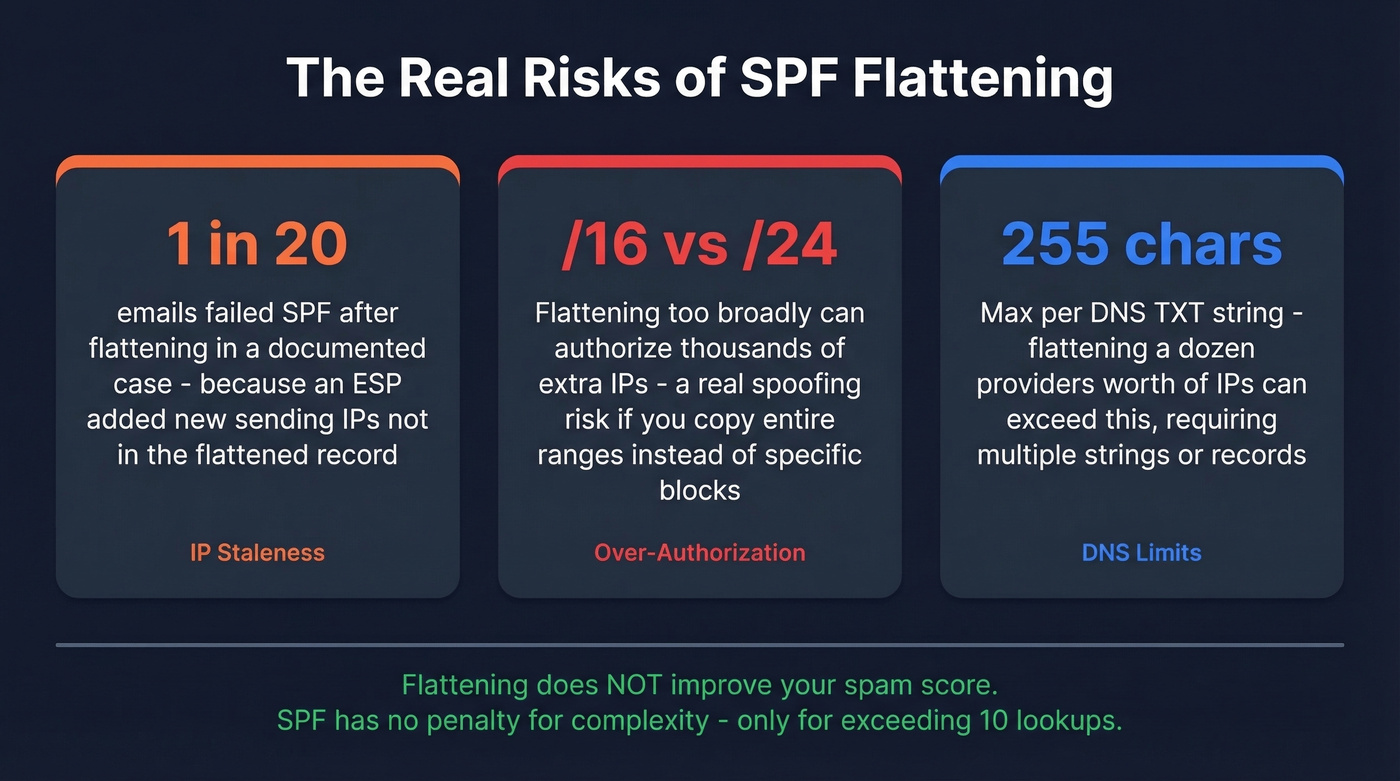
The biggest risk is stale IPs. Mailhardener documented a case where roughly 1 in 20 emails failed SPF after flattening - not because the record was malformed, but because an ESP added new sending IPs that weren't in the flattened record. SPF checkers showed everything was fine. The failures were intermittent and brutal to diagnose.
Flattening can also expand your authorization surface. If you copy IP ranges too broadly - say, authorizing an entire /16 when a provider only uses a /24 - you've inadvertently authorized thousands of IPs that could be used for spoofing. That's a genuine security risk that most flattening guides gloss over.
There's also a practical DNS limit. A single DNS TXT record can hold 255 characters per string. If you're flattening a dozen providers' worth of IP ranges, you can easily exceed that, requiring multiple strings or even multiple TXT records.
Let's be clear about what flattening doesn't do: it doesn't improve your spam score. SPF has no penalty for complexity. The only penalty is exceeding 10 lookups. If you're under 10, a record with 8 includes performs identically to one with 8 ip4 blocks. Flattening for "optimization" when you're under the limit is solving a problem that doesn't exist.
Fixing Too Many DNS Lookups Without Flattening
Most SPF flattening tools solve a problem that better architecture eliminates entirely. Here are the options in order of preference.
Prune and Optimize First
Before you flatten anything, audit what's actually in your SPF record. We've seen teams carrying includes for services they decommissioned two years ago - nobody remembered to clean up DNS. Remove unused services. Drop ptr (it's deprecated and wastes a lookup). Replace mx with explicit ip4 entries if your MX hosts are stable. Kill redirect if you can fold the target record into your own.
Order your remaining mechanisms by sending volume. SPF evaluation is sequential - putting your most common legitimate senders first reduces evaluation work for your highest-volume mail flows.
If you want a quick sanity check on syntax and common provider patterns, compare against a few SPF record examples before you publish changes.
Subdomain Segmentation
This is the permanent fix that every flattening tool page conveniently forgets to mention - probably because it solves the problem for free.
Move each mail stream to its own subdomain. Marketing sends from marketing.yourcompany.com. Transactional email goes through transactional.yourcompany.com. Each subdomain gets its own SPF record with its own 10-lookup budget.
; marketing.yourcompany.com TXT record
v=spf1 include:spf1.hubspotemail.net include:sendgrid.net -all

; transactional.yourcompany.com TXT record
v=spf1 include:_spf.google.com -all
The tradeoff is warmup time. ISPs treat subdomains as separate senders with separate reputation, so expect 30-60 days of warmup starting at 100-500 emails per day and ramping up. If you're paying ~$50-$100/month for a flattening tool, spend two hours setting up subdomains instead. The math works out in your favor by month two.
If you're doing this for outbound, keep an eye on email velocity while you ramp.
SPF Macros (Dynamic SPF)
If you're comfortable with DNS and want the most elegant solution, macro-based services keep SPF evaluation to 2 lookups regardless of how many IPs you authorize. They use SPF macro syntax to dynamically construct DNS queries at evaluation time.
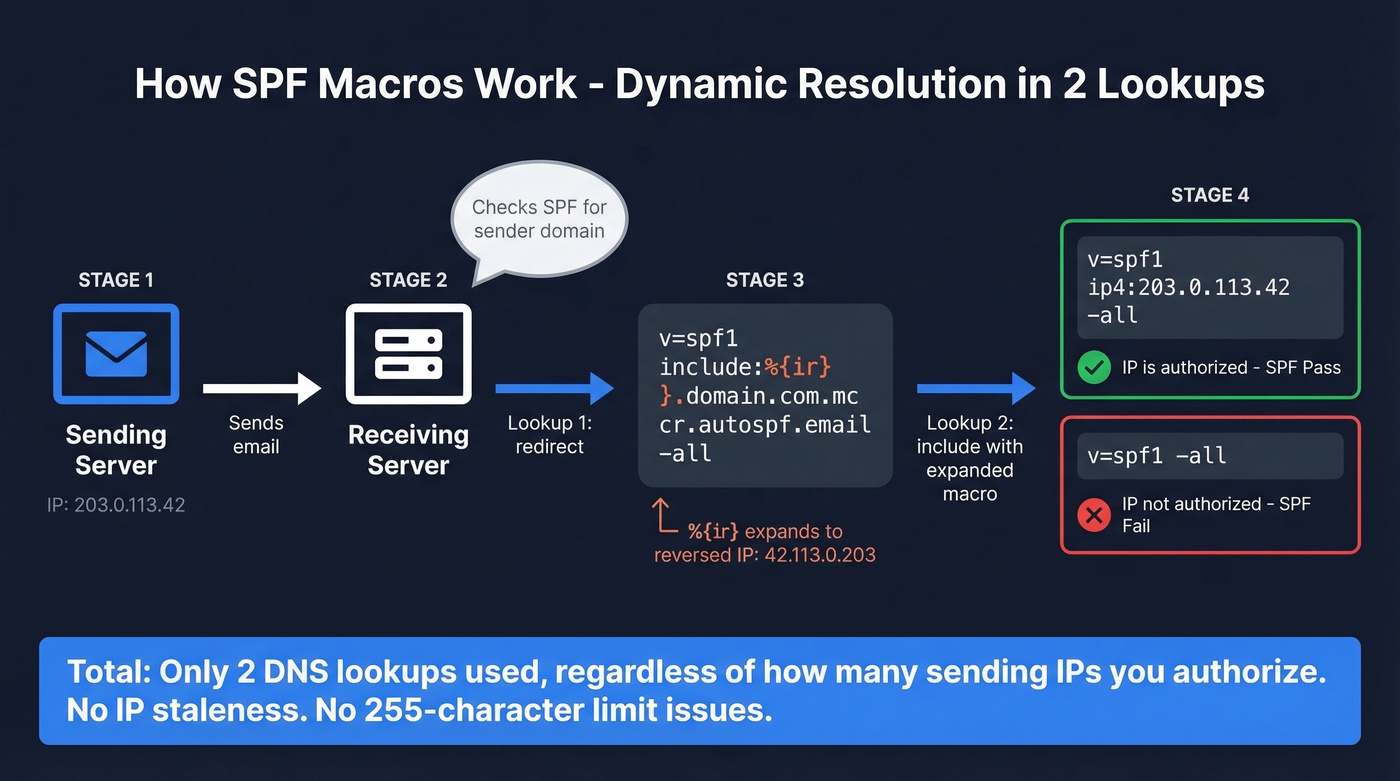
Here's how DuoCircle's macro-based implementation works:
; Your domain's SPF record (1 redirect lookup)
v=spf1 redirect=yourdomain.com.on.autospf.email

; Redirect target (contains macro)
v=spf1 include:%{ir}.yourdomain.com.mcr.autospf.email -all
When a receiver evaluates this, %{ir} expands to the reversed sender IP. So if the sending IP is 203.0.113.42, the receiver queries 42.113.0.203.yourdomain.com.mcr.autospf.email - which returns either v=spf1 ip4:203.0.113.42 -all (authorized) or v=spf1 -all (not authorized). Two lookups total. No IP staleness. No 255-character limit issues.
The key macros worth knowing:
| Macro | Expands To |
|---|---|
%{s} |
Full sender address |
%{l} |
Local part |
%{d} |
Responsible domain |
%{i} |
Sender IP |
%{ir} |
Reversed sender IP |
Most macro-based SPF services handle the implementation for you - you just point your SPF record at their infrastructure.
SPF Flattening Tools Compared
If you've decided flattening or macro-based automation is the right path, here are the main tools worth evaluating:
| Tool | Approach | Pricing | Best For |
|---|---|---|---|
| AutoSPF | Macros + traditional | Starts at $37/mo | Pure-play SPF |
| PowerDMARC | PowerSPF (macros) | Free tier; paid ~$12-15/mo | Full DMARC suite |
| Valimail | Instant SPF (macros) | ~$500+/mo (enterprise) | Set-and-forget |
| DmarcDuty | Traditional flattening | Free | Budget SMB |
| MxToolbox | Flattening + monitoring | Free basic; paid ~$99/mo | Existing MxToolbox users |
AutoSPF is the most focused SPF tool in the group. It offers a 30-day free trial and rescans provider includes every 5 minutes, which is the main thing you're paying for - catching IP changes before they cause failures. Used by 2,000+ businesses daily with a 99.99% DNS availability SLA for enterprise tiers.
PowerDMARC bundles PowerSPF into a broader DMARC suite. The free plan is genuinely useful for small teams, and paid plans around $12-15/month add active management plus analytics. If you need DMARC reporting alongside SPF management, this is the pragmatic pick.
Valimail targets enterprise. Their "Instant SPF" is macro-based and designed to be hands-off, but you'll need to talk to sales and budget $500+/month. They also offer a free monitoring tier that's worth checking out before committing.
DmarcDuty does free traditional flattening - no macros, just IP resolution. Thin feature set, but for a small domain with stable providers, it works. MxToolbox includes flattening within their broader monitoring suite; if you're already paying for MxToolbox, it's a natural add-on rather than a standalone purchase.
Which Approach Is Right for You?
Here's the decision framework we use when advising teams:
- Under 8 lookups: Prune. Remove dead includes, drop
ptrand unnecessarymx. You don't need a tool. - 8-10 lookups, few services: Subdomain segmentation. Two hours of DNS work beats a monthly subscription.
- 10+ lookups, complex infrastructure: Macros or an automated flattening tool. AutoSPF or PowerDMARC are the pragmatic choices.
- Enterprise with compliance requirements: Valimail or PowerDMARC's enterprise tier for the full DMARC suite.
Look, I'll say it plainly: you probably don't need an SPF flattening tool. The 10-lookup limit is a design constraint that hasn't aged well, but the workarounds - pruning, subdomains, macros - are free or nearly free. Tools add convenience and monitoring, which has real value, but the email industry has turned a simple DNS architecture problem into a SaaS category. In our experience, most teams that think they need flattening actually need to decommission two vendors they stopped using and move marketing email to a subdomain.
Beyond SPF: Your Deliverability Stack
SPF fixes authentication, but authentication is only half the equation. Stale flattened SPF records break delivery because IPs drift. Stale contact data breaks delivery because addresses bounce. Both problems share the same root cause - data that was accurate once but isn't anymore.
If you're spending time fixing SPF only to blast emails at dead addresses, you're solving the wrong problem first. Prospeo's email verification catches spam traps and honeypots before they damage your sender reputation, running on a 7-day refresh cycle with 98% accuracy. And remember: DMARC can still pass on DKIM alone even if SPF errors - but fix SPF anyway while DKIM carries the load.
If you’re troubleshooting broader inboxing issues, use an email deliverability guide to prioritize fixes.
The real reason SPF records explode is too many tools sending on your behalf because your data forces you to spray and pray. Prospeo's 143M+ verified emails at 98% accuracy mean you reach the right people with fewer sends - fewer platforms, fewer includes, fewer DNS headaches.
Better data means fewer sending tools and a cleaner authentication setup.
FAQ
Does SPF flattening improve my spam score?
No. SPF has no penalty for record complexity - only for exceeding the 10-lookup limit. Flattening fixes permerror but doesn't boost sender reputation or improve inbox placement beyond resolving the authentication failure itself.
What happens when SPF exceeds 10 DNS lookups?
The receiving server returns permerror and stops evaluating your SPF record. Depending on the receiver's implementation and your DMARC policy, emails can be rejected outright, routed to spam, or treated as unauthenticated - degrading deliverability across all mail streams on that domain.
How often should I re-flatten my SPF record?
If you're flattening manually, check weekly at minimum. Providers change IPs without notice - that's the whole reason include exists. Automated tools like AutoSPF and PowerDMARC handle this continuously, which is their primary value proposition.
Can DKIM save me if SPF fails?
Yes, if DKIM passes and aligns for DMARC. Many domains pass DMARC on DKIM alone, making SPF permerror non-fatal in those cases. But relying on a single authentication mechanism is risky - receiver policies vary, and a DKIM signing failure would leave you with zero passing authentication.
How do I check my current SPF lookup count?
Use MxToolbox's SPF checker or run dig TXT yourdomain.com and manually trace each include. Count every include, a, mx, ptr, exists, and redirect mechanism - those are your lookup-causing terms. Most online checkers automate this, but they sometimes disagree on nested counts, so cross-check with two tools.