

SPF Softfail: Why ~all Is Almost Always the Right Choice
A security scanner just flagged your SPF record as "weak" because you're using ~all instead of -all. Your IT lead wants to "fix" it by switching to hardfail. Don't. That scanner is wrong about SPF softfail being a vulnerability, and the "fix" will break more than it solves.
The Short Version
SPF softfail (~all) is the correct default for any domain that sends email - don't let a security scanner scare you into switching to hardfail. With DMARC deployed, softfail and hardfail lead to the same security outcome, but hardfail can break legitimate mail. The real upgrade path isn't ~all to -all. It's ~all + DKIM + DMARC p=reject.
What Is SPF Softfail?
SPF (Sender Policy Framework) is a DNS record that tells receiving mail servers which IP addresses are authorized to send email on behalf of your domain. When a message arrives from an IP that isn't listed, the SPF result depends on the qualifier at the end of your record.
Softfail is the result produced by ~all. Per RFC 7208, it means the sending host is "probably not authorized" - a deliberate hedge. Here's a typical SPF record with softfail:
v=spf1 [include:_spf.google.com](https://knowledge.workspace.google.com/admin/security/set-up-spf) include:sendgrid.net ~all
That ~all tells receivers: "If the sending IP doesn't match anything listed, treat it as suspicious - but don't reject it outright." Most receiving servers interpret this as "accept the message but increase its spam score." It's a signal, not a verdict.
Softfail vs Hardfail
This is the question that brings most people here, so let's be direct.
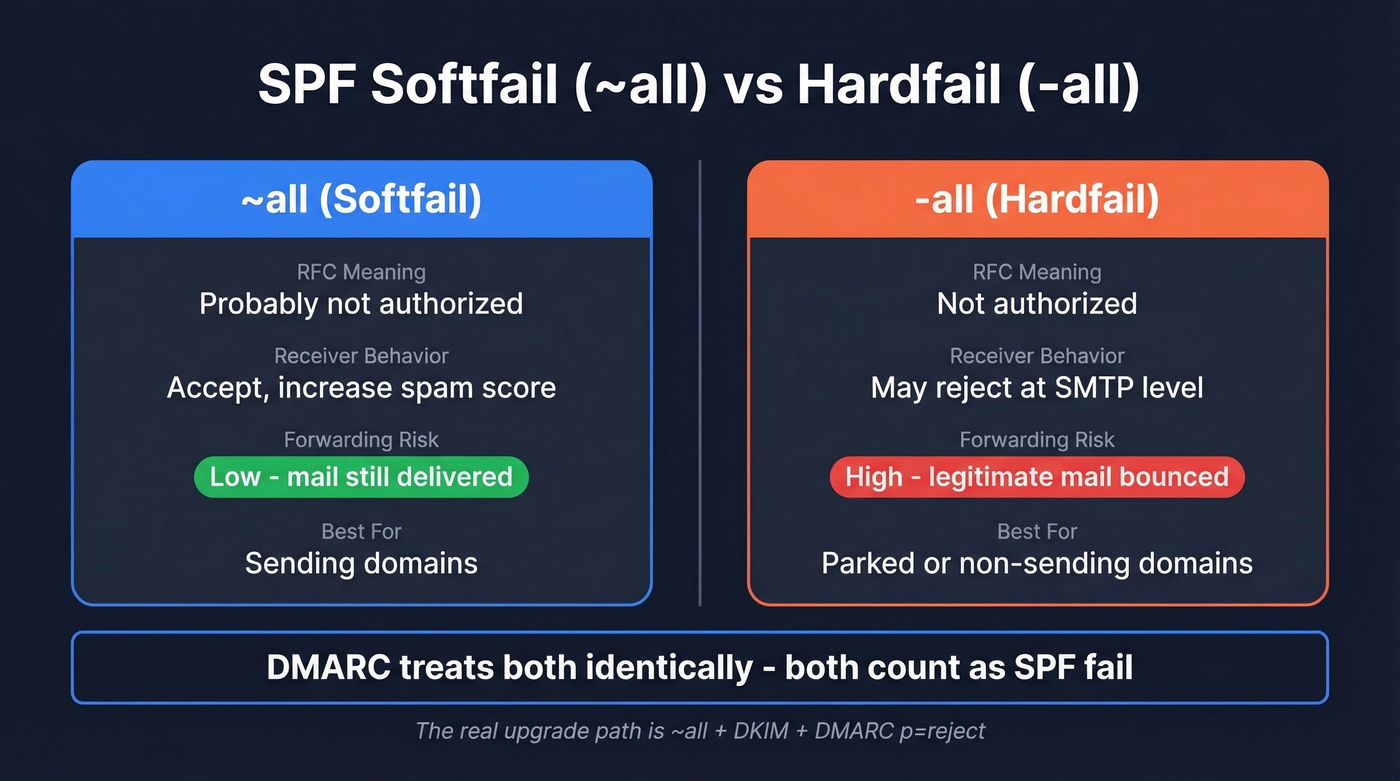
~all (Softfail) |
-all (Hardfail) |
|
|---|---|---|
| RFC meaning | "Probably not authorized" | "Not authorized" |
| Receiver behavior | Accept, increase spam score | May reject at SMTP level |
| DMARC interaction | SPF fail (identical) | SPF fail (identical) |
| Forwarding impact | Lower risk of breakage | Can reject forwarded mail |
| Best use case | Sending domains | Parked/non-sending domains |
Here's the thing: DMARC makes no distinction between softfail and hardfail. Both register as SPF failures in DMARC processing, so if you're relying on DMARC to decide "pass vs fail," ~all and -all land in the same bucket.
The critical difference is what happens before DMARC evaluates. When a receiver sees a hardfail, it can reject the message at the SMTP level - before DKIM or DMARC evaluation ever occurs. That creates a real operational risk: a message that would've passed DMARC via DKIM alignment gets bounced because the receiver never looked past the SPF result. The bounce message will often include language like "SPF fail - not authorized," which is confusing when you know the sender is legitimate.
That's not theoretical. We've seen it happen in production environments with legitimate mail flowing through third-party relays. And if you're in a regulated industry - financial services, government, healthcare - you might feel pressure to use hardfail for compliance optics. Resist it. DMARC p=reject is the strongest enforcement mode and is widely used to stop spoofing without the deliverability landmines that hardfail introduces.
The entire softfail vs hardfail debate is a distraction. If you don't have DMARC at p=reject, arguing over your all qualifier is like debating which padlock to put on a screen door. Deploy DMARC first. Then the all qualifier becomes far less important.
All SPF Result Types
SPF evaluation produces seven possible results. Understanding the full set prevents confusion - especially between softfail and permerror, which get mixed up constantly.
| Result | Meaning |
|---|---|
| Pass | Sender IP is authorized |
| Fail | Sender IP is explicitly not authorized (-all) |
| Softfail | Sender IP is probably not authorized (~all) |
| Neutral | Domain makes no assertion (?all) |
| None | No SPF record found |
| Temperror | Temporary DNS error during lookup |
| Permerror | SPF record is broken (syntax error, too many lookups) |
Permerror deserves special attention because it's often confused with softfail. A permerror means your SPF record itself is invalid - duplicate records, exceeding the 10-DNS-lookup limit, or syntax errors. It's not a policy decision; it's a configuration problem that needs fixing immediately.
Temperror is different again. Caused by a transient DNS timeout, it can look like a policy failure in logs, but it's an infrastructure issue. Temperrors usually resolve on their own, but persistent ones point to DNS reliability problems worth investigating.
How DMARC Changes Everything
DMARC is the reason the softfail vs hardfail debate is mostly academic for any domain that's properly configured.
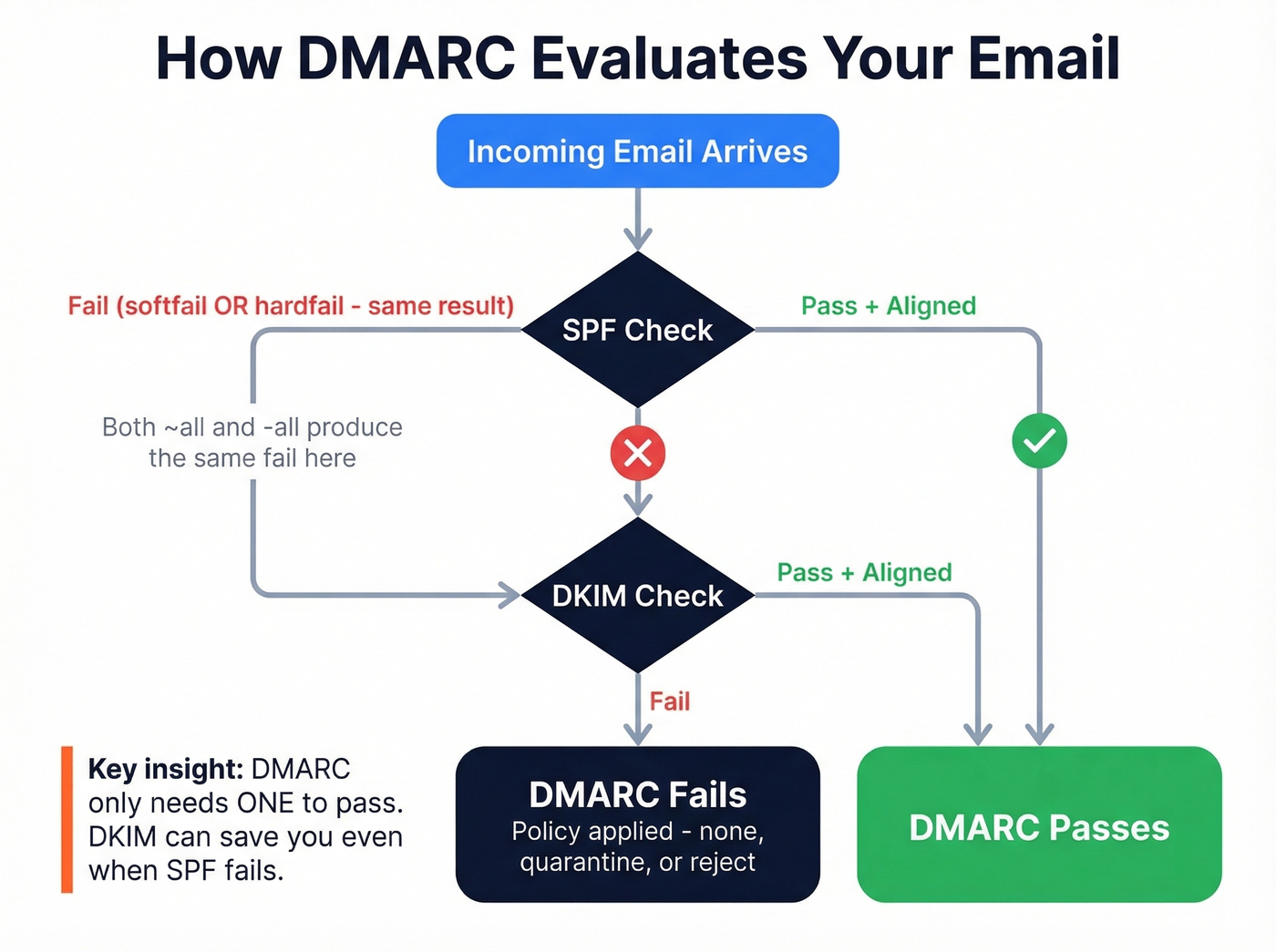
DMARC evaluates two things: SPF alignment and DKIM alignment. A message passes DMARC if either one aligns. Since DMARC treats softfail and hardfail identically - both count as SPF authentication failures - the DMARC outcome is the same regardless of your all qualifier. If a message passes DMARC via aligned DKIM, that outweighs an SPF failure in the overall authentication decision.
The upgrade path isn't ~all to -all. It's ~all + DKIM + DMARC p=reject. That combination gives you the strongest possible authentication without the deliverability risks of hardfail. Hardfail adds zero security benefit on top of DMARC - it only adds the risk that a receiver rejects your mail before DKIM can save it.
If someone tells you to switch to -all for better security, ask them whether they've deployed DMARC first. That's the conversation that actually matters.

You're optimizing SPF records to protect deliverability - smart. But authentication only matters if you're sending to real, verified addresses. Prospeo's 5-step email verification and 98% accuracy rate mean bounce rates under 4%, not 35%.
Stop fixing DNS records for emails that were never valid in the first place.
Why SPF Breaks During Forwarding
Forwarding is where SPF falls apart, and it's the strongest practical argument for softfail over hardfail.
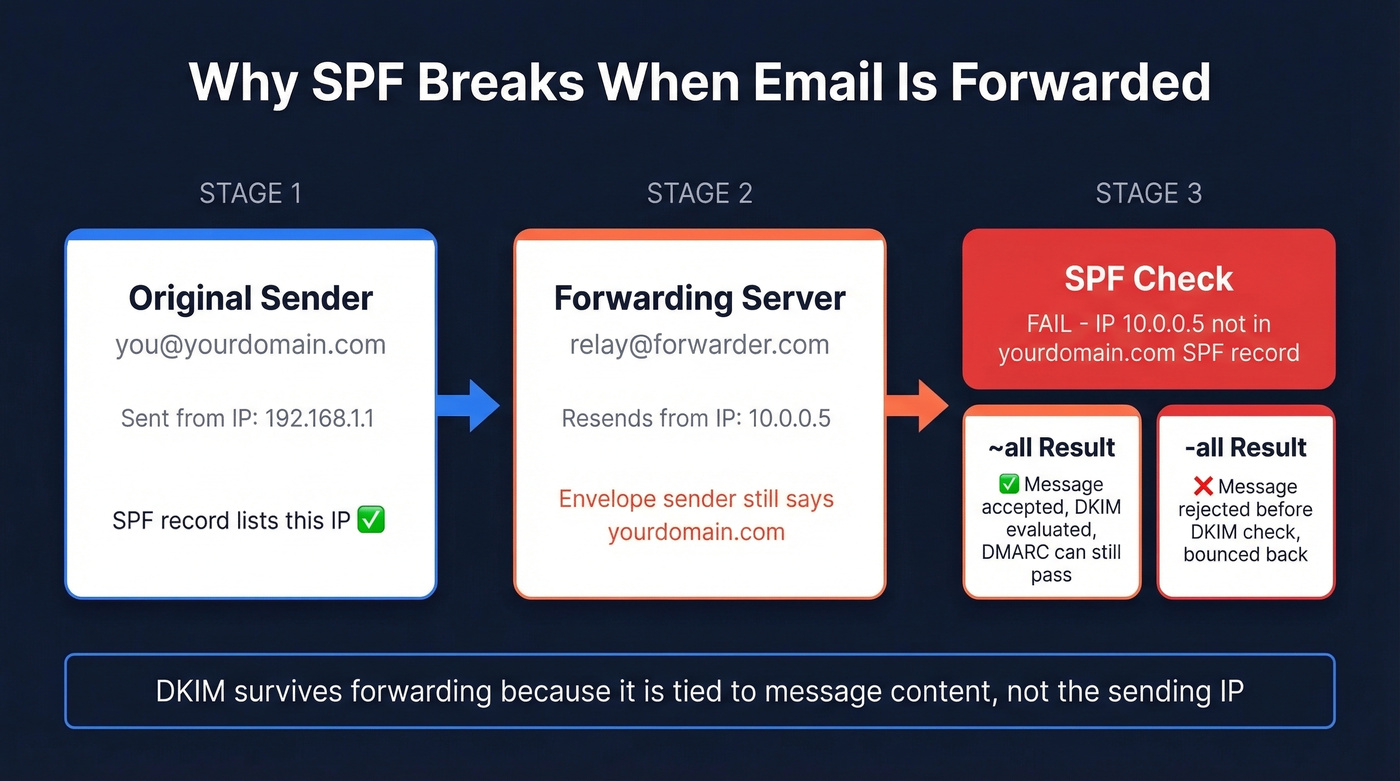
When someone forwards your email - through a mailing list, a personal forwarding rule, or an alias - the forwarding server resends the message from its own IP address. But the envelope sender (MAIL FROM) often stays the same: your domain. The receiving server checks SPF against your domain, sees an IP that isn't in your record, and returns a fail or softfail.
With ~all, the message still has a chance. The receiver can evaluate DKIM (which survives forwarding because it's tied to the message content, not the sending IP) and make a DMARC decision. With -all, the message gets rejected before that evaluation happens - sometimes triggering a policy rejection bounce that gives the forwarding user no recourse.
Two mechanisms help mitigate this. SRS (Sender Rewriting Scheme) rewrites the envelope sender to the forwarder's domain, so SPF is evaluated against the forwarder instead of the original sender. ARC (Authenticated Received Chain) preserves the original authentication results through the forwarding chain. Microsoft explicitly recommends ARC for forwarding scenarios because it lets receivers trust the original SPF/DKIM results even after the message has been relayed.
As one dmarcian forum moderator put it: "In the overwhelming majority of cases the 'all' directive will not matter at all" - because SRS, DKIM, and ARC are doing the heavy lifting.
How Providers Handle SPF Softfail
Provider behavior varies, but the general pattern is consistent: softfail increases spam scoring, hardfail increases rejection likelihood.
Microsoft Outlook.com has the most explicit public enforcement. For domains sending more than 5,000 emails per day, SPF must pass, DKIM must pass, and DMARC must be at least p=none with alignment. Non-compliant messages can be rejected with error code 550; 5.7.515. That's a hard bounce, not a spam folder.
Other major inbox providers have tightened authentication expectations in recent years. They don't publish simple "softfail = X, hardfail = Y" rules, but the operational consensus is clear: softfail alone is a minor negative signal that nudges messages toward spam, while hardfail combined with other negative signals - no DKIM, no DMARC, poor reputation - is more likely to trigger outright rejection. Google's email sender guidelines reinforce this layered approach.
Providers care about the full authentication stack, not just your SPF qualifier in isolation.
Checking Headers for SPF Results
When you're debugging a deliverability issue, the Authentication-Results header tells you exactly what happened:
Authentication-Results: mx.example.net;
    spf=softfail smtp.mailfrom=example.com;
Look for spf=softfail to confirm the result, smtp.mailfrom for the envelope sender domain being evaluated, and client-ip (when present) for the sending IP that failed the check. In Microsoft environments, you'll often see this in ARC-Authentication-Results headers, which preserve authentication results through forwarding chains.
One thing worth knowing: some mail appliances evaluate SPF against both the HELO identity and the MAIL FROM identity, which can produce different results. If you're seeing unexpected softfails that don't match your MAIL FROM analysis, check whether the HELO identity is the culprit.
Troubleshooting Unexpected Softfails
If you're seeing unexpected softfail results, work through this checklist:
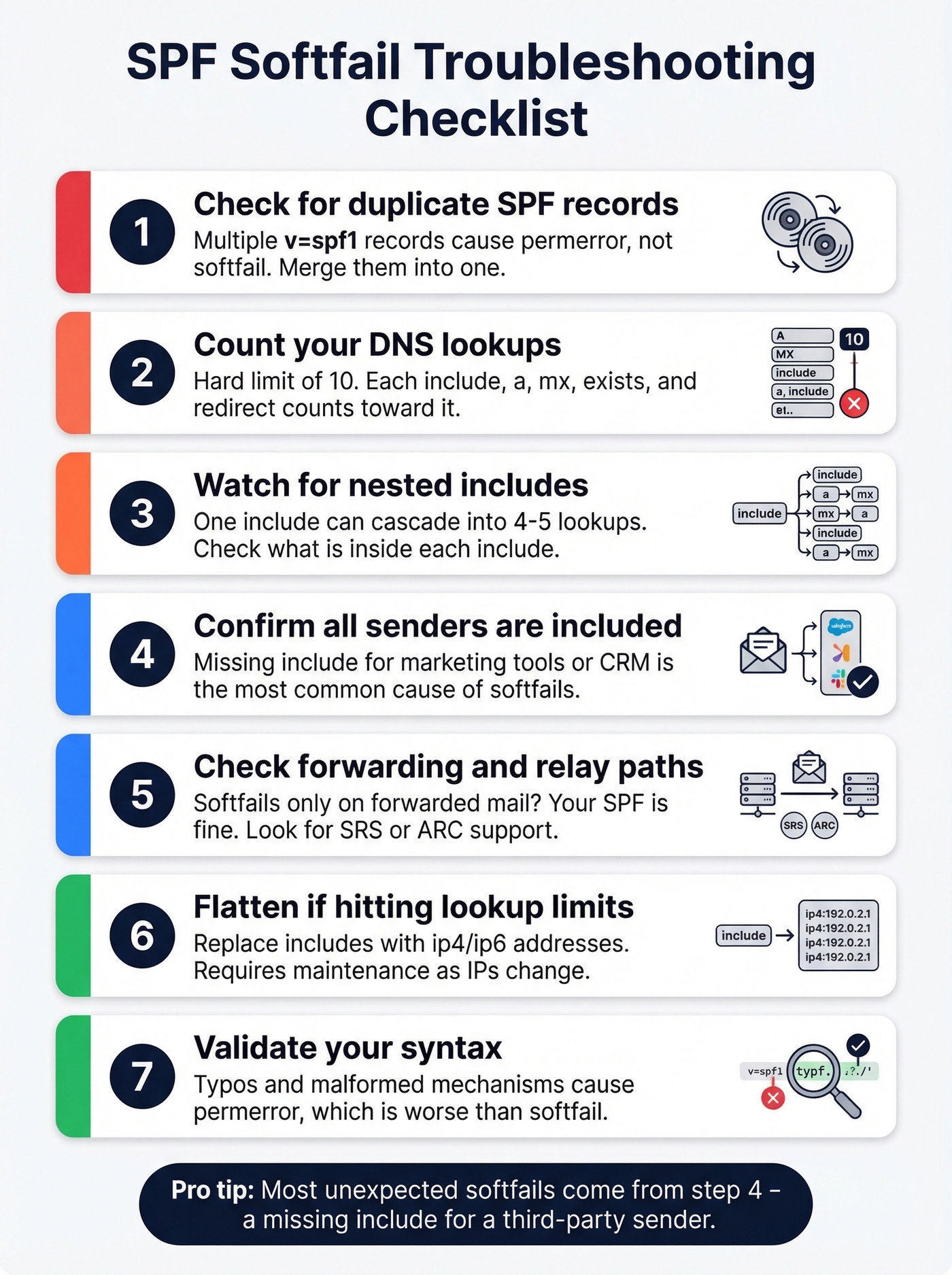
- Verify you have exactly one SPF record. Multiple TXT records starting with
v=spf1cause a permerror, not a softfail. Merge them. - Count your DNS lookups. SPF has a hard limit of 10 DNS lookups. Each
include,a,mx,exists, andredirectcounts. Exceeding this limit produces a permerror that receivers treat worse than a softfail. - Watch nested includes. We've seen SPF tools count
include:spf.protection.outlook.comas consuming nearly the entire lookup budget in some scenarios, especially when nested includes cascade. - Confirm all sending services are included. In our experience, a missing
includefor a third-party sender - marketing automation, transactional email, CRM - is the single most common cause of unexpected softfails. - Check forwarding and relay paths. If softfails appear only for forwarded messages, the issue isn't your SPF record. It's the forwarding infrastructure. Look for SRS rewriting or ARC support at the forwarding hop.
- Flatten if you're hitting lookup limits. SPF flattening replaces
includemechanisms with resolvedip4/ip6addresses, reducing lookup count. It requires maintenance since IPs change, but it's the standard workaround for complex vendor stacks. AutoSPF and dmarcian's SPF tools can help. - Validate syntax. Use any SPF checker tool to catch typos or malformed mechanisms. Syntax errors produce a permerror, which behaves differently from softfail.
Protecting Your Domain Beyond SPF
SPF, DKIM, and DMARC form the authentication stack that protects your domain from spoofing. The recommended configuration for sending domains: ~all for SPF, DKIM signing on all outbound mail, and DMARC at p=reject once you've confirmed alignment (see DMARC alignment). Use -all only for parked domains that send zero email. For further hardening, look into MTA-STS and BIMI to strengthen your domain's trust signals.
But authentication only solves half the deliverability equation. SPF stops other people from spoofing your domain. It doesn't stop you from damaging your own sender reputation by emailing invalid addresses. High bounce rates - from outdated lists, typo-ridden imports, or unverified scrapes - hurt domain reputation just as effectively as a misconfigured SPF record. We've watched teams nail their SPF/DKIM/DMARC setup and still land in spam because 8% of their list was bouncing. Prospeo's email verification catches invalid addresses, spam traps, and honeypots before they become bounce-rate problems, with 98% accuracy across 143M+ verified emails.
If you want more examples of correct syntax across providers, see our SPF record guide. And if you're diagnosing list quality issues, start with bounce rates and a full deliverability audit.
SPF, DKIM, and DMARC protect your domain reputation - but bad contact data destroys it faster than any misconfigured DNS record. Prospeo refreshes 300M+ profiles every 7 days and removes spam traps and honeypots before you ever hit send.
Your authentication stack is only as strong as the data behind it.
FAQ
Is SPF softfail a vulnerability?
No. With DMARC deployed, softfail and hardfail produce the same DMARC evaluation outcome. Security scanners that flag ~all as a vulnerability are misleading - softfail combined with DMARC p=reject is the industry-recommended configuration for sending domains.
Should I switch to hardfail?
Only for domains that send zero email. For active sending domains, ~all is safer because hardfail can cause receivers to reject mail before DKIM or DMARC evaluation occurs, breaking legitimate forwarded and relayed messages.
Does SPF softfail affect deliverability?
Softfail alone is a minor negative signal - most providers increase spam scoring rather than rejecting outright. The bigger deliverability factors are DKIM alignment, DMARC policy, and sender reputation, including bounce rates from bad list data. Keeping your lists clean matters more than your all qualifier.
What does "SPF authentication failed" mean in my headers?
It means the sending IP wasn't listed in the domain's SPF record. Whether this results in a softfail or a hard fail depends on the domain's all qualifier. Check the Authentication-Results header for the specific result - spf=softfail vs spf=fail - and then look at the DMARC result to see whether DKIM alignment saved the message.