

Subject Line Testers: What They Actually Measure (and What They Can't)
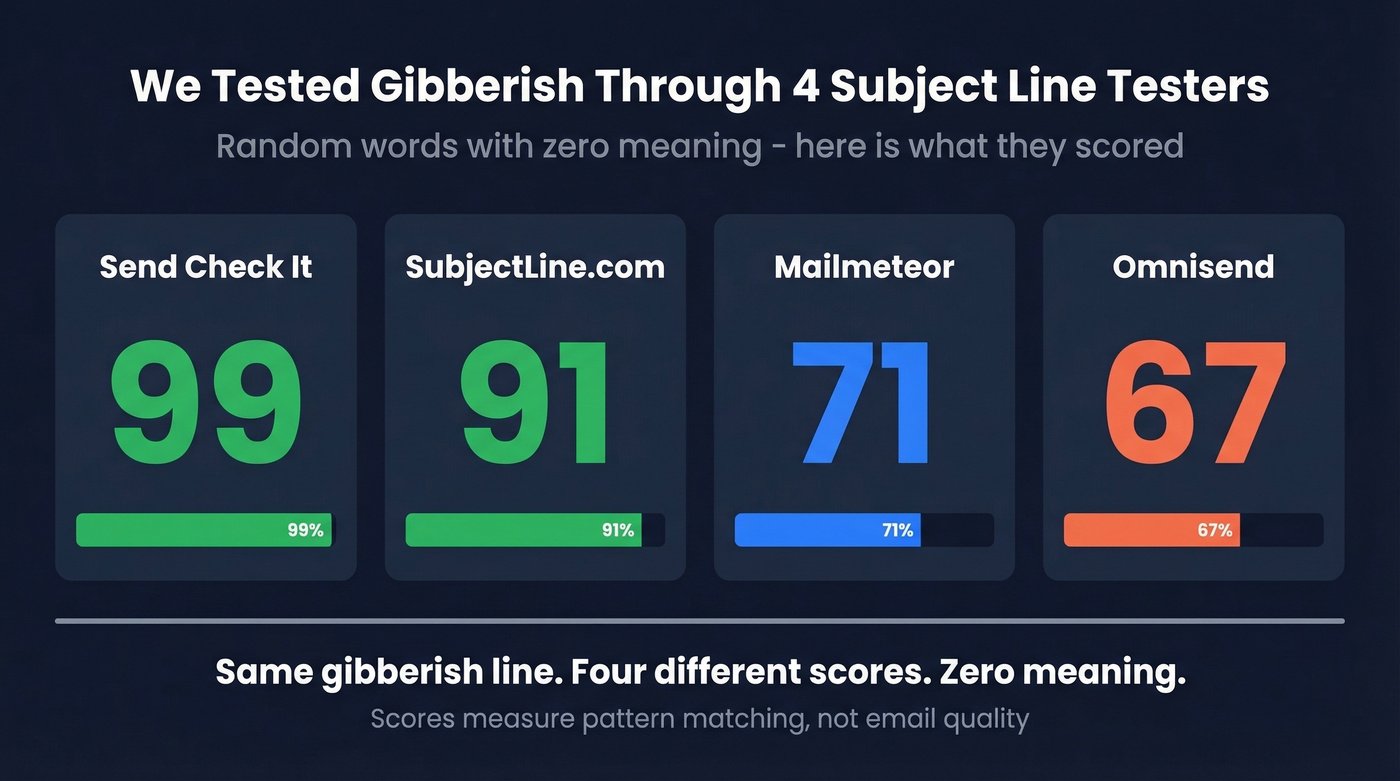
We ran the same subject line through four popular testers last week. Send Check It gave it a 99. SubjectLine.com scored it 91. Mailmeteor landed at 71. Omnisend returned a 67. The subject line was gibberish - random words strung together with no meaning whatsoever.
That's the state of subject line testing in 2026: tools that reward patterns, not performance. Every subject line tester is useful, but you need to know exactly what each one can and can't do before you trust a score.
What You Need (Quick Version)
- Fastest check (no sign-up): Omnisend - paste, score, done
- Most detailed feedback: CoSchedule - keyword categories, word bank, and previews
- Best AI alternatives: Mailmeteor - GPT-powered rewrites, not just a grade
- For mobile preview: Test Subject by Zurb - see exactly where your line gets cut off
Use two or three of these, look for consensus on what's wrong (not the number), then A/B test the winner with your actual list. No single tester is an oracle. Treat them like spell check for subject lines - they'll catch the obvious mistakes, but they can't write your email for you.
Best Email Subject Line Testers Compared
Here's every tool at a glance.
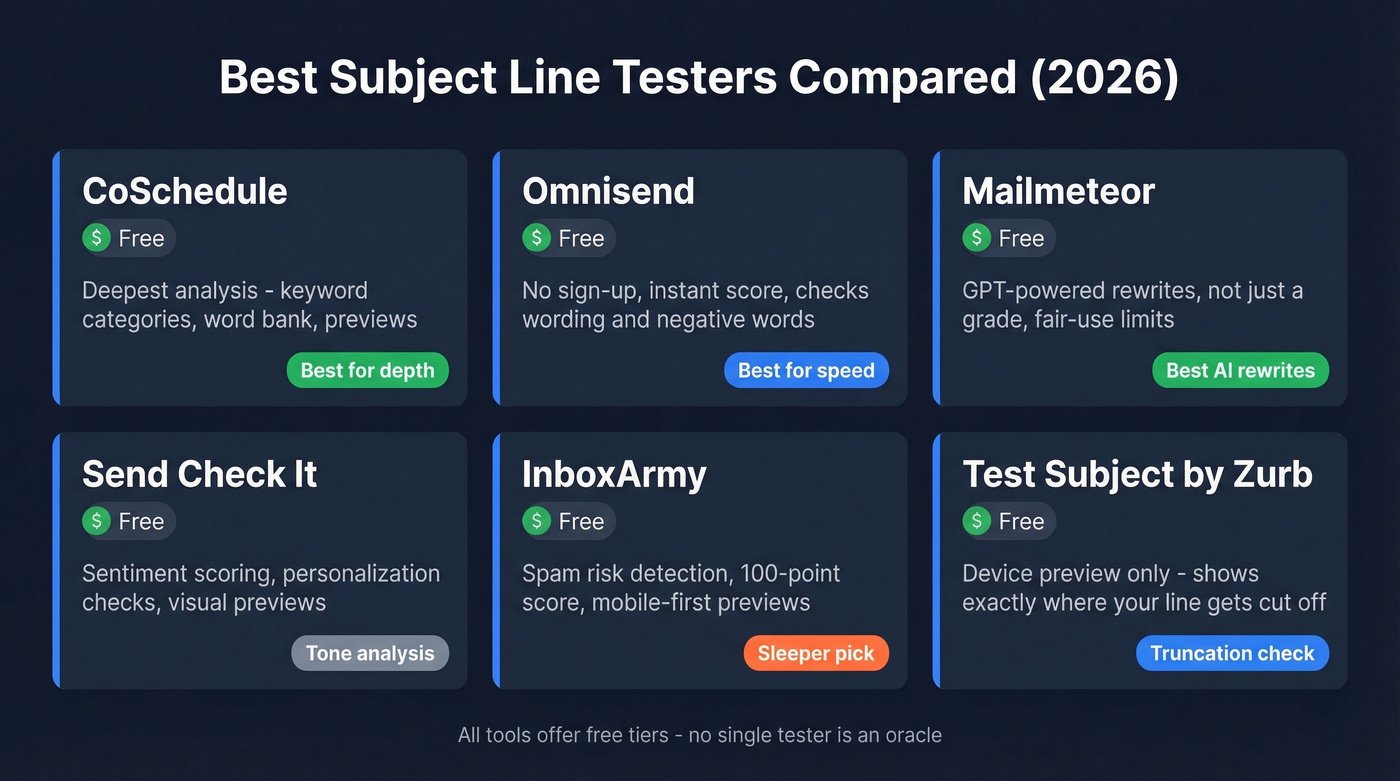
| Tool | What It Checks | Notes | Best For | Price |
|---|---|---|---|---|
| CoSchedule | Keywords, length, tone | Account required; word bank | Deep analysis | Free / ~$19/mo+ |
| Omnisend | Wording + negative words | No sign-up; no AI | Quick checks | Free |
| Mailmeteor | Score + AI rewrites | No sign-up; GPT-powered | Generating variants | Free (fair-use) |
| Send Check It | Sentiment, personalization | Account required; visual previews | Tone analysis | Free |
| InboxArmy | Spam risk, 100-pt score | No sign-up; AI alternatives | Spam detection | Free |
| MailerLite | Tester + benchmarks | Account required; 3.6M campaign benchmarks | ESP users | Free plan |
| SubjectLine.com | Basic scoring | No sign-up; 800+ rules | Quick sanity check | Free |
| Test Subject | Device preview | No sign-up; not a scorer | Truncation check | Free |
| Moosend Refine | Basic scoring | No sign-up | Moosend users | Free |
| Warmup Inbox | Basic scoring | No sign-up; warmup service ~$15-$30/mo | Warmup customers | Free |
CoSchedule Email Subject Line Tester
Use this if you want the most granular feedback available. CoSchedule breaks your subject line into four keyword categories - common, uncommon, emotional, and power - and shows you a word bank to strengthen weak areas. It recommends around 50 characters and 7-10 words, provides previews, and flags spammy language. The scoring feels more transparent than most competitors because you can see why you got dinged, not just a number with no explanation behind it.
Skip this if you just need a fast gut check. CoSchedule requires account creation, which adds friction when you're testing five variations in a row. The tool also skews toward marketing email best practices - if you're writing cold outbound with 2-4 word subject lines, its recommendations won't always apply. The broader Headline Studio runs ~$19/mo and up; the basic tester is free with an account.
Omnisend Subject Line Tester
Use this if speed matters more than depth. No sign-up, no friction - paste your line, get a score. Omnisend checks wording patterns and flags negative words. This is the tool we'd recommend for quick iteration when you're writing sequences and want a sanity check between drafts.
Skip this if you want to understand why you got a specific score. Omnisend's methodology is opaque, and its scoring uses discrete buckets (100, 92, 83, 75, 67, 58, 33) rather than a continuous scale. Small changes to your subject line can cause a 9-point jump or drop with no clear explanation. It's a blunt instrument - useful, but don't overthink the number.
Mailmeteor Subject Line Tester
Use this if you want AI-generated alternatives, not just a grade. Mailmeteor is GPT-powered, so it doesn't just score your line - it rewrites it. You'll get performance predictions alongside multiple variations you can steal or adapt. No sign-up required, though there are fair-use limits on how many you can test per day.
Here's the thing: the scoring itself is decent but not the main draw. You're here for the rewrites. If you need a pure scoring tool for benchmarking consistency, look elsewhere - because Mailmeteor's AI generates different alternatives each time, it's better for creative brainstorming than systematic testing.
Send Check It
Goes beyond basic word analysis with sentiment scoring and personalization checks. Includes visual previews of how your subject line renders across clients, which is decent for catching tone issues that pure word-count tools miss. That said, Mailtrap's review described the visual previews as "artsy, inaccurate" - they look nice but don't reflect real inbox rendering. Requires sign-up, and not worth the account creation if you're already using CoSchedule.
InboxArmy
The sleeper pick on this list. InboxArmy runs a 100-point scoring system with explicit spam-risk detection, mobile-first previews, and AI-generated alternatives. It's one of the few tools that actively flags deliverability risks rather than just grading "engagement potential." The AI alternatives are serviceable but not as strong as Mailmeteor's GPT-powered rewrites. Less community feedback on accuracy than the bigger names, but free and worth adding to your rotation.
MailerLite Subject Line Tester
MailerLite offers a free tester, but the real value is their benchmark data - 3.6 million campaigns analyzed across Dec 2024-Nov 2025. You need a MailerLite account, which makes it impractical as a standalone tool. Best for teams already on the platform who want feedback baked into their workflow.
SubjectLine.com
Free, no paid tier, no sign-up. Claims over 800 unique rules tested against 3 billion+ email messages sent and tracked via their partners and clients. It's also the tool where gibberish scored a 91. Calibrate your expectations accordingly. Use it as one data point in a multi-tool check, never as your only reference.
Test Subject by Zurb
Not a scoring tool at all - it's a device preview tool that shows how your subject line renders on mobile screens. Free and genuinely useful for checking truncation. If your subject line gets cut at 30 characters on an iPhone, Zurb will show you exactly where.
Moosend Refine
Free basic scorer from Moosend. Functional but unremarkable - worth a look if you're already a Moosend customer, skippable otherwise.
Warmup Inbox
Free tester attached to an email warmup service (~$15-$30/mo for the core product). The tester is a lead-gen tool for their warmup business. Fine for a quick check, but you'll get more value from Omnisend or Mailmeteor.
One tool to skip entirely: SubjectLineTesting.com charges $7.99/month for functionality every tool above offers free. Don't bother.
How These Tools Score Your Lines
Every subject line tester runs your text through a checklist of pattern-based signals. The specific factors vary by tool, but here's what most of them evaluate:
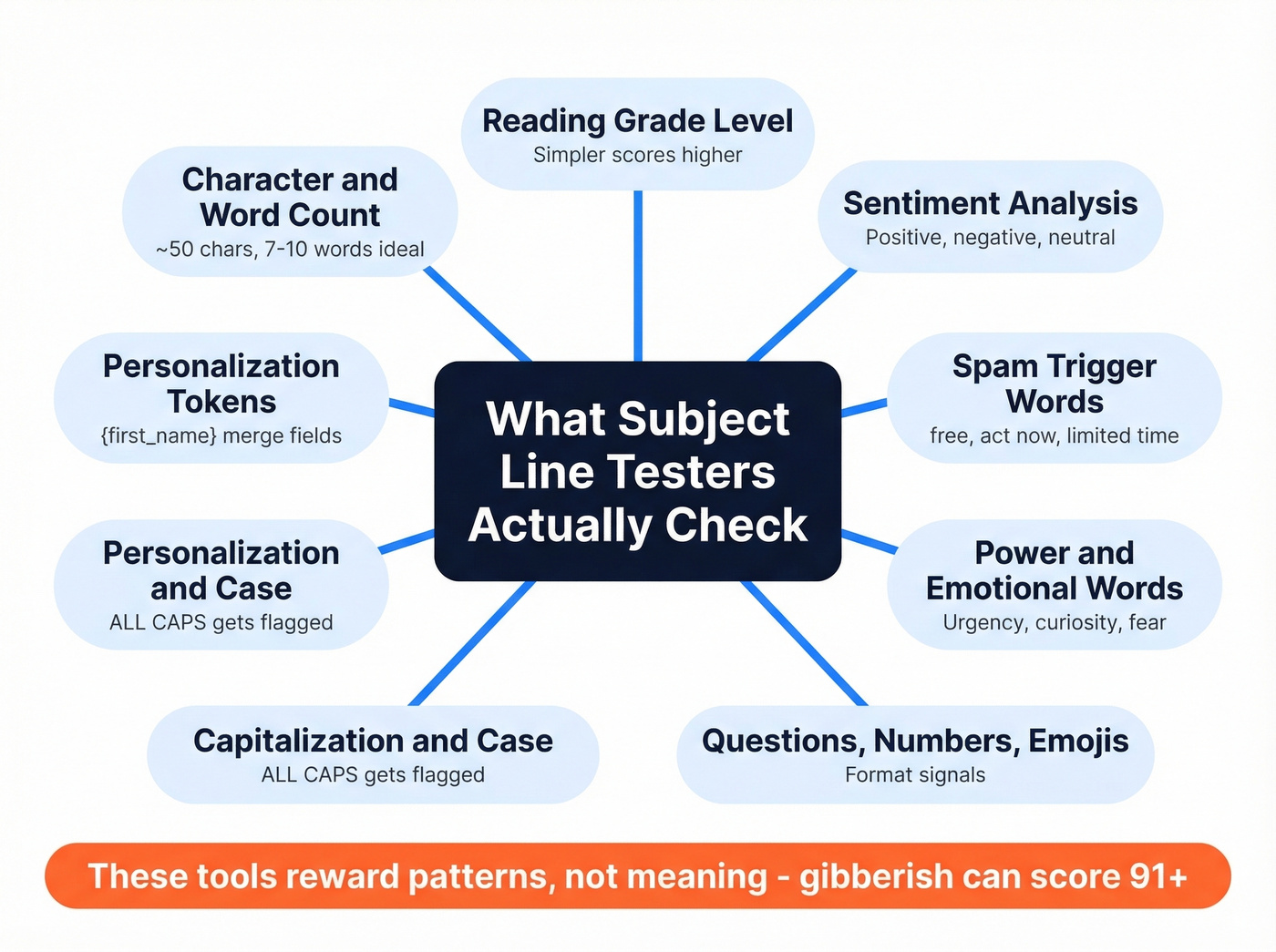
- Character and word count - too short or too long gets penalized
- Reading grade level - simpler tends to score higher
- Sentiment analysis - positive, negative, or neutral tone
- Spam trigger words - "free," "act now," "limited time" (see our spam trigger words breakdown)
- Power words and emotional words - urgency, curiosity, fear
- Questions, numbers, and emojis - format signals that correlate with opens
- Capitalization and case - ALL CAPS gets flagged
- Personalization tokens - presence of merge fields like {first_name}
These tools reward patterns, not meaning. They can't tell if your subject line is relevant to your audience, timely, or compelling. They just check whether it matches the structural patterns that historically correlate with higher open rates across massive datasets.
That's why gibberish scores well. A random string of words can hit the right length, include "power words," avoid spam triggers, and use sentence case - all without saying anything coherent. Four tools, four scores, zero meaning in the subject line. Omnisend's discrete scoring buckets make this even more obvious - your line either hits a threshold or it doesn't, with no nuance in between.
The rubric inconsistency across tools is the other problem. SubjectLine.com checks against 800+ rules while other tools use far fewer. What CoSchedule flags as a "spam word," Mailmeteor categorizes as a "power word." There's no industry standard for these classifications, which is exactly why running the same line through three tools produces three wildly different scores.

You're optimizing subject lines to boost open rates - but none of that matters if 35% of your emails bounce. Prospeo's 98% email accuracy means every subject line you test actually lands in a real inbox, not a dead address.
Fix your data before you fix your subject lines.
Do These Scores Predict Open Rates?
They work as checklists, not as performance predictors.
Campaign Monitor documented a case where a subject line with a 28.1% open rate was graded poorly by testers. The line performed well with its actual audience, but it didn't match the generic patterns these tools optimize for. Most testers are implicitly calibrated for retail and e-commerce - if you're in B2B, SaaS, or any niche vertical, the scoring assumptions won't apply to your readers.
Reddit threads on r/copywriting and r/Emailmarketing consistently echo this. The consensus isn't that testers are useless - it's that scores often conflict with real results. One poster noted that tools sometimes rate the worse-performing subject line as the better one. Practitioners want an "outside opinion," but they've learned not to trust the number.
Let's be honest about what these tools are. They're spell check for subject lines. They'll catch "URGENT!!! FREE OFFER ACT NOW" before you embarrass yourself. They'll remind you that your 90-character subject line gets truncated on mobile. They won't tell you whether your audience cares about the webinar you're promoting. That distinction matters - 69% of people will report an email as spam based only on the subject line. Getting the basics right is worth the 30 seconds a tester takes. Just don't mistake a high score for a high open rate.
What Actually Moves Your Open Rate
Best Practices by the Numbers
Marketing emails and cold emails play by different rules. Here's what the data shows for each.
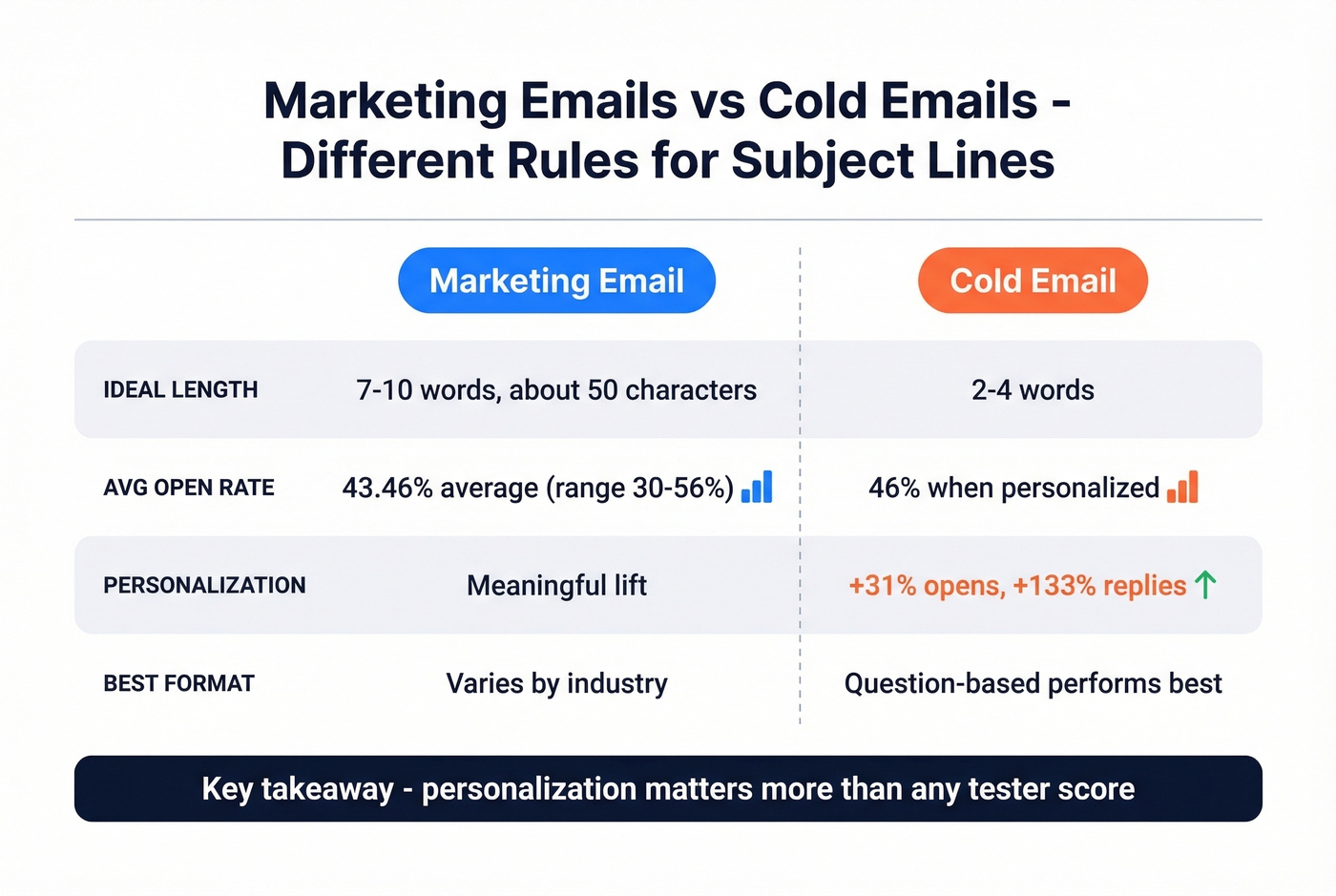
| Factor | Marketing Email | Cold Email |
|---|---|---|
| Ideal length | 7-10 words / ~50 chars | 2-4 words |
| Avg open rate | 43.46% avg, range: 30-56% (MailerLite) | 46% personalized (Belkins) |
| Personalization lift | Meaningful | +31% opens, +133% replies |
| Best format | Varies by industry | Question-based (46% opens) |
For marketing emails, CoSchedule's recommendation of 7-10 words and ~50 characters holds up well. Return Path's research found 61-70 characters optimal for desktop, though mobile truncation kicks in around 30-40 characters. MailerLite's benchmarks across 3.6 million campaigns show a 43.46% average open rate, with industry ranges spanning 30.10% to 55.71%.
Cold email is a different game entirely. Belkins analyzed 5.5 million emails and found that 2-4 word subject lines hit 46% open rates - performance drops steadily beyond 7 words. Personalization is the biggest lever: 46% opens with personalized subject lines vs. 35% without, and reply rates jump from 3% to 7%. Question-based formats matched that 46% open rate as the top-performing structure. If you're running cold outbound, a scoring tool can flag obvious issues, but the real lift comes from relevance and personalization - not from chasing a perfect score. (If you want examples, start with these cold email subject lines.)
Here's our frustration with the whole subject line tester category: they train people to optimize the wrong thing. If your average deal size is under five figures, you probably don't need to agonize over tester scores at all. Write something short, personal, and honest. The data overwhelmingly shows that who you're emailing and whether they receive it matters more than clever wordplay.
A/B Testing Beats Any Score
Stop optimizing for tester scores and start optimizing for your actual audience.
Campaign Monitor documented a 127% increase in click-throughs from systematic A/B testing. The workflow is straightforward: send two subject line variations to small subsets of your list, measure opens over a few hours, then send the winner to the remainder. Most ESPs automate this entirely.
Yet 39% of brands don't A/B test their emails at all. That's a massive missed opportunity. A tester can tell you your subject line is "too long" or "contains spam words." Only your audience can tell you whether they'll open it. Use testers as the starting checklist - flag the obvious issues, generate a few variations - then let A/B testing determine the winner. The data from your own list will always beat a generic algorithm.
The Factor Testers Ignore: List Quality
Sender reputation has a bigger impact on whether your email gets opened than any combination of words in your subject line. If 15% of your list bounces, your domain reputation tanks, and even a perfect subject line lands in spam. 160 billion spam emails get sent every day. Inbox providers are aggressive about filtering, and they care far more about your sending history and authentication than whether you used the word "free."
SPF, DKIM, and DMARC configuration have a bigger impact on inbox placement than any scoring tool can measure. (If you're troubleshooting, start with this email deliverability guide.) Apple Mail Privacy Protection has also inflated open rate metrics across the board, making it harder to know if your subject line improvements are real or just noise. The upstream problem is clear: fix the list before you fix the subject line.
For cold outbound teams, we've seen this play out dozens of times - someone spends an hour perfecting a subject line, then sends it to a list where 20% of the addresses are dead. Prospeo's 5-step email verification catches invalid addresses, spam traps, and honeypots at 98% accuracy, with catch-all domain handling built in. The free tier gives you 75 verifications per month, enough to audit a segment before your next campaign. (If you're diagnosing issues, check your email bounce rate first.)
Testing subject lines against bad contact data is like A/B testing headlines on a broken website. Prospeo gives you 143M+ verified emails refreshed every 7 days - so your open rate reflects your copy, not your data quality.
Start with emails that actually exist. Everything else follows.
FAQ
What is a good subject line tester score?
There's no universal "good" score - a 75 on Omnisend means something completely different from a 75 on CoSchedule. Focus on fixing the specific flags each tool raises (too long, spam words, missing personalization) rather than chasing a number. Run your line through 2-3 tools and look for consensus on what needs fixing.
How many characters should a subject line be?
For marketing emails, aim for around 50 characters or 7-10 words based on CoSchedule's data. Cold emails perform best at 2-4 words per Belkins' 5.5 million email study. Mobile apps truncate after 30-40 characters, so front-load the important words regardless.
Why do different testers give different scores?
Each tool uses its own proprietary algorithm, weighting system, and training data - there's no industry standard. One tool's "spam word" is another's "power word." A gibberish subject line scored between 67 and 99 across four popular testers, proving they check structural patterns rather than actual meaning.
Do emojis help email open rates?
CoSchedule's data suggests emojis can boost open rates by up to 57%, but results vary dramatically by audience. They tend to perform well in B2C promotional emails where personality is expected. In B2B cold outreach, emojis can hurt credibility. A/B test with your specific list to know for sure.
How do I improve open rates without better subject lines?
Clean your email list first - invalid addresses destroy sender reputation faster than any subject line can save it. Then personalize (46% vs. 35% open rate per Belkins), then A/B test systematically. The subject line is the last thing to optimize, not the first.