

Suppression Lists: The Complete Guide for Email Marketers and Sales Teams
It's Monday morning. You sent a 50,000-contact campaign on Friday. Your bounce rate came back at 8%, three spam complaints triggered a Gmail warning, and your domain reputation just dropped from "high" to "low." The culprit isn't your copy or your offer - it's the 4,000 addresses that should've been on your suppression list before you hit send.
A suppression list is the single most underrated deliverability tool in your stack. Get it right and your emails land in inboxes. Get it wrong - or ignore it - and you're burning your domain one campaign at a time.
Quick version: A suppression list is a "do not send" database of email addresses excluded from campaigns - including unsubscribes, hard bounces, spam complaints, and legally mandated removals. Every ESP maintains one automatically, but manual additions (competitors, role accounts, invalid addresses) are your responsibility. Neglecting it tanks deliverability; over-suppressing kills revenue.
The upstream fix: verify emails before they enter your system so your list stays lean.
What Is a Suppression List?
A suppression list is a master "do not send" file that prevents specific email addresses from receiving your campaigns. When you trigger a send, your ESP or outbound tool compares every recipient against this file and removes matches before a single message leaves the server.
The concept extends beyond email. In adtech, the term refers to device ID exclusion files uploaded to ad platforms so you don't retarget converted customers. Same principle, different channel. For this guide, we're focused on email, where the stakes are highest and the rules are strictest.
Think of it as a blocklist you control. ISPs and third parties maintain their own blocklists of flagged IPs and domains. Your internal "do not send" file is the equivalent - a guardrail that protects your sender reputation before external systems have to intervene.
Why Deliverability Depends on It
Email deliverability isn't binary. Your messages don't simply "arrive" or "not arrive." They land in inboxes, get routed to spam, or vanish entirely - and the gap between those outcomes is enormous. Suppression hygiene is one of the biggest levers you have.
Inbox placement across major providers, based on Validity benchmark data:
| Provider | Inbox | Spam | Missing |
|---|---|---|---|
| Gmail | 87.2% | 6.8% | 6.0% |
| Microsoft | 75.6% | 14.6% | 9.8% |
| Yahoo/AOL | 86.0% | 4.8% | 9.2% |
| Apple Mail | 76.3% | 14.3% | 9.4% |
Microsoft and Apple Mail route nearly 15% of messages straight to spam. If you're sending to addresses that have already bounced, complained, or unsubscribed, you're feeding those spam percentages and training ISP algorithms to distrust your domain.
The authentication picture is just as grim. Only 7.6% of domains enforce DMARC, and just 18.2% have valid records. List hygiene and authentication aren't separate problems; they compound each other.
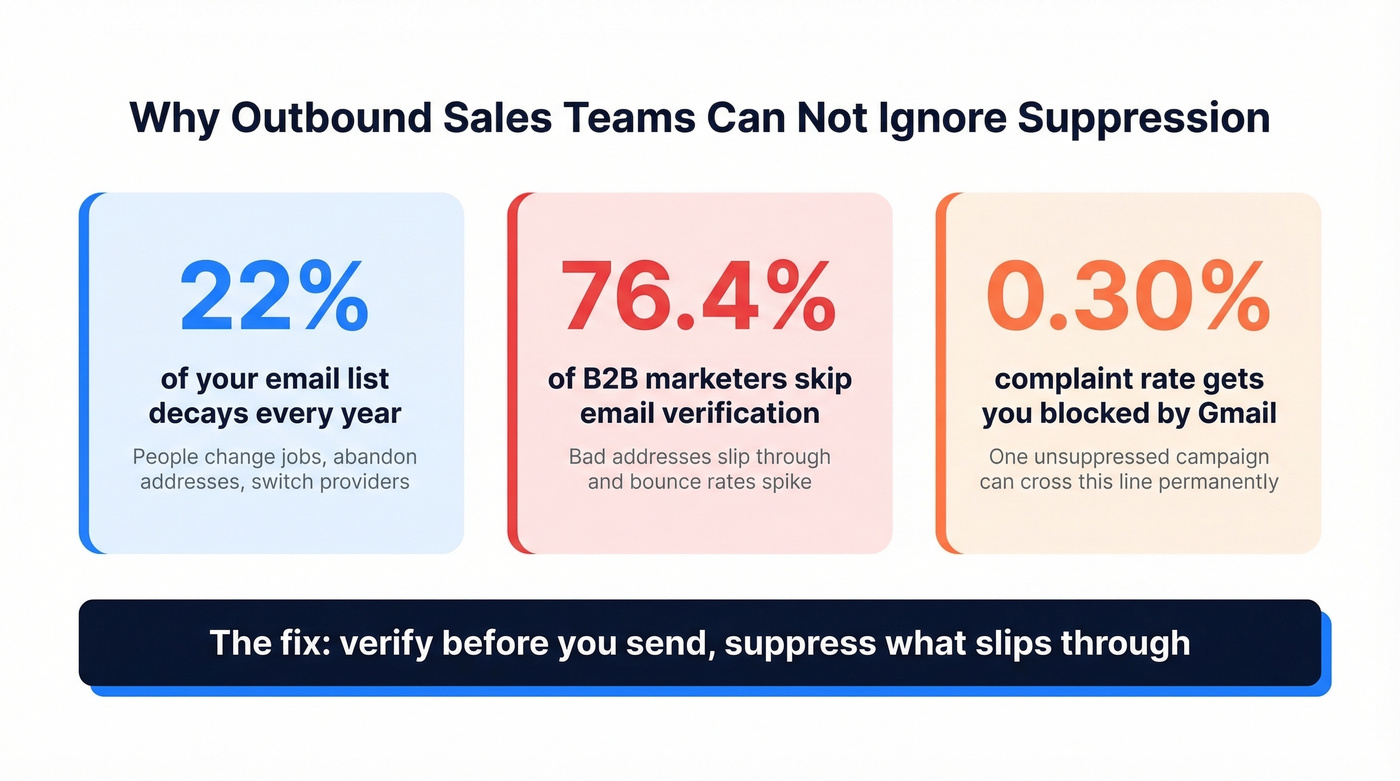
Email lists decay roughly 22% per year. People change jobs, abandon addresses, switch providers. A list that was clean in January has thousands of dead addresses by December. Every one of those dead addresses that isn't suppressed is a bounce waiting to happen.
Gmail and Yahoo's bulk sender rules make this explicit: keep spam complaint rates below 0.10%, and never let them reach 0.30%. Cross that threshold and you're not just losing inbox placement - you're getting throttled or blocked entirely. A well-maintained suppression list is the primary mechanism that keeps you under those lines.
Here's the thing: most teams obsess over email subject lines and send times while ignoring the 22% of their list that's rotting. You'll get more ROI from 30 minutes of list hygiene than from A/B testing your emoji strategy for a week.
What Belongs on a Suppression List
Two categories: the automatic entries your ESP handles and the manual entries that are your job.
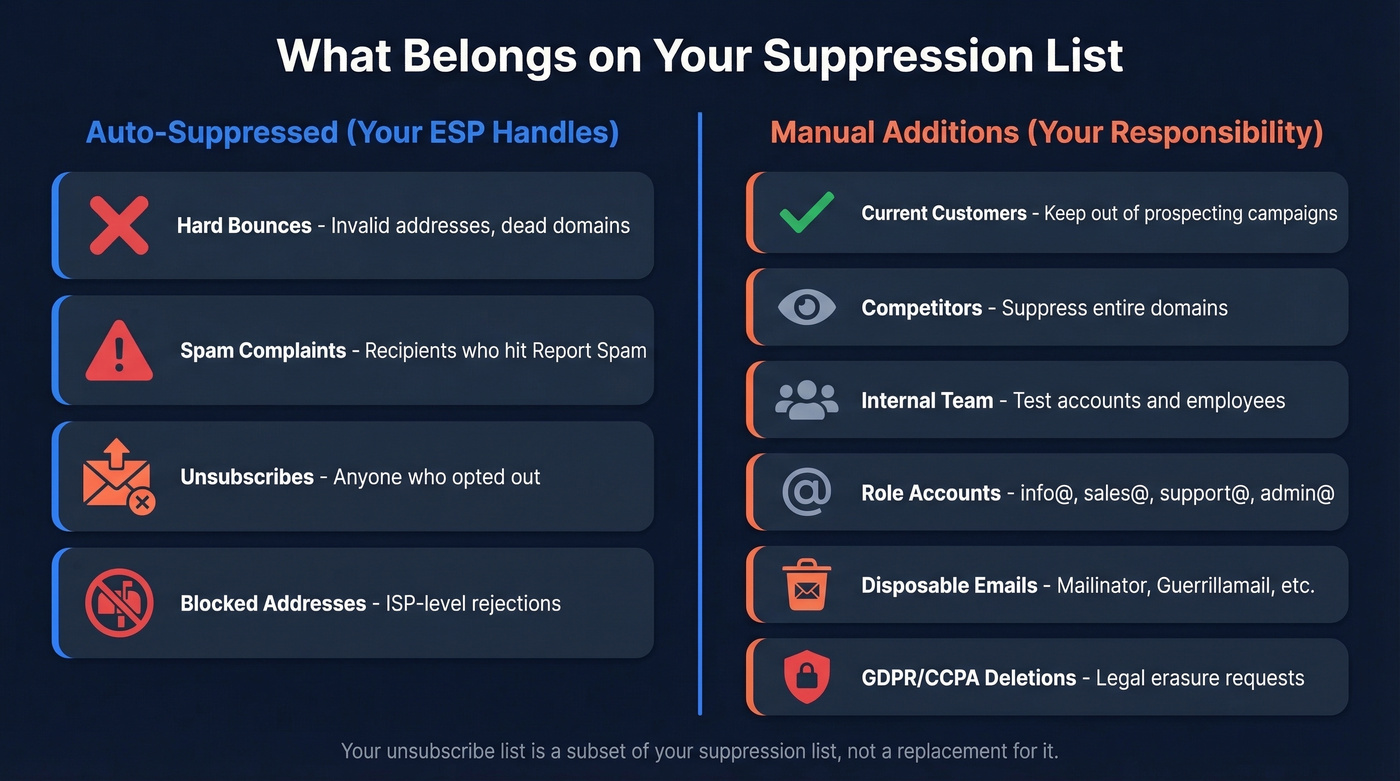
Auto-suppressed (your ESP should handle these):
- Hard bounces - permanent delivery failures (invalid address, domain doesn't exist)
- Spam complaints - recipients who clicked "Report Spam"
- Unsubscribes - anyone who opted out via your unsubscribe link
- Blocked addresses - ISP-level rejections
Manual additions (your responsibility):
- Current customers you don't want in prospecting campaigns
- Competitors and their domains
- Internal team members and test accounts
- Role accounts like info@, sales@, support@, and admin@
- Disposable email domains like Mailinator and Guerrillamail
- GDPR/CCPA deletion requests - people who've exercised their right to erasure
That last category is critical. When someone submits a data deletion request, you're legally required to remove their data - but you still need to remember not to email them again. The standard approach is to keep a hashed or minimal suppression record (email + suppression reason + timestamp) while deleting everything else.
Some organizations also seed their suppression files with trap addresses - unique emails planted in their database that should never receive mail. If a seeded address receives a campaign, it means someone bypassed or ignored the exclusion rules. We've seen this catch internal process failures that would've otherwise gone unnoticed for months.
| Suppression List | Unsubscribe List | Blocklist | |
|---|---|---|---|
| Who controls it | Sender | Recipient action | ISP / third party |
| What it contains | All "do not send" | Opt-out requests only | Flagged IPs/domains |
| Scope | Internal to sender | Subset of suppression | External, industry-wide |
| Consequence of ignoring | Reputation + legal risk | Legal violations | Emails blocked entirely |
Your unsubscribe list is a subset of your suppression list. Without the suppression mechanism enforcing it, clicking "unsubscribe" wouldn't actually do anything.
How the Mechanics Work
The process is straightforward. When a campaign fires, your ESP runs every recipient address against the suppression list. Matches get pulled before any email is sent. No message, no bounce, no complaint.

Most of this happens automatically. A recipient clicks "unsubscribe" - they're added. An email hard bounces - added. Someone reports spam - added. Your ESP handles these events in real time, which is why switching ESPs requires migrating your suppression data. Teams forget this step constantly, and the consequences are ugly.
One operational detail: some platforms store entries preserving the original case and require exact-case matches for management calls. Always normalize addresses to lowercase when importing files so you don't create mismatches between systems.
Manual entries require more discipline. You need a process for bulk-importing exclusion files and a cadence for reviewing them. Soft bounces - temporary failures like a full inbox - often follow a graduated schedule: 7 days, then 14, then 30, then 180 as repeats accumulate. Hard bounces are suppressed immediately, and many systems keep those entries for around 180 days unless manually cleared. Spam complaints are immediate and typically non-expiring.
Store the reason and timestamp for every entry. When your marketing director asks "why can't we email this list?", you need receipts.

Your suppression list exists because bad data got in. Prospeo's 5-step verification and 7-day data refresh cycle stop invalid emails at the source - before they ever touch your campaigns. 98% email accuracy means fewer bounces, fewer complaints, and a suppression list that stays short.
Fix the problem upstream - start with data that doesn't need suppressing.
Suppression for Outbound Sales
Marketing teams have ESPs that auto-suppress. Outbound sales teams often don't. If you're running cold email through Smartlead, Instantly, or a custom SMTP setup, suppression is entirely on you.
The categories are different too. Beyond bounces and complaints, outbound teams need to suppress:
- Existing customers and active pipeline. Nothing kills a deal like a cold email to someone your AE is already working.
- Entire competitor domains, not just individual addresses.
- Role accounts that'll never convert and often trigger spam filters.
- Addresses from previous campaigns that bounced or complained.
- Anyone who replied "not interested" or "remove me" - even without a formal unsubscribe link.
Only 23.6% of B2B marketers verify email lists before campaigns. For outbound sales teams, that number is lower. The result is predictable: bad addresses slip through, bounce rates spike, and domains get flagged.
The upstream fix is verification before any contact enters your sequence. Prospeo's 5-step email verification catches invalid addresses, spam traps, and honeypots before they damage your domain - 98% accuracy across 143M+ verified emails. At roughly $0.01 per email, it's cheaper than a single bounced campaign that tanks your sender reputation.
Legal Requirements
Suppression lists aren't just a deliverability best practice - they're a legal requirement under multiple frameworks.
CAN-SPAM
CAN-SPAM requires a functioning opt-out mechanism in every commercial email. Once someone unsubscribes, you have 10 business days to process the request. CAN-SPAM doesn't require you to delete the contact - just suppress them from future sends. You can keep the suppression record indefinitely as proof of compliance.
GDPR: Storage and Erasure
GDPR is stricter. Article 5(e) mandates storage limitation - you can't keep personal data longer than necessary. Article 17 grants the right to erasure: delete personal data "without undue delay" upon a valid request.
You need to delete the person's data, but you also need to remember not to email them again. The standard solution is keeping a minimal, hashed suppression record - just enough to prevent re-contact, with everything else purged. Cumulative GDPR fines have reached approximately EUR 5.88B across 2,245 enforcement actions. This isn't theoretical risk.
CCPA/CPRA
California's framework gives consumers the right to delete their data, with a 45-day processing window. Opt-out-of-sale requests must be processed within 15 business days. Penalties run $2,500 per unintentional violation and $7,500 per intentional one. Eight new comprehensive state privacy laws took effect in 2025 alone, expanding similar requirements beyond California.
2026 Bulk Sender Rules
Gmail and Yahoo's bulk sender requirements apply to anyone sending 5,000+ messages per day - and the classification is permanent once triggered. Requirements include SPF, DKIM, and DMARC authentication, TLS encryption, valid DNS records, and one-click unsubscribe (RFC 8058) for all marketing email.
The complaint threshold ties directly to suppression: keep rates below 0.10%, never reach 0.30%. Every unsuppressed address that bounces or generates a complaint pushes you closer to that line.
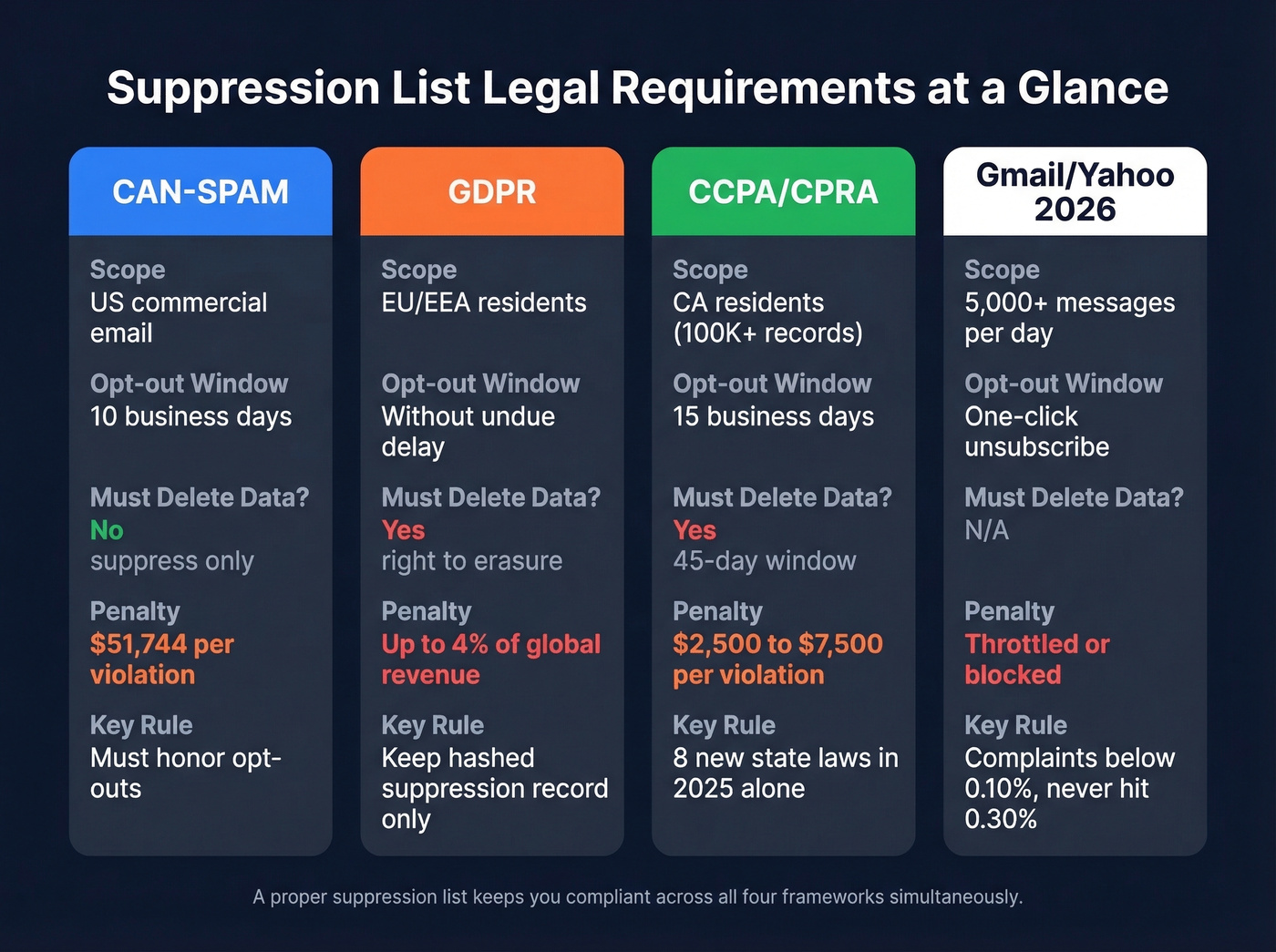
| CAN-SPAM | GDPR | CCPA/CPRA | Gmail/Yahoo | |
|---|---|---|---|---|
| Scope | US commercial email | EU/EEA residents | CA residents (100K+) | 5,000+ msgs/day |
| Opt-out window | 10 business days | Without undue delay | 15 business days | One-click unsub |
| Deletion required | No (suppress only) | Yes (right to erasure) | Yes (45-day window) | N/A |
| Penalties | $51,744/violation | Up to EUR 20M or 4% rev | $2,500-$7,500/each | Throttling/blocking |
Common Mistakes
We've audited dozens of email programs, and the same five mistakes show up every time.
1. Emailing suppressed contacts for "re-engagement." Your CEO sees 200,000 suppressed contacts and calls it "revenue on the table." The answer is no. The consensus on r/Emailmarketing is unanimous - blasting suppressed profiles, even from a different subdomain, is a deliverability disaster. Those contacts were suppressed for a reason.
2. Deleting suppressed contacts instead of flagging them. This is a common CRM hygiene debate. If you delete a bounced contact entirely, nothing stops that address from re-entering your system through a list import or form submission. Suppress the email, keep the record, and try to find a replacement address before writing the contact off.
3. Over-suppressing. One Klaviyo user on r/ecommerce reported 135,000 suppressed profiles out of 246,000 total - 55% of their database. They were suppressing anyone who hadn't opened recently, partly for deliverability and partly to reduce their ESP bill. That's too aggressive. Suppression should be surgical, not a cost-cutting tool.
4. Cleaning once a year. Email lists decay roughly 22% annually. If you're only auditing once a year, you're spending 9+ months sending to stale addresses. Quarterly is the minimum; monthly is better for high-volume senders.
5. Buying or renting lists. A purchased list blast typically produces 25% bounce rates and 2% spam complaint rates - both catastrophic when the industry standard for complaints is under 0.1%. Every address on a purchased list that bounces ends up on your suppression list, bloating it with contacts that never should've been there in the first place.
Best Practices for 2026
Let's break this down into the fundamentals that actually move the needle.
Automate everything you can. Bounces, complaints, and unsubscribes should flow into your exclusion file in real time. If your ESP doesn't handle this automatically, switch ESPs.
Verify before sending. Catching bad addresses upstream means fewer bounces entering your suppression list, cleaner sends, and a sender reputation that stays healthy. In our experience, teams that verify before every campaign see bounce rates drop below 3% consistently - one of our customers, Stack Optimize, maintains 94%+ deliverability across all their clients using this approach.
Hash lists when sharing with third parties. If you're uploading suppression files to ad platforms or sharing with partners, hash the email addresses with SHA-256. Never share raw lists externally.
Store source, reason, and timestamp for every entry. "Suppressed" isn't enough. You need "hard bounce, 2026-03-15, spring campaign" so you can audit intelligently.
Audit quarterly. Review manual suppressions, check for over-suppression, and verify that automated rules are firing correctly. Skip this if you're sending fewer than 1,000 emails a month - at that volume, real-time auto-suppression is probably sufficient on its own.
Implement preference centers. Instead of a binary subscribe/unsubscribe, let recipients choose content types and frequency. A preference center reduces full unsubscribes by giving people control without leaving your list entirely.
If you want the broader playbook, start with an email deliverability guide and then tighten your sender reputation process.
Suppression Beyond Email
Suppression lists aren't just an email concept. In paid advertising, you upload customer lists or device ID files to exclude existing customers from acquisition campaigns - same logic, different channel.
Mobile advertising relies on device identifiers (IDFA on iOS, GAID on Android) for suppression. But privacy frameworks are tightening: Apple's ATT requires explicit opt-in for IDFA access, and Android's Privacy Sandbox is restricting GAID usage while pushing alternatives like contextual targeting and first-party data. With 95% of Android apps collecting at least one device identifier, the principle stays the same - don't contact people who shouldn't be contacted - but the mechanics are evolving fast.
FAQ
How often should I update my suppression list?
Auto-suppression handles bounces, complaints, and unsubscribes in real time - that part runs itself. Manual review of role accounts, competitors, and domain-level suppressions should happen quarterly at minimum. High-volume senders (50K+ emails/month) should audit monthly, since lists decay roughly 22% per year.
Can I remove someone from a suppression list?
Only if the person explicitly re-opts in through a confirmed action like double opt-in. Never remove unsubscribes or spam complaints unilaterally - that violates CAN-SPAM and GDPR. Hard bounces should stay suppressed unless the address is re-verified as valid through a verification tool, not a guess.
Do suppression lists apply to transactional emails?
Suppression lists primarily govern marketing email, but permanently invalid addresses should be suppressed across all email types. Sending to dead addresses damages your sender reputation regardless of whether the message is a receipt, a password reset, or a promotional blast.
What's the difference between a suppression list and a blocklist?
A suppression list is sender-controlled - you decide which addresses to exclude from your campaigns. A blocklist is maintained by ISPs or third parties like Spamhaus and flags entire IPs or domains caught sending spam. You manage one; the other manages you.
For more on authentication standards that work alongside suppression, see Google's bulk sender guidelines and the DMARC specification at dmarc.org.
Email lists decay 22% per year. Prospeo refreshes every record every 7 days - not the 6-week industry average - so the contacts you pull are verified and current. That means fewer hard bounces flooding your suppression file and more emails landing in real inboxes.
Clean data in, clean campaigns out. Starting at $0.01 per email.