

How to Test If an Email Is Valid - What Actually Happens When You Click "Verify"
You paste an email into a free checker, the tool says "valid," you drop it into your sequence, and it bounces. Now your bounce rate's climbing, your ESP is flagging your domain, and you're left wondering what "valid" even means. Validity's 2024 benchmark found roughly 1 in 6 emails never reach the inbox - an 84% placement rate sounds fine until it's your pipeline on the line.
The Short Answer
"Valid" means four things checked in sequence: syntax is correct, the domain has working mail servers, the mailbox exists, and the address isn't a disposable or spam trap. No verifier nails all four 100% of the time. In a 3,000-email benchmark test, the top score was 70% accuracy.
What "Valid" Actually Means
Think of email validity as layers, not a binary switch.
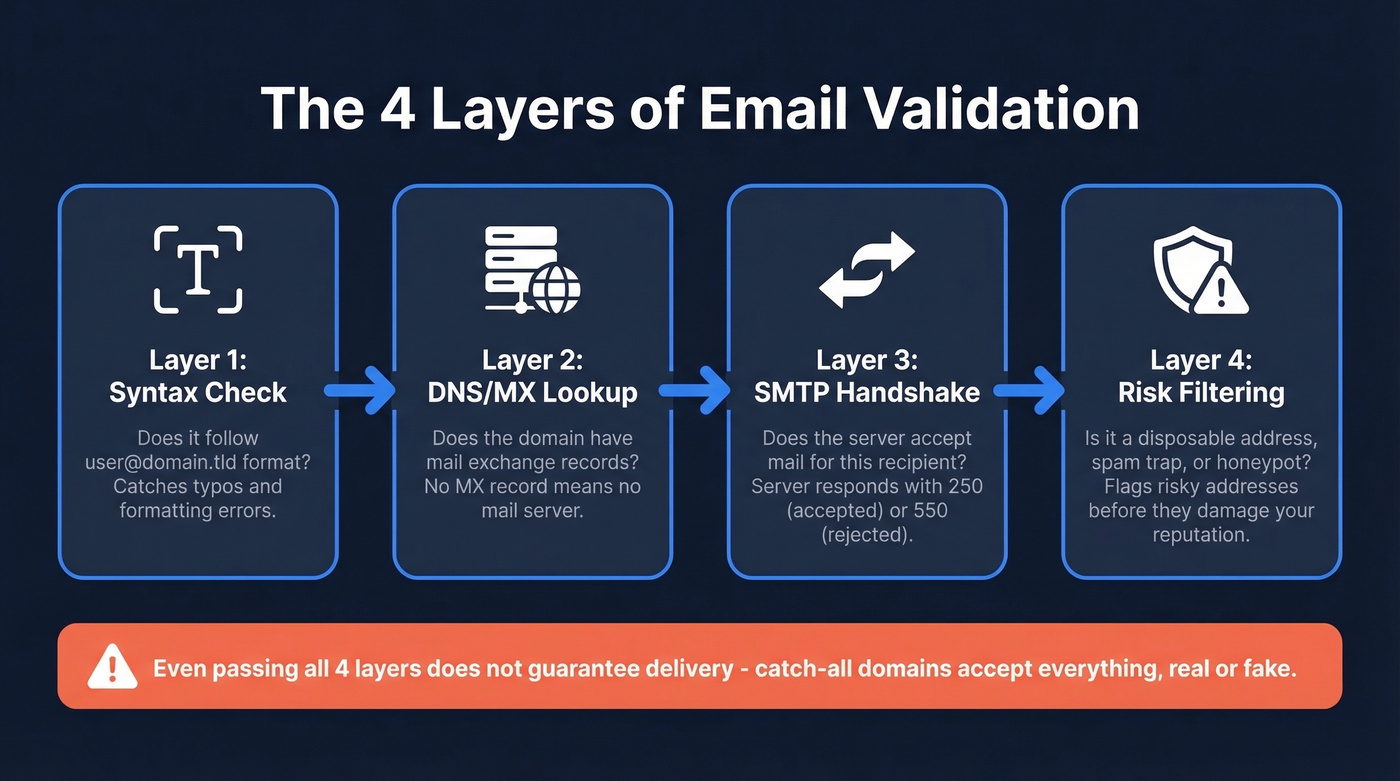
First comes syntax - does the address follow the right format? Then DNS: does the domain have MX records pointing to a real mail server? Next, the SMTP check: does that server accept mail for this specific recipient? Finally, risk filtering: is this a disposable address, a known spam trap, or a honeypot?

Even passing all four layers doesn't guarantee delivery. Catch-all domains accept mail for every address - real or fake - so the server says "yes" to everything. In B2B lists, 15-30% of addresses sit on catch-all domains. We've seen batches where 28% were catch-all. That's a massive blind spot for any verifier that treats a server's "accepted" response as proof the mailbox is real.
How Verification Actually Works Under the Hood
Every verification tool follows roughly the same protocol:
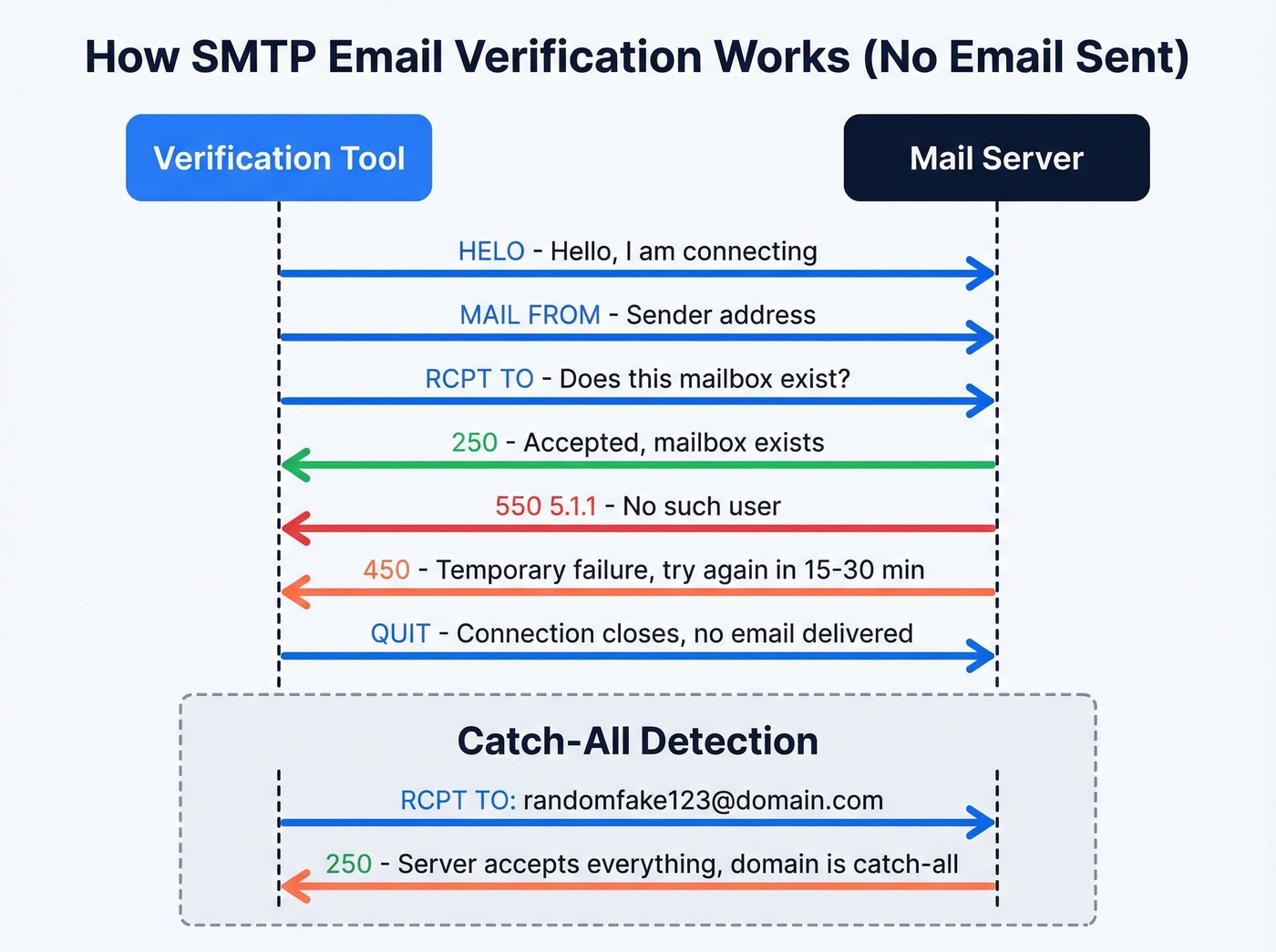
- Syntax check - confirms the address follows
user@domain.tldformatting. Fast, trivial, catches typos. - DNS/MX lookup - queries the domain's DNS records for mail exchange servers. No MX record means no mail server, which means the address is dead.
- SMTP handshake - connects to the mail server on port 25 and runs through the protocol:
HELOthenMAIL FROMthenRCPT TO. - Response analysis - the server replies with a code.
250means accepted.550 5.1.1means "no such user." A450means temporary failure, often greylisting, which requires a retry in 15-30 minutes. - Catch-all detection - the tool sends a
RCPT TOfor a random, obviously fake address at the same domain. If the server still returns250, it's a catch-all, and every result from that domain gets flagged as "risky."
No email is actually sent - the connection closes before delivery. You can technically do this yourself with nslookup -q=mx domain and telnet mxhost 25, but it's slow, unreliable at scale, and aggressive probing can get your IP blacklisted fast.
Here's the thing: servers increasingly obscure mailbox existence to prevent harvesting. Some accept everything then silently discard. Strong verifiers compensate with multi-pass checks from different IPs and time windows, and the best systems map delayed bounces back to earlier verification signals to continuously improve their models - something a single manual SMTP probe can't replicate.

The best verifier in that 3,000-email benchmark scored 70%. Prospeo's 5-step verification - with catch-all handling, spam-trap removal, and honeypot filtering - delivers 98% email accuracy. Why verify after the fact when you can source pre-verified emails at $0.01 each?
Skip the verify-after-the-fact workflow. Start with clean data.
Why Free Checkers Get It Wrong
Most basic free checkers run a one-pass SMTP check and call it a day. That catches obviously dead addresses, but it falls apart on the edges - and the edges are where your email deliverability lives.
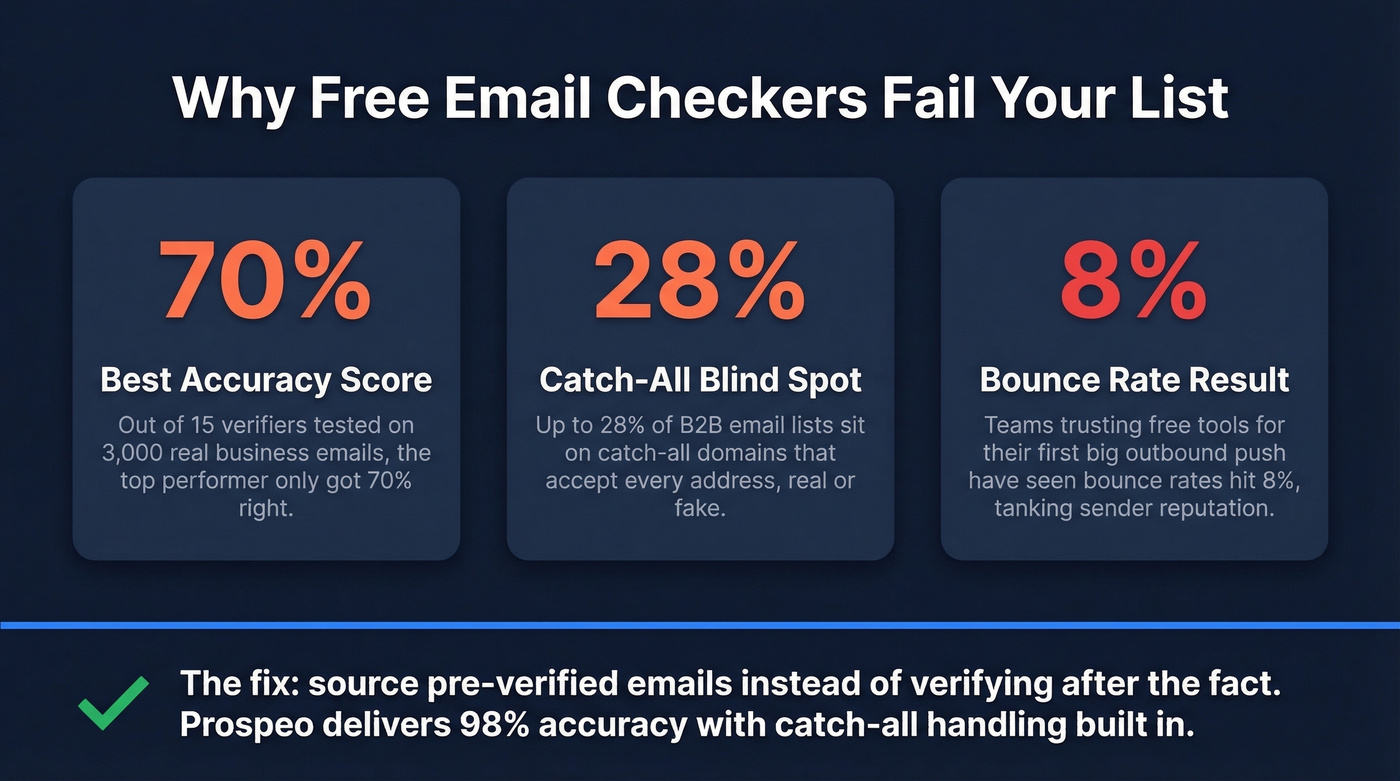
The 3,000-email benchmark from Hunter is revealing: 15 verifiers were tested against real business emails, and the top score was 70%. Not 99%. Not 95%. Seventy percent. Accuracy dropped further on mid-market and enterprise domains with stricter server configurations. On developer forums like Stack Overflow, the consensus matches: SMTP-based checks help clean obviously dead addresses but can't reliably confirm mailbox existence on their own.
The catch-all problem compounds this. If 28% of your list sits on catch-all domains, a basic verifier marks them all "valid" because the server technically accepted the request. You upload 5,000 "verified" contacts, launch your campaign, and watch an 8% bounce rate tank your sender reputation. We've seen this exact scenario play out with teams who trusted a free tool for their first big outbound push.
Let's be honest: most teams don't need a better verifier - they need data that's verified before it reaches them. Sourcing pre-verified emails eliminates the verify-after-the-fact workflow entirely, and it's the single biggest deliverability improvement most B2B teams can make.
Best Tools to Test If an Email Is Valid
Prospeo
Instead of building a list and then running it through a separate verifier, Prospeo finds and verifies B2B emails in one workflow. The 5-step verification process handles catch-all domains, strips spam traps, and filters honeypots - the exact failure points where free tools break down.

The database covers 143M+ verified emails across 300M+ professional profiles, all refreshed every 7 days compared to the 6-week industry average. Email accuracy sits at 98%. The free tier gives you 75 emails per month to test, and paid plans work out to roughly $0.01 per email. For B2B teams, this is the cleanest path from "I need this person's email" to "it's verified and in my sequencer." Snyk's team of 50 AEs cut their bounce rate from 35-40% to under 5% after switching, and their AE-sourced pipeline jumped 180%.
If you're comparing verification-first workflows, see our breakdown of email list providers and data enrichment services that keep records fresh.
Hunter
Hunter's free verifier is the go-to for quick single-email checks. It runs format validation, gibberish detection, disposable/webmail filtering, MX record checks, and SMTP probing. You get 100 free verifications per month, with paid plans starting at $34/mo.

What sets Hunter apart is transparency - they published the benchmark showing 70% as the best accuracy score across 15 tools. Use it for spot-checking individual addresses or small batches. Skip it if you need to find emails, not just verify ones you already have. If you do need alternatives, compare options in our guide to Hunter alternatives.
ZeroBounce
Use this if you're focused on deliverability beyond verification - ZeroBounce bundles abuse detection, toxicity scoring, and activity tracking alongside standard checks. Starts around $16/mo for 2,000 emails, with 100 free monthly verifications.
Skip this if you need email finding built in. ZeroBounce is verification-only, so you'll need a separate data source feeding it.
Email Hippo
Dead simple UI for one-off checks. You get 100 free verifications per day, which is generous for individual use. Paid pricing varies by product but expect something in the $10-20/mo range. Best for quick, ad-hoc checks rather than production workflows.
NeverBounce
Solid bulk list cleaner at roughly $0.008 per email on pay-as-you-go. Straightforward, no frills - exactly what you want from a bulk verifier. No free tier, though.
Bouncer
Budget-friendly at $8 per 1,000 verifications on pay-as-you-go. Good option for mid-size list cleaning when you don't need the extras. If you're shopping around, our list of Bouncer alternatives covers similar tools.
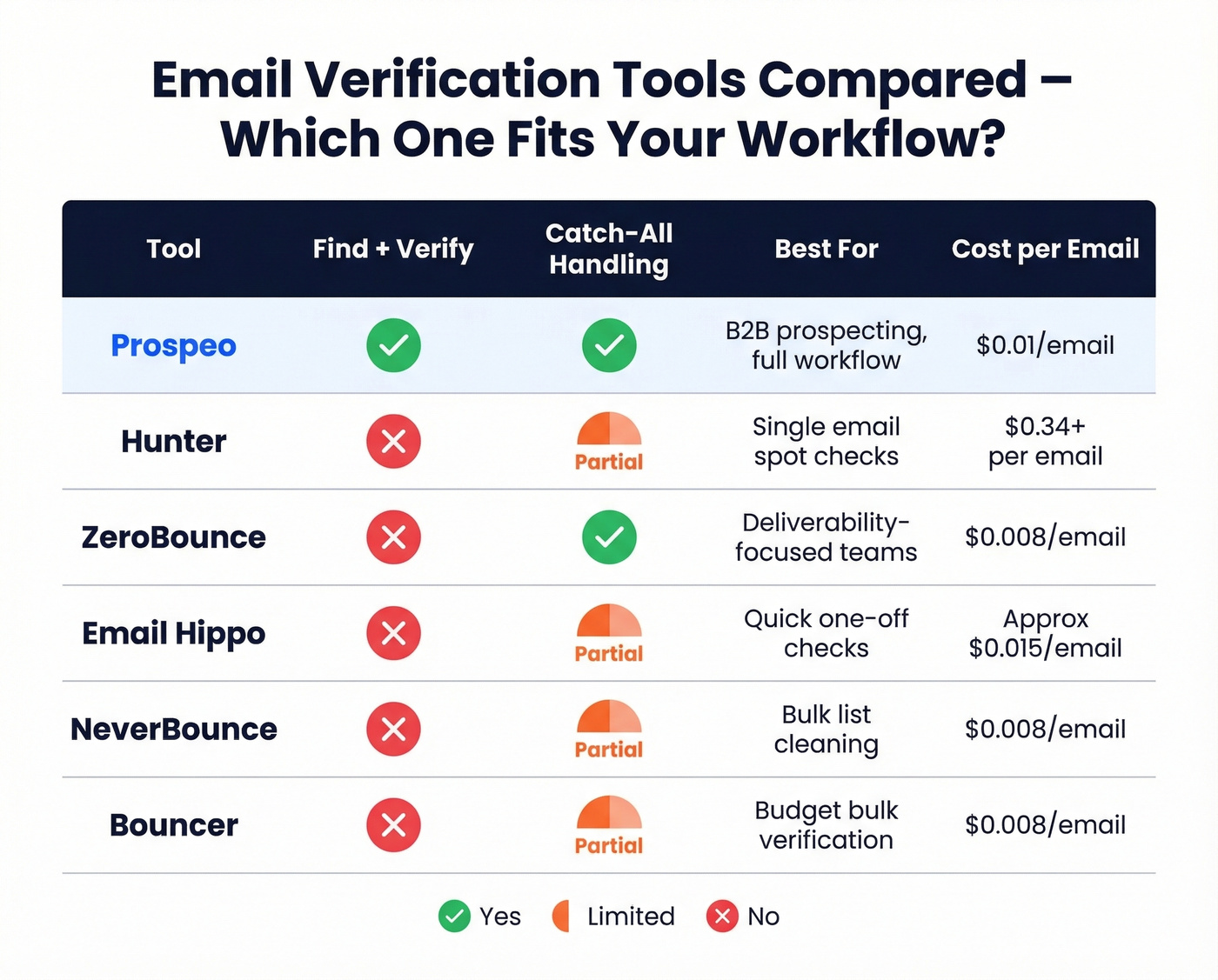
| Tool | Free Tier | Paid From | Best For |
|---|---|---|---|
| Prospeo | 75 emails/mo | ~$0.01/email | B2B prospecting (find + verify) |
| Hunter | 100/mo | $34/mo | Single-email checks |
| ZeroBounce | 100/mo | ~$16/mo | Deliverability teams |
| Email Hippo | 100/day | ~$15/mo | Quick one-off checks |
| NeverBounce | None | ~$0.008/email | Bulk list cleaning |
| Bouncer | None | $8/1,000 | Budget bulk verification |
Re-Verify Before You Send
Verified lists decay. After just four weeks, roughly 2% of a previously clean list goes invalid - people change jobs, mailboxes get deactivated, domains expire. That sounds small until you're sending 10,000 emails and 200 bounce.
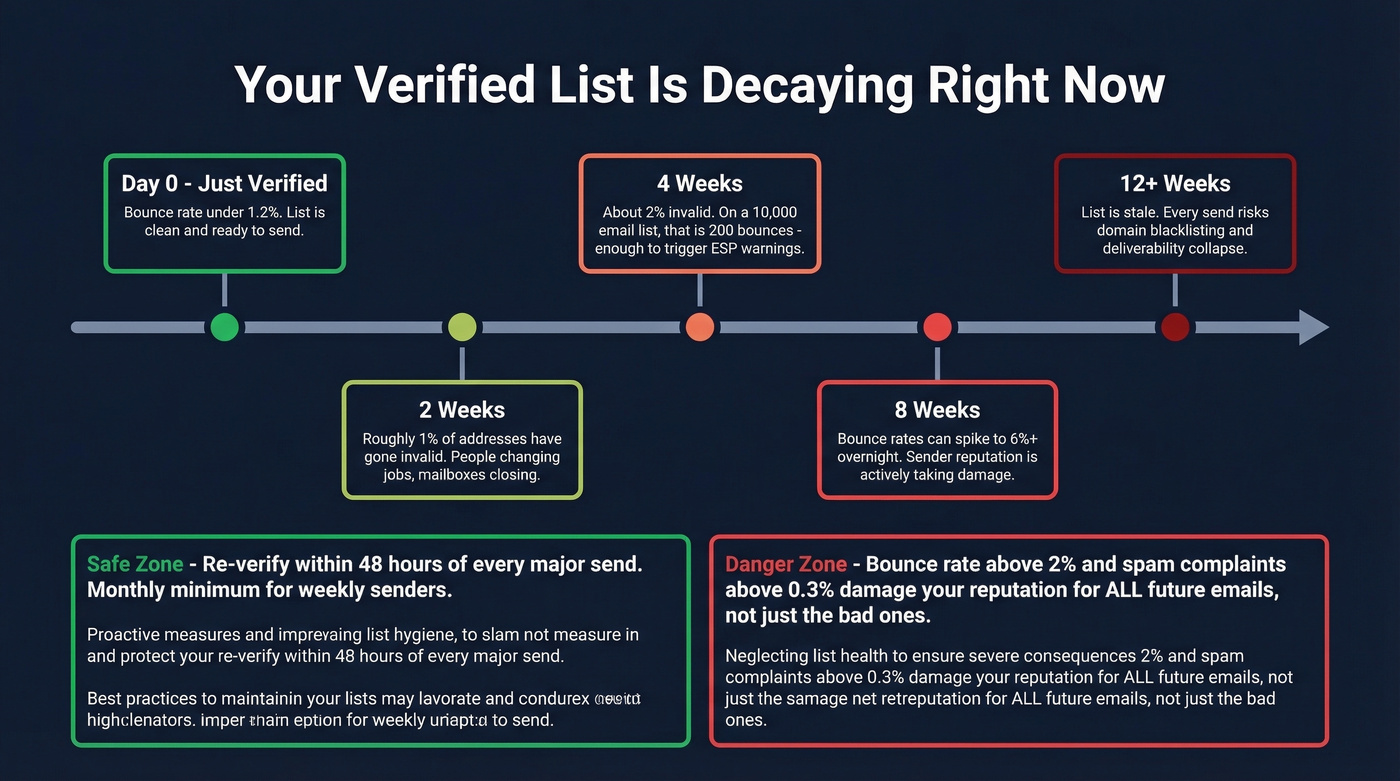
In our experience, lists that haven't been re-verified in 30+ days are the number one cause of sudden bounce rate spikes. We've watched teams go from a clean 1.2% bounce rate to 6%+ overnight because they reused a list from two months ago without rechecking it.
Re-verify before every major campaign. Keep your bounce rate under 2% and spam complaints below 0.3%. Anything above those thresholds actively damages your sender reputation - and that affects every email you send going forward, not just the bad ones. The simplest way to test if an email is still valid is to run your list through a multi-step verifier right before launch, not days or weeks ahead. If you're troubleshooting, this guide on email bounce rate helps decode what the bounces actually mean, and how to improve sender reputation covers the recovery steps.
Catch-all domains fool every free checker on this list. Prospeo's proprietary infrastructure handles them natively - no separate verification step, no surprise bounces. Snyk's 50 AEs dropped from 35-40% bounce rates to under 5% and added 200+ opportunities per month.
Get emails that actually land. 143M+ verified and refreshed every 7 days.
FAQ
How can I check if an email is valid without sending a message?
Verification tools probe the mail server using SMTP commands without delivering a message. The server's response code - 250 for accepted, 550 for invalid - indicates whether the mailbox exists. Catch-all domains can give false positives since they accept everything, so look for tools with dedicated catch-all detection.
Why do different email checkers give different results?
Each tool uses different infrastructure, IP addresses, and retry logic. Mail servers respond inconsistently - greylisting, rate-limiting, and catch-all configurations mean the same email can return "valid" on one tool and "unknown" on another. In benchmark tests, top overall accuracy was just 70%.
What's the most accurate way to verify an email address?
Use a tool that verifies at the point of data collection rather than after the fact. A 5-step verification process - including catch-all handling, spam-trap removal, and honeypot filtering - paired with a frequent data refresh cycle keeps bounce rates under 2%. Hunter and ZeroBounce are solid alternatives for verification-only workflows.
How often should I re-verify my email list?
Re-verify within 48 hours of every major send. Lists lose roughly 2% validity per month as people change roles and mailboxes get deactivated. For teams sending weekly campaigns to 5,000+ contacts, monthly re-verification is the minimum to stay under the 2% bounce-rate threshold.