

UCEPROTECTL3: The Blacklist You Can (Mostly) Ignore
You open a monitoring alert on a Tuesday morning. Your office IP is blacklisted by UCEPROTECTL3. You didn't send spam. You didn't change anything. Your stomach drops, you start Googling, and you briefly wonder if a VPN would fix it.
Relax. You almost certainly don't need to do anything.
What You Need (Quick Version)
- Gmail and Microsoft don't use UCEPROTECT for mail filtering decisions. No bouncebacks referencing UCEPROTECT means no problem.
- L3 listings auto-expire after 7 spam-free days. Don't rush.
- Don't pay for express delisting. It costs about 89 CHF (~$90-$100), doesn't fix the root cause, and reviewers report getting relisted.
- Fix Spamhaus and Barracuda first - those are the blacklists that actually affect inbox placement.
What Is UCEPROTECTL3?
UCEPROTECT operates three escalating blacklist levels. Level 1 targets individual IPs. Level 2 targets network allocations (subnets). Level 3 - the one you're reading about - targets entire ASNs.
An ASN is a block) of IP addresses managed by a single organization, usually an ISP or hosting provider. Think of it as a neighborhood. The L3 blacklist flags the entire neighborhood because some houses are sending spam. Your server could be perfectly clean, but if your ISP's ASN gets listed, you're caught in the blast radius.
| Level | What's Listed | Scope | Listings (March 2026) |
|---|---|---|---|
| L1 | Individual IPs | Narrow | ~93,600 IPs |
| L2 | Network allocations | Medium | ~10,600 allocations |
| L3 | Entire ASNs | Massive | ~1,000 ASNs |
The jump from L1 to L3 is enormous. A single ASN can contain millions of IP addresses. That's why L3 is so controversial - and why most deliverability experts recommend ignoring it.
How the Escalation Works
Level 2 escalation follows a threshold system based on how many L1-listed IPs appear within a network allocation over 7 days. Smaller allocations get listed faster. Most guides skip this detail entirely, but the thresholds come directly from UCEPROTECT's own policy documentation:
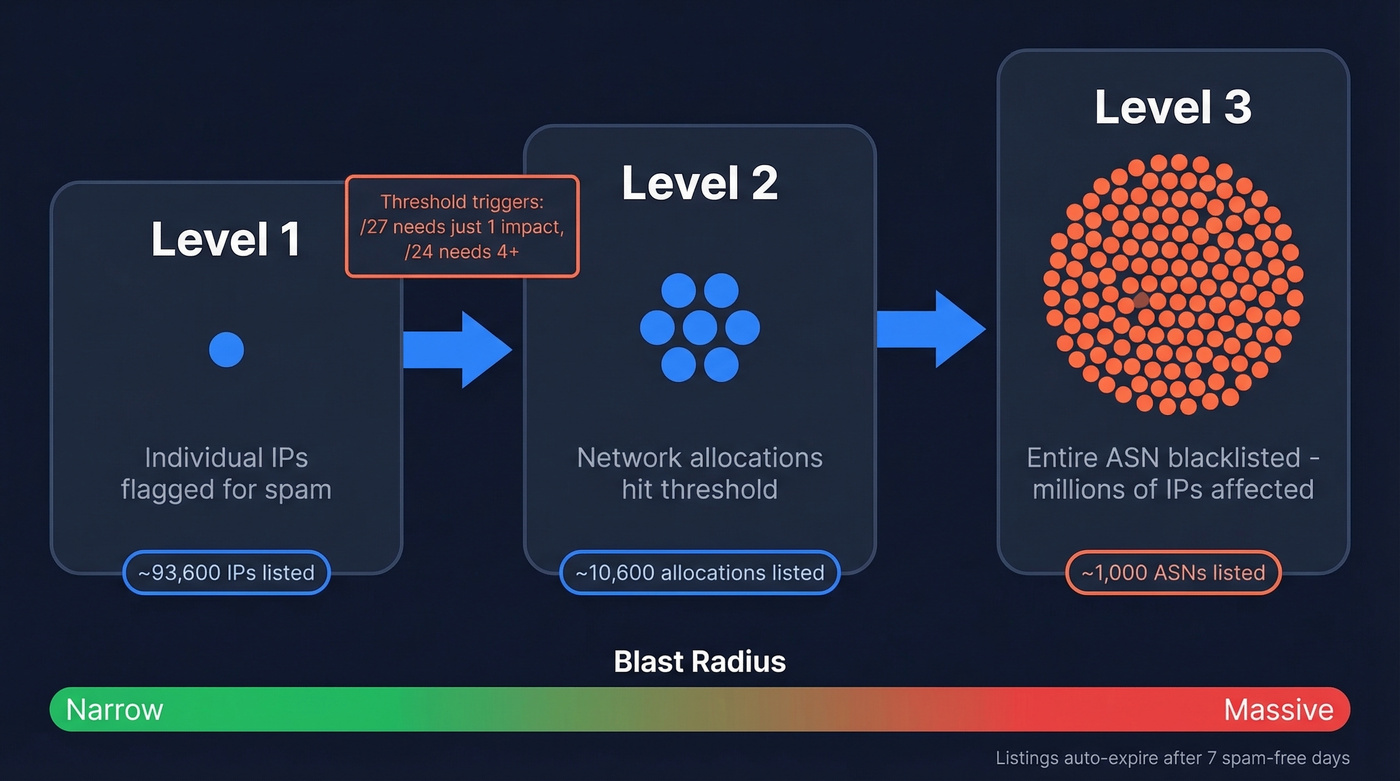
| Allocation Size | Impacts to Trigger L2 |
|---|---|
| /27 | 1 |
| /26 | 2 |
| /25 | 3 |
| /24 | 4+ |
| /23 | 6 |
| /10 | 954 |
There's also a "provider protection" mechanism that limits how fast impacts accumulate. For the first 24 hours after a new L1 listing, each IP can only generate one additional impact every 4 hours. After 24 hours, that window shrinks to 1 hour. After 48 hours, protection disappears and every impact counts indefinitely.
One escape hatch exists for self-hosted mail infrastructure: clean IPs registered at ips.whitelisted.org get excluded from Level 2 listings.
Level 3 escalation works similarly - when enough of an ASN's allocations are flagged, the whole ASN gets listed - but the exact thresholds aren't published as transparently.
Does This Listing Actually Affect Your Email?
For most senders, a UCEPROTECTL3 listing has zero practical impact.
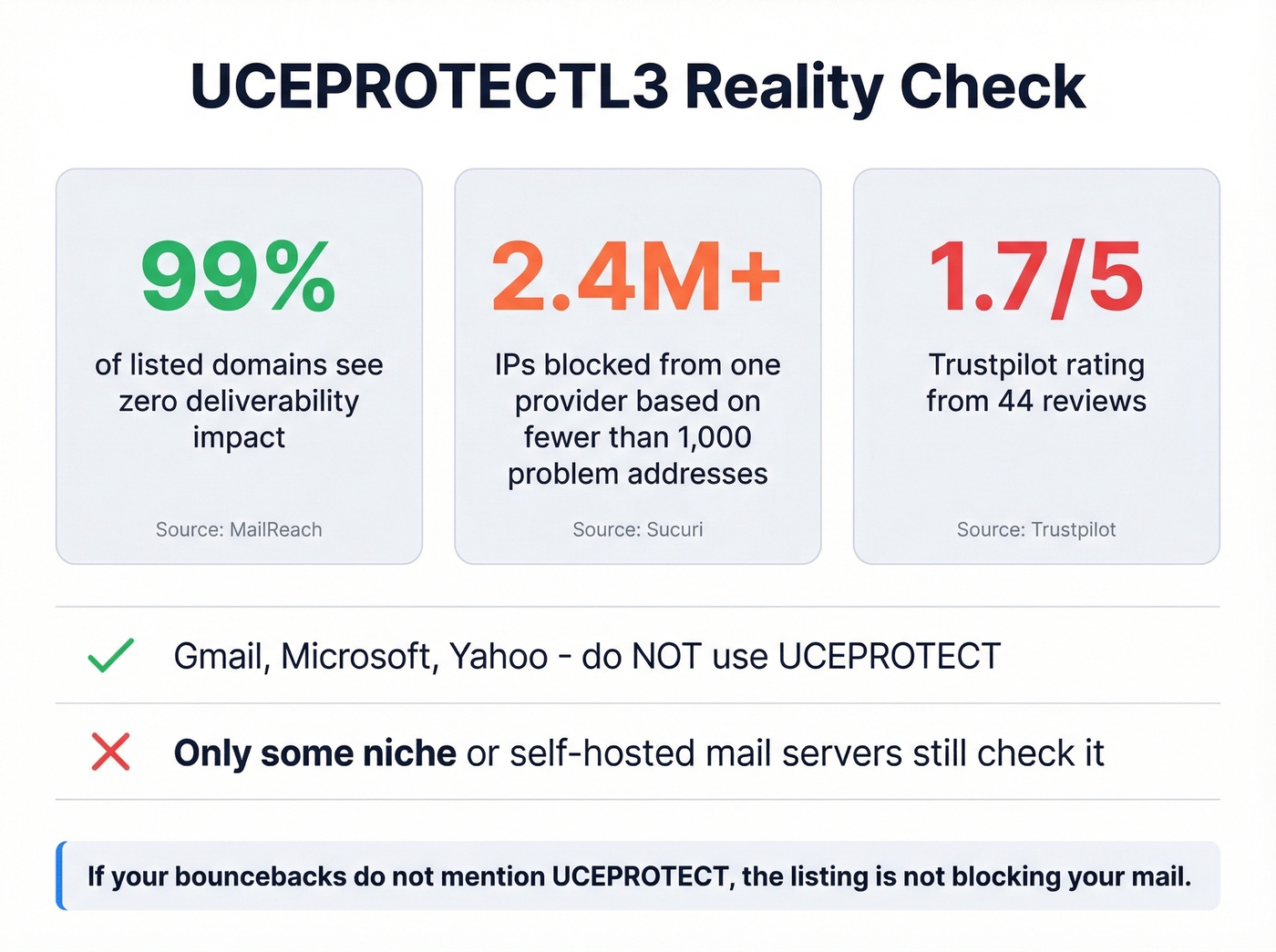
Major email providers like Gmail and Microsoft don't use UCEPROTECT for delivery decisions. They rely on their own internal reputation systems, and the blacklists that tend to matter in day-to-day deliverability triage are Spamhaus and Barracuda.
The simplest diagnostic: check your bouncebacks. If rejection messages don't reference UCEPROTECT, the listing isn't blocking your mail. Period.
You'll see threads claiming Hotmail blocks mail based on these listings. In practice, the impact is overwhelmingly concentrated in smaller or niche receiving setups that still consult the list. MailReach puts it bluntly: across their customer base, hundreds of domains are listed on UCEPROTECTL3, and for 99% of them it has zero impact on sender reputation and deliverability.
If you're sending through Google Workspace or Microsoft 365, this listing is irrelevant. If you're running a self-hosted mail server on a small ISP, there's a narrow scenario where a niche receiving server checks it - but that's the exception, not the rule.
Sucuri documented that UCEPROTECT blocked over 2.4 million IP addresses from a single provider based on complaints about fewer than 1,000 addresses. That ratio tells you everything about how this list operates.

UCEPROTECTL3 won't tank your deliverability - but a 35% bounce rate will. Bad email data gets you listed on Spamhaus and Barracuda, the blacklists Gmail and Microsoft actually check. Prospeo's 5-step verification delivers 98% email accuracy, keeping bounce rates under 4% across 15,000+ companies.
Stop fixing blacklist symptoms. Fix the data that causes them.
The Controversy - Is UCEPROTECT a Scam?
A significant portion of the email community considers UCEPROTECT's business model to be extortion. Let's be honest: that's generous.
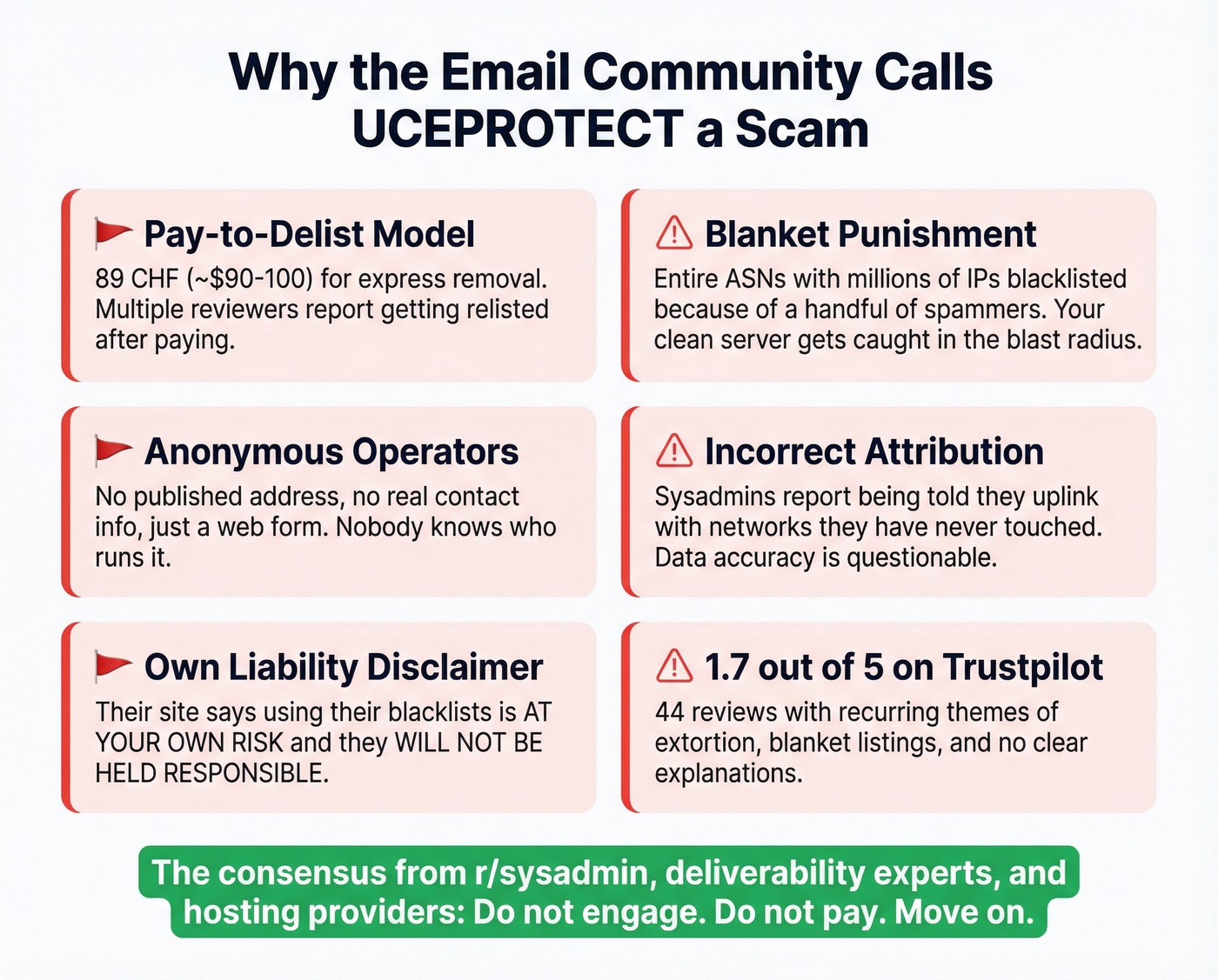
Trustpilot shows a 1.7 out of 5 rating from 44 reviews. The recurring themes are predictable: blanket listings of entire IP ranges, no clear explanation for why you're listed, and a paid "express delisting" option that costs about 89 CHF. Multiple reviewers report getting relisted after paying.
The organization behind UCEPROTECT is essentially anonymous. There's no published address, no real contact information beyond a web form, and sysadmins on Reddit have reported incorrect ASN attribution - being told they uplink with a network they've never touched. UCEPROTECT's own site includes a liability disclaimer: using their blacklists is "AT YOUR OWN RISK" and they "WILL NOT BE HELD RESPONSIBLE."
Here's the thing: a blacklist operator that charges money to remove listings they created, based on the behavior of other people sharing your infrastructure, while hiding behind anonymity isn't running a security service. It's running a shakedown. The consensus on r/sysadmin is overwhelmingly the same - don't engage, don't pay, move on.
How to Check If You're Listed
Three tools, in order of convenience:
- MxToolbox - quickest single-IP blacklist check. Paste your IP, get results in seconds.
- MultiRBL - checks dozens of blacklists simultaneously, including all three UCEPROTECT levels.
- UCEPROTECT's own lookup - available on their site if you want to check directly, though the interface feels like it hasn't been updated since 2008.

If UCEPROTECT is the only list flagging you, that's a strong signal you can deprioritize it entirely.
How to Get Delisted
Wait it out. Listings auto-expire after 7 days with no new spam activity from the listed range. This is the correct path for L3 listings because the problem isn't your server - it's your ASN.
Don't pay for express delisting. At about 89 CHF, it doesn't fix the underlying issue, reviewers report relisting after payment, and you're rewarding the business model that created the problem. We've seen teams panic-pay and end up right back on the list within a week. Don't do it.
If your ISP's ASN keeps getting listed, contact their abuse desk and reference the specific ASN listing. Ask what they're doing about the L1 sources triggering escalation. You can't fix someone else's spam problem by paying UCEPROTECT $100.
What to Fix Instead
If you've landed here because of a deliverability scare, this listing probably isn't your real problem. Here's where to focus your energy:
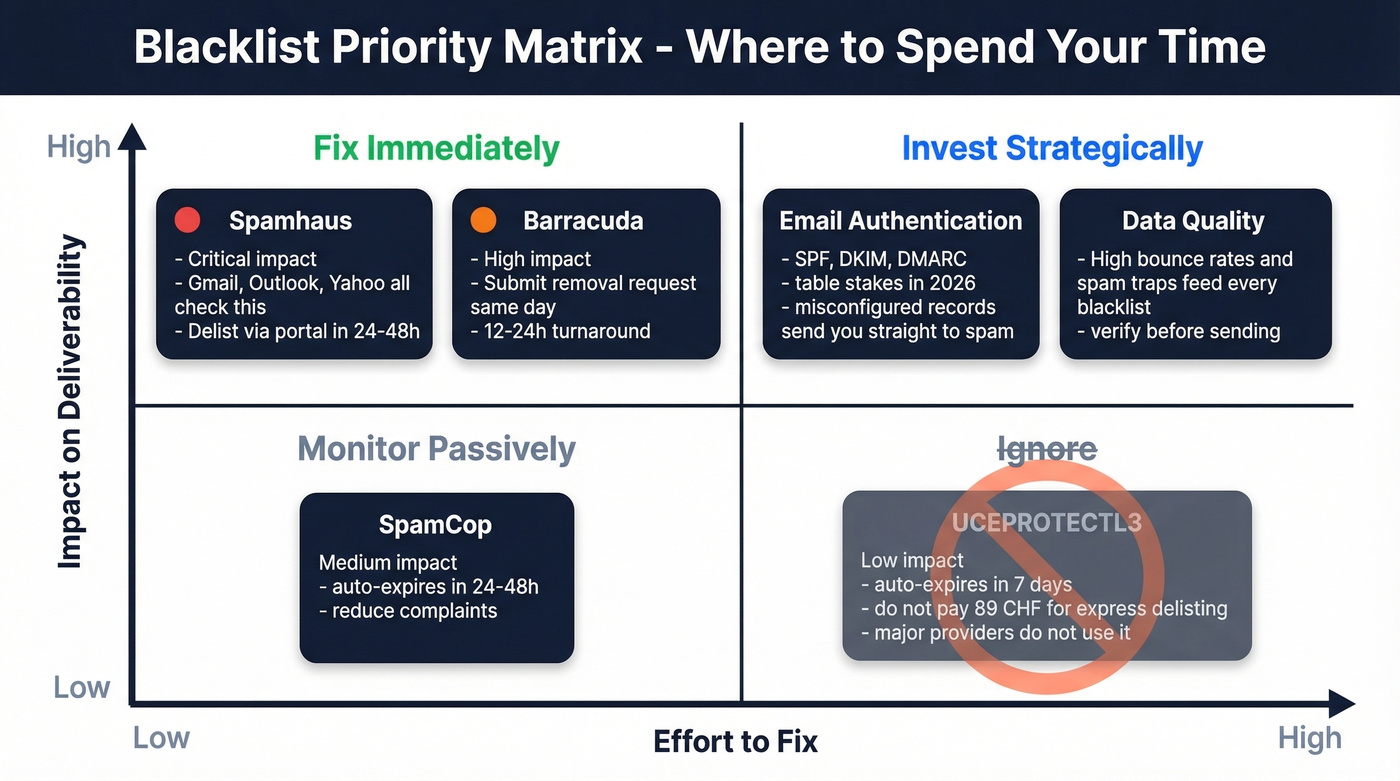
| Blacklist | Impact | Delisting | Action |
|---|---|---|---|
| Spamhaus | Critical | 24-48h (manual) | Delist via Spamhaus portal |
| Barracuda | High | 12-24h (request) | Submit removal request same day |
| SpamCop | Medium | 24-48h (auto) | Monitor, reduce complaints |
| UCEPROTECT | Low | 7 days (auto) | Ignore in most cases |
Spamhaus and Barracuda are the lists Gmail, Outlook, and Yahoo actually reference. A Spamhaus listing will tank your deliverability overnight. A UCEPROTECTL3 listing probably won't.
If your average deal size is under five figures and you're on a mainstream ESP, you'll never need to think about UCEPROTECT. The teams that panic about L3 listings are almost always ignoring the authentication gaps and data quality issues that actually cause deliverability problems.
Authentication and Infrastructure
SPF, DKIM, and DMARC are table stakes in 2026 - Google and Microsoft both require authentication for bulk senders. Misconfigured records are the fastest path to spam folders regardless of blacklist status.
While you're at it, check whether your server is an open relay by telnetting to port 25 and testing with MAIL FROM/RCPT TO commands. Open relays are a direct path to L1 listings that cascade upward. We've seen teams spend hours investigating a UCEPROTECT listing when the real culprit was a misconfigured SPF record that had been broken for months.
Monitor Continuously
Set up Google Postmaster Tools for Gmail reputation tracking and Microsoft SNDS for Outlook. These give you direct visibility into how the providers that actually matter view your sending reputation. For cold outreach, keep daily volume reasonable - 30-50 emails per day per mailbox is a safe ceiling (see Email Velocity for practical limits).
Fix Your Data Quality
High bounce rates and spam-trap hits are the upstream triggers that feed blacklist escalation. If you're sending to unverified lists, you're generating the exact signals that get IPs listed on Spamhaus and Barracuda - the lists that do matter. Prospeo's 5-step verification catches spam traps and honeypots before they cascade into reputation damage, with 98% email accuracy across 143M+ verified addresses. Clean data means fewer bounces, fewer spam-trap hits, and fewer blacklist triggers across every list.
Skip this section if you're already running verification on every list before sending. But if you're not - and in our experience, most teams that end up panicking about blacklists aren't - this is the single highest-leverage fix available. If you want a deeper playbook, start with our Email Deliverability Guide and then tighten your Email Bounce Rate controls.

The real deliverability threat isn't UCEPROTECT - it's sending to unverified addresses that trigger spam traps and honeypots. Prospeo's proprietary infrastructure catches both, with spam-trap removal, catch-all handling, and a 7-day data refresh cycle so you're never working with stale contacts.
Clean data at $0.01 per email beats a $90 delisting fee every week.
FAQ
Does UCEPROTECTL3 affect Gmail delivery?
No. Gmail uses internal filtering alongside blacklists like Spamhaus and Barracuda - not UCEPROTECT. If you're not seeing bouncebacks referencing UCEPROTECT, it isn't blocking your mail to Gmail or Outlook recipients.
Should I pay for express delisting?
No. It costs about 89 CHF, doesn't address the root cause, and reviewers consistently report relisting within days. Wait 7 days for auto-removal - it's free and equally effective.
Why am I listed if I never sent spam?
L3 lists entire ASNs, not individual senders. Your ISP shares infrastructure with someone who triggered enough L1 listings to escalate the whole system. You can't fix an ASN-wide penalty - only the ISP can address the upstream spam sources.
How do I prevent future blacklist problems?
Authenticate with SPF, DKIM, and DMARC. Keep bounce rates under 2%. Verify contact data before sending - tools like Prospeo remove spam traps and invalid addresses automatically. Monitor reputation through Google Postmaster Tools and Microsoft SNDS for real-time feedback from providers that matter.