

Verified Email Addresses: What They Are, How They Work, and Why 1 in 5 Will Bounce
You just uploaded 10,000 leads to your sequencer. The list cost real money - maybe from a data vendor, maybe hours of manual research. Three days into the campaign, 400 emails have hard bounced. Your ESP flags the domain. Deliverability tanks across every sequence, not just the bad one.
This happens constantly when teams skip verification. A 2026 report analyzing nearly 1 billion email addresses across 23 industries found that only 80.94% were valid. Roughly 1 in 5 emails sitting in a typical database right now won't reach anyone. The damage from sending to those addresses goes far beyond wasted sends - it compounds into sender reputation hits, ESP throttling, and campaigns that underperform for weeks after a single bad batch.
The fix isn't complicated, but it requires understanding what verified email addresses actually are, how the verification process works under the hood, and where even good tools fall short.
What You Need (Quick Version)
A verified email address is one that's been confirmed - through syntax checks, domain validation, and mailbox-level probing - to exist and accept mail. Not just "formatted correctly." Actually reachable.
Here's the three-thing checklist that covers 90% of the problem:
- Verify at point of entry. Every email that enters your database should be checked in real time - signup forms, lead capture, manual imports. Bad data is cheapest to catch before it's in your CRM.
- Clean your lists quarterly at minimum. Monthly if you're running aggressive outbound. Lists decay 20-25% per year, and that rot accelerates with job changes and domain shutdowns.
- Use a multi-step verifier, not a format checker. Syntax validation alone catches typos. You need SMTP-level mailbox probing, catch-all detection, and spam-trap filtering to actually protect deliverability.
What Does "Verified" Mean?
The distinction between a "verified" and "unverified" email address is simple in theory but messy in practice. An unverified email is any address you've collected but haven't confirmed can receive mail. It might be a typo (john@gmial.com), an abandoned inbox, a former employee's address, or a deliberate fake someone entered to download your whitepaper.
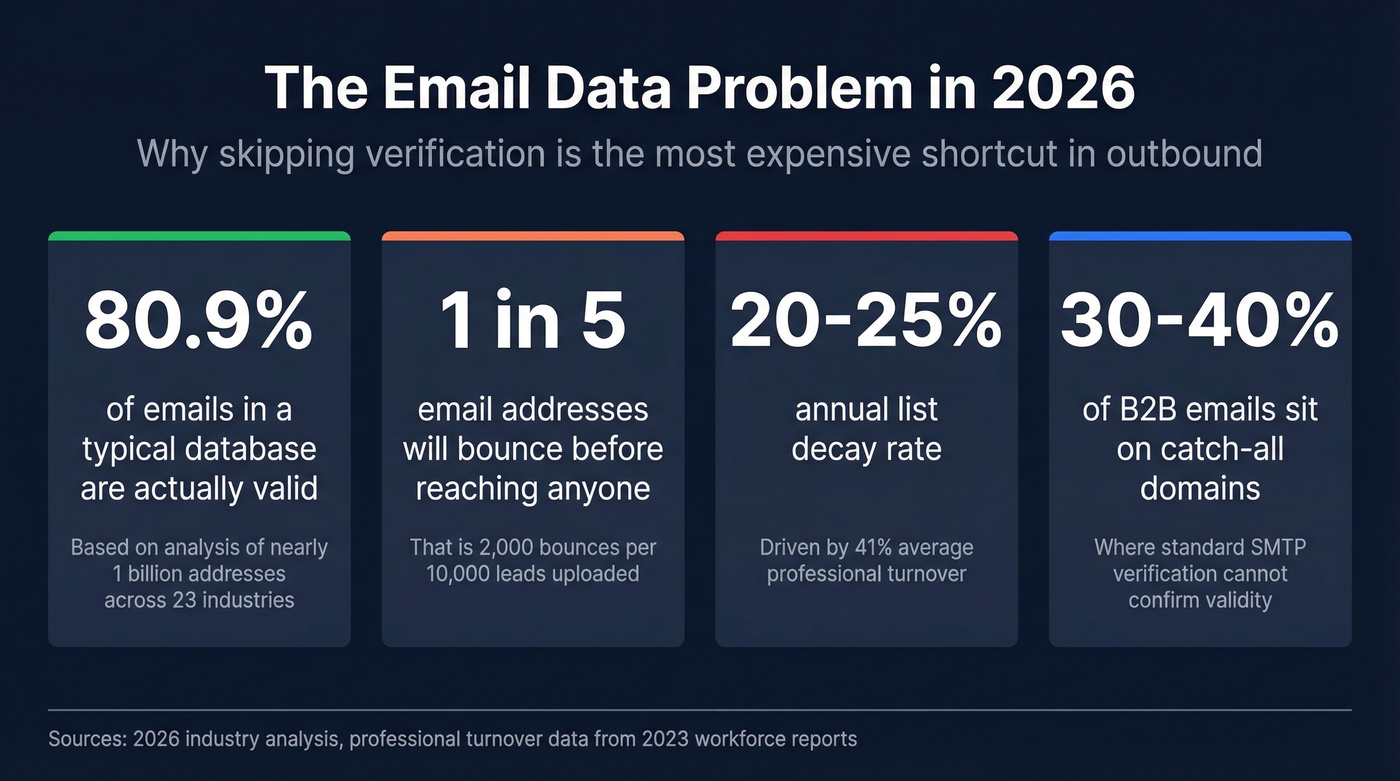
A verified address has passed multiple layers of validation confirming the mailbox exists on a functioning mail server and is likely to accept delivery. That "likely" qualifier matters - no verification tool can guarantee 100% deliverability, because mail servers can change behavior between the moment of verification and the moment of sending.

Why does this matter beyond bounce rates? Deliverability and sender reputation. When you send to invalid addresses, your ESP and the receiving mail servers notice. ISPs like Google and Microsoft track your bounce rate, spam complaints, and engagement signals. A spike in hard bounces tells them you're not maintaining your list - and they respond by routing more of your mail to spam, even the messages going to perfectly valid addresses.
The decay is relentless. Email lists degrade by 20-25% annually. Professional turnover drives much of this - average professional turnover hit 41% in 2023, with 38% of employees leaving within their first year. Every departure means a deactivated mailbox that was valid last quarter and isn't today. If you haven't confirmed each address before your next campaign, you're sending blind.
How Email Verification Works
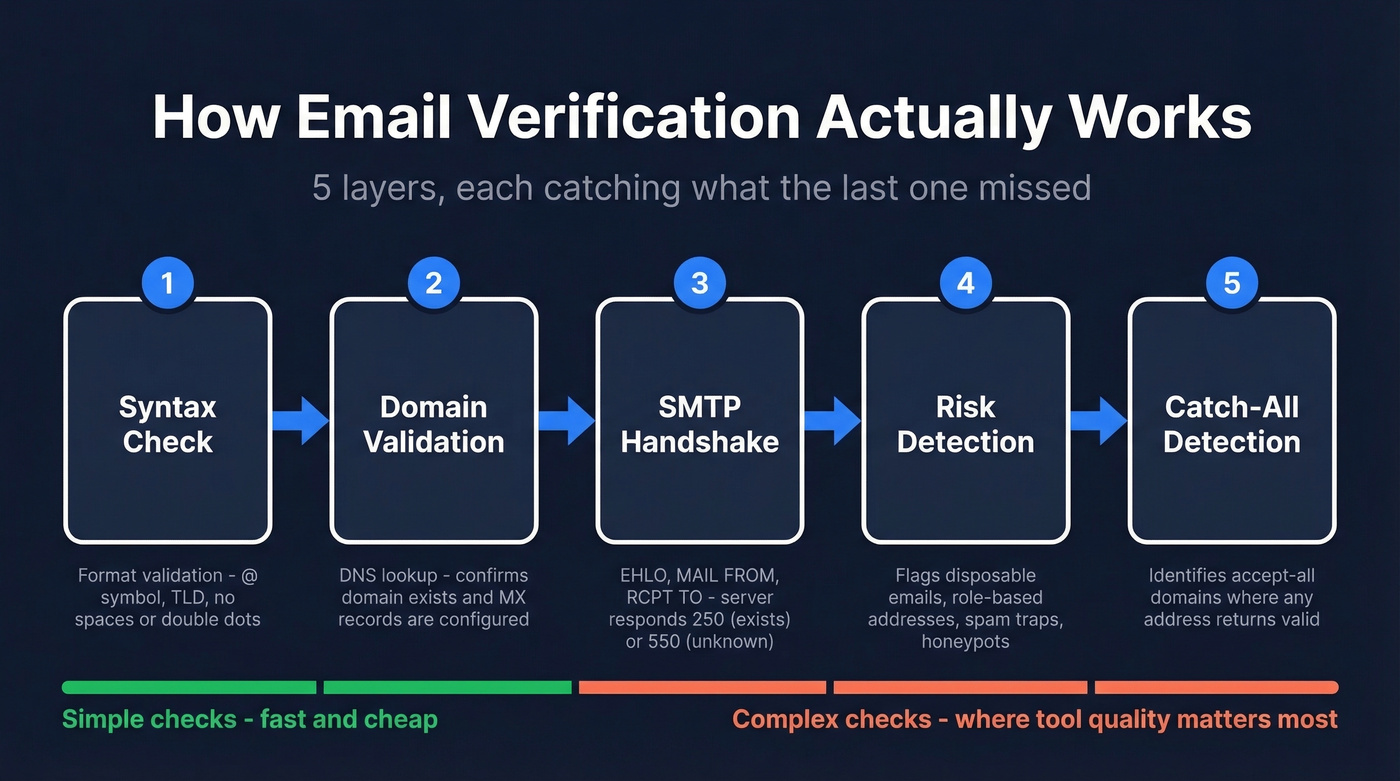
Modern email verification isn't a single check - it's a layered process where each step catches problems the previous one missed. Most people think verification means "ping the server and see if the email exists." The reality involves five distinct stages, and skipping any of them leaves gaps that will cost you bounces.
Syntax and Domain Checks
The first layer is the simplest. Syntax validation confirms the email follows the correct format - a local part, an @ symbol, and a domain with a valid TLD. This catches obvious garbage: missing @ signs, spaces, double dots, and addresses like "test@.com."
Domain validation goes a step further. The verifier performs a DNS lookup to confirm the domain exists, then checks MX (Mail Exchanger) records to verify the domain has mail servers configured to receive email. If there's no MX record, there's nowhere for mail to go. This catches defunct domains, typosquatted domains that were never set up for email, and domains that have been parked or abandoned.
These two checks are fast and cheap. They're also insufficient on their own - a domain can have valid MX records while the specific mailbox you're targeting was deleted six months ago.
The SMTP Handshake
This is where verification gets real. The tool opens a connection to the mail server, typically on port 25, 587, or 465, and initiates an SMTP dialogue without actually sending an email.
The conversation follows a specific sequence: the verifier sends an EHLO command to introduce itself, then a MAIL FROM to specify a sender address, then RCPT TO with the target email address. The server's response to RCPT TO is the critical moment. A 250 response code means the server acknowledges the mailbox exists. A 5xx response like 550 "user unknown" means it doesn't. A 4xx response indicates a temporary condition - the server can't confirm right now.
The verifier disconnects before the DATA stage, so no message is ever sent. It's a handshake that stops short of actual delivery.
But SMTP responses aren't always trustworthy. Some servers defer recipient validation until after DATA, meaning they'll accept any RCPT TO and only reject during delivery. Greylisting adds another wrinkle - servers temporarily reject messages from unknown senders, which makes verification probes return false negatives. Good verifiers retry with appropriate delays to handle greylisting. Cheap ones just mark the address as "unknown" and move on.
Advanced Risk Detection
Even if the SMTP handshake returns a 250, the address might still be dangerous to send to. Advanced verification layers check for:
- Disposable/temporary emails - services like Guerrilla Mail or Mailinator that create throwaway inboxes. Sending to these wastes credits and skews engagement metrics.
- Role-based addresses - info@, support@, sales@. These aren't personal mailboxes and typically have lower engagement.
- Spam traps - addresses maintained by ISPs and anti-spam organizations specifically to catch senders with poor list hygiene. Hitting a spam trap can get your domain blacklisted instantly.
- Honeypots - similar to spam traps but often planted in scraped lists. They exist solely to identify senders using purchased or scraped data.
This layer is where the quality gap between verification tools becomes obvious. A basic verifier stops at SMTP. A thorough one flags all four risk categories and removes them before they damage your sender reputation.
Why VRFY Is Dead
The SMTP protocol technically includes a VRFY command designed specifically to check whether a mailbox exists. In theory, it's the perfect tool. In practice, virtually all mail servers have disabled it because spammers abused it to harvest valid addresses. If you see a verification tool marketing VRFY support as a feature, that's a red flag - it hasn't worked reliably in over a decade.
The Catch-All Problem
Here's where even good verification tools hit a wall.
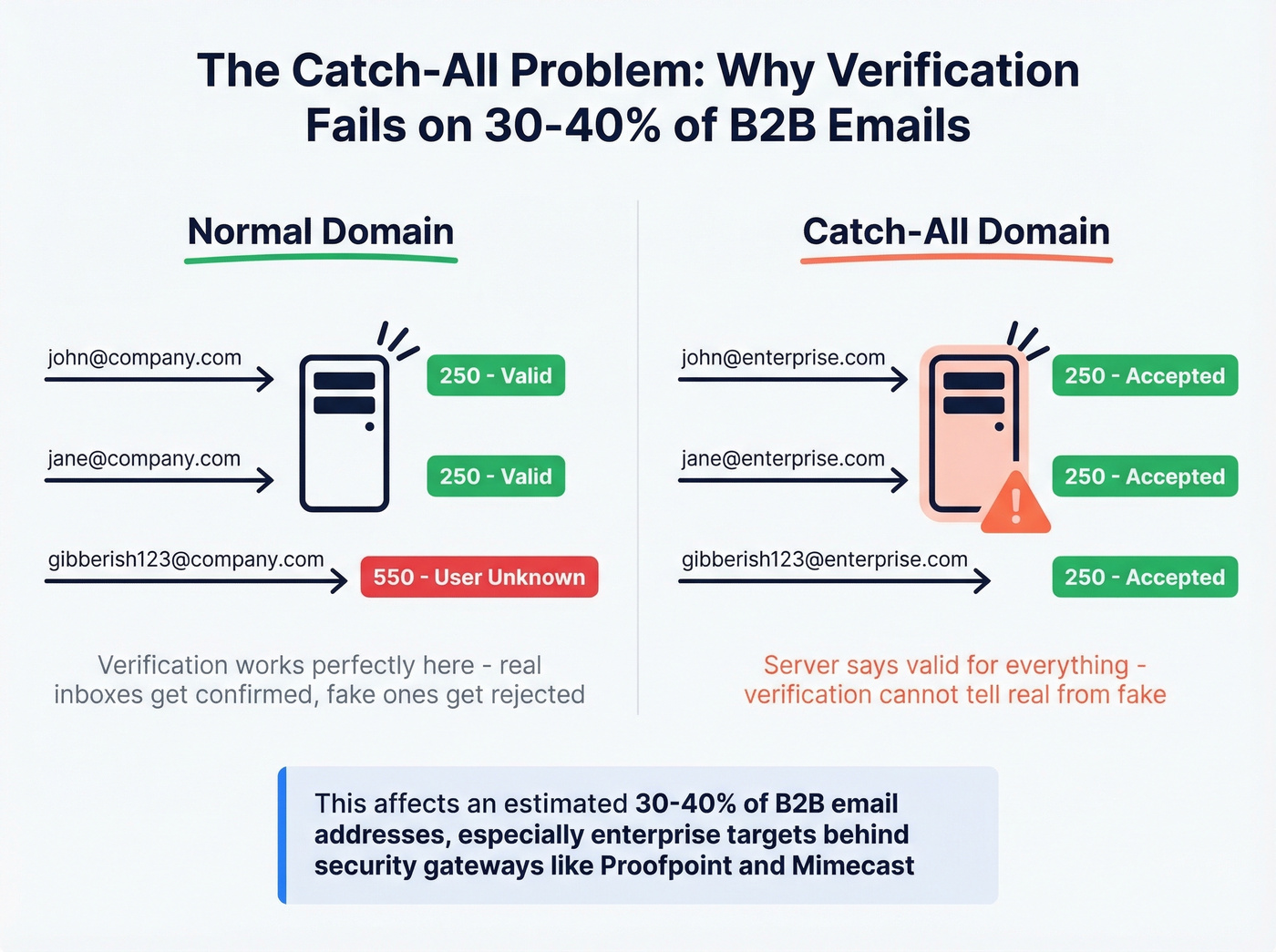
An estimated 30-40% of B2B email addresses sit on catch-all domains - domains configured to accept mail sent to any address, whether the specific mailbox exists or not. Send to john.smith@company.com, jane.doe@company.com, or gibberish123@company.com, and the server accepts all three with a 250 response.
This makes standard SMTP verification useless for catch-all domains. The server says "valid" for everything, so the verifier can't distinguish between a real inbox and a nonexistent address. Most tools handle this by labeling catch-all results as "accept-all" or "risky" and leaving the decision to you. That's not very helpful when a third of your B2B list falls into that bucket.
The problem gets worse with enterprise targets. Security gateways like Proofpoint, Mimecast, and Microsoft 365 Defender sit in front of the actual mail server and can block or greylist verification probes entirely. The result? An "unknown" status that might mean catch-all, might mean the security gateway blocked the probe, or might mean the server was temporarily unavailable. Three different causes, one unhelpful label.

You just read that 1 in 5 emails in a typical database won't reach anyone. Prospeo's 5-step verification - syntax checks, SMTP probing, catch-all handling, spam-trap removal, and honeypot filtering - runs before you ever get the email. 98% accuracy. 143M+ verified addresses. At $0.01 per email, fixing your data costs less than one bounced campaign.
Stop verifying after the damage. Start with emails that are already clean.
How Accurate Are Verification Tools?
Every verification tool on the market claims 98-99% accuracy. Those numbers mean almost nothing without context.
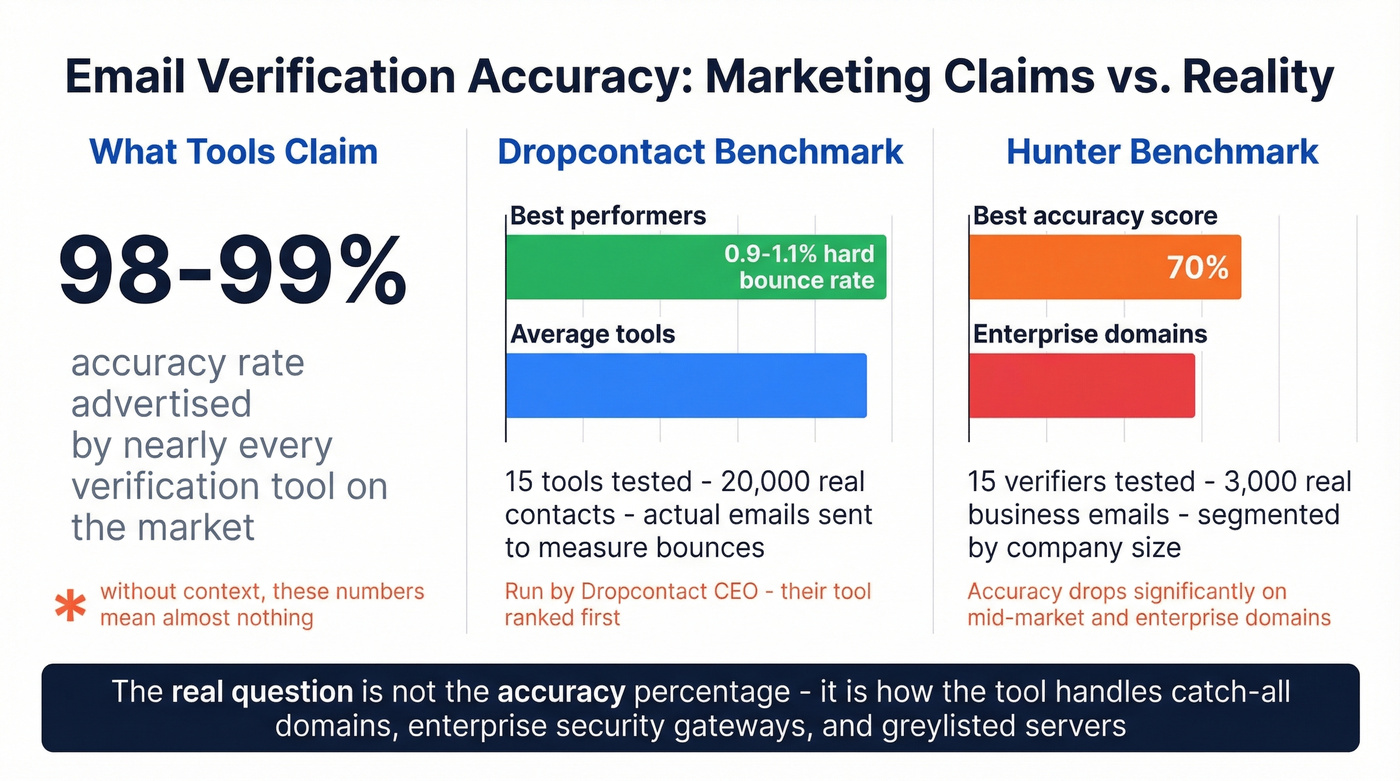
Two benchmarks are worth examining. The Dropcontact benchmark tested 15 email finder tools against 20,000 real contacts and actually sent emails to measure hard bounces - not just status codes. The best performers hit hard bounce rates of 0.9-1.1%. That's excellent, but because it's measuring finders rather than standalone verifiers, the results reflect the full find-and-verify pipeline.
Hunter's benchmark tested 15 standalone verifiers using 3,000 real business emails segmented by company size. The top accuracy score? 70%. Hunter deserves credit for publishing that - accuracy drops significantly on mid-market and enterprise domains where stricter server configurations create more unknowns and false results.
Both benchmarks have methodology biases worth noting. Dropcontact's benchmark was run by Dropcontact's CEO, and their tool ranked first. Hunter's dataset came from Hunter's own outreach activity. Neither is dishonest, but neither is fully independent either.
In our testing, the gap between marketing claims and real-world accuracy was even wider on enterprise domains. The real question isn't what accuracy percentage a tool advertises - it's how the tool handles catch-all domains, enterprise security gateways, and greylisted servers. A tool that returns "valid" or "invalid" for 95% of addresses but dumps the remaining 5% into "unknown" might technically have high accuracy on the addresses it does classify, while leaving you blind on the ones that matter most.
Let's be honest: if your deal sizes are under $15K and your list is mostly SMB domains, almost any verification tool will work fine. The accuracy differences only matter when you're targeting enterprise accounts with strict mail server configurations - and that's exactly where most tools fall apart.
Bounce Rate Benchmarks
Your bounce rate is the simplest diagnostic for list quality. The formula: (bounced emails / sent emails) x 100.
Here are the thresholds that matter:
- Below 2%: You're in good shape. Most ESPs won't flag you.
- 2-5%: Warning zone. Your list has hygiene issues that'll compound over time.
- Above 5%: Red flag. Your sender reputation is actively taking damage. Stop sending and clean the list.
Industry benchmarks vary significantly. What's normal in ecommerce would be alarming in construction:
| Industry | Avg. Bounce Rate |
|---|---|
| Ecommerce | 0.19% |
| IT / Software | 0.90% |
| Financial Services | 1.20% |
| Government | 1.30% |
| Construction / Manufacturing | 2.20% |
Data compiled by WebFX via ListMint industry benchmarks.
If you're running cold outbound, aim for under 2% hard bounces. We've watched teams go from 5% bounce rates to under 1.5% just by implementing real-time verification at point of entry and suppressing hard bounces immediately. Above 3% on cold email and you're playing with fire - mailbox providers like Google and Microsoft throttle senders with elevated bounce rates, and recovering from that throttling takes weeks even after your list is cleaned.
Best Email Verification Tools
Let's compare the tools worth considering. Pricing is per-email at standard tiers - volume discounts apply at higher quantities for most providers.
| Tool | Price/Email | Price/10K | Free Tier | Best For |
|---|---|---|---|---|
| Prospeo | ~$0.01 | ~$100 | 75/mo | Lowest bounce rates on catch-all domains |
| ZeroBounce | $0.008 | $64 | 100/mo | Compliance-heavy teams |
| Hunter | ~$0.015 | $149 | up to 100/mo | Finding + verifying in one workflow |
| NeverBounce | $0.008 | $50 | - | Set-and-forget bulk cleaning |
| EmailListVerify | $0.0024 | $24 | 100 credits | 100K+ lists on a tight budget |
| MillionVerifier | ~$0.0037 | ~$37 | None | Irregular, no-commitment use |
| Bouncer | - | $45 | - | Custom API workflows |
| Emailable | $0.005 | $50 | - | Simple UI, low learning curve |
Prospeo
Prospeo runs the most thorough verification pipeline we've tested at this price point. The 5-step process - syntax, DNS/MX, SMTP handshake, advanced risk detection covering spam traps, honeypots, and disposable domains, plus catch-all resolution - means you're not just checking if an address exists. You're checking if it's safe to send to.
The 98% email accuracy rate holds up in practice. Meritt, one of Prospeo's customers, went from a 35% bounce rate to under 4% after switching - that's the kind of before/after that matters more than any benchmark percentage. The 7-day data refresh cycle is another differentiator; most verification databases refresh around 6 weeks, which means addresses that went invalid last week still show as "valid" in their systems.
Pricing is straightforward: ~$0.01 per email, no contracts, cancel anytime. The free tier gives you 75 email verifications per month - enough to test accuracy before committing. For teams that also need verified business emails for prospecting, the 300M+ profile database and native integrations with Salesforce, HubSpot, Lemlist, Instantly, and Clay mean verification is built into the prospecting workflow rather than bolted on as a separate step.
ZeroBounce
Why it wins for compliance-heavy teams: GDPR features and a mature platform make ZeroBounce a common choice when your legal team has opinions about data handling. The AI-powered scoring adds a layer beyond basic SMTP verification, and the abuse/complaint detection catches addresses that are technically valid but likely to mark you as spam.
ZeroBounce claims 99.6% accuracy. That number doesn't hold up against independent benchmarks - Hunter's test of 15 verifiers showed the best accuracy at 70%, and the Dropcontact live-send benchmark found even top tools producing 0.9-1.1% hard bounces. ZeroBounce is solid, but the marketing number is marketing.
Pricing: 100 free verifications/month. Paid plans from $15/mo for 2,000 emails. Pay-as-you-go at $0.008/email scales reasonably to mid-five-figure volumes.

Hunter
I've always respected Hunter's transparency. Their own benchmark of 15 verifiers showed their tool hitting 70% accuracy - and they published it anyway. That's unusual in a market where everyone claims 98%+.
Hunter's real strength is the combined email finder and verifier in one platform. You're not just verifying addresses you already have - you're finding new ones and getting verification included. The free plan includes up to 100 verifications per month, making it one of the most accessible free tiers for teams that need both discovery and validation.
Use this if: You need email finding and verification in one tool and your volume is under 10K/month.
Skip this if: You're doing pure bulk verification on existing lists. At ~$0.015/email, you're paying a premium for finder functionality you won't use.
NeverBounce
Picture this: you have a marketing list of 50,000 contacts, you need it cleaned before Friday's campaign, and you don't want to think about it. That's NeverBounce's sweet spot. At $0.008/email, it integrates with Mailchimp, HubSpot, ActiveCampaign, and most major email platforms. Upload the list, get results, move on. It won't wow you with advanced catch-all handling or risk scoring, but it does the core job reliably.
EmailListVerify
Here's the cost comparison that matters. At $0.0024/email, EmailListVerify costs $24 to verify 10,000 emails. The same job costs $50 at NeverBounce, $64 at ZeroBounce, and $100 at Prospeo. For a 100K-contact database, that's $240 vs $500-$1,000. The savings are real.
The caveat is equally real: cheap verification with high "unknown" rates can cost more in bounces than you saved on the tool. We've seen teams use budget verifiers, get a 15% unknown rate, send to those unknowns anyway, and end up with bounce rates that tank their domain. If you use EmailListVerify, treat every "unknown" result as invalid. The savings only work if you're disciplined about it.
MillionVerifier
MillionVerifier charges ~$3.70 per 1,000 emails with no subscription required. Buy credits, use them whenever - next week or next quarter. Best for teams with irregular verification needs: a quarterly outbound campaign, or a consultant cleaning client lists on an ad-hoc basis. The interface is basic but functional.
Bouncer
$45/10K with volume discounts. A reliable mid-range verifier with a clean API. Worth testing if you're building custom verification workflows and need straightforward API integration without the overhead of a full platform.
Emailable
$50/10K with a clean interface and standard feature set. Nothing remarkable, nothing broken - a safe choice for teams that want simplicity over power features.
Lists decay 20-25% per year. Prospeo refreshes every record on a 7-day cycle - 6x faster than the industry average. That means the verified email you pull today is still verified next week, not a stale address from last quarter's database snapshot.
Fresh data every 7 days. Zero bounced-campaign surprises.
Verification Best Practices
Seven practices that separate teams with clean lists from teams constantly fighting deliverability fires:
- Validate at point of entry. Every form submission, every CSV import, every manual add should trigger real-time verification. Catching a bad email before it enters your CRM is always cheaper than cleaning it out later.
- Bulk clean quarterly at minimum. Monthly if you're running aggressive lead gen or outbound. Lists decay 20-25% per year - that's not a slow drip, it's a steady erosion that compounds.
- Use double opt-in where possible. For inbound and marketing lists, double opt-in remains the gold standard. It confirms both that the address is valid and that the person actually wants your emails. Not practical for cold outbound, but essential for marketing lists.
- Monitor engagement signals. A validated email that never opens, never clicks, and never replies is a liability. Segment disengaged contacts and either re-engage or suppress them. ISPs watch engagement metrics closely.
- Never send to purchased lists without verification. Purchased lists are a major source of spam traps and honeypots. Verify every single address first - and expect to discard 20-30% as invalid or risky. (If you're unsure about the risk/compliance side, read Is It Illegal to Buy Email Lists?.)
- Remove hard bounces immediately. Not after the campaign. Not at the end of the month. The moment an address hard bounces, suppress it permanently. Sending to known invalid addresses is the fastest way to get blacklisted.
- Re-verify before every major campaign. Even a list you cleaned last month can have new invalids. Job changes, domain shutdowns, and mailbox deactivations happen constantly. A quick re-verification run before a big send is cheap insurance.
Common Verification Mistakes
Five mistakes we see repeatedly - and every one of them is avoidable.
Treating verification as a one-time event. This is the most common and most damaging mistake. With 41% annual professional turnover and 38% of employees leaving within their first year, a list verified in January is meaningfully degraded by June. Verification is a recurring process, not a checkbox.
Using format-only checkers. Syntax validation catches typos. It doesn't catch deactivated mailboxes, spam traps, or role-based addresses. If your "verification" tool only checks formatting, you don't have verification - you have a regex. The consensus on r/coldemail is pretty clear on this: format-only checking is barely better than no checking at all.
Ignoring catch-all and unknown results. When 30-40% of B2B addresses sit on catch-all domains, dumping all "unknown" results into your send list is reckless. Treat unknowns as risky. Either use a tool with catch-all resolution or exclude them from high-stakes campaigns.
Not re-verifying before campaigns. You cleaned the list three months ago. Great. But you've added 2,000 new contacts since then, and 500 of the original addresses have gone stale. Re-verify the full list before any campaign where deliverability matters - which is every campaign.
Relying on manual checks. Sending a test email to see if it bounces is not verification. It's slow, it doesn't scale, and it exposes your sending domain to unnecessary risk. Use a proper verification tool. The cost per email is measured in fractions of a penny.
FAQ
What is a verified email address?
A verified email address has passed syntax, domain, and mailbox-level checks confirming it exists on a functioning mail server and can receive mail. Verification reduces hard bounces, protects sender reputation, and ensures campaigns reach real inboxes instead of dead addresses or spam traps.
How do I verify an email address for free?
Most verification tools offer free tiers. Prospeo provides 75 free verifications per month, ZeroBounce offers 100, and Hunter gives up to 100 per month. These are enough to test accuracy before committing to a paid plan - you can confirm whether an address reaches an active inbox without spending anything.
What percentage of email addresses are invalid?
An analysis of nearly 1 billion emails across 23 industries found 80.94% were valid - meaning roughly 1 in 5 emails in a typical database will bounce. The invalid rate varies by list source, with purchased lists running significantly worse than organic opt-in lists.
How often should I clean my email list?
At minimum quarterly, monthly if you're running aggressive outbound or lead gen. Always re-verify before major sends, since lists decay 20-25% per year and job changes mean a meaningful chunk of verified email addresses go stale every few months.
What is a catch-all email domain?
A catch-all domain accepts mail sent to any address at that domain, whether the specific mailbox exists or not. This makes SMTP verification unreliable - the server returns "valid" for everything. An estimated 30-40% of B2B emails sit on catch-all domains, which is why tools with catch-all resolution deliver meaningfully better results than those that simply label these as "unknown."