

How to Verify Sender Email Address in 2026
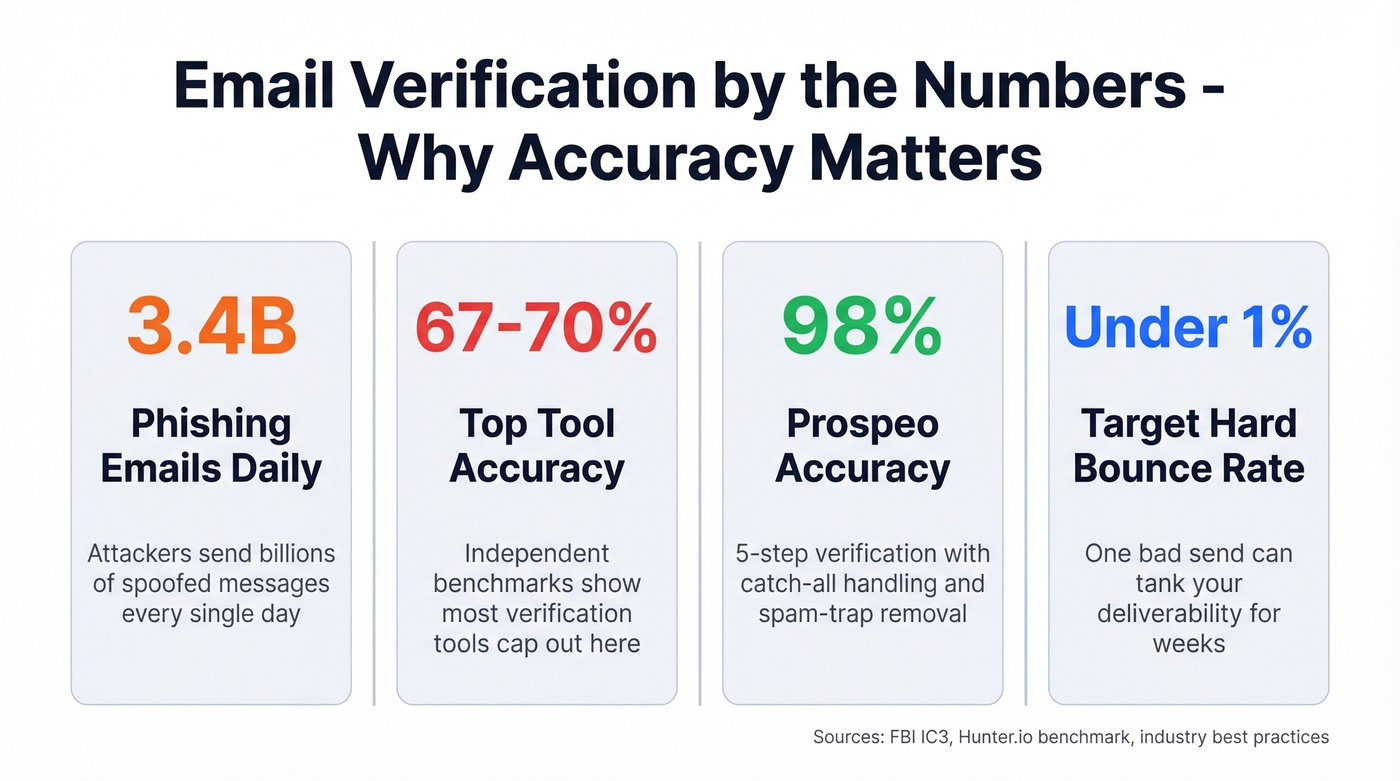
You got an email from your CEO asking you to wire $50,000 to a new vendor. The display name looks right. The signature looks right. The urgency feels real. The median time it takes someone to click a phishing link is 21 seconds - faster than making coffee. BEC scams cost organizations $2.7 billion in 2024 according to FBI IC3 data, and roughly 3.4 billion phishing emails land every single day.
Knowing how to verify a sender's email address isn't paranoia - it's basic operational hygiene. But the phrase means two very different things depending on which side of the email you're on.
What You Need (Quick Version)
Receiving a suspicious email? Hover over the display name to reveal the actual address, check the domain character by character, and inspect headers for SPF/DKIM/DMARC pass results. If your organization sends email, enforce DMARC and look into BIMI for visible trust signals.
Quick Checks for Suspicious Emails
Before you touch a single email header, these checks take 10 seconds:
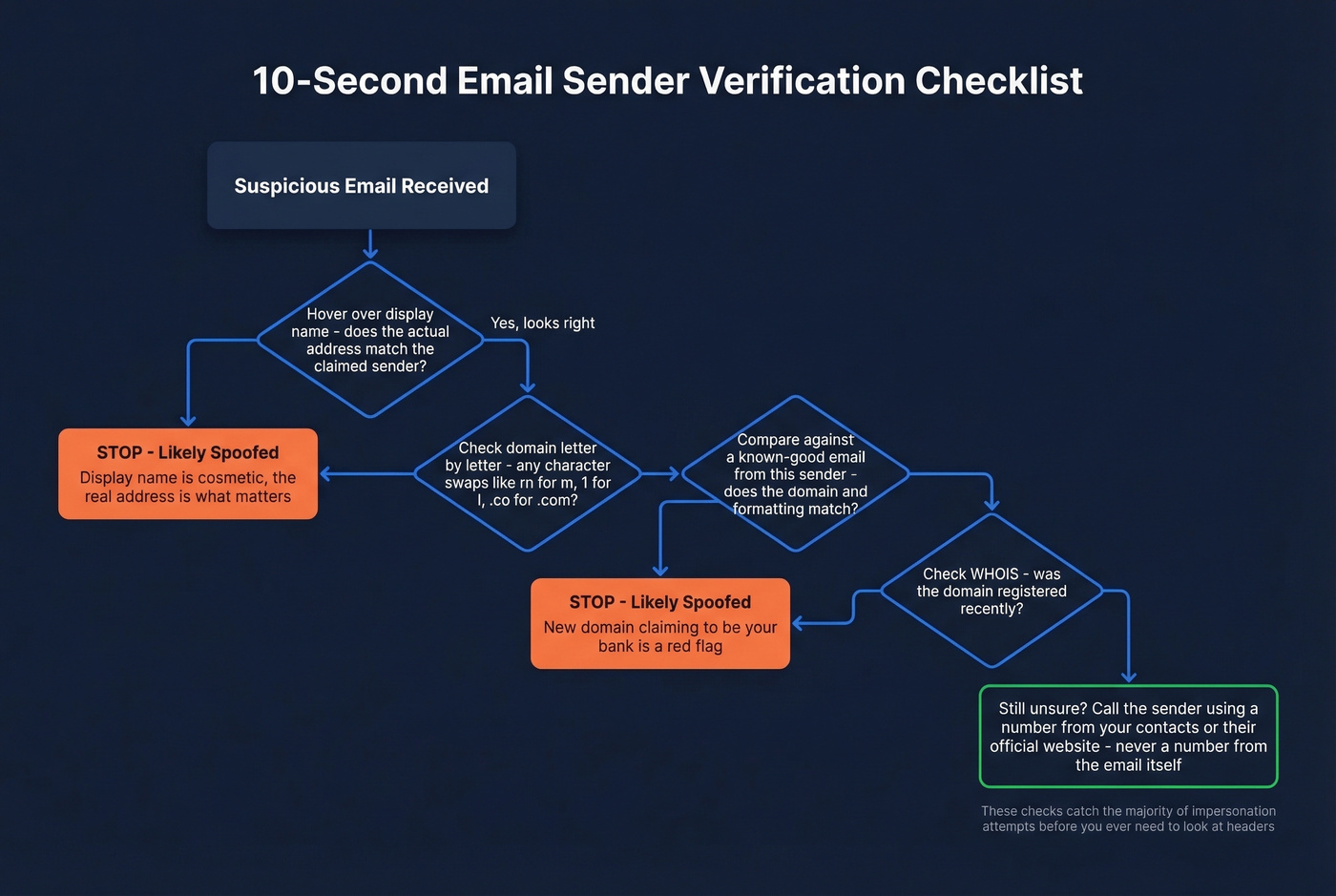
- Hover over the display name. "Amazon Support" might resolve to
amaz0n-billing@randomdomain.ru. The display name is cosmetic - the address behind it is what matters. - Check for character substitution. Attackers swap
rnform,1forl, and.cofor.com. Read the domain letter by letter, not at a glance. - Compare against previous emails. Pull up a known-good message from the same sender. Does the domain match? The formatting?
- Check the domain's WHOIS registration. A domain registered last week claiming to be your bank is a red flag. ICANN's WHOIS lookup takes seconds.
- Call to verify - using a known number. If the email asks for money, credentials, or sensitive data, call the sender directly. Use a number from your contacts or the company website, never one from the suspicious email itself.
These checks catch the majority of impersonation attempts before you ever need to look at headers.

Verifying inbound senders protects you. Verifying outbound addresses protects your domain. Prospeo's 5-step verification with catch-all handling, spam-trap removal, and honeypot filtering delivers 98% email accuracy - keeping your bounce rate under 1% where it belongs.
Don't let bad data destroy the sender reputation you worked to build.
How to Read Email Headers
When visual checks aren't enough, headers tell the full story. Every email carries metadata showing which servers handled it, what authentication checks it passed, and whether the "From" address matches the actual sending infrastructure. To access them:
- Gmail: Open the message, click the three dots, then Show original
- Outlook: Open the message, go to File, then Properties, then Internet headers
- Apple Mail: View, then Message, then All Headers
Once you're looking at raw headers, find the [Authentication-Results](https://datatracker.ietf.org/doc/html/rfc8601) section. A legitimate message produces results like this:
Authentication-Results: spf=pass; dkim=pass; dmarc=pass
A spoofed email looks like this:
Authentication-Results: spf=fail; dkim=none; dmarc=fail action=reject

Return-Path: random-server@sketchy-domain.net
The red flags: SPF/DKIM/DMARC failures, a Return-Path that doesn't match the From domain, and suspicious routing through unexpected servers. Read the Received lines bottom-to-top - that's the chronological order the message traveled.
If raw headers look like gibberish, paste them into MXToolbox's Email Header Analyzer or Google Admin Toolbox Messageheader. Both parse the mess into a readable table. Fair warning: mobile email clients make header inspection nearly impossible. There are threads on r/ios from users trying to automate header checks with Shortcuts - it's a real gap nobody has solved well.
SPF, DKIM, DMARC, and BIMI Explained
These four protocols form the authentication chain that determines whether an email is trustworthy. Together they power sender address verification at the infrastructure level.
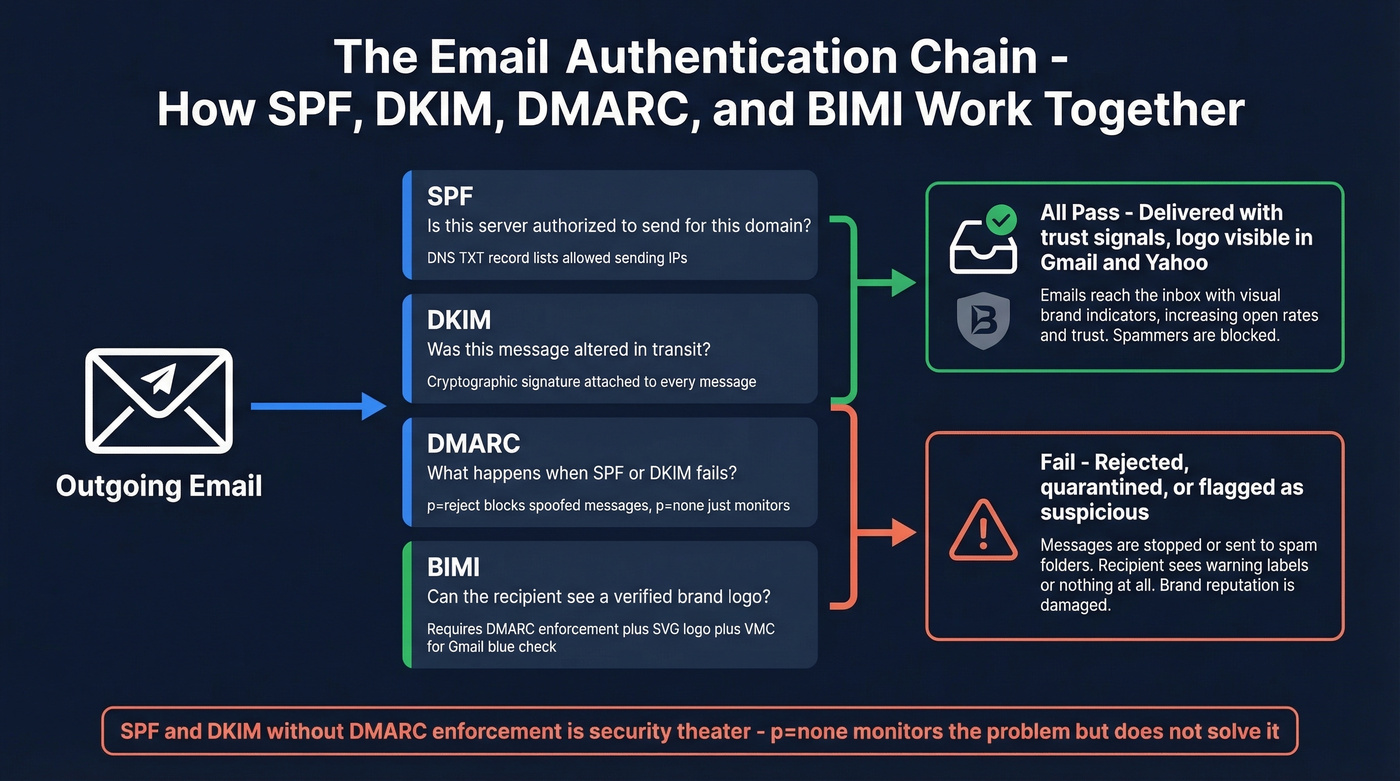
SPF lists which servers are authorized to send email for a domain. DKIM attaches a cryptographic signature proving the message wasn't altered in transit. DMARC tells receiving servers what to do when SPF or DKIM fails - reject, quarantine, or do nothing.
Here's the thing: SPF and DKIM without DMARC enforcement are security theater. If your DMARC policy is p=none, you're monitoring the problem, not solving it. You need p=quarantine or p=reject to actually block spoofed messages. This matters especially when you use delegated sending - if a third-party platform sends on your behalf, its servers must be included in your SPF record and sign with your DKIM keys, or DMARC will flag every message as unauthorized.
Spoofing comes in three flavors. Exact-domain spoofing puts your real domain in the From field. Lookalike domains register something close - micros0ft-support.com or netf1ix.com. Friendly-from spoofing uses a generic email provider with a trusted-looking display name. DMARC stops the first type. The other two require vigilance and advanced filtering.
BIMI is the most underrated development in email trust. People have been asking for a reliable sender identity signal since the telnet days - BIMI is the first real answer. It displays a verified brand logo next to your emails in Gmail, Yahoo, and Apple Mail. The requirements: DMARC at enforcement, an SVG Tiny-PS logo under 32KB hosted over HTTPS, and a BIMI DNS record. For Gmail's blue checkmark specifically, you need a Verified Mark Certificate. Yahoo doesn't require the certificate to show the logo, making it an easier starting point.
If you're a brand sending at any volume, BIMI should be on your 2026 roadmap.
Let's be honest about something: stop training people to spot bad grammar. Attackers adapt content constantly, and AI-generated phishing emails are grammatically flawless now. The one thing they can't easily fake is authenticated sender identity. Check headers, not spelling.
Verify Sender Email Address Before Sending Campaigns
This is the other side of sender verification - and it's where marketers and sales teams bleed money. Every invalid address damages your domain reputation. The rule of thumb: keep total bounces below 2%, with hard bounces under 1%. One bad send can tank your deliverability for weeks, and that matters even more now that Gmail and Yahoo require bulk senders to authenticate their email with SPF, DKIM, and DMARC. Fail those checks and deliverability drops sharply.
Email verification tools perform an SMTP handshake with the recipient's mail server, checking whether the mailbox exists without actually sending a message. The catch: catch-all domains accept everything during the handshake, so verifiers can't definitively confirm whether a specific mailbox is real. This is where tool quality diverges sharply.
A Hunter benchmark testing 15 tools on 3,000 real business emails found the top performers hitting only 67-70% accuracy - and even with potential home-field advantage, that's the ceiling. We've tested most of these tools ourselves, and the gap between marketing claims and real-world performance is wider than you'd expect. Prospeo's 5-step verification process - including catch-all handling, spam-trap removal, and honeypot filtering - delivers 98% email accuracy on a 7-day data refresh cycle, compared to the six-week industry average.
The Workflow That Actually Works
Verify your entire list before the first send. Re-verify any segment older than 30 days. Never send to addresses flagged as "risky" or "unknown" - the potential upside isn't worth the domain damage. If you rely on delegated senders like marketing automation platforms or outbound tools, make sure those platforms also support list-level verification so bounces don't accumulate under your domain.
If you need a deeper playbook, start with an email deliverability guide and then tighten your email bounce rate controls before scaling volume.
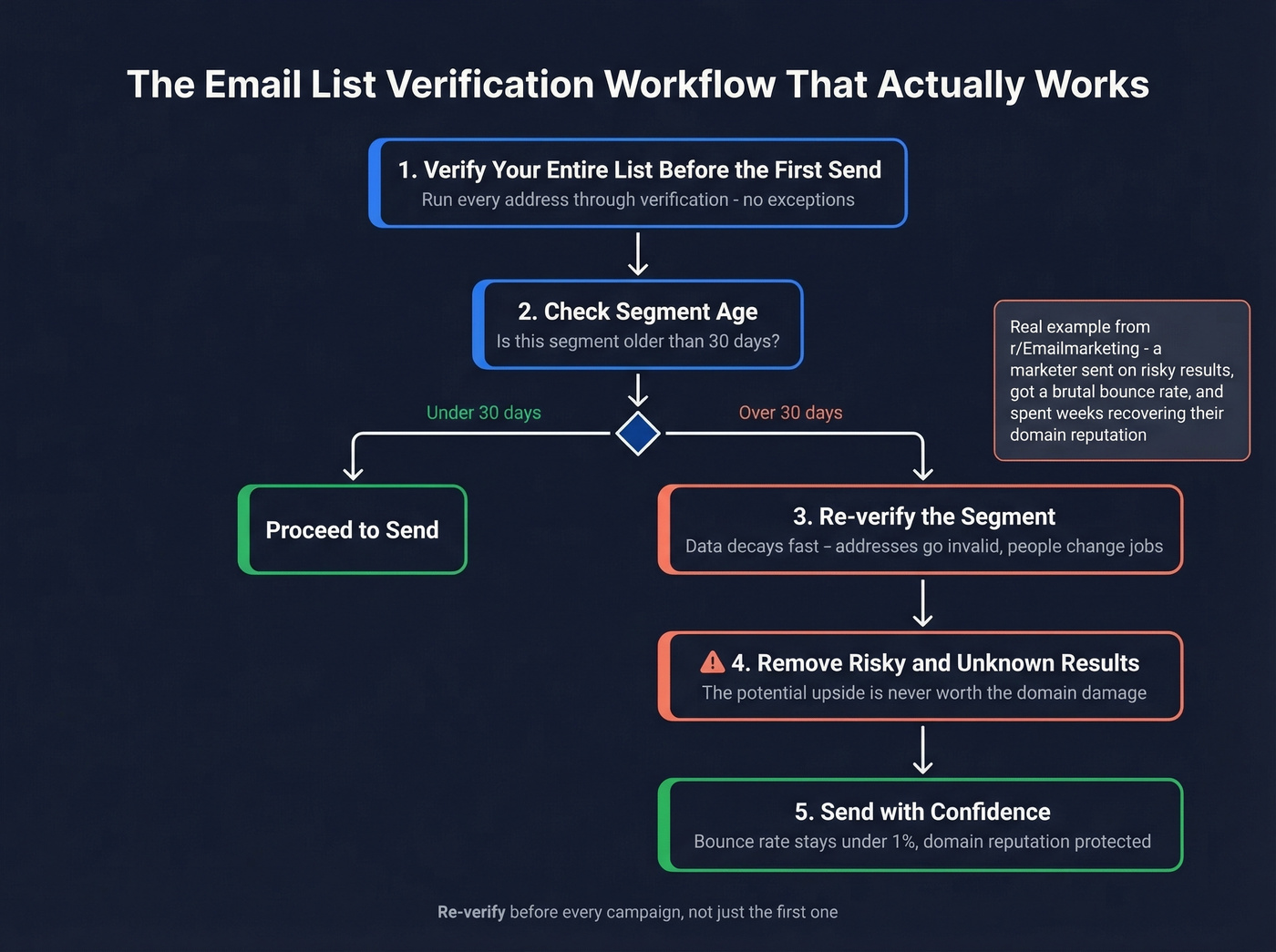
A thread on r/Emailmarketing captured this perfectly: a marketer's enrichment looked clean, they sent anyway on "risky" results, and got a brutal bounce rate that took weeks to recover from. We've seen this pattern repeatedly - teams that skip re-verification on segments older than 30 days almost always see bounce rates spike.
Cost Comparison
| Tool | Cost per 1K | Free Tier | Notes |
|---|---|---|---|
| Prospeo | ~$10 | 75 emails/mo (+100 extension credits) | 5-step, catch-all, 7-day refresh |
| NeverBounce | ~$8 | 10 credits | Solid for bulk lists |
| MillionVerifier | ~$3.70 | - | Budget option, skip if catch-all accuracy matters |
| ZeroBounce | ~$10 | 100/mo | Abuse + spam-trap scoring |
| Hunter | ~$24.50 | 50/mo | Bundled with finder credits |
If you're building lists from scratch, pair verification with data enrichment services and a reliable email list providers workflow.
Catch-all domains fool most verification tools. Prospeo's proprietary email infrastructure doesn't rely on third-party providers - it verifies 143M+ emails on a 7-day refresh cycle so you're never sending to stale or invalid addresses. At $0.01 per email, protecting your deliverability costs less than one bounced lead.
Send to real inboxes. Every time. Starting at a penny per verified email.
FAQ
Can the "From" field in an email be faked?
Yes. SMTP lets anyone set any From address with zero authentication by default. SPF, DKIM, and DMARC exist specifically to catch this, but they only work if the sender's domain has them configured with p=quarantine or p=reject. Without enforcement, the From field alone proves nothing.
How often should I verify my email list?
Before every campaign, and re-verify any segment older than 30 days. One bad send with a high bounce rate can damage your domain reputation for weeks. A 7-day data refresh cycle keeps records current between verifications, which is why we built ours around that cadence.
What's the most accurate email verification tool?
Independent benchmarks show top tools hitting 67-70% accuracy on real business emails. Prospeo's 5-step verification delivers 98% accuracy with catch-all handling, spam-trap removal, and honeypot filtering - starting at 75 free verifications per month.
What is delegated sending and how does it affect authentication?
Delegated sending is when a third-party service - like a marketing automation platform or outbound sales tool - sends email on behalf of your domain. These delegated senders must be explicitly authorized in your SPF record and configured to sign messages with your DKIM keys. Without proper setup, DMARC treats their messages as unauthorized, hurting deliverability even when the emails are completely legitimate.