


WebHarvy Pricing, Reviews, Pros & Cons (2026)
Three sites show three different prices for WebHarvy. G2 says $139. Software Advice says $129. The actual starting price is $99 - and G2's pricing page was last updated in November 2021, so the aggregators are just wrong. We dug into WebHarvy's actual buy page, cross-referenced 74 Capterra reviews and 8 on G2, and put together a full breakdown of where this scraper works and where it falls apart.
30-second verdict: WebHarvy is a solid buy at $99 one-time if you scrape simple, static websites on Windows and hate subscriptions. Skip it if you need Mac support, Cloudflare bypass, or large-scale unattended scraping.
Verified Pricing Breakdown
The prices below come directly from WebHarvy's buy page, not from a review aggregator.
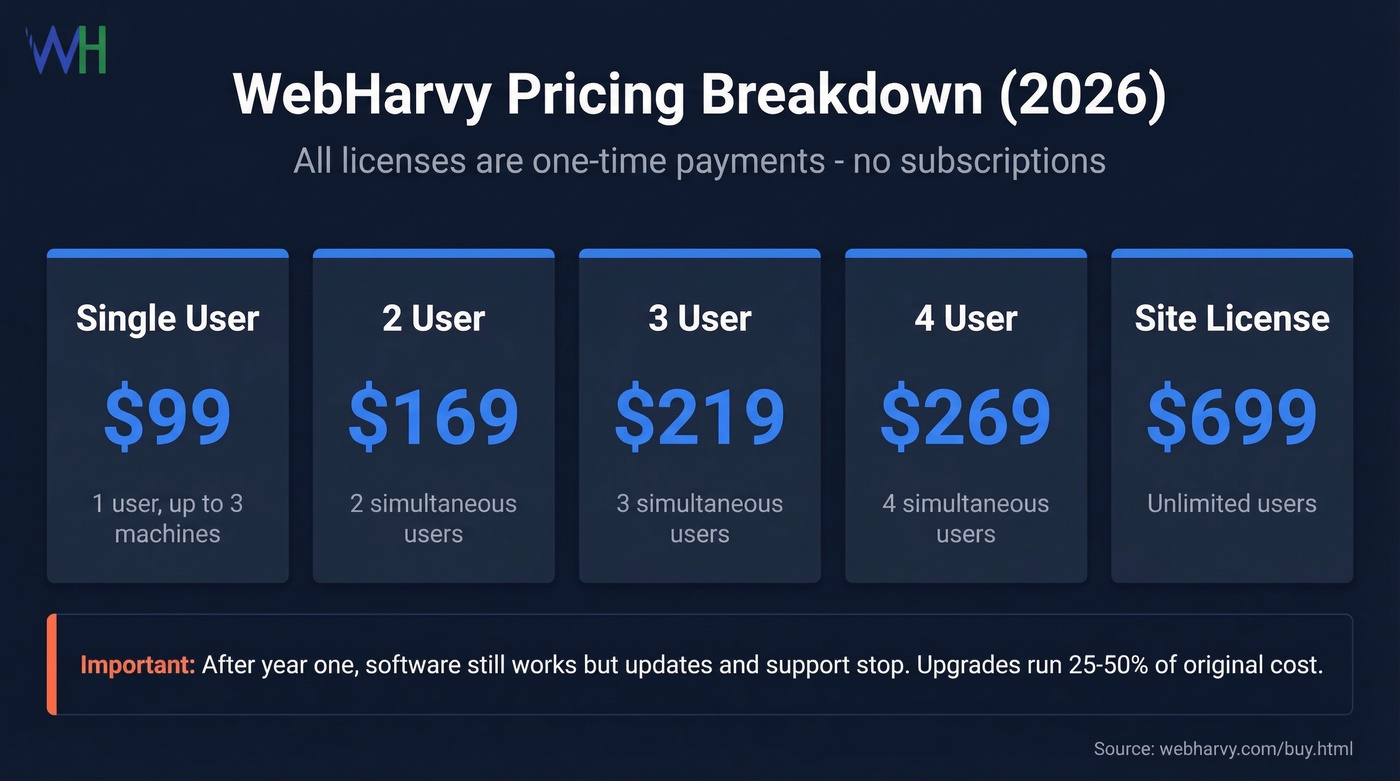
| License | Price | Users |
|---|---|---|
| Single User | $99 | 1 (up to 3 machines) |
| 2 User | $169 | 2 simultaneous |
| 3 User | $219 | 3 simultaneous |
| 4 User | $269 | 4 simultaneous |
| Site License | $699 | Unlimited |
Every license is a one-time payment. You get one year of free updates, one year of email support, and lifetime access to any version released during that window. There's also a 15-day money-back guarantee.
Here's the catch most people miss: after year one, your software still works, but you stop getting updates and support. To access newer versions, you need to purchase a license upgrade within one year of expiration. Miss that window and you're buying a full new license. Upgrades typically run around 25-50% of the original cost, so budget accordingly if you want to stay current.
G2 and Software Advice both show higher numbers because their pricing data is stale. WebHarvy's current buy-page pricing is lower than what those aggregators list.
What WebHarvy Does
WebHarvy is a Windows desktop app with a point-and-click GUI for web scraping lead generation. No code required for basic jobs. You click the data you want, it detects patterns, and it extracts to Excel, CSV, JSON, XML, or directly to SQL databases. It handles pagination, login-protected sites, proxy rotation, scheduled scraping, RegEx, and custom JavaScript execution.
What Users Love
Across 74 reviews on Capterra and 8 on G2, WebHarvy holds a 4.6/5 overall rating. The value-for-money sub-rating hits 4.59/5 - $99 once versus $99/month for cloud scrapers is a compelling pitch for occasional data extraction.
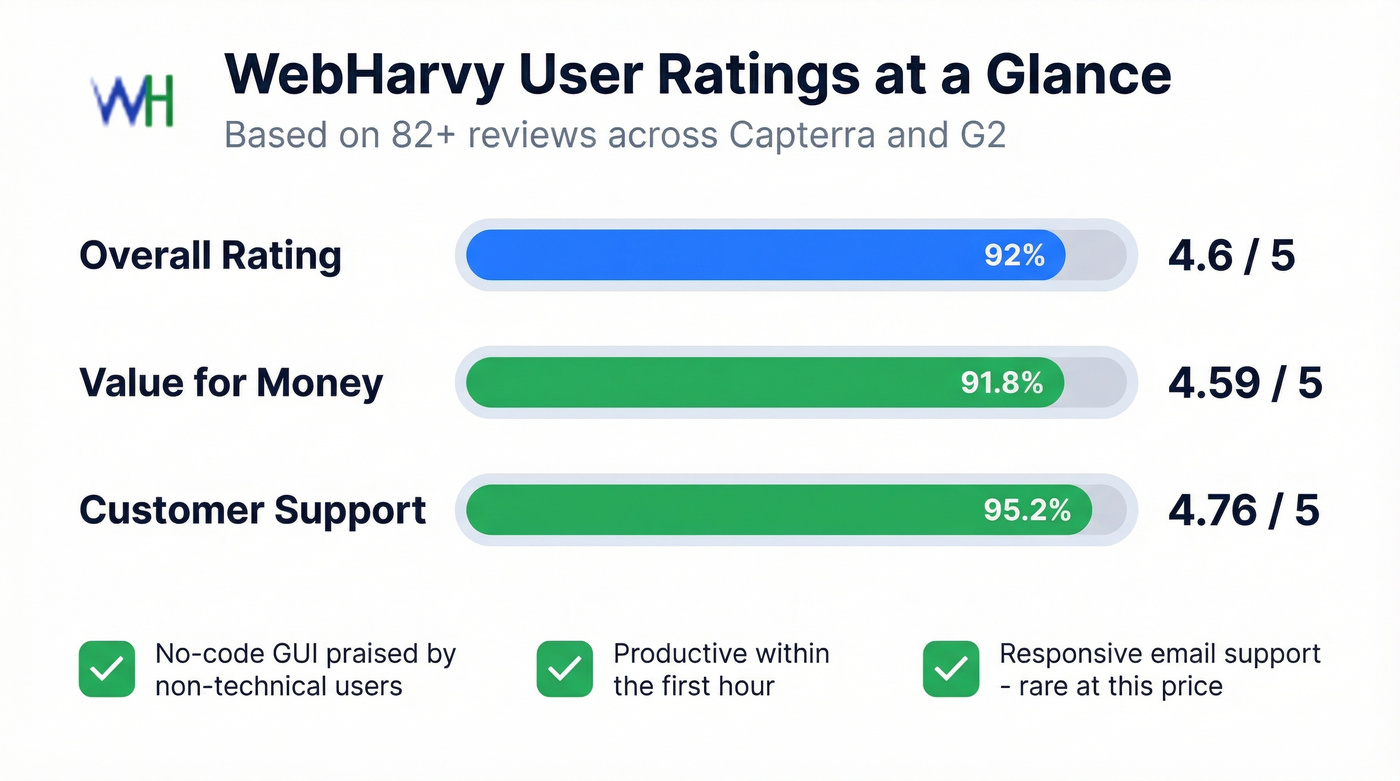
Support quality is the surprise standout at 4.76/5. Multiple reviewers call out responsive, helpful email support, which is unusual for a tool at this price point. In our experience testing budget scraping tools, that level of responsiveness is genuinely rare. The GUI accessibility gets consistent praise too: non-technical users can configure basic scraping jobs without writing a single line of code, and several reviewers specifically mention getting productive within their first hour.

WebHarvy users praise its GUI for extracting data - but if the data you need is emails and phone numbers, you're overengineering the problem. Prospeo gives you 143M+ verified emails and 125M+ mobile numbers with 98% accuracy, searchable by 30+ filters. No scraping rules, no anti-bot headaches, no overnight jobs that crash.
Skip the scraper. Get verified contact data in seconds.
What Breaks in Practice
Speed and stability on large jobs is the most common frustration. Capterra reviewers describe spending "all night" collecting data, jobs stopping mid-run, and the blunt assessment that "unattended operation for big data is not possible." If you're planning to scrape thousands of pages overnight and wake up to a clean dataset, temper your expectations.
If you're trying to turn scraped pages into outreach lists, it's worth comparing against data enrichment services instead of adding more scraping complexity.
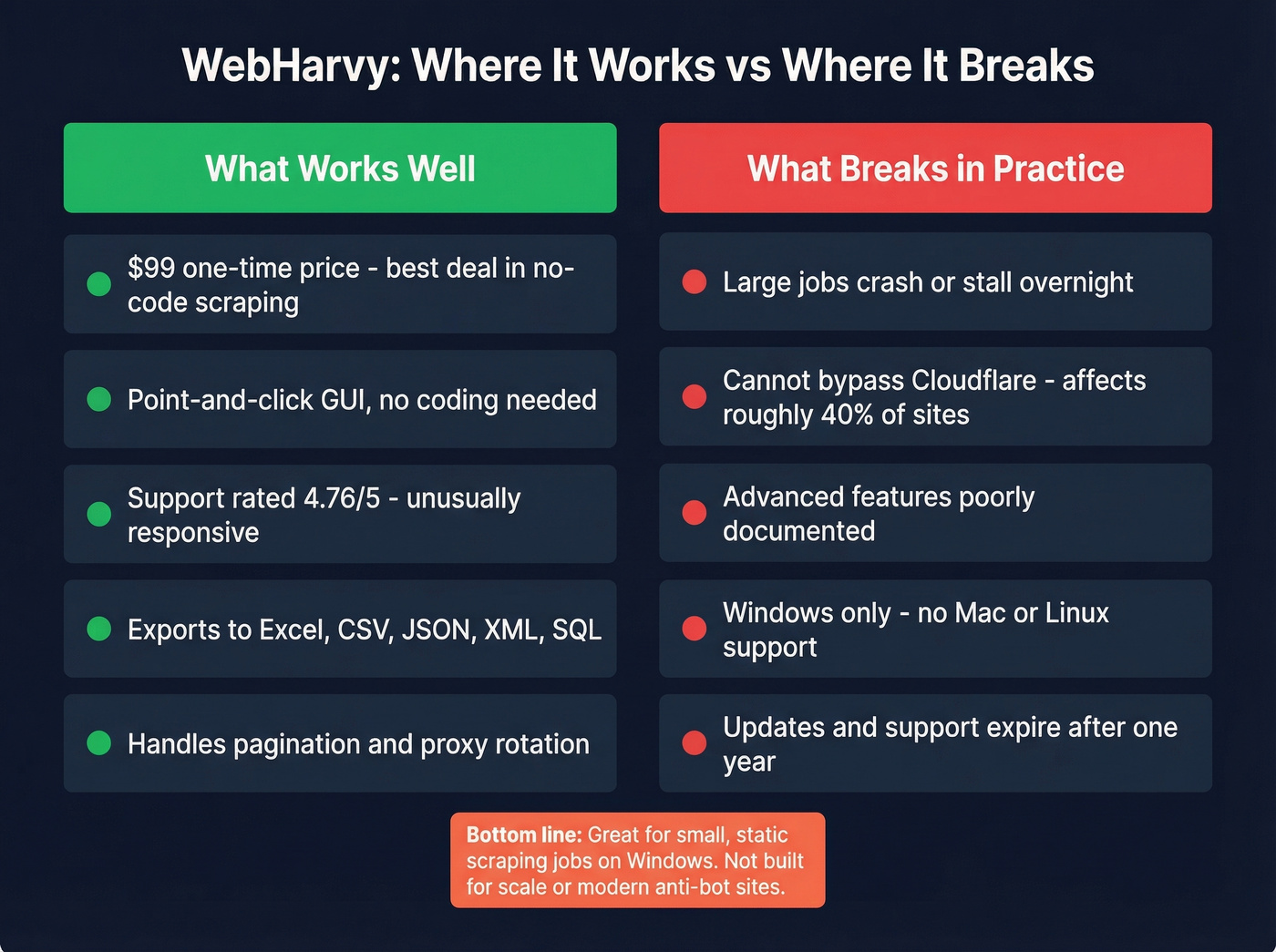
Anti-bot protection is a dealbreaker for many sites. A Reddit user in r/webscraping reported that Cloudflare's checkbox challenge consistently failed inside WebHarvy's built-in browser - even with a VPN. Roughly 40% of websites now use Cloudflare's CDN, and modern anti-bot systems require residential proxies and real browser automation that desktop no-code scrapers simply aren't built to handle.
Advanced features have a steep learning curve. RegEx extraction, JavaScript execution, and dynamic site handling are technically possible but poorly documented. One reviewer put it plainly: "often not obvious how a feature works." That's frustrating when you've already paid and you're staring at a config screen with no clear guidance.
Windows-only remains a hard constraint. Mac and Linux users need a cloud VM workaround, adding cost and friction that defeats the simplicity pitch.
Who Should Buy (and Who Shouldn't)
Buy WebHarvy if you're a Windows user doing small-scale scraping of static or lightly dynamic websites - one-off data projects, price monitoring, or research tasks where you don't need real-time speed or Cloudflare bypass.
Skip WebHarvy if you're on Mac, need to scrape Cloudflare-protected sites, run large unattended jobs, or require team collaboration. And if your actual goal is building prospect lists with emails and phone numbers, a purpose-built tool like Prospeo is faster and more reliable than configuring extraction rules manually.
If you're building lists for outbound, you’ll usually get more leverage from a sales prospecting database than from a desktop scraper.
Let's be honest about the bigger picture: WebHarvy's $99 one-time price is the best deal in no-code scraping, but no-code scraping itself is a shrinking category. As more sites adopt aggressive anti-bot measures, the number of websites you can actually scrape with a desktop tool keeps getting smaller every year.
Alternatives Worth Considering
For cloud-based no-code scraping, Octoparse offers a free tier with paid plans from $99/mo - subscription pricing, but you get cloud execution and scheduling without managing VMs. Apify leans developer-friendly with plans from $29/mo and handles anti-bot challenges significantly better than desktop tools. ScrapingBee is API-based with built-in proxy rotation and JavaScript rendering, starting at $49/mo, and it's a good fit if you're comfortable writing a few lines of code.
If you’re evaluating API-first options, see our breakdown of ScrapingBee alternatives.

If your scraping goal is actually "find contact data for outreach," skip the scraper entirely. Prospeo gives you direct access to 143M+ verified emails and 125M+ mobile numbers at 98% email accuracy. Search by 30+ filters, export verified contacts, and push them straight into your sequencer. It starts free with 75 verified emails per month, and paid plans run about $0.01 per email - no contracts, no annual commitment.
To keep deliverability clean when you export contacts, pair any list-building workflow with email verification and an email deliverability guide.
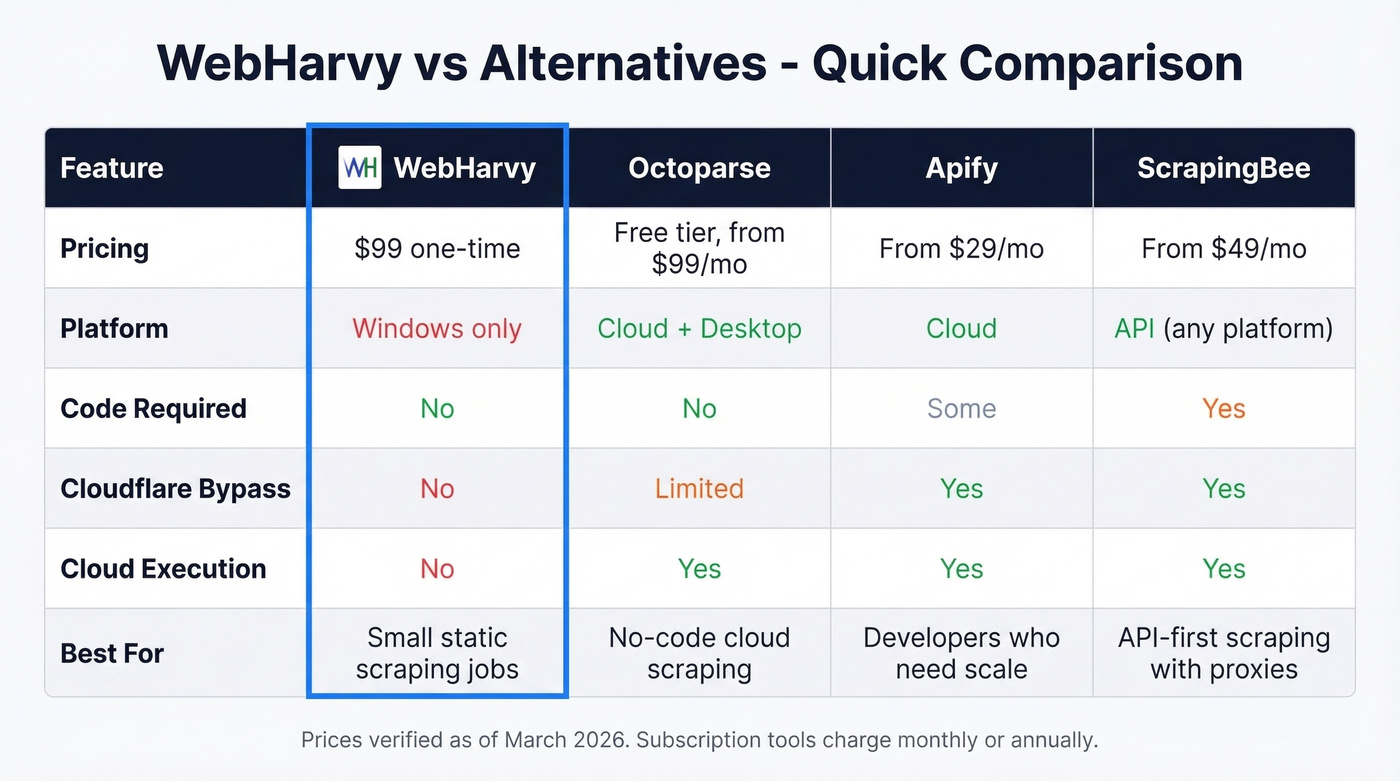
WebHarvy costs $99 once but still can't bypass Cloudflare or run stable overnight jobs. Prospeo's free tier gives you 75 verified emails per month - and paid plans cost about $0.01 per email with no contracts. You get direct access to decision-maker data instead of wrestling with extraction configs.
Better data at $0.01/email, no scraping required.
FAQ
Does WebHarvy have a free trial?
No. WebHarvy offers a 15-day money-back guarantee instead of a free trial, so you can test the full product and refund if it doesn't meet your needs. The guarantee applies to all license tiers.
Does WebHarvy work on Mac?
No - it's Windows-only. Mac users need a Windows VM on AWS or Azure, which typically adds $10-30/month in hosting costs and defeats the simplicity advantage.
Can WebHarvy bypass Cloudflare?
Generally, no. WebHarvy's built-in browser struggles with modern anti-bot challenges like Cloudflare Turnstile. If your target sites use Cloudflare, consider a cloud-based scraper or API service with built-in bypass capabilities.
What's a good alternative if I just need contact data?
If you're scraping websites specifically to find emails and phone numbers, you don't need a scraper at all. Prospeo gives you 143M+ verified emails and 125M+ mobiles with 98% accuracy, starting free at 75 emails/month. Search by job title, company, or industry and export verified contacts directly - no scraping configuration needed.