

What Is a Dedicated IP Address - and Do You Actually Need One?
Every time you log into your bank through a VPN, it asks you to verify your identity again. New device? No. Same laptop, same browser, same coffee shop. The IP address changed, and the bank doesn't trust you anymore. That's when the question hits: what is a dedicated IP address, and would it fix this?
Here's the thing: most of you don't need one.
The Quick Version
Three rules to save you ten minutes of reading:
- Want privacy on a VPN? Stick with a shared IP. You blend into the crowd.
- Need consistent access to banking, remote work tools, or IP-allowlisted systems? A dedicated IP solves that.
- Everyone else? You probably don't need one.
This article covers dedicated IPs across three contexts - VPN, web hosting, and email sending - because the answer changes depending on what you're doing. Keep reading only if you're not sure which camp you fall into.
Dedicated IP Address Explained
A dedicated IP address is an IP assigned exclusively to you. Nobody else uses it. Think of it as having your own private phone number versus sharing an office line with twenty coworkers. When someone calls that number, they reach you and only you.
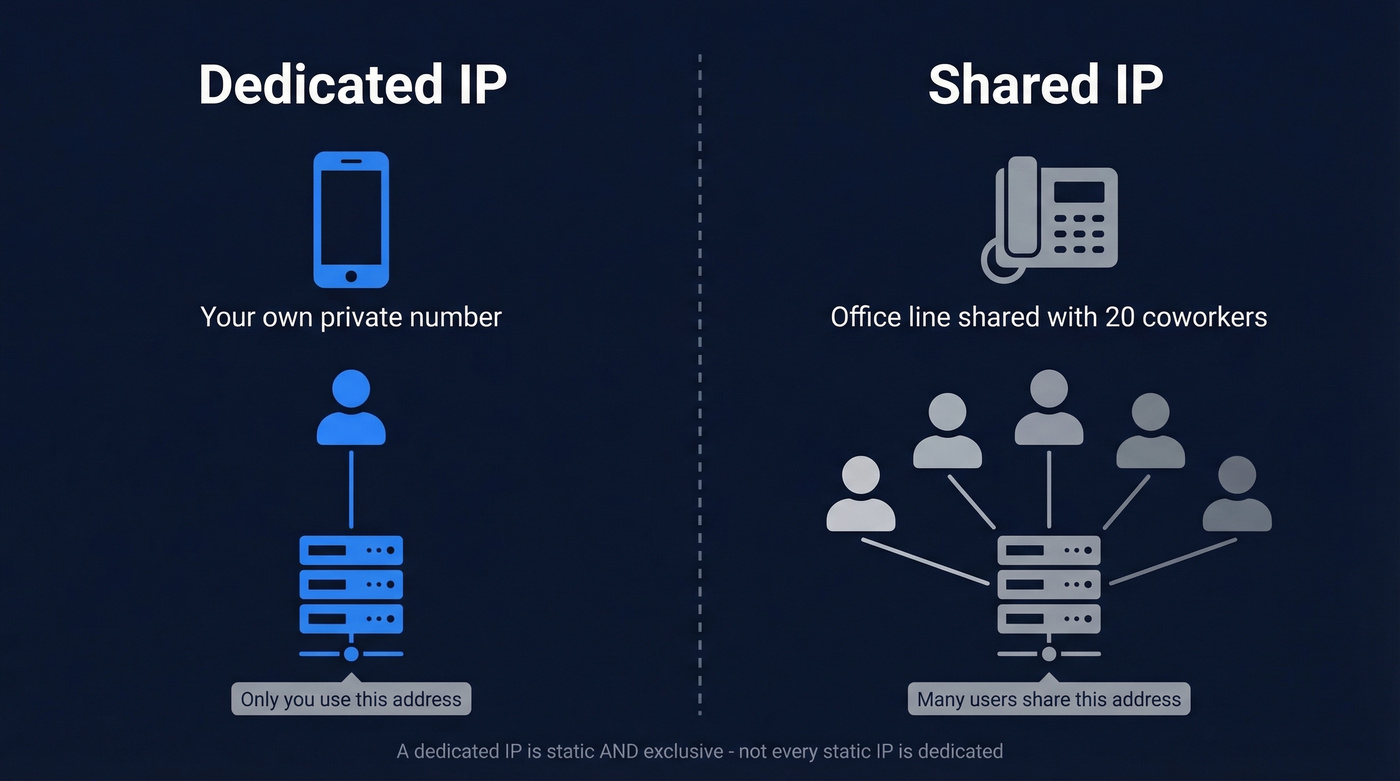
One common confusion: a dedicated IP is a subtype of a static IP, but not every static IP is dedicated. A static IP stays the same over time, yet it can still be shared among multiple users. A dedicated IP is both static and exclusive to a single user or account. That distinction trips up most people.
IP Address Types Compared
Not all IPs work the same way. Here's the breakdown based on the GoodAccess taxonomy:
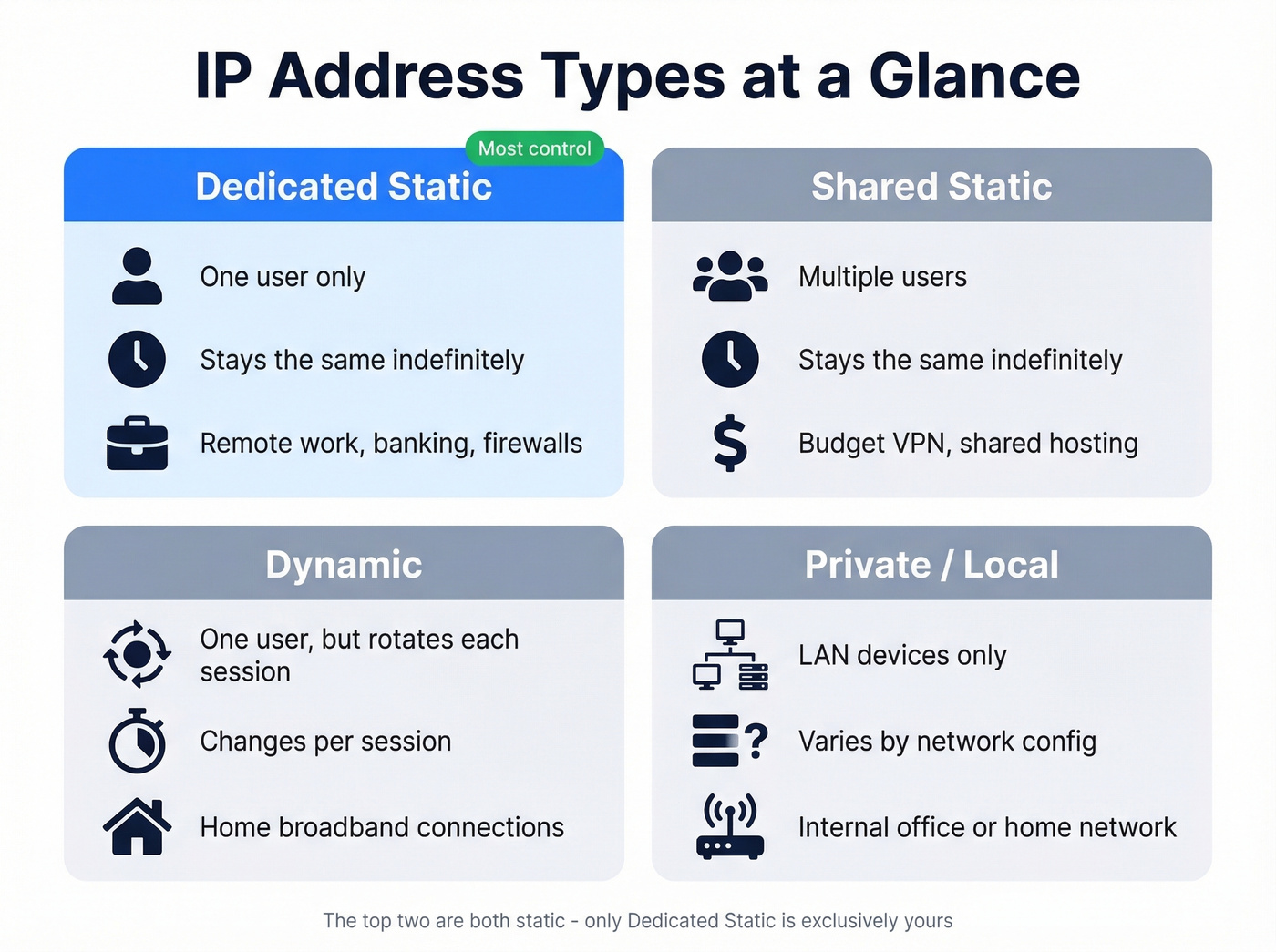
| Type | Users | Duration | Example Use Case |
|---|---|---|---|
| Dedicated static | One | Indefinite | Remote work, banking |
| Shared static | Multiple | Indefinite | Budget VPN, shared hosting |
| Dynamic | One (rotates) | Session-based | Home broadband |
| Private/local | LAN devices | Varies | Internal network |
The first two are the ones people confuse. Both are static. Only the first is exclusively yours.

Before you spend months warming up a dedicated IP, check the real culprit. Most deliverability issues start with bad contact data - not IP reputation. Prospeo's 5-step verification catches spam traps, honeypots, and invalid addresses before they tank your sender score.
Drop your bounce rate below 4% before you touch your IP setup.
When a Dedicated IP Actually Matters
For VPN Users
Use a dedicated IP if you're logging into banking apps, corporate VPNs, or IP-allowlisted business tools daily. The constant CAPTCHAs and identity checks on shared VPN IPs aren't just annoying - they waste real time. Remote workers who need to allowlist an IP on a company firewall have no choice here.
Skip it if privacy is your main goal. A dedicated VPN IP is traceable back to you specifically, which defeats the purpose. Shared IPs give you crowd anonymity - your traffic blends in with hundreds of other users. The consensus on r/nordvpn is straightforward: shared for privacy, dedicated for smoother predictable access.
For Web Hosting
The old argument - "you need a dedicated IP for SSL" - died years ago. SNI (Server Name Indication) lets multiple sites share an IP and still run HTTPS without issues. Virtually all modern browsers support it.
The only remaining edge case is direct IP access, meaning you type the IP into a browser and hit your site. That matters for some server admin workflows and almost nobody else. Your host is upselling you a dedicated IP at $2-$10/month for a benefit you'll never use. In our experience, it's almost never worth it.
For Email Sending
This is where dedicated IPs get trickier than people expect - and where most people make the wrong call.
Sender reputation rests on IP reputation, domain reputation, and DNS authentication (SPF, DKIM, DMARC). A dedicated IP for email gives you full control over the IP piece. That sounds great until you realize 70% of emails show at least one spam-related issue, and the wrong IP choice can reduce delivery rates by up to 27%.
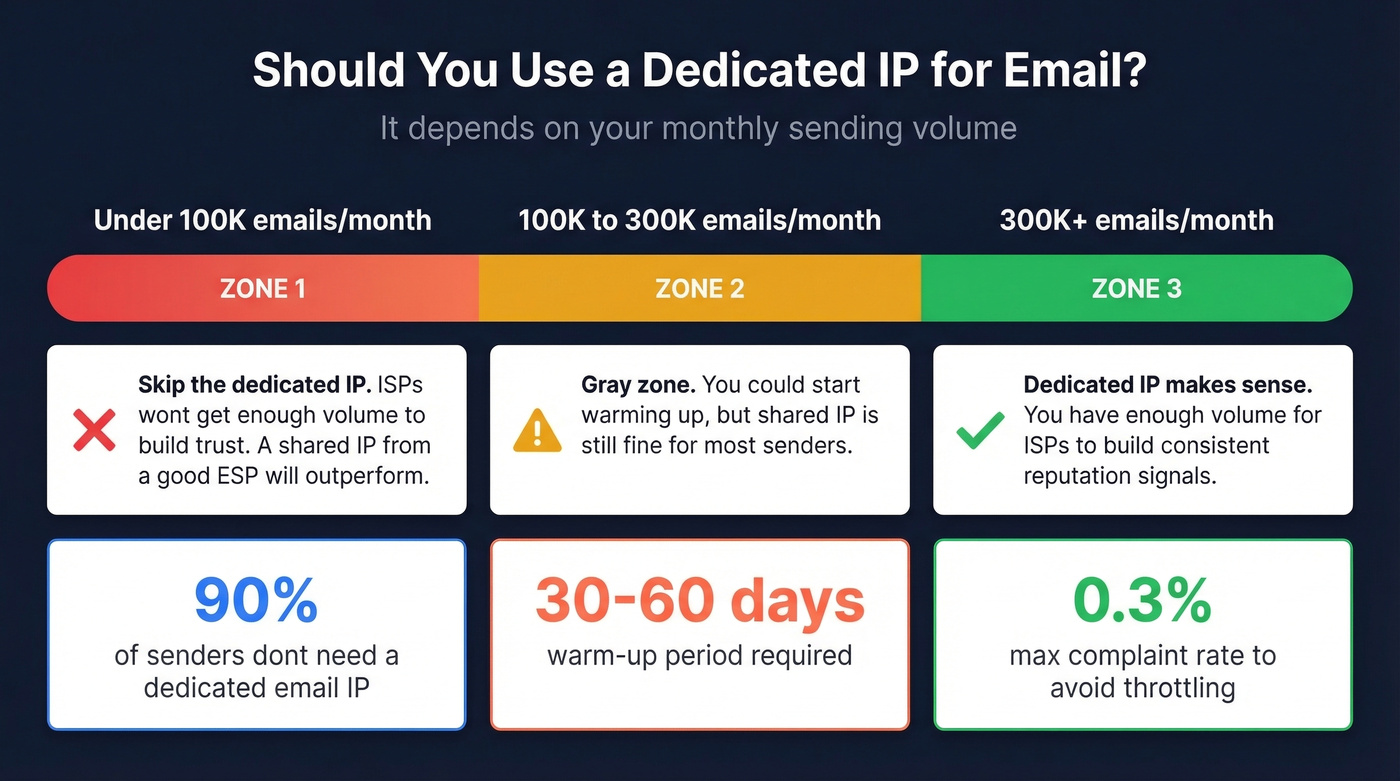
Around 90% of senders don't need a dedicated IP for email. If you're sending under roughly 100,000 emails per month, a shared IP from a reputable ESP will usually outperform a dedicated one because ISPs won't get enough volume from your dedicated IP to build trust. Dedicated IP email sending starts to make sense around 300,000+ emails per month, with 100,000 as a practical minimum for building consistent reputation signals. Warm-up takes 30-60 days. Keep complaint rates below roughly 0.3% to avoid throttling.
Marketers with successful email programs are 22% more likely to monitor deliverability and inbox placement. And they'll tell you the problem is usually data quality, not IP type. Before paying for a dedicated sending IP, check your bounce rate. If it's above 4%, the culprit is almost always invalid addresses. We've seen teams waste months warming up dedicated IP infrastructure when the real problem was a dirty contact list - Prospeo's 5-step email verification catches bad addresses, spam traps, and honeypots before they damage your sender reputation.

Does a Dedicated IP Help SEO?
No.
John Mueller has confirmed that search engines evaluate sites individually, not by shared IP. The "bad neighborhood" fear - where a spammy site on your shared server drags your rankings down - is outdated. SNI eliminated the SSL argument. Modern search engines are smarter than that.
The real shared-IP risk is email blacklists, not search rankings. If someone on your shared hosting IP gets flagged by Spamhaus or Barracuda, it can affect email deliverability from that IP. But your Google rankings? Unaffected.
What a Dedicated IP Costs in 2026
| Context | Provider Example | Monthly Cost | Notes |
|---|---|---|---|
| VPN | NordVPN | From $3.69/mo | Promo floor; add-on |
| VPN | Surfshark | From $3.75/mo | Add-on to base plan |
| Hosting | Most shared hosts | $2-$10/mo | Often unnecessary |
| ISP (business) | Varies by region | $10-$20/mo | Static IP add-on |
| Email/SMTP | AWS SES | ~$24.95/IP/mo | Highest stakes, highest cost |
Add-ons typically run $3-$10/month depending on provider, location, and term. Email dedicated IPs are the most expensive because the stakes and the warm-up requirements are highest.
Do You Need One? A 30-Second Decision
Yes, get one if you're logging into banking or corporate tools through a VPN daily, sending 300K+ emails per month consistently, or your remote team needs IP allowlisting on a firewall.
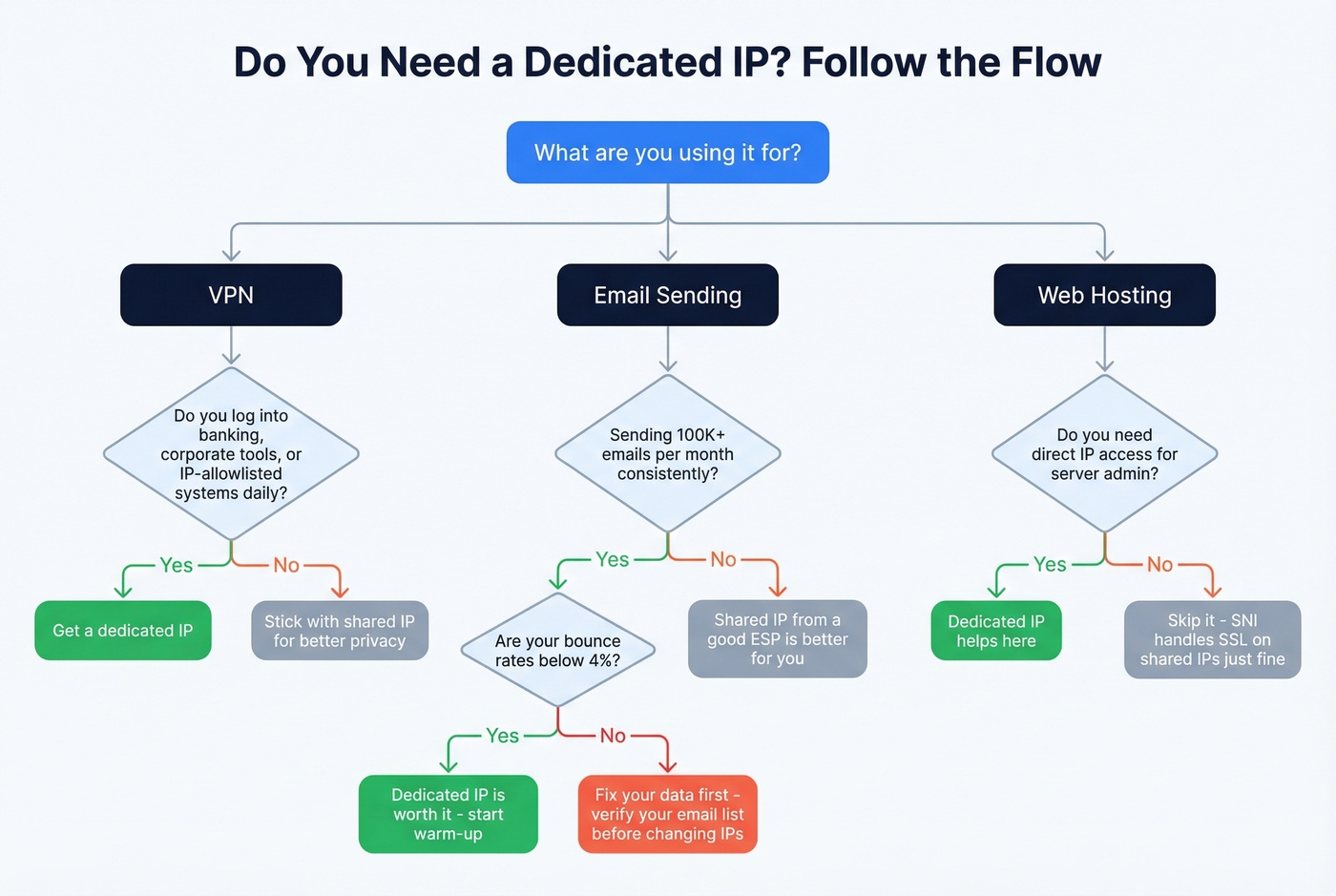
Probably not if you're a casual VPN user, running a small website on shared hosting, or sending fewer than 100K emails per month. A shared IP from a reputable provider handles all of these fine.
Fix something else first if your bounce rates are high. That's a data quality problem, not an IP problem. Before investing in dedicated IP infrastructure for email, run your contact list through an email verification tool to rule out bad data as the real culprit.
Let's be honest: if your deal sizes are modest and you're sending fewer than 100K emails a month, a dedicated IP is a distraction. Fix your data, nail your authentication, and let the shared IP do its job.
You read it above: 70% of emails have at least one spam-related issue, and dirty data is the #1 cause. Prospeo delivers 98% email accuracy with catch-all handling, spam-trap removal, and a 7-day data refresh - so your dedicated or shared IP stays clean.
Clean data protects your IP reputation. Start with 75 free verified emails.
FAQ
Is a dedicated IP the same as a static IP?
No. A dedicated IP is a type of static IP, but not all static IPs are dedicated. A static IP stays the same over time but can be shared among users. A dedicated IP is both static and exclusively assigned to one account.
Can a dedicated IP improve email deliverability?
Only if you send 100K+ emails per month consistently. Below that volume, ISPs don't receive enough reputation signals, and a shared IP from a reputable ESP actually performs better. Fix your contact data first - bad addresses, spam traps, and invalid emails hurt deliverability far more than IP type ever will.
How long does it take to warm up a dedicated IP?
Typically 30-60 days. You start with low volume and gradually increase over weeks. During warm-up, deliverability can be worse than a shared IP because ISPs haven't built trust with your new address yet. Rushing the process triggers spam filters and sets you back to square one.