

7 Best Zcal Alternatives for 2026 (With Pricing)
Why People Switch from Zcal
Zcal's free tier is genuinely impressive - unlimited links, unlimited calendars, beautiful booking pages, all at $0. So why are people looking for Zcal alternatives? Three reasons keep surfacing in Capterra reviews: no custom domains, no custom SMTP, and too much Zcal branding on booking pages. If you're running outbound and need your scheduling page on yourdomain.com with emails from your own server, Zcal can't do it yet.
The tool holds a 4.5/5 on G2 with 17 reviews and 4.9/5 on Capterra with 12 reviews, but those small review counts tell you something - it's still early. G2 reviewers also flag a lack of spam protection on booking pages, and Zcal is English-only, which rules it out for international teams.
Our Picks (TL;DR)
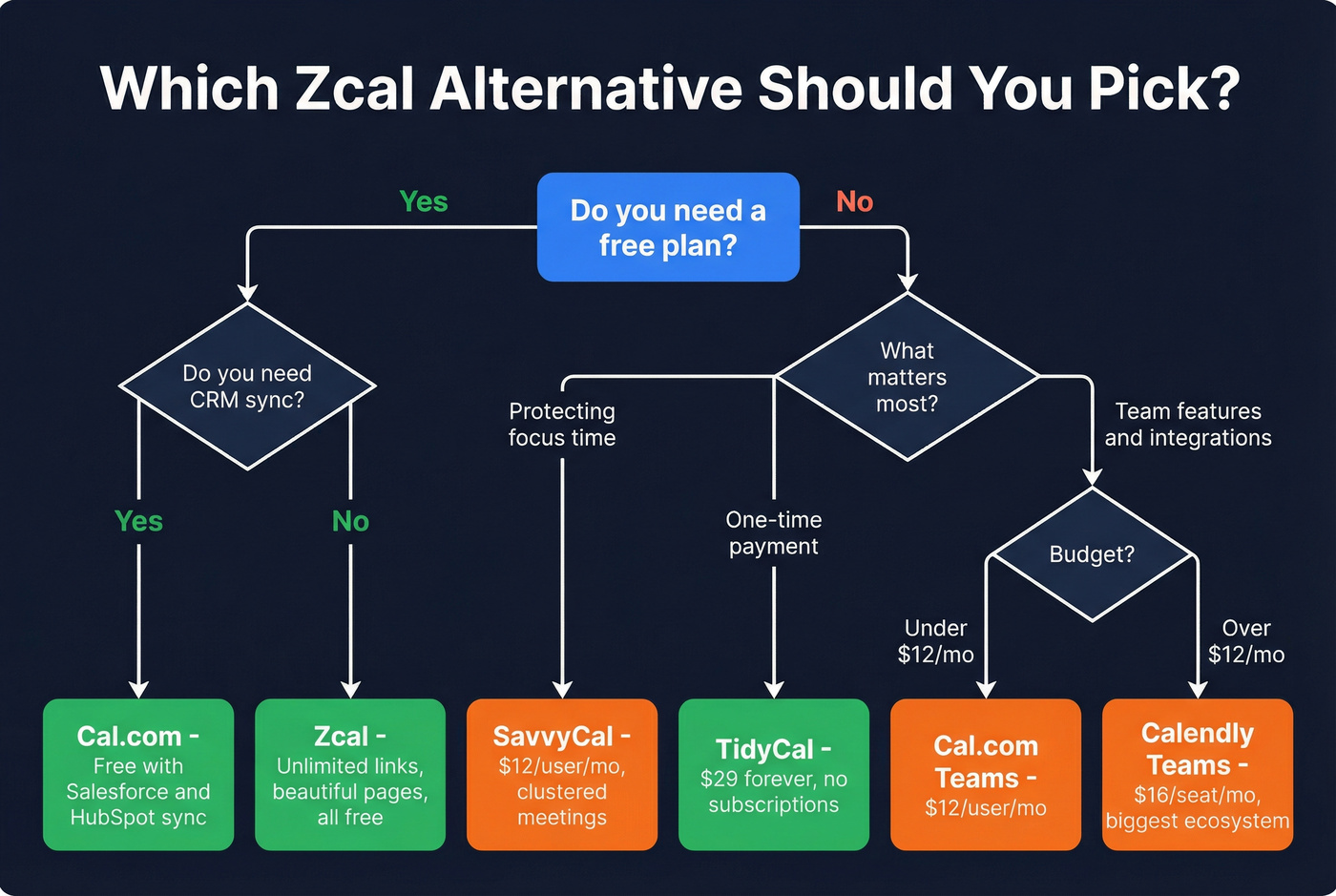
- Cal.com - best free alternative. Unlimited event types, unlimited calendars, Stripe/PayPal payments, all at $0.
- SavvyCal - best for protecting focus time. Clustered meetings and ad-free polls at $12/user/mo.
- Calendly - safest default. Huge integration ecosystem, most battle-tested.
Pricing at a Glance
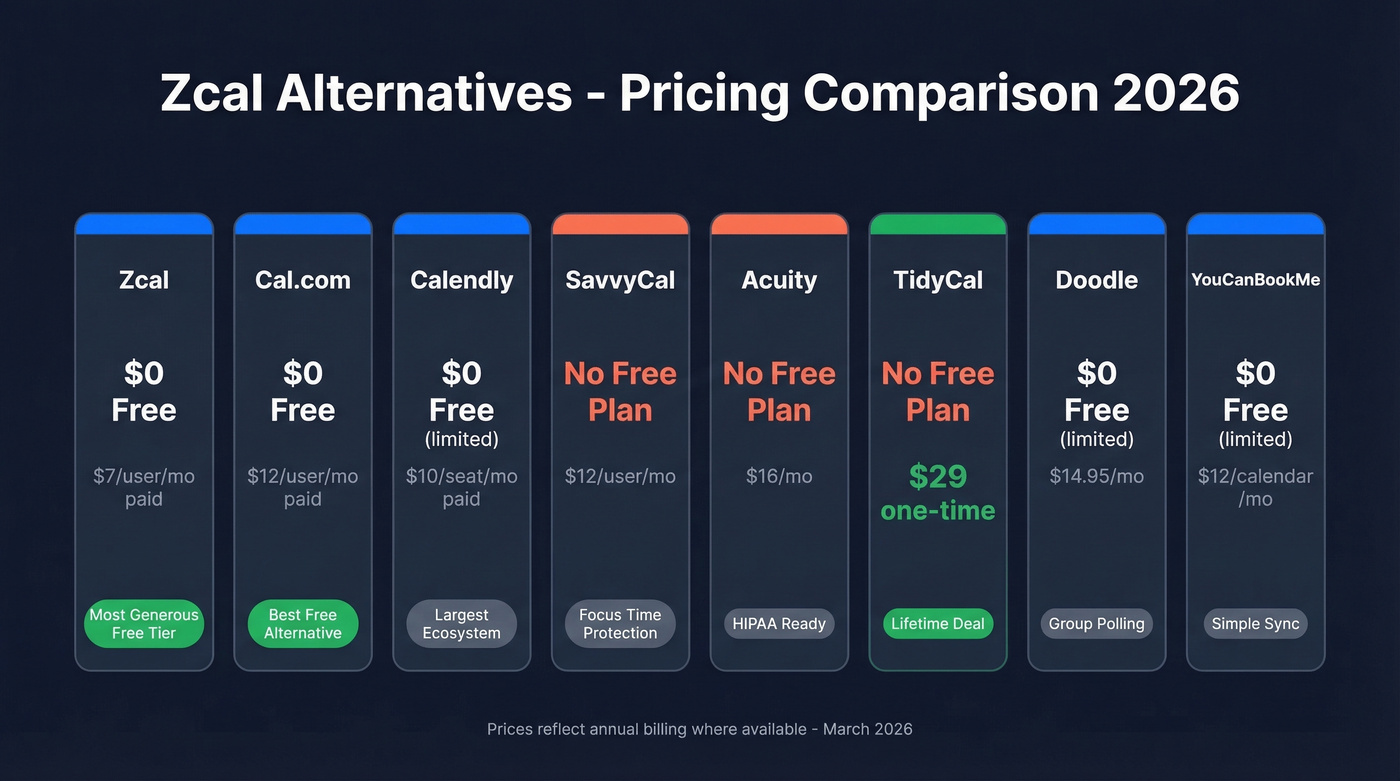
| Tool | Best For | Free Plan | Paid From | Key Differentiator |
|---|---|---|---|---|
| Zcal | Free booking pages | ✅ Unlimited | $7/user/mo | Most generous free tier in scheduling |
| Cal.com | Open-source flexibility | ✅ Unlimited | $12/user/mo | Built-in video, half the per-user cost of Calendly Teams |
| Calendly | Integration ecosystem | ✅ 1 event type | $10/seat/mo | Largest app ecosystem |
| SavvyCal | Protecting deep work | ❌ | $12/user/mo | Clustered meetings, ad-free polls |
| Acuity | Service businesses | ❌ | $16/mo (annual) | HIPAA BAA, memberships |
| TidyCal | Subscription-fatigued | ❌ | $29 one-time | Lifetime deal |
| Doodle | Group polling | ✅ Limited | $14.95/mo | 30M monthly users |
| YouCanBookMe | Appointment businesses | ✅ Limited | $12/calendar/mo | Simple calendar sync |

A better booking page means nothing if you're booking meetings with the wrong people. Prospeo gives you 300M+ profiles with 98% email accuracy and 30+ filters - buyer intent, technographics, job changes - so every meeting on your calendar is with a real decision-maker.
Fix who you're meeting, not just how you schedule them.
Free Tier Comparison
If you're leaving Zcal because of missing features - not price - here's what the free plans actually include:
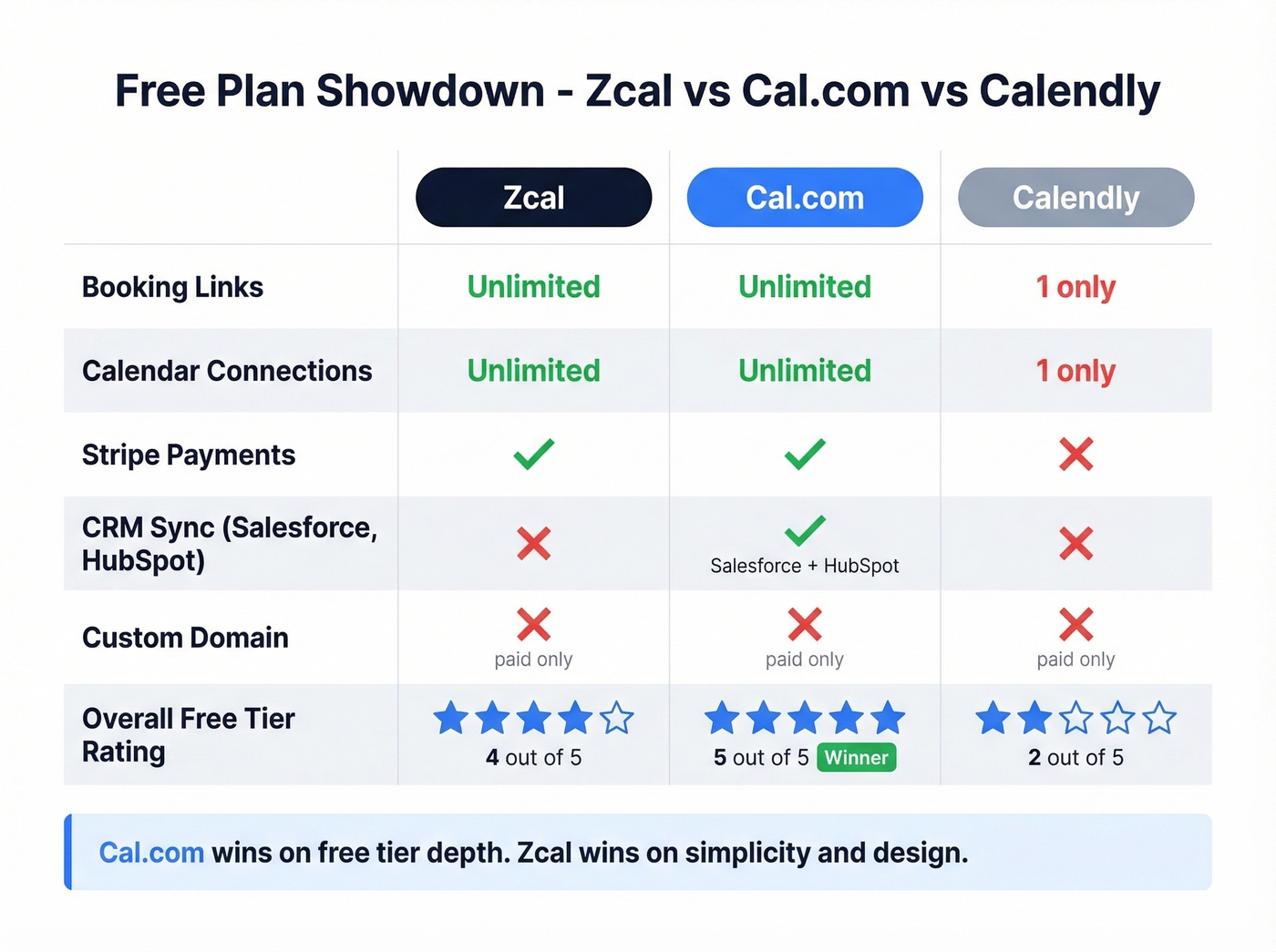
| Feature | Zcal Free | Cal.com Free | Calendly Free |
|---|---|---|---|
| Booking links | Unlimited | Unlimited | 1 booking page |
| Calendar connections | Unlimited | Unlimited | 1 |
| Payments (Stripe) | ✅ | ✅ | ❌ |
| CRM sync | ❌ | ✅ (Salesforce, HubSpot) | ❌ |
| Custom domain | ❌ | ❌ (paid) | ❌ (paid) |
Cal.com wins on free-tier depth. Zcal wins on simplicity and design.
The Best Scheduling Tools to Replace Zcal
Cal.com
Use it if you want Zcal's generous free tier but with more power underneath. Cal.com's free plan includes unlimited event types, unlimited calendars, Stripe and PayPal payments, two-way Salesforce and HubSpot sync, and a one-click Calendly import. That's more than most tools offer on paid plans.
The Teams tier runs $12/user/mo billed yearly - about half the price per user compared to Calendly's $16/seat/mo Teams plan. You also get built-in Cal Video, which can eliminate a separate Zoom license for simple meetings. The Organizations tier at $28/user/mo adds SAML SSO + SCIM and enterprise controls, with SOC 2, HIPAA, and ISO 27001 compliance listed.
One Reddit user in a scheduling tools roundup called it an "open-source gem," and that tracks. We've tested the Calendly import feature ourselves, and it pulled over event types, availability windows, and integrations in under two minutes - genuinely painless.
Skip it if you're in Europe and rely on embeddable widgets. Cal.com's widget lacks built-in GDPR consent, so you'll need to implement your own consent layer before loading it.
Calendly
The Toyota Camry of scheduling tools - reliable, everywhere, and nobody's favorite topic at dinner. Calendly supports Stripe, PayPal, Zapier/webhooks, HubSpot, and Salesforce on paid tiers, plus a massive integration ecosystem overall. Standard runs $10/seat/mo billed yearly, Teams $16/seat/mo, and Enterprise starts at $15k/year.
The free plan is stingy: one event type, one calendar. That's it. Reddit threads consistently flag the cost - one user pointed out they were paying $144/year for features Zcal offers free. If you don't need the integration depth, you're overpaying.
SavvyCal
Use it if you guard your calendar like a hawk. SavvyCal's clustered meetings feature groups bookings together so you keep contiguous blocks of focus time. No other scheduling tool does this as well. Meeting polls come ad-free - a direct shot at Doodle.
Basic starts at $12/user/mo, Premium at $20/user/mo. The Premium tier adds custom domains, which is the exact feature Zcal users request most on Capterra. Payments run through Stripe with Apple Pay and Google Pay support, plus automatic sales tax collection.
Skip it if you need a free plan. SavvyCal doesn't have one. For solopreneurs watching every dollar, Cal.com or Zcal's free tier makes more sense.
Acuity Scheduling
Acuity exists for a specific person: the coach, salon owner, or clinic administrator who needs to sell packages, manage memberships, issue gift certificates, and collect payments through Stripe, Square, or PayPal - all from a booking page. It's a lot of tool.
Starter begins at $16/mo on annual billing or $20 month-to-month, and there's no free plan. Premium includes a HIPAA BAA, which is non-negotiable for healthcare. Here's the thing - if you just need a simple booking link for sales calls, Acuity is overkill. The setup alone will eat an afternoon. But for service businesses with complex intake forms and payment workflows, nothing else comes close at this price.
TidyCal
$29. One time. Forever.
Booking pages, calendar sync, reminders - the basics, done. A Reddit user recommended TidyCal specifically for solopreneurs with subscription fatigue, and it's hard to argue with the math. It won't scale for teams, and there's no round-robin or workflow automation. But if you're a freelancer who books 1-on-1 calls and wants to stop paying monthly for the privilege, this is the answer.
Doodle
Best for group polling and finding mutual availability across a messy set of calendars. 30 million people use Doodle every month, and it sits around a 4.4/5 on G2 with 2,000+ reviews. The free plan is limited; paid plans start at $14.95/month. Doodle isn't a full scheduling-link tool - it's a meeting-poll specialist, and it does that one job well.
Skip it if you need a persistent booking page rather than one-off polls.
YouCanBookMe
Best for appointment-based small businesses that want straightforward Google, Outlook, and iCloud sync. The free plan includes 1 calendar connection and up to 10 booking pages. Paid plans start at $12/month per calendar connection. Honestly, it's less feature-rich than Cal.com or Calendly at similar price points, which makes it a tough sell unless you're already locked in and don't want to migrate.
When to Stay with Zcal
Zcal is genuinely great for solopreneurs who want beautiful booking pages without paying a dime. The free tier includes unlimited links, unlimited calendar connections, meeting polls, group events, and Stripe payments. If you don't need custom domains, custom SMTP, or deep team features, there's no reason to switch. Sometimes the best alternative is the tool you already have.
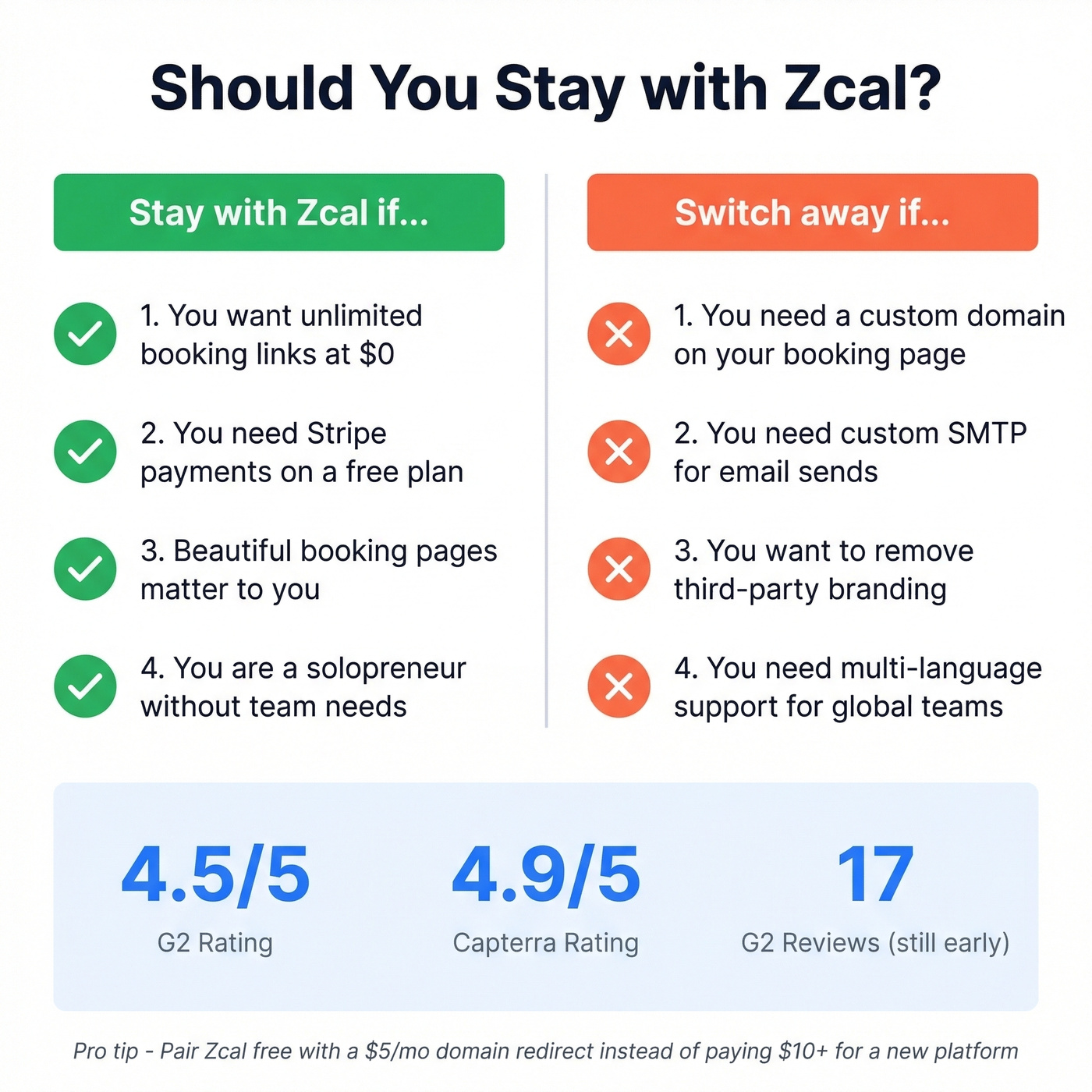
Let's be honest: most people searching for a new scheduling app don't actually need to switch. They need one specific feature - usually custom domains - and they'd be better off pairing Zcal's free tier with a $5/mo domain redirect than paying $10+/mo for a whole new platform.
Before You Schedule, Find the Right People
A scheduling link only works if it reaches the right inbox. We've seen teams obsess over their booking page design while sending it to unverified email lists - and then wonder why nobody books. Prospeo covers 300M+ professional profiles with 98% email accuracy and a 7-day data refresh cycle, so you're not sending your shiny new Cal.com link to addresses that bounced six months ago. The free tier gives you 75 verified emails per month, no contract required.
If you're building outbound systems end-to-end, pair scheduling with sales prospecting techniques, clean data via data enrichment services, and list hygiene from an email deliverability guide.

You're optimizing scheduling links and CRM sync - smart. Now make sure those calendars fill with qualified buyers. Prospeo's intent data tracks 15,000 topics so you reach prospects actively researching your solution, at $0.01 per verified email.
Stop scheduling meetings with people who were never going to buy.
FAQ
Is Zcal really free?
Yes. Zcal's free plan includes unlimited booking links, unlimited calendar integrations, and full booking pages at $0. Pro at $7/user/mo and Business at $12/user/mo add team features like round-robin and collective events, plus custom domain support on Business.
What's the best free Zcal alternative?
Cal.com. Its free tier includes unlimited event types, Stripe/PayPal payments, and two-way Salesforce and HubSpot sync - more generous than any other free scheduling tool available in 2026.
Can I use a scheduling tool for outbound sales?
Yes, but the link only converts if it reaches decision-makers. Pair Cal.com or Calendly with a prospecting tool that verifies emails in real time so your booking link lands in the right inbox instead of bouncing.
Is TidyCal's lifetime deal worth it?
At $29 one-time, TidyCal pays for itself in three months versus any $10+/mo subscription. It covers booking pages, calendar sync, and reminders. Skip it only if you need team features like round-robin - it's built for solo operators, not growing sales teams.