

Zcal Review 2026: Pricing, Pros, Cons, and Whether It's Worth It
Calendly's paid plans start at $12/user/month. Zcal gives you unlimited scheduling links, unlimited calendar connections, meeting polls, and Zoom/Meet/Teams integrations for $0. Zapier named it a top-10 meeting scheduler for 2026. But a generous free tier doesn't automatically make it the right tool, and we've seen plenty of "free" products quietly gut their plans once they hit scale. Here's what you actually need to know about Zcal's pricing, what real users say, and where it falls short.
30-Second Verdict
Zcal's free plan is one of the most generous in scheduling - unlimited links, unlimited calendars, meeting polls, and video conferencing integrations at no cost. Most solo users won't ever need Pro. The catch: support is slow, there's no CalDAV/WebCAL sync, and it's English-only. If you need team features, Pro at $7/user/month is fair. If you need enterprise controls, look at Calendly.
What Is Zcal?
Founded in 2021, Zcal is a design-forward scheduling tool built around a free-first model. Think Calendly-style scheduling with Typeform-like visual polish - customizable booking pages with cover photos, welcome videos, and theme options. It's positioned as the free alternative for professionals who don't want to pay just to share a booking link.
Zcal Pricing Breakdown (2026)
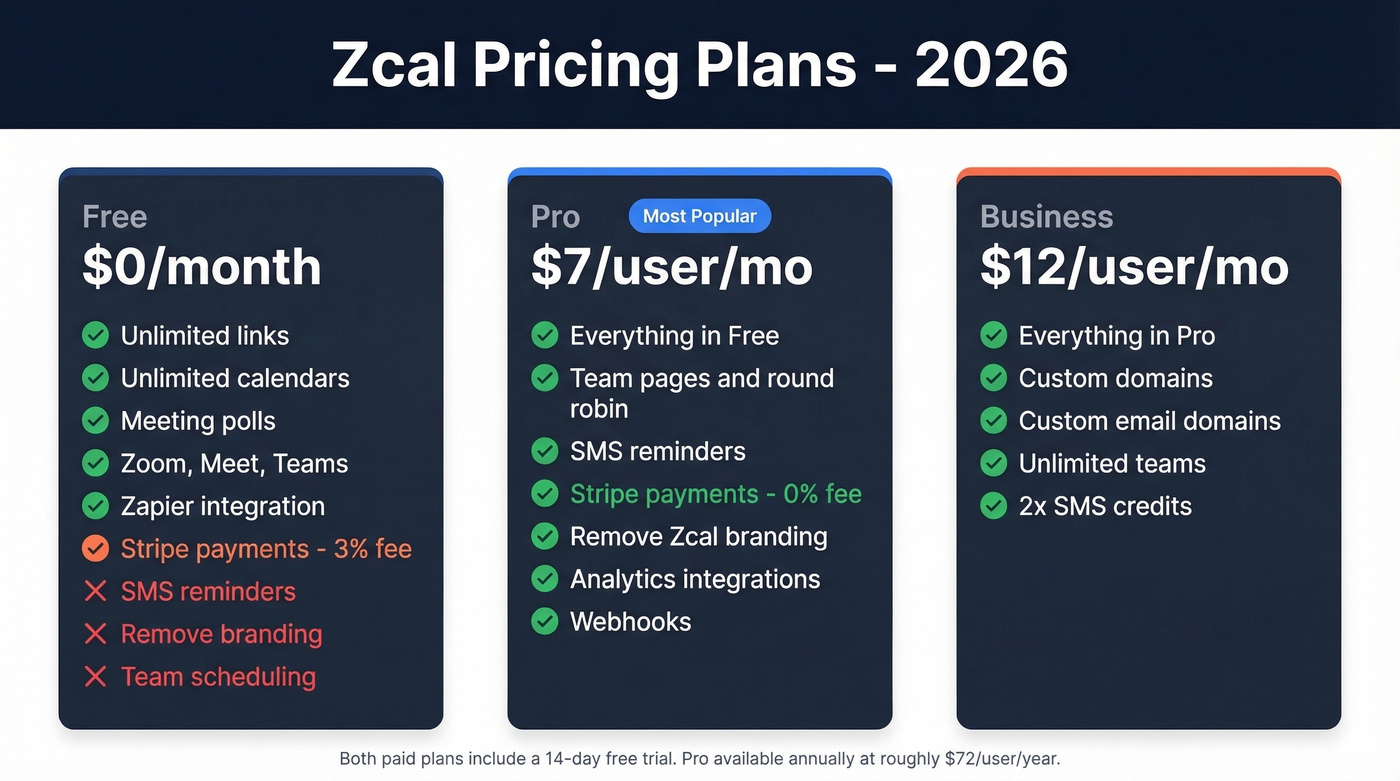
Zcal runs a clean three-tier structure:
| Feature | Free ($0) | Pro ($7/user/mo) | Business ($12/user/mo) |
|---|---|---|---|
| Scheduling links | Unlimited | Unlimited | Unlimited |
| Calendar connections | Unlimited | Unlimited | Unlimited |
| Meeting polls | ✓ | ✓ | ✓ |
| Zoom/Meet/Teams | ✓ | ✓ | ✓ |
| Zapier integration | ✓ | ✓ | ✓ |
| Group invite cap | 20 attendees | 1,000 attendees | 1,000 attendees |
| Stripe payments | 3% commission | 0% commission | 0% commission |
| SMS reminders | ✗ | ✓ | ✓ (2x credits) |
| Remove branding | ✗ | ✓ | ✓ |
| Team scheduling | ✗ | ✓ | ✓ |
| Custom domains | ✗ | ✗ | ✓ |
Both paid tiers include a 14-day free trial. Pro is also available annually at roughly $72/user/year.
The Free-to-Pro jump is mostly about team features - team pages, round robin, and collective scheduling - plus removing Zcal branding from your booking page. Pro also unlocks analytics integrations with Google Analytics and Meta Pixel, webhooks, and coupon codes. For most small teams, Pro is the ceiling.
The Stripe commission difference matters if you're collecting payments through bookings. On the free plan, Zcal takes a 3% cut on top of Stripe's own fees. Pro eliminates that entirely, which pays for itself fast if you're a coach or consultant processing even a few hundred dollars a month in session fees. At $500/month in bookings, that's $15 saved - more than double the Pro subscription cost.
Zcal has also run AppSumo lifetime deals in the past at around $49, so keep an eye out if you want to lock in access permanently.
Pros - What Zcal Gets Right
Unlimited everything on free. Links, calendars, meeting polls, and automated email reminders with no artificial caps to push you toward paid. Calendly's free plan limits you to one event type and one calendar connection. That gap is enormous.
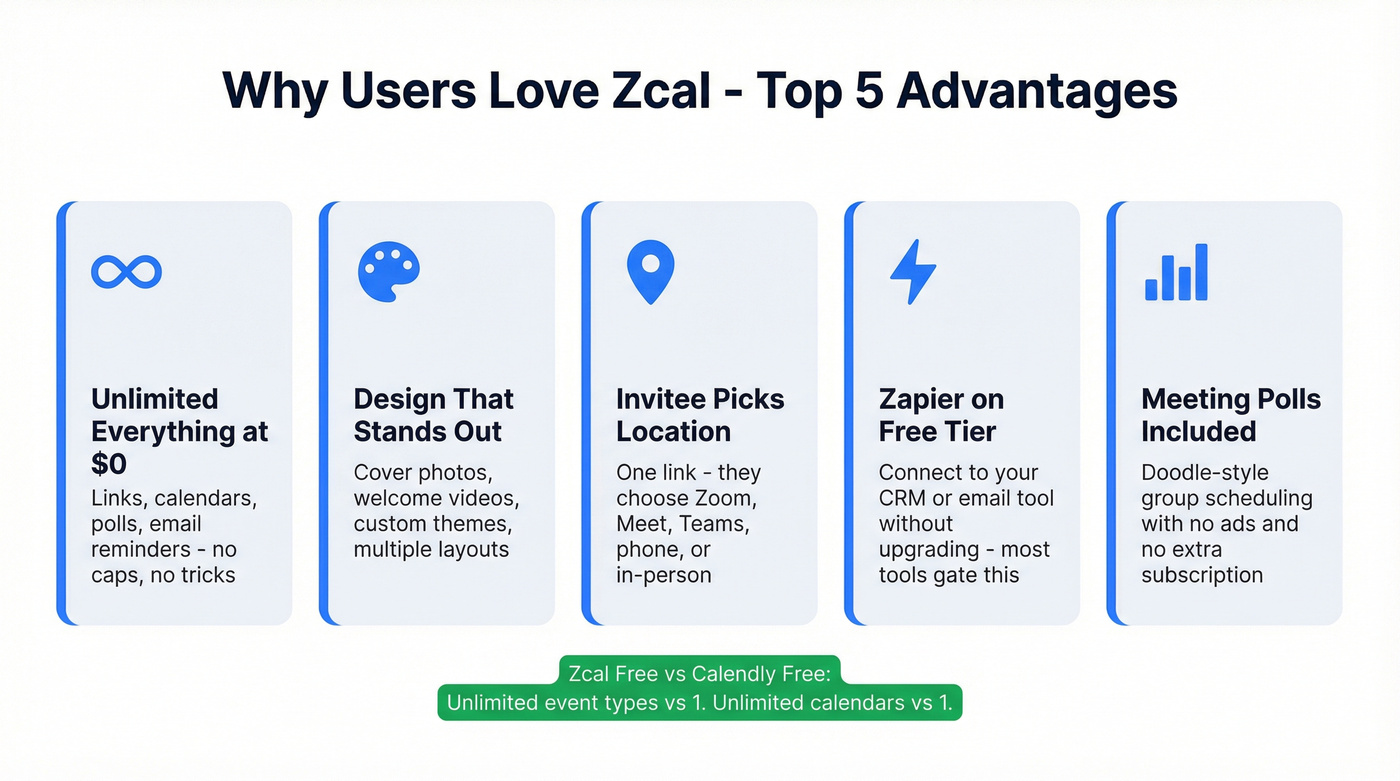
Design customization that actually matters. Cover photos, welcome videos, custom themes, multiple layouts. Your booking page doesn't look like every other scheduling link out there. G2 reviews frequently mention customization as a standout.
Invitees choose the meeting location. From a single booking link, invitees can pick Zoom, Google Meet, Microsoft Teams, phone, or in-person. Small thing, big convenience.
Zapier on the free tier. Most scheduling tools gate automation behind paid plans. Zcal doesn't, which means you can connect it to your CRM or email tool without upgrading. That's rare.
Meeting polls included free. A Doodle-style feature without the ads or the separate subscription.

Zcal handles the booking page. But who are you sending that link to? Prospeo gives you 98% accurate emails and 125M+ verified mobile numbers so every scheduling link lands with a real decision-maker - not a dead inbox.
Stop optimizing your calendar and start filling it with qualified prospects.
Cons - Where Zcal Falls Short
Here's the thing: no tool is perfect at $0, and Zcal has real gaps.
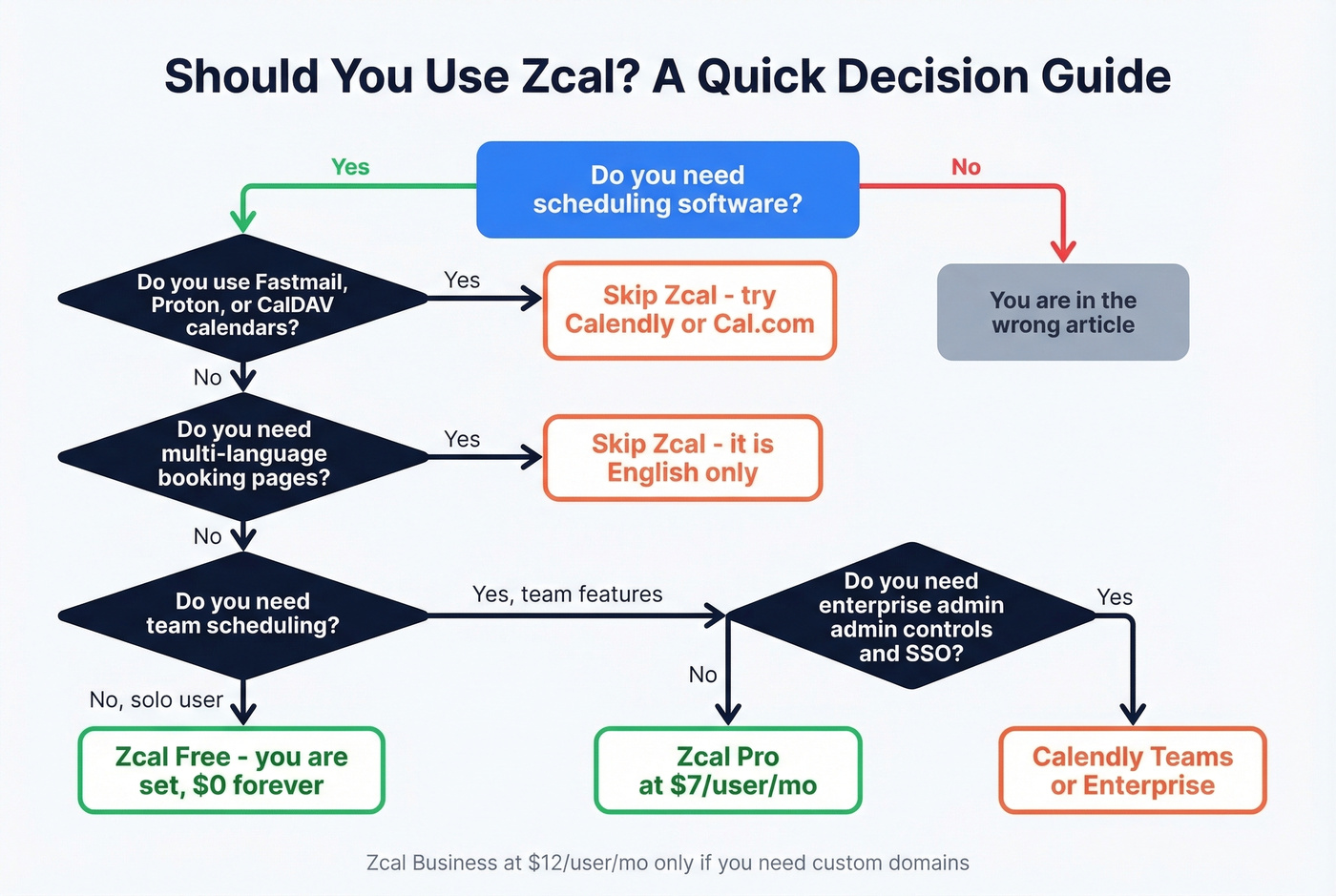
No CalDAV or WebCAL support. If you're on Fastmail, Proton Mail, or any self-hosted calendar, you're locked out. This is a dealbreaker for privacy-focused users, and there's no workaround.
English-only. No multi-language booking pages. If your clients speak French, German, or Spanish, they're getting an English-only experience. The consensus on r/ProductivityApps is that this kills it for international teams.
Support responsiveness is a problem. AppSumo's 73 reviews give Zcal a 4.3/5, and a consistent complaint is slow or absent support responses. One reviewer bluntly wrote "Admin does not reply." We've seen this pattern with small teams that ship fast but can't keep up with tickets - it's a yellow flag, not a red one, but worth knowing.
Availability editing feels limited. Reviewers specifically call out pain points like no bulk date blocking and clunky day-by-day availability changes. If you manage a complex schedule, this gets old fast.
No multiple duration options per link. You can't offer 30- and 60-minute sessions from a single scheduling link - a small but annoying gap for consultants.
Spam bookings with no built-in protection. Users report getting bogus registrations with no filtering mechanism. That's frustrating when your calendar is your revenue.
Is Zcal Pro Worth It?
Upgrade to Pro if you need team scheduling (round robin, collective events), SMS reminders, analytics integrations, or you're processing payments and want to drop the 3% commission. $7/user/month is fair - especially against Calendly's $12 starting point.
Stay on Free if you're a solo professional. The free plan covers what most individual users need without forcing an upgrade for basic scheduling.
Skip Business at $12/user/month unless you specifically need a custom domain for your booking page or want to send emails from your own domain. For most users, that's a nice-to-have.
Zcal vs. Calendly vs. TidyCal
| Zcal | Calendly | TidyCal | |
|---|---|---|---|
| Free plan | Winner - unlimited links + calendars | 1 event type, 1 calendar | 1 calendar, manual video links |
| Paid pricing | $7-$12/user/mo | $12-$20/user/mo | Winner - $39 lifetime |
| Design customization | Winner - cover photos, videos, themes | Basic | Basic |
| Team scheduling | Pro tier - best for small teams | Winner - enterprise-grade | Agency tier at $79 lifetime |
| Best for | Free power users | Enterprise teams | Budget-conscious solos |
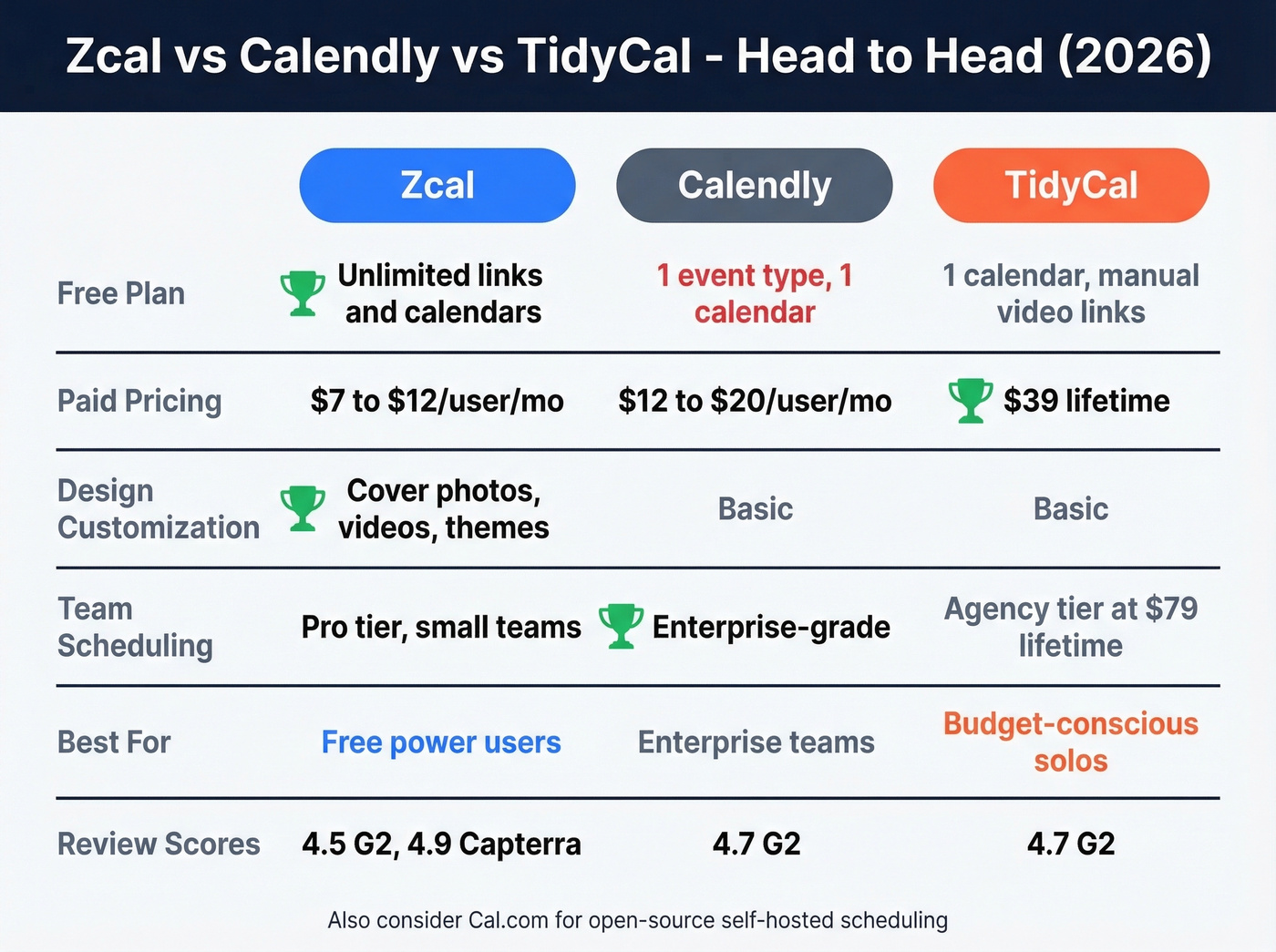
Zcal wins on free-plan generosity. Nothing else comes close at $0. Calendly wins on enterprise maturity - admin controls, routing, and it powers scheduling for 80% of the Fortune 500. TidyCal wins on lifetime value - $39 once and you're done, though you lose the polish and integrations.
Cal.com is worth a look if you want the open-source route - free to self-host, or paid hosted plans starting around $30/month. More technical to set up but infinitely customizable.
For review scores across platforms: Zcal holds a 4.5/5 on G2 (17 reviews), 4.9/5 on Capterra (12 reviews), 4.9/5 on GetApp (12 reviews), and 4.3/5 on AppSumo (73 reviews).
Who Should Use Zcal?
| ✅ Use Zcal if... | ❌ Skip Zcal if... |
|---|---|
| You're a solo professional, freelancer, or bootstrapped founder | You need enterprise admin controls, SSO, or advanced routing |
| You want a polished booking page without a monthly bill | You use non-Google/Outlook calendars like Fastmail or Proton |
| You need meeting polls, video integrations, and Zapier for $0 | You need multi-language booking pages |
| You're a coach collecting payments through bookings | You need reliable support SLAs or phone support |
| You want design customization beyond what Calendly offers | You need bulk availability editing across event types |
Let's be honest about the real risk here: Zcal's free plan is so generous that the question isn't whether it's missing features - it's whether a company giving this much away can sustain it long-term. If your entire booking workflow depends on Zcal and they change the model, you're scrambling. For a free tool, that's worth acknowledging before you build your whole process around it.

A booking page is useless without prospects to send it to. If you're using Zcal for outbound sales meetings, you need verified emails feeding your pipeline first. Prospeo finds them at 98% accuracy with a 7-day data refresh cycle, and the free tier gives you 75 verified emails per month - pairs naturally with a free Zcal page when you're bootstrapping outreach.
Verdict
Zcal is the best free scheduling tool available in 2026. For solo professionals, it eliminates the need to pay for Calendly entirely. The design customization is genuinely good, and the feature set at $0 is unmatched. The support risk is real, and the CalDAV gap will frustrate some users, but for the price of nothing, it's hard to argue. Set up your page - then focus on filling it with sales prospecting techniques that consistently book meetings.
You're comparing scheduling tools to save $12/month. Meanwhile, bad prospect data is costing you entire pipelines. Prospeo delivers verified contact data at $0.01/email with a 7-day refresh cycle - so your outreach actually reaches someone worth booking.
Great scheduling tools are useless without accurate contact data behind them.