

Zoho CRM Sales Pipeline: Setup Guide (2026)
Zoho CRM powers over 250,000 businesses, but a surprising number get stuck before their first deal hits the pipeline. The data model trips people up, stage customization has quirks nobody warns you about, and Blueprint - the feature that actually makes pipelines useful - starts at the Professional plan. Here's how to set it up right.
What You Need Before Building
- Plan: Professional (₹1,400/user/month on annual billing) unlocks Blueprint, which enforces stage transitions.
- Data model: Pipelines live in the Deals module - not Contacts.
- Stages: Start with 5-6. Assign probability percentages to each. Don't overthink it on day one.
- Data quality: Verify contact emails before importing. Garbage data creates phantom deals that wreck your forecast.
Zoho's Pipeline Data Model
The #1 confusion on r/Zoho is users importing a CSV of contacts, then wondering why they can't find a pipeline anywhere. Pipelines don't live in Contacts. They live in Deals.
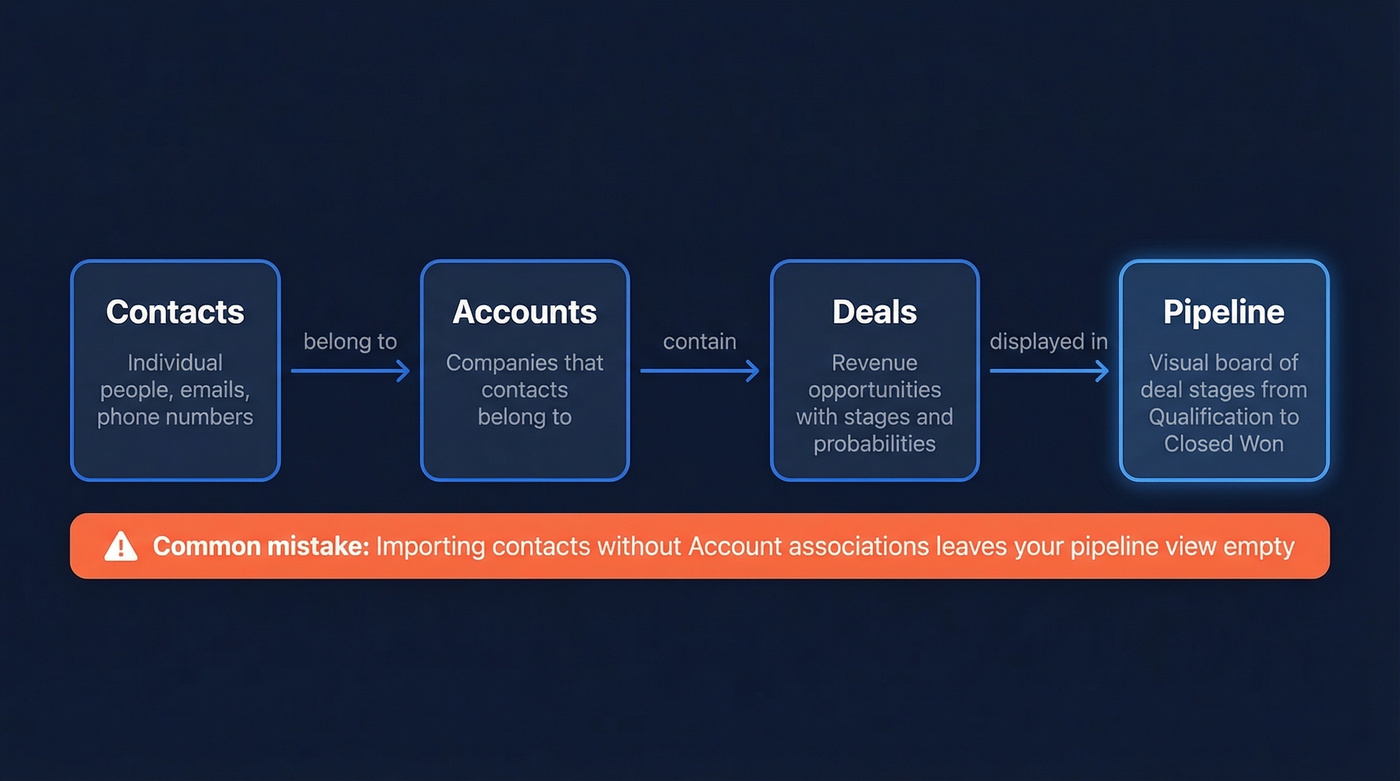
Contacts belong to Accounts (companies). Deals are created under Accounts and assigned to a Pipeline. Skip the Account step and your Deals have nowhere to anchor, leaving your pipeline view empty. This isn't intuitive, and Zoho's onboarding doesn't make it obvious - before you import anything, make sure your CSV maps contacts to company names so Zoho can create Account associations automatically.
Creating Your Pipeline
- Go to Setup → Customization → Pipelines under the Deals module.
- Click New Pipeline.
- Name your pipeline, add stages, and assign probability percentages.
- For multiple pipelines, associate each pipeline with a layout so different sales motions can use different fields and access rules.
Zoho also uses a system-defined standard pipeline: when you create custom pipelines under certain conditions - say, deals already exist in the layout you're working in - Zoho generates a standard pipeline using your existing Deal Stage picklist values. This keeps existing deals properly associated.
One gotcha from Reddit threads: plan your stage names and colors before you build. Users have found they can't change stage colors after creation, and removing a stage can trigger a "One with the same name already exists" error when you try to recreate it. Annoying, but avoidable if you plan ahead.
Designing Deal Stages
Five to seven stages is the practical range. Fewer than five and you're flying blind between "qualified" and "closed." More than seven and reps start skipping stages because the pipeline feels like paperwork.
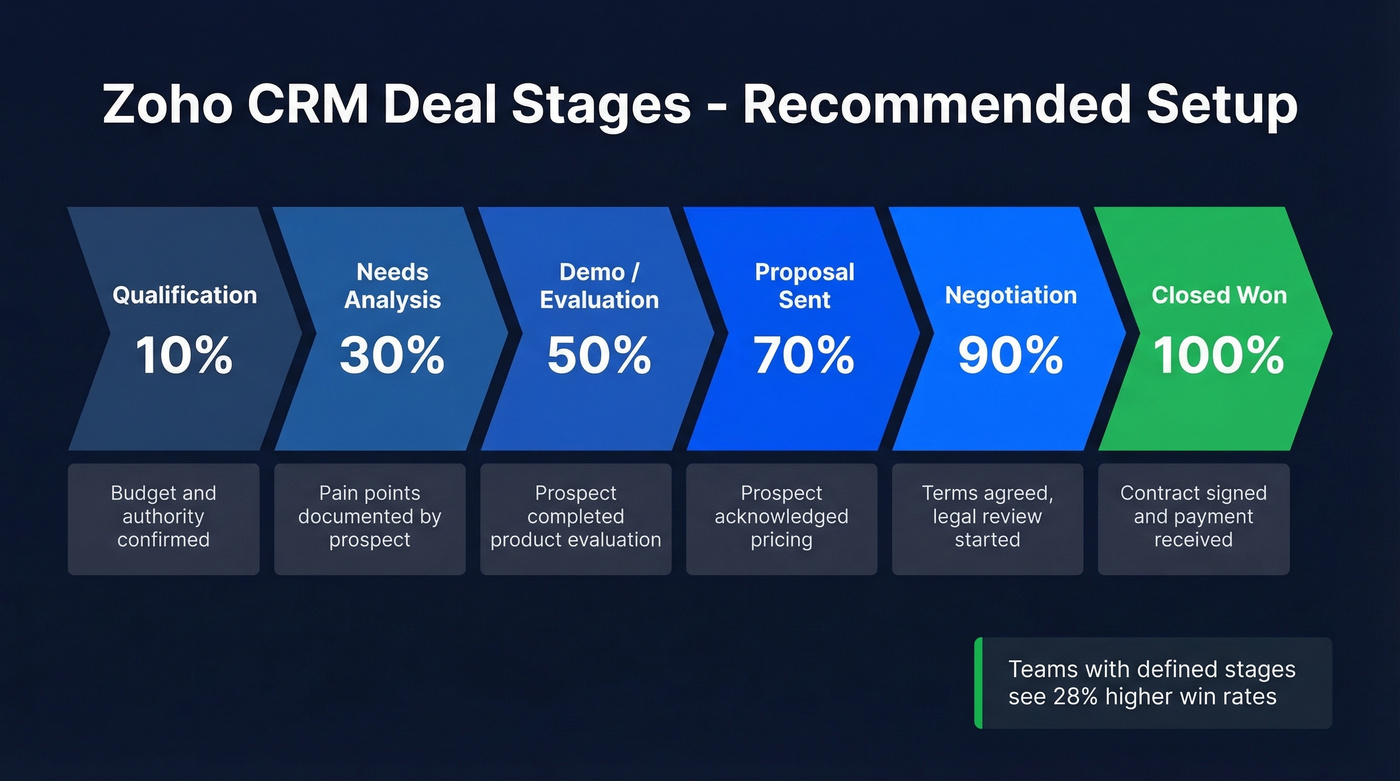
| Stage | Probability |
|---|---|
| Qualification | 10% |
| Needs Analysis | 30% |
| Demo/Evaluation | 50% |
| Proposal Sent | 70% |
| Negotiation | 90% |
| Closed Won | 100% |
Organizations with a defined sales process see 28% higher win rates. The key is making exit criteria customer-action-based. "Prospect confirmed budget and timeline" is a real exit criterion. "Rep sent follow-up email" isn't - that's activity, not progress.

Every deal stage you just designed depends on reaching a real person. Import unverified contacts into Zoho and your probability percentages mean nothing - you're forecasting on phantom data. Prospeo verifies emails at 98% accuracy and costs roughly $0.01 per email.
Stop inflating your pipeline with contacts that will never pick up.
Blueprint vs. Workflows
These two features confuse almost everyone. Let's break it down.
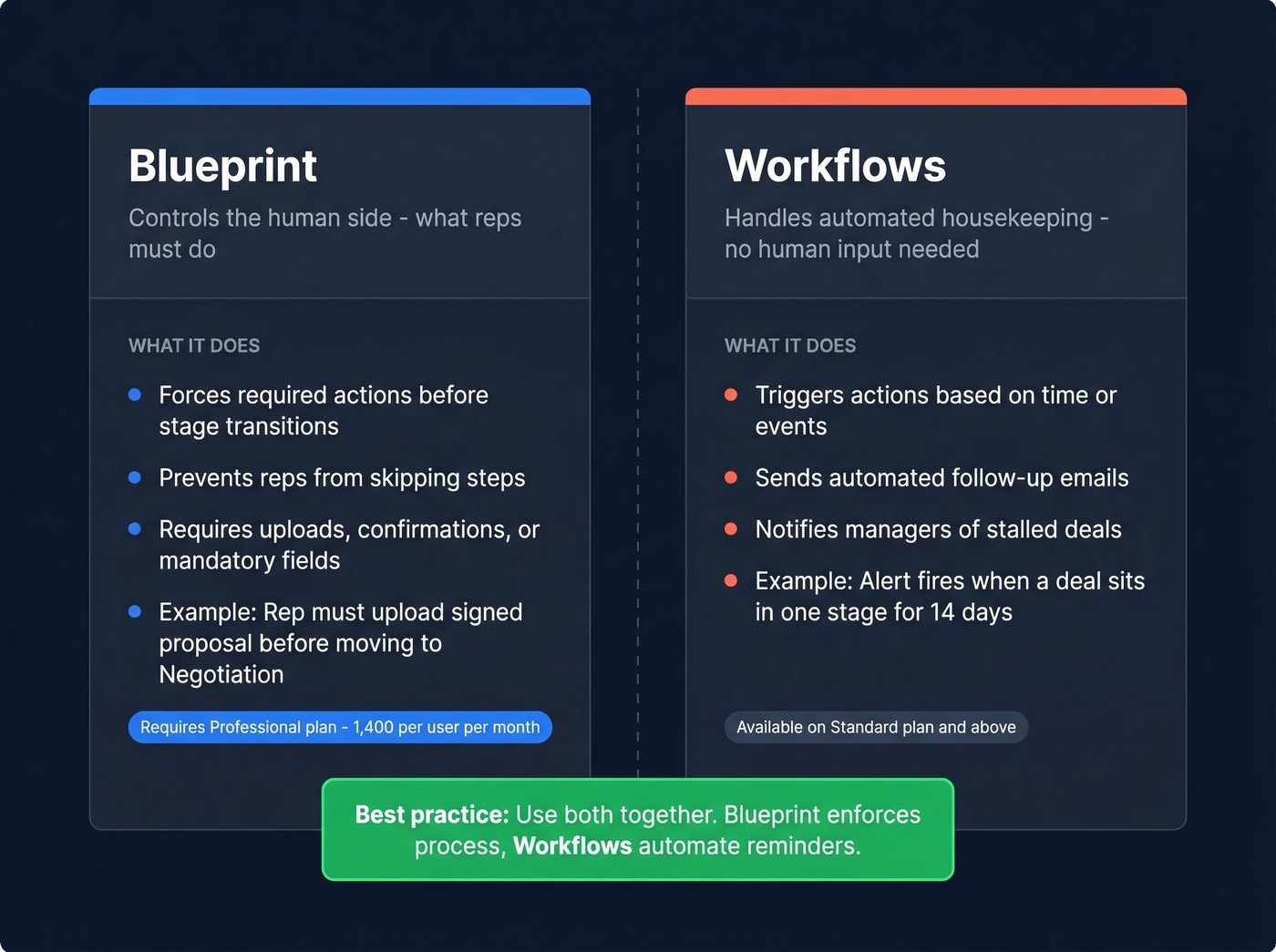
Blueprint prevents reps from skipping steps by forcing required actions before a deal can advance - upload a signed proposal, confirm a discovery call happened, fill a mandatory field. It's guardrails that stop reps from dragging deals to "Negotiation" when they haven't done a demo.
Workflows handle time-based or event-based automation without human input. Send a follow-up email three days after a demo. Notify a manager when a deal stalls in one stage too long. Set up a stalled-deal alert for any deal that hasn't moved in a set number of days - this is the single easiest way to catch pipeline rot early.
Most teams need both. Blueprint controls the human side; Workflows handle automated housekeeping.
Which Plan Do You Need?
| Feature | Standard (₹800/user/mo) | Professional (₹1,400/user/mo) | Enterprise (₹2,400/user/mo) | Ultimate (₹2,600/user/mo) |
|---|---|---|---|---|
| Basic Pipelines | ✓ | ✓ | ✓ | ✓ |
| Blueprint | - | ✓ | ✓ | ✓ |
| Custom Reports | 100 | Unlimited | Unlimited | Unlimited |
| Zia (AI Assistant) | - | - | ✓ | ✓ |
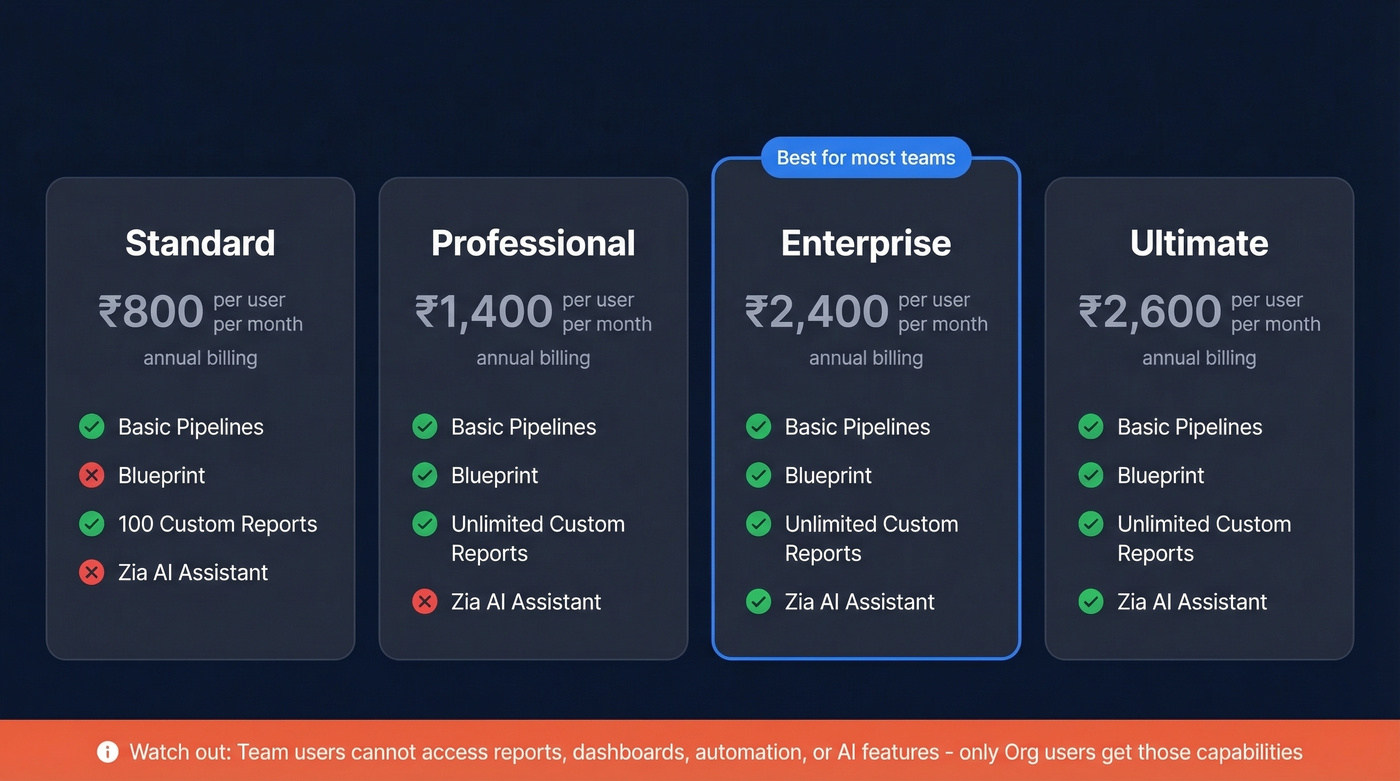
Professional is the sweet spot for most sales teams - Blueprint, unlimited custom reports, and serious pipeline functionality. Enterprise only makes sense if you need Zia's AI sales assistant for deal predictions and anomaly detection.
One thing Zoho buries: "Team users" can't access reports, dashboards, automation, or AI features. Only Org users get those. Worth knowing before you assign licenses.
Keeping Your Pipeline Healthy
A healthy pipeline needs roughly 3X coverage. If your quarterly target is $500K, you want $1.5M in pipeline. Anything less and you're hoping, not forecasting.
Here's the thing - we've seen the same three mistakes kill pipeline accuracy over and over:
Stale deals inflating the pipeline. If a deal hasn't moved in weeks and the prospect isn't responding, it's dead weight. Remove it. Use Zoho's time-in-stage reporting to spot bottleneck stages where deals consistently stall. That's your diagnostic tool for pipeline problems, and it's built right into the CRM.
Skipping weekly reviews. 84% of sales reps miss quota. Weekly pipeline reviews catch slippage before it becomes a missed quarter - a 15-minute team standup looking at stuck deals, aging opportunities, and next-step commitments can save an entire quarter's forecast from going sideways.
Importing unverified contacts. Invalid emails create contacts that generate deals that inflate your pipeline, and none of them will ever close. Run your list through a verification tool like Prospeo before importing into Zoho CRM - 98% email accuracy on bulk CSV verification means you're not building your forecast on phantom data. Clean data in, clean pipeline out.

You need 3X pipeline coverage to hit quota - but only if those deals are real. Prospeo enriches your Zoho contacts with 50+ data points and verified emails on a 7-day refresh cycle, so stale data never poisons your forecast. Free tier included, no contracts.
Build your 3X coverage on data that actually converts.
Benchmarks to Track
Use these as a gut-check for your pipeline health:
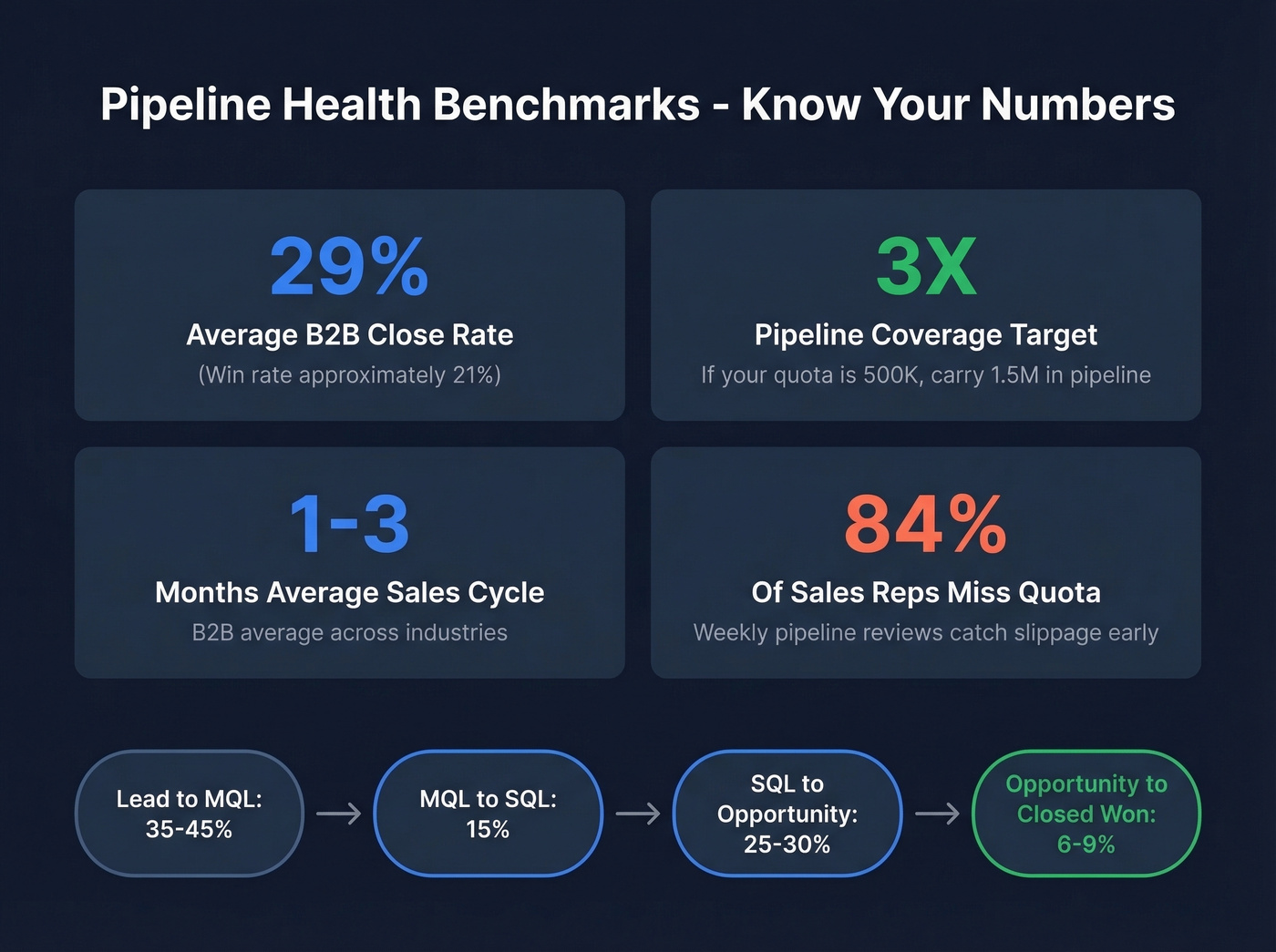
- Average B2B close rate: 29%; win rate ~21% (sales pipeline benchmarks)
- Stage conversions: Lead→MQL 35-45%, MQL→SQL 15%, SQL→Opportunity 25-30%, Opportunity→Closed Won 6-9% (funnel metrics)
- Sales cycle: 1-3 months average
- Pipeline coverage: 3X your target (pipeline health)
In our experience, teams significantly below these numbers almost always have a data quality problem upstream - not a selling problem. For deeper analytics, Zoho Analytics blends CRM data with other sources for advanced pipeline reporting.
Hot take: If your average deal size is under $15K and your team is fewer than 10 reps, Zoho CRM Professional gives you 90% of what Salesforce does at a quarter of the price. The pipeline tooling is genuinely good. Where Zoho falls short is ecosystem - fewer third-party integrations, weaker community support. But for pipeline management specifically? It punches way above its weight class.
FAQ
What's the difference between a pipeline and a funnel?
A pipeline tracks individual deals through stages - your process. A funnel measures conversion rates between stages - your metrics. In Zoho CRM, pipelines are managed in Deals, while funnels are a reporting view built on top of pipeline data.
Can I have multiple pipelines in Zoho CRM?
Yes. Each pipeline can be associated with a layout containing different fields and access rules - ideal for separating inbound vs. outbound processes or distinct product lines. You manage them under Setup → Customization → Pipelines.
What's the minimum plan for pipeline automation?
Professional at ₹1,400/user/month on annual billing. It unlocks Blueprint, which enforces required actions at each stage transition. Standard gives you basic pipelines but zero process enforcement - reps can drag deals anywhere they want.
How do I prevent bad data from bloating my pipeline?
Verify emails before importing contacts. Bulk CSV verification catches invalid addresses before they create phantom deals, and pairing that with Zoho's built-in duplicate-detection rules keeps your Deals module clean. We've seen teams cut pipeline bloat by 20-30% just by cleaning their import lists.