


Act! CRM Review 2026: Pricing, Pros, Cons, and Whether It's Still Worth It
You've been on Act! for years - maybe a decade, maybe two. The workflows are built, the data's in there, and switching feels like moving houses. But the renewal just hit, the UI still feels dated, and you're wondering if loyalty is costing you.
This breakdown covers Act! pricing, real user reviews, and the honest pros and cons so you can decide with numbers instead of inertia.
30-Second Verdict
Act! scores 3.9/5 across G2 (510 reviews) and Capterra (851 reviews). Cloud plans run $30-$60/user/month billed annually; the Desktop plan is $39/user/month billed annually and self-hosted. It's best for long-term users with established workflows who need hybrid or offline access. For anyone starting fresh in 2026, HubSpot and Zoho both offer free tiers with more modern UX.
Act! Pricing Breakdown
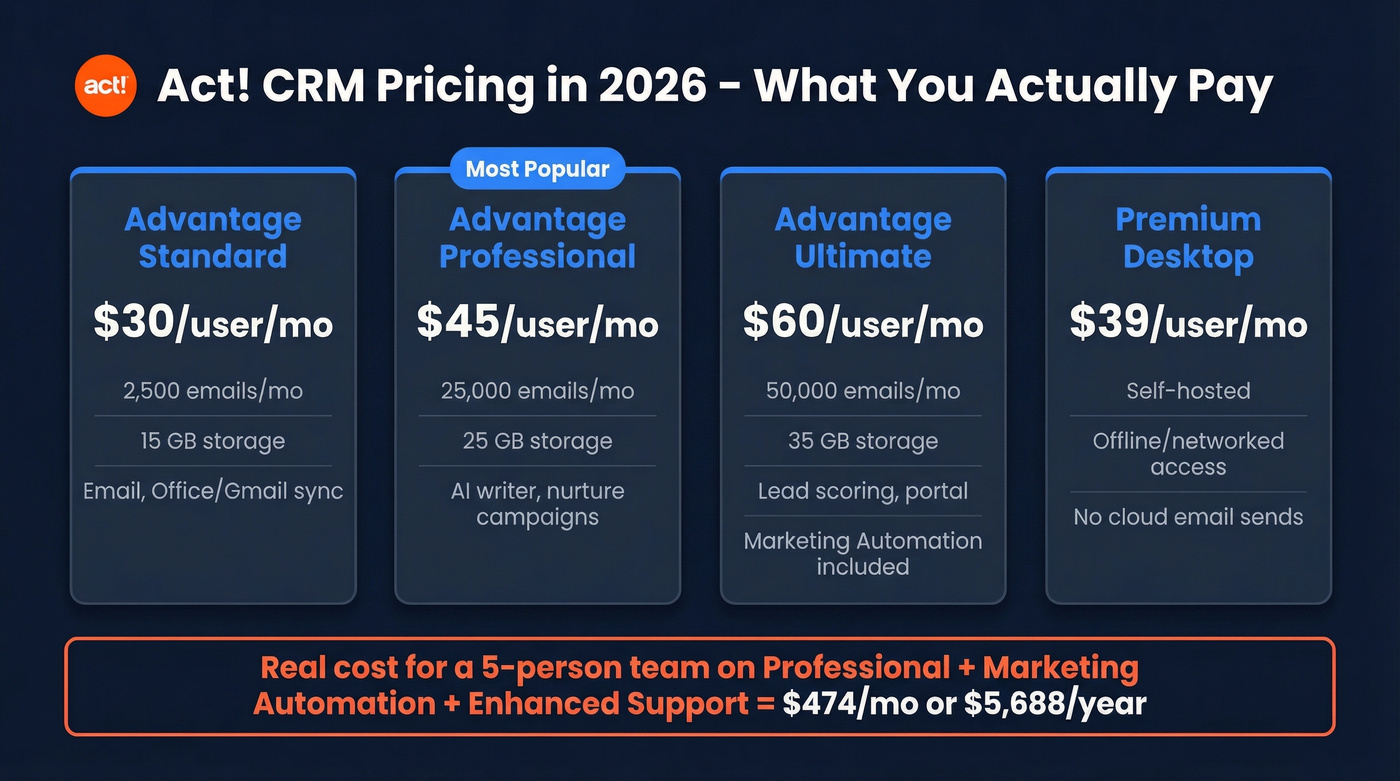
Some third-party pricing pages still list $12 and $25 tiers, but those are outdated. Here's what Act.com charges in 2026, billed annually:
| Plan | $/User/Mo | Email Sends | Storage | Key Extras |
|---|---|---|---|---|
| Advantage Standard | $30 | 2,500/mo | 15 GB | Email, Office/Gmail |
| Advantage Professional | $45 | 25,000/mo | 25 GB | AI writer, nurture campaigns |
| Advantage Ultimate | $60 | 50,000/mo (Marketing Automation incl.) | 35 GB | Lead scoring, portal |
| Premium Desktop | $39 | - | Self-hosted | Offline/networked access |
Reasonable on paper. Then you add the extras most teams actually need:
| Add-On | Price |
|---|---|
| AMA Select (25K emails) | $70/account/mo |
| Act! Marketing Automation (50K emails) | $199/account/mo (billed annually) |
| AMA Advanced (100K emails) | $399/account/mo |
| Enhanced Support | $10/user/mo |
| SMS Messaging | From $19/mo |
| Extra Storage (5 GB) | $4/mo |
We ran the numbers on a realistic 5-person team: Professional ($225) + Marketing Automation ($199) + Enhanced Support ($50) = $474/month, or $5,688/year. That's real money for a tool scoring 3.9/5 that competes against HubSpot's free tier - and HubSpot CRM's Capterra sentiment snapshot shows 4,122 positive reviews vs. Act!'s 599.
What Act! Does Well
Act!'s contact management is genuinely deep. Rich profiles with full interaction history, notes, and custom fields at a level few CRMs match for the price. "Customer management" shows up as a recurring positive theme on G2, and for good reason - if your business runs on knowing every detail about a contact's history, Act! delivers.
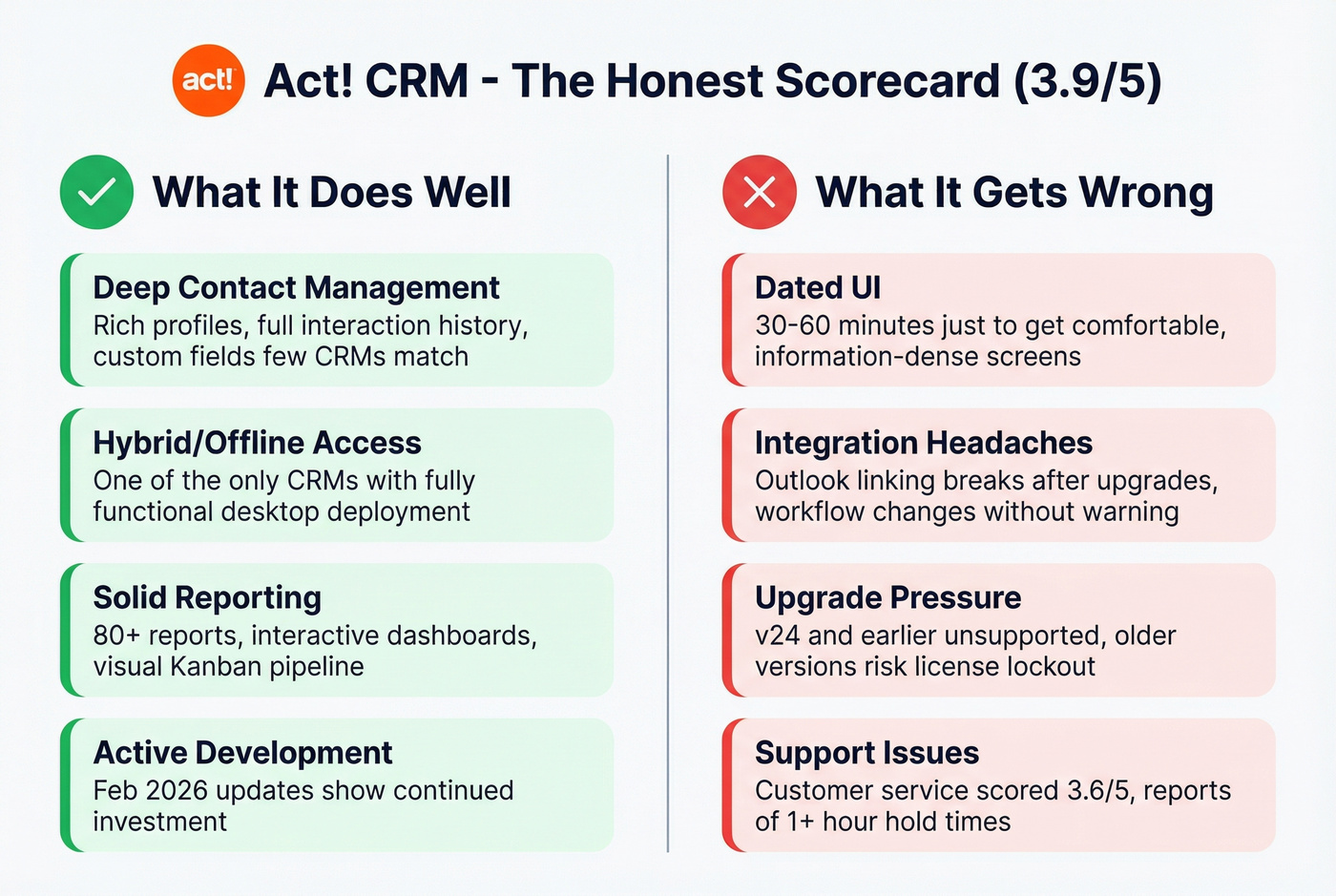
The hybrid story is still a real differentiator. Act! Premium Desktop is one of the few CRMs that still supports fully functional offline and networked deployment. One Capterra reviewer put it plainly: "ACT is the only company I know of that offers a fully functional hybrid." If you work in the field or have unreliable connectivity, that matters.
Reporting is solid too - 80+ reports, interactive dashboards via Act! Insight, and a visual Kanban pipeline. The February 2026 updates (Notification Center, modernized list views, recurring campaign resends, persistent filters) show Act! is investing in catching up.
If you're comparing platforms, it helps to look at other examples of a CRM with real pricing and fit notes.

Act! doesn't verify your contact data - it just stores it. After years of decay, your database is full of bounced emails and dead numbers. Prospeo enriches your entire CRM export across 300M+ profiles with 98% email accuracy and 125M+ verified mobiles, refreshed every 7 days.
Stop paying $5,688/year to manage contacts that bounce.
What Act! Gets Wrong
The UI is still dated. Even after recent updates, editorial testers describe the interface as "information-dense" and "overwhelming," noting it can take 30-60 minutes just to get comfortable. We've seen this firsthand - the learning curve isn't steep, but it's sticky in an annoying way.
Integration issues are a recurring complaint. Outlook email linking breaks after upgrades, Trustpilot reviews surface the same problem in the cloud version, and Capterra reviews include frustration with updates changing workflows without warning.
Imports aren't as modern as newer CRMs. Act! supports CSV imports, but field mapping and cleanup take real effort - especially if your database is old, messy, or heavily customized. If you're planning a cleanup-first approach, data enrichment can reduce bad fields before you import.
Support responsiveness is a consistent sore spot. Capterra's customer service score sits at 3.6/5 - the lowest sub-score - and one February 2026 reviewer reported waiting on hold for over an hour.
Here's the thing: Act!'s upgrade pressure is its worst trait. v24 and earlier are unsupported. v23 and earlier aren't compatible with Windows 11. v18.1 and earlier can run into license activation failure after reinstalls, hardware changes, or user-count changes - potentially locking you out entirely. This isn't speculation; it's published on Act!'s own site. One r/CRM poster described using Act! for 20+ years with 40k contacts and actively seeking migration help. When your own vendor makes staying feel risky, that's a problem.
Performance degrades with scale, too. Larger databases are where you start seeing slow operations, sync failures, and freezing - and that's usually the moment teams begin planning a move.
What Users Say in Reviews
| Platform | Rating | Reviews | Star Distribution |
|---|---|---|---|
| G2 | 3.9/5 | 510 | 53% five-star, 24% four-star |
| Capterra | 3.9/5 | 851 | Service scores 3.6/5 |
| Trustpilot | 2.6/5 | 19 | Small, angry sample |
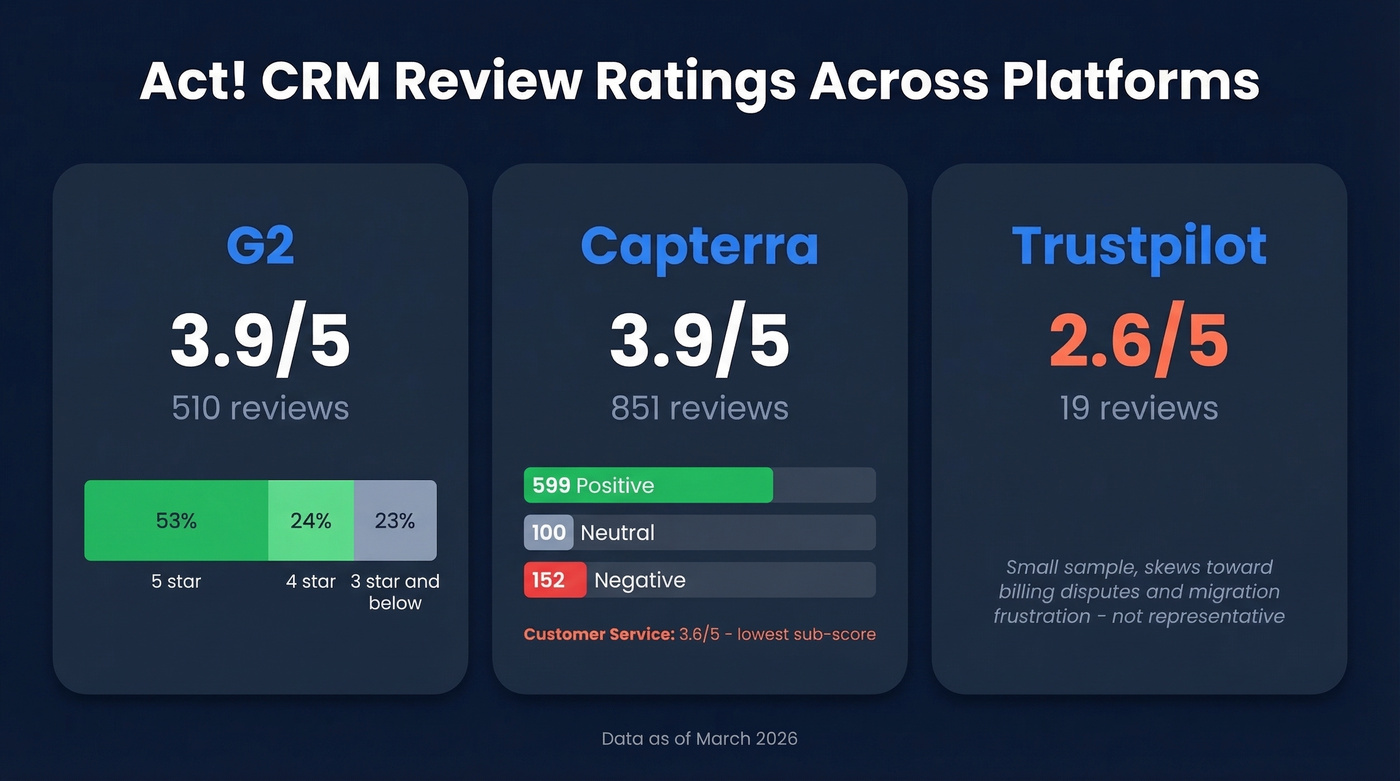
The Trustpilot gap looks alarming but nineteen reviews vs. 851 on Capterra isn't representative. Trustpilot skews toward billing disputes and migration frustration - one reviewer described being pushed to a newer cloud platform at roughly 3x the cost. Capterra's breakdown (599 positive, 100 neutral, 152 negative) gives a more balanced picture.
Who Should Use Act!
Use it if you're a long-term user with established workflows, need hybrid/offline access, or you're a small team (under 10) in financial services, insurance, or manufacturing where contact history depth matters more than modern UX.
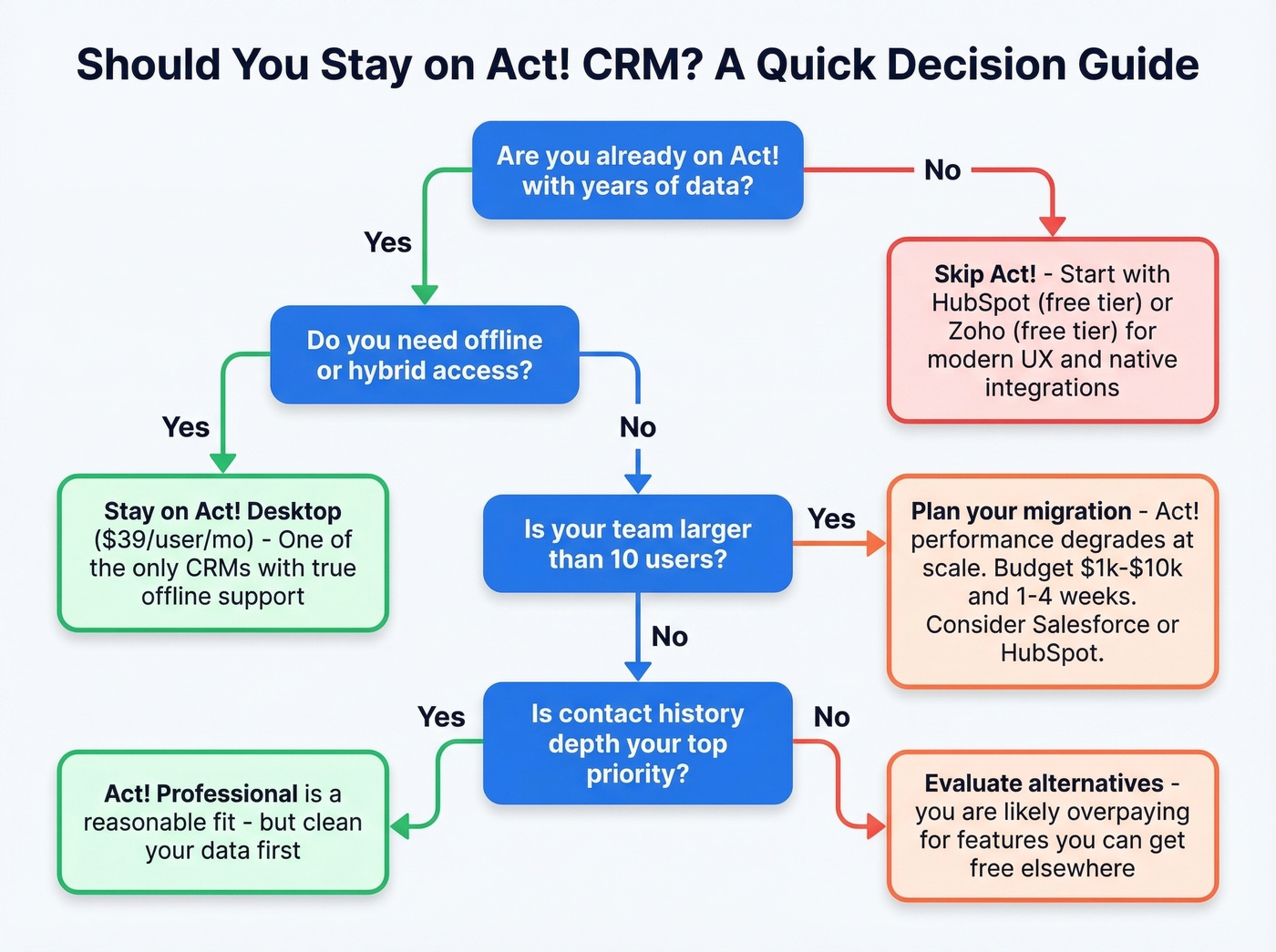
Skip it if you're starting fresh, need native integrations beyond the basics, or you're scaling past 10 users. Expect $1k-$10k and 1-4 weeks for a full migration depending on database size - but HubSpot and Zoho both offer more modern experiences at zero upfront cost. If you're evaluating bigger stacks, compare against Salesforce pricing before you commit.
Whatever CRM you choose, your outreach is only as good as your contact data. A database full of stale emails and disconnected numbers won't close deals regardless of how pretty the dashboard looks. If deliverability is already slipping, start with your email bounce rate and fix the list before you scale sends.

Keep Your Act! Data Clean
If you've been on Act! for years, your database has decay baked in - contact data degrades roughly 30% annually. Let's be honest: most teams don't notice until bounce rates spike and campaigns tank.
Prospeo fixes this. Upload a CSV export, and it re-verifies and enriches every contact across 300M+ professional profiles at 98% email accuracy, with a 7-day refresh cycle that keeps data current. Teams switching from Act! can clean their entire database before importing into a new CRM - or keep Act! running with data that actually converts. If you're comparing vendors, see the broader landscape of data enrichment services.
Migrating off Act!? Your new CRM deserves clean data on day one. Upload your CSV to Prospeo and get 50+ data points per contact at a 92% match rate - verified emails, direct dials, job titles, and company intel. At $0.01 per email, it costs less than one month of Act!'s Enhanced Support add-on.
Clean your database before the migration, not after the bounce spike.
FAQ
How much does Act! CRM cost in 2026?
Cloud plans range from $30-$60/user/month billed annually. Desktop is $39/user/month billed annually. Marketing automation add-ons run $70-$399/month extra. A realistic 5-person setup costs around $474/month, or $5,688/year.
Does Act! offer a free plan?
No. Act! offers a 14-day trial but no free tier. HubSpot and Zoho both deliver solid core CRM functionality at $0. For contact data specifically, Prospeo offers 75 free email credits per month - useful for verifying leads before they hit any CRM.
Can I use Act! offline?
Yes. Act! Premium Desktop ($39/user/month billed annually) supports offline and networked access - one of the few CRMs still offering this. Cloud-based Advantage plans require an internet connection.
Is Act! CRM good for large teams?
Not ideal. Performance degrades with larger databases, and users report slow operations and sync failures at scale. Teams above 10 users generally find better value in Salesforce, HubSpot, or Zoho, which are built for multi-team workflows and offer deeper native integrations.