

ActiveCampaign Email Deliverability: What the Data Actually Shows
You just migrated from HubSpot to ActiveCampaign, ran your first GlockApps test, and watched your spam rate climb while Gmail inbox placement cratered - down nearly 50% from what you were seeing before. The CFO wants to know why you switched.
ActiveCampaign email deliverability isn't broken. But at $30-$500/month depending on your contact count and tier, it's not what the marketing page suggests, either.
The Short Version
- ActiveCampaign's measured inbox rate is 76.59% - below the 83.1% ESP average. The "#1 deliverability" claim doesn't map 1:1 to inbox-placement testing.
- Three things fix most problems: complete authentication (DKIM + DMARC), follow the warm-up schedule exactly, and verify your list before importing.
- If you just migrated and Gmail is the worst performer, that's normal. It takes 30+ days to stabilize.
How ActiveCampaign Actually Performs
EmailDeliverabilityReport has been testing ActiveCampaign since September 2025 across 64,940 emails. ActiveCampaign lands 76.59% in the inbox, sends 21.25% to spam, and loses 2.56% entirely. The average across 15 ESPs is 83.1%. Per EmailTooltester's benchmarks, anything above 89% is considered good; below 80% is poor. ActiveCampaign sits in the "poor" range by that standard.
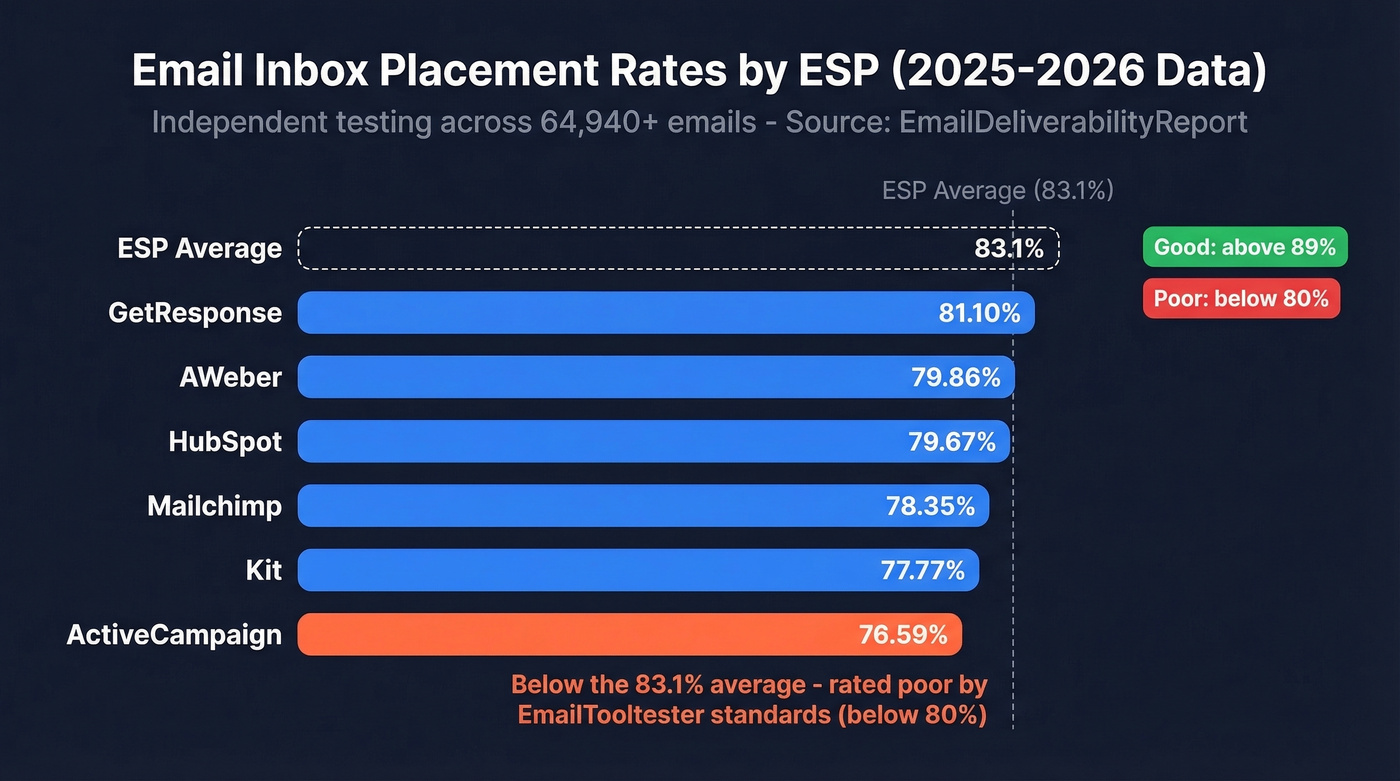
Here's how it stacks up against similar platforms:
| ESP | Inbox Rate |
|---|---|
| GetResponse | 81.10% |
| AWeber | 79.86% |
| HubSpot | 79.67% |
| Mailchimp | 78.35% |
| Kit | 77.77% |
| ActiveCampaign | 76.59% |
Performance varies by industry too. Health-related sends average 79.56% inbox placement, finance hits 79.34%, while dating (73.22%) and job/career (74.17%) fare worse. If you're in a "spammier" vertical, expect to work harder.
ActiveCampaign scores 89/100 overall on EmailDeliverabilityReport's rating - which sounds good until you realize that score factors in features and platform quality, not just raw inbox placement.
Why the "#1" Claim Misleads
ActiveCampaign markets itself as having the best deliverability in the industry, pointing to its private MTA infrastructure, the ability to send hundreds of thousands of messages per minute, and a claimed 10x send speed improvement on its private network. Impressive engineering. But infrastructure quality doesn't automatically translate to inbox placement. When independent testers actually send emails and count where they land, ActiveCampaign can come in below average depending on the dataset and methodology.
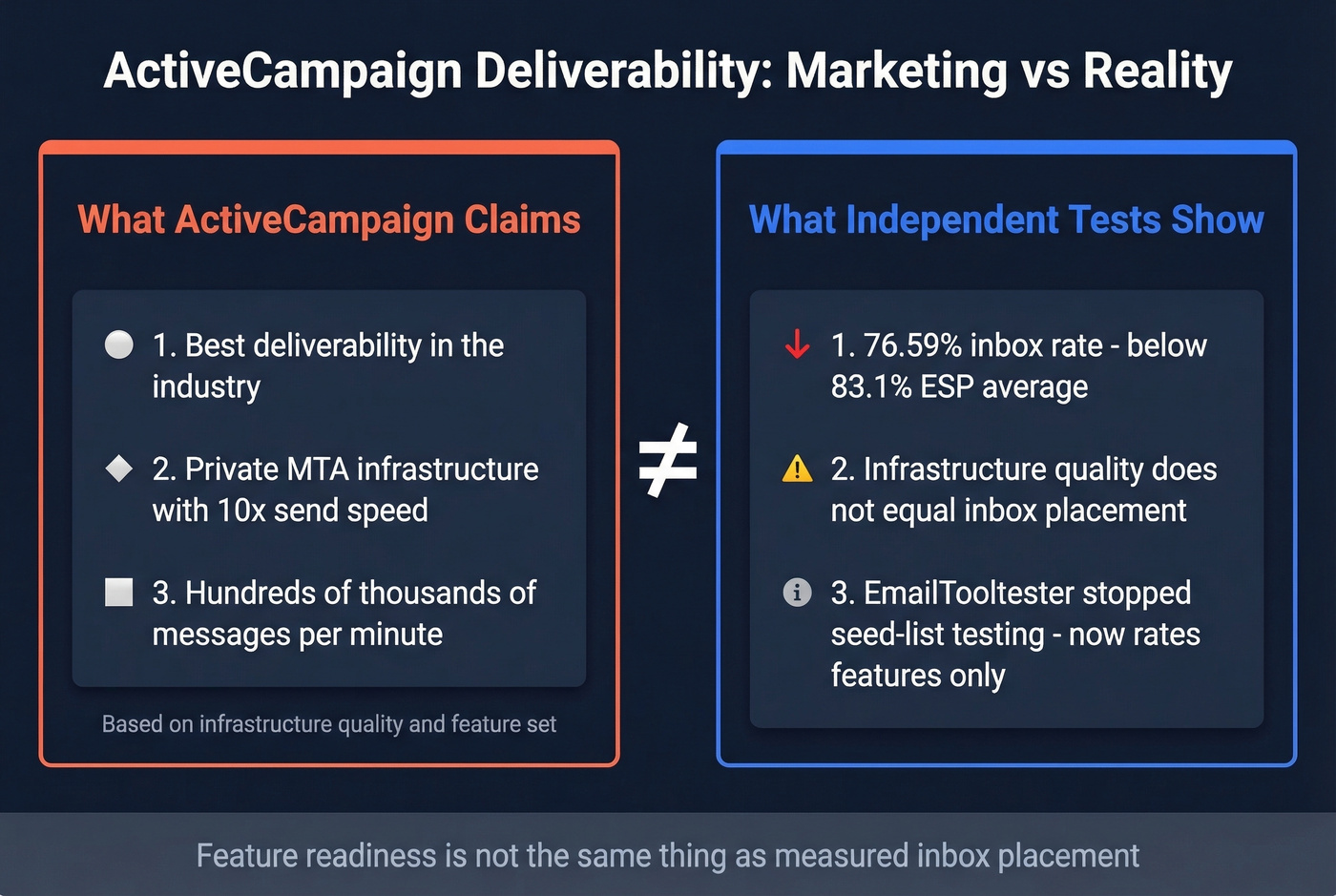
One reason rankings get messy: EmailTooltester moved away from seed-list inbox testing because they consider it "increasingly unreliable." They now rate ESPs on deliverability features - authentication support, suppression tools, warm-up guidance, spam-check utilities. ActiveCampaign scores well on features. Feature readiness isn't the same thing as measured inbox placement.
Why Gmail Is the Hardest Inbox
If Gmail is where your deliverability tanked, you're not alone. GlockApps Q4 2025 data shows Gmail's average inbox rate across all senders is 56.97%. Outlook is even worse at 45.06%. Inbox rates vary dramatically by testing methodology and sender profile - EmailTooltester's benchmark page shows Google at 89.8% - but the pattern is consistent: some inboxes are simply harder than others, and Gmail is often where weak sender reputation gets exposed first.
Gmail isn't broken. Your warm-up is.
It's especially punishing for new sending domains or recently migrated accounts. The thread on r/DigitalMarketing about deliverability issues centers on Gmail being the worst-hit mailbox provider, which tracks with how sensitive Gmail is during trust-building.
Here's the thing: ActiveCampaign's deliverability is average, and for most teams that's completely fine. The platform matters far less than your sending practices. We've seen teams with pristine list hygiene hit 95%+ inbox rates on ActiveCampaign, and teams on "better" ESPs crater below 60% because they skipped warm-up. Stop blaming the tool.

Your ActiveCampaign deliverability is only as good as the data you feed it. Import unverified contacts and your bounce rate spikes, your sender reputation tanks, and Gmail sends you straight to spam. Prospeo's 5-step email verification - with catch-all handling, spam-trap removal, and honeypot filtering - delivers 98% accuracy. Teams using Prospeo-verified lists see bounce rates drop from 35%+ to under 4%.
Fix deliverability at the source - verify before you ever hit send.
The Deliverability Checklist
ActiveCampaign has excellent deliverability tools. Most users never configure them properly. If you need a broader framework beyond this platform, start with our email deliverability guide.
Authentication Setup
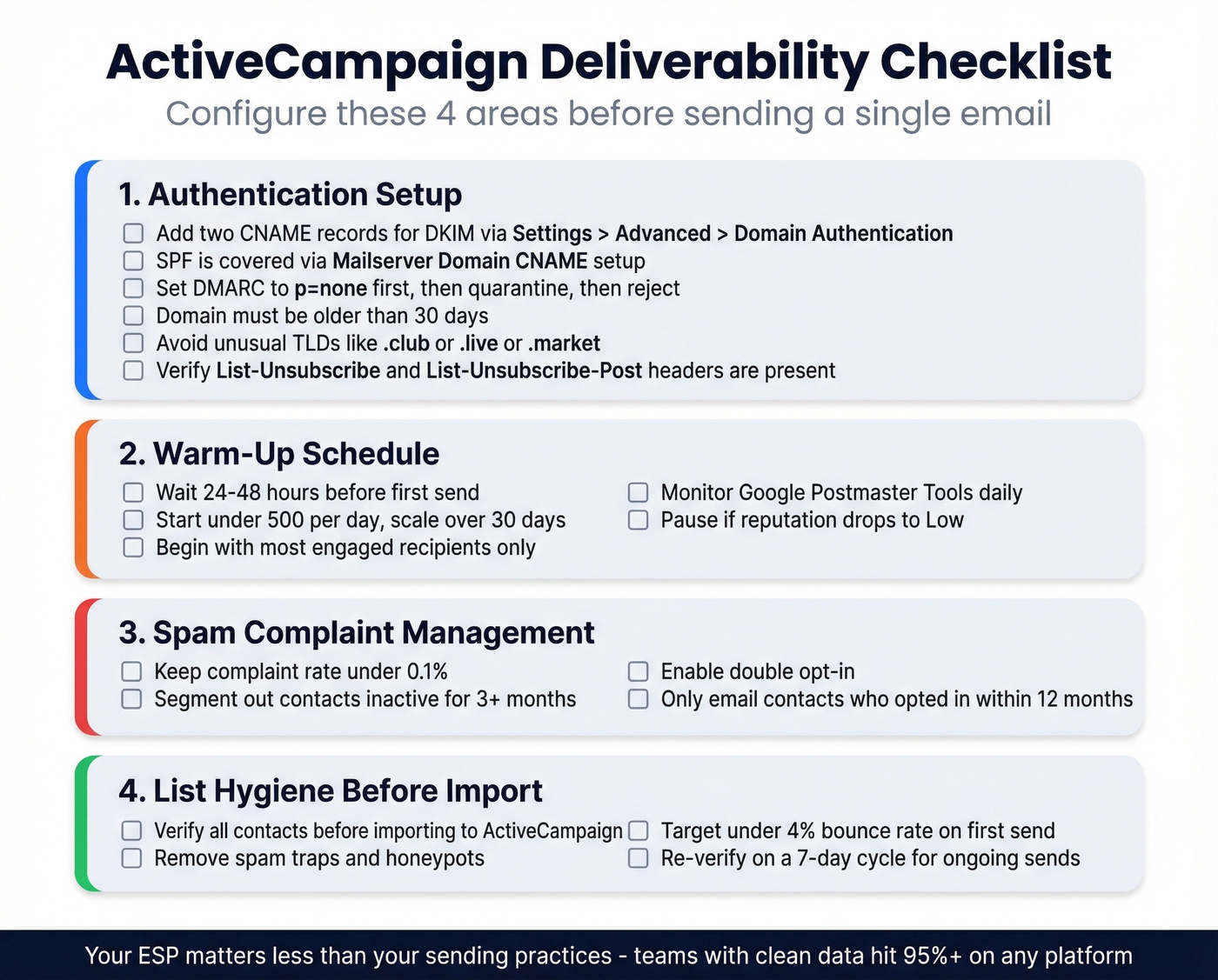
Head to Settings > Advanced > Domain Authentication, select your domain, and click View DNS records. Add two CNAME records for DKIM in your DNS provider.
SPF is typically covered when you set up the Mailserver Domain via CNAME, so you often don't need to create or modify an SPF record specifically for ActiveCampaign. For DMARC, start with p=none to monitor, then progress to quarantine, and eventually reject once you're confident everything's aligned. If you want to go deeper on alignment, see DMARC specifics.
Three prerequisites people miss: your sending domain must be older than 30 days, it should point to a valid website, and avoid unusual TLDs like .club, .live, or .market - they trigger suspicion with mailbox providers.
Since February 2024, Gmail and Yahoo require bulk senders (5,000+ messages/day) to support one-click unsubscribe per RFC 8058. ActiveCampaign supports the List-Unsubscribe standard, but verify that your emails include the List-Unsubscribe and List-Unsubscribe-Post headers and that unsubscribes are processed quickly.
Warm-Up Schedule
This is where most migrations fail. ActiveCampaign's official warm-up guidance is specific - follow it exactly. If you're trying to calibrate safe sending speeds, use this as a baseline alongside email velocity best practices.
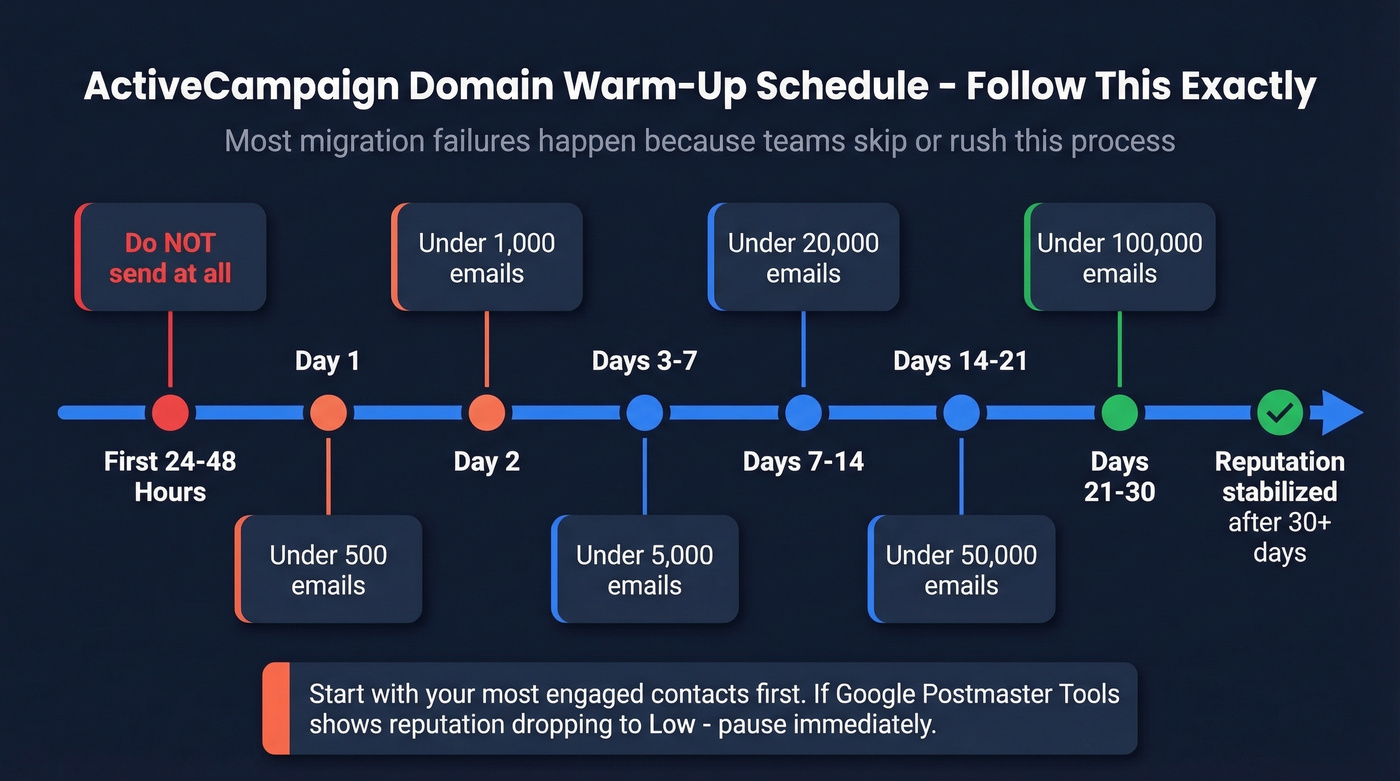
| Period | Max Daily Volume |
|---|---|
| First 24-48 hrs | Don't send at all |
| Day 1 | < 500 |
| Day 2 | < 1,000 |
| Day 3-7 | < 5,000 |
| Day 7-14 | < 20,000 |
| Day 14-21 | < 50,000 |
| Day 21-30 | < 100,000 |
For lists over 50,000 contacts, ActiveCampaign recommends a weekly ramp instead: 25K/day in week 1, scaling to 50K, 75K, 100K, and full volume by week 5. There's also an accelerated warm-up option for experienced senders, but skip it unless you've done this before and have Google Postmaster Tools data to back your confidence.
Start with your most engaged recipients. Verify your domain in Google Postmaster Tools before you start sending - watch the spam rate and domain reputation dashboards. If reputation drops to "Low," pause sending immediately. ActiveCampaign says it takes at least 30 days of regular sending for open rates and inbox placement to level out. We've seen teams blow past these caps on day three and crush their sender reputation with Outlook before they even get to week two. Don't be that team.
Spam Complaint Management
The target is below 0.1% - that's 1 complaint per 1,000 emails. Cross 0.3% and you're in the danger zone. Gmail and other providers evaluate complaint rates over a rolling 30-60 day window, which means recovery takes just as long.
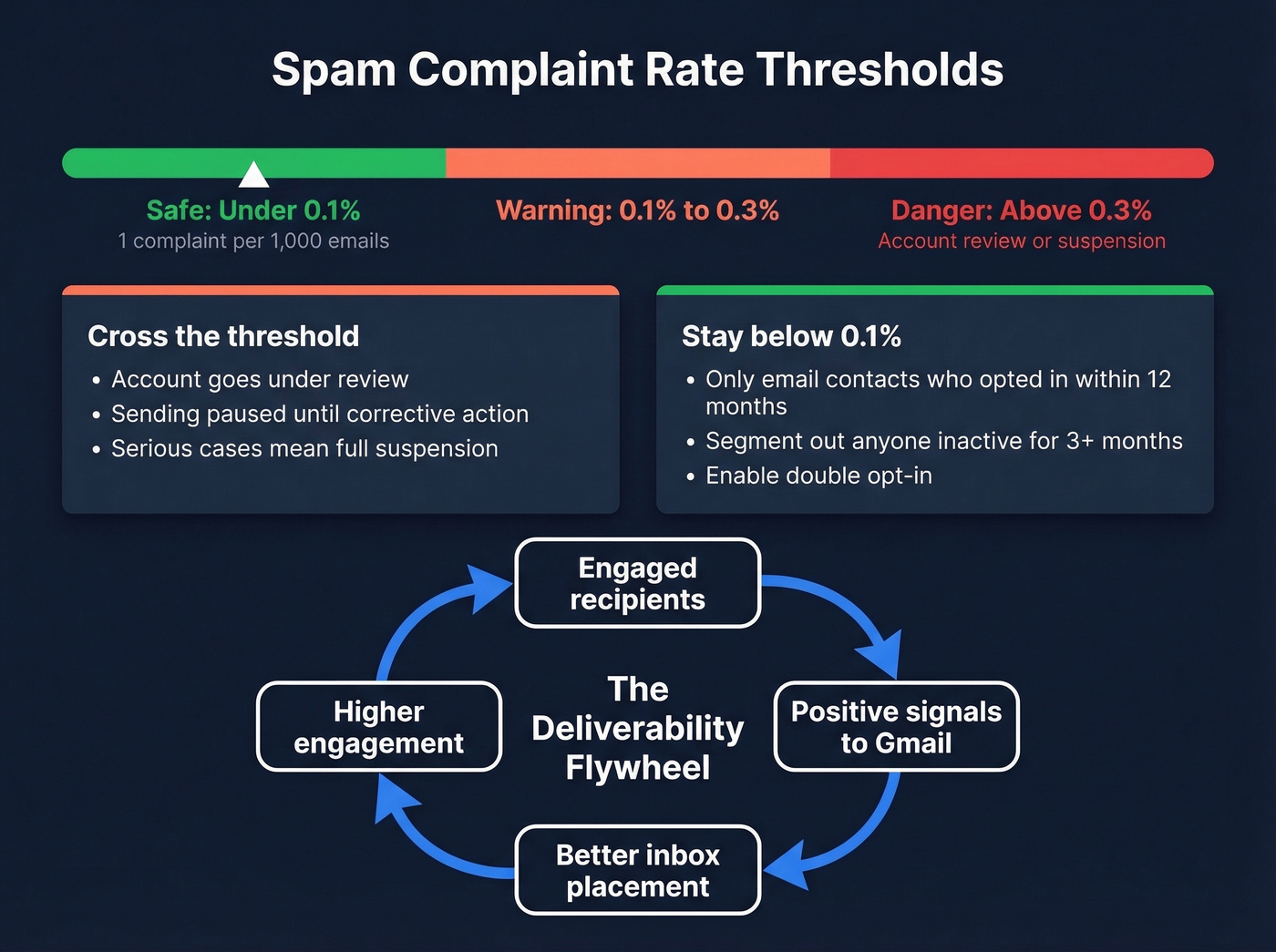
ActiveCampaign enforces this aggressively. Exceed their threshold and your account goes under review - you can't send until you've taken corrective action. In serious cases, they'll suspend the account entirely.
Only send to contacts who opted in within the last 12 months. Use ActiveCampaign's Engagement Management tool or Engagement Tagging automations to segment out anyone who hasn't opened in 3 months. Think of it as a flywheel: engaged recipients generate positive signals, which improve inbox placement, which increases engagement, which generates more positive signals. Enable double opt-in. A smaller engaged list outperforms a large dead one every time.
List Hygiene Before Import
Bad data causes bounces. Bounces kill sender reputation. Reputation kills deliverability.
ActiveCampaign suppresses bounced addresses after the fact, but the damage is already done - that first send to a list full of invalid addresses is what tanks your reputation. In our experience working with outbound teams, this single step prevents more deliverability disasters than any other configuration change. Verify your contacts before they ever touch ActiveCampaign. Prospeo's 5-step email verification catches invalid addresses, spam traps, and honeypots at 98% accuracy, so your first send doesn't wreck your sender reputation before you've even started the warm-up. If you want to benchmark what “good” looks like, compare against email bounce rate targets.
Known Limitations
ActiveCampaign has some operational issues beyond inbox placement worth knowing about.
Automation emails can be slow to trigger - practitioner tests on Reddit show 30 seconds to 2+ minutes of latency, with some automations not firing at all. There's no dedicated deliverability dashboard for monitoring in real time. And if you want one-on-one deliverability help from ActiveCampaign's team, that's a $79 consultation on top of your subscription.
When to Consider Alternatives
If send speed is your priority, a few ESPs look better in limited practitioner tests. In one user-run test, AWeber ranked #1 for trigger speed - often near-instant to around 30 seconds - and hit Gmail inboxes reliably. MailerLite was also fast, though it sometimes landed in Gmail's Promotions tab. Kit was described as more consistent on automation timing in that same thread.
The tradeoff is real. ActiveCampaign's automation depth is a major strength, and if your workflows are complex, switching ESPs will solve one problem and create another. Let's be honest - regardless of which platform you choose, verifying your contact data before import is the single highest-leverage thing you can do for inbox placement. If you're evaluating tooling for outbound, it can help to compare AI bulk email senders and the best way to send bulk email without getting blacklisted.
You just spent 30 days warming up your ActiveCampaign domain. One bad import can undo all of it. Prospeo refreshes every record on a 7-day cycle - not the 6-week industry average - so the emails you import today are still valid tomorrow. At $0.01 per verified email, clean data costs less than a single spam complaint.
Stop gambling your sender reputation on stale, unverified contact data.
FAQ
Is ActiveCampaign good for email deliverability?
ActiveCampaign has strong deliverability features - authentication enforcement, automatic suppression, and a built-in spam checker - but independent inbox testing shows 76.59% placement, below the 83.1% ESP average. Your results depend heavily on authentication setup, warm-up discipline, and list quality.
Why are my ActiveCampaign emails going to spam in Gmail?
Gmail averages a 56.97% inbox rate across all senders per GlockApps Q4 2025 data, making it the toughest mainstream provider. Common causes: incomplete DKIM/DMARC setup, skipping the warm-up schedule, missing one-click unsubscribe headers, or importing unverified contacts that generate bounces and tank sender reputation.
How long does it take to fix deliverability issues?
Expect at least 30-60 days. Mailbox providers evaluate sender reputation over rolling windows, so every bad send stays in your record for weeks. Follow the warm-up schedule, keep complaint rates below 0.1%, and verify your list before sending. There are no shortcuts.