

Appointment Request Email Templates That Get Replies in 2026
"I feel like a dumb idiot but I don't ever have to write emails and I don't know how to formulate a proper formal email." That's a real person on Reddit, putting off a doctor's appointment because they didn't know what to type. If you've ever searched for an appointment request email template for the same reason, you're in good company - the average professional inbox gets ~121 emails per day, which means your request is competing with 120 other things for attention.
Here's the thing most template articles won't tell you: the template isn't the problem. Your system is. A perfect email sent to a bad address, without a follow-up sequence, at the wrong time, will lose to a mediocre email backed by good process every single time.
You don't need 25 templates. You need the right one for your situation and the system to make it work.
What Every Effective Request Needs
Every appointment email that gets a reply has six elements:
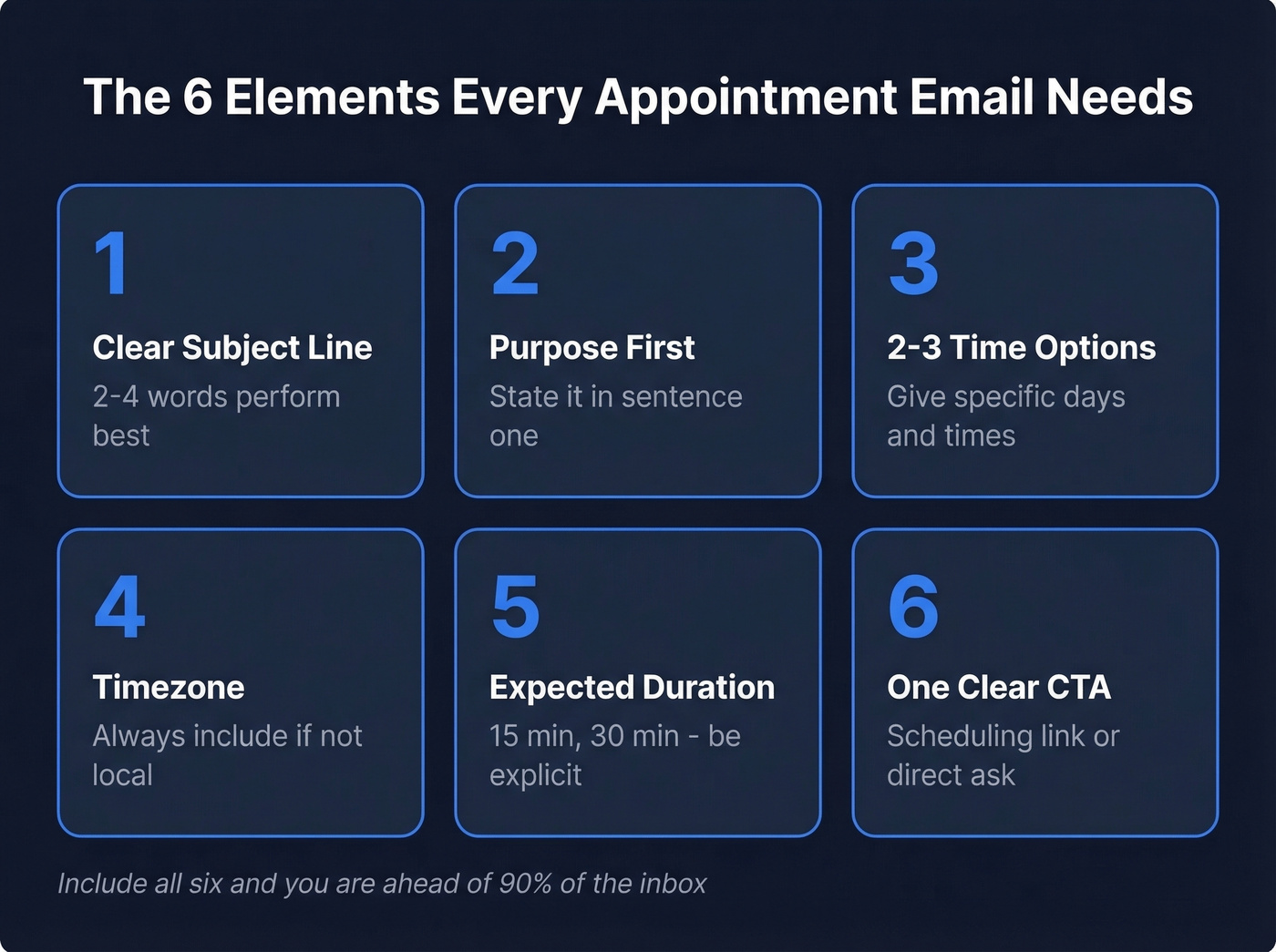
- Clear subject line - 2-4 words perform best
- Purpose stated in the first sentence
- 2-3 specific time options
- Timezone if there's any chance you're not local
- Expected duration
- One clear CTA - a scheduling link or a direct ask
If your email has all six, you're ahead of 90% of the inbox. Jump to the template you need:
- Professional meeting (warm)
- Formal / executive
- Client meeting
- [Cold outreach / sales](#cold-outreach - sales-meeting-request)
- [Healthcare / doctor](#healthcare - doctor-appointment-request)
- [Professor / academic](#professor - academic-appointment-request)
- Job interview scheduling
- Internal meeting
- Follow-ups
- [Confirmations & reminders](#confirmation - reminder-templates)
Subject Lines That Get Opened
Most appointment emails fail before they're opened. The subject line is the bottleneck, not the body.
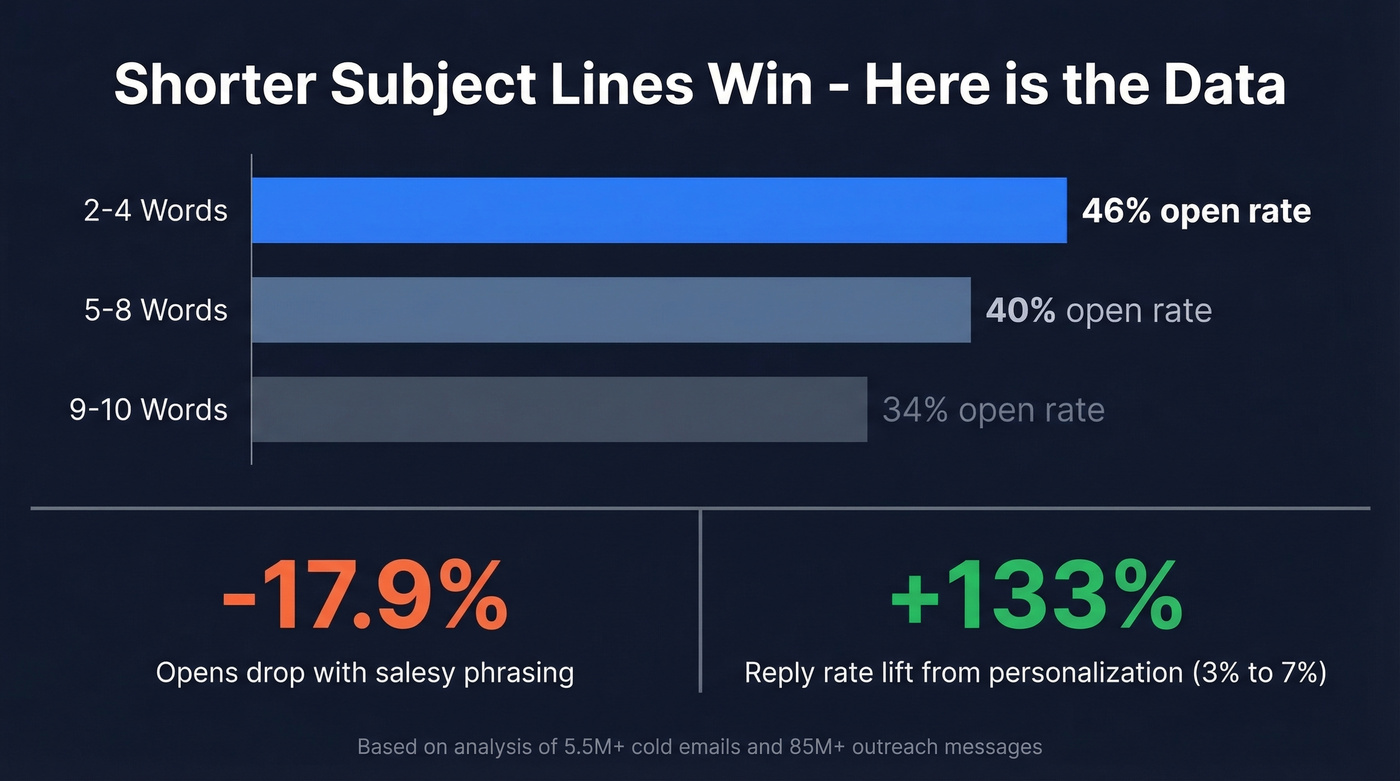
A 5.5 million-email cold outreach analysis found that 2-4 word subject lines hit a 46% open rate. Stretch to 9-10 words and you drop to 34%. Personalized subject lines lifted reply rates from 3% to 7% - a 133% increase. And in an 85M+ cold email analysis from 30MPC and Gong, all-lowercase subject lines outperformed everything else, while "salesy" phrasing cut opens by up to 17.9%.
We've tested dozens of subject line formats across outreach campaigns, and the pattern is consistent: shorter wins. Most phones truncate after ~35-50 characters, so keep yours under 40.
Subject lines that work, organized by tone:
- Direct - quick call Thursday? / 15 min this week? / meeting re: Q3 plan / time to connect?
- Polite - hoping to meet briefly / would love 15 minutes / request for a meeting appointment
- Formal - meeting request - [topic] / appointment request: [your name] / scheduling a brief discussion
- Casual-Professional - coffee chat this week? / got 15 min Tuesday? / quick sync on [project]?
Short, specific, lowercase-friendly. No "URGENT" or "Don't miss this opportunity." Those are the salesy techniques that tank your open rate.
The Right Email Format
The Fyxer framework nails this: state your purpose in the first line, propose 2-3 times, include the duration, and close with a single CTA. That's the whole email.
For warm contacts, keep it under 150 words. For cold outreach, 50-125 words is the sweet spot - anything longer and you're asking someone to invest time before they've decided you're worth it.
The tone rule that matters most: clarity is politeness. Over-apologizing - "I'm so sorry to bother you, I know you're incredibly busy, but if it's not too much trouble..." - doesn't make you polite. It makes you easy to ignore. A clear, confident ask respects the recipient's time more than three sentences of hedging.
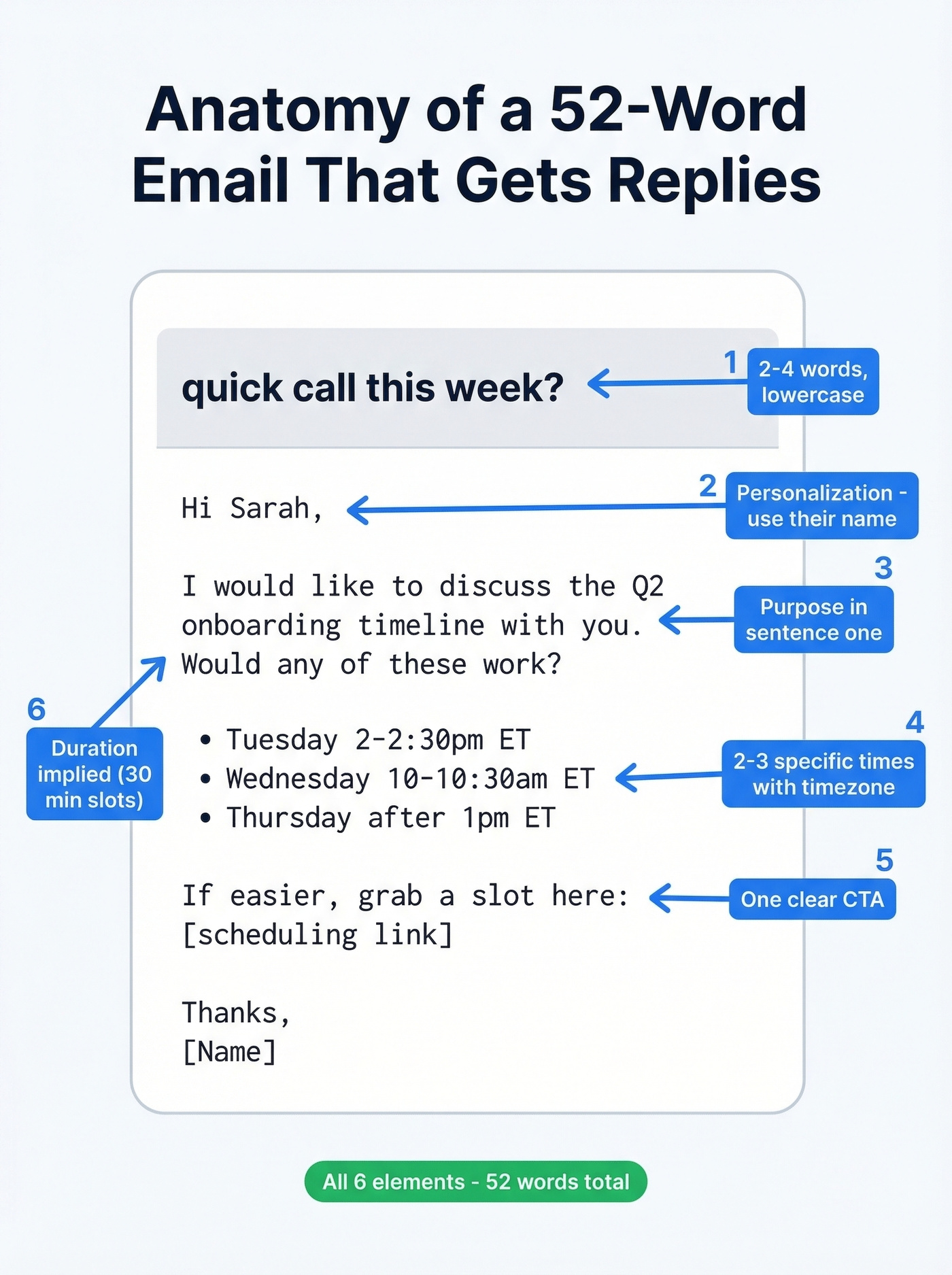
Annotated example:
Subject: quick call this week?
Hi Sarah, (name = personalization)
I'd like to discuss the Q2 onboarding timeline with you. (purpose, first sentence)
Would any of these work? (time options)
- Tuesday 2-2:30pm ET
- Wednesday 10-10:30am ET
- Thursday after 1pm ET
If easier, grab a slot here: [scheduling link] (CTA)
Thanks, [Name]
That's 52 words. It has all six elements. It'll get a reply.
Templates by Scenario
Professional Meeting Request (Warm)
The most common scenario - you know the person, you just need to get something on the calendar.
Subject: quick sync on [topic]?
Hi [Name],
I'd like to set up a 30-minute meeting to discuss [specific topic]. I have a few ideas on [brief context] that I think would be worth walking through together.
Would any of these times work?
- [Day, Date] at [Time] [Timezone]
- [Day, Date] at [Time] [Timezone]
- [Day, Date] at [Time] [Timezone]
Or feel free to pick a time here: [scheduling link]
Looking forward to it, [Your name]
Leads with purpose, offers flexibility, and gives an escape hatch for people who'd rather click than reply.
Formal Appointment Request (Executive/VIP)
Subject: meeting request - [topic]
Dear [Name],
I'm reaching out to request a 20-minute meeting regarding [specific topic]. [One sentence on why this is relevant to them specifically.]
I'm available [Day] and [Day] this week, or happy to work around your schedule. If it's easier to coordinate through your assistant, please feel free to loop them in.
Thank you for your time, [Your full name] [Title, Company]
Short, respects the gatekeeper dynamic, and doesn't grovel. Executives scan - give them the ask in under 80 words. This format works for board members, investors, and senior leadership alike.
Client Meeting Request
Subject: [Project name] check-in - 30 min?
Hi [Name],
I'd like to schedule a 30-minute check-in to review [specific deliverable] and align on next steps for [upcoming phase].
Proposed agenda:
- [Topic A] status update
- [Topic B] decision needed
- Timeline for [next milestone]
Does [Day] at [Time] or [Day] at [Time] work on your end?
Best, [Your name]
Clients want to know the meeting has a point. The mini-agenda signals you won't waste their time.
Cold Outreach / Sales Meeting Request
Let's set expectations before you write this one. Across 14.3 billion cold emails analyzed by Smartlead, the averages land around ~42% opens, ~3% replies, and ~1% meetings booked. If your numbers are in that range, your templates are working - the game is volume, targeting, and follow-ups.
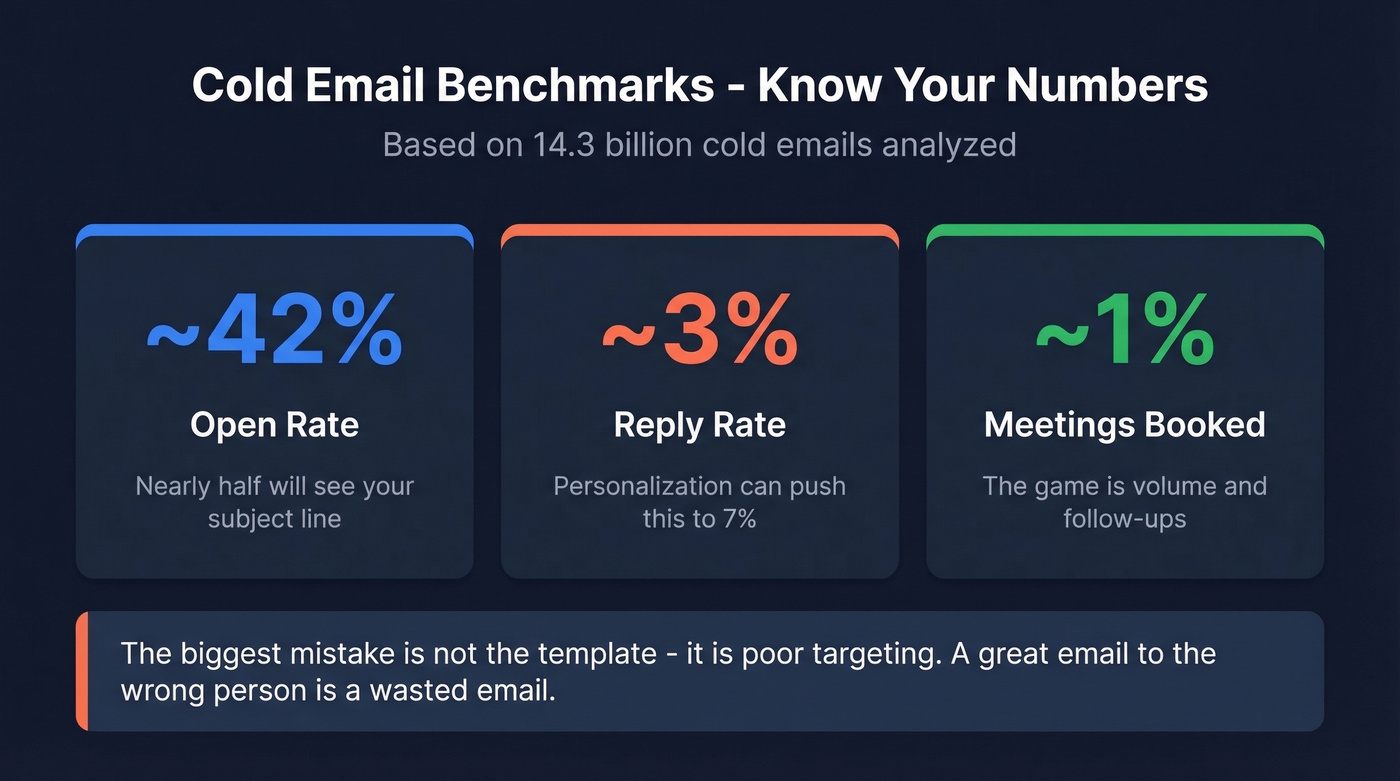
The biggest mistake in cold outreach isn't the template. It's poor targeting. Sending a great email to the wrong person, or to someone with no relevant pain, wastes effort no matter how good your copy is.
Subject: [their company name] + [your solution area]
Hi [First name],
[One sentence about a specific challenge their company likely faces - reference something real: a job posting, a recent announcement, a known industry pain.]
We help [type of company] [specific outcome]. [One proof point - a number, a client result, something concrete.]
Worth a 15-minute call this week? I'm open [Day] and [Day] - or grab a time here: [link].
[Your name]
Pain-point-first, no feature dump, 50-125 words. Personalization - referencing something specific about their company - is what separates a 3% reply rate from a 7% one.
Healthcare / Doctor Appointment Request
"How do I write an email requesting an appointment?" asked a 16-year-old on r/NoStupidQuestions, anxious about contacting a therapist. If that's you - for any kind of medical appointment - this template handles it, including the part most people stress about: asking about cost.
Subject: appointment request - new patient
Hello,
My name is [Your name] and I'd like to schedule an appointment with [Doctor's name / the practice] for [reason - e.g., an initial consultation, a follow-up].
A couple of questions:
- What is the fee per session?
- Do you accept [insurance name], or is there a sliding scale available?
I'm available [Day/Time] and [Day/Time]. Please let me know what works or if there's an online booking link I should use.
Thank you, [Your name] [Phone number]
Offices hear these questions every day. Just ask.
Professor / Academic Appointment Request
Students on r/UBC stress about sounding entitled when emailing professors. The fix is simple: mention what you want to discuss. It shows you've thought about it, and professors appreciate that more than any amount of politeness.
Subject: office hours - [course name or topic]
Dear Professor [Last name],
I'm [Your name] from your [Course name, section]. I'd like to meet to discuss [specific topic - e.g., feedback on my midterm paper, guidance on my thesis proposal].
Would any of your office hours this week work, or is there another time that's better? I'm available [Day/Time] and [Day/Time].
Thank you, [Your name]
Job Interview Scheduling Request
Subject: re: interview availability - [your name]
Hi [Recruiter/HR name],
Thank you for the opportunity to interview for the [Role title] position. I'm excited to learn more about the team.
I'm available at the following times:
- [Day, Date] at [Time] [Timezone]
- [Day, Date] at [Time] [Timezone]
- [Day, Date] at [Time] [Timezone]
Please let me know which works best, or if you'd like me to use a scheduling link.
Best regards, [Your full name] [Phone number]
Three options show flexibility. Including your timezone prevents the back-and-forth that delays scheduling by days.
Internal Meeting Request
Here's the before and after that shows why internal emails should be the shortest ones you write:
Too formal (skip this):
Dear Michael, I hope this email finds you well. I am writing to request a meeting at your earliest convenience to discuss the upcoming product launch timeline. Please let me know your availability...
Right tone:
Hey Michael,
Can we grab 20 minutes this week to align on the launch timeline? Want to make sure we're on the same page before Friday's standup.
I'm free Tuesday afternoon or Thursday morning. Or just throw something on my calendar - [link].
Thanks!
Your colleague doesn't need a formal greeting or your job title. State the purpose, propose times, done.

A perfect appointment request email sent to a bad address is a wasted email. Prospeo gives you 98% verified emails across 300M+ professional profiles - so your meeting requests actually reach the inbox, not a bounce folder.
Stop crafting great emails for dead addresses. Verify first.
Follow-Up Templates
If you're not following up, you're leaving most of your replies on the table. Woodpecker's data shows reply rates jump from 9% to 13% with just one follow-up. For experienced outreach teams, the gap is even wider: 16% without follow-ups versus 27% with them. In our experience, roughly 60% of total replies come after at least one follow-up - the first email is just the opening bid.
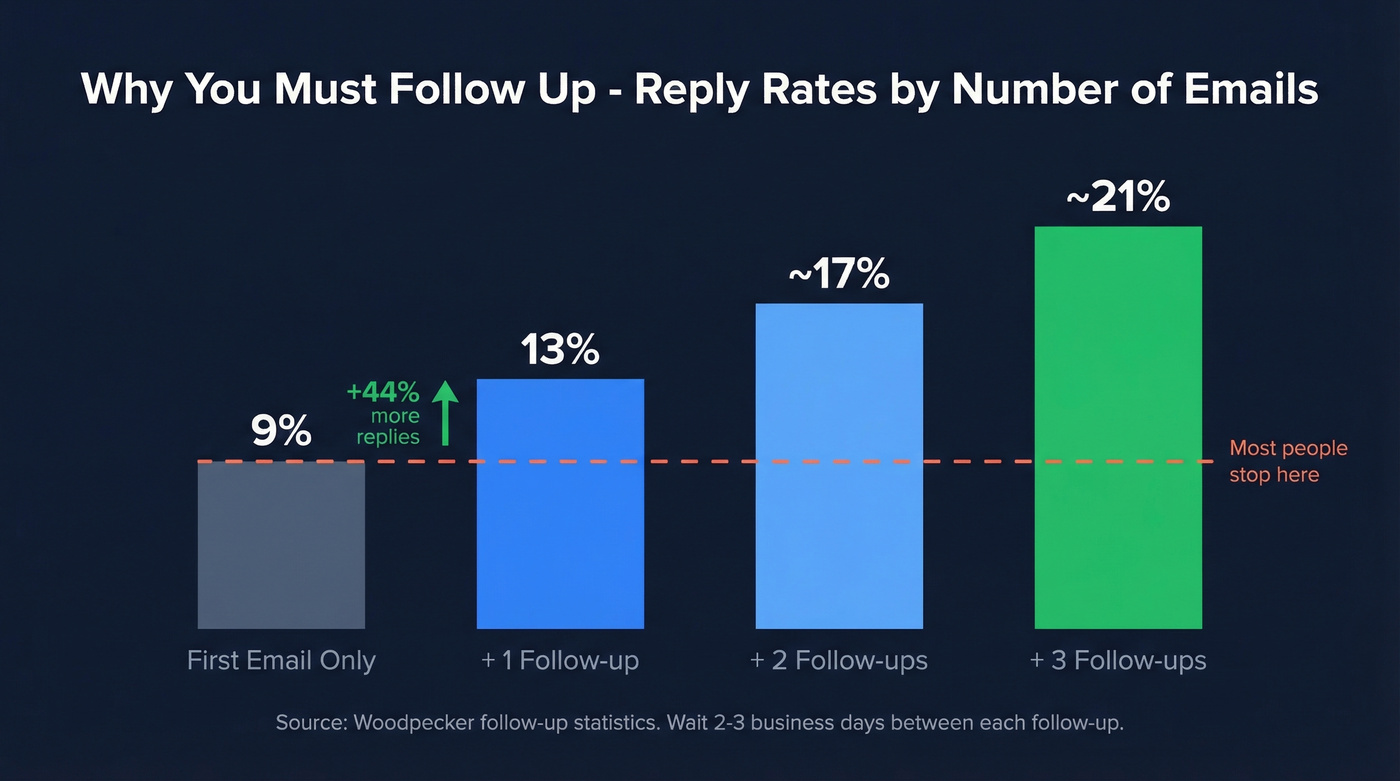
Optimal count: 2-3 follow-ups, spaced 2-3 days apart.
First Follow-Up (Day 2-3)
Subject: re: [original subject line]
Hi [Name],
Just circling back on my note from [Day]. I'd love to find 15 minutes to discuss [topic].
Would [new time option] or [new time option] work better?
[Your name]
Under 50 words. Reference the original email so they can find it. Add one new time option.
Second Follow-Up (Day 6-7)
Subject: re: [original subject line]
Hi [Name],
I know things get buried - wanted to try one more time. I'm flexible on timing this week if [original times] didn't work.
Here's my calendar link if that's easier: [link]
[Your name]
Slightly different angle. The scheduling link does the heavy lifting.
Final Follow-Up / Breakup Email (Day 12-14)
Subject: should I close the loop?
Hi [Name],
I've reached out a couple of times about [topic]. If now isn't the right time, totally understand - just let me know and I'll follow up down the road instead.
[Your name]
The permission-based close works because it removes pressure. Giving someone an easy out often gets the reply.
Confirmation & Reminder Templates
No-shows aren't just annoying - they're expensive. In healthcare alone, missed appointments cost the U.S. ~$150 billion annually, with each no-show costing a physician $200+ in lost revenue. One hospital system tracked 67,000 no-shows in a single study period, totaling $7 million in losses. A two-tier reminder strategy - one at 3 days out, one at 24 hours - cuts no-show rates dramatically.
3-Day Reminder:
Hi [Name], just a heads-up that we have a meeting scheduled for [Day, Date] at [Time] [Timezone]. Let me know if anything's changed - happy to reschedule if needed.
24-Hour Reminder:
Hi [Name], quick reminder about our meeting tomorrow at [Time] [Timezone]. [Zoom link / address]. Looking forward to it - let me know if anything's changed.
Confirmation (immediately after booking):
Hi [Name], confirming our meeting on [Day, Date] at [Time] [Timezone]. We'll cover [brief agenda]. Here's the [Zoom/location link]. See you then!
Keep all three short. They're not emails people read carefully - they're emails people glance at to confirm the details.
Mistakes That Kill Your Response Rate
Wrong target, wrong person. The best template in the world won't save an email sent to someone who has no reason to care. For cold outreach, spend more time on targeting than on copy. It matters more.
Vague or long subject lines. Salesy subject lines reduce opens by up to 17.9%. Keep it 2-4 words, specific, lowercase-friendly. If you want more options, pull from a swipe file of subject line formats and test a few.
No time options. "Let me know when you're free" puts the work on them. Always propose 2-3 specific slots - you'll cut the back-and-forth by at least one round.
Too long. Cold emails should be 50-125 words. Warm requests under 150. If you're writing a paragraph about why you're reaching out before you've stated what you want, you've lost them.
No follow-up. This is the biggest one. The majority of replies come after the first follow-up. Sending one email and waiting is leaving most of your responses on the table. If you need more sequences, use these follow-up templates as a starting point.
Wrong email address. Your template is perfect, your subject line is optimized, your follow-up sequence is built - and it all bounces because the email address is bad. Before you send any outreach, verify the address. Tools like Prospeo handle this with 98% accuracy, and the free tier gives you 75 verifications per month. It takes seconds and saves your sender reputation (here’s how to improve sender reputation if you’ve already taken hits).
Cold outreach averages ~1% meetings booked. The fastest way to beat that number isn't a better template - it's better targeting. Prospeo's 30+ filters let you find the exact decision-makers who match your ICP, with verified contact data refreshed every 7 days.
Send your appointment request to the right person at $0.01 per email.
Tools to Kill the Back-and-Forth
The fastest way to eliminate scheduling ping-pong is a booking link. Pick one, embed it in your email's CTA, and stop overthinking it. If you’re building a repeatable outbound motion, pair this with a simple sequence management process so follow-ups don’t slip.
| Tool | Best For | Starting Price | Free Tier? |
|---|---|---|---|
| Calendly | Most people | $12/mo/user | Yes |
| zcal | Best free option | $9.50/mo/user | Yes (generous) |
| TidyCal | One-time payment lovers | $29 one-time | N/A |
| Cal.com | Customization | $15/mo/user | Yes |
| SavvyCal | Overlay scheduling | $12/mo/user | Yes |
| Reclaim | AI time blocking | $10/mo/user | Yes |
Calendly is the default for a reason - it works, everyone recognizes it, and the free tier handles basic scheduling fine. If you hate subscriptions, TidyCal's $29 one-time payment is hard to beat - a sentiment echoed frequently on r/ProductivityApps. And zcal's free tier is genuinely generous: clean booking pages and a lot of functionality without forcing you to upgrade immediately.
Look, if your average deal size is under $15k, you don't need a $200/month scheduling suite. A free Calendly link and verified email addresses will outperform any fancy tool stack with bad data behind it. (If you’re still building your list, these sales prospecting techniques help you target better before you send.)
FAQ
How formal should my appointment email be?
Match the relationship. Doctor's office or professor - professional but not stiff. Colleague - casual. Cold outreach - confident and clear. When in doubt, err toward clarity over formality. A clear email always reads as more polite than an over-apologetic one.
How many times should I follow up?
Two to three follow-ups is optimal. Reply rates jump from 9% to 13% with just one follow-up. Space them 2-3 days apart. After the third, send a brief breakup email giving them an easy out.
Should I include a scheduling link?
Yes - it eliminates the back-and-forth that kills momentum. Tools like Calendly or zcal let the recipient pick a time in one click. Include it as your CTA, not buried mid-paragraph.
What's the best day and time to send?
Tuesday and Thursday between 9:30-11:00am tend to get the highest open rates. Avoid Monday mornings (inbox overload) and Friday afternoons (mentally checked out). For executives, late evening sends sometimes work - they clear inboxes after hours.
How do I make sure my email actually reaches the recipient?
Verify the address before you hit send. Bounced emails damage your sender reputation and waste follow-up sequences. Real-time email verification catches invalid addresses in seconds - pair it with any scheduling tool to make sure your appointment request actually lands.