

How to Use Asana for Sales Pipeline (And When It Breaks)
Your founder just asked you to set up a sales pipeline and your entire company runs on Asana. You don't want to buy a CRM for three reps. Fair enough. Using Asana for sales pipeline management works surprisingly well for small teams - we've seen it handle up to 30 active deals without breaking a sweat. Past that, things get ugly fast.
Here's exactly how to set it up, where the ceiling is, and how to keep your data clean along the way.
What You Need (Quick Version)
- Already paying for Asana? Asana's free Sales Pipeline template plus Starter ($10.99/user/mo billed annually) gives you the custom fields and Rules that make a pipeline actually usable.
- Past ~30 deals or need real reporting? Pair Asana with HubSpot CRM (free plan available) or Pipedrive (starts at $24/seat/mo). Asana runs the work; the CRM holds the record.
- Before adding any prospect to your pipeline, verify their email. Prospeo catches bad addresses at $0.01/email so you're not chasing bounces from day one.
What Asana's Template Actually Gives You
Use this if you need a visual pipeline with task management baked in. The template supports four views - List, Board, Calendar, and Timeline - so you can drag deals across stages on a Kanban board or zoom out to a timeline for the quarter. Custom fields let you track estimated opportunity value, lead status, and account owner. Rules automate the repetitive admin: add collaborators when a lead status changes, update priority based on estimated value, fire off a Slack message when something closes.
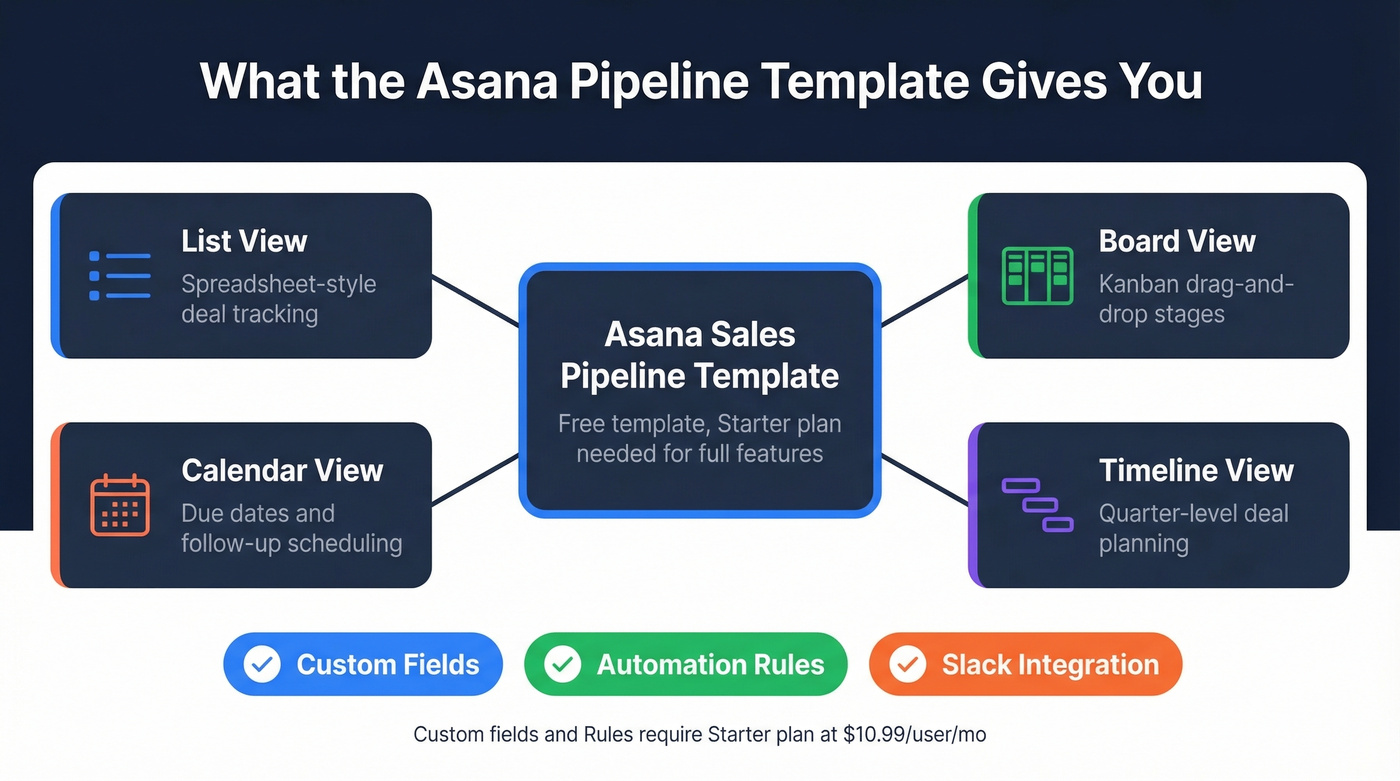
Skip this if you need a contact database, automatic email logging, or revenue forecasting that doesn't require a spreadsheet on the side. The template itself is free, but custom fields and Rules - the features that actually make a pipeline functional - require Starter at $10.99/user/mo.
Setting Up Your Pipeline Step by Step
1. Create a new project from the Sales Pipeline template. Start with Board view. It's the most intuitive for pipeline visualization, and it's what your reps will actually use day-to-day.
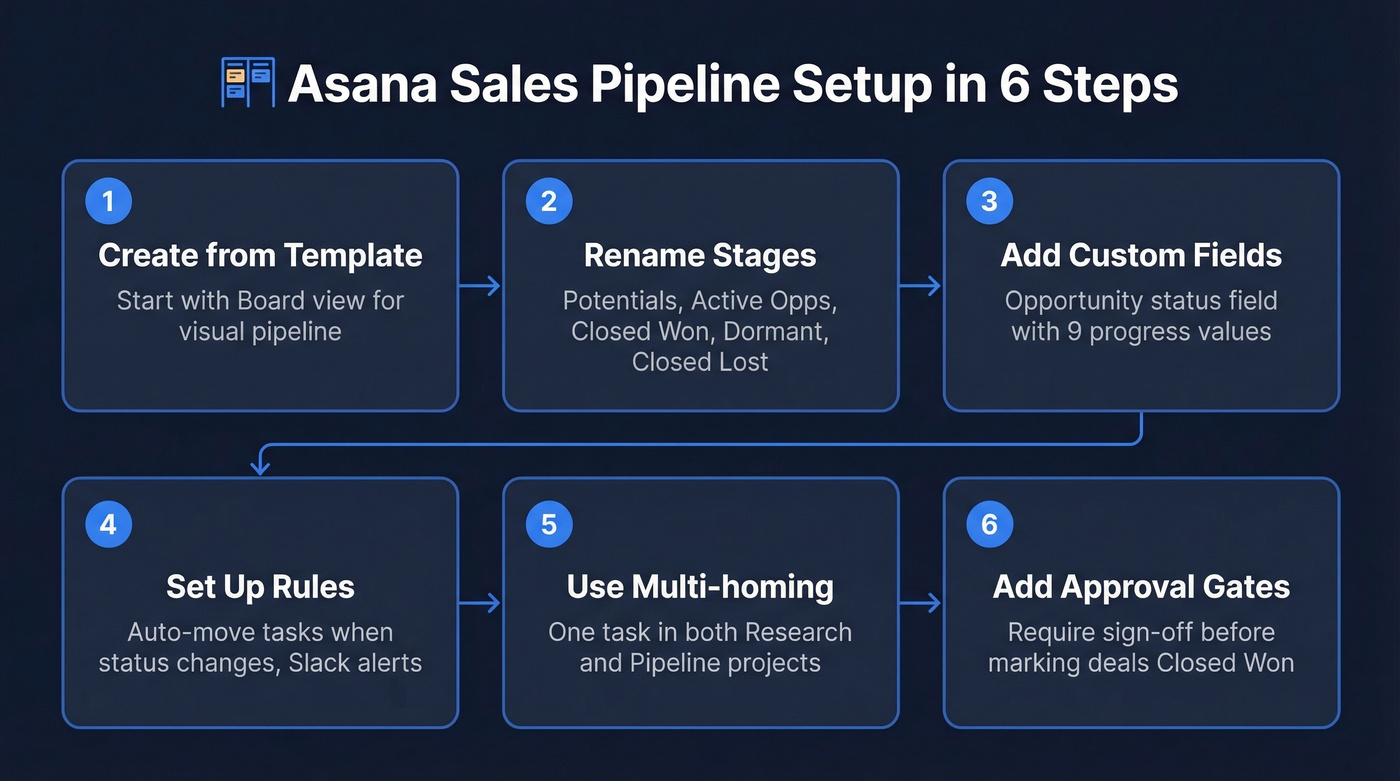
2. Rename sections to match your stages. This sequence works well for small teams: Potentials → Active Opportunities → Closed Won → Dormant Opportunities → Closed Lost (and optionally Passed On). Keep it to five or six stages max. More than that and reps stop updating.
3. Add a custom field called "Opportunity status." Give it values like: Contacted Once, Contacted Twice, Contacted Three Times, Responded, Call/Meeting, Verbal Commitment, Proposal, Closed, On Hold. This field tracks progress within each stage, which is where the real granularity lives.
4. Set up Rules to automate stage movement. When Opportunity status changes to "Responded," move the task to Active Opportunities. When it hits "Closed," move to Closed Won. Chain Rules together - on Closed Won, post a Slack notification and reset the due date to today for onboarding follow-up. This is where Asana starts feeling like a real pipeline tool instead of a glorified to-do list.
5. Use multi-homing for research and pipeline. Create a separate Research project where each lead is a task. When a lead qualifies, add that same task to your Pipeline project. One record, two contexts - no duplicate data entry. We picked up this pattern from the Storyware case study of a pipeline built for LoyalBrew, and it's become our go-to recommendation for teams running prospecting and deal management in parallel.
6. Add an Approval task for close-won deals. This requires Asana's Advanced plan, but if you have it, it's worth using: when approved, trigger Rules to move the deal to Closed Won, update the status field, and notify the team. It creates a lightweight approval gate that prevents reps from marking deals closed without sign-off. Use subtasks under each deal for execution work like pitch decks, demos, and proposals.

Every deal in your Asana pipeline starts with a real contact. Prospeo verifies emails at 98% accuracy for $0.01 each - so you're not dragging dead leads across stages. 15,000+ teams use it to keep their pipeline clean from day one.
Stop filling your Asana board with contacts that bounce.
When You Outgrow Asana
Let's be honest: most guides pretend Asana can replace a CRM. It can't. But your CRM doesn't manage the work that actually closes deals, either. Think of it as two layers - Asana is the execution layer (tasks, handoffs, approvals), while a CRM is the relationship layer (contacts, activity history, pipeline analytics).
Sales teams that pair Asana with a CRM run account plans, deal support requests like legal, security, and finance reviews, and customer handoffs inside Asana while the CRM holds the pipeline record. In our experience, the breaking point sits around 30 active deals. After that, the lack of a native contact database, automatic activity history, and real pipeline reporting becomes a daily frustration that no amount of custom fields can fix.
Here's the thing: Asana is a better sales tool than most CRMs - for everything except being a CRM. HubSpot's task management feels limited. Pipedrive's project features are an afterthought. If your sales cycle involves cross-functional work like legal reviews, onboarding handoffs, or content creation, Asana paired with a free CRM beats an expensive CRM trying to do project management.
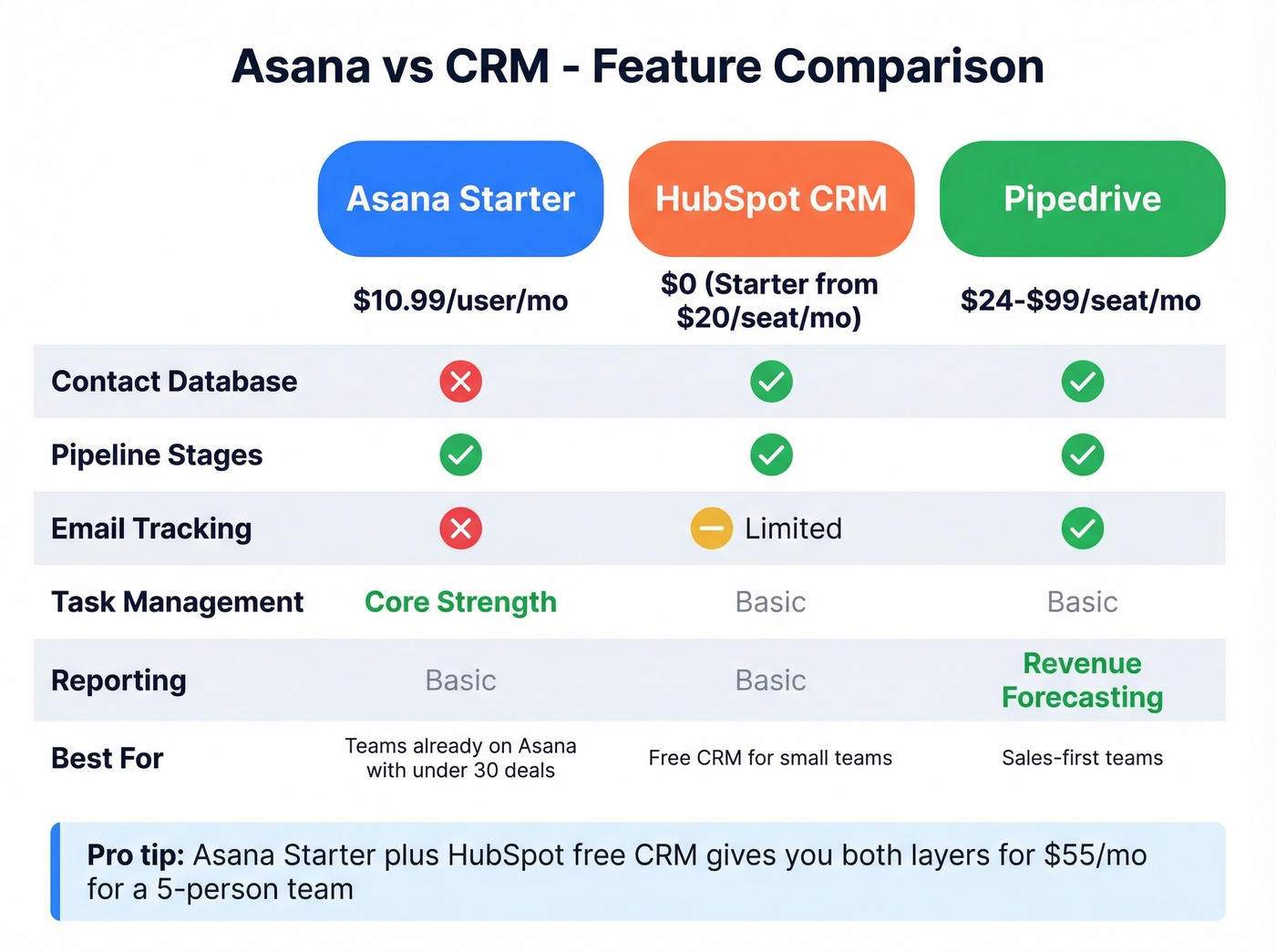
| Feature | Asana Starter | HubSpot CRM | Pipedrive |
|---|---|---|---|
| Price | $10.99/user/mo | $0 (Sales Hub Starter from $20/seat/mo) | $24-$99/seat/mo |
| Contact DB | No (tasks only) | Yes (native) | Yes (native) |
| Pipeline stages | Custom fields | Drag-and-drop | Drag-and-drop |
| Email tracking | No | Yes (limited) | Yes |
| Task management | Core strength | Basic | Basic |
| Reporting | Basic dashboards | Basic reports | Revenue forecasting |
| Best for | Teams on Asana, <30 deals | Free CRM for small teams | Sales-first teams |
For a 5-person team, the math is simple. Asana Starter costs $55/mo, HubSpot CRM can be $0, and Pipedrive starts around $120/mo at the base tier. If you're already paying for Asana, adding HubSpot's free CRM gives you both layers for the same $55.
Connecting Asana to Your CRM
HubSpot's workflow engine supports a "Create an Asana task" action, which means you can trigger Asana tasks when deals hit specific stages in HubSpot. One gotcha: private Asana projects don't appear in HubSpot, so your pipeline project needs to be visible to the connecting user. That user also needs to be a collaborator on the Asana project for it to show up - we've seen teams waste an hour debugging this before checking permissions.
The integration can also surface HubSpot deal context - stage, amount, deal owner - directly inside Asana tasks, which is a nice quality-of-life improvement. For bidirectional sync where changes in Asana reflect back in HubSpot, teams use middleware like Zapier, Unito, or Make. Salesforce integration is available through Asana for Salesforce but requires Asana's Advanced plan at $24.99/user/mo.
The Data Problem Asana Doesn't Solve
Asana tracks deals beautifully. It doesn't verify or refresh the contact data inside those deals. Emails and phone numbers pasted into custom fields go stale - there's no deduplication, no validation, no way to know if a contact changed jobs last week.
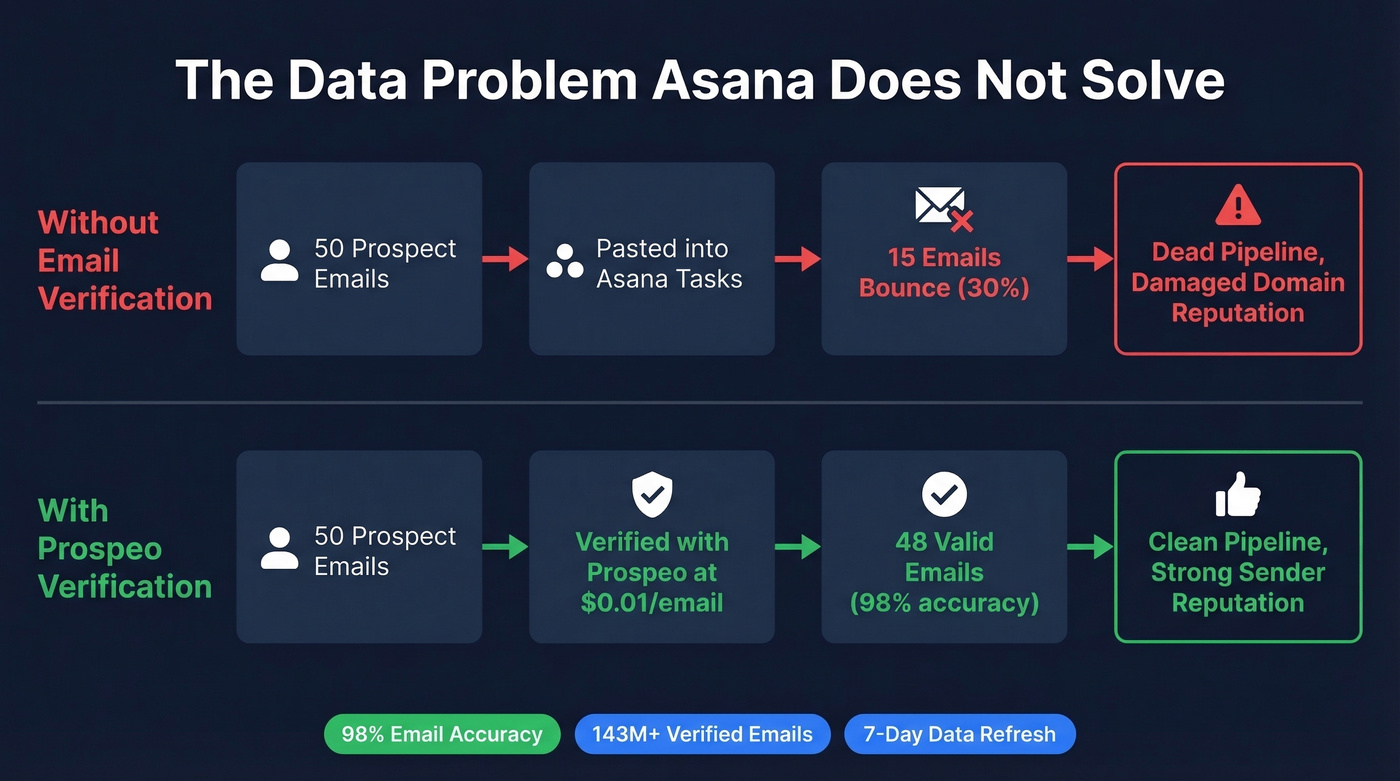
Here's a scenario we see constantly: you paste 50 prospect emails into Asana tasks, start your outreach sequence, and fifteen of them bounce. That's not a pipeline. That's a to-do list full of dead ends, and it tanks your domain reputation in the process.
Run contacts through Prospeo's email finder before adding them to your pipeline. With 98% email accuracy, 143M+ verified emails, and a 7-day data refresh cycle, you're starting with clean data instead of hoping for the best. The Chrome extension lets you verify an email from any website in one click, so you're never pasting unverified data into Asana.
Asana doesn't have a contact database. Prospeo does - 300M+ verified profiles with 30+ filters to find the right buyers before you ever create a task. Export verified emails and direct dials straight into your pipeline workflow.
Build your prospect list in minutes, not hours of manual research.
FAQ
Is Asana free for pipeline tracking?
The Sales Pipeline template is free, but custom fields and automation Rules - the features that make pipeline management functional - require Asana Starter at $10.99/user/mo billed annually. The free tier is too limited for real deal tracking.
Can Asana replace a CRM?
For teams managing fewer than 30 active deals, Asana handles pipeline stages, task assignments, and handoffs well. Beyond that threshold, pair it with HubSpot's free CRM or Pipedrive (from $24/seat/mo) to get native contact records, email logging, and revenue forecasting.
How do I keep contact data accurate in my Asana pipeline?
Asana has no built-in email validation or data enrichment. Verify emails before adding them to task fields - at $0.01 per email with 98% accuracy, it's cheaper than chasing bounces manually and repairing domain reputation after the fact.
What integrations connect Asana to sales tools?
HubSpot offers a native workflow action to create Asana tasks from deal stage changes. Salesforce integration requires Asana Advanced ($24.99/user/mo). For other tools, Zapier, Make, and Unito handle bidirectional syncing between Asana and most CRMs.