

How to Automate Lead Distribution: A Practical Playbook
A sales manager on r/sales described tracking lead assignments across 18 reps using a "rough mental tally." That's not a system - it's a prayer. And as r/CRM posters regularly confirm, leads go cold before reps even know they exist.
Once your team hits double digits, manual routing doesn't slow down. It silently kills deals. The fix: automate lead distribution before the pipeline damage compounds.
The cheat sheet before you read further:
- Under 10 reps, simple routing: Your CRM's round-robin plus a Zapier workflow. Done.
- Inbound-heavy, speed matters: Chili Piper or RevenueHero for instant form-to-meeting booking.
- Before you build anything: Clean your data with Prospeo so leads actually route to the right rep. Routing rules are only as good as the fields they read.
When Manual Routing Breaks Down
Not every team needs a dedicated routing tool on day one. You've outgrown manual assignment when:
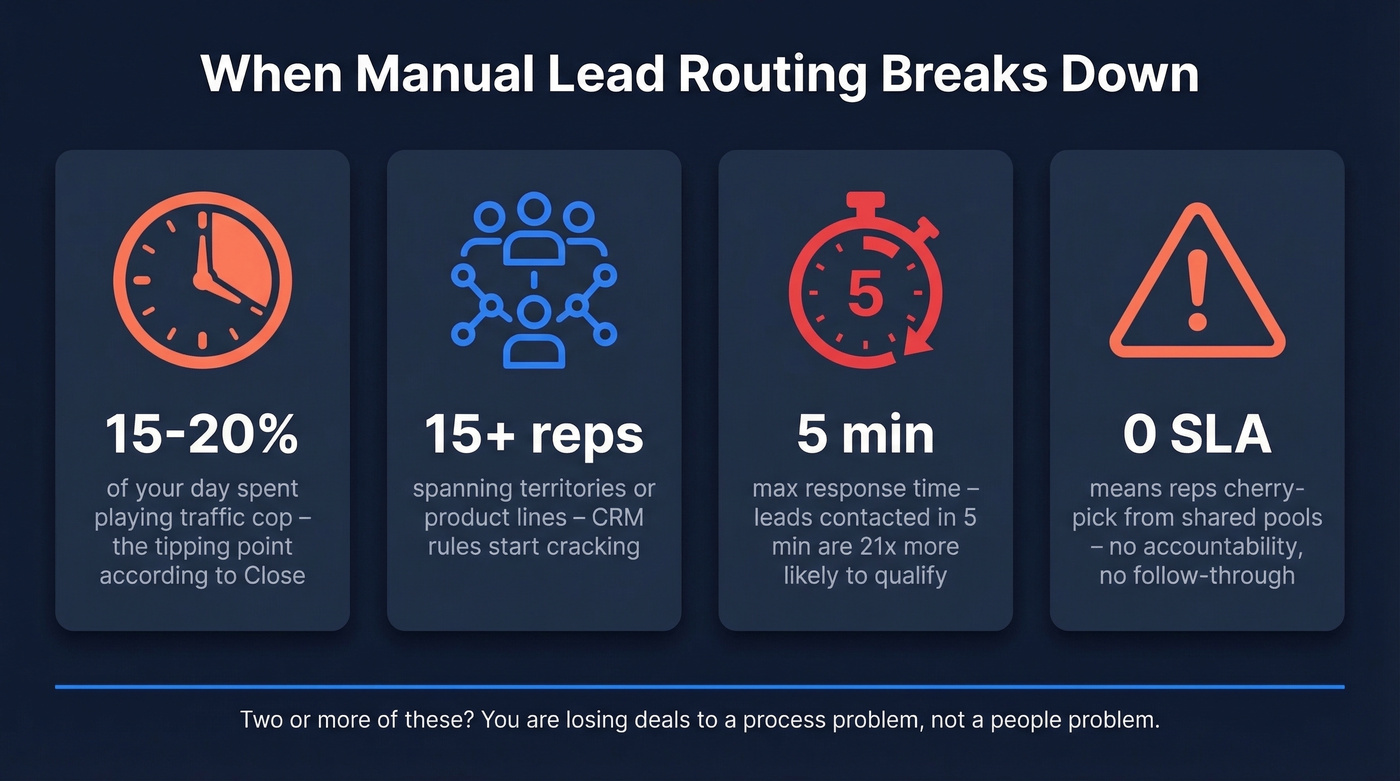
- Manual routing eats 15-20% of your day. Nick Persico at Close calls this the tipping point - once you're playing traffic cop that much, you've already lost revenue.
- You're past 15-20 reps spanning multiple territories or product lines. CRM-native rules start cracking at this scale.
- Leads sit unassigned for more than 15 minutes. The Lead Response Management Study benchmark is clear: contacting a lead within five minutes makes you 21x more likely to qualify them versus waiting 30 minutes. Every minute of delay is measurable pipeline loss.
- Reps cherry-pick from a shared pool instead of working assigned leads. No SLA, no accountability.
Two or more of those? You're already losing deals to a process problem, not a people problem.
Three Distribution System Types
| System Type | How It Works | Choose This When |
|---|---|---|
| CRM-native | Built into your CRM - HubSpot rotation, Salesforce assignment rules, Pipedrive workflows | <10 reps, basic round-robin |
| Overlay | Sits on top of CRM via API; handles complex logic | 15+ reps, territories, lead-to-account matching |
| Scheduling-based | Overlay + instant booking at conversion | Speed-to-meeting is your #1 metric |
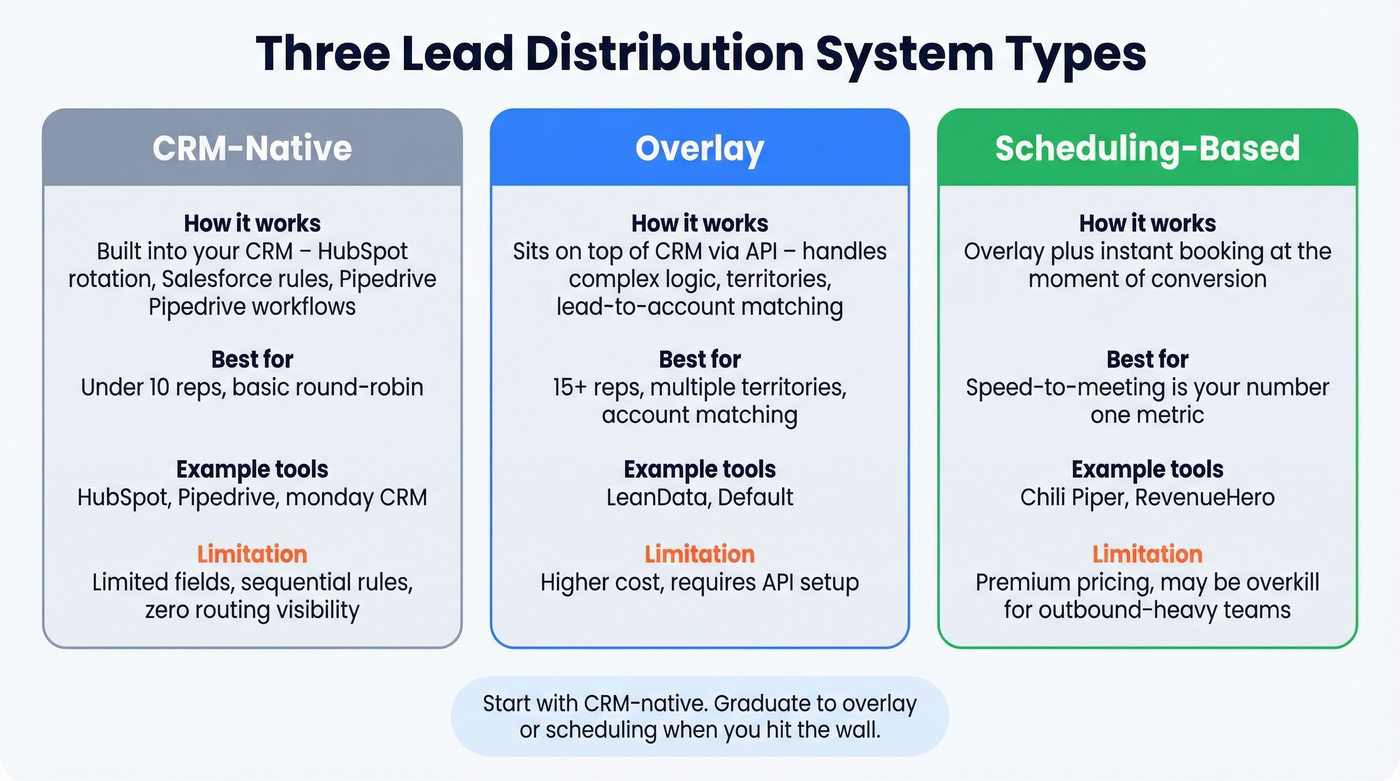
CRM-native routing is a starter feature, not a distribution engine. It evaluates a limited set of fields, runs rules sequentially, and gives you zero visibility into routing performance. It works until it doesn't - and most teams don't realize it's broken until they audit where leads actually ended up.

Up to 40% of B2B data is inaccurate - and bad fields silently misroute leads to the wrong reps. Prospeo's enrichment API fills industry, company size, location, and verified email with a 92% match rate and 50+ data points per contact. Data refreshes every 7 days, not the 6-week industry average, so your routing logic reads current fields instead of stale ones.
Fix the data before you fix the routing.
What Breaks Routing Rules
Here's the thing: the most common routing failure isn't a software bug. It's bad data.
Up to 40% of B2B data is inaccurate at any given time. If a lead's industry field says "Healthcare" when they're actually in fintech, your territory rules send them to the wrong rep. That rep wastes time on a bad-fit conversation. The right rep never sees the lead. Nobody flags it because the system "worked" - it just worked on garbage inputs.
We've seen this pattern repeatedly: a team spends weeks building sophisticated routing logic, only to discover half their leads are routing on empty or stale fields. Before leads hit your routing engine, run them through an enrichment API to fill verified industry, company size, location, and email fields. With a 7-day refresh cycle and 98% email accuracy, Prospeo keeps records current instead of decaying on the typical 6-week lag. Routing logic can be brilliant, but it's worthless reading wrong fields.

The other killer is no SLA enforcement. If a rep doesn't act within five minutes and the system doesn't reassign, that lead is effectively dead.
Recommended Tools for 2026
| Tool | Type | Starting Price | Best For |
|---|---|---|---|
| Chili Piper | Scheduling overlay | ~$30/user/mo + platform fee | Fast inbound form-to-meeting |
| LeanData | Salesforce overlay | ~$39/user/mo | Complex territory + account matching (Salesforce) |
| Default | Overlay / orchestration | ~$750/mo + $45/user/mo | Full RevOps workflow |
| RevenueHero | Scheduling overlay | ~$25/user/mo (annual) + $79/mo platform | Budget scheduling routing |
| Pipedrive | CRM-native | ~$19/seat/mo | SMB with basic round-robin |
| monday CRM | CRM-native | $12-28/user/mo | Small teams, simple routing |
| Zapier + CRM | DIY automation | ~$20+/mo (Zapier) | <10 leads/day, budget teams |
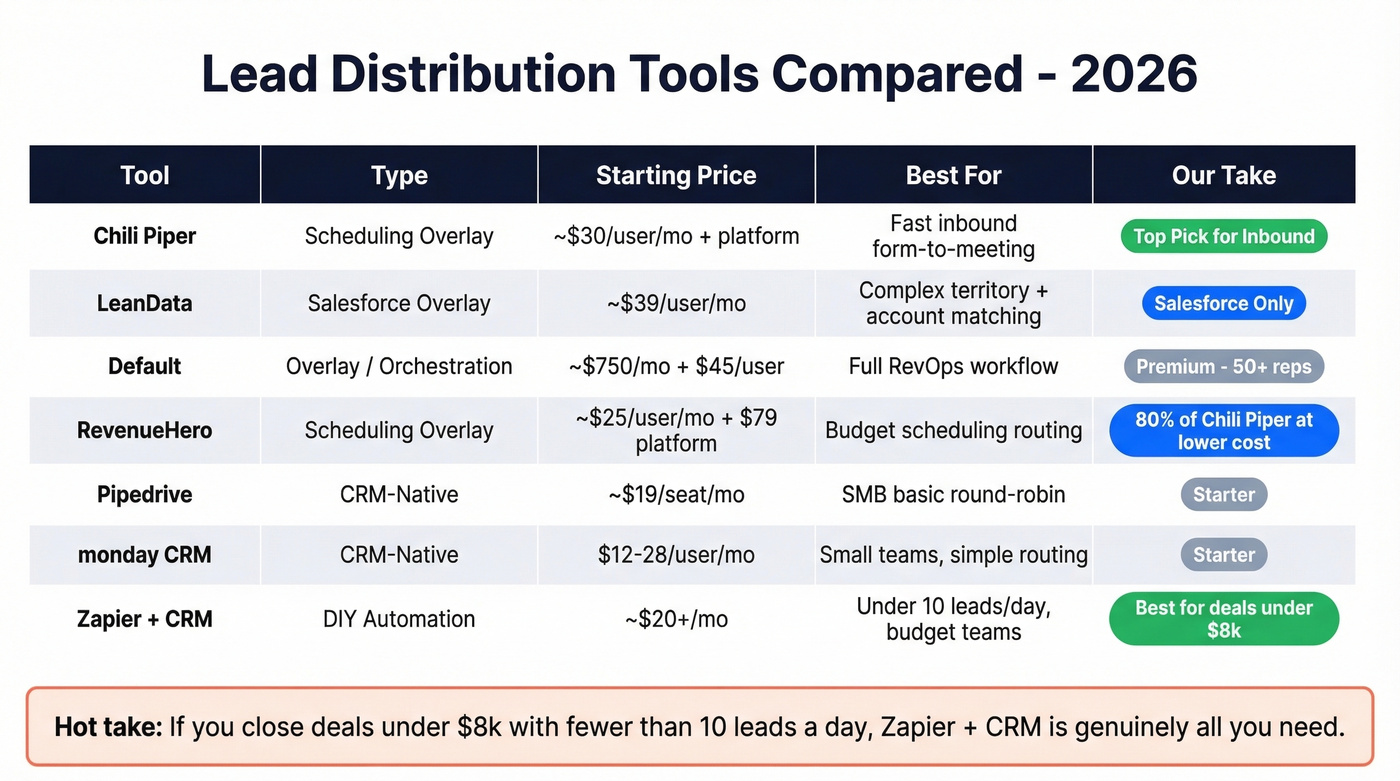
Chili Piper is the default choice for inbound-heavy teams that need form submissions to become booked meetings in seconds. It auto-skips unavailable reps via calendar sync. If speed-to-meeting is your north star, start here. The Chili Piper docs walk through the form concierge setup, which is where most of the value lives - converting a form fill into a calendar hold before the lead has time to forget they submitted anything.
LeanData vs Default: Both are overlay tools, but they serve different buyers. LeanData wins when you're deep in Salesforce and need lead-to-account matching with strict ownership governance - skip it if you're not on Salesforce. Default tries to be the full RevOps orchestration layer with routing, workflow automation, and forms baked together. Premium pricing reflects the ambition; worth evaluating if you're consolidating point solutions, but in our experience most teams under 50 reps don't need that level of orchestration yet.
Skip RevenueHero if you need Chili Piper's full chat and routing stack. Pick it if you want 80% of that functionality at a lower price point.
Pipedrive and monday CRM both handle basic round-robin for small teams. Pipedrive edges ahead on sales-specific workflow automation; monday CRM is better if your team already lives in the monday ecosystem. Don't expect enterprise-grade logic from either.
Hot take: If you're closing deals under $8k and handling fewer than 10 leads a day, a Zapier + CRM workflow is genuinely all you need. One Reddit user running an insurance agency automated weighted lead assignment with Zapier and Google Sheets, saving 3+ hours a week. That's real ROI for zero engineering effort.
Five Steps to Automate Lead Distribution
1. Clean your data first. Enrich your lead list to fill missing industry, company size, location, and email fields. An enrichment pass returning 50+ data points per contact at a 92% match rate gives you enough to power even granular routing logic. Routing rules can't work on empty or stale records - this step isn't optional, it's foundational. If you’re comparing vendors, start with our breakdown of data enrichment services.
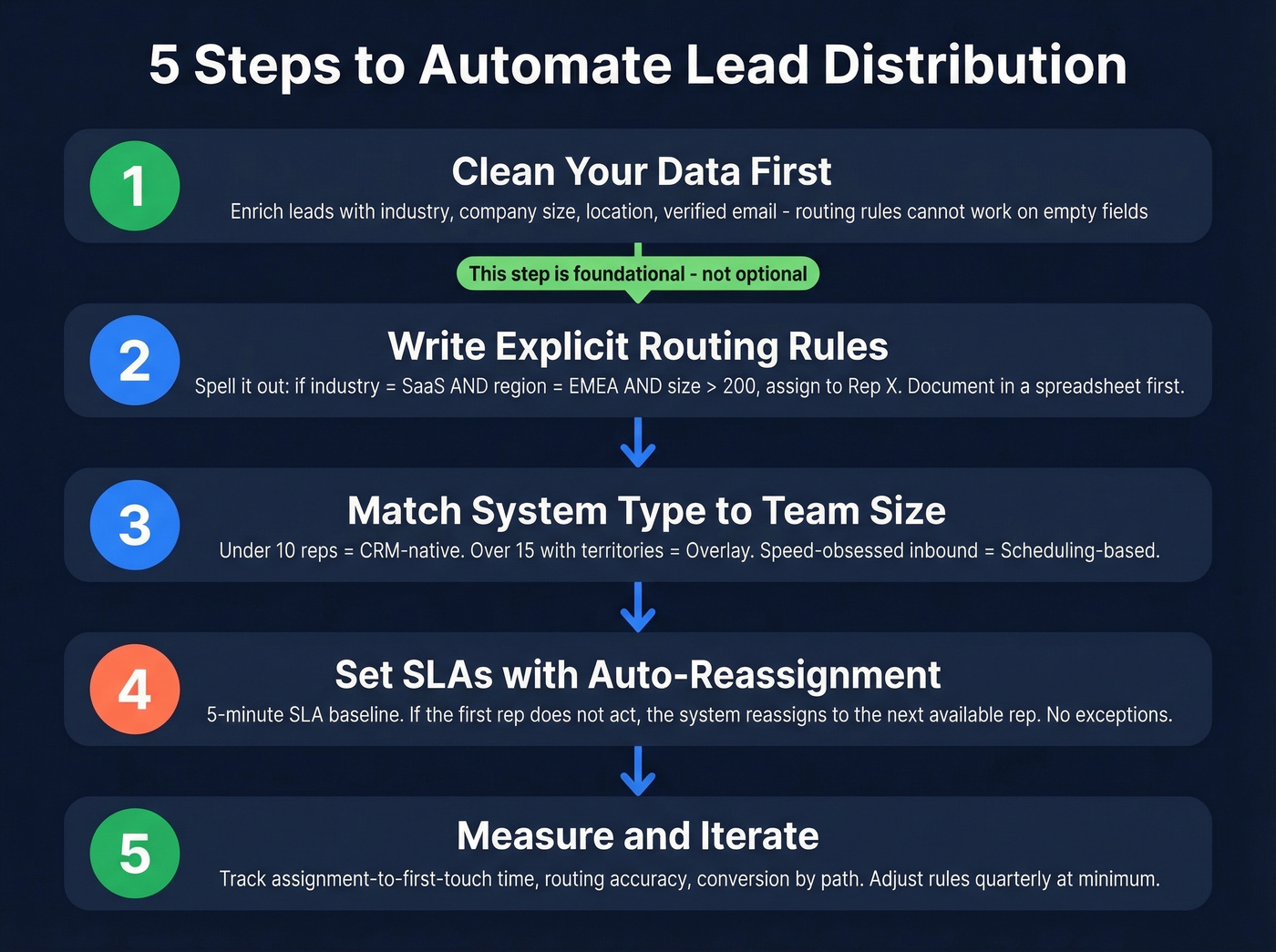
2. Write explicit routing rules. Not "route by territory" - spell it out: if industry = SaaS AND region = EMEA AND company size > 200, assign to Rep X. The more specific your rules, the fewer edge cases slip through. We've found that teams who document their rules in a shared spreadsheet before building them in software catch 80% of conflicts upfront.
3. Match system type to team size. Under 10 reps? CRM-native. Over 15 with territories? Overlay. Speed-obsessed inbound team? Scheduling-based. Refer to the comparison table above and don't overbuy - you can always upgrade, but ripping out an overengineered system wastes months. If you’re building territories, sales mapping software can make the handoff cleaner.
4. Set SLAs with automatic reassignment. Five-minute SLA with auto-reassignment to the next available rep is the baseline. No exceptions. HubSpot's guide to lead response time breaks down the data behind this if you need ammunition for the internal pitch. To operationalize it, define clear lead status stages and ownership rules.
5. Measure and iterate. Track assignment-to-first-touch time, routing accuracy, and conversion by routing path. Adjust rules quarterly at minimum. Let's be honest - most teams set up routing once and never look at it again. That's how you end up with 30% of leads going to reps who left six months ago. Tie this back to pipeline health so routing issues show up early, and use sales operations metrics to keep the dashboard honest.
You just built granular routing rules with industry, region, and company size conditions. Now make sure every lead actually has those fields filled - accurately. Prospeo enriches CRM and CSV lists at 98% email accuracy and $0.01 per email, so your distribution engine routes on verified data instead of guesswork.
Stop routing leads on empty fields - enrich them first.
FAQ
What is automated lead distribution?
Automated lead distribution uses software rules to assign incoming leads to reps instantly based on territory, deal size, availability, or custom fields - eliminating manual delays, cherry-picking, and assignment bottlenecks. Most teams see a measurable speed-to-contact improvement within the first week.
What's the best free way to set up lead routing?
Your CRM's native round-robin plus a Zapier workflow triggered on new lead creation costs nothing beyond your existing subscriptions. It won't scale past 15 reps or complex territory logic, but for teams under 10 reps it works immediately with zero dev time.
Why do routing rules fail after setup?
Dirty data is the #1 cause. If a lead's industry or location field is wrong - or empty - rules send them to the wrong rep and nobody notices until conversion drops. Enriching records before they enter your routing engine fixes the root problem.
How fast should leads be assigned to reps?
Under five minutes. The Lead Response Management Study found that contacting a lead within five minutes makes qualification 21x more likely than waiting 30 minutes. Set a five-minute SLA with automatic reassignment to the next available rep if the first one doesn't act.