

How to Automate Target Account Lists (So They Actually Stay Accurate)
You spent three weeks building the perfect ABM target account list. Firmographics checked, buying committee mapped, emails loaded into your sequencer. Then you hit send - and 23% of the emails bounce, two champions have changed roles, and one of your Tier 1 accounts got acquired last month. CRM data decays roughly 30% per year. Your list started dying the moment you finished building it.
Here's the thing: sales teams spend only 29% of their time actually selling. The rest disappears into data hygiene, manual research, and list maintenance. That's why more RevOps teams automate target account lists instead of rebuilding them from scratch every quarter. The fix isn't building better lists. It's building lists that maintain themselves.
The Short Version
If you're pressed for time, nail these three things:
- Move TAL management into your CRM with workflow-driven membership. A spreadsheet or static CSV isn't automation - it's a snapshot that's already wrong.
- Layer enrichment and real-time verification so contact data stays deliverable week over week, not just on launch day.
- Build fit + engagement scoring with routing thresholds so tier changes and rep assignments happen without someone manually triaging in a Monday standup.
What "Automate" Actually Means Here
Most "automation" articles describe exporting a filtered list from a database. That's not automation. If your workflow ends with downloading a CSV, you didn't automate anything - you just searched faster.
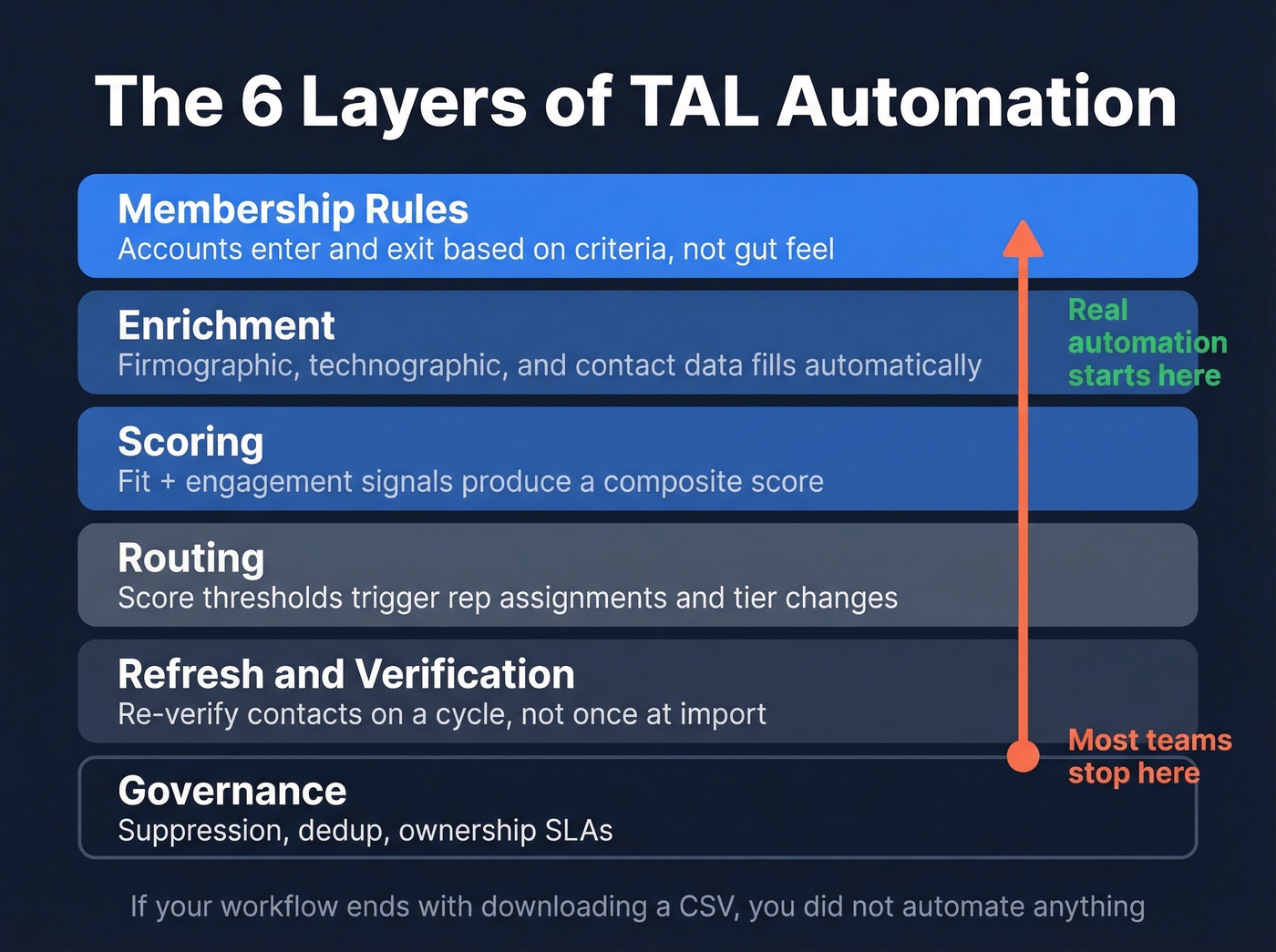
Real TAL automation has six layers, and you need all of them working together:
- Membership rules - accounts enter and exit the list based on criteria, not gut feel
- Enrichment - firmographic, technographic, and contact data fills in automatically
- Scoring - fit and engagement signals produce a composite score per account
- Routing - score thresholds trigger rep assignments and tier changes without manual intervention
- Refresh and verification - contact data gets re-verified on a cycle, not once at import
- Governance - suppression lists, deduplication, and ownership SLAs keep the list clean
Reply.io frames it well: automation should deliver speed (minutes, not days), quality (fewer stale records and bounces), and execution (shared, usable data that feeds directly into outreach). If any of those three break, you're back to manual work with extra steps.
The Data Model
Before you automate anything, your TAL needs the right fields. Missing a column means missing a trigger - and triggers are the whole point.
| Field | Category | Refresh Cadence |
|---|---|---|
| Industry, employee count, revenue, HQ | Firmographic | Monthly |
| Tech stack, tools used | Technographic | Quarterly |
| Topic surges, page visits | Intent | Weekly/daily |
| Verified email, mobile, title, dept | Contact | Continuous |
| Tier, owner, date added, last refreshed | Operational | On trigger |
The operational fields are the ones most teams skip. "Why is this account here?" and "When was this last refreshed?" aren't nice-to-haves - they're what make the list auditable. Without them, reps stop trusting the data within a month. Some platforms like HG Insights add technology usage intelligence across company tech stacks as another trigger signal, which is especially useful if you sell consumption-based software.
If you're looking for an ABM target account list template, start with these fields. They cover the minimum viable data model for any automated TAL.
Account Identification and Scoring
Scoring without routing is a dashboard exercise. The value comes from signal to action, not pretty charts.
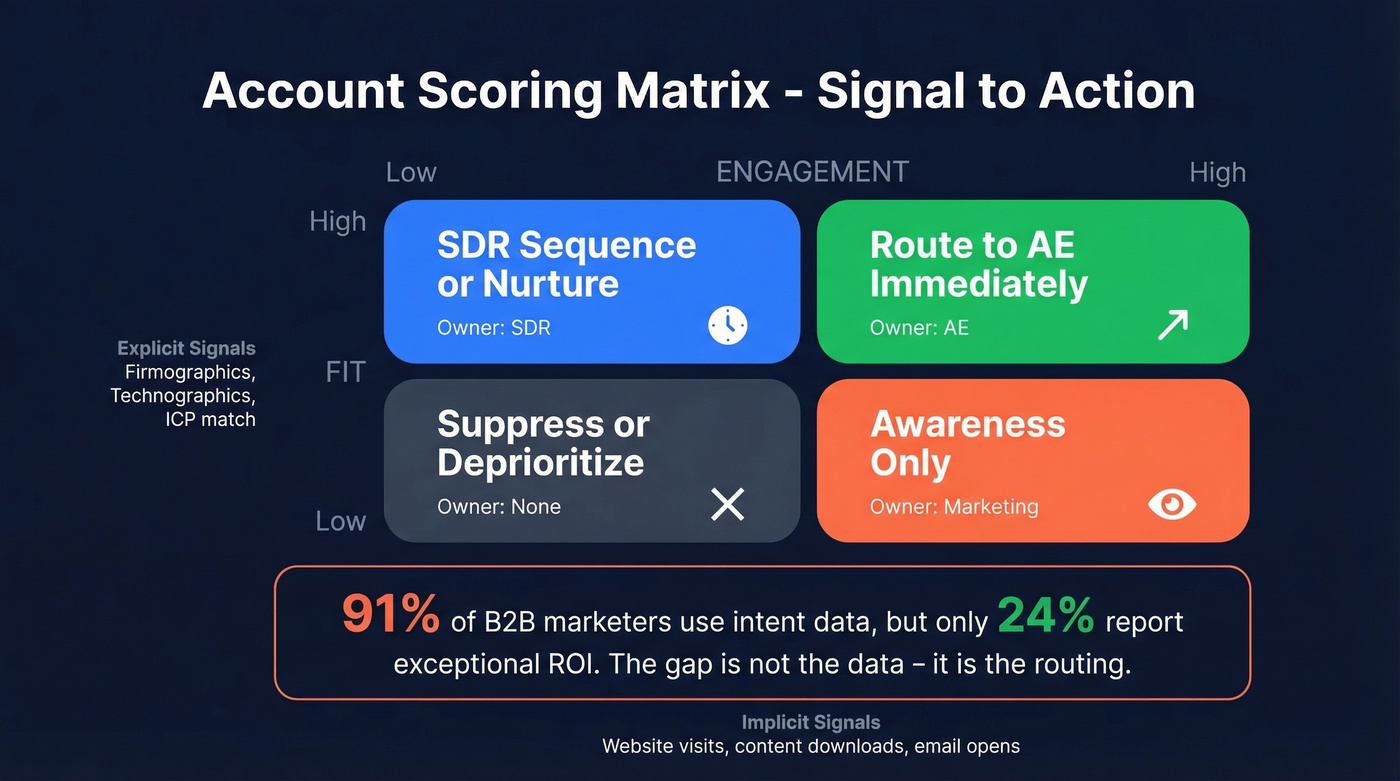
Split your scoring into two dimensions. Explicit signals - firmographics, technographics, ICP match - measure fit. Implicit signals - website visits, content downloads, email opens, ad engagement - measure engagement. This taxonomy from Factors.ai is the clearest framework we've seen. Getting account identification right at this stage determines whether your downstream routing actually works or just generates noise.
Don't forget negative scoring. A company that matches your ICP but has a "do not contact" flag, a recent churn, or a competitor domain shouldn't route to an AE just because the firmographics look right. Exclude existing customers from campaigns too - nothing kills credibility faster than cold-emailing someone who's already paying you.
| Score Range | Action | Owner |
|---|---|---|
| High fit + high engagement | Route to AE immediately | AE |
| High fit + low engagement | SDR sequence / nurture | SDR |
| Low fit + high engagement | Awareness only | Marketing |
| Low fit + low engagement | Suppress or deprioritize | None |
Here's the stat that should change how you think about intent data: 91% of B2B marketers now use intent data, but only 24% report exceptional ROI. The gap isn't the data - it's the routing. Teams buy intent signals and dump them into a dashboard nobody checks. Even a rule-based model that triggers real actions beats a predictive model that feeds a report.
Let's be honest about intent data budgets: if your average deal size is under $15K, you probably don't need Bombora-level signals. Firmographic fit plus your own first-party engagement - website visits, content downloads, email replies - will get you 80% of the way there. Save the $25K+/year intent budget until your routing logic actually works.
Triggers That Keep Lists Current
Triggers are the automation primitives - the "if this, then that" rules that keep your TAL current without human intervention.
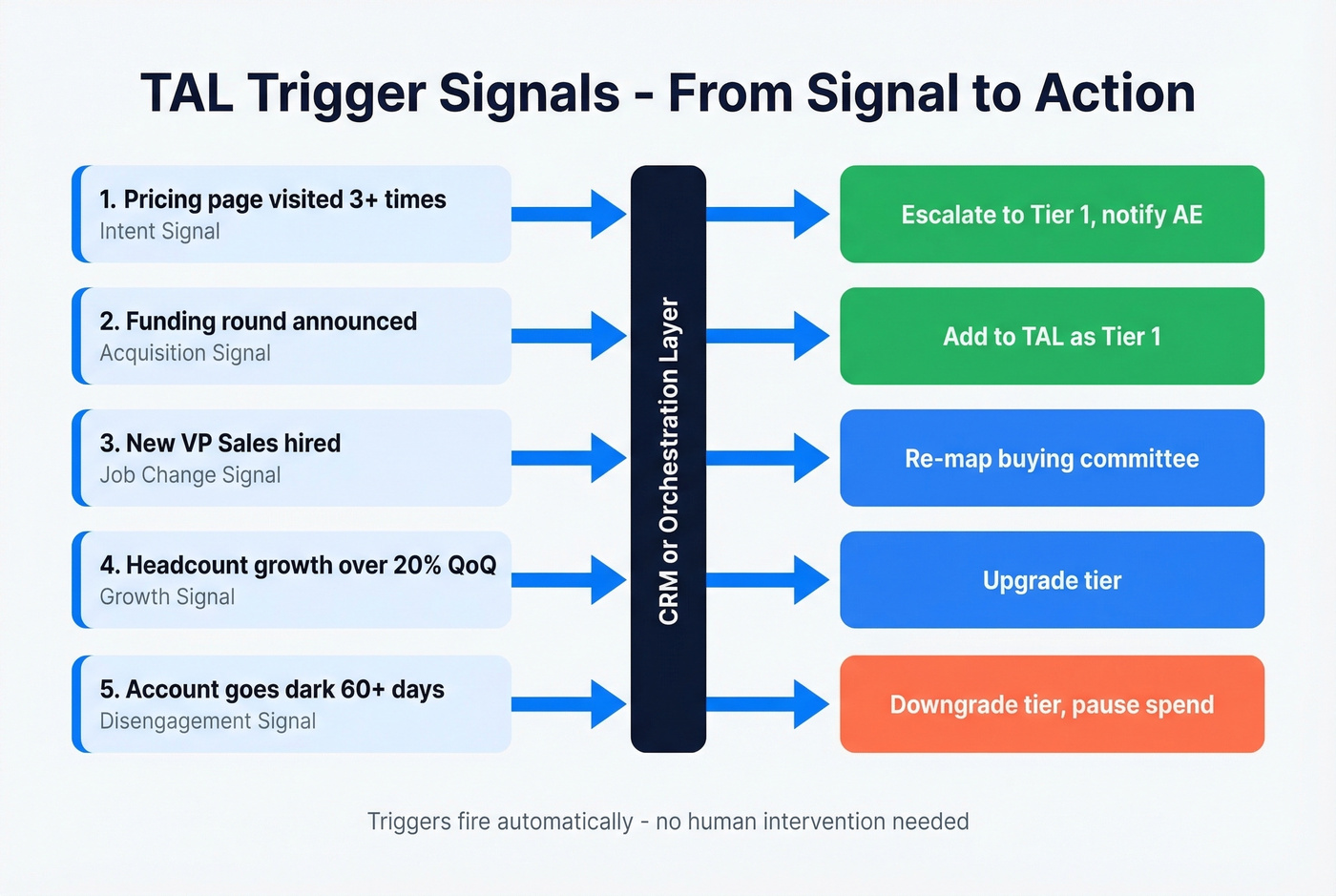
| Trigger Signal | Automated Action |
|---|---|
| Pricing page visited 3+ times | Escalate to Tier 1, notify AE |
| Funding round announced | Add to TAL as Tier 1 |
| New VP Sales hired (job change) | Re-map buying committee |
| Intent spike on your topic cluster | Route to AE for outreach |
| Contract renewal within 90 days | Flag for expansion play |
| Headcount growth >20% QoQ | Upgrade tier |
| Champion leaves the account | Trigger re-engagement sequence |
| New buyers join target accounts | Update buying committee, notify rep |
| Account goes dark for 60+ days | Downgrade tier, pause spend |
The first column is the hard part - you need data sources feeding these signals into your CRM or orchestration layer. Prospeo tracks 15,000 intent topics via Bombora and surfaces job change and headcount growth signals through 30+ search filters, which means several of these triggers can fire from a single data source rather than stitching together three or four vendors. Acquisition identification - flagging companies that just raised a round or completed a merger - is one of the highest-signal triggers for adding accounts to your TAL.

You just read that CRM data decays 30% per year. Prospeo refreshes all 300M+ profiles every 7 days - not every 6 weeks like competitors. Layer intent data across 15,000 topics, job changes, and headcount growth into your TAL triggers from a single source.
Stop rebuilding lists quarterly. Build one that maintains itself.
CRM-Native Automation
You don't need a $50K orchestration platform to start. Your CRM can handle the foundation.
In HubSpot, create a boolean company property called "Target Account." Then build a company-based workflow that sets it to True when a company meets your ICP criteria - industry, employee count, revenue range. Build a parallel workflow that flips it to False when criteria no longer match or suppression rules kick in. Use Sales Workspace's "Find companies" feature to refresh results as your filters evolve. A target account dashboard inside your CRM gives reps a single view of tier, score, last activity, and next step - far more actionable than a spreadsheet pinned in Slack.
For Salesforce shops, Account Engagement (starting at $1,250/mo) offers similar workflow automation with more granular scoring and routing options. The principle is identical: CRM-native rules manage membership, not a human updating a spreadsheet. Get the membership logic working before you layer on enrichment tools.
Enrichment, Verification, and Stakeholder Mapping
After triggers fire and accounts enter your TAL, the list is only useful if contact data is verified and current. This is where most automation stacks quietly fail - the account is right, but the email bounces, the phone number's dead, or you're reaching the wrong person entirely.
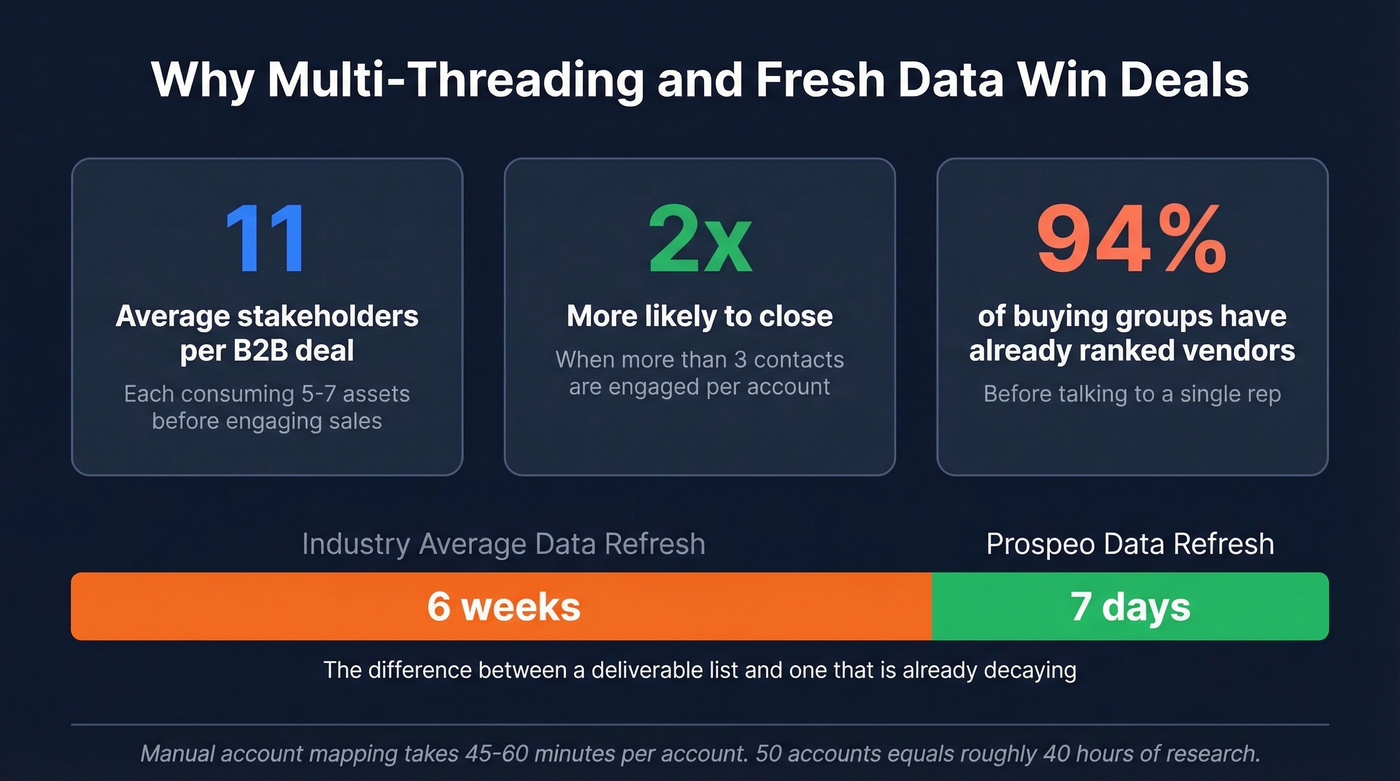
B2B deals involve 11 stakeholders on average, each consuming 5-7 assets before engaging sales. Even more sobering: 94% of buying groups have already ranked their preferred vendors before talking to a single rep. Gong's research shows deals with more than 3 contacts engaged are 2x as likely to close. Multi-threading isn't optional - it's the difference between a pipeline number and a closed deal.
Manual account mapping takes 45-60 minutes per account. Fifty accounts means roughly 40 hours of research - a full work week spent on data entry instead of selling.
Prospeo handles the enrichment and verification layer that makes multi-threading possible at scale. With 143M+ verified emails at 98% accuracy and 125M+ verified mobiles with a 30% pickup rate, it covers the contact data gap that breaks most outbound motions. The 7-day data refresh cycle means contacts verified last week are still verified this week - compared to the 6-week industry average, that's the difference between a deliverable list and one that's already decaying. Native integrations with Salesforce, HubSpot, Clay, Zapier, and Make push data into your CRM automatically.

For the waterfall enrichment approach - where you query multiple providers sequentially until data is found - Clay integrates 100+ data vendors and supports conditional logic. Pair it with a verification layer to make sure whatever Clay surfaces is actually deliverable. The combination gives you coverage and accuracy without betting everything on a single source.
Map each account's buying committee into roles: economic buyer, champion, evaluator, blocker. Automate the structure, then let reps customize the outreach order.
Your TAL automation breaks the moment contact data bounces. Prospeo's 5-step verification delivers 98% email accuracy and 125M+ verified mobiles - so your triggers actually reach real buyers, not dead inboxes. At $0.01 per email, continuous refresh costs less than one bounced sequence.
Feed your routing logic data that's verified this week, not last quarter.
Tools by Budget and Maturity
Not every team needs a $100K intent orchestration platform. Match your tooling to your maturity level.
Tier 1 - CRM-native (low budget). You're automating membership and basic scoring inside your existing CRM. monday CRM starts at $12/seat/mo, HubSpot Marketing Hub at $890/mo, and Salesforce Account Engagement at $1,250/mo. This tier is enough to stop wasting ad spend on the wrong accounts and start targeting the right ones based on fit. Skip the enterprise intent tools at this stage - they'll sit unused.
Tier 2 - Enrichment + prospecting engine (mid budget). You've got CRM workflows running and need verified contact data, multi-threading, and enrichment automation. Apollo at $49/user/mo gives you a broader prospecting platform with sequences built in. Clay at ~$700+/mo is the workflow engine for teams with a technical RevOps person who wants custom enrichment logic. At this level, teams targeting enterprise accounts benefit most from layered enrichment - firmographics alone won't cut it when you're selling into complex orgs.
Tier 3 - Full intent orchestration (enterprise budget). You're running ABM at scale with dedicated ops resources. We've seen teams buy 6sense before they had a scoring model, and the intent data just sat in a dashboard nobody checked. Don't be that team.
| Tool | Starting Price |
|---|---|
| ZoomInfo | $15,000+/yr |
| G2 Buyer Intent | $10K-$87K/yr |
| Bombora | $25K-$80K/yr |
| 6sense | $35K-$150K+/yr |
| Demandbase | $40K-$120K/yr |
Budget 15-25% above license cost for implementation, integration, and ongoing optimization. Start with CRM-native workflows plus a verification layer. Add intent orchestration only when your routing logic is already working.
Governance and Failure Modes
Most guides obsess over picking accounts. The real win is keeping the list correct automatically - and that's where teams stumble hardest.
The Clay "Jenga stack" problem is real. RevOps builds a beautiful Clay-to-Zapier-to-CRM workflow, and three weeks later a sync breaks. Reps don't notice for a week. By the time someone flags it, 200 accounts have stale data and the SDR team has lost trust in the list entirely. Poor data quality drives an estimated 20% of B2B revenue loss.
Build these guardrails from day one:
- Suppression lists - customers, competitors, do-not-contact, and recently churned accounts get filtered automatically
- Deduplication rules - define match logic using domain + company name and enforce it on every import and enrichment run
- Ownership SLAs - if an account sits unworked for 14 days, it gets reassigned or downgraded
- Explainability - every account should have a "why is this here" field that traces back to the trigger or score that added it
- Referral tracking - log partner, customer, or internal referrals so you can measure which sourcing channels produce the highest-quality accounts
The consensus on r/b2bmarketing is consistent: teams that automate list building but not list maintenance end up manually qualifying 2K-4K accounts per month and wondering why they're paying for tooling.
Industry-Specific Considerations
The framework above applies broadly, but certain verticals need extra filters and compliance layers.
A target account list for financial services requires regulatory screening (OFAC, KYC) and often restricts outreach to specific entity types - you can't treat a regional credit union the same as a bulge-bracket bank. Teams building lists for banking should add institution type, asset size, and charter type as firmographic fields and automate compliance checks before any account enters the TAL.
For product launches, the cadence is different. You're front-loading accounts that match early-adopter profiles and decaying the list faster as launch momentum fades. Automate the membership window so accounts added for a launch campaign automatically exit after 90 days unless engagement signals justify keeping them.
FAQ
How many accounts should be on a target account list?
Tier 1 (high-touch, large ACV): 25-50 accounts per AE. Tier 2 (structured outreach): 100-300. Tier 3 (programmatic): broader. The right number depends on deal size and rep capacity - a $200K ACV deal warrants fewer, deeper accounts than a $15K deal. Scale the list to what your team can actually work.
How often should you refresh your TAL?
Firmographics monthly, technographics quarterly, intent signals weekly or daily. Contact verification should run continuously - CRM data decays roughly 30% annually, so a list that isn't refreshing is already wrong.
What's the difference between a target account list and an ICP?
Your ICP is the criteria - industry, company size, tech stack, buying signals. Your TAL is the specific list of companies that match those criteria right now. The ICP is the filter; the TAL is the output. Automate the connection between them, and the TAL updates itself as companies enter or exit your ICP.
Can you automate target account lists without intent data?
Yes. Start with firmographic and technographic filters in your CRM, add enrichment and verification, and build scoring from engagement signals you already have - website visits, content downloads, email opens. Intent data accelerates prioritization but isn't required to automate the core workflow. Get the plumbing right first.
How do I measure whether my automated TAL is working?
Track three metrics: TAL-to-pipeline conversion rate (what percentage of target accounts enter your pipeline), average days from TAL entry to first meeting, and TAL accuracy (what percentage of accounts still meet ICP criteria at the 90-day mark). If accuracy drops below 70%, your membership rules or refresh cadence need work.