

Automated Email Writing: What Works, What Doesn't, and What You Actually Need in 2026
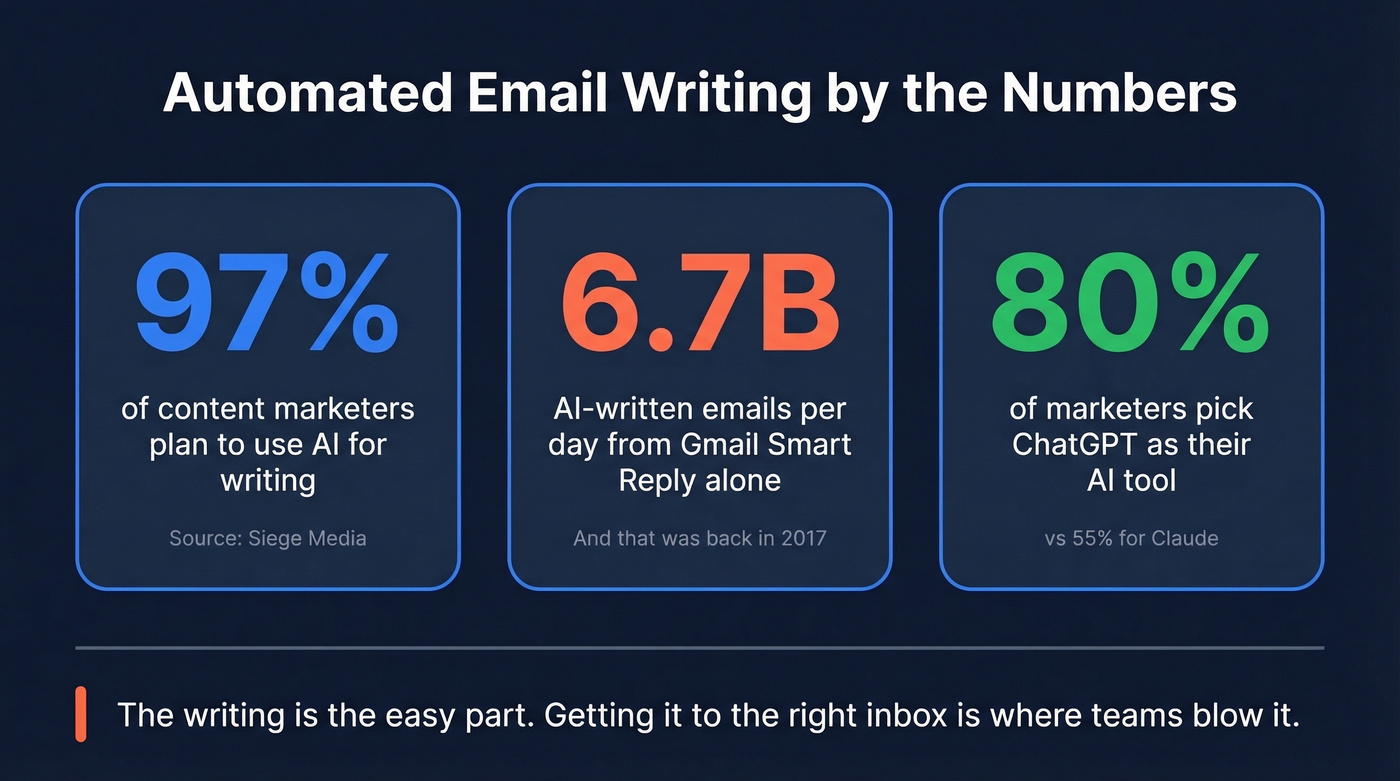
97% of content marketers plan to use AI this year. Gmail's smart reply feature was already generating 6.7 billion AI-written emails per day back in 2017. The tools have gotten dramatically better since then - but the market around automated email writing has gotten worse. Dozens of "AI email writers" now charge $20-30/mo for what amounts to a ChatGPT prompt with a nicer UI.
You've probably already tried pasting an email into ChatGPT and gotten a decent result. So the real question isn't "should I use AI for email?" - it's "do I actually need to pay for a dedicated tool?" For most people, the answer is no. What you need is a clear workflow, a decent prompt, and verified contact data so those emails actually land.
The writing is the easy part. Getting it to the right inbox is where teams blow it.
A perfectly crafted cold email that bounces doesn't just waste your time; it actively damages your sender reputation and poisons future sends from that domain. The gap between "great email" and "great email that arrives" is where most outreach programs quietly die. We've watched teams spend weeks perfecting their AI prompts while ignoring a contact list where a third of the addresses were dead - and then wonder why their domain got flagged.
Here's our hot take: if your average deal size is under five figures, you almost certainly don't need a paid AI email tool. ChatGPT plus good data will outperform Jasper plus bad data every single time.
Let's break down what actually works, which tools earn their price tag, and the deliverability rules that matter more than any AI-generated subject line.
The Short Answer
If you don't want to read the full breakdown:
- For 80% of people: ChatGPT or Claude (both free) plus Grammarly for polish. This handles routine emails, cold outreach drafts, and follow-ups without spending a dime.
- For sales teams: Lavender ($29-$69/user/mo) adds real-time coaching and email scoring that general-purpose LLMs can't replicate. Pair it with AI drafting for sales sequences and you'll see measurable improvement in reply rates.
- For everyone: Your contact data matters more than your writing tool. A perfectly crafted email to an invalid address bounces and damages your sender reputation. Verify before you send.
What Automated Email Writing Actually Covers
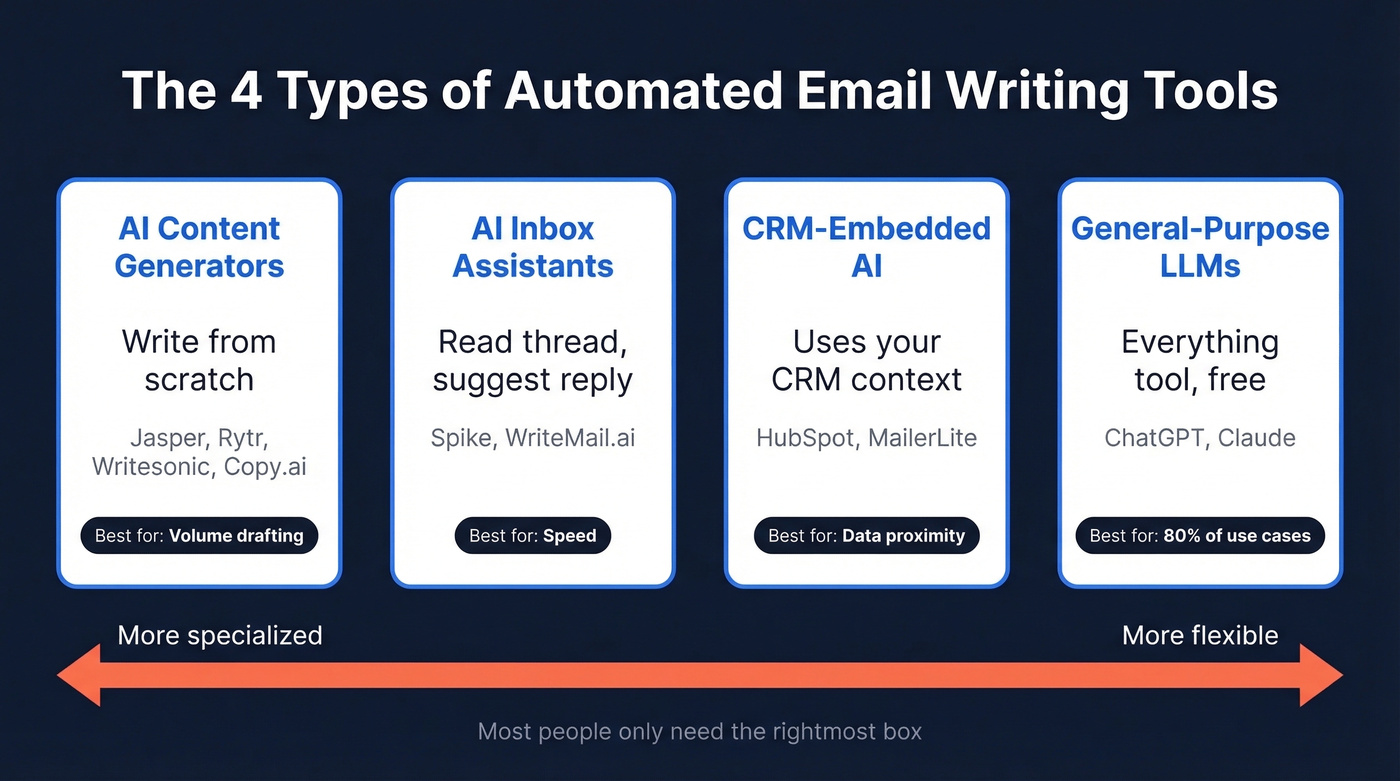
The phrase covers four distinct categories, and lumping them together is how people end up buying the wrong tool.
AI Email Content Generation
Standalone tools built specifically to write emails from scratch. You give them a prompt, they produce a draft. Jasper, Rytr, Writesonic, and Copy.ai live here. Some focus on sales emails, others on marketing copy, but they all start from a blank page.
AI Inbox Assistants
Browser extensions or inbox-native tools that sit inside your email client. They read the thread, suggest replies, and let you edit before sending. Spike and WriteMail.ai fit this mold. The appeal is speed - you're not writing from scratch, you're approving and tweaking.
CRM-Embedded AI
This lives inside platforms you're already using. HubSpot's AI email features pull contact context from your CRM. MailerLite generates marketing email drafts within its campaign builder. The advantage is data proximity - the AI knows who you're emailing and why.
General-Purpose LLMs
ChatGPT and Claude aren't email tools at all. They're everything tools. But for email drafting specifically, they handle 80% of use cases better than most dedicated products, and they're free.
The "ChatGPT Wrapper" Problem
The #1 frustration on Reddit about AI email tools? They feel like ChatGPT with a skin. Users describe paying $20-30/mo for tools that lock them into a single model (usually GPT), bundle inbox features they never asked for, and don't do anything they couldn't accomplish with a well-crafted prompt.
What people actually want is simple: hit a button, have AI read the thread, and draft a reply. No priority inbox. No folder reorganization. No "productivity dashboard." Just fast, context-aware drafts.
The model lock-in complaint is real too. Some users prefer Claude for nuanced, relationship-heavy emails and faster models for quick replies. A dedicated tool that only runs one model takes that flexibility away.
One thing most AI email tools don't advertise: your email content may be stored by the underlying LLM provider. OpenAI retains API inputs for up to 30 days for abuse monitoring. If you're writing anything sensitive - compensation discussions, legal matters, M&A - check the data retention policy before pasting it into any AI tool.
ChatGPT's free tier handles routine email writing as well as or better than most paid tools. The paid tools earn their keep only when they add something ChatGPT can't: real-time scoring, CRM context, or inbox-native workflow. If a tool doesn't offer at least one of those, it's a wrapper, and you should skip it.
When AI Helps (and When It Hurts)
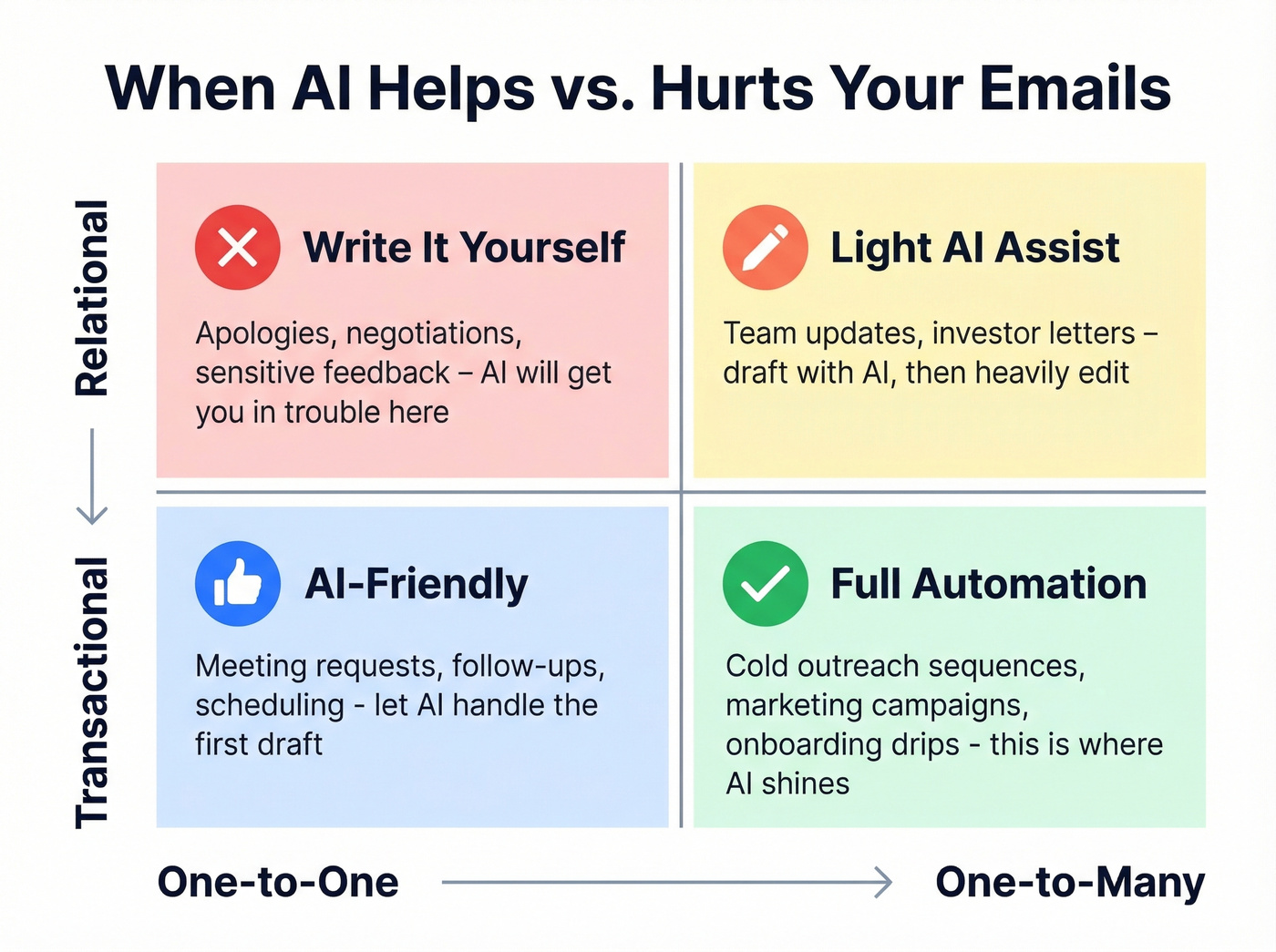
Not every email should be AI-generated. The simplest framework we've found maps email types across two axes: relational vs. transactional, and one-to-one vs. one-to-many.
| One-to-One | One-to-Many | |
|---|---|---|
| Relational | Write it yourself. Apologies, negotiations, sensitive feedback. | Light AI assist. Team updates, investor letters - draft with AI, heavily edit. |
| Transactional | AI-friendly. Meeting requests, follow-ups, scheduling. | Full automation. Cold outreach sequences, marketing campaigns, onboarding drips. |
The bottom-right quadrant is where AI shines - high volume, low relationship stakes, repeatable structure. The top-left is where AI will get you in trouble.
The risks scale with relationship stakes: tone miscues in a transactional email are forgettable; in a relational one, they erode trust and credibility. A Stanford researcher found that people perceive identical text as more authentic when they believe a human wrote it. That perception gap matters most in high-stakes, relationship-driven communication.
Watch for these AI tells that erode trust: vocabulary that doesn't match how you normally write, hallucinated details where AI confidently references a blog post that doesn't exist, generic openers like "Hope this email finds you well" in contexts where that phrase is tone-deaf, and copy/paste artifacts - accidentally including prompt instructions or AI meta-text in your email is an instant credibility killer.
There's also a productivity trap nobody warns you about. Iterative prompting - "make it shorter," "now more casual," "add a PS" - can turn a 5-minute email into a 30-minute ordeal. If you're spending more time prompting than writing, the tool isn't saving you anything. For relational emails, just write the damn thing.

You just read it: a perfect AI email that bounces destroys your sender reputation. Prospeo's 5-step email verification delivers 98% accuracy on 143M+ contacts - refreshed every 7 days, not every 6 weeks. Stop perfecting prompts and start fixing the data underneath them.
Bad data kills great emails. Fix that first.
Best AI Email Drafting Tools
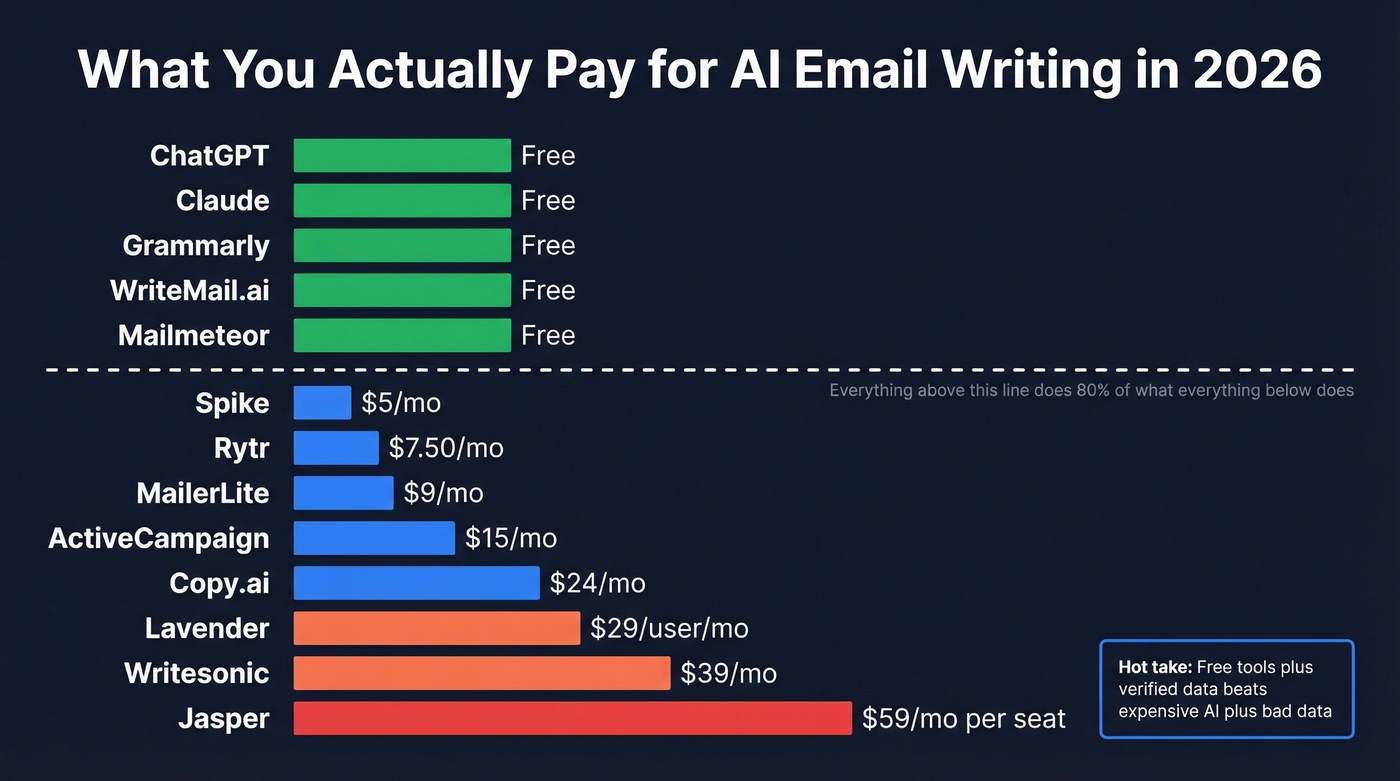
Here's every tool worth knowing, with pricing and positioning in one place:
| Tool | Category | Starting Price | Best For | Free Tier |
|---|---|---|---|---|
| ChatGPT | General LLM | Free | Everything | Yes |
| Claude | General LLM | Free | Nuanced writing | Yes |
| Lavender | Inbox assistant / coaching | $29/user/mo | Sales coaching | Yes (5/mo) |
| Grammarly | Editing layer | Free | Polish + tone | Yes |
| Jasper | AI generator | $59/mo per seat (annual) | Marketing teams | 7-day trial |
| MailerLite | Email marketing platform | $9/mo | Email campaigns | Yes |
| HubSpot | CRM-embedded | Free | CRM-native AI | Yes |
| WriteMail.ai | Inbox assistant | Free (5/mo) | Quick replies | Yes |
| Rytr | AI generator | $7.50/mo | Budget drafting | Yes |
| Copy.ai | AI generator | $24/mo | Marketing copy | Yes |
| Writesonic | AI generator | $39/mo | Long-form + email | Yes |
| Spike | Inbox assistant | $5/mo | Conversational email | Not public |
| ActiveCampaign | Marketing automation | $15/mo | Automation flows | No |
| Mailmeteor | AI generator | Free | Gmail drafts + mail merge | Yes |
| QuillBot | Editing layer | Free | Paraphrasing | Yes |
ChatGPT & Claude
Use this if: You want maximum flexibility, zero cost, and you're comfortable writing your own prompts. ChatGPT's free tier handles cold outreach drafts, follow-up sequences, meeting requests, and internal communications. Claude produces more natural-sounding prose for relationship-heavy emails - less "corporate AI" in tone.
Skip this if: You need real-time coaching on email performance, inbox-native integration, or team-wide templates with analytics. General LLMs don't score your emails, don't know your prospect's title, and don't track what's working across your team.
We ran the same prompt through both - "Write a cold email to a VP of Marketing at a 200-person SaaS company about our analytics platform" - and the outputs were instructive. ChatGPT produced a tight, structured email with a clear CTA, solid for high-volume outreach. Claude wrote something that read more like a human drafted it, with a softer open and more conversational rhythm. Neither was perfect out of the box, but both beat every $20/mo wrapper we tested.
ChatGPT Plus and Claude Pro both run $20/mo for faster models and higher limits. For email writing specifically, the free tiers are more than sufficient. ChatGPT is the most-selected AI tool among content marketers at 80% vs. 55% for Claude - though in our experience, Claude's outputs need less editing for tone-sensitive emails. The real move is building 3-5 custom prompt templates for your most common email types and reusing them. That beats any template library a paid tool offers.
Lavender
Lavender is the best sales email tool on the market if you can tolerate the bugs.
The scoring model genuinely improves rep output over time. But it's a coaching layer, not a writing platform - pair it with ChatGPT for drafting and Lavender for optimization.
What earns its price: Real-time email scoring and coaching that tells you why an email will underperform, not just that it will. 4.8/5 on G2 across 62 reviews, with strong praise for Gmail integration and personalization suggestions. Clean pricing ladder: Free at $0 for 5 emails/mo, Starter at $29/user/mo, Pro at $49/user/mo, Teams at $69/user/mo. It positions itself as a coaching layer - no database, no sequencing, just better emails.
What doesn't: Users report bugginess and occasional crashes - one G2 reviewer said they'd recommend ChatGPT over Lavender due to bugs. The free tier at 5 emails/month is barely a trial. Coaching feedback can feel surface-level ("shorten this sentence") rather than strategic. And it's email only, so you'll need separate tools for everything else.

Grammarly
Grammarly doesn't write emails - it improves them. Think of it as the editing pass, not the first draft. If you're already drafting emails in ChatGPT or Claude, Grammarly catches tone mismatches, awkward phrasing, and grammar issues before you hit send. The free tier includes 100 AI prompts per month. Paid plans start at $30/mo.
It's the best complement to any generator on this list, and the free tier is generous enough for most individual users. Skip it only if you're confident your unedited AI drafts already match your voice - and be honest with yourself about that.
Jasper
| Jasper | ChatGPT (Free) | |
|---|---|---|
| Email quality | Polished, template-driven | Flexible, prompt-dependent |
| Price | $59-69/mo per seat | Free |
| Best at | Brand-consistent marketing copy | Ad hoc drafting across formats |
| Weakest at | Niche/creative emails | Team-wide consistency |
| Verdict | Worth it for full content teams | Better for email-only needs |
Jasper offers 50+ templates including email-specific formats, plus brand voice tools that maintain consistency across a team. Pro plan runs $69/mo monthly or $59/mo annually per seat, with a 7-day free trial. The Business plan is custom pricing - expect $100+/seat/mo based on market positioning.
Jasper makes sense if your marketing team already uses it for blog posts, ads, and landing pages. Adding email to that workflow is natural. Buying Jasper just for email is like buying a pickup truck to commute - technically works, wildly inefficient.
MailerLite
MailerLite's AI writing features live on the Advanced plan starting at ~$20/mo, though the platform itself starts at $9/mo. The AI generates marketing email drafts within the campaign builder, which means it has context about your audience segments and campaign goals. It's good for quick first drafts of newsletters and promotional emails, but the output still needs manual editing for anything beyond straightforward announcements.
Here's what makes MailerLite interesting beyond basic AI drafting: only 44% of marketers use lifecycle emails, according to Litmus, which means the teams that do have a structural advantage. CRM-embedded AI like MailerLite's makes building those sequences faster.
HubSpot
HubSpot's AI Email Writer is labeled as Beta, and its AI email writing features are available for free. The AI pulls contact context - job title, company, recent interactions - directly from your CRM records, producing more relevant drafts than any standalone tool can. Paid Marketing Hub plans start at ~$20/mo for additional features. If your team already lives in HubSpot, the AI email writer is a no-brainer add-on. If you're not in HubSpot, don't switch CRMs for the email AI.
Other Tools Worth Knowing
| Tool | Price | One-Line Take |
|---|---|---|
| WriteMail.ai | Free-$19.95/mo | Solid free inbox assistant for quick replies; limited for complex drafting. |
| Rytr | $7.50/mo | Budget generator with decent templates; output quality trails ChatGPT. |
| Copy.ai | $24/mo | Marketing-focused with good workflow automation; overkill for email only. |
| Writesonic | $39/mo | Full content suite; email is a side feature, not the main event. |
| Spike | $5/mo | Conversational email client with AI replies; niche but cheap. |
| ActiveCampaign | $15/mo | Strong automation platform; AI writing is a feature, not the product. |
| Mailmeteor | Free | Free AI Email Writer plus mail merge workflows; perfect for simple mass sends. |
| QuillBot | Free | Paraphrasing tool; useful for rewriting AI drafts to sound more human. |
Making AI Drafts Sound Human
The gap between "AI-generated" and "human-written" is smaller than it was two years ago, but it's still detectable - especially by the people you're emailing.
Strip the generic openers. "Hope this email finds you well" and "I wanted to reach out because" are AI fingerprints at this point. Start with something specific - a reference to their recent funding round, a conference talk, a job change.
Add details the AI can't know. AI writes from patterns. You write from context. Mention something from their company's blog, a mutual connection, or a specific pain point you've observed. One real detail outweighs three paragraphs of polished AI prose.
Read it aloud before sending. If it sounds like a template, it is one. The "would I say this in person?" test catches 90% of AI-isms. Nobody says "I'd love to explore potential synergies" over coffee.
Watch your punctuation. More than one exclamation point per email reads as either AI-generated or overly eager. Same with emojis in professional contexts - one is personality, three is a red flag. And if the AI uses words you'd never use, your recipient will notice the disconnect, even subconsciously.
Use a two-pass workflow. Generate the draft with AI. Then strip every sentence that feels generic, add one personal detail, adjust the tone to match how you actually talk, and send. The generation saves time; the editing makes it yours. Run it through Grammarly or QuillBot as a final pass - not for grammar, but for tone.
Deliverability Rules for AI-Written Outreach
Your email can be perfectly written and still never reach the inbox. 16.9% of legitimate emails never make it - and over 50% of spam is now AI-written. Spam filters aren't detecting "AI text" specifically, but they're getting ruthless about the patterns AI-produced outreach tends to create: repetitive structure, identical templates across thousands of sends, and low engagement signals.
Here are the rules that actually matter:
- Cap volume at 20 emails/day per inbox. Scale by adding inboxes, not by cranking up volume on a single account.
- Never send cold outreach from your main domain. Buy separate domains and limit to 3 inboxes per sending domain.
- Warm up for 3+ weeks before launching any cold campaign. Continue warmup alongside live sends. (If you need the full setup, start with a proper Gmail warm up.)
- Don't track open rates. Tracking pixels are increasingly flagged by providers. Measure replies and engagement instead.
- Set up SPF, DKIM, and DMARC. Non-negotiable. If you haven't done this, nothing else on this list matters. (Use a full sender authentication checklist.)
- Send plain-text for first touch. Heavy HTML, images, and logos in cold emails scream "marketing blast" to spam filters.
- Keep Yahoo complaint rates below 0.1-0.3%. Cross that threshold and your deliverability craters across all providers.
- Verify your list before you send. Run your contacts through an email verification tool to catch invalid addresses and spam traps. One bad batch can damage a domain you spent weeks warming up. (If you want a deeper dive, see our guide to spam trap removal.)
The best practices for email automation haven't changed much in years. What's changed is enforcement. Providers are stricter, filters are smarter, and the margin for error is thinner. Follow these rules or watch your domain reputation evaporate.
The Upstream Problem: Data Quality
Look, I've seen this play out dozens of times. An SDR team sends 500 cold emails last week and gets a 0.2% reply rate. The emails were well-written - punchy subject lines, personalized openers, clear CTAs. The problem wasn't the copy. The problem was that 35% of those emails bounced because the contact data was stale.
The biggest risk of automated email writing isn't bad copy - it's bad data. Every bounced email chips away at your sender reputation. Enough bounces and your domain gets flagged, which means even your legitimate emails to valid addresses start landing in spam. The writing tool doesn't matter if the foundation is rotten.
Prospeo catches this at the source. With 98% email accuracy and a 7-day data refresh cycle - while the industry average sits at six weeks - it filters out invalid addresses, spam traps, and honeypots before they ever enter your sequence. The free tier gives you 75 verified emails plus 100 Chrome extension credits per month, enough to test the difference yourself. Beyond that, paid plans run about $0.01 per verified email, a fraction of what a single bounced email costs your domain reputation. One customer, Meritt, saw bounce rates drop from 35% to under 4% after switching their verification workflow, and their pipeline tripled from $100K to $300K per week in the same period.

Before you spend another hour optimizing your AI email prompts, verify your list. The best email in the world can't convert if it never arrives. (If you're building lists at scale, use a repeatable cold email lead list building workflow.)
ChatGPT can draft your cold email in seconds. But who are you sending it to? Prospeo gives you 300M+ profiles with 30+ filters - buyer intent, technographics, job changes - so your AI-written outreach reaches real decision-makers at $0.01 per email.
Pair your AI drafts with contacts that actually convert.
FAQ
Is AI email writing free?
Yes. ChatGPT, Mailmeteor, QuillBot, and WriteMail.ai all offer free tiers that handle routine email drafting. ChatGPT's free tier is enough for cold outreach, follow-ups, and internal emails. Paid tools like Lavender add coaching and scoring, but core AI generation costs nothing.
Can spam filters detect AI-written emails?
Spam filters don't flag "AI-generated text" as a category. They detect patterns AI outreach tends to produce - repetitive templates, identical structure across high-volume sends, and low engagement. Vary your copy, authenticate your domain with SPF, DKIM, and DMARC, and cap sends at 20/day per inbox.
What's the best AI email tool for sales?
Lavender ($29-$69/user/mo) for real-time coaching and scoring. For pure drafting, ChatGPT with custom prompt templates is more flexible and free. The ideal stack: ChatGPT for drafts, Lavender for optimization, and verified contact data from a platform like Prospeo so emails actually reach real inboxes.
How do I make AI emails sound natural?
Strip generic openers like "Hope this email finds you well." Add one specific detail the AI can't know - a recent company announcement, a mutual connection, a relevant pain point. Read it aloud before sending. If it sounds like a template, add more of your voice. A human editing pass is non-negotiable.
Does the writing tool matter if my data is bad?
No. A perfectly written email to an invalid address bounces, damages your sender reputation, and wastes your sending domain. Verify your contact list before any outreach campaign. Tools with 98% accuracy and spam-trap removal protect your domain from the start.