

Gmail Warm Up: The Honest Guide for 2026
You set up a fresh Google Workspace account, wrote a solid cold email, hit send on 50 prospects - and every single one landed in spam. Inbox placement: zero. Now you're searching "gmail warm up" and wondering if a $30/month warmup tool will fix this.
Maybe. But probably not the way you think.
What You Need (Quick Version)
Before you spend a dime on warmup software, do these three things:
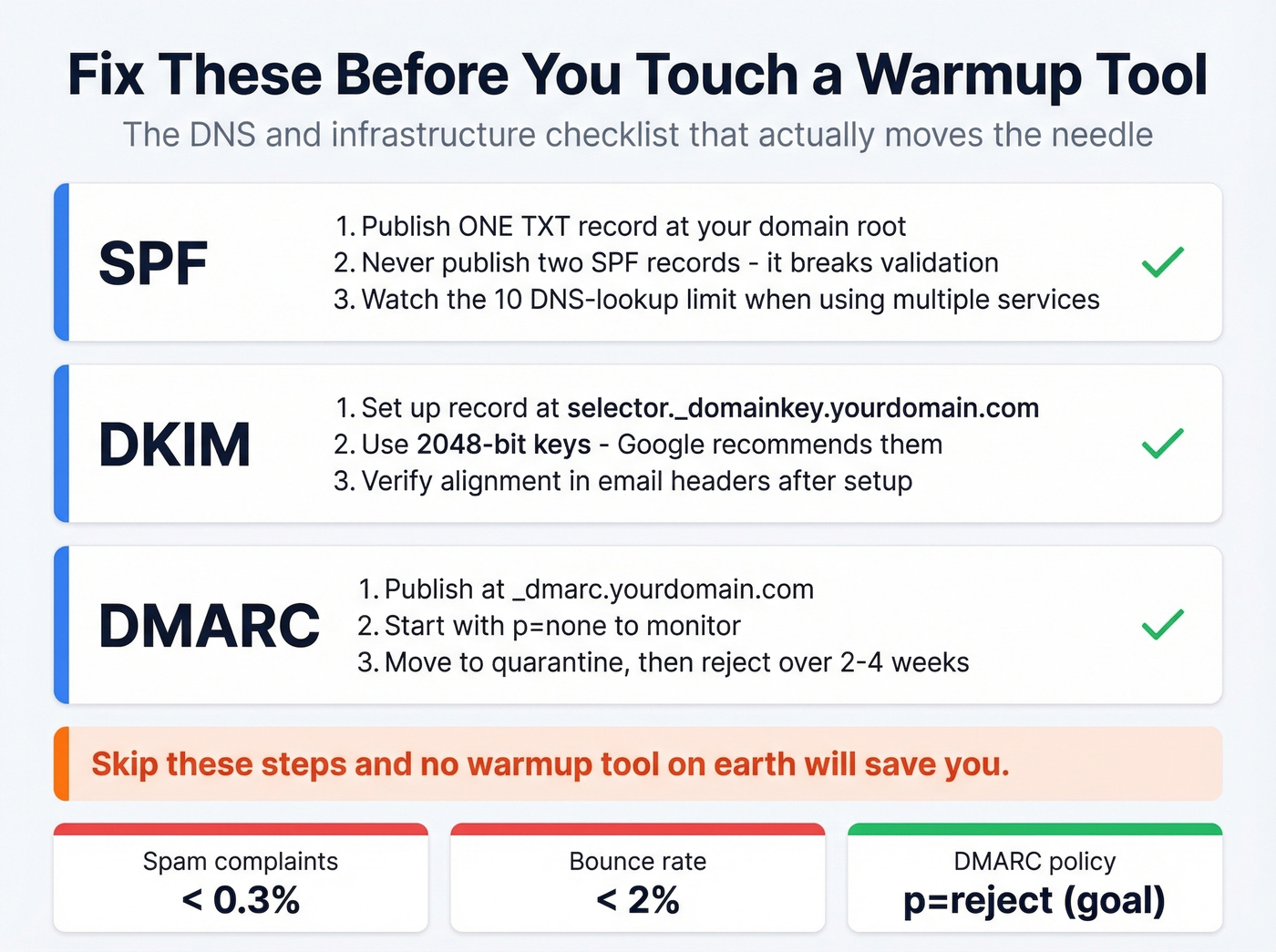
- Fix your DNS first. SPF, DKIM, and DMARC solve most "going to spam" problems for free. Skip this step and no warmup tool on earth will save you.
- If you still need warmup, DIY with real contacts beats paying for bot engagement. Google can detect automated warmup patterns. Fifteen friends replying to your emails is more valuable than 500 bots opening them.
- Verify your contact list before sending. A bounce rate over 2% puts your sender reputation in a hole fast. Prospeo's free tier gives you 75 verified emails per month - enough to test whether your list is clean before you launch anything.
What Gmail Warm Up Actually Means
Gmail warm up is the process of gradually increasing your sending volume from a new or dormant email account so Gmail's algorithms learn to trust you as a legitimate sender. Send a few emails, get opens and replies, slowly ramp up, and build a positive reputation before you start cold outreach at scale.
There are two flavors. Automated warmup uses a tool that connects to your inbox via SMTP or OAuth, then exchanges emails with a network of other accounts - opening, replying, and marking messages as "not spam" on your behalf. Manual warmup means you or your team send real emails to real people and generate genuine engagement signals. The manual path is often more sustainable long-term.
Here's what you're working with on Gmail's sending limits:
| Account Type | Daily SMTP Limit | Browser Limit |
|---|---|---|
| Free Gmail | 100/day | 500/day |
| Google Workspace | 2,000/day | 2,000/day |
| G Suite Trial | 500/day | 500/day |
Those limits are ceilings, not targets. During warmup, you should be nowhere near them.
What Changed - Google's Crackdown
Everything about email warmup for Gmail shifted between 2023 and 2025.
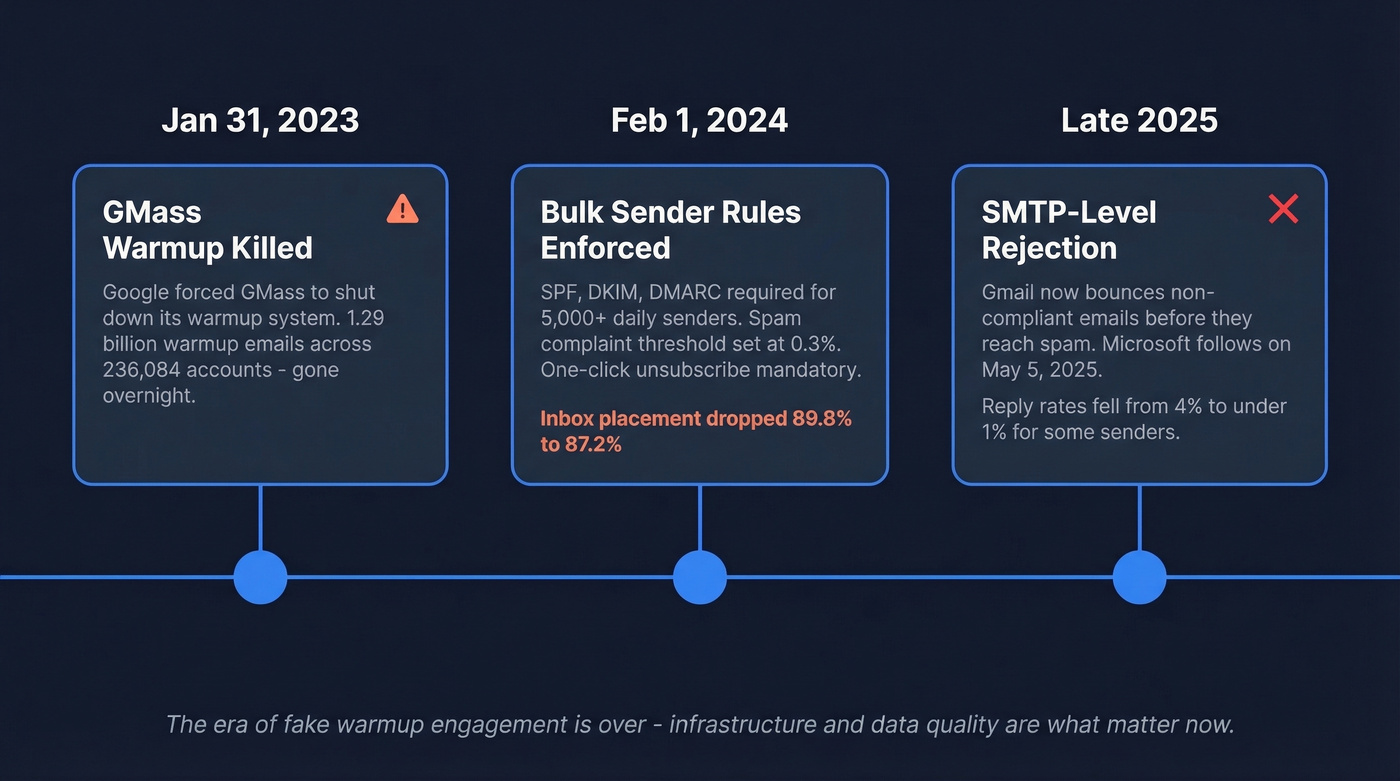
On Jan 31, 2023, GMass shut down its warmup system after Google told them to kill it or lose Gmail API access. GMass complied, ending a system that had sent 1,295,152,830 warm-up emails across 236,084 accounts over two years. That wasn't a quiet sunset - it was Google drawing a line.
Then came Feb 1, 2024. Google and Yahoo rolled out bulk sender requirements mandating SPF, DKIM, and DMARC authentication, plus one-click unsubscribe for marketing messages, all for anyone sending more than 5,000 emails per day. Spam complaint thresholds tightened to 0.3%. One tracked benchmark from the Skylead bake-off summary shows Gmail inbox placement dropping from 89.8% in early 2024 to 87.2% by Q4 as enforcement kicked in.
By late 2025, Gmail escalated further. Instead of quietly routing non-compliant emails to spam, Gmail began SMTP-level rejection - bouncing messages outright before they even reach a spam folder. Microsoft followed with similar enforcement for Outlook.com on May 5, 2025. An r/smallbusiness user described reply rates falling from ~4% to under 1% overnight, forcing a complete stack rebuild. Apollo removed its warmup feature in 2024 and shifted to "Inbox Ramp Up" - volume pacing without the fake engagement. That's a telling signal from one of the biggest players in the space.
Does Account Warmup Still Work in 2026?
The answer depends on what you mean by "work."
The case against warmup tools. Postbox Services tested nearly all major warmup tools and reported no measurable improvement in open rates and no significant lift in Google Postmaster reputation scores. Their explanation: automated openers running on cloud infrastructure create detectable patterns. The engagement is repetitive, the templates are formulaic, and Google's machine learning is good enough to tell bot opens from human behavior.
EmailChaser takes an even harder stance, arguing that warmup tools are detectable bot activity that can actively get accounts blacklisted. Their position: gradual ramping should happen naturally through responsible sending, not through artificial engagement networks.
There's also the dashboard problem. Most warmup tools measure success using seed tests within their own network. That's like grading your own homework. Your "95% inbox placement" score might only reflect delivery to other warmup accounts, not to real prospects at real companies.
Some tools now advertise "read emulation" features - simulating scroll behavior, time spent reading, and link clicks. Others claim "topic warmup" that matches your email content to the warmup messages. These are marketing differentiators, not proven deliverability improvements. No independent test has shown they move the needle beyond standard open-and-reply signals.
The case for warmup (narrow). Warmup still has a role in two specific scenarios: brand-new domains with zero sending history, and reputation recovery after a bounce spike or spam complaint surge. In those cases, some form of gradual volume increase with real engagement signals can help rebuild trust. But even then, the engagement needs to look human.

Here's the thing: most teams don't have a warmup problem. They have a data quality problem and a DNS configuration problem. Fix those two things and you'll never need a warmup tool. The warmup industry exists because it's easier to sell a $30/month subscription than to tell someone their SPF record is broken.
DNS and Infrastructure Checklist
This is the unsexy stuff that actually moves the needle. Fix these before you touch a warmup tool.
SPF, DKIM, and DMARC Setup
SPF (Sender Policy Framework). Publish one SPF TXT record at your domain's root. Never publish two - it breaks validation. Watch the 10 DNS-lookup limit; if you're using multiple sending services, you can hit it fast. Use include: mechanisms and flatten where needed.
DKIM (DomainKeys Identified Mail). Set up your DKIM record at selector._domainkey.yourdomain.com. Use 2048-bit keys - Google recommends them, and there's no reason to use weaker encryption in 2026. If you want to double-check your setup, follow a quick DKIM verification workflow.
DMARC (Domain-based Message Authentication). Publish at _dmarc.yourdomain.com. Start with p=none to monitor alignment, then move to quarantine, then reject once you're confident everything's passing. This progression typically takes 2-4 weeks. If you're unsure why alignment matters, read up on DMARC alignment.
Domain and Sending Limits
Secondary domains. Never cold email from your primary business domain. Period. Set up variant domains like tryacme.com or acme-mail.com and warm those instead. If one gets burned, your main domain stays clean.
Infrastructure math. Run 2-3 inboxes per domain, sending 10-15 emails per day per inbox. That gives you roughly 30-45 emails per domain per day - enough for meaningful outbound without triggering volume flags. If you want a deeper framework for pacing, use an email velocity model.
Thresholds that matter. Keep spam complaints under 0.3% (check Google Postmaster Tools) and bounce rates under 2%. Exceed either and you're in a hole that warmup can't dig you out of. If you're diagnosing bounces, start with email bounce rate benchmarks and fixes.
One more thing warmup tools won't tell you: landing in Gmail's Primary tab versus the Promotions tab is largely controlled by email content and formatting, not sender reputation. If your emails read like marketing blasts - heavy HTML, multiple images, promotional language - they'll land in Promotions regardless of how much warmup you've done. Write like a human, format like a human. If you need help tightening copy, use a practical email copywriting checklist.

A bounce rate over 2% destroys your sender reputation faster than any warmup tool can rebuild it. Prospeo verifies emails through a 5-step process with catch-all handling, spam-trap removal, and honeypot filtering - delivering 98% accuracy. The free tier gives you 75 verified emails per month to test your list before you send a single cold email.
Fix your data before you fix your warmup. Start with 75 free verified emails.
How to Warm Up a New Email Account
Using a Warmup Tool
If you decide a warmup tool is worth the risk, here's the standard process.
Connect the tool to your Gmail or Workspace account via SMTP credentials or OAuth. Set your starting volume low - typically 5-10 emails per day - and configure a ramp schedule that increases by 3-5 emails per day. Most tools automate this.
Timeline expectations: existing domains with some sending history need 14 days minimum, 21 days to be safe. Brand-new domains need 1-3 months. Don't rush it.
Keep warmup running alongside your actual campaigns. Stopping abruptly can reset the engagement signals you've built. The consensus on r/coldemail is that continuous warmup on newer domains is non-negotiable.
The TOS warning is real. Google forced GMass to shut down over it and indicated they'd detect IMAP-based workarounds. Any automated warmup tool carries TOS risk, even if enforcement is inconsistent. You're making a calculated bet.
The Free DIY Method
This approach takes more effort but generates engagement signals Google can't distinguish from normal email behavior - because they are normal email behavior.
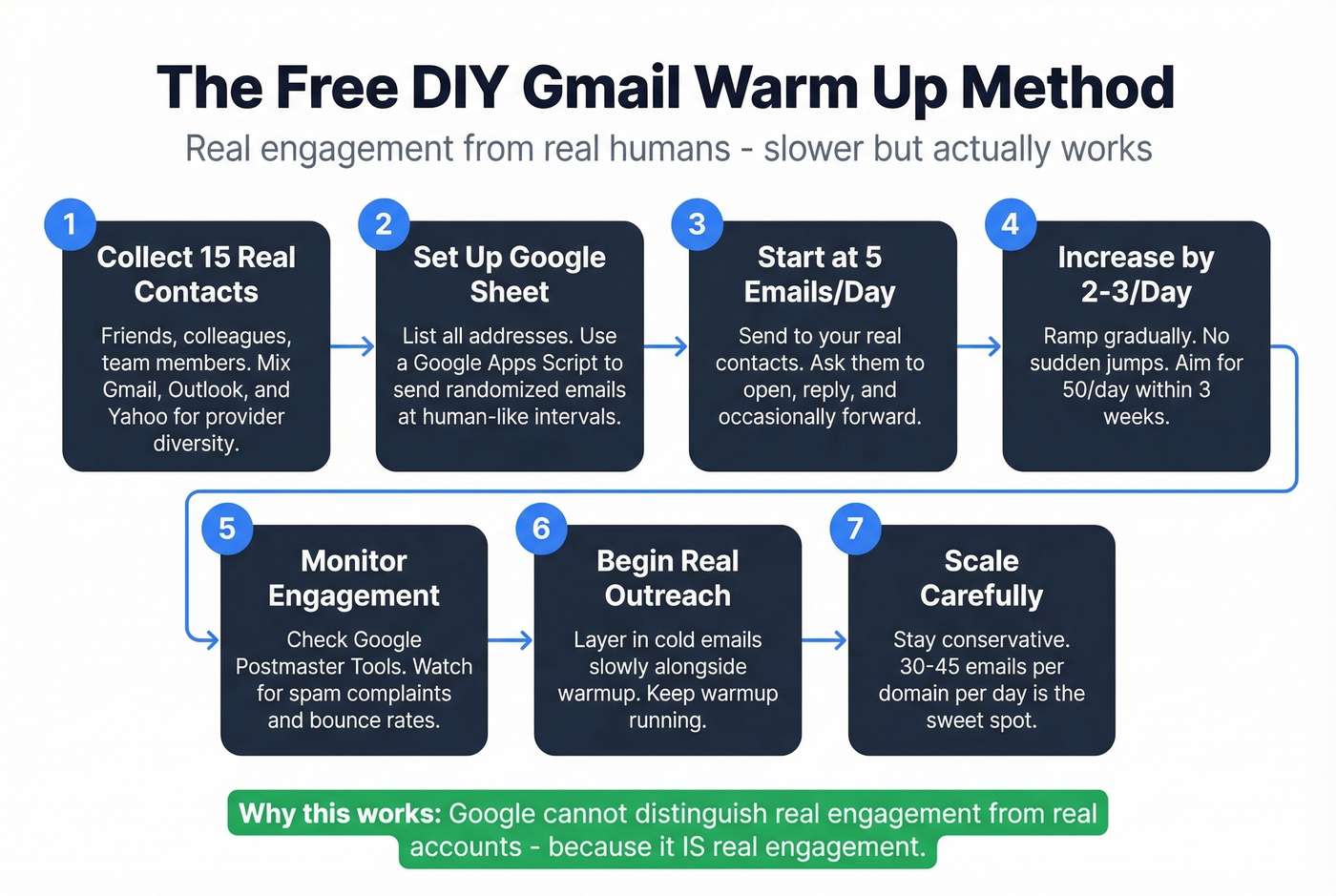
Collect about 15 real email addresses from friends, colleagues, or team members across Gmail, Outlook, and Yahoo. Provider diversity matters. Then set up a Google Sheet with those addresses and use a Google Apps Script to send randomized emails at human-like intervals throughout the day.
Ask your contacts to open, reply, and occasionally forward your emails. These are real engagement signals from real accounts - exactly what Gmail's algorithms reward.
Ramp gradually. Start at 5 emails per day, increase by 2-3 per day, and aim for 50 per day within 3 weeks. One Reddit user reported scaling to 500/day with this system, though staying conservative is the smarter play.
Real engagement from real humans beats bot engagement every time. It's slower, it's manual, and it works.
Warmup Tools Compared
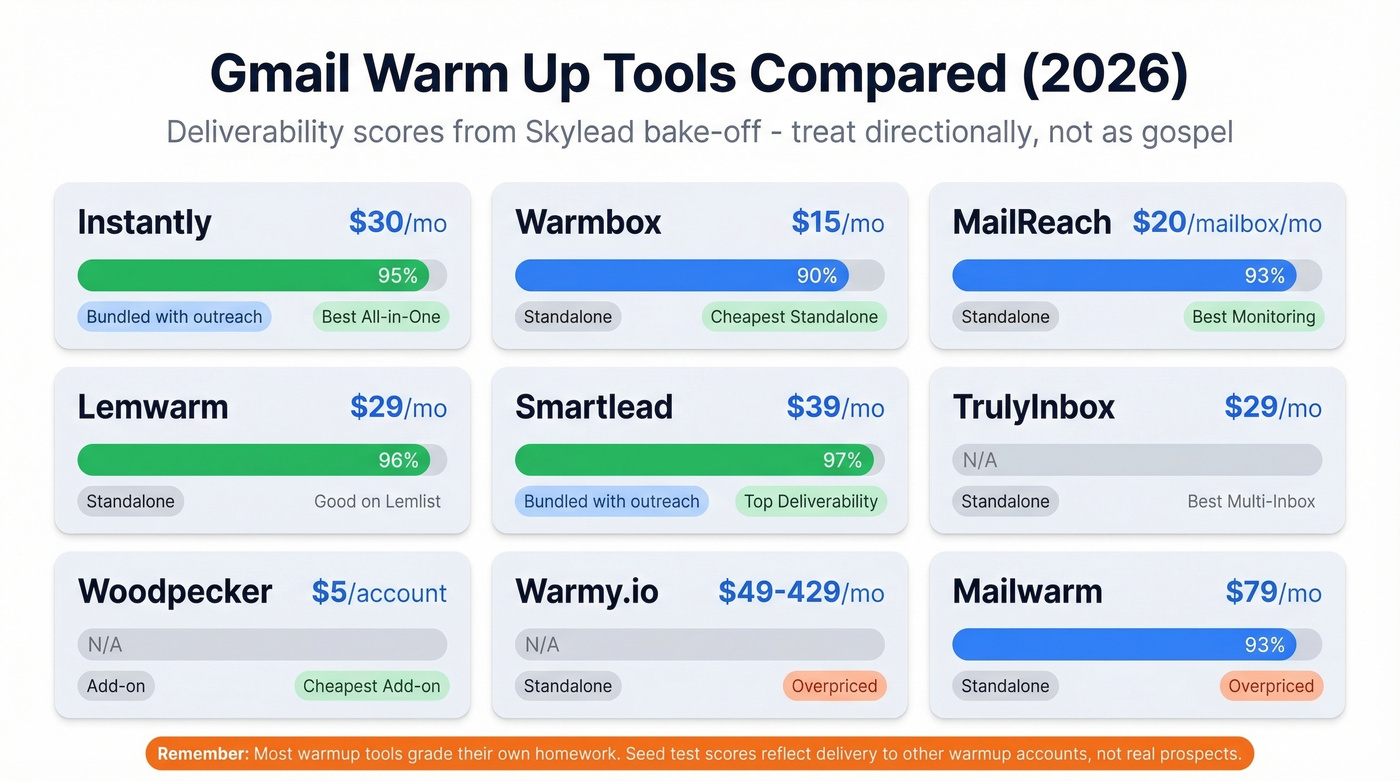
If you're going the paid route, here's how the major tools stack up. Deliverability scores come from a Skylead bake-off test - treat them directionally, not as gospel.
| Tool | Starting Price | Bundled? | Deliverability | Verdict |
|---|---|---|---|---|
| Instantly | From $30/mo | With outreach | 95% | Best all-in-one |
| Warmbox | $15/mo (annual) | Standalone | 90% | Cheapest standalone |
| MailReach | ~$20/mailbox/mo | Standalone | 93% | Best monitoring |
| Lemwarm | $29/mo | Standalone | 96% | Good on Lemlist |
| Smartlead | $39/mo | With outreach | 97% | Top deliverability |
| TrulyInbox | $29/mo | Standalone | N/A | Best multi-inbox |
| Woodpecker | $5/account | Add-on | N/A | Cheapest add-on |
| Warmy.io | $49-429/mo | Standalone | N/A | Overpriced |
| Mailwarm | $79/mo | Standalone | 93% | Overpriced |
Top three picks. Instantly if you're already using it for outreach - warmup is baked into the platform and the UX is clean. Warmbox if you just need standalone warmup without the outreach platform. MailReach if you care most about deliverability analytics and monitoring.
Warmy.io at $49-429/month and Mailwarm at $79/month are hard to justify. You're paying 3-5x more for roughly the same warmup mechanics. In our experience, the premium pricing doesn't translate to premium results in any independent test.
One caveat on Instantly: some users report that the warmup network quality varies. You might be warming up against other cold inboxes, which dilutes the engagement signal. Still the best bundled option, but don't assume the dashboard numbers reflect real-world inbox placement.
What Matters More Than Warmup
Warmup is a supporting actor. Data quality is the lead.
A bounce rate over 2% undoes weeks of warmup fast. Every hard bounce tells Gmail your list is garbage, and Gmail responds by throttling or spam-foldering everything else you send. We've seen teams spend a month warming up a domain, launch their first campaign with an unverified list, and crater their reputation in 48 hours. Using a new email account for cold outreach without verifying your list first is the fastest way to burn a domain. If you want a full framework, start with an email deliverability guide.
The numbers back this up. The average cold email reply rate sits at 3.43%, and only 8.5% of cold outreach emails receive any reply across 12M emails analyzed. Those are tight margins - you can't afford to waste sends on invalid addresses. Belkins found that campaigns targeting 50 or fewer recipients average a 5.8% response rate, while campaigns blasting 500+ recipients drop to 2.1%. Smaller, cleaner, more targeted sends beat high-volume spray-and-pray every time.
This is where list verification becomes non-negotiable. Prospeo runs a 5-step verification process with catch-all handling, spam-trap removal, and honeypot filtering - delivering 98% email accuracy on a 7-day data refresh cycle. Stack Optimize built their agency to $1M ARR using this data, maintaining 94%+ client deliverability with bounce rates under 3% and zero domain flags across all clients. If you're comparing vendors, see our breakdown of data enrichment services.
Warmup protects your sending reputation. Bad data destroys it. Fix the data first.
You just read that most teams don't have a warmup problem - they have a data quality problem. Prospeo refreshes all 300M+ profiles every 7 days, not the 6-week industry average. That means the emails you pull today are still accurate next week. At $0.01 per email, cleaning your list costs less than one month of a warmup tool that doesn't work.
Stop paying $30/month to warm up emails that bounce. Pay a penny to send ones that land.
How to Measure If Warmup Is Working
Don't trust your warmup tool's dashboard. Here's what to check instead.
Google Postmaster Tools is the only objective measure of your domain's reputation with Gmail. Set it up, monitor the domain reputation graph, and watch the spam rate metric. If your domain reputation isn't trending upward after 2-3 weeks of warmup, the tool isn't helping. If you're trying to recover after a hit, use a step-by-step plan to improve sender reputation.
External seed tests give you ground truth. Use GlockApps or set up your own cross-provider inbox checks with Gmail, Outlook, and Yahoo accounts you control. Send test emails and manually verify inbox placement. This tells you what's actually happening outside the warmup network.
Spam rate under 0.3% is Google's published threshold. If you're above it, warmup alone won't fix the problem - you have a content or list quality issue. If you need a quick diagnostic, run an email spam checker before you change anything else.
Let's be honest about warmup dashboards. Those "95% inbox placement" scores are measured within the warmup tool's own network. It's a closed loop that tells you very little about real-world delivery to your prospects' inboxes. Skip the vanity metrics and look at Postmaster Tools instead.
Gmail Warm Up FAQ
Is warming up a Gmail account against Google's TOS?
Yes. Google forced GMass to shut down its warmup service on Jan 31, 2023, explicitly citing a terms-of-service violation. Google also indicated they'd detect and penalize IMAP-based workarounds. Any automated warmup tool carries TOS risk, even if enforcement remains inconsistent across accounts.
How long does it take to warm up a new email account?
Existing domains with sending history need 14-21 days minimum. Brand-new domains need 1-3 months to build meaningful reputation. Keep warmup running after you start campaigns - stopping abruptly can reset your progress and trigger deliverability drops.
Can I warm up a free Gmail account?
Technically yes, but free Gmail caps SMTP sending at 100 emails per day and isn't designed for outbound prospecting. Use Google Workspace instead - it's $6-7/month per user and gives you 2,000 daily sends plus proper domain authentication.
What's the fastest way to fix Gmail deliverability without a warmup tool?
Fix your DNS first - SPF, DKIM, and DMARC authentication solves most spam placement issues for free. Then verify your contact list to keep bounces under 2%. Finally, cap sends at 15 per inbox per day. This combination resolves most deliverability problems without paid warmup.
Should I keep warmup running during active campaigns?
Yes. Most practitioners recommend continuous warmup alongside active campaigns, especially on domains less than six months old. The ongoing engagement signals help counterbalance the inevitable spam complaints and bounces from cold outreach.