

The B2B CRM Guide That Isn't Trying to Sell You a CRM
You've got 200 leads in a spreadsheet, three reps pinging you on Slack about who owns what, and a founder asking why nothing's in "the system." That's the moment every team realizes they need a B2B CRM - and immediately drowns in vendor content. The global CRM market surpassed $112.91B in 2025, and most advice on the topic comes from companies selling you one. This guide isn't that. Let's fix it.
What You Need (Quick Version)
Before you demo anything, answer three questions honestly:
- How many people will use it daily? Not "have a login" - actually use it. This determines your tier.
- What's your real monthly budget per user? Include add-ons, integrations, and the admin time you'll burn. A $14/user CRM can quietly become $100/user.
- Does it integrate with your outreach stack? If your CRM can't talk to your sequencer, reps will ignore it within a month.
| Team Size | Best Starting Point | Price |
|---|---|---|
| Under 20 reps | Pipedrive | $14/user/mo |
| 10-50, sales + marketing | HubSpot Professional | $80/user/mo |
| 50+, complex processes | Salesforce Enterprise | $165/user/mo |
| Any size, outbound-heavy | Close | $29-$149/user/mo |
That table gets you 80% of the way there. But the CRM platform you pick matters less than the data inside it - and we'll get into why that's the real bottleneck later.
What Is a B2B CRM?
A B2B CRM is software that manages your company's relationships with other businesses across the entire revenue cycle. The key word is "businesses" - not individuals. That distinction shapes everything about how the tool works.
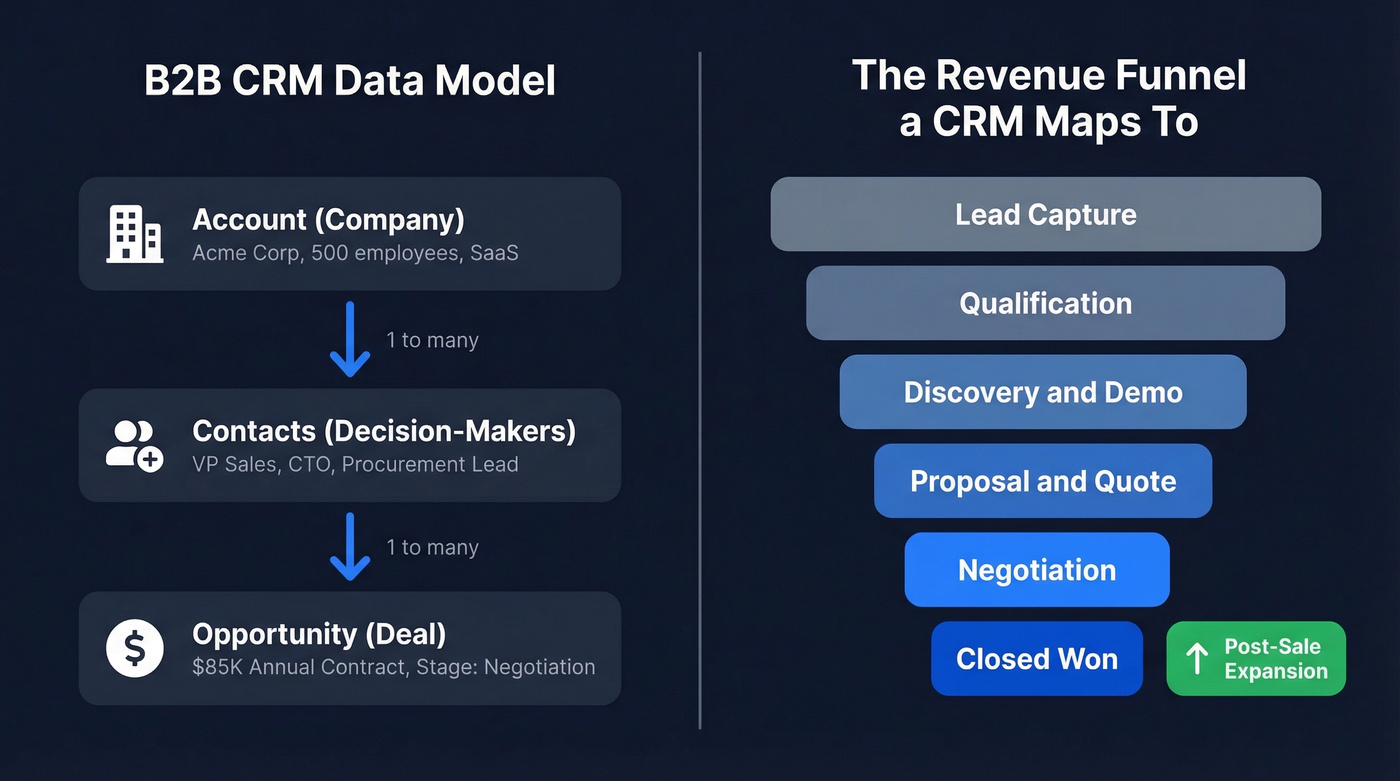
The data model follows a hierarchy: Account -> Contact -> Opportunity. One company has multiple decision-makers, and each deal moves through pipeline stages until it closes or dies. 91% of companies with 10+ employees already use a CRM, so this isn't a "do I need one" question anymore. It's a "which one won't waste my time" question.
A good CRM for B2B sales tracks deal stages, logs every touchpoint across email, calls, and meetings, scores leads based on firmographic fit, and gives managers a forecast they can actually trust. It maps to the full revenue funnel - from lead capture and qualification through scheduling, nurturing, quoting, closing, and post-sale expansion. A bad one becomes a data entry chore that reps resent and eventually abandon.
B2B CRM vs. B2C CRM
This distinction matters because picking a CRM built for the wrong model will fight you at every turn.
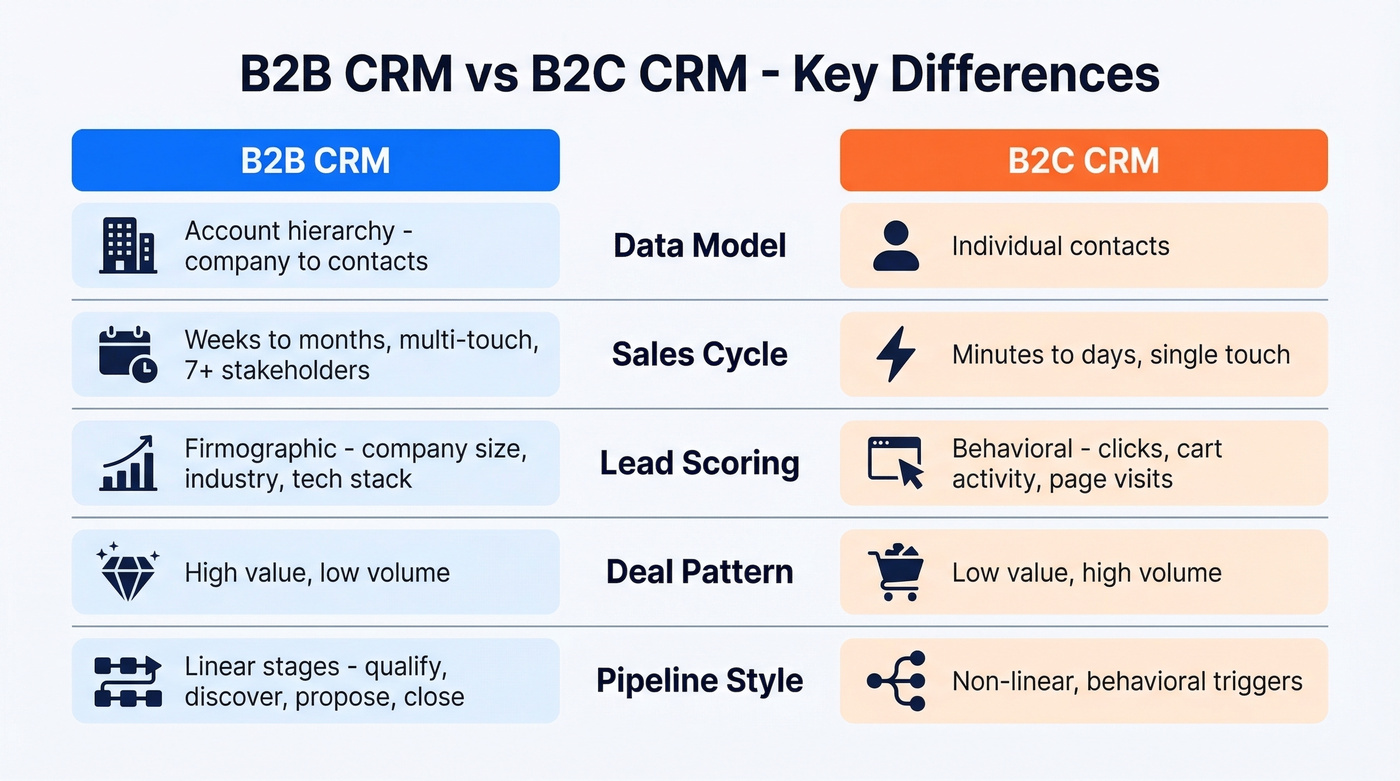
| Dimension | B2B CRM | B2C CRM |
|---|---|---|
| Data model | Account hierarchy (company -> contacts) | Individual contacts |
| Sales cycle | Weeks to months, multi-touch | Minutes to days, often single-touch |
| Pipeline design | Linear stages with task-heavy UI | Behavioral triggers, segment-based |
| Lead scoring | Firmographic (size, industry, tech stack) | Behavioral (clicks, cart activity) |
| Key integrations | ERP, outreach tools, enrichment | E-commerce, marketing automation |
| Transaction pattern | High value, low volume | Low value, high volume |
B2B pipelines are linear and deliberate - qualification, discovery, proposal, negotiation, close. B2C workflows are non-linear, driven by behavioral triggers like abandoned carts or lapsed engagement. B2B lead scoring cares about whether a company fits your ICP; B2C scoring cares about what an individual did on your website last Tuesday.
If you're selling to businesses, you need account-level relationship mapping, parent/subsidiary hierarchies, and the ability to track multiple stakeholders within a single deal. A CRM designed for e-commerce won't give you any of that.
Why It Matters in 2026
The B2B buying process has gotten genuinely harder. Gartner's projection that 80% of B2B sales interactions happen digitally has arrived. McKinsey's "rule of thirds" captures the new reality: one-third of buyers prefer in-person, one-third remote, and one-third digital self-serve. The average mid-market deal involves 7 stakeholders using 10+ interaction channels. And 84% of reps missed quota last year.
Without a CRM that centralizes all of this, you're asking reps to track multi-threaded deals across email, Slack, Zoom, and their own memory. That doesn't scale past two reps.
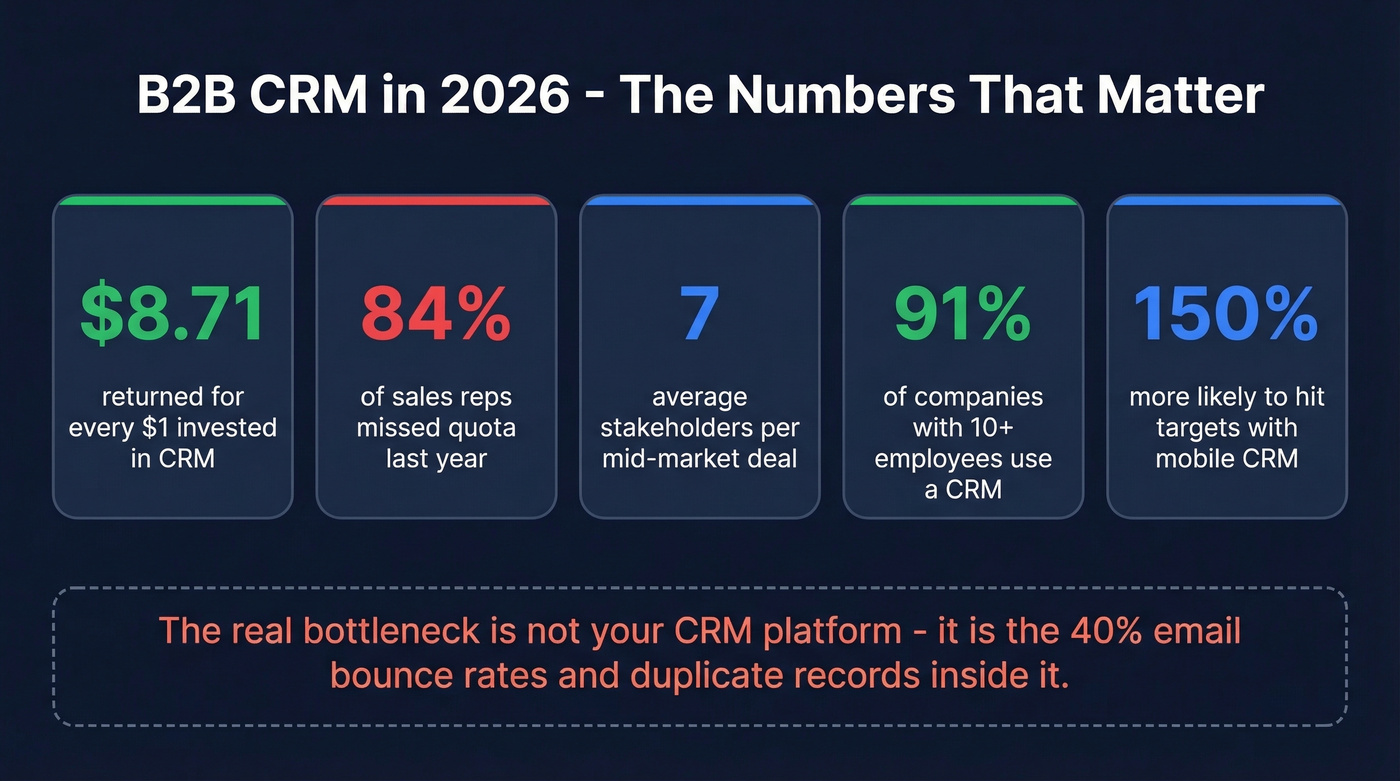
The ROI case is clear: CRM returns $8.71 for every $1 invested. 70% of businesses now use mobile CRM, and those that do are 150% more likely to hit sales targets. ABM strategies are pushing requirements further too - teams running account-based plays need their CRM to support multi-contact engagement tracking, account scoring, and coordinated outreach across sales and marketing. This isn't optional infrastructure anymore. It's the operating system for revenue.
Here's the thing: most teams don't need a better CRM. They need cleaner data in the CRM they already have. We've watched companies spend six figures migrating to Salesforce when their real problem was 40% email bounce rates and duplicate records. Fix the data layer before you shop for a new platform.
How to Choose the Right CRM for B2B
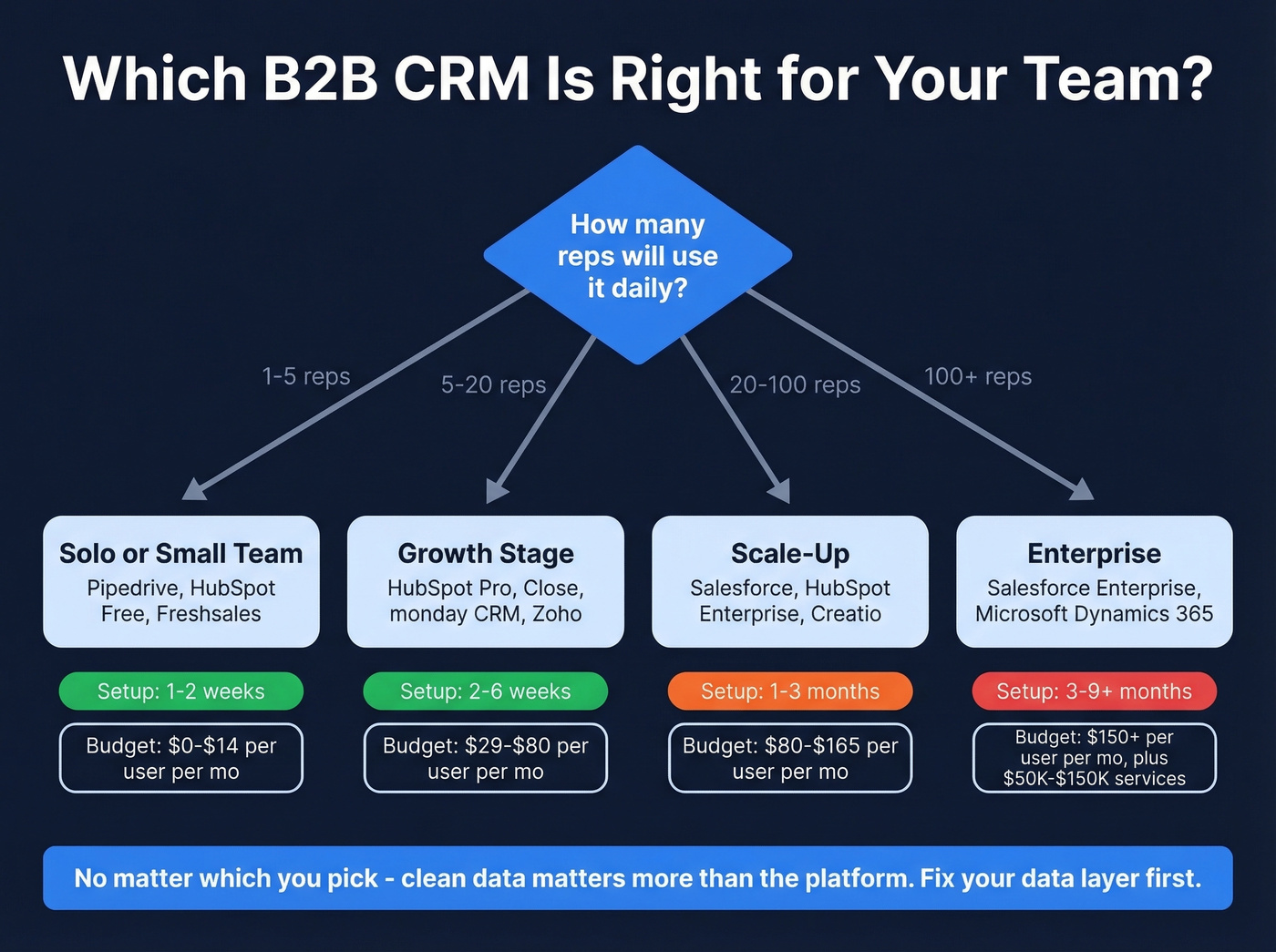
Solo / 1-5 Reps
Keep it simple. Pipedrive, HubSpot Free/Starter, or Freshsales. You don't need workflow automation or AI forecasting yet - you need a visual pipeline and email integration. Setup should take 1-2 weeks, not months. The consensus on r/sales backs this up: a 5-person startup evaluating CRM options explicitly called Salesforce "way too complex and expensive" for their size.
5-20 Reps
This is where it gets interesting. HubSpot Professional, monday CRM, Close, or Zoho CRM all work here. You'll want basic automation, reporting dashboards, and integrations with your outreach stack. Budget 2-6 weeks for setup. Make sure your platform can feed clean data into sequencing tools - if enriched contacts require manual CSV exports to reach your sequencer, reps will skip the step entirely.
20-100 Reps
Salesforce, HubSpot Enterprise, or Creatio. You'll need a dedicated admin or at least a RevOps person comfortable with configuration. Implementation runs 1-3 months. The complexity tax is real, but so is the payoff - these platforms handle territory management, advanced forecasting, and multi-team workflows that lighter tools can't touch.
100+ Reps
Salesforce Enterprise or Microsoft Dynamics 365. Budget 3-9+ months for implementation and $50K-$150K+ in services. At this scale, the CRM decision is really an infrastructure decision - it touches every revenue team, every process, every report the board sees.

You just read it: most teams don't need a new CRM - they need cleaner data in the one they have. Prospeo enriches your Salesforce or HubSpot records with 50+ data points per contact at a 92% match rate. 98% email accuracy, 7-day refresh cycle, and native CRM integrations mean your reps stop battling bounces and start closing.
Fix your CRM data layer before you spend six figures migrating platforms.
The 10 Best B2B CRM Tools for 2026
Salesforce
Best for: Enterprise teams with complex processes and a dedicated admin
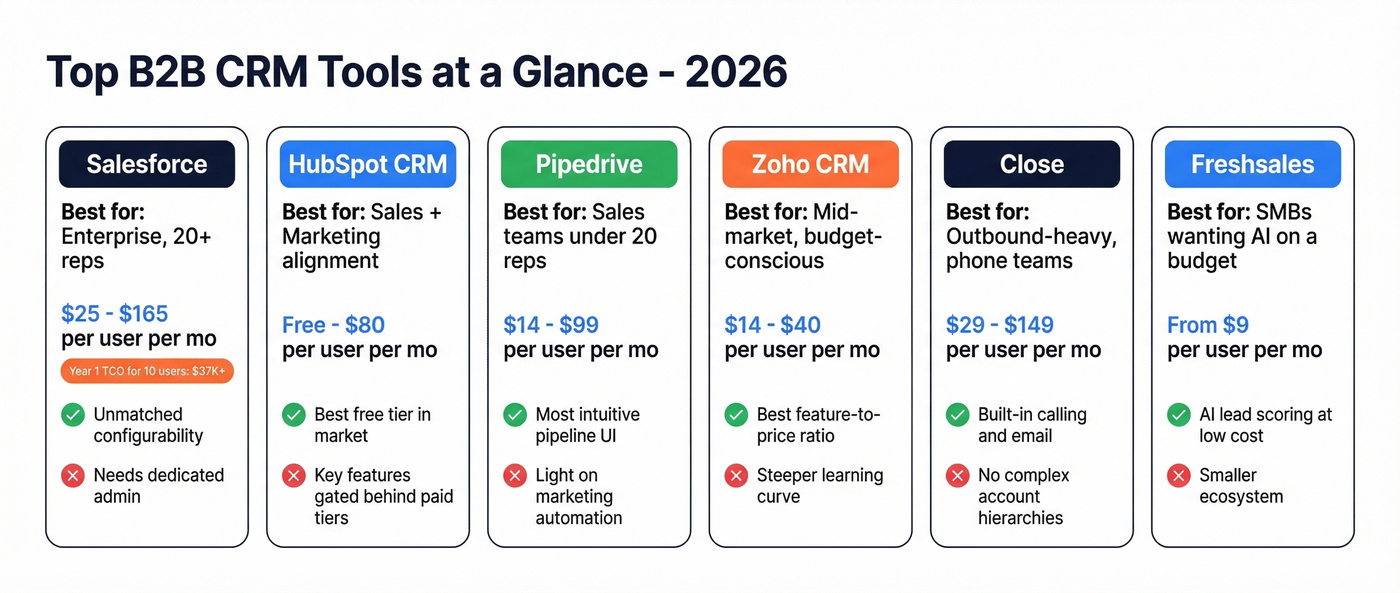
Use Salesforce if you've got 20+ reps, multi-stage deal cycles, and the budget to do it right. Skip it if you're under 20 reps with no admin - you'll pay enterprise prices for a tool your team uses as a glorified spreadsheet.

Salesforce Starter Suite starts at $25/user/mo. Enterprise runs around $165/user/mo - but those numbers get misleading fast once you add modules, implementation, and admin time. Their AI-enabled CRM pricing starts around $500/user/mo. A realistic year-one TCO for 10 users, including implementation, training, and add-ons, lands around $37,000+. Salesforce holds roughly 23.8% of the global CRM market for a reason: nothing else matches its configurability or AppExchange ecosystem. But we've seen teams under 15 reps spend six months implementing Salesforce and end up with 40% adoption. The tool isn't the problem. The mismatch is.
HubSpot CRM
Best for: Teams wanting sales + marketing on one platform
HubSpot's free tier is the strongest in the market, and it's the right starting point for most teams under 10 reps. The catch? You'll outgrow it. Reddit threads are full of teams hitting contact limits and discovering that basic automation is gated behind paid tiers.
Pricing scales from free to $20/user/mo (Starter) to $80/user/mo (Professional). Enterprise Customer Platform runs $4,300/mo for 7 users. HubSpot's real strength is unifying marketing and sales - if alignment between those teams matters to you, it's hard to beat. For teams running pure outbound with no marketing function, you're paying for capabilities you won't use. For many growing companies, HubSpot remains one of the best options because it scales from free to enterprise without forcing a platform migration.
Pipedrive
Best for: Sales-first teams under 20 reps who want simplicity
I watched a 7-person sales team evaluate Salesforce, HubSpot, and Pipedrive over two weeks. They picked Pipedrive in three days and had their pipeline running by Friday. That's the product's superpower - it gets out of the way.

Pricing: $14 (Essential), $29 (Advanced), $49 (Power), $99 (Enterprise) per user/mo on annual billing. The phone integration add-on runs $24/user/mo, which adds up. Pipedrive's visual pipeline is the most intuitive in the category, and reps actually enjoy using it - which matters more than any feature comparison. The tradeoff is lighter marketing automation and AI compared to HubSpot or Salesforce. If you need marketing nurture flows, look elsewhere. If you need reps to update their deals without being nagged, this is it.
Zoho CRM
Best for: Mid-market teams wanting feature depth at low cost
Zoho starts at $14/user/mo, with higher tiers at $23/user/mo and $40/user/mo. It's a strong option if you want workflow automation and a broad suite of connected apps without paying HubSpot or Salesforce pricing. The ecosystem is massive: Zoho Books, Zoho Desk, and Zoho Campaigns all integrate natively. The UI isn't as polished as Pipedrive or HubSpot, and reviewers consistently flag the learning curve on initial setup. But if budget is tight and requirements aren't, Zoho is one of the best feature-to-price plays in the market.
Close
Best for: Outbound-heavy teams who live on the phone
Your SDR team makes 200 calls a day and hates switching between tabs. Close was built to solve exactly that - a CRM for sales teams that need calling, email, and pipeline management in a single window. Pricing runs $29 (Startup) to $149 (Business) per user/mo. Skip this if you need marketing automation or complex account hierarchies. Use it if your reps' primary workflow is dial-email-dial and you want everything in one place.
Freshsales
Best for: SMBs wanting AI features without enterprise pricing
Freshsales starts at $9/user/mo, with AI-powered lead scoring and deal insights available at the $59/user/mo Enterprise tier where Freddy AI handles scoring and deal predictions. It's part of the Freshworks suite, so if you're already using Freshdesk or Freshchat, the tools connect natively. Solid for teams that want a modern platform without the HubSpot price jump.
monday CRM
Best for: Teams already using monday.com for project management
Pricing starts at $15/user/mo (Basic) and goes to $20/user/mo (Standard), with Enterprise on custom pricing. The CRM inherits monday's visual, flexible interface - great for teams that think in boards and automations. It's lighter on traditional features like lead scoring and forecasting, but the workflow customization is excellent.
Creatio
Best for: No-code process automation combined with CRM
At $40/user/mo including AI tokens and the no-code platform, Creatio offers unusual flexibility for teams that want to build custom workflows without developers. It also stands out for PRM capabilities - if you manage channel partners alongside direct sales, Creatio handles both. Enterprise-grade, but with a learning curve.
Microsoft Dynamics 365
Best for: Enterprise teams deep in the Microsoft ecosystem
Pricing: $65 to $150 per user/mo. If your company runs on Outlook, Teams, and Azure, Dynamics integrates more deeply than anything else. The cross-sell and upsell tracking is strong for post-sale expansion plays. Outside the Microsoft ecosystem, it's harder to justify.
Zendesk Sell
Best for: Teams already using Zendesk for support
At $55/user/mo (Growth), it's not cheap for what you get. But the support-to-sales handoff is genuinely smooth, and the renewal/expansion tracking gives customer success teams visibility they don't get from most standalone CRMs. Skip it if you don't already use Zendesk.
Pricing Comparison
The average entry-level CRM costs ~$15/user/mo. Mid-tier plans average ~$60/user/mo. Enterprise tiers start around ~$150/user/mo. But these numbers hide the real cost - add-ons, implementation, and the admin time that nobody budgets for.
| Tool | Entry Tier | Mid Tier | Enterprise | Watch Out For |
|---|---|---|---|---|
| Salesforce | $25/user/mo | $100/user/mo | $165/user/mo | Add-ons, admin costs |
| HubSpot | Free | $80/user/mo | $4,300/mo (7 users) | Steep tier jumps |
| Pipedrive | $14/user/mo | $29/user/mo | $99/user/mo | Phone add-on: $24/user/mo |
| Zoho CRM | $14/user/mo | $23/user/mo | $40/user/mo | UI learning curve |
| Close | $29/user/mo | $109/user/mo | $149/user/mo | No marketing tools |
| Freshsales | $9/user/mo | $39/user/mo | $59/user/mo | AI needs top tier |
| monday CRM | $15/user/mo | $20/user/mo | Custom | Lighter CRM features |
| Creatio | $40/user/mo | Single tier | Custom | Learning curve |
| Dynamics 365 | $65/user/mo | $105/user/mo | $150/user/mo | Microsoft lock-in |
| Zendesk Sell | $55/user/mo | Custom | Custom | Needs Zendesk ecosystem |
A $14/user/mo CRM can balloon to $100+/user once you add automation, reporting, API access, and phone integration. Budget for the real number, not the landing page number.
Hidden Costs and Implementation Traps
CRM implementations fail at a 63% rate. The average failed project costs $180K+ and 8 months of lost productivity. The failures are rarely the software's fault - they're process and people failures wearing a technology mask.
Over-customization kills adoption. Teams that create more than 25 custom fields in the first 90 days see 41% adoption rates. Teams that start minimal hit 78%. The instinct to "build it perfectly before launch" is the single biggest implementation killer. Start with 5-10 fields. Add more after reps are actually using the system.
Data migration is where projects stall. 73% of failed implementations had data quality issues persisting 12+ months after go-live. If you're migrating from spreadsheets or a legacy CRM, budget 20-30% of your total timeline just for discovery and data cleanup.
Training gets skipped. One Reddit poster nailed it: the biggest mistake is "skipping training because it's intuitive enough." It's not. Role-specific training at 30, 60, and 90 days is the difference between a CRM that sticks and one that becomes a $37K/year ghost town. Companies that invest in proper training see 39% higher quota attainment and 24% shorter sales cycles.
A 10-user Salesforce implementation can run $37,000+ in year one. Even a Pipedrive rollout for 10 reps costs ~$5,900/year before add-ons. The software cost is the easy part. The hard part is getting humans to change behavior.
The Data Quality Problem
Here's the uncomfortable truth about every CRM on this list: 76% of users say less than half their CRM data is accurate. And 37% report direct revenue loss from bad data. You can pick the perfect CRM, nail the implementation, train every rep - and still watch it underperform because half the emails in your contact records bounce.

This is where most CRM guides stop. They don't talk about the data layer because they're written by CRM vendors, not by people who've actually run outbound at scale. In our experience, the right enrichment layer eliminates manual research and keeps contact records fresh automatically - and that single change has more impact on pipeline than any CRM migration.
The fix is pairing your CRM with an enrichment tool that verifies and refreshes contacts. If you're evaluating data enrichment services, prioritize match rate, refresh frequency, and how well the tool handles deduplication. Prospeo plugs directly into Salesforce and HubSpot, enriching contacts with 50+ data points per record at a 98% email accuracy rate. The real differentiator is the 7-day refresh cycle - most enrichment tools update every 4-6 weeks, by which point your contacts have changed jobs, switched emails, or gone dark. Weekly refreshes mean your reps aren't sending sequences to dead addresses.
A CRM that can't talk to your outreach stack is a CRM reps ignore. Prospeo plugs directly into Salesforce, HubSpot, Smartlead, Instantly, and Lemlist - pushing verified emails and direct dials into your workflows automatically. No manual CSV exports. No stale records. Data refreshed every 7 days at $0.01 per email.
Connect Prospeo to your CRM and stop feeding reps dead data.
AI in B2B CRM - What Works in 2026
70% of companies now use AI in their CRM. The predictive analytics market alone is projected to hit $28.1B by 2026, and the broader AI-in-CRM market is on track to grow from $11.04B to $48.4B by 2033. Let's separate what actually works from what's still a demo.
What works today:
- Lead scoring that surfaces high-intent accounts before reps notice them (use a consistent lead scoring model, not vibes)
- Forecasting models that catch pipeline risk earlier than gut feel (pair with dedicated sales forecasting solutions if your CRM is weak here)
- Email draft suggestions that save reps 15-20 minutes per day
- Meeting summaries that auto-log to the CRM
- Deduplication that catches the 4,000 duplicate contacts your last data import created
What's still overhyped: Fully autonomous deal management, AI-generated pipeline strategy, and "predictive" features that require 18 months of clean historical data to produce anything useful. Multiple reps in r/sales reported that AI forecasting in their CRM was "just wrong" until the team had been logging consistently for over a year.
The catch with all of it: AI is only as good as the data feeding it. If 76% of your CRM data is inaccurate, your AI-powered lead scoring is just confidently wrong. Fix the data layer first. Then turn on the AI.
FAQ
Is Salesforce worth it for small teams?
Generally no. Teams under 20 reps without a dedicated admin will overpay and under-adopt. Pipedrive or HubSpot Starter are better starting points - migrate to Salesforce when complexity demands it.
What's the best free B2B CRM?
HubSpot's free tier is the strongest option, supporting up to 5 users with contact management, deal tracking, and basic reporting. Budget for the upgrade to Starter or Professional from day one - contact limits and gated automation will force the move within 6-12 months.
How long does CRM implementation take?
SMB rollouts take 1-4 weeks. Mid-market implementations run 1-3 months. Enterprise deployments span 3-9+ months. The biggest variable isn't software setup - it's data migration and training.
How do I keep my CRM data clean?
Pair your CRM with an enrichment tool that verifies and refreshes contacts automatically. A 7-day refresh cycle keeps records current; most competitors update every 4-6 weeks, so data decays faster than you can maintain it manually.
Which platforms support outbound-heavy teams?
Close and Pipedrive are the strongest for outbound-first workflows. Close has built-in calling and a predictive dialer; Pipedrive offers the most intuitive visual pipeline. Both integrate with popular sequencing tools, so reps can move from prospecting to pipeline management without switching tabs.