

How to Remove Your IP From the Barracuda Blacklist (and Stay Off It)
Your sales team just pinged you. Half the outbound sequence bounced overnight. You pull up the logs and see this:
450 4.7.1 Try Later; see http://www.barracudacentral.org/rbl/removal-request
That's the Barracuda blacklist. Your IP got flagged, and every prospect running a Barracuda Spam Firewall is now rejecting your mail. Barracuda blacklist removal isn't complicated, but doing it wrong - or doing it twice - makes things significantly worse.
Quick version:
- Confirm the listing at Barracuda Central's lookup tool
- Diagnose the root cause before touching the removal form
- Fix the issue - compromised account, open relay, bad list, whatever it is
- Submit one removal request with a specific explanation
- Wait 12-24 hours. Do NOT submit again.
- Set up monitoring so you catch future listings before your pipeline stalls
What Is the Barracuda Reputation Block List?
The Barracuda Reputation Block List (BRBL) is a real-time IP reputation database maintained by Barracuda Networks. It feeds into the Barracuda Spam & Virus Firewall, which achieves a 95% spam accuracy rate as part of its broader filtering stack.
The BRBL lists single IP addresses, not domains. When your IP gets flagged as "poor," Barracuda's team manually verifies the listing. Under the hood, it's a DNS lookup: a query returning a 127.0.0.2 A record means you're listed, while an NXDOMAIN response means you're clean. Simple mechanics, but the downstream impact on B2B deliverability is brutal.
Does a Listing Actually Affect You?
Not all blacklists hit equally.
It's urgent if you're sending B2B email to enterprises, mid-market companies, or organizations running Barracuda Spam Firewalls. Smaller ISPs and private mail servers also reference the BRBL. If your prospects sit in these environments, your emails are bouncing right now.
It's less critical if your audience is primarily on Gmail or Microsoft 365. Gmail uses its own internal reputation system rather than relying on third-party blocklists like the BRBL. Your emails may still land in those inboxes - but don't ignore the listing, because enterprise prospects won't get them.
Here's the thing: if more than 20% of your pipeline targets companies with 500+ employees, treat a Barracuda listing like a fire alarm. Selling to SMBs on Google Workspace? It's a smoke detector chirp - annoying but not an emergency.
How to Confirm You're Listed
Step 1: Go to Barracuda Central's lookup tool and enter your sending IP. If the result reads "currently listed as 'poor' on the Barracuda Reputation System," you're on the blocklist.
Step 2: Cross-reference with your bounce logs. Look for the 450 4.7.1 error code pointing to barracudacentral.org/rbl/removal-request. That confirms the BRBL is the specific list causing rejections.
Why You Got Listed
Don't request removal yet. First, figure out what triggered the listing.
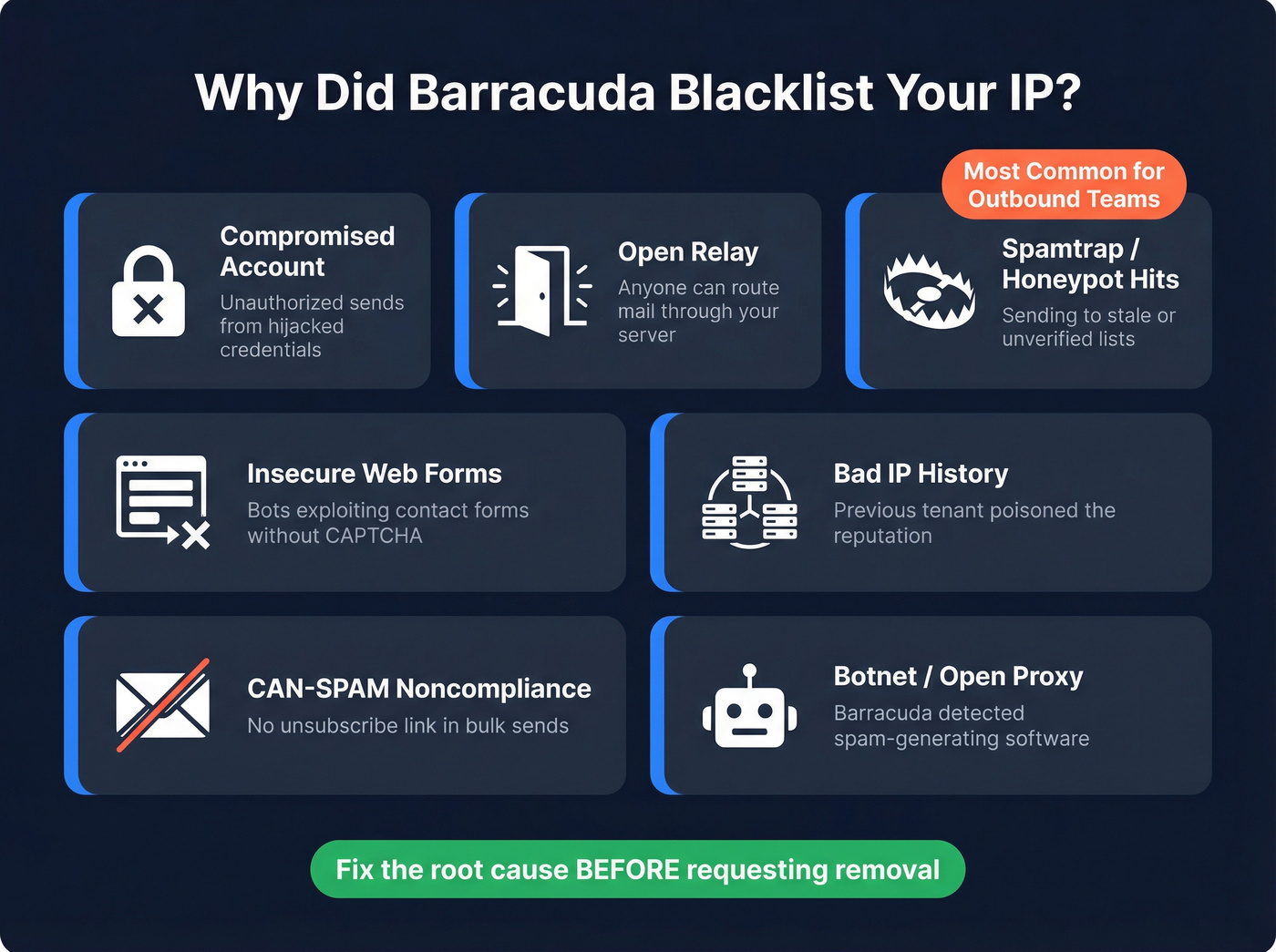
- Compromised user account - The #1 cause. Scan server logs for accounts sending thousands of messages or showing abnormally high login counts. Reset the password immediately and enforce MFA.
- Open relay - Run an open relay test on your mail server. An open relay lets anyone route spam through your IP.
- Spamtrap and honeypot hits - Sending to unverified, stale lists is the fastest way outbound teams hit spamtraps, and the easiest to prevent with proper email verification.
- Insecure web forms - Check web server logs for high-rate POST requests to your contact forms. Patch or add CAPTCHA.
- Dynamic IP with bad history - If you're on a shared or dynamic IP, a previous tenant's spam activity may have poisoned the reputation.
- CAN-SPAM noncompliance - Bulk sending without proper unsubscribe mechanisms triggers automated flags.
- Botnet activity / open proxy - Barracuda analyzes connecting machines for open proxies or spam-generating botnets. If it finds one, the IP gets added to the BRBL immediately.
Identify which of these applies before moving to the removal form. Skipping diagnosis is the single most common mistake - and it leads directly to relisting.

Spamtrap and honeypot hits are the #1 way outbound teams land on the Barracuda blacklist. Prospeo's 5-step verification includes spam-trap removal, honeypot filtering, and catch-all handling - delivering 98% email accuracy so your sequences reach real inboxes, not blocklists.
Stop cleaning up blacklist messes. Send to verified contacts from day one.
Step-by-Step Delisting Process
Fix the Root Cause First
This isn't optional. MxToolbox warns explicitly: removal requests submitted without addressing the core problem will likely result in relisting, which can cause extended listing periods without release. We've seen teams submit the form three times in a week because they never bothered to find the compromised account that started the whole mess.
Skip diagnosis and jump to the form? You're wasting your time. Worse, you're burning your one clean shot at removal.
Submit the Removal Request
Go to the Barracuda removal request form. You'll need three required fields:
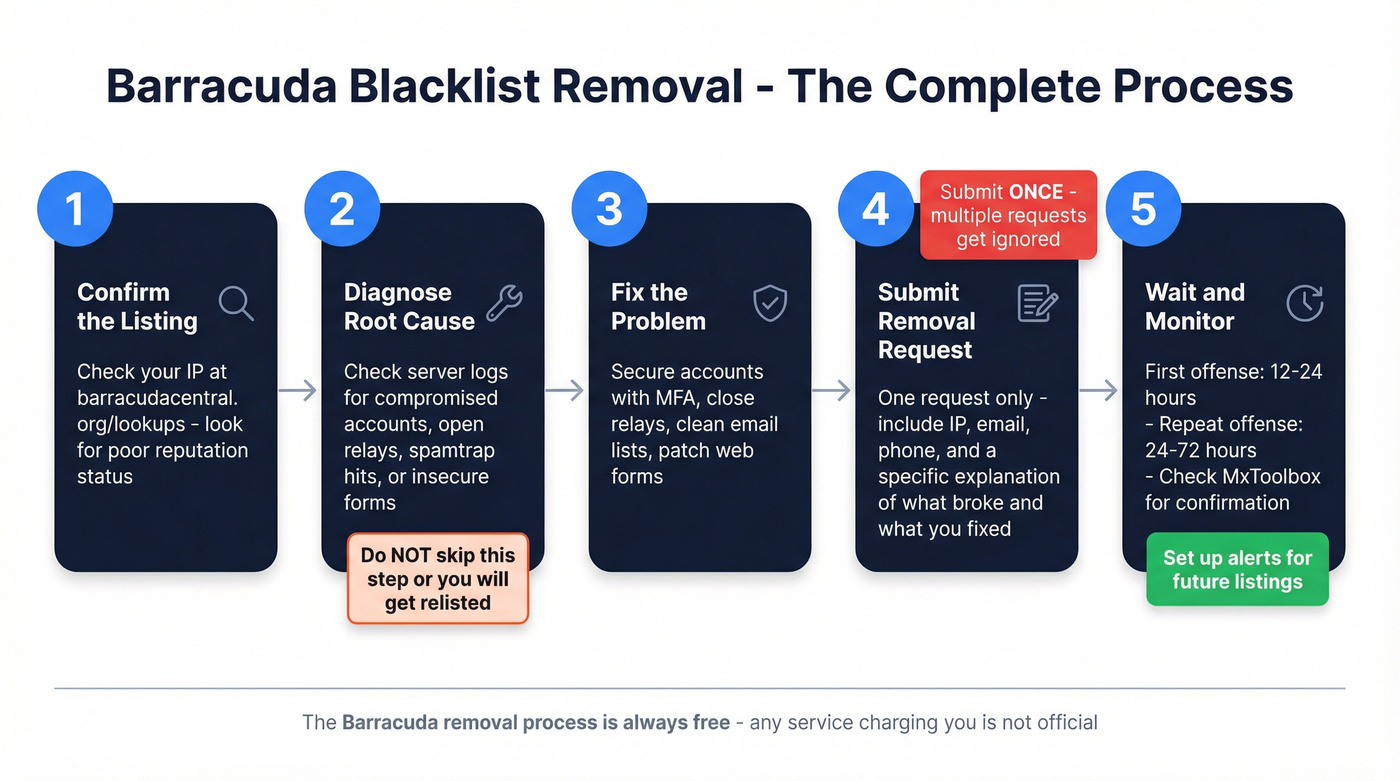
- Email Server IP Address - the listed IP
- Email Address - your contact email
- Phone Number - a valid number
There's also an optional "Reason for Removal" field. Technically optional. In practice, leaving it blank gets you ignored. Barracuda says removal requests are typically investigated and processed within 12 hours of submission if provided with a valid explanation - and requests without valid information will be ignored.
The critical rule: submit once. Multiple requests will also be ignored. One shot, one clear explanation.
Template: Compromised Account
"The listing was caused by a compromised user account sending unauthorized messages. The account has been secured (password reset, MFA enabled), and we've audited all accounts for similar activity. SPF, DKIM, and DMARC records confirmed. Open relay test passed. Ongoing monitoring implemented to prevent recurrence."
Template: Stale Email List / Spamtrap Hits
"The listing was triggered by spamtrap hits from an unverified email list. The list has been cleaned and verified through a dedicated verification service with spam-trap removal and honeypot filtering. All future sends will use verified contacts only. SPF, DKIM, and DMARC records confirmed. Open relay test passed."
Adapt these to your actual situation. Be specific about what broke and what you fixed. Generic "we've resolved the issue" language won't cut it.
One more thing: the Barracuda removal process is free. Any service charging for delisting isn't an official path. The form above is the legitimate route.
How Long Delisting Takes
| Scenario | Expected Timeline | Auto-Delist? |
|---|---|---|
| First offense | 12-24 hours | No |
| Repeat offense | 24-72 hours | No |
| Chronic offender | Extended listing, no guaranteed release | No |
First-time listings with a solid explanation typically clear within a day. Barracuda delisting is always handled via manual request - there's no automatic expiration.
What If Barracuda Doesn't Respond?
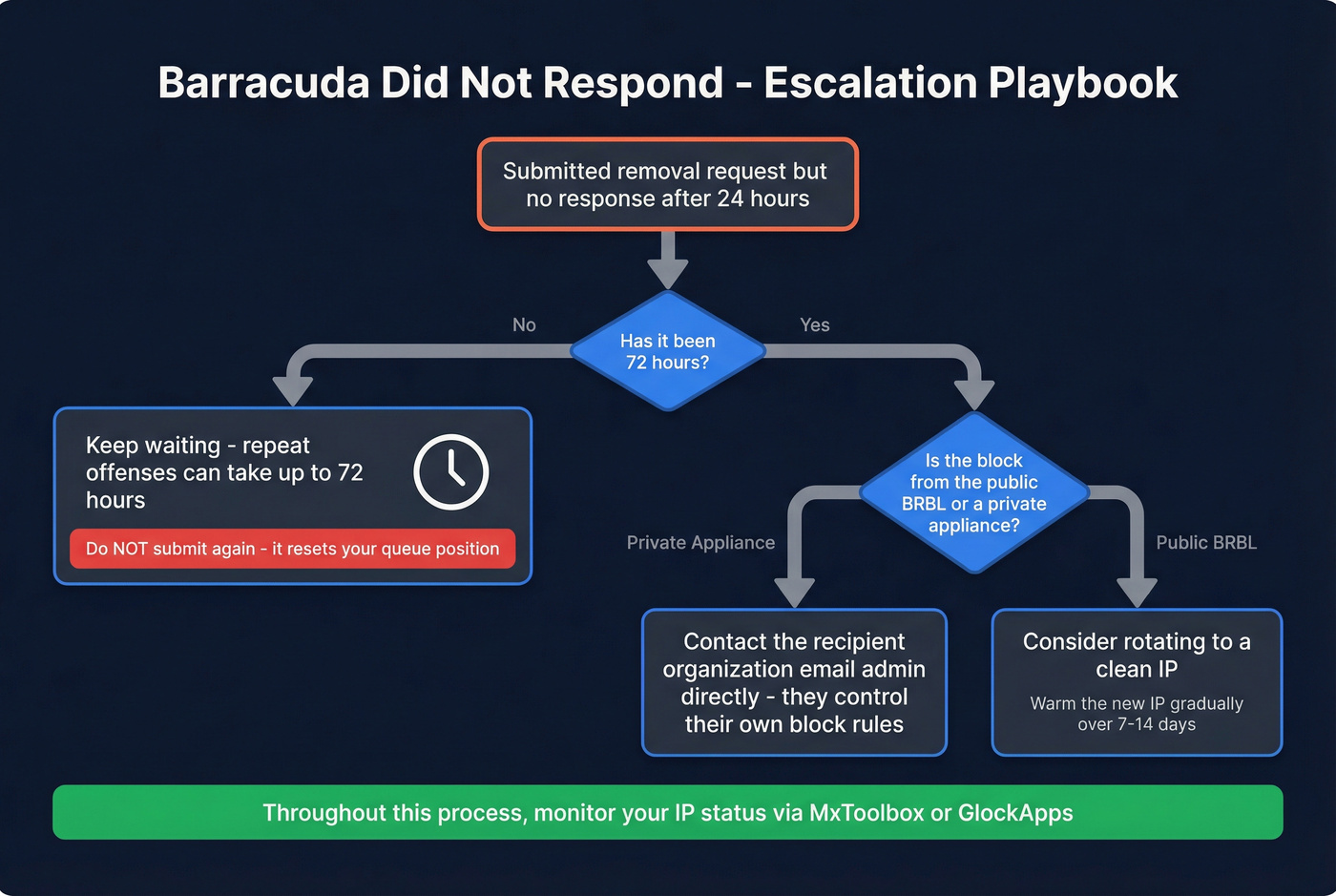
You submitted your request 48 hours ago. Nothing happened. The instinct is to submit again.
Don't.
Submitting again genuinely makes it worse. Barracuda explicitly says multiple requests will also be ignored. A second form entry doesn't speed things up - it resets your place in the queue or gets you flagged as noise.
Here's the escalation playbook:
- Wait the full 72 hours. Repeat-offense timelines can stretch to three days.
- Check if it's a private appliance. If the block is coming from a specific recipient's Barracuda appliance rather than the public BRBL, contact that organization's email administrator directly. They control their own block rules.
- Consider rotating to a clean IP. As a last resort, move to a new IP and warm it properly over 7-14 days. Not ideal, but better than being stuck on a poisoned IP indefinitely.
- Monitor via MxToolbox to confirm when the listing clears.
Check Other Blacklists Too
If you're on Barracuda, there's a decent chance you're on other lists. Run your IP through at least two of these:
- MxToolbox SuperTool - scans 100+ DNS-based blacklists
- MultiRBL - aggregates across hundreds of blocklists
- DNSChecker - checks 50+ anti-spam blacklists
Each blacklist has its own removal process, so you'll likely need to submit separate requests. Pay special attention to UCEPROTECTL3 - if your IP's entire /8 netblock is listed there, removal works differently because it's an automated listing based on aggregate abuse from your IP range, not individual sender behavior. UCEPROTECTL3 listings expire automatically once spam volume from the netblock drops below their threshold. You can't submit a manual request.
Prevent Future Listings
Getting delisted is step one. Staying off is the real work.
Lock Down Your Infrastructure
Authenticate everything. SPF, DKIM, and DMARC should all be configured and passing - no exceptions. Close open relays and test monthly with MxToolbox. Secure contact forms with CAPTCHA and rate limiting. Set alerts for unusual sending volume or login patterns.
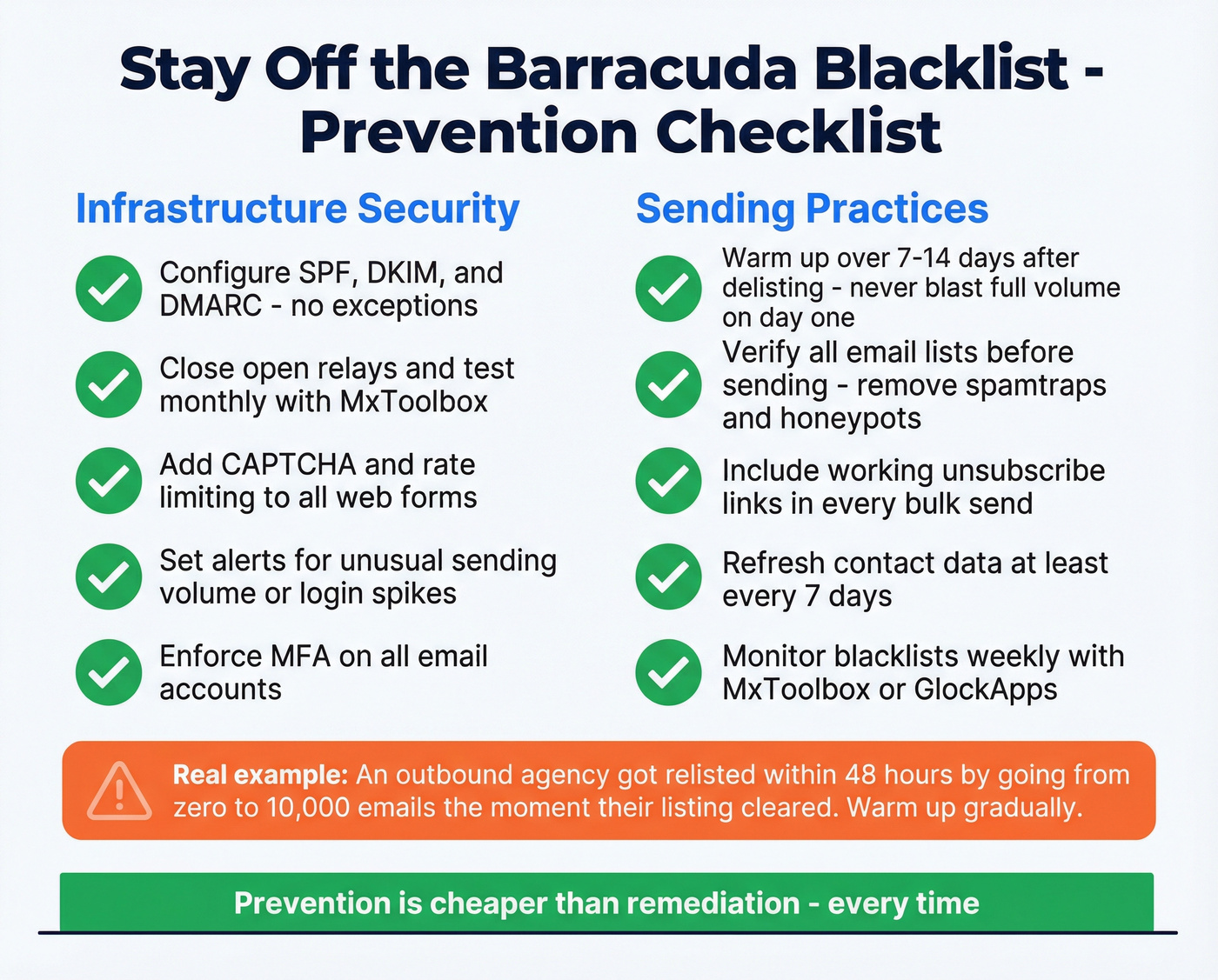
After delisting, don't blast your full volume on day one. A 7-14 day warm-up period signals legitimate sending behavior to reputation systems. We've seen teams get relisted within 48 hours because they went from zero to 10,000 emails the moment the listing cleared. That's not a hypothetical - it happened to an agency we talked to on r/coldemail who lost the same IP twice in one month.
Verify Your Data Before You Send
Barracuda uses honeypots to identify bad senders. If you're hitting them, you're sending to unverified or stale lists. Let's be honest - this is the most preventable cause on the list, and it's the one outbound teams keep ignoring.

Prospeo's 5-step verification process includes dedicated spam-trap removal and honeypot filtering, catching these dangerous addresses before they tank your deliverability. The platform delivers 98% email accuracy on a 7-day data refresh cycle, so contacts stay current rather than decaying into the spamtraps that got you listed in the first place.
If you want a deeper deliverability baseline, run an email deliverability checklist and audit your email sending infrastructure before scaling volume again.
Set Up Blacklist Monitoring
Catch listings within hours, not after your pipeline stalls.
| Tool | Blacklists Monitored | Pricing |
|---|---|---|
| MxToolbox | 100+ | ~$930/year |
| GlockApps | 30+ | Free 14-day trial |
Don't be the team that goes months without realizing they're listed because nobody set up alerts. Even the free GlockApps trial gives you enough coverage to catch the major lists.
You just spent hours diagnosing a blacklist, writing removal templates, and waiting on Barracuda's review. The root cause? Stale, unverified email lists. Prospeo refreshes all 300M+ profiles every 7 days - not every 6 weeks - so you never send to dead addresses or spamtraps again.
Replace the list that got you blacklisted. Pay $0.01 per verified email.
FAQ
How long does it take to get removed from Barracuda?
First-time listings with a clear explanation typically clear within 12-24 hours. Repeat offenses take 24-72 hours. Chronic offenders face extended listing periods without guaranteed release. The quality and specificity of your removal request is the biggest variable.
Is the Barracuda blocklist the same as Spamhaus or Spamcop?
No - these are completely separate databases with different listing criteria and removal processes. Being on Barracuda doesn't mean you're on Spamhaus, and vice versa. Use MxToolbox to check all major blacklists in a single scan.
Can Barracuda block my domain or just my IP?
The BRBL lists IP addresses only. However, Barracuda also maintains a separate URL reputation system. If your domain appears in emails flagged as spam, URLs containing it can be blocked independently - even if your sending IP is clean.
How do I prevent spamtrap hits that cause listings?
Never send to purchased or scraped lists without verification. Spamtraps are dead addresses seeded to catch exactly this behavior. Use an email verification tool with spam-trap removal and honeypot filtering, and clean your lists quarterly at minimum. In our experience, teams that verify before every send almost never hit the BRBL a second time.
Is UCEPROTECTL3 removal handled the same way?
No. Unlike Barracuda blacklist removal, which requires a manual request through their form, UCEPROTECTL3 listings expire automatically once spam volume from your IP's netblock decreases. You can't submit a removal request - the only option is to wait or pay for express delisting, which many deliverability experts advise against since the listing recurs if underlying netblock abuse continues.