

How to Choose the Best Domain for Business Email in 2026
Someone on r/Domains described their lastname.am email as looking "a bit weird and scammy" to clients. They weren't wrong. Another user on r/smallbusiness found their "free business domain" was actually a subdomain - company.co.site - which isn't a real business domain at all. It's a vanity address dressed up as a legitimate one, and clients noticed.
Most advice jumps straight to email hosting. Hosting matters, but it's step three. The real decision starts with your domain extension, then your registrar, then your email provider. Get the order wrong and you're polishing the wrong part of the machine.
We've watched teams argue about Google Workspace vs Microsoft 365 for days while sending from a .xyz domain that already looks suspicious to inbox filters. That isn't "branding." It's self-sabotage.
Let's get all three decisions right.
What You Need (Quick Version)
Three decisions, in order:
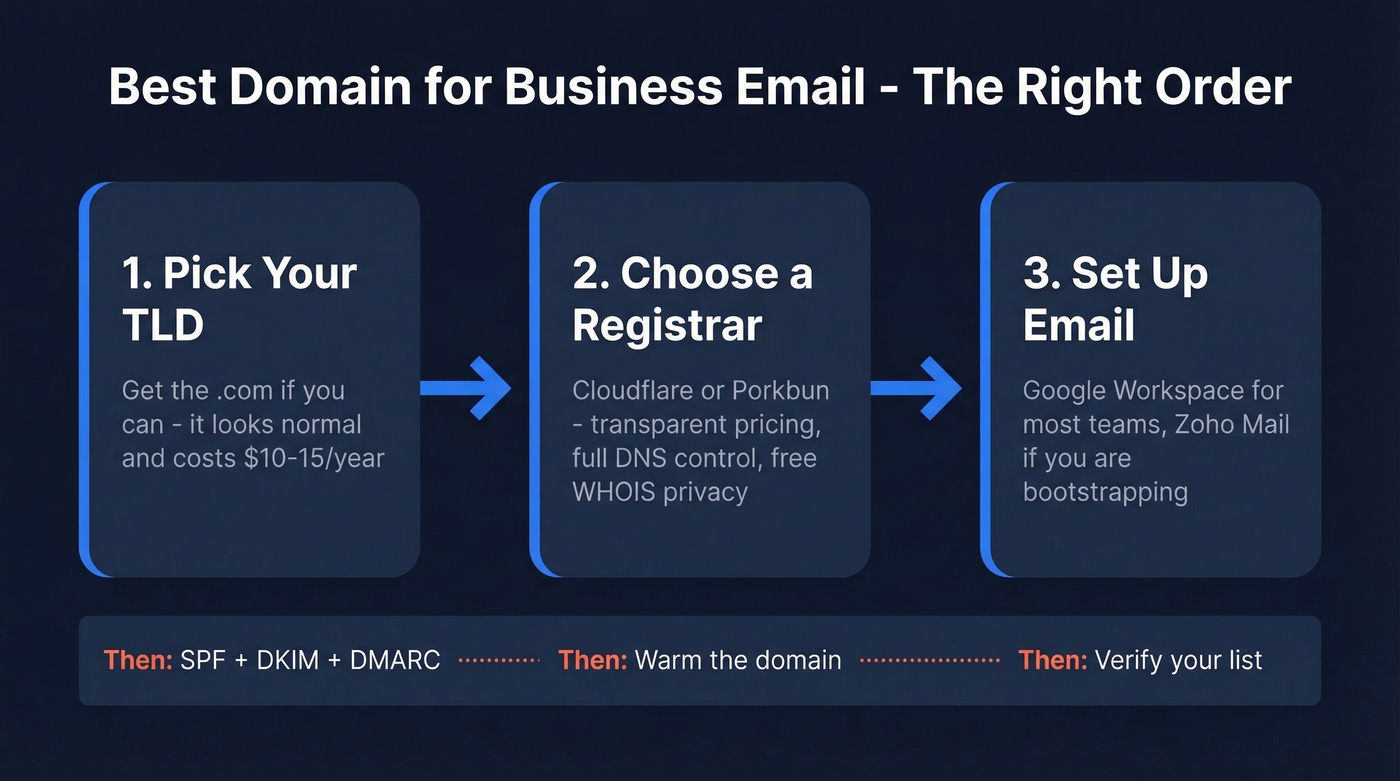
- TLD (domain extension): Get the .com if you can. People default to it, and it tends to be the least "risky-looking" option in the From line.
- Registrar: Cloudflare or Porkbun are the two we keep coming back to for transparent pricing and clean DNS control.
- Email provider: Google Workspace for most teams. Zoho Mail if you're bootstrapping.
Before you send anything: set up SPF, DKIM, and DMARC. Then warm the domain. Then verify your list.
Which Domain Extension to Choose
There are a lot of TLDs now. That doesn't mean they're equal for business email.
For email, you're not trying to win a naming contest. You're trying to look normal, be easy to remember, and avoid anything that triggers the "this feels off" reaction in a prospect's head or an inbox provider's filters.
Why .com Still Wins
.com is the default people assume when they can't remember the ending. That alone is a practical reason to buy it: fewer mis-typed addresses, fewer "did you mean..." replies, fewer leads disappearing into the void.
It also tends to read as "real company" in a way that newer extensions don't. And yes, that perception shows up in studies: .com usually scores slightly higher on credibility than alternatives like .co or .org.
Cost is the final nail in the coffin. A .com is usually in the $10-15/year range. Many trendy extensions cost more and buy you less trust. For a professional email address, where the first impression happens in one glance, .com is the boring choice for a reason.
If you can only do one thing today: buy the .com.
When .io, .co, or .ai Make Sense
If you're a tech company and the .com is gone, .io and .co are generally fine. .ai can also be a legit signal if you're actually an AI company, not a random agency trying to look fashionable.
But here's the move we recommend in practice: even if you brand on .io or .ai, still buy the .com and redirect it. It's cheap insurance, and it prevents the classic scenario where a prospect types company.com out of habit, hits a parked page, and decides you look sketchy.
We've seen this happen in the wild: a founder ran outbound from company.io, got a reply saying "your site doesn't load," and it turned out the prospect had typed company.com, landed on a domain squatter page, and assumed the whole thing was spam. That one mistake cost them a warm lead.
TLDs That Hurt Deliverability (Or Just Look Spammy)
Some extensions are cheap and heavily abused. That abuse becomes reputation, and reputation becomes filtering signals.
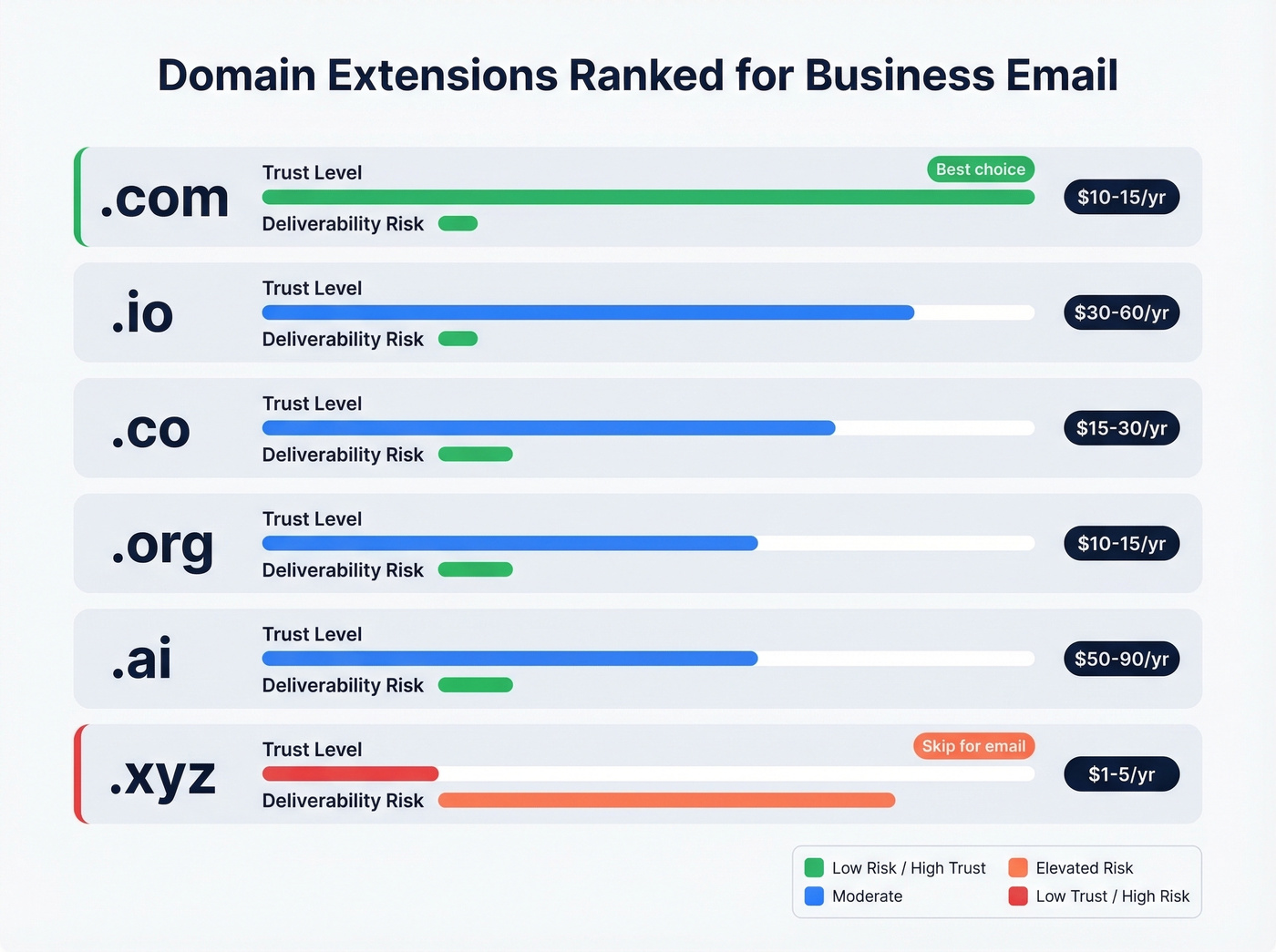
Spamhaus publishes abuse stats by TLD, and inbox providers absolutely use reputation signals at scale. In r/coldemail threads, you'll see the same pattern: people don't love "weird" TLDs because they've watched deliverability get harder when the domain already looks like it belongs in a scam folder.
Avoid these for business email unless you have a very specific reason:
- .xyz
- .top
- .click
- anything that looks like a throwaway promo domain
Do they guarantee spam placement? No. Do they start you in a hole? Yes. And it's a dumb hole to dig when a .com costs about the same as lunch.
| TLD | Typical annual cost | Trust level | Deliverability risk | Best for |
|---|---|---|---|---|
| .com | $10-15 | High | Low | Almost everyone |
| .io | $30-60 | Medium-high | Low | Tech/SaaS |
| .co | $15-30 | Medium | Low | Startups |
| .org | $10-15 | Medium | Low | Nonprofits |
| .ai | $50-90 | Medium | Low | AI companies |
| .xyz | $1-5 | Low | Elevated | Skip for email |
Where to Buy Your Domain
Registrar choice matters less than people think, but pricing honesty matters a lot. The biggest trap is promo pricing that jumps on renewal. It's annoying, and it adds up.
Here's how we'd summarize it:
- Cloudflare: best pricing consistency, great DNS, slightly more technical.
- Porkbun: best "normal human" UI, still priced fairly, easy DNS edits.
- Dynadot: solid middle ground.
- Namecheap / GoDaddy: can be fine, but watch renewal pricing and paid add-ons.
| Registrar | .com first year | .com renewal | WHOIS privacy | Notes |
|---|---|---|---|---|
| Cloudflare | $9.77 | $9.77 | Free | Lowest consistent pricing |
| Porkbun | $10.37 | $10.37 | Free | Beginner-friendly UI |
| Dynadot | $10.19 | $10.19 | Free | No surprises |
| Namecheap | $10.28 | $15.88 | Free first year | Renewal jump hurts |
| GoDaddy | Varies | Varies | Often paid | Renewals can get expensive |
Two non-negotiables:
- WHOIS privacy so your personal address and phone number don't end up in public records
- Full DNS control so you can set MX, SPF, DKIM, and DMARC without fighting the interface
Cloudflare and Porkbun both check those boxes.

You just spent time choosing the right domain and TLD to protect your sender reputation. Don't waste it by emailing addresses that bounce. Prospeo's 5-step verification delivers 98% email accuracy - teams using it cut bounce rates from 35% to under 4%.
Your domain is clean. Make sure your email list is too.
Best Email Providers for a Custom Domain
Pick the provider based on how your team works, not on feature checklists you'll never use.
| Provider | Starting price | Storage | Best for |
|---|---|---|---|
| Google Workspace | Starts around $8.40/user/mo (annual billing) | 30 GB+ | Most businesses |
| Microsoft 365 | From $4/user/mo (annual billing) | 50 GB | Microsoft-heavy teams |
| Zoho Mail | $1/user/mo (annual billing); free for up to 5 users | 5 GB per user (free plan) | Bootstrappers |
| Fastmail | $5/mo billed yearly (Individual) | 60 GB | Privacy-focused solo operators |
| Proton Mail | Typically ~$7-13/user/mo | 15-50 GB | Regulated industries |
Google Workspace is the default for a reason. Deliverability is strong, the interface is familiar, and admin is straightforward once it's set up. If your team lives in Google Calendar and Google Drive, don't overthink it.
Zoho Mail is the value pick. Free for up to 5 users on a custom domain is hard to beat, and the paid plans stay reasonable as you grow.
Proton Mail is great at what it does, but it's not the default recommendation for most small businesses. If you're in healthcare, legal, finance, or you have strict compliance requirements, it's worth a serious look. If you're a two-person agency trying to send proposals and invoices, you're paying for security you won't use.
Look, this is where people get cheap in the wrong place: don't use your registrar's bundled email. It's usually worse on deliverability, storage, and admin controls, and the migration pain later isn't worth the $2 you saved.
If you're planning any outbound, make sure your stack is built for it (provider + sending limits + tooling) before you scale volume - our guide to cold email infrastructure breaks down the setup.
Set Up Email Authentication (Don't Skip This)
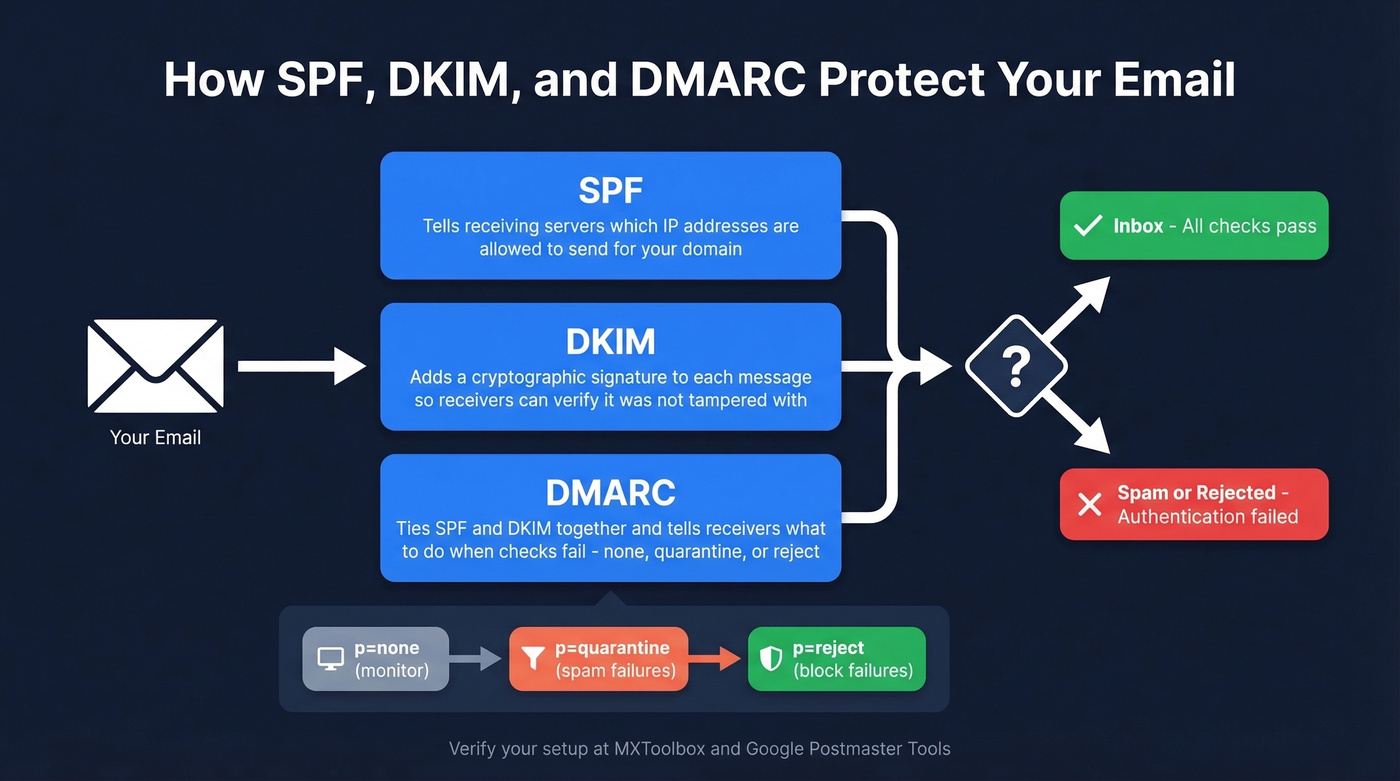
This is the part that decides whether your emails land in the inbox or get quietly buried. It's three DNS records and about 30-60 minutes of work.
SPF
SPF tells receiving servers which senders are allowed to send on behalf of your domain.
For Google Workspace, SPF often looks like:
v=spf1 include:_spf.google.com ~all
If you use multiple sending tools (helpdesk, newsletter, outbound platform), you add them to SPF too. Keep it tidy, because SPF has lookup limits.
DKIM
DKIM signs each message with a cryptographic signature. Your email provider generates the key; you publish it in DNS. Receivers verify the signature and trust the message more.
DMARC
DMARC ties SPF and DKIM together and tells receivers what to do when authentication fails. Start with monitoring, then enforce.
A sensible progression:
p=none(monitor and collect reports)p=quarantine(send failures to spam)p=reject(block failures)
Gmail and Yahoo require DMARC for high-volume senders, and even if you're nowhere near that volume, DMARC is still table stakes for protecting your domain from spoofing and building consistent reputation.
We also recommend validating your setup with a checker like MXToolbox and reading Google's sender guidance if you're doing any outreach at scale: Google Postmaster Tools and Google's bulk sender guidelines.
If you want a deeper deliverability playbook beyond authentication, see our guide on how to avoid the spam folder.
A quick cautionary tale: we saw a small team set up "some kind of DMARC" through a registrar email trial and assume they were done. Gmail placement improved, so they celebrated. Then Outlook and a few corporate gateways started flagging everything, replies dropped, and they blamed their copy. The real issue was incomplete authentication and inconsistent alignment across tools. Do SPF, DKIM, and DMARC properly, then verify the records.
Warm Your New Domain
A brand-new domain has zero sending reputation. If you blast 500 cold emails on day one, you're going to pay for it.
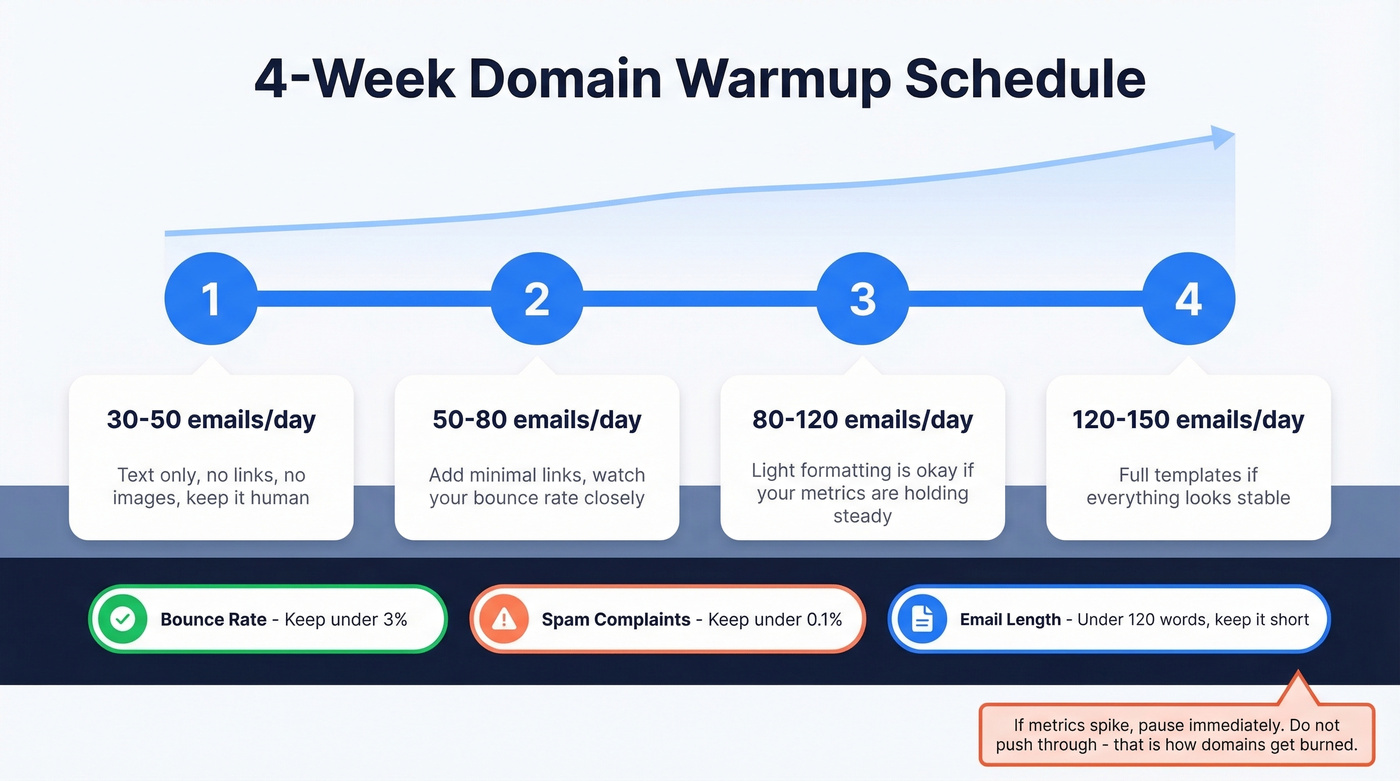
A simple ramp that works:
| Week | Daily volume | Notes |
|---|---|---|
| 1 | 30-50 | Text only, no links or images |
| 2 | 50-80 | Add minimal links, watch bounces |
| 3 | 80-120 | Light formatting if metrics hold |
| 4 | 120-150 | Full templates if everything's stable |
Guardrails:
- Keep bounce rate under 3%
- Keep spam complaints under 0.1%
- Keep early cold emails short (under ~120 words) and human
If you're unsure what "safe" volume looks like by provider and inbox age, use our benchmarks on how many cold emails per day.
If metrics spike, pause. Don't "push through." That's how domains get burned.
Verify Your List First (Or You're Lighting Reputation on Fire)
You've done the hard work: picked a normal-looking domain, set up authentication, warmed the inbox. Don't torch it by emailing dead addresses or spam traps.
This is where tools like Prospeo fit naturally in the stack. Prospeo verifies emails with a 5-step process that filters invalid addresses, catch-alls, spam traps, and honeypots, and it maintains 98% email accuracy across 143M+ verified emails. In our experience, list verification is the difference between a domain that stays healthy for months and one that gets throttled after a single bad campaign.
If you're building an outbound stack, it helps to compare categories (finder vs verifier vs sequencer) - start with our roundup of cold email marketing tools or, if you’re specifically cleaning lists at scale, see the best bulk email verification services.
If you're sending any meaningful volume, also get familiar with the baseline standards from the email community. The Spamhaus Project is a good reference point for reputation and abuse signals, and their data is a big reason certain TLDs develop a bad smell over time.
If you’re troubleshooting bounces and reputation damage, our guide to email bounce handling is a useful next step.
Setting up SPF, DKIM, and DMARC is step one. Step two is making sure every address you send to actually exists. Prospeo refreshes 300M+ contacts every 7 days - not every 6 weeks like competitors - so your outbound hits real inboxes, not spam traps.
Stop burning your new domain on stale data. Start at $0.01 per email.
FAQ
Can I use Gmail or Yahoo for business email?
You can, but you shouldn't. A custom domain email (you@company.com) costs under $20/year for the domain and roughly $4-9/month for hosting. Clients, vendors, and spam filters treat custom domains more seriously than free addresses, which often signal "side project" instead of a real business.
Do I need a website to use a custom domain for email?
No. Register a domain, point its MX records to an email provider, and you're done. Plenty of operators run email-only domains for years. You just need DNS configured, not a website.
How do I keep new business emails out of spam?
Set up SPF, DKIM, and DMARC in DNS, then warm the domain gradually. Start with 30-50 emails per day and ramp over four weeks. And verify your recipient list before sending so bounces don't wreck your reputation on day one.
What's the best domain extension for a professional email address?
A .com is the strongest choice for almost every business because it's the default people assume and it tends to carry the least baggage with inbox filters. If .com isn't available, .co and .io are usually acceptable for tech companies, but it's still smart to buy the .com and redirect it if you can.